Tales From A Lazy Fat DBA

Its all about Databases, their performance, troubleshooting & much more …. ¯\_(ツ)_/¯

Archive for December, 2023

Oracle’s Evolution: Sweet Little Dual Tables Exiled in 23c

Posted by FatDBA on December 28, 2023

Hi All,

Here comes what is likely the final post of the year 2023!

While there have been previous discussions on this topic, I’d like to delve deeper into the specific enhancements and features related to the use of the DUAL table in Oracle 23c and little more about this sweet little object in Oracle databases …

The DUAL table has been a part of the Oracle Database for a very long time. It has been a fundamental component of Oracle’s SQL language for decades. The DUAL table in Oracle Database serves a specific purpose and is often used for various tasks. Its primary function is to provide a one-row, one-column table that can be used for evaluating expressions or performing certain types of queries. DUAL is a table automatically created by Oracle Database along with the data dictionary. DUAL is in the schema of the user SYS but is accessible by the name DUAL to all users. It has one column, DUMMY, defined to be VARCHAR2(1), and contains one row with a value X.

Some of the very popular use cases of it are – When evaluating expressions (SELECT SYSDATE FROM DUAL), Providing Constants (SELECT 10 * 5 FROM DUAL), In PL/SQL blocks or scripts, the DUAL table can be used to store and retrieve scalar values, we often use the DUAL table during testing or debugging to check the result of an expression or function without the need for an actual table … I always remember it using as a quick way to check connectivity of the database etc. I mean while it seemingly mundane, the DUAL table is a small but significant component in the Oracle database ecosystem, serving a variety of purposes across different contexts.

One of the interesting performance tip related to DUAL tables that I remember is – Starting from Oracle Database 10g Release 1, when calculating an expression that excludes the DUMMY column in the DUAL table, logical I/O is not executed. This optimization is identified as FAST DUAL in the execution plan. However, if you explicitly SELECT the DUMMY column from DUAL, this optimization is bypassed, and logical I/O is performed.

A quick example :

SQL> explain plan for select * from dual;        ---> Logical IO will be performed.

select * from table(dbms_xplan.display(format=>'basic'));

----------------------------------
| Id | Operation | Name |
----------------------------------
| 0 | SELECT STATEMENT | |
| 1 | TABLE ACCESS FULL| DUAL |
----------------------------------

Yet, when choosing a standard expression from DUAL, the FAST DUAL row source is employed:

SQL> explain plan for select sysdate from dual;    ---> No Logical IO will be performed.

select * from table(dbms_xplan.display(format=>'basic'));

---------------------------------
| Id | Operation | Name |
---------------------------------
| 0 | SELECT STATEMENT | |
| 1 | FAST DUAL | |
---------------------------------

Starting with Oracle 23c, there is no need to explicitly select expressions from the DUAL table; you can simply omit the FROM clause altogether. Lets do a quick demo.

---------------------------------
-- Prior 23c release
---------------------------------
SQL > select sysdate from dual 

SYSDATE
---------
28-DEC-23

SQL > select sysdate;
ORA-00923 FROM keyword not found where expected


-- One more test
SQL> create sequence emp2;
Sequence Created

SQL> select emp2.nextval from dual;

NEXTVAL
---------
1

SQL> select emp2.nextval;
ORA-00923 FROM keyword not found where expected


---------------------------------
-- In Oracle 23c 
---------------------------------
SQL > select sysdate;
SYSDATE
---------
28-DEC-23

SQL> create sequence emp2;
Sequence Created

SQL> select emp2.nextval from dual;

NEXTVAL
---------
1

SQL> select emp2.nextval;

NEXTVAL
---------
2

Hope It Helped
Prashant Dixit
Posted in Uncategorized | Tagged: , , , | 2 Comments »

A simple script to automatically catch those intermittent database performance issues …

Posted by FatDBA on December 16, 2023

Hi All,

Occasionally, anticipating the occurrence of a problem becomes unpredictable, and simultaneously, dealing manually with a transient issue to extract necessary information may not always be feasible (mainly due to the rapid resolution of the problem before we can initiate the extraction process). Additionally, there is a requirement for adaptability in the content we aim to extract.

The ensuing approach allows us to attain our primary objectives without resorting to invasive measures. There could be multiple use cases, few of the scenarios would be :
Case 1 : With little changes to it, you can make it employable for gathering solely the system state upon encountering a specific wait event.
Case 2: Can be utilized for gathering 10046, error stack, etc., for the obstructing session when a designated wait event is triggered concurrently with the execution of a known SQL statement (SQL_ID).
Case 3: Utilizable for obtaining hang analysis, system state, and additionally, 10046, error stack for the session causing the obstruction when a specific wait event is encountered.

Let me explain how we can utilize this quick, short but handy code to generate the diagnostic dump like hanganalyze / systemstate / errorstack / 10046 trace etc if any session is found to be waiting on any specific wait event for any specific period of time.

This is the simple script to collect diagnostic information with few of the customizable parameters or inputs i.e. ‘waitevent’ which is for the event we know we have the problem with, ‘seconds’ is the amount of time we think a session can wait on that session before we decide it is stuck and want to trigger dumping and ‘tid’ which is the session we are going to attach to run oradebug against. This could be the waiting session, a blocking session.

In the example, I have modified the code to collect diag info if any session is found to be waiting on “enq: TX – row lock contention” waits above 10 seconds.

set serverout on
spool logit.sql
declare
waitevent varchar2(100):='enq: TX - row lock contention';
seconds number :=10;      
w1 v$session%rowtype;
w2 v$session%rowtype;
tid number := 0;

begin

loop
dbms_lock.sleep(seconds);
begin
select * into w1 
from v$session 
where event=waitevent and wait_time=0 and rownum=1;
dbms_lock.sleep(seconds);
select * into w2
from v$session
where wait_time=0
and sid=w1.sid
and event=waitevent
and seq#=w1.seq# ;
select spid into tid from v$process
where addr=(select paddr from v$session where sid=w2.blocking_session);
dbms_output.put_line('oradebug setospid '||tid);
dbms_output.put_line('oradebug unlimit');
dbms_output.put_line('oradebug hanganalyze 3');  /**If RAC then use -G all**/
dbms_output.put_line('oradebug tracefile_name');
dbms_output.put_line('exit');
exit;
exception
when no_data_found then null;
end;
end loop;
end;
/
exit


-- Result : 
SQL>  
oradebug setospid 6794
oradebug unlimit
oradebug hanganalyze 3
oradebug tracefile_name
exit

PL/SQL procedure successfully completed.

SQL> 

The subsequent instance is intricate yet showcases versatility of this simple script. In this scenario, I encounter an intermittent issue involving sessions experiencing wait times due to TX enqueue row lock contention. While I may not be overly concerned about these sessions, it is crucial for me to understand the actions of the session causing the blockage. Given that I am aware of the SQL being executed during that period, I can leverage this information to ensure accurate trapping of the relevant event.
Here is something that you can do to alter it accordingly.

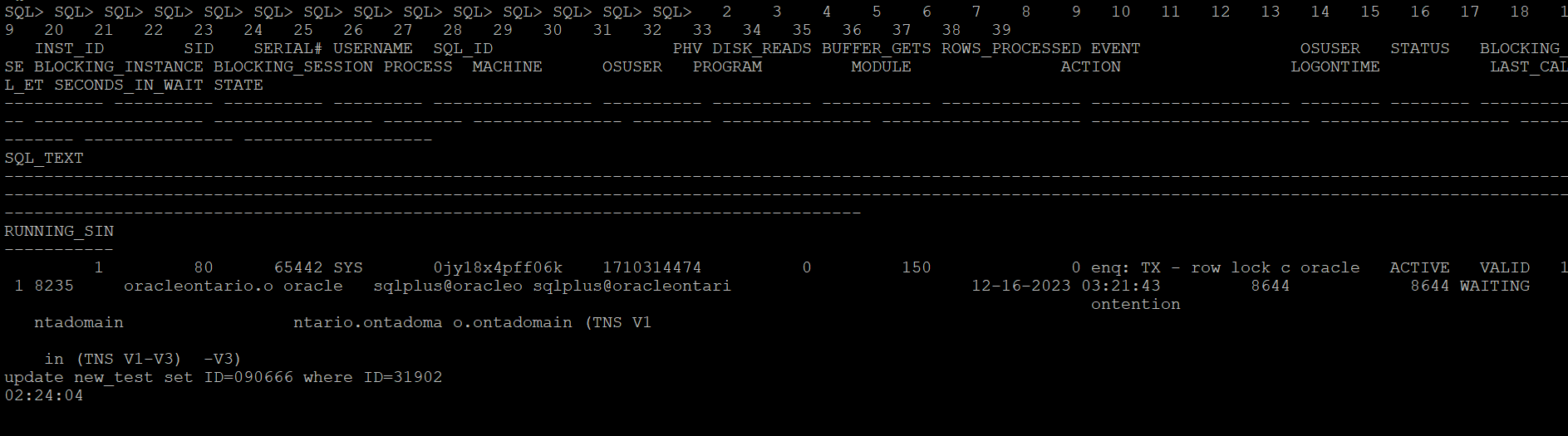
Let me create a row locking situation and see how it captures stats for a particular SQLID. Below is the row locking case that I have created to test how the scripts catches details for this SQLID ‘0jy18x4pff06k’

This is the modified version of the script which catches details for the SQL waiting on any specific wait event.

set serverout on
spool logit.sql
declare
waitevent varchar2(100):='enq: TX - row lock contention';
seconds number :=10;
w1 v$session%rowtype;
w2 v$session%rowtype;
tid number := 0;

begin

loop
dbms_lock.sleep(seconds);
begin
select * into w1
from v$session
where event=waitevent and wait_time=0 and sql_id='0jy18x4pff06k' and rownum=1;
dbms_lock.sleep(seconds);
select * into w2
from v$session
where wait_time=0
and sid=w1.sid
and event=waitevent
and seq#=w1.seq# ;
select spid into tid from v$process
where addr=(select paddr from v$session where sid=w2.blocking_session);
dbms_output.put_line('oradebug setospid '||tid);
dbms_output.put_line('oradebug unlimit');
dbms_output.put_line('oradebug dump errorstack 3');
dbms_output.put_line('oradebug event 10046 trace name context forever, level 8');
dbms_output.put_line('oradebug event 10200 trace name context forever, level 1');
dbms_output.put_line('oradebug event 10224 trace name context forever, level 1');
dbms_output.put_line('execute dbms_lock.sleep(20);');
dbms_output.put_line('oradebug event 10046 trace name context off');
dbms_output.put_line('oradebug event 10200 trace name context off');
dbms_output.put_line('oradebug event 10224 trace name context off');
dbms_output.put_line('exit');
exit;
exception
when no_data_found then null;
end;
end loop;
end;
/
exit


-- Result : 
SQL>  
oradebug setospid 6794
oradebug unlimit
oradebug dump errorstack 3
oradebug event 10046 trace name context forever, level 8
oradebug event 10200 trace name context forever, level 1
oradebug event 10224 trace name context forever, level 1
execute dbms_lock.sleep(20);
oradebug event 10046 trace name context off
oradebug event 10200 trace name context off
oradebug event 10224 trace name context off
exit

PL/SQL procedure successfully completed.

SQL> 

The next what we can do to trap any such wait events of interest when it exceeds the behnchmark, you can put eveything in a shell script and run it in the loop and execute the oradebug code. Once finished you can look it in the diagnostic_dest for the dump file. For 11g and above, look under subdirectory trace under home directory of ADR.

Next once you have put it in the shell script format, you can call it in the nohup mode and the script will run in background and sit in a loop for the defined condition to hit.

[oracle@oracleontario ~]$ more exec
#!/bin/bash
sqlplus -s '/ as sysdba' @waitdumpv1
[oracle@oracleontario ~]$
[oracle@oracleontario ~]$ chmod 777 exec
[oracle@oracleontario ~]$
[oracle@oracleontario ~]$

[oracle@oracleontario ~]$ nohup ./exec > waitdump2.log
nohup: ignoring input and redirecting stderr to stdout
[oracle@oracleontario ~]$

[oracle@oracleontario ~]$ more waitdump1.log
[oracle@oracleontario ~]$ nohup ./exec > waitdump2.log
nohup: ignoring input and redirecting stderr to stdout
[oracle@oracleontario ~]$ more waitdump2.log
oradebug setospid 6794
oradebug unlimit
oradebug hanganalyze 3
oradebug tracefile_name
exit

PL/SQL procedure successfully completed.

[oracle@oracleontario ~]$
[oracle@oracleontario ~]$

Hope It Helped!
Prashant Dixit

Posted in Uncategorized | Tagged: , , , , | Leave a Comment »

Some weirdness with V$DIAG_ALERT_EXT and magical support from Oracle Customer Support.

Posted by FatDBA on December 13, 2023

Hi All,

Recently, one of our custom monitoring scripts, which comprises more than 2000 lines of PL/SQL code covering all possible performance areas of the Oracle database, started behaving strangely on some 19c (19.15.0) databases. Usually, the report completes within 10-12 minutes on databases running version 12.2 and above, but it began taking approximately 30 minutes for a single run, with worst times exceeding 40 minutes. This issue seems to occur specifically on our 19c instances.

During analysis, we identified one of the underlying SQL queries in our script that queries V$DIAG_ALERT_EXT as the culprit, consuming most of the time and significantly exceeding average execution times. We utilize V$DIAG_ALERT_EXT to access the XML-formatted alert log from the Automatic Diagnostic Repository (ADR), particularly in cases where we can only access the database through integrated development environments (IDEs) like SQL Developer, and direct access to the databases is unavailable.

The SQL queries are straightforward, one of the simple one we used is focusing on capturing INCIDENT_ERROR and ERROR type codes. We have implemented filter conditions to select rows where the message_type is either 2 or 3 and where the originating_timestamp is within the last 8 hours (sysdate – 8/24 represents the current date and time minus 8 hours).

SELECT TO_CHAR(originating_timestamp,'DD/MM/YYYY HH24:MI:SS') AS time, message_text 

FROM v$diag_alert_ext
WHERE message_type IN (2, 3) AND originating_timestamp > sysdate - 8/24
ORDER BY RECORD_ID;

Initially, we were perplexed by the problem but were confident that it was specific to 21c databases, as all other versions where we had this script scheduled were working perfectly. After exhausting all optimization attempts and with no insights into what was happening with this specific dynamic view on this database version, we decided to engage Oracle support. They promptly confirmed that the issue was due to a known bug in Oracle 19c database – Bug 33513906, which is resolved in the 19.16.0.0.220719 (July 2022) Database Release Update (DB RU).

Oracle Database support stands out as one of the best I have worked with. They possess extensive knowledge about their products, provide comprehensive private and public documentation, and, in the presence of all diagnostic files, swiftly identify issues. Moreover, they offer both temporary and permanent fixes to problems.

Hope It Helped!
Prashant Dixit

Posted in Uncategorized | Tagged: , , , | Leave a Comment »