Tales From A Lazy Fat DBA

Its all about Databases, their performance, troubleshooting & much more …. ¯\_(ツ)_/¯

Archive for the ‘Basics’ Category

Core/Basics/Theory

MySQL ERROR 1054 (42S22): Unknown column ‘Password’ in ‘field list’ – Version 5.7

Posted by FatDBA on November 27, 2017

mysql> update mysql.user set Password = PASSWORD(‘mysql’) where user =’root’;
ERROR 1054 (42S22): Unknown column ‘Password’ in ‘field list’

WHY ??????
This was working all good in other instances of MySQL where i had earlier versions installed, why not this one – Puzzled, Perplexed!
Let me check version information of this instance.

mysql> show variables like "%version%";
+-------------------------+------------------------------+
| Variable_name | Value |
+-------------------------+------------------------------+
| innodb_version | 5.7.20 |
| protocol_version | 10 |
| slave_type_conversions | |
| tls_version | TLSv1,TLSv1.1 |
| version | 5.7.20 |
| version_comment | MySQL Community Server (GPL) |
| version_compile_machine | x86_64 |
| version_compile_os | Linux |
+-------------------------+------------------------------+
8 rows in set (0.01 sec)

Well, starting from MySQL version 5.7 the PASSWORD column from mysql.user table has been removed and now replaced with ‘authentication_string’.
So the all new syntax for this password reset would be like this …

mysql> use mysql;
Reading table information for completion of table and column names
You can turn off this feature to get a quicker startup with -A

Database changed
mysql>

mysql> update user set authentication_string=password(‘mysql’) where user=’root’;
Query OK, 2 rows affected, 1 warning (0.00 sec)
Rows matched: 3 Changed: 2 Warnings: 1


Hope That Helps
Prashant Dixit

Posted in Basics | Tagged: | 2 Comments »

Cassandra NodeTool Utility

Posted by FatDBA on July 14, 2017

The nodetool utility gives a easy CLI to perform some of the admin activities and configure the database.
Today i would like to share few of the command/operations that i have tried and tested by my own, below mentioned are few of the commands with its syntax and usage details.

Let’s first explore all possible options or attributes of this utility.

Starting NodeTool
Missing required option: h
usage: java org.apache.cassandra.tools.NodeCmd --host

-h,--host node hostname or ip address
-p,--port remote jmx agent port number
-pw,--password remote jmx agent password
-u,--username remote jmx agent username

Available commands:
ring - Print informations on the token ring
join - Join the ring
info - Print node informations (uptime, load, ...)
cfstats - Print statistics on column families
clearsnapshot - Remove all existing snapshots
version - Print cassandra version
tpstats - Print usage statistics of thread pools
drain - Drain the node (stop accepting writes and flush all column families)
decommission - Decommission the node
loadbalance - Loadbalance the node
compactionstats - Print statistics on compactions
disablegossip - Disable gossip (effectively marking the node dead)
enablegossip - Reenable gossip
disablethrift - Disable thrift server
enablethrift - Reenable thrift server
snapshot [snapshotname] - Take a snapshot using optional name snapshotname
netstats [host] - Print network information on provided host (connecting node by default)
move - Move node on the token ring to a new token
removetoken status|force| - Show status of current token removal, force completion of pending removal or remove provided token
flush [keyspace] [cfnames] - Flush one or more column family
repair [keyspace] [cfnames] - Repair one or more column family
cleanup [keyspace] [cfnames] - Run cleanup on one or more column family
compact [keyspace] [cfnames] - Force a (major) compaction on one or more column family
scrub [keyspace] [cfnames] - Scrub (rebuild sstables for) one or more column family
invalidatekeycache [keyspace] [cfnames] - Invalidate the key cache of one or more column family
invalidaterowcache [keyspace] [cfnames] - Invalidate the key cache of one or more column family
getcompactionthreshold - Print min and max compaction thresholds for a given column family
cfhistograms - Print statistic histograms for a given column family
setcachecapacity - Set the key and row cache capacities of a given column family
setcompactionthreshold - Set the min and max compaction thresholds for a given column family

Provides a histogram of network statistics at the time you fired this command.

bash-4.2$ nodetool proxyhistograms
proxy histograms
Percentile Read Latency Write Latency Range Latency CAS Read Latency CAS Write Latency View Write Latency
(micros) (micros) (micros) (micros) (micros) (micros)
50% 0.00 0.00 0.00 0.00 0.00 0.00
75% 0.00 0.00 0.00 0.00 0.00 0.00
95% 0.00 0.00 0.00 0.00 0.00 0.00
98% 0.00 0.00 0.00 0.00 0.00 0.00
99% 0.00 0.00 0.00 0.00 0.00 0.00
Min 0.00 0.00 0.00 0.00 0.00 0.00
Max 0.00 0.00 0.00 0.00 0.00 0.00

Note: I haven’t done any activity on the database, so obvious we getting 0 for all the values or sections.

To do a sequential repair of all keyspaces on the current node:
bash-4.2$ nodetool repair -seq

Describe the cluster details.

bash-4.2$ nodetool describecluster
Cluster Information:
Name: Test Cluster
Snitch: org.apache.cassandra.locator.DynamicEndpointSnitch
Partitioner: org.apache.cassandra.dht.Murmur3Partitioner
Schema versions:
1852b5d8-f9ba-3549-b4b7-eaae1da39062: [127.0.0.1]

Status of the node.

bash-4.2$ nodetool status
Datacenter: datacenter1
=======================
Status=Up/Down
|/ State=Normal/Leaving/Joining/Moving
-- Address Load Tokens Owns (effective) Host ID Rack
UN 127.0.0.1 190.25 KiB 256 100.0% 0277aea4-d06c-4175-8d57-6100101f0491 rack1

History of database comp actions done in the DB.

bash-4.2$ nodetool compactionhistory
Compaction History:
id keyspace_name columnfamily_name compacted_at bytes_in bytes_out rows_merged
39d4ff90-66df-11e7-ba43-41553ec85c87 system size_estimates 2017-07-12T14:20:59.209 172588 42619 {4:4}
36186cc0-66df-11e7-ba43-41553ec85c87 system sstable_activity 2017-07-12T14:20:52.664 475 82 {1:8, 4:1}
05558d20-66c6-11e7-ba43-41553ec85c87 system size_estimates 2017-07-12T11:20:33.714 173036 43201 {4:4}
0424fc60-66c6-11e7-ba43-41553ec85c87 system sstable_activity 2017-07-12T11:20:31.718 548 83 {1:12, 4:1}
20b362b0-660b-11e7-ba43-41553ec85c87 system size_estimates 2017-07-11T13:02:43.739 166052 43228 {3:1, 4:3}
203ab040-660b-11e7-ba43-41553ec85c87 system sstable_activity 2017-07-11T13:02:42.948 687 82 {1:28, 3:1}
62569400-65fa-11e7-ba43-41553ec85c87 system local 2017-07-11T11:02:52.416 10157 5164 {4:1}
a1d34560-65f5-11e7-ba43-41553ec85c87 system_schema keyspaces 2017-07-11T10:28:51.446 668 277 {1:4, 2:2}
a1955200-65f5-11e7-ba43-41553ec85c87 system_schema tables 2017-07-11T10:28:51.040 5486 2689 {1:3, 2:2}
a0d906e0-65f5-11e7-ba43-41553ec85c87 system_schema columns 2017-07-11T10:28:49.806 10214 5654 {1:3, 2:2}
003788e0-65f2-11e7-ba43-41553ec85c87 system local 2017-07-11T10:02:51.822 5358 5170 {4:1}
fd05d0f0-65f1-11e7-ba43-41553ec85c87 system local 2017-07-11T10:02:46.463 5324 5199 {4:1}
fca0f4a0-65f1-11e7-ba43-41553ec85c87 system local 2017-07-11T10:02:45.802 5346 5171 {4:1}
c604f720-6551-11e7-9add-f1b60320c550 system local 2017-07-10T14:55:54.706 5166 5067 {4:1}
bd3430c0-6551-11e7-9add-f1b60320c550 system local 2017-07-10T14:55:39.916 301 148 {4:1}
bb8e9710-6551-11e7-9add-f1b60320c550 system local 2017-07-10T14:55:37.153 324 148 {4:1}

Statistics related to any ongoing compaction task, 0 if not any.

bash-4.2$ nodetool compactionstats
pending tasks: 0

Garbage collection statistics.

bash-4.2$ nodetool gcstats
Interval (ms) Max GC Elapsed (ms)Total GC Elapsed (ms)Stdev GC Elapsed (ms) GC Reclaimed (MB) Collections Direct Memory Bytes
36066339 9200 57107 2102 2612889352 32 -1
bash-4.2$

Log levels defined in database for all areas.

bash-4.2$ nodetool getlogginglevels

Logger Name Log Level
ROOT INFO
com.thinkaurelius.thrift ERROR
org.apache.cassandra DEBUG
bash-4.2$

Tracing probabilities currently set in DB.

bash-4.2$ nodetool gettraceprobability
Current trace probability: 0.0
bash-4.2$

Gossip protocol related statistics.

bash-4.2$ nodetool gossipinfo
localhost/127.0.0.1
generation:1499747570
heartbeat:36966
STATUS:15:NORMAL,-1019516550404639999
LOAD:36910:255305.0
SCHEMA:1623:1852b5d8-f9ba-3549-b4b7-eaae1da39062
DC:6:datacenter1
RACK:8:rack1
RELEASE_VERSION:4:3.11.0
RPC_ADDRESS:3:127.0.0.1
NET_VERSION:1:11
HOST_ID:2:0277aea4-d06c-4175-8d57-6100101f0491
RPC_READY:20:true
TOKENS:14:

Provides network information about the host machine.

bash-4.2$ nodetool netstats
Mode: NORMAL
Not sending any streams.
Read Repair Statistics:
Attempted: 0
Mismatch (Blocking): 0
Mismatch (Background): 0
Pool Name Active Pending Completed Dropped
Large messages n/a 0 0 0
Small messages n/a 0 4 0
Gossip messages n/a 0 0 0
bash-4.2$

Hope It Helps
Prashant Dixit

Posted in Basics | Tagged: | Leave a Comment »

Installing Cassandra 3.0 on OEL7 – Steps!

Posted by FatDBA on July 11, 2017

Hi All,
Though many of you knows and heard about Cassandra database, still i would first like to explain a little for one who not much familiar with the term and will follow with the steps on how to install Cassandra 3.0 on OEL7.

Apache Cassandra is a highly scalable, high-performance distributed database designed to handle large amounts of data across many commodity servers, providing high availability with no single point of failure. It is a type of NoSQL database. Let us first understand what a NoSQL database does.

A NoSQL database (sometimes called as Not Only SQL) is a database that provides a mechanism to store and retrieve data other than the tabular relations used in relational databases. These databases are schema-free, support easy replication, have simple API, eventually consistent, and can handle huge amounts of data.

In this post, we will be installing Apache Cassandra on Oracle Enterprise Linux 7 server.

Step 1: Installing Java
Java is the main prerequisite for Cassandra.

[root@fatdba ~]# wget –no-cookies –no-check-certificate –header “Cookie:oraclelicense=accept-securebackup-cookie” “http://download.oracle.com/otn-pub/java/jdk/8u131-b11/d54c1d3a095b4ff2b6607d096fa80163/jdk-8u131-linux-x64.rpm”
–2017-07-10 14:31:35– http://download.oracle.com/otn-pub/java/jdk/8u131-b11/d54c1d3a095b4ff2b6607d096fa80163/jdk-8u131-linux-x64.rpm
Resolving download.oracle.com (download.oracle.com)… 96.17.182.42, 96.17.182.49
Connecting to download.oracle.com (download.oracle.com)|96.17.182.42|:80… connected.
HTTP request sent, awaiting response… 302 Moved Temporarily
Location: https://edelivery.oracle.com/otn-pub/java/jdk/8u131-b11/d54c1d3a095b4ff2b6607d096fa80163/jdk-8u131-linux-x64.rpm [following]
–2017-07-10 14:31:37– https://edelivery.oracle.com/otn-pub/java/jdk/8u131-b11/d54c1d3a095b4ff2b6607d096fa80163/jdk-8u131-linux-x64.rpm
Resolving edelivery.oracle.com (edelivery.oracle.com)… 104.108.215.179, 2600:1417:2c:190::2d3e, 2600:1417:2c:195::2d3e
Connecting to edelivery.oracle.com (edelivery.oracle.com)|104.108.215.179|:443… connected.
HTTP request sent, awaiting response… 302 Moved Temporarily
Location: http://download.oracle.com/otn-pub/java/jdk/8u131-b11/d54c1d3a095b4ff2b6607d096fa80163/jdk-8u131-linux-x64.rpm?AuthParam=1499677417_13d7c840391385e13fc7e785791cb8d6 [following]
–2017-07-10 14:31:37– http://download.oracle.com/otn-pub/java/jdk/8u131-b11/d54c1d3a095b4ff2b6607d096fa80163/jdk-8u131-linux-x64.rpm?AuthParam=1499677417_13d7c840391385e13fc7e785791cb8d6
Connecting to download.oracle.com (download.oracle.com)|96.17.182.42|:80… connected.
HTTP request sent, awaiting response… 200 OK
Length: 169983496 (162M) [application/x-redhat-package-manager]
Saving to: ‘jdk-8u131-linux-x64.rpm’

100%[==============================================================================================================================>] 169,983,496 1.13MB/s in 2m 27s

2017-07-10 14:34:04 (1.11 MB/s) – ‘jdk-8u131-linux-x64.rpm’ saved [169983496/169983496]

[root@fatdba ~]# yum -y localinstall jdk-8u131-linux-x64.rpm
Loaded plugins: langpacks, ulninfo
Repodata is over 2 weeks old. Install yum-cron? Or run: yum makecache fast
Examining jdk-8u131-linux-x64.rpm: 2000:jdk1.8.0_131-1.8.0_131-fcs.x86_64
Marking jdk-8u131-linux-x64.rpm to be installed
Resolving Dependencies
–> Running transaction check
—> Package jdk1.8.0_131.x86_64 2000:1.8.0_131-fcs will be installed
–> Finished Dependency Resolution
ol7_UEKR4/x86_64 | 1.2 kB 00:00:00
ol7_UEKR4/x86_64/updateinfo | 73 kB 00:00:00
ol7_UEKR4/x86_64/primary | 18 MB 00:00:17
ol7_addons/x86_64 | 1.2 kB 00:00:00
ol7_addons/x86_64/updateinfo | 38 kB 00:00:00
ol7_addons/x86_64/primary | 73 kB 00:00:00
ol7_latest/x86_64 | 1.4 kB 00:00:00
ol7_latest/x86_64/updateinfo | 1.3 MB 00:00:01
ol7_latest/x86_64/primary | 26 MB 00:00:26

Dependencies Resolved

========================================================================================================================================================================
Package Arch Version Repository Size
========================================================================================================================================================================
Installing:
jdk1.8.0_131 x86_64 2000:1.8.0_131-fcs /jdk-8u131-linux-x64 269 M

Transaction Summary
========================================================================================================================================================================
Install 1 Package

Total size: 269 M
Installed size: 269 M
Downloading packages:
Running transaction check
Running transaction test
Transaction test succeeded
Running transaction
Installing : 2000:jdk1.8.0_131-1.8.0_131-fcs.x86_64 1/1
Unpacking JAR files…
tools.jar…
plugin.jar…
javaws.jar…
deploy.jar…
rt.jar…
jsse.jar…
charsets.jar…
localedata.jar…
Verifying : 2000:jdk1.8.0_131-1.8.0_131-fcs.x86_64 1/1

Installed:
jdk1.8.0_131.x86_64 2000:1.8.0_131-fcs

Complete!

Verify the version of JAVA now after the installation.

[root@fatdba ~]# java -version
openjdk version “1.8.0_131”
OpenJDK Runtime Environment (build 1.8.0_131-b12)
OpenJDK 64-Bit Server VM (build 25.131-b12, mixed mode)

Step 2: Installing Cassandra

[root@fatdba etc]# yum -y install cassandra
Loaded plugins: langpacks, ulninfo
Resolving Dependencies
–> Running transaction check
—> Package cassandra.noarch 0:3.11.0-1 will be installed
–> Finished Dependency Resolution

Dependencies Resolved

========================================================================================================================================================================
Package Arch Version Repository Size
========================================================================================================================================================================
Installing:
cassandra noarch 3.11.0-1 cassandra 28 M

Transaction Summary
========================================================================================================================================================================
Install 1 Package

Total download size: 28 M
Installed size: 37 M
Downloading packages:
cassandra-3.11.0-1.noarch.rpm | 28 MB 00:02:25
Running transaction check
Running transaction test
Transaction test succeeded
Running transaction

Installing : cassandra-3.11.0-1.noarch 1/1
Verifying : cassandra-3.11.0-1.noarch 1/1

Installed:
cassandra.noarch 0:3.11.0-1

Complete!
[root@fatdba etc]#
[root@fatdba etc]#

Reload your system daemons by running:

[root@fatdba etc]# systemctl daemon-reload

Start Cassandra by using following command.

[root@fatdba etc]# systemctl start cassandra

You can verify the status of Cassandra by using following command.

[root@fatdba default.conf]# nodetool status
Datacenter: datacenter1
=======================
Status=Up/Down
|/ State=Normal/Leaving/Joining/Moving
— Address Load Tokens Owns (effective) Host ID Rack
UN 127.0.0.1 175.32 KiB 256 100.0% 0277aea4-d06c-4175-8d57-6100101f0491 rack1

bash-4.2$ nodetool describecluster
Cluster Information:
Name: Test Cluster
Snitch: org.apache.cassandra.locator.DynamicEndpointSnitch
Partitioner: org.apache.cassandra.dht.Murmur3Partitioner
Schema versions:
1852b5d8-f9ba-3549-b4b7-eaae1da39062: [127.0.0.1]

Other checks to conform Cassandra status.

[root@fatdba default.conf]# service cassandra sattus
Usage: cassandra start|stop|status|restart|reload
[root@fatdba default.conf]# service cassandra status
● cassandra.service – LSB: distributed storage system for structured data
Loaded: loaded (/etc/rc.d/init.d/cassandra; bad; vendor preset: disabled)
Active: active (running) since Tue 2017-07-11 10:02:03 IST; 1min 37s ago
Docs: man:systemd-sysv-generator(8)
Process: 28704 ExecStart=/etc/rc.d/init.d/cassandra start (code=exited, status=0/SUCCESS)
Main PID: 28795 (java)
Memory: 8.0K
CGroup: /system.slice/cassandra.service
‣ 28795 /usr/lib/jvm/java-1.8.0-openjdk-1.8.0.131-3.b12.el7_3.x86_64/jre/bin/java -Xloggc:/var/log/cassandra/gc.log -ea -XX:+UseThreadPriorities -XX:Threa…

Jul 11 10:01:36 fatdba.localdomain systemd[1]: Starting LSB: distributed storage system for structured data…
Jul 11 10:01:37 fatdba.localdomain su[28714]: (to cassandra) root on none
Jul 11 10:02:03 fatdba.localdomain systemd[1]: Started LSB: distributed storage system for structured data.
Jul 11 10:02:03 fatdba.localdomain cassandra[28704]: Starting Cassandra: OK

[root@fatdba etc]#

[root@fatdba etc]# ps -ef|grep cassandra
cassand+ 28795 1 12 10:02 ? 00:00:01 /usr/lib/jvm/java-1.8.0-openjdk-1.8.0.131-3.b12.el7_3.x86_64/jre/bin/java -Xloggc:/var/log/cassandra/gc.log -ea -XX:+UseThreadPriorities -XX:ThreadPriorityPolicy=42 -XX:+HeapDumpOnOutOfMemoryError -Xss256k -XX:StringTableSize=1000003 -XX:+AlwaysPreTouch -XX:-UseBiasedLocking -XX:+UseTLAB -XX:+ResizeTLAB -XX:+UseNUMA -XX:+PerfDisableSharedMem -Djava.net.preferIPv4Stack=true -XX:+UseParNewGC -XX:+UseConcMarkSweepGC -XX:+CMSParallelRemarkEnabled -XX:SurvivorRatio=8 -XX:MaxTenuringThreshold=1 -XX:CMSInitiatingOccupancyFraction=75 -XX:+UseCMSInitiatingOccupancyOnly -XX:CMSWaitDuration=10000 -XX:+CMSParallelInitialMarkEnabled -XX:+CMSEdenChunksRecordAlways -XX:+CMSClassUnloadingEnabled -XX:+PrintGCDetails -XX:+PrintGCDateStamps -XX:+PrintHeapAtGC -XX:+PrintTenuringDistribution -XX:+PrintGCApplicationStoppedTime -XX:+PrintPromotionFailure -XX:+UseGCLogFileRotation -XX:NumberOfGCLogFiles=10 -XX:GCLogFileSize=10M -Xms1024M -Xmx1024M -Xmn100M -XX:CompileCommandFile=/etc/cassandra/conf/hotspot_compiler -javaagent:/usr/share/cassandra/lib/jamm-0.3.0.jar -Dcassandra.jmx.local.port=7199 -Dcom.sun.management.jmxremote.authenticate=false -Dcom.sun.management.jmxremote.password.file=/etc/cassandra/jmxremote.password -Djava.library.path=/usr/share/cassandra/lib/sigar-bin -Dlogback.configurationFile=logback.xml -Dcassandra.logdir=/var/log/cassandra -Dcassandra.storagedir= -Dcassandra-pidfile=/var/run/cassandra/cassandra.pid -cp /etc/cassandra/conf:/usr/share/cassandra/lib/airline-0.6.jar:/usr/share/cassandra/lib/antlr-runtime-3.5.2.jar:/usr/share/cassandra/lib/asm-5.0.4.jar:/usr/share/cassandra/lib/caffeine-2.2.6.jar:/usr/share/cassandra/lib/cassandra-driver-core-3.0.1-shaded.jar:/usr/share/cassandra/lib/commons-cli-1.1.jar:/usr/share/cassandra/lib/commons-codec-1.9.jar:/usr/share/cassandra/lib/commons-lang3-3.1.jar:/usr/share/cassandra/lib/commons-math3-3.2.jar:/usr/share/cassandra/lib/compress-lzf-0.8.4.jar:/usr/share/cassandra/lib/concurrentlinkedhashmap-lru-1.4.jar:/usr/share/cassandra/lib/concurrent-trees-2.4.0.jar:/usr/share/cassandra/lib/disruptor-3.0.1.jar:/usr/share/cassandra/lib/ecj-4.4.2.jar:/usr/share/cassandra/lib/guava-18.0.jar:/usr/share/cassandra/lib/HdrHistogram-2.1.9.jar:/usr/share/cassandra/lib/high-scale-lib-1.0.6.jar:/usr/share/cassandra/lib/hppc-0.5.4.jar:/usr/share/cassandra/lib/jackson-core-asl-1.9.2.jar:/usr/share/cassandra/lib/jackson-mapper-asl-1.9.2.jar:/usr/share/cassandra/lib/jamm-0.3.0.jar:/usr/share/cassandra/lib/javax.inject.jar:/usr/share/cassandra/lib/jbcrypt-0.3m.jar:/usr/share/cassandra/lib/jcl-over-slf4j-1.7.7.jar:/usr/share/cassandra/lib/jctools-core-1.2.1.jar:/usr/share cassandra/lib/jflex-1.6.0.jar:/usr/share/cassandra/lib/jna-4.4.0.jar:/usr/share/cassandra/lib/joda-time-2.4.jar:/usr/share/cassandra/lib/json-simple-1.1.jar:/usr/share cassandra/lib/jstackjunit-0.0.1.jar:/usr/share/cassandra/lib/libthrift-0.9.2.jar:/usr/share/cassandra/lib/log4j-over-slf4j-1.7.7.jar:/usr/share/cassandra/lib/logback-classic-1.1.3.jar:/usr/share/cassandra/lib/logback-core-1.1.3.jar:/usr/share/cassandra/lib/lz4-1.3.0.jar:/usr/share/cassandra/lib/metrics-core-3.1.0.jar:/usr/share/cassandra/lib/metrics-jvm-3.1.0.jar:/usr/share/cassandra/lib/metrics-logback-3.1.0.jar:/usr/share/cassandra/lib/netty-all-4.0.44.Final.jar:/usr/share/cassandra/lib/ohc-core-0.4.4.jar:/usr/share/cassandra/lib/ohc-core-j8-0.4.4.jar:/usr/share/cassandra/lib/reporter-config3-3.0.3.jar:/usr/share/cassandra/lib/reporter-config-base-3.0.3.jar:/usr/share/cassandra/lib/sigar-1.6.4.jar:/usr/share/cassandra/lib/slf4j-api-1.7.7.jar:/usr/share/cassandra/lib/snakeyaml-1.11.jar:/usr/share/cassandra/lib/snappy-java-1.1.1.7.jar:/usr/share/cassandra/lib/snowball-stemmer-1.3.0.581.1.jar:/usr/share/cassandra/lib/ST4-4.0.8.jar:/usr/share/cassandra/lib/stream-2.5.2.jar:/usr/share/cassandra/lib/thrift-server-0.3.7.jar:/usr/share/cassandra/apache-cassandra-3.11.0.jar:/usr/share/cassandra/apache-cassandra-thrift-3.11.0.jar:/usr/share/cassandra/stress.jar: org.apache.cassandra.service.CassandraDaemon
root 28828 25570 0 10:02 pts/1 00:00:00 grep –color=auto cassandra

Cassandra has an inbuilt command line shell cqlsh to run query on the database/cluster. CQL is Cassandra Query language. To connect with the CQL CMD, run following command.

[root@fatdba default.conf]# cqlsh
Connected to Test Cluster at 127.0.0.1:9042.
[cqlsh 5.0.1 | Cassandra 3.11.0 | CQL spec 3.4.4 | Native protocol v4]
Use HELP for help.
cqlsh>
cqlsh>
cqlsh>

Lets do some tests on the command line.
– Let’s check the entire list of commands that exists for Cassandra terminal.

cqlsh> help

Documented shell commands:
===========================
CAPTURE CLS COPY DESCRIBE EXPAND LOGIN SERIAL SOURCE UNICODE
CLEAR CONSISTENCY DESC EXIT HELP PAGING SHOW TRACING

CQL help topics:
================
AGGREGATES CREATE_KEYSPACE DROP_TRIGGER TEXT
ALTER_KEYSPACE CREATE_MATERIALIZED_VIEW DROP_TYPE TIME
ALTER_MATERIALIZED_VIEW CREATE_ROLE DROP_USER TIMESTAMP
ALTER_TABLE CREATE_TABLE FUNCTIONS TRUNCATE
ALTER_TYPE CREATE_TRIGGER GRANT TYPES
ALTER_USER CREATE_TYPE INSERT UPDATE
APPLY CREATE_USER INSERT_JSON USE
ASCII DATE INT UUID
BATCH DELETE JSON
BEGIN DROP_AGGREGATE KEYWORDS
BLOB DROP_COLUMNFAMILY LIST_PERMISSIONS
BOOLEAN DROP_FUNCTION LIST_ROLES
COUNTER DROP_INDEX LIST_USERS
CREATE_AGGREGATE DROP_KEYSPACE PERMISSIONS
CREATE_COLUMNFAMILY DROP_MATERIALIZED_VIEW REVOKE
CREATE_FUNCTION DROP_ROLE SELECT
CREATE_INDEX DROP_TABLE SELECT_JSON

– Let me check the CLUSTER details and CONSISTENCY level (Default).

cqlsh> CONSISTENCY
Current consistency level is ONE.
cqlsh> describe cluster;

Cluster: Test Cluster
Partitioner: Murmur3Partitioner

– Now i am going to create a table.

cqlsh> CREATE TABLE prashant.dixit_alt_stats ( id UUID PRIMARY KEY, lastname text, birthday timestamp, nationality text, weight text, height text );
ConfigurationException: Keyspace prashant doesn’t exist

Oops an error, this reads that the keyspace which i used doesn’t exists, let me quickly create one.
cqlsh> create keyspace prashant
… WITH replication = {‘class’:’SimpleStrategy’, ‘replication_factor’ : 3};

Let’s try to create the table once again.
cqlsh> CREATE TABLE prashant.dixit_alt_stats ( id UUID PRIMARY KEY, lastname text, birthday timestamp, nationality text, weight text, height text );

Done!

Now, lets query the newly created object and send the result to a file at any of the location.
For that we have the CAPTURE option, This command captures the output of a command and adds it to a file.

cqlsh> CAPTURE ‘/tmp/outputfile’
Now capturing query output to ‘/tmp/outputfile’.

[root@fatdba tmp]# more outputfile

id | birthday | height | lastname | nationality | weight
—-+———-+——–+———-+————-+——–

(0 rows)

Hope It Helps
Prashant Dixit

Posted in Basics | Tagged: | Leave a Comment »

New HISTORY command in SQLPlus on 12c Release 2 :)

Posted by FatDBA on July 5, 2017

The newly release Oracle Database version 12c Release 2 comes with more than 300 new features, this is one of the coolest (Non-Vital) new feature that i have noticed. This is the History command for SQLPlus … Finally!!
Me being a great fan of CMD prompt advocate i thought to share this one. No need to use RLWRAP rpm’s now.

Let me show you how to use this feature.

First you will have to enable this feature.

SQL> history
SP2-1650: History is off, use “SET HIST[ORY] ON” to enable History.
SQL> set history on
SQL>

Verify if it is enabled.

SQL> show history
history is ON and set to “100”

Execute some command on the prompt and check the history.

SQL> history
1 select count(*) from dba_segments;
2 select * from tab;
3 select * from dixit.tab;
4 select * from tab.dixit;
5 select * from dixit.t214;

In case if you want to run the command coming at order number 1, then do it like this …

SQL> history 1 run

COUNT(*)
———-
11393

If there is a need to edit the command at ID 5.

SQL> history 5 edit

SQL> history
1 select count(*) from dba_segments;
2 select * from tab;
3 select * from dixit.tab;
4 select * from tab.dixit;
5 select * from dixit.t214;
6 show history
7 select count(*) from dixit.t214;


Hope This Helps
Prashant Dixit

Posted in Basics | Leave a Comment »

What’s new with Oracle 12C Release 2: RMAN Recovery Options

Posted by FatDBA on March 24, 2017

Hi Everyone,

Oracle introduced the long awaited Database 12c Release 2 earlier this year at Oracle Open World. The latest major release since 2013, originally announced in beta at Oracle Open World 2015, may have left some customers scratching their head after hearing the latest release would be what Oracle is calling “Cloud first availability”.

Some of the key Oracle Database 12c Release 2 highlights are:
Multitenancy improvements, which allow for more databases to run on a single machine, 4,096 to be exact, up from 252 in 12.1.
Performance increases with SQL Performance Analyzer, DB Replay and SQL Plan Management. Users can now increase query execution with the Optimizer Statistics Advisor, SQL JOIN processing.
Availability enhanced features in RMAN like table recovery, transport data across platforms, enhancements related to online operations and ongoing enhancements with Oracle Data Pump, SQL*Loader and external tables.

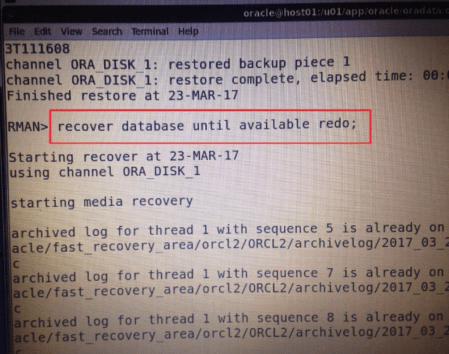
One of the coolest feature i have noticed during recent tests of Oracle 12c R2 was related with the RMAN recovery.
With this newest offering from Oracle Corporation now you can “RECOVER DATABASE UNTIL AVAILABLE REDO” 🙂

Hope That Helps
Prashant Dixit

Posted in Basics | Leave a Comment »

Part 1: ASM Installation on 11gR2 (VMWare)

Posted by FatDBA on January 10, 2016

Hello Everyone,
Today i would like to start series/chapters describing Oracle Automatic Storage Management (Oracle ASM) concepts and provides an overview of Oracle ASM features. Followed posts will covers subjects like Installation, Configuration, Administration/Management, Monitoring. Troubleshooting and Optimization etc.

In this maiden post (Part 1) i would like to discuss and elaborate about ASM installation and related areas.

Prerequisites:
Considering that you already have the OS ready with all packages per-installed before we begin our ASM installation on the top. I will start with right from the scratch.

Step 1:
Preparing Disks or Partitions which will be used while creating the ASM diskgroups.
I’ve created 3 Persistent Disks each of 4GB in size from the VM Disk (I will perform all steps in VM environment).

This is how the VM Setting will look like once you are done with the Disk creation.
*Forgot about the Fifth Hard Disk of 10GB for now. Will explain the usage later on the series.

1

Once you have the disks created, Next you’ll have to format the newly created disks to make them usable: Using fdisk command. Command displays the status of available newly created partitions/disks as:
/dev/sdb, /dev/sdc, /dev/sdd – Each of 4GB (4294 MBs) in size.

[root@localhost ~]# fdisk -l

Disk /dev/sda: 91.3 GB, 91268055040 bytes, 178257920 sectors
Units = sectors of 1 * 512 = 512 bytes
Sector size (logical/physical): 512 bytes / 512 bytes
I/O size (minimum/optimal): 512 bytes / 512 bytes
Disk label type: dos
Disk identifier: 0x000aab6c

Device Boot Start End Blocks Id System
/dev/sda1 * 2048 1026047 512000 83 Linux
/dev/sda2 1026048 178257919 88615936 8e Linux LVM

Disk /dev/sdb: 4294 MB, 4294967296 bytes, 8388608 sectors
Units = sectors of 1 * 512 = 512 bytes
Sector size (logical/physical): 512 bytes / 512 bytes
I/O size (minimum/optimal): 512 bytes / 512 bytes

Click Here to Read More!!

Posted in Advanced, Basics | Tagged: | Leave a Comment »

runInstaller Error: An unexpected error has been detected by HotSpot Virtual Machine

Posted by FatDBA on January 6, 2016

Hello Everyone,
Installing your Oracle Software using GUI Method requires to call “runInstaller” script and is always an easy step if you have proper permissions, DISPLAY settings in place.
But here i would like to discuss one of the case where I’ve spent several hours to fix one of the error that occurred every-time i called runInstaller script even after setting all required permissions and DISPLAY variables.

It fails to render the installer and creates a log file under /tmp directory with below mentioned contents.

#
# An unexpected error has been detected by HotSpot Virtual Machine:
#
# SIGSEGV (0xb) at pc=0x0000003e2ce14d70, pid=4000, tid=140717162321680
#
# Java VM: Java HotSpot(TM) 64-Bit Server VM (1.5.0_51-b10 mixed mode)
# Problematic frame:
# C [ld-linux-x86-64.so.2+0x14d70]
#

————— T H R E A D —————

Current thread (0x000000004220d3f0): JavaThread “AWT-EventQueue-0” [_thread_in_native, id=4014]

siginfo:si_signo=11, si_errno=0, si_code=128, si_addr=0x0000000000000000

Registers:
RAX=0x0000000000000001, RBX=0x000000004216ae50, RCX=0x000000009eba2203, RDX=0x000000000fabfbff
RSP=0x00007ffb44792278, RBP=0x00007ffb447923c0, RSI=0x0000000000000000, RDI=0x0000000000000058
R8 =0x0000000000000000, R9 =0x0000000000000000, R10=0x00007ffb447921f0, R11=0x000000004216ae50
R12=0x00007ffb447923e8, R13=0x0000000041f85330, R14=0x0000000000000000, R15=0x0000000000000000
RIP=0x0000003e2ce14d70, EFL=0x0000000000010202, CSGSFS=0x0000000000000033, ERR=0x0000000000000000
TRAPNO=0x000000000000000d

Top of Stack: (sp=0x00007ffb44792278)
0x00007ffb44792278: 0000003e2ce0aaea 0000000000000000

Signal Handlers:
SIGSEGV: [libjvm.so+0x67ed60], sa_mask[0]=0x7ffbfeff, sa_flags=0x14000004
SIGBUS: [libjvm.so+0x67ed60], sa_mask[0]=0x7ffbfeff, sa_flags=0x14000004
SIGFPE: [libjvm.so+0x582020], sa_mask[0]=0x7ffbfeff, sa_flags=0x14000004
SIGPIPE: [libjvm.so+0x582020], sa_mask[0]=0x7ffbfeff, sa_flags=0x14000004
SIGILL: [libjvm.so+0x582020], sa_mask[0]=0x7ffbfeff, sa_flags=0x14000004
SIGUSR1: SIG_DFL, sa_mask[0]=0x00000000, sa_flags=0x00000000
SIGUSR2: [libjvm.so+0x583ed0], sa_mask[0]=0x00000000, sa_flags=0x14000004
SIGHUP: [libjvm.so+0x5839a0], sa_mask[0]=0x7ffbfeff, sa_flags=0x14000004
SIGINT: [libjvm.so+0x5839a0], sa_mask[0]=0x7ffbfeff, sa_flags=0x14000004
SIGQUIT: [libjvm.so+0x5839a0], sa_mask[0]=0x7ffbfeff, sa_flags=0x14000004
SIGTERM: [libjvm.so+0x5839a0], sa_mask[0]=0x7ffbfeff, sa_flags=0x14000004

————— S Y S T E M —————

OS:Red Hat Enterprise Linux Server release 6.0 (Santiago)

uname:Linux 2.6.32-573.12.1.el6.x86_64 #1 SMP Tue Dec 15 06:42:08 PST 2015 x86_64
libc:glibc 2.12 NPTL 2.12
rlimit: STACK 10240k, CORE 0k, NPROC 16384, NOFILE 65536, AS infinity
load average:0.09 0.06 0.08

CPU:total 1 em64t

Memory: 4k page, physical 2046684k(69828k free), swap 2031612k(2031612k free)

vm_info: Java HotSpot(TM) 64-Bit Server VM (1.5.0_51-b10) for linux-amd64, built on Jun 6 2013 09:59:46 by java_re with gcc 3.2.2 (SuSE Linux)

time: Sat Jan 2 23:09:21 2016
elapsed time: 2 seconds

The workaround to the problem is to set “LD_BIND_NOW” environment variable to a value “1” as shown below and re-launch the installer.

bash-4.1$ export LD_BIND_NOW=1
bash-4.1$ ./runInstaller
Starting Oracle Universal Installer…

Checking Temp space: must be greater than 120 MB. Actual 27339 MB Passed
Checking swap space: must be greater than 150 MB. Actual 4031 MB Passed
Checking monitor: must be configured to display at least 256 colors. Actual 16777216 Passed
Preparing to launch Oracle Universal Installer from /tmp/OraInstall2013-07-01_03-29-40AM. Please wait …
bash-4.1$

This bug seems to have reported on 11.2.0.1 & 11.2.0.3.

Hope That Helps
Prashant Dixit

Posted in Advanced, Basics | Tagged: , | 3 Comments »

Using DBCA (DB Create) in Silent Mode.

Posted by FatDBA on August 23, 2013

DBCA is one of the most important and easiest utility to create new databases. Most of us have used it during our careers in GUI mode, but we have an option to launch it in non-graphical mode (Non-Interactive Mode) as well. Below provided steps can be performed to create database in silent/non-interactive mode. So you can launch DBCA in text mode from your favorite ssh client/terminal like putty, secureCRT, SSH Tectia Client etc. and can save yourself from that ‘old’ manual DB create methods (Using catprocs, catalog sql’s and creating new dump directories).

To create database: This requires a response file which includes all necessary details like GGDBNAME (Global Database Name), SID, Listener Name, SYS/SYSTEM/DBSNMP/SYSMAN Passwords etc.
Browser the response file (ORACLE_HOME/assistants/dbca) and make all mandatory changes.

Step 1: Location of response file
[oracle@prashant dbca]$ pwd
/u01/app/oracle/product/11.2.0/db_1/assistants/dbca    — Default Location of Response File.

[oracle@prashant dbca]$ ls
dbca.rsp  doc  jlib  logs  templates

Create a copy of original file.
[oracle@prashant dbca]$ cp dbca.rsp  dbcacreatedb.rsp

[oracle@prashant dbca]$ ls
dbcacreatedb.rsp  dbca.rsp  doc  jlib  logs  templates

Step 2:
Edit all mandatory changes in response file.
GDBNAME = “silent”
SID = “silent”
SYSPASSWORD = “oracle90”
SYSTEMPASSWORD = “oracle90”
SYSMANPASSWORD = “oracle90”
DBSNMPPASSWORD = “oracle90”
CHARACTERSET   = “US7ASCII” (Default)
NATIONAL CHARACTERSET = “UTF8” (Default)

Although there are various sections inside the response file “.rsp” file like createdatabase, deleteDatabase, createTemplateFromDB or createCloneTemplate. In this post we have talk only about ‘createDatabase‘ and is the area of interest (Used to create new database).

All Examples :
—————————–
1. dbca -progress_only -responseFile <response file>
Display a progress bar depicting progress of database creation
process.

2. dbca -silent -responseFile <response file>
Creates database silently. No user interface is displayed.

3. dbca -silent -createDatabase -cloneTemplate
-responseFile <response file>    
Creates database silently with clone template. The template in
responsefile is a clone template.

4. dbca -silent -deleteDatabase -responseFile <response file>
Deletes database silently.

Step: 3

So, we are going to install the database using ‘STEP 3’ without using -cloneTemplate. This will create database silently and will show progress in percentages.
[oracle@prashant dbca]$ dbca -silent -createDatabase -responseFile dbcacreatedb.rsp
Copying database files
1% complete
3% complete
11% complete
18% complete
26% complete
37% complete
Creating and starting Oracle instance
40% complete
45% complete
50% complete
55% complete
56% complete
60% complete
62% complete
Completing Database Creation
66% complete
70% complete
73% complete
85% complete
96% complete
100% complete
Look at the log file “/u01/app/oracle/cfgtoollogs/dbca/silent/silent.log” for further details.

It seems that Database Creation is successful completed. Let’s check creation  log file.
File: “/u01/app/oracle/cfgtoollogs/dbca/silent/silent.log”

Okay, while checking log file i found some new entries after creating database:

Database creation complete. For details check the log-files at:
/u01/app/oracle/cfgtoollogs/dbca/silent.
Database Information:
Global Database Name:silent
System Identifier(SID):silent

[oracle@prashant dbca]$ cd /u01/app/oracle/cfgtoollogs/dbca/silent
[oracle@prashant silent]$ ls -ltr
total 104
-rw-r—– 1 oracle oinstall  1372 Aug 23 11:47 rmanRestoreDatafiles.sql
-rw-r—– 1 oracle oinstall   330 Aug 23 11:49 CloneRmanRestore.log
-rw-r—– 1 oracle oinstall  1135 Aug 23 11:50 cloneDBCreation.log
-rw-r—– 1 oracle oinstall     8 Aug 23 11:50 postScripts.log
-rw-r—– 1 oracle oinstall     6 Aug 23 11:50 lockAccount.log
-rw-r—– 1 oracle oinstall   349 Aug 23 11:51 postDBCreation.log
-rw-r—– 1 oracle oinstall   458 Aug 23 11:51 OraDb11g_home1_silent_creation_checkpoint.xml
-rw-r—– 1 oracle oinstall 66392 Aug 23 11:51 trace.log
-rw-r—– 1 oracle oinstall   654 Aug 23 11:51 silent.log

* There are some interesting files generated during DB creation like CloneRmanRestore.log, cloneDBCreation.log, postDBCreation.log and rmanRestoreDatafiles.sql.

Let’s check our new database ‘Silent’.
[oracle@prashant silent]$ ps -ef|grep pmon
oracle   12671     1  0 Aug20 ?        00:00:03 ora_pmon_sairam
oracle   20771     1  0 11:50 ?        00:00:00 ora_pmon_silent
oracle   22315 18308  0 13:06 pts/2    00:00:00 grep pmon

Okay we have a PMON for databse (Silent).
[oracle@prashant silent]$ . oraenv
ORACLE_SID = [sairam] ? silent
The Oracle base for ORACLE_HOME=/u01/app/oracle/product/11.2.0/db_1 is /u01/app/oracle
[oracle@prashant silent]$ sqlplus / as sysdba

SQL*Plus: Release 11.2.0.1.0 Production on Fri Aug 23 13:07:04 2013
Copyright (c) 1982, 2009, Oracle.  All rights reserved.

Connected to:
Oracle Database 11g Enterprise Edition Release 11.2.0.1.0 – Production
With the Partitioning, OLAP, Data Mining and Real Application Testing options

SQL> select name, open_mode from v$database;

NAME      OPEN_MODE
——— ——————–
SILENT    READ WRITE


Thanks
Prashant Dixit
“Sharing is Good”

Posted in Advanced, Basics | Tagged: , , | Leave a Comment »

Oracle 12c (12.1.0.1) is officially released.

Posted by FatDBA on June 26, 2013

Ulntit11led


Untitled

Finally the long wait is over, 12c (12.1.0.1) has released and is available on Oracle official website to download and test.

Link: http://www.oracle.com/technetwork/database/enterprise-edition/downloads/index.html

Posted in Basics | Tagged: | Leave a Comment »

11.2.0.3.4 (Why so many 1’s, 2’s, 3’s and 4’s)

Posted by FatDBA on May 16, 2013

Release_Number

Why we have so many numbers (1,2,3,4) in 11.2.0.3.4 ?. Alright, today I’ll try to explain significance of these numbers and it’s relevance.

11.X .X. X.X
Major Database Release Number:
Major database release number, major new edition, contains significant new functionality. It represents a major new version of the software that contains significant new functionality.

X. 2. X. X
Database Maintenance Release Number:
Number increases when bug fixes or new features to existing programs become available.

X . X .O. X .X
Middleware Release Number:
Release level of Oracle Middleware. In case of 10g/9i it was Oracle Application Server Release Number.

X. X . X. 3. X
Component-Specific/Patch Release Number:
A Patch release contains fixes for serious bugs that cannot wait until the next maintenance releasefor example, component patch sets or interim releases.

X. X . X. X. 4
Platform-Specific Release Number:
Usually this is a patch set Updates.
Used to identify a particular emergency patch release of a software product on that operating system, it usually fixes or works around a particular, critical problem

Views:
SQL> select banner from v$version;
SQL> SELECT * FROM PRODUCT_COMPONENT_VERSION;

Posted in Basics | Tagged: | Leave a Comment »