Tales From A Lazy Fat DBA

Its all about Databases, their performance, troubleshooting & much more …. ¯\_(ツ)_/¯

Archive for the ‘Uncategorized’ Category

Oracle Secure Backup: Configuration

Posted by FatDBA on October 31, 2012

  • Steps to Configure Oracle Secure Backup (OSB):

Step 1. As the root user, check if the uncompress utility is installed on the system. If it is not,
create a symbolic link pointing to the gunzip utility:

(This is an important per-requisite and this is needed by the installed to uncompress files to installation directory and Mostly this does not comes pre-installed with Linux OS, create symbolic link with the Gunzip utility or install an RPM for this)
[root@lin32 ~]# uncompress
-bash: uncompress: command not found
[root@lin32 ~]# ln -s /bin/gunzip /bin/uncompress
Step 2. Create a directory for the download, and then issue the change directory command to
that directory:
[root@lin32 ~]# mkdir download
[root@lin32 ~]# cd download/
Step 3. Download OSB into the download directory and then unzip the product:
[root@lin32 download]# ls –l
total 43864
-rw-r–r– 1 root root 44866571 Jan 19 20:31 osb-10.3.0.1.0_linux32_release.zip
[root@lin32 download]# unzip osb-10.3.0.1.0_linux32_release.zip
Archive: osb-10.3.0.1.0_linux32_release.zip
creating: osb-10.3.0.1.0_linux32_cdrom090504/
extracting: osb-10.3.0.1.0_linux32_cdrom090504/OSB.10.3.0.1.0_LINUX32.rel
creating: osb-10.3.0.1.0_linux32_cdrom090504/doc/
creating: osb-10.3.0.1.0_linux32_cdrom090504/doc/dcommon/
creating: osb-10.3.0.1.0_linux32_cdrom090504/doc/dcommon/css/
inflating: osb-10.3.0.1.0_linux32_cdrom090504/doc/dcommon/css/blafdoc.css
inflating: osb-10.3.0.1.0_linux32_cdrom090504/doc/dcommon/css/bp_layout.css

inflating: osb-10.3.0.1.0_linux32_cdrom090504/welcome.html
inflating: osb-10.3.0.1.0_linux32_cdrom090504/doc.tar
Step 4. Create the directory where the install will place OSB files:
[root@lin32 download]# mkdir -p /usr/local/oracle/backup

Step 5. Issue the change directory command to the OSB destination and run setup:
[root@lin32 download]# cd /usr/local/oracle/backup/
[root@lin32 backup]# /root/download/osb-10.3.0.1.0_linux32_cdrom090504/setup
The following output is returned:
Welcome to Oracle’s setup program for Oracle Secure Backup. This program loads
Oracle Secure Backup software from the CD-ROM to a filesystem directory of your
choosing.
This CD-ROM contains Oracle Secure Backup version 10.3.0.1.0_LINUX32.
Please wait a moment while I learn about this host… done.
– – – – – – – – – – – – – – – – – – – – – – – – – – –
1. linux32
administrative server, media server, client
– – – – – – – – – – – – – – – – – – – – – – – – – – –
Loading Oracle Secure Backup installation tools… done.
Loading linux32 administrative server, media server, client… done.
– – – – – – – – – – – – – – – – – – – – – – – – – – –
Oracle Secure Backup has installed a new obparameters file.
Your previous version has been saved as install/obparameters.savedbysetup.
Any changes you have made to the previous version must be made to the new obparameters file.
Would you like the opportunity to edit the obparameters file
Please answer ‘yes’ or ‘no’ [no]:
Step 6. Leaving the default parameters for now, press ENTER to choose the default answer. The
following output is returned:
– – – – – – – – – – – – – – – – – – – – – – – – – – –
Loading of Oracle Secure Backup software from CD-ROM is complete.
You may unmount and remove the CD-ROM.
Would you like to continue Oracle Secure Backup installation with ‘installob’ now?
(The Oracle Secure Backup Installation Guide contains complete information about
installob.)
Please answer ‘yes’ or ‘no’ [yes]:
Step 7. Again, press ENTER to choose the default answer. The following output is returned:
– – – – – – – – – – – – – – – – – – – – – – – – – – –
Welcome to installob, Oracle Secure Backup’s installation program.
For most questions, a default answer appears enclosed in square brackets.
Press Enter to select this answer.
Please wait a few seconds while I learn about this machine… done.
Have you already reviewed and customized install/obparameters for your Oracle
Secure Backup installation [yes]?
Step 8. Again, press ENTER to choose the default answer and to leave the default parameters. The
following output is returned:
– – – – – – – – – – – – – – – – – – – – – – – – – – –
Oracle Secure Backup is not yet installed on this machine.
Oracle Secure Backup’s Web server has been loaded, but is not yet configured.
Choose from one of the following options. The option you choose defines the
software components to be installed.

Configuration of this host is required after installation completes.
You can install the software on this host in one of the following ways:
(a) administrative server, media server and client
(b) media server and client
(c) client
If you are not sure which option to choose, please refer to the Oracle Secure
Backup Installation Guide. (a,b or c) [a]?
Step 9. You are going to install all three components of OSB on the same server, so again press
ENTER to choose the default answer. The following output is returned:
Beginning the installation. This will take just a minute and will produce
several lines of informational output.
Installing Oracle Secure Backup on lin32 (Linux version 2.6.18-53.el5)
You must now enter a password for the Oracle Secure Backup encryption key store.
Oracle suggests you choose a password of at least 8 characters in length,
containing a mixture of alphabetic and numeric characters.
Please enter the key store password:
Re-type password for verification:
Step 10. Enter the OSB encryption key twice. The key is not displayed. You will see the
following output:
You must now enter a password for the Oracle Secure Backup ‘admin’ user. Oracle
suggests you choose a password of at least 8 characters in length, containing a
mixture of alphabetic and numeric characters.
Please enter the admin password:
Re-type password for verification:
Step 11. Enter the admin password twice. The password is not displayed. You will see the
following output:
You should now enter an email address for the Oracle Secure Backup ‘admin’ user.
Oracle Secure Backup uses this email address to send job summary reports and to
notify the user when a job requires input. If you leave this blank, you can set it
later using the obtool’s ‘chuser’ command.
Please enter the admin email address:
Step 12. Leave the e-mail address blank for now. The following output is returned:
generating links for admin installation with Web server
updating /etc/ld.so.conf
checking Oracle Secure Backup’s configuration file (/etc/obconfig)
setting Oracle Secure Backup directory to /usr/local/oracle/backup in /etc/obconfig
setting local database directory to /usr/etc/ob in /etc/obconfig
setting temp directory to /usr/tmp in /etc/obconfig
setting administrative directory to /usr/local/oracle/backup/admin in /etc/obconfig
protecting the Oracle Secure Backup directory
creating /etc/rc.d/init.d/observiced
activating observiced via chkconfig
initializing the administrative domain
****************************** N O T E ******************************
On Linux systems Oracle recommends that you answer no to the next two questions.
The preferred mode of operation on Linux systems is to use the /dev/sg devices for

attach points as described in the ‘ReadMe’ and in the ‘Installation and
Configuration Guide’.
Is lin32 connected to any tape libraries that you’d like to use with Oracle Secure Backup [no]?
Is lin32 connected to any tape drives that you’d like to use with Oracle Secure
Backup [no]?
Step 13. Since, in this example, you use a Linux system, answer “no,” as recommended by
Oracle, and configure the media server later. The following summary is returned:
Installation summary:
Installation Host OS Driver OS Move Reboot
Mode Name Name Installed? Required? Required?
admin lin32 Linux no no no
Oracle Secure Backup is now ready for your use.
The OSB administrative server, media server, and client are now installed. The OSB Web tool
is used to configure the tape library and tape drives.

Once configured launch your Web browser and supply the URL of the host running Oracle Secure Backup. Use the following syntax, where hostname can be a fully qualified domain name:

https://hostname
https://localhost.localdomain
Posted in Uncategorized | Tagged: | Leave a Comment »

Re-Creating the Control File: RMAN Effects during the activity.

Posted by FatDBA on October 29, 2012

It used to be that certain conditions required the occasional rebuild of the database control
file. If you use RMAN and you do not use a recovery catalog, be very careful of the control file
rebuild. When you issue the command

alter database backup control file to trace;

the script that is generated does not include the information in the control file that identifies
your backups. Without these backup records, you cannot access the backups when they are
needed for recovery. All RMAN information is lost, and you cannot get it back. The only
RMAN information that gets rebuilt when you rebuild the control file is any permanent
configuration parameters you have set with RMAN.
If you back up the control file to a binary file, instead of to trace, then all backup
information is preserved. This command looks like the following:

alter database backup controlfile to ‘/u01/backup/bkup_cfile.ctl’;

Posted in Uncategorized | Tagged: | Leave a Comment »

Cumulative vs Differential vs Full Backups

Posted by FatDBA on October 27, 2012

Types of backups:

1. Full Backup or zero level backup.

2. Incremental Backup’s: Changed noted by the backup after a full backup. Broadly divided into two types

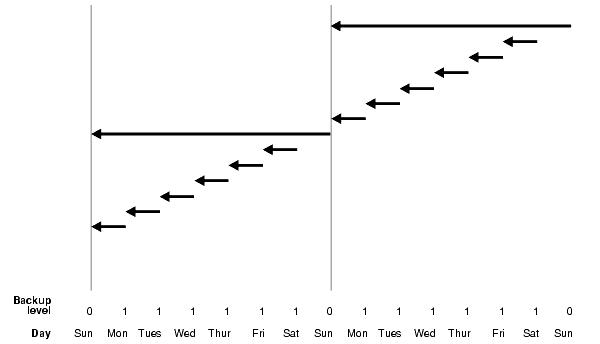
– Differential Incremental Backup (Figure a)

– Cumulative Incremental Backup (Figure b)

Level 0 and Level 1 Incremental Backups

Incremental backups can be either level 0 or level 1. A level 0 incremental backup, which is the base for subsequent incremental backups, copies all blocks containing data, backing the datafile up into a backup set just as a full backup would. The only difference between a level 0 incremental backup and a full backup is that a full backup is never included in an incremental strategy.

A level 1 incremental backup can be either of the following types:

  • A differential backup, which backs up all blocks changed after the most recent incremental backup at level 1 or 0
  • A cumulative backup, which backs up all blocks changed after the most recent incremental backup at level 0

Incremental backups are differential by default.

Differential Incremental Backups

In a differential level 1 backup, RMAN backs up all blocks that have changed since the most recent cumulative or differental incremental backup, whether at level 1 or level 0. RMAN determines which level 1 backup occurred most recently and backs up all blocks modified after that backup. If no level 1 is available, RMAN copies all blocks changed since the level 0 backup.

The following command performs a level 1 differential incremental backup of the database:

RMAN> BACKUP INCREMENTAL LEVEL 1 DATABASE;

If no level 0 backup is available, then the behavior depends upon the compatibility mode setting. If compatibility is >=10.0.0, RMAN copies all blocks changed since the file was created, and stores the results as a level 1 backup. In other words, the SCN at the time the incremental backup is taken is the file creation SCN. If compatibility <10.0.0, RMAN generates a level 0 backup of the file contents at the time of the backup, to be consistent with the behavior in previous releases.

Figure  Differential Incremental Backups (Default)

Description of Figure 4-1 follows

Cumulative Incremental Backups

In a cumulative level 1 backup, RMAN backs up all the blocks used since the most recent level 0 incremental backup. Cumulative incremental backups reduce the work needed for a restore by ensuring that you only need one incremental backup from any particular level. Cumulative backups require more space and time than differential backups, however, because they duplicate the work done by previous backups at the same level.

The following command performs a cumulative level 1 incremental backup of the database:

BACKUP INCREMENTAL LEVEL 1 CUMULATIVE DATABASE; # blocks changed since level 0

Figure Cumulative Incremental Backups

Description of Figure 4-2 follows

Posted in Uncategorized | Tagged: | 1 Comment »

Difference between awrrpt.sql and awrrpti.sql ?

Posted by FatDBA on June 28, 2012

Difference between awrrpt.sql and awrrpti.sql?

The output of these reports is essentially the same, except that awrrpti.sql script allows you to define a specific instance to report on.

AWR Report types (Most Commonly used Reports):

  • The awrrpt.sql SQL script generates an HTML or text report that displays statistics for a range of snapshot Ids.
  • The awrrpti.sql SQL script generates an HTML or text report that displays statistics for a range of snapshot Ids on a specified database and instance.
  • The awrsqrpt.sql SQL script generates an HTML or text report that displays statistics of a particular SQL statement for a range of snapshot Ids. Run this report to inspect or debug the performance of a SQL statement.
  • The awrsqrpi.sql SQL script generates an HTML or text report that displays statistics of a particular SQL statement for a range of snapshot Ids on a specified database and instance. Run this report to inspect or debug the performance of a SQL statement on a specific database and instance.
  • The awrddrpt.sql SQL script generates an HTML or text report that compares detailed performance attributes and configuration settings between two selected time periods.
  • The awrddrpi.sql SQL script generates an HTML or text report that compares detailed performance attributes and configuration settings between two selected time periods on a specific database and instance.
  • The awrgrpt.sql  Generate AWR Cluster aggregated statistics from all the instances.
  • The awrgdrpt.sql  report compares the statistic results of differences between two different snapshot intervals, for the whole cluster database.

SQL> @awrsqrpt.sql —- Generate AWR Report Single Select Statement:

Run the awrsqrpt.sql script from $ORACLE_HOME/rdbms/admin/ as a sys user. The script will ask you for the output format of the report (HTML or TEXT), the the number of days (n) will result in the most recent
(n) days of snapshots being listed (If you hit enter, you will get all the available snapshots listed), begin and end snapshot interval Ids intervals and the SQL_ID for the specific SELECT statement …

To check SQL ID —

SQL> select SQL_ID  from V$SQLAREA where rownum =1 ;

SQL_ID
————-
1fkh93md0802n

Posted in Advanced, Basics, Uncategorized | Tagged: | Leave a Comment »

RMAN (Do’s & Dont’s)

Posted by FatDBA on June 26, 2012

No SPFILE before control file if both are backed up at the same time.

RMAN> backup current spfile controlfile;

RMAN-00571: ===========================================================
RMAN-00569: =============== ERROR MESSAGE STACK FOLLOWS ===============
RMAN-00571: ===========================================================
RMAN-00558: error encountered while parsing input commands
RMAN-01009: syntax error: found “spfile”: expecting one of: “controlfile”
RMAN-01007: at line 1 column 16 file: standard input

RMAN> backup current controlfile spfile;

Starting backup at 29-MAY-12
using channel ORA_DISK_1
….

================================================================
* RMAN don’t support PFILE backups. SPFILE is only support parameter type in RMAN.

* RMAN does not backup TEMP tablespaces.
That is because “TEMP” was not backed up at the outset. RMAN does not backup Temporary Tablespaces. Such tablespaces do NOT need to be backed up, and, therefore are not restored or cloned.

* Redo logs can’t be backed up using RMAN but REDO Archivelogs can.

Posted in Advanced, Basics, Uncategorized | Tagged: , | Leave a Comment »

The Kickstart

Posted by FatDBA on May 5, 2012

Hello Everyone,

Date is 05-05-2012 and I’ve finally decided to publish my Oracle database study online. Oracle Ant is big footstep towards my love for the Red.

Note: During this journey I’ll prefer calling terms like ‘The Red’ or ‘Red’ to Oracle Database.

Thanks

– Prash ANT

Posted in Uncategorized | 2 Comments »