Tales From A Lazy Fat DBA

Its all about Databases, their performance, troubleshooting & much more …. ¯\_(ツ)_/¯

Oracle Secure Backup ?

Posted by FatDBA on October 31, 2012

What is Oracle Secure backup ?
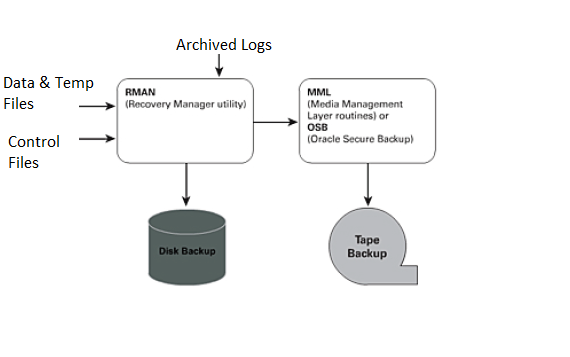
Oracle Secure Backup is centralized tape backup management software providing secure data protection for heterogeneous file systems and the Oracle Database. Oracle has its own media management software solution, Oracle Secure Backup (OSB). OSB is a fully integrated, RMAN-to-tape solution that does not require any third-party vendor software plug-in, and OSB has come a long way since its introduction in 10gR2.

In Oracle 10gR2 and Oracle 11g, you can utilize OSB to provide free backup to tape functionality, provided that you have a single tape head and it is attached directly to the server that contains the Oracle database that you want to back up. In addition to tape backup, OSB delivers an integrated Oracle database backup to third-party cloud (Internet) storage, through the Oracle Secure Backup Cloud Module. Oracle Secure Backup offers two tape management editions: OSB and OSB Express.

Oracle Secure Backup Interfaces:
You can interact with Oracle Secure Backup by means of the following tools:
– Oracle Secure Backup Web tool
– Oracle Secure Backup command-line interface
– Oracle Enterprise Manager

OSB Roles and Admin Domains:
Administrative server:
Each administrative domain must have exactly one administrative server. This server stores data pertinent to the operation of the administrative domain in a set of configuration files. Metadata relating to backup and restore operations is also stored on the administrative server in a backup catalog.
The administrative server runs the scheduler, which starts and monitors jobs within the administrative domain.

Media Server
A media server has one or more secondary storage devices, such as a library and tape drives, connected to it. At a minimum, a media server must have one standalone tape drive. Many media servers utilize robotic tape libraries.

Client
A client host is a host that has locally-accessed data that is backed up or restored by Oracle Secure Backup. Any host where Oracle Secure Backup is installed, or that contains data that Oracle Secure Backup accesses through Network Data Management Protocol (NDMP), can act as a client. Each client host is associated with one administrative server.



Posted in Advanced | Tagged: | Leave a Comment »

Standby: Protection Modes.

Posted by FatDBA on October 30, 2012

The protection modes run in the order from highest (most data protection) to the lowest (least data protection):

Minimum Requirements for Data Protection Modes
Maximum Protection Maximum Availability Maximum Performance
Redo Archival Process LGWR LGWR LGWR or ARCH
Network Transmission Mode SYNC SYNC ASYNC when using LGWR process. Not applicable when using ARCH process.
Disk Write Option AFFIRM AFFIRM NOAFFIRM
Standby Redo Logs Required? Yes Required for physical standby databases only. Standby redo logs are not supported for logical standby databases. Required for physical standby databases using the LGWR process.
Database Type Physical only Physical and Logical Physical and Logical

Posted in Advanced | Tagged: , | Leave a Comment »

Re-Creating the Control File: RMAN Effects during the activity.

Posted by FatDBA on October 29, 2012

It used to be that certain conditions required the occasional rebuild of the database control
file. If you use RMAN and you do not use a recovery catalog, be very careful of the control file
rebuild. When you issue the command

alter database backup control file to trace;

the script that is generated does not include the information in the control file that identifies
your backups. Without these backup records, you cannot access the backups when they are
needed for recovery. All RMAN information is lost, and you cannot get it back. The only
RMAN information that gets rebuilt when you rebuild the control file is any permanent
configuration parameters you have set with RMAN.
If you back up the control file to a binary file, instead of to trace, then all backup
information is preserved. This command looks like the following:

alter database backup controlfile to ‘/u01/backup/bkup_cfile.ctl’;

Posted in Uncategorized | Tagged: | Leave a Comment »

Cumulative vs Differential vs Full Backups

Posted by FatDBA on October 27, 2012

Types of backups:

1. Full Backup or zero level backup.

2. Incremental Backup’s: Changed noted by the backup after a full backup. Broadly divided into two types

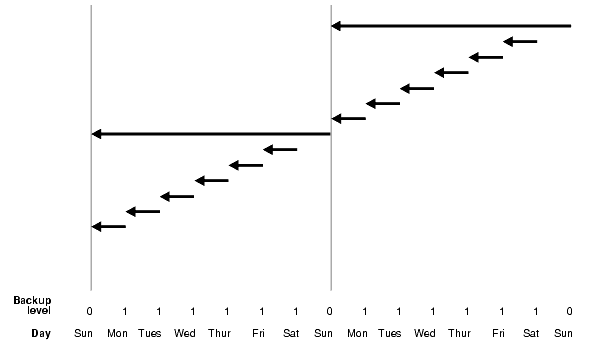
– Differential Incremental Backup (Figure a)

– Cumulative Incremental Backup (Figure b)

Level 0 and Level 1 Incremental Backups

Incremental backups can be either level 0 or level 1. A level 0 incremental backup, which is the base for subsequent incremental backups, copies all blocks containing data, backing the datafile up into a backup set just as a full backup would. The only difference between a level 0 incremental backup and a full backup is that a full backup is never included in an incremental strategy.

A level 1 incremental backup can be either of the following types:

  • A differential backup, which backs up all blocks changed after the most recent incremental backup at level 1 or 0
  • A cumulative backup, which backs up all blocks changed after the most recent incremental backup at level 0

Incremental backups are differential by default.

Differential Incremental Backups

In a differential level 1 backup, RMAN backs up all blocks that have changed since the most recent cumulative or differental incremental backup, whether at level 1 or level 0. RMAN determines which level 1 backup occurred most recently and backs up all blocks modified after that backup. If no level 1 is available, RMAN copies all blocks changed since the level 0 backup.

The following command performs a level 1 differential incremental backup of the database:

RMAN> BACKUP INCREMENTAL LEVEL 1 DATABASE;

If no level 0 backup is available, then the behavior depends upon the compatibility mode setting. If compatibility is >=10.0.0, RMAN copies all blocks changed since the file was created, and stores the results as a level 1 backup. In other words, the SCN at the time the incremental backup is taken is the file creation SCN. If compatibility <10.0.0, RMAN generates a level 0 backup of the file contents at the time of the backup, to be consistent with the behavior in previous releases.

Figure  Differential Incremental Backups (Default)

Description of Figure 4-1 follows

Cumulative Incremental Backups

In a cumulative level 1 backup, RMAN backs up all the blocks used since the most recent level 0 incremental backup. Cumulative incremental backups reduce the work needed for a restore by ensuring that you only need one incremental backup from any particular level. Cumulative backups require more space and time than differential backups, however, because they duplicate the work done by previous backups at the same level.

The following command performs a cumulative level 1 incremental backup of the database:

BACKUP INCREMENTAL LEVEL 1 CUMULATIVE DATABASE; # blocks changed since level 0

Figure Cumulative Incremental Backups

Description of Figure 4-2 follows

Posted in Uncategorized | Tagged: | 1 Comment »

News: ASMlib will not be certified or supported on Red Hat Enterprise Linux 6.

Posted by FatDBA on October 25, 2012

For More Click or go to News section of the Blog:

https://oracleant.wordpress.com/news/

Posted in Advanced | Leave a Comment »

Real-Time Apply Error: ORA-38500: ‘USING CURRENT LOGFILE option not available without stand’

Posted by FatDBA on October 25, 2012

Hi Folks,

Going to discuss about one of the most recent problem that i faced while configuring/activating the Real-Time Apply service on one of the standby database.

(Using Oracle 10g r2)
Prior Status:
SQL> SELECT RECOVERY_MODE FROM V$ARCHIVE_DEST_STATUS WHERE DEST_ID=2 ;

RECOVERY_MODE
———————–
MANAGED

To start real-time apply i used CURRENT LOGFILE clause but received below provided error message:

SQL> alter database recover managed standby database disconnect using current logfile;
alter database recover managed standby database disconnect using current logfile
*
ERROR at line 1:
ORA-38500: USING CURRENT LOGFILE option not available without stand

Resolution:
1. I created Log Groups and Log Files for Standby Database to try fix this issue and as per my expectations it worked.

Added Three log groups of same size 50MB each on Primary Database for Standby (Log Groups should be always be of same size – What you have on Primary DB, Mine was – 52428800 (50MB)):

SQL>ALTER DATABASE ADD STANDBY LOGFILE GROUP 3 SIZE 50M;
Database Altered

SQL>ALTER DATABASE ADD STANDBY LOGFILE GROUP 4 SIZE 50M;
Database Altered

SQL>ALTER DATABASE ADD STANDBY LOGFILE GROUP 5 SIZE 50M;
Database Altered

SQL> select group#, member, type from v$logfile;

GROUP#         MEMBER                                                                        TYPE
———- ———————————————————————————————————————————–
4       /u01/app/oracle/flash_recovery_area/DOOM/onlinelog/o1_mf_4_88j4601r_.log                      STANDBY
3       /u01/app/oracle/flash_recovery_area/DOOM/onlinelog/o1_mf_3_88j4859l_.log                      STANDBY
5       /u01/app/oracle/flash_recovery_area/DOOM/onlinelog/o1_mf_5_88j4d4t5_.log                      STANDBY

On Standby Database:
2. Added a standby logfile on Std DB end:

SQL> alter database add standby logfile ‘/u01/app/oracle/admin/doom/stdy_log.log’ size 10m;
Database altered.

SQL> alter database recover managed standby database disconnect using current logfile;
Database altered.

SQL> SELECT RECOVERY_MODE FROM V$ARCHIVE_DEST_STATUS WHERE DEST_ID=2 ;
RECOVERY_MODE
———————–
MANAGED REAL TIME APPLY

SQL> select RECOVERY_MODE, DATABASE_MODE, PROTECTION_MODE from v$archive_dest_status;

RECOVERY_MODE           DATABASE_MODE   PROTECTION_MODE
———————– ————— ——————–
MANAGED REAL TIME APPLY MOUNTED-STANDBY MAXIMUM PERFORMANCE

11 rows selected.

Posted in Advanced | Tagged: , , | Leave a Comment »

Data Guard – Adding and Resizing a datafile on the Primary database

Posted by FatDBA on October 13, 2012

Standby Database (Data Guard) is slowly and steadily turning out to be my best topic/subject among others in High Availability. It attracts me to experiment to improve the HA features.

Alright, today I’ve fixed one of the problem i was facing from past few days and discovered that i was doing a stupid mistake and that i failed to catch too till the moment i rechecked some parameters in initialization file minute ago.

I tried to add/modify some data files and was not getting at the Standby End which resulted in several errors at Sb DB and lead to Standby Database crash. Otherwise i have to manual port log files from primary destination to the Standby party to maintain the sync between the two after datafiles addition.

Below were the error messages i was getting when tested the standby status:

SQL>  select message from v$dataguard_status;

MESSAGE
——————————————————————————–
ARC0: Archival stopped
ARC1: Archival stopped
Media Recovery Waiting for thread 1 seq# 197

Solution:
I’ve check and found Standby_File_Management was set to ‘MANUAL’
and both the db_file_name_convert and log_file_name_conver were different.

I’ve set all the three parameters to below provided values
Standby_File_Management=AUTO  (Both on Primary and Standby)
db_file_name_convert          ( I’ve left it unchanged on both sides – it was empty (default))
log_file_name_convert         ( I’ve left it unchanged on both sides – it was empty (default))

Snippets from my machine:
SQL> show parameter standby_file_management    (On both Primary and Standby)

NAME                                 TYPE        VALUE
———————————— ———– ——————————
standby_file_management              string      AUTO

SQL> show parameter db_file_name_convert

NAME                                 TYPE        VALUE
———————————— ———– ——————————
db_file_name_convert                 string

SQL> show parameter log_file_name_convert

NAME                                 TYPE        VALUE
———————————— ———– ——————————
log_file_name_convert                string


  1. Add a new tablespace to the primary database:
    SQL> CREATE TABLESPACE new_ts DATAFILE '/disk1/oracle/oradata/payroll/t_db2.dbf'
      2> SIZE 1m AUTOEXTEND ON MAXSIZE UNLIMITED;
  2. Archive the current online redo log file so the redo data will be transmitted to and applied on the standby database:
    SQL> ALTER SYSTEM ARCHIVE LOG CURRENT;
  3. Verify the new datafile was added to the primary database:
    SQL> SELECT NAME FROM V$DATAFILE;
    NAME
    ----------------------------------------------------------------------
    /disk1/oracle/oradata/payroll/t_db1.dbf
    /disk1/oracle/oradata/payroll/t_db2.dbf
  4. Verify the new datafile was added to the standby database:
    SQL> SELECT NAME FROM V$DATAFILE;
    NAME
    ----------------------------------------------------------------------
    /disk1/oracle/oradata/payroll/s2t_db1.dbf
    /disk1/oracle/oradata/payroll/s2t_db2.dbf

Posted in Advanced | Tagged: , | Leave a Comment »

Database Links Explained ?

Posted by FatDBA on October 7, 2012

Database Links are objects which we create to establish a connection from one database to another. They are classified in to three parts:

1. Private Database Links: Belongs to specific schema. Only the owner of the link can use it and is default DB link type.
2. Public Database Links: Belongs to all users exists in Database.
3. Global database link – Defined in an OID or Oracle Names Server. Anyone on the network can use it.
Conditions:
1. User should have Privilege ‘CREATE DATABASE LINK’.

Format:
Create Database Link <DB Link> connect to < User > identified by < Password > using < Service Name >;
OR
Create Public Database Link <DB Link> connect to < User > identified by < Password > using < Service Name >;

Example:

Create Database Link <DB Link Name> connect to < User > identified by < Password > using < Service Name >;
SQL> create database link larry1 connect to larry identified by oracle90 using ‘ORCL’;
Database link created.

SQL> select * from dual@larry1;

D

X

SQL> update etr@larry1 set ID=7  where NAME=’prashant’ and TEAM=’cis’;

1 row updated.

SQL> select * from etr@larry1;

NAME         TEAM       ID
———— ———- —
prashant     cis        7
shantanu     cis        12
saurabh      oracle     19
ram          helpdesk   3
prashant     unix       5
tondu        security   1
amit         qa

7 rows selected.

Posted in Basics | 1 Comment »

What is Yum in Linux and how to configure ?

Posted by FatDBA on October 1, 2012

Why to use: Many times while installing Database on Linux/Linux most of us encounters problems with the pre-installations which requires some of the Packages to be available to Oracle before the installation starts.  Searching required RPM’s online is a tedious job and needs lot of patience which could ultimately lead to errors about “Dependencies Failed”.  A best resolution of this problem is YUM, which resolves dependency part by itself  and allow the package search and install easily from the repository created.

The Yellow dog Updater Modified (YUM) is a package management application for computers running Linux operating systems. yum is a standard method of managing the installation and removal of software.

Steps to Configure YUM Repository on RED HAT:

1) Install vsftpd (FTP Server) & createrepo Packages
Insert RHEL 5 Installation DVD

# mkdir ~/Desktop/rhel_cd
# mount /dev/cdrom ~/Desktop/rhel_cd
# cd ~/Desktop/rhel_cd/Server
# rpm –ivh vsftpd*
# rpm –ivh createrepo*

2) Copy all packages from DVD to LINUX filesystem

# cp ~/Desktop/rhel_cd/Server/ /var/ftp/pub
# cd /
# eject

3) Configure Local Yum Repository Server

# cd /var/ftp/pub/Server/repodata
# cp comps-rhel5-server-core.xml /var/ftp/pub/Server/
# cd /var/ftp/pub/Server
# createrepo -vg comps-rhel5-server-core.xml /var/ftp/pub/Server/
# service vsftpd start
# chkconfig –add vsftpd

4) Configure Clients
Run following commands on clients

# vi /etc/yum.repos.d/yum_server.repo

Add:
[Server]
name=YUM_SERVER
baseurl=ftp://192.168.2.100/pub/Server
gpgcheck=0

# vi /etc/vsftpd/vsftpd.conf

Set the following parameter (if not already set)
anonymous_enable = yes

# service vsftpd restart

Now your clients can use this yum server to download & install packages & resolve
dependencies.

Posted in Advanced | Tagged: | Leave a Comment »

ALTER DATABASE OPEN *RESETLOGS*

Posted by FatDBA on September 24, 2012

What is and why there is a need to open database in RESETLOGS mode ?

Answer:
Whenever you perform incomplete recovery or recovery with a backup control file, you must reset the online logs when you open the database.

– Archives the current online redo logs (if they are accessible) and then erases the contents of   the online redo logs and resets the log sequence number to 1.

– Reinitializes the control file metadata about online redo logs and redo threads.

– The RESETLOGS prevents you from corrupting datafiles with archived logs that are not from   direct parent incarnations of the current incarnation.

 
To reset the log sequence number when opening a database after recovery and thereby create a new incarnation of the database, execute the following statement:
ORA-01589: must use RESETLOGS or NORESETLOGS option for database open

SQL> alter database open resetlogs;
Database altered.


SQL> archive log list;
Database log mode              Archive Mode
Automatic archival             Enabled
Archive destination            USE_DB_RECOVERY_FILE_DEST
Oldest online log sequence     0
Next log sequence to archive   1
Current log sequence           1

Posted in Advanced | Tagged: | Leave a Comment »