Tales From A Lazy Fat DBA

Its all about Databases, their performance, troubleshooting & much more …. ¯\_(ツ)_/¯

Posts Tagged ‘DataGuard’

Data Guard: ORA-16789: missing standby redo logs

Posted by FatDBA on September 17, 2012

Error message while changing ‘logxptmode’ using DGMGRL CLI on Primary Database:

DGMGRL> edit database ‘orcl’ set property ‘logxptmode’=’SYNC’;
edit database ‘orcl’ set property ‘logxptmode’=’SYNC’;
Error: ORA-16789: missing standby redo logs
Solution:
As it is clearly asking about missing standby redo logs, Hence we have to create a redo log entry for standby

SQL> alter database add standby logfile (‘/u01/app/oracle/oradata/orcl/log1.rdo’) size 20m;

Database altered.

DGMGRL> edit database orcl set property logxptmode=”SYNC”;
edit database orcl set property logxptmode=”SYNC”;
Property “logxptmode” updated

Posted in Advanced | Tagged: , | Leave a Comment »

SYNC Vs ASYNC (Data Guard – Logxptmode)

Posted by FatDBA on September 14, 2012

Data Guard synchronous (SYNC) vs asynchronous (ASYNC) modes

Oracle Data Guard redo log transport offers synchronous log transport mode (LogXptMode = ‘SYNC’) or asynchronous log transport mode (LogXptMode = ‘ASYNC’).  Systems with a network bottleneck would get better overall response time with the ASYNC mode, while shops that cannot tolerate a stale standby server (i.e. maximum availability or maximum protection are best with the SYNC mode.

The difference is all about when the COMMIT happens.

LogXptMode = (‘SYNC‘):  As the name implies, SYNC mode synchronizes the primary with the standby database and all DML on the primary server will NOT be committed until the logs have been successfully transported to the standby servers.  The synchronous log transport mode is required for the Maximum Protection and Maximum Availability data protection modes.
LogXptMode = (‘ASYNC‘):  Conversely, asynchronous mode (ASYNC) allows updates (DML) to be committed on the primary server before the log file arrives on the standby servers.  The asynchronous log transport mode is required for the Maximum Performance data protection mode.

To check status of log export mode on database.

DGMGRL> show database qrcl logxptmode;
show database qrcl logxptmode;
LogXptMode = ‘ASYNC’
DGMGRL>

To edit logxptmode:

DGMGRL> edit database ‘qrcl’ set property ‘logxptmode’=’ASYNC’;
edit database ‘qrcl’ set property ‘logxptmode’=’ASYNC’;
Property “logxptmode” updated

Posted in Advanced | Tagged: | Leave a Comment »

Standby (DG) – Processes Explained.

Posted by FatDBA on August 27, 2012

SQL> SELECT PROCESS, STATUS FROM V$MANAGED_STANDBY;

PROCESS   STATUS
——— ————
ARCH      CONNECTED
ARCH      CONNECTED
RFS         IDLE
MRP0    WAIT_FOR_LOG

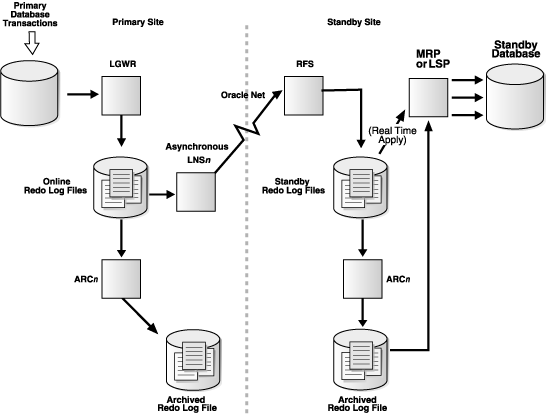
RFS: Is Remote File Server. RFS process writes the redo data to either archived redo log files or standby redo log files. the RFS process writes the redo data to either archived redo log files or standby redo log files. However, if you use standby redo log files, you can enable real-time apply, which allows Data Guard to recover redo data from the current standby redo log file as it is being filled up by the RFS process.

lgwrsync1

LGWR SYNC Archival to a Remote Destination with Standby Redo Log Files

————————

lgwrasync2

LGWR ASYNC Archival with Network Server (LNSn) Processes


Real Time Feature: If the real-time apply feature is enabled, log apply services can apply redo data as it is received, without waiting for the current standby redo log file to be archived. This results in faster switchover and failover times because the standby redo log files have been applied already to the standby database by the time the failover or switchover begins.

Use the ALTER DATABASE statement to enable the real-time apply feature, as follows:

  • For physical standby databases, issue the ALTER DATABASE RECOVER MANAGED STANDBY DATABASE USING CURRENT LOGFILE statement.
  • For logical standby databases, issue the ALTER DATABASE START LOGICAL STANDBY APPLY IMMEDIATE statement.

MRP/MRP0: Stands for Managed Recovery Process and sits between Standby Database and redo-log files/Archives redo. MRP is the process which will apply the changes from standby redolog files to standby database.

Posted in Advanced | Tagged: | Leave a Comment »

Heartbeat Error – 16009 (PING[ARC1]) – STANDBY DB

Posted by FatDBA on August 27, 2012

Error: PING[ARC1]: Heartbeat failed to connect to standby ‘qrcl’. Error is 16009. (Alert Log Traces)

Always check Standby Archive Destination before you start troubleshooting.

SQL> show parameter archive

NAME                                 TYPE        VALUE
———————————— ———– ——————————
log_archive_dest_1                   string      location=use_db_recovery_file_
dest, valid_for=(ALL_LOGFILES,
ALL_ROLES)
log_archive_dest_2                   string      service=qrcl optional reopen=20

In this example both of my Primary and Secondary machine has same same name ‘qrcl’. To reduce conflicts I’ve renamed the standby to ‘qrcl_std’ and changed the same in all files including tnsnames.ora but somehow failed to alter the service name in parameter file for log_archive_dest_2 (For Standby) and that lead to this Heart beat error.

Also reflects when crosschecked log archive destination 2 parameter using ‘show parameter’

Resolution:

SQL> alter system set log_archive_dest_2 =’service=qrcl_std’;
System altered.

SQL> show parameter log_archive_dest;

NAME                                 TYPE        VALUE
———————————— ———– ——————————
log_archive_dest_1                   string      location=use_db_recovery_file_
dest, valid_for=(ALL_LOGFILES,
ALL_ROLES)
log_archive_dest_2                   string      service=qrcl_std

Changed and this will fix this error. Verify it using ‘archive log list’ command on both primary and secondary machines to check log sequence number.

Posted in Advanced | Tagged: | Leave a Comment »