Tales From A Lazy Fat DBA

Its all about Databases, their performance, troubleshooting & much more …. ¯\_(ツ)_/¯

Posts Tagged ‘oracle’

Optimizing PL/SQL Profiler for EBS After Oracle 19c PDB Upgrade

Posted by FatDBA on July 14, 2024

Hi All,

Today’s post covers an intriguing issue I encountered last year after upgrading a system to 19c PDB (19.6) from 12c Non-PDB for an EBS-based application. Our developers frequently run code against the database and use PL/SQL Profilers to identify performance bottlenecks. Running the profiler.sql script generates a detailed HTML report highlighting the top time-consuming operations based on the PL/SQL Profiler’s analysis. While I won’t delve into the specifics of its purpose or how to call the core scripts, you can find more information in my previous blog posts.

After the upgrade to 19c PDB, we noticed that the PL/SQL profiler, which had previously worked fine with the 12c Non-PDB database, started taking an excessively long time and would hang. We experimented with different arguments to determine if the issue was isolated to specific flags or options but found that the slowness was pervasive.

As this was a novel problem, we were the first to report it, prompting quick involvement from Oracle’s development, testing, and R&D divisions. Following several days of analysis with Oracle support, it was confirmed that the new database was affected by a buggy behavior while querying the ALL_ARGUMENTS view, which caused significant slowdowns in 19.6 PDB. The ALL_ARGUMENTS view, which lists the arguments of accessible procedures and functions, is frequently used by the profiler.

After intensive analysis, Oracle’s development team provided patch 31142749. Unfortunately, the issue persisted even after applying the patch. Subsequently, they suggested a solution using the CONTAINER_DATA parameter. This parameter restricts data fetching to the current container only when selecting from views defined as extended data link views, which typically fetch data from CDB$ROOT and can cause performance issues. For cases where fetching data from the current PDB suffices, this method avoids unnecessary overhead.

We applied the following fix:

ALTER SESSION SET CONTAINER_DATA=CURRENT_DICTIONARY;
This solution yielded excellent results, restoring the PL/SQL Profiler’s performance to the levels we experienced with 12c.

This experience underscores the importance of thorough testing and collaboration with vendor support when upgrading critical systems. It also highlights how new features and configurations in database management systems can impact performance in unexpected ways. By sharing this solution, I hope to assist others who might face similar challenges with their PL/SQL Profiler after upgrading to 19c PDB. If you have any questions or need further details, feel free to leave a comment or reach out to me directly. Stay tuned for more insights and solutions in my upcoming posts!

Hope It Helped!
Prashant Dixit

Posted in Uncategorized | Tagged: , , , | Leave a Comment »

Oracle ACE Program: My Personal Journey …

Posted by FatDBA on June 23, 2024

Hi All,

This year has been incredibly successful in terms of professional achievements and personal growth. One of the major milestones of my career was being recognized as an Oracle Ace Pro for 2023-2024. This honor was awarded for my contributions to the database community through my blogs, YouTube channels, code repositories, social media posts, Oracle forums, and in-person presentations. Receiving this recognition has not only validated my efforts but also inspired me to further deepen my engagement and share more knowledge with the community.

I remember how it all happened – I have been blogging since 2010 when I started my blog, fatdba.com, originally known as oracleant.com. Initially, the blog served as a personal archive where I documented the issues I encountered daily and the innovative solutions I devised. It was a convenient reference for recurring problems. However, as more people began to use my blog and post questions, I started taking it more seriously. Blogging transitioned from a simple tool for self-help into my passion and hobby.

Over time, I began posting about some of the trickiest performance and stability issues, which were greatly appreciated by the community. This positive feedback motivated me to expand my presence to other platforms. I launched YouTube channels where I share videos focused mainly on database performance and tuning. As code repositories gained popularity, I created a GitHub repository to share all my Oracle codes and scripts that I use for performance and administrative tasks. This too was well-received by the community, further fueling my dedication to sharing knowledge and helping others in the field.

I always remember when one of my professional friends from India was awarded and posted that shiny crystal trophy on social media. At that time, I had not much idea about selection criteria’s, how to get involved, or how to get referred. I wondered if I was even eligible for such an honor. Intrigued and inspired, I started researching the program and reaching out to community members. Through consistent effort, learning, and sharing my knowledge, I gradually became more involved in the Oracle community. I still vividly remember joining this esteemed group of like-minded individuals in 2022 (for period 2021-2022) as an Ace Associate, thanks to a referral from a friend Nassyam who is an Oracle Ace Director.

Something more about the program and other areas ..

The Oracle ACE Program is a prestigious recognition initiative setup by Oracle Corporation to acknowledge and reward members of the Oracle community who are experts and enthusiasts of Oracle technologies. The program aims to foster a network of highly skilled professionals who actively share their knowledge and expertise through various channels. Here are the key details about the Oracle ACE Program:

There are different levels of Recognition:

  • Oracle ACE Associate: The entry-level recognition for individuals who demonstrate strong knowledge and contributions to the Oracle community.
  • Oracle ACE Pro: Mid-level recognition for professionals who have consistently contributed through writing, presenting, and sharing their expertise. This advanced recognition is for those who have demonstrated a significant level of expertise and contribution over time, often including speaking at major conferences and publishing detailed technical content.
  • Oracle ACE Director: The highest level of recognition, awarded to individuals who not only contribute extensively to the community but also influence the direction of Oracle technologies and engage directly with Oracle’s product management and development teams.

The selection criteia is simple and some of the examples are :

  • Community Contributions: Active involvement in the Oracle community through blogging, social media, forums, technical articles, webinars, and public speaking.
  • Technical Expertise: Demonstrated deep technical knowledge and skills in Oracle products and technologies.
  • Leadership and Mentorship: Providing guidance and mentorship to other community members and helping to grow the community.

Benefits of the Program:

  • Recognition: Acknowledgment of one’s expertise and contributions, enhancing professional credibility and reputation. You will get your profile listed on Oracle’s Ace portal.
  • Networking Opportunities: Access to a global network of Oracle experts, enabling collaboration and knowledge exchange.
  • Exclusive Opportunities: Invitations to Oracle events, webinars, and meetings with Oracle product teams, as well as early access to Oracle products and updates.
  • Professional Growth: Opportunities to further enhance skills and knowledge through interaction with other experts and participation in advanced technical discussions and events. Free OCI credits, Certification credits etc.

The main motive of the program is to create a vibrant community of advocates who help promote the use and understanding of Oracle technologies worldwide.

If you have any questions about the Oracle ACE Program, feel free to reach out. I will do my best to explain the selection criteria and address any other queries related to the topic. You can email me at prashant@fatdba.com or send me a message on LinkedIn.

Oracle Ace Page : https://ace.oracle.com/pls/apex/ace_program/r/oracle-aces/home
Quick short video : https://www.youtube.com/watch?v=z57AD7en-BY&t=1s

Hope It Helped!
Prashant Dixit

Posted in Uncategorized | Tagged: , , | Leave a Comment »

Replication between Oracle & PostgreSQL using Oracle Golden Gate.

Posted by FatDBA on May 31, 2024

Hi Mates,

Recently I was doing one migration where Golden Gate was used for data movement/migration between this source which is was Oracle 19.1 database to target, that was PostgreSQL 12. This was the first time I was doing this for PostgreSQL, I earlier tried with MySQL, Teradata and Cassandra and they were little tricky, specially the one with Cassandra. Let’s see how this one with PostgreSQL goes …

Okay, so this post is all about setting a test replication setup between Oracle and PostgreSQL database. Without further ado, let’s get started!

Details:
Source: Oracle 19c (19.3.0) database
Target: Vanilla/Open-Source PostgreSQL 12.6.7
Golden Gate Version: Golden Gate 19.1 for Oracle (Source), Golden Gate 19.1 for PostgreSQL Database (Target Host).
Source Hostname: canttowinsec.quebecdomain (IP 192.168.154.129)
Target Hostname: canttowin.ontadomain (192.168.154.128)

ON SOURCE:

Let’s first create the user and one test table on the source database which we will use to do this demo.

sqlplus / as sysdba

SQL*Plus: Release 19.0.0.0.0 - Production on Wed Jun 23 15:21:01 2021
Version 19.3.0.0.0
Copyright (c) 1982, 2019, Oracle.  All rights reserved.
Connected to:
Oracle Database 19c Enterprise Edition Release 19.0.0.0.0 - Production Version 19.3.0.0.0

SQL> create user opeth identified by opeth;

User created.

SQL> grant connect to opeth;

Grant succeeded.

SQL> conn opeth/opeth
Connected.

SQL>  create table testtable (col1 number, col2 varchar2(20));

Table created.

SQL> alter table testtable add primary key (col1);

Table altered.

Next I will install Golden Gate using a response file (silent method to install).

[oracle@canttowin Disk1]$ ./runInstaller -silent -nowait -responseFile /home/oracle/ggdirpsql/Disk1/response/oggcore.rsp
Starting Oracle Universal Installer...

Checking Temp space: must be greater than 120 MB.   Actual 6549 MB    Passed
Checking swap space: must be greater than 150 MB.   Actual 3945 MB    Passed
Preparing to launch Oracle Universal Installer from /tmp/OraInstall2021-06-18_04-33-50AM. Please wait ...[oracle@canttowin Disk1]$ You can find the log of this install session at:
 /u01/app/oraInventory/logs/installActions2021-06-18_04-33-50AM.log
The installation of Oracle GoldenGate Core was successful.
Please check '/u01/app/oraInventory/logs/silentInstall2021-06-18_04-33-50AM.log' for more details.
Successfully Setup Software.

Next, I will set the environmental variables to avoid any errors while calling the GG cli and will create the manager process.

[oracle@canttowinsec ggdirpsql]$ pwd
/home/oracle/ggdirpsql
[oracle@canttowinsec ggdirpsql]$ export PATH=$PATH:/home/oracle/ggdirpsql
[oracle@canttowinsec ggdirpsql]$ export LD_LIBRARY_PATH=$ORACLE_HOME/lib:/home/oracle/ggdirpsql
[oracle@canttowinsec ggdirpsql]$


[oracle@canttowin ggdir]$ ./ggsci

Oracle GoldenGate Command Interpreter for Oracle
Version 19.1.0.0.4 OGGCORE_19.1.0.0.0_PLATFORMS_191017.1054_FBO
Linux, x64, 64bit (optimized), Oracle 19c on Oct 17 2019 21:16:29
Operating system character set identified as UTF-8.

Copyright (C) 1995, 2019, Oracle and/or its affiliates. All rights reserved.


GGSCI (canttowinsec.quebecdomain) 7> view param mgr

PORT 7810


GGSCI (canttowinsec.quebecdomain) 1> start mgr
Manager started


GGSCI (canttowinsec.quebecdomain) 1> info all

Program     Status      Group       Lag at Chkpt  Time Since Chkpt

MANAGER     RUNNING

Now when manager process is running, next will login to the source database using Golden Gate and will list the table what we have created in the beginning, this is just to assure if everything is okay at the source.

GGSCI (canttowinsec.quebecdomain) 6> dblogin userid opeth, password opeth
Successfully logged into database.


GGSCI (canttowinsec.quebecdomain as opeth@dhavaldb) 10> list tables opeth.*
opeth.testtable

Found 1 tables matching list criteria.


All good, lets's create the EXTRACT process on the source system.

GGSCI (canttowinsec.quebecdomain) 2> edit param EORPSQL

GGSCI (canttowinsec.quebecdomain) 1> view params EORPSQL

EXTRACT EORPSQL
USERID opeth, password opeth
RMTHOST 192.168.154.128, MGRPORT 7810
RMTTRAIL ./dirdat/ep
TABLE opeth.testtable;


GGSCI (canttowinsec.quebecdomain) 4> add extract EORPSQL, tranlog, begin now
EXTRACT added.


GGSCI (canttowinsec.quebecdomain) 5> add exttrail ./dirdat/ep, extract EORPSQL, megabytes 5
EXTTRAIL added.

GGSCI (canttowinsec.quebecdomain) 6> start EORPSQL

Sending START request to MANAGER ...
EXTRACT EORPSQL starting


GGSCI (canttowinsec.quebecdomain) 11> info EORPSQL

EXTRACT    EORPSQL   Last Started 2021-06-23 15:10   Status RUNNING
Checkpoint Lag       00:00:00 (updated 00:00:07 ago)
Process ID           10714
Log Read Checkpoint  Oracle Redo Logs
                     2021-06-23 15:11:11  Seqno 15, RBA 31941120
                     SCN 0.2711866 (2711866)

ON TARGET:

Now we are done with all prerequisites, installation and configurations at the source end, let’s move to the target system now where we have our PostgreSQL database running. I will create the same table what we have created on Oracle database (source).

[postgres@canttowin ggdirpsql]$ psql -p 5432
psql (12.6.7)
Type "help" for help.

postgres=# \c opeth opeth
You are now connected to database "opeth" as user "opeth".

opeth=# CREATE TABLE "public"."testtable"
opeth-# (
opeth(#   "col1" integer NOT NULL,
opeth(#   "col2" varchar(20),
opeth(#   CONSTRAINT "PK_Col111" PRIMARY KEY ("col1")
opeth(# )
opeth-# ;
CREATE TABLE
opeth=#
opeth=#
opeth=# \dt+
                     List of relations
 Schema |  Name  | Type  |  Owner   |  Size   | Description
--------+--------+-------+----------+---------+-------------
 public | testtable | table | postgres | 0 bytes |
(1 row)

Next comes the most important part, that is to create the odbc.ini file, Golden Gate uses an ODBC connection to connect to the Postgres database. The ODBC driver is shipped with the installation and on Unix you have to create the ODBC configuration file which is commonly called odbc.ini on your own. You need to create this file in GG_HOME directory on the target system.

[postgres@canttowin ggdirpsql]$ more odbc.ini
[ODBC Data Sources]
PostgreSQL on pgsql
[ODBC]
IANAAppCodePage=4
InstallDir=/home/postgres/ggdirpsql
[pg12db]
Driver=/home/postgres/ggdirpsql/lib/GGpsql25.so
Description=Postgres driver
Database=opeth
HostName=canttowin.ontadomain
PortNumber=5432
LogonID=opeth
Password=opeth


Reference:
Driver=<your goldengate home directory>/lib/GGpsql25.so
InstallDir= <where you have installed your GG software on target server.
IANAAppCodePage= <The value 4 represents the ISO-8859-1 character set>
Database=<Postgres Database Name>
HostName=<Hostname of the Postgres database>
PortNumber=<Port number of the Postgres database>
LogonID=<Username of the Postgres database>
Password=<Password of the Postgres database>

Now, let’s set the environmental variables to point locations for odbc file along with lib directory and installation dir and create all required GG specific directories on the target database server.

[postgres@canttowin ggdirpsql]$ export ODBCINI=/home/postgres/ggdirpsql/odbc.ini
[postgres@canttowin ggdirpsql]$ export PATH=$PATH:/home/postgres/ggdirpsql
[postgres@canttowin ggdirpsql]$  export LD_LIBRARY_PATH=/home/postgres/ggdirpsql/lib


[postgres@canttowin ggdirpsql]$ ./ggsci

Oracle GoldenGate Command Interpreter for PostgreSQL
Version 19.1.0.0.200714 OGGCORE_19.1.0.0.0OGGBP_PLATFORMS_200628.2141
Linux, x64, 64bit (optimized), PostgreSQL on Jun 29 2020 03:59:15
Operating system character set identified as UTF-8.

Copyright (C) 1995, 2019, Oracle and/or its affiliates. All rights reserved.


GGSCI (canttowin.ontadomain) 1> create subdirs

Creating subdirectories under current directory /home/postgres/ggdirpsql

Parameter file                 /home/postgres/ggdirpsql/dirprm: created.
Report file                    /home/postgres/ggdirpsql/dirrpt: created.
Checkpoint file                /home/postgres/ggdirpsql/dirchk: created.
Process status files           /home/postgres/ggdirpsql/dirpcs: created.
SQL script files               /home/postgres/ggdirpsql/dirsql: created.
Database definitions files     /home/postgres/ggdirpsql/dirdef: created.
Extract data files             /home/postgres/ggdirpsql/dirdat: created.
Temporary files                /home/postgres/ggdirpsql/dirtmp: created.
Credential store files         /home/postgres/ggdirpsql/dircrd: created.
Masterkey wallet files         /home/postgres/ggdirpsql/dirwlt: created.
Dump files                     /home/postgres/ggdirpsql/dirdmp: created.


Now, time to create all GG related processes, will start with manager process, followed by replicat 
GGSCI (canttowin.ontadomain) 2> edit param mgr

GGSCI (canttowin.ontadomain) 3> start mgr
Manager started.


GGSCI (canttowin.ontadomain) 2> dblogin sourcedb pg12db userid opeth
Password:

2021-06-23 15:00:58  INFO    OGG-03036  Database character set identified as UTF-8. Locale: en_US.UTF-8.

2021-06-23 15:00:58  INFO    OGG-03037  Session character set identified as UTF-8.
Successfully logged into database.


GGSCI (canttowin.ontadomain as opeth@pg12db) 5> list tables public.*
public.testtable

Found 1 tables matching list criteria.


GGSCI (canttowin.ontadomain as opeth@pg12db) 15> view params RORPSQL

REPLICAT RORPSQL
SOURCEDEFS ./dirdef/testtable.def
SETENV ( PGCLIENTENCODING = "UTF8" )
SETENV (ODBCINI="/home/postgres/ggdirpsql/odbc.ini" )
SETENV (NLS_LANG="AMERICAN_AMERICA.AL32UTF8")
TARGETDB pg12db, USERID opeth, PASSWORD opeth
DISCARDFILE ./dirrpt/diskg.dsc, purge
MAP opeth.testtable, TARGET public.testtable, COLMAP (COL1=col1,COL2=col2);


GGSCI (canttowin.ontadomain as opeth@pg12db) 7> add replicat RORPSQL, NODBCHECKPOINT, exttrail ./dirdat/ep
REPLICAT added.


GGSCI (canttowin.ontadomain as opeth@pg12db) 8> start RORPSQL

Sending START request to MANAGER ...
REPLICAT RORPSQL starting


GGSCI (canttowin.ontadomain as opeth@pg12db) 9> info all

Program     Status      Group       Lag at Chkpt  Time Since Chkpt

MANAGER     RUNNING
REPLICAT    RUNNING     RORPSQL     00:00:59      00:00:03


GGSCI (canttowin.ontadomain as opeth@pg12db) 13>

GGSCI (canttowin.ontadomain as opeth@pg12db) 13> info RORPSQL

REPLICAT   RORPSQL   Last Started 2021-06-23 15:20   Status RUNNING
Checkpoint Lag       00:00:00 (updated 00:00:03 ago)
Process ID           97138
Log Read Checkpoint  File ./dirdat/ep000000000
                     2021-06-23 15:21:41.005117  RBA 29169

All set, we have all processes running at both source and target system. Now, if you running on Golden gate version 12.3 and above, no need to do generate the definition of tables, as the metadata is now present in the trail file itself, like in this demo I am using GG 19.1.

So, only if you running on GG version < 12.3 you need to generate the definition (using defgen file) of the table on source system and move it to the DIRDAT directory on target so that replicat considers that.

Now, let’s do some testing to see if records are flowing from source to target database.

ON SOURCE:

[oracle@canttowinsec dirdef]$ !sql
sqlplus / as sysdba

SQL*Plus: Release 19.0.0.0.0 - Production on Wed Jun 23 15:21:01 2021
Version 19.3.0.0.0
Copyright (c) 1982, 2019, Oracle.  All rights reserved.
Connected to:
Oracle Database 19c Enterprise Edition Release 19.0.0.0.0 - Production Version 19.3.0.0.0

SQL> conn opeth/opeth
Connected.
SQL> insert into testtable values (1,'hello world!');

1 row created.

SQL> select * from testtable;

      COL1 COL2
---------- --------------------
         1 hello world!

SQL>
SQL> commit;

Commit complete.

Let’s see if the same record is reached the target side.

ON TARGET:

[postgres@canttowin ggdirpsql]$ psql -p 5432
psql (12.6.7)
Type "help" for help.

postgres=# \c opeth opeth
You are now connected to database "opeth" as user "opeth".

psql (12.6.7)
Type "help" for help.

opeth=# select * from testtable;
 col1 |  col2
------+---------
   10 | hello world!

(1 rows)

opeth=# 

Cool! it’s pretty easy to setup this solution to migrate your data from Oracle to PostgreSQL database.

Few things to note here
–> You don’t need to install Golden Gate for PostgreSQL, on source system which is where your oracle database is, requires Golden Gate for Oracle.
–> Only on target database is where you have to install Golden Gate for PostgreSQL
–> odbc.ini is the file which you have to create on target end (where your postgresql server is).
–> Always before calling ggsci, set PATH and LD_LIBRARY_PATH, else you might get an error message while calling the cli.
–> Be very careful while creating the odbc.ini file otherwise you will end up with some obscure errors,

Hope It Helped!
Prashant Dixit

Posted in Uncategorized | Tagged: , , , | Leave a Comment »

Toronto Oracle Users Group (TOUG) Spring Meetup 2024 Slide deck

Posted by FatDBA on May 16, 2024

I appreciate Toronto Oracle Users Group (TOUG) for providing me with this fantastic opportunity to present. I trust that the audience enjoyed my presentation “Unveiling My Top 5 Favorites: Oracle 23ai Performance!

The meetup was fantastic, featuring some great presentations from Simo Vilmulen (Accenture – Enkitec Group) and Oleksiy Razborshchuk (from Oracle Corp).

Attached is the slide deck I utilized during the session. Please don’t hesitate to inquire about any of the six features or improvements we covered.

Posted in Uncategorized | Tagged: , , | Leave a Comment »

Oracle Database On Autopilot: A simple way to automatic restarts using Linux Services and Runlevels

Posted by FatDBA on March 3, 2024

Hello everyone,

Today’s post addresses a common request we’ve encountered in our careers— the need to automatically initiate the Oracle database upon the reboot of a Linux server. The objective is to ensure that all databases, listeners, and other dependent services are up and running seamlessly where there is no Oracle Restarts configured, eliminating the need for manual intervention. This post will delve into how we can achieve this efficiently and swiftly using Linux services. T

I am doing this test for Oracle 19c on RHEL7 but the steps are almost same for other DB or Types.

Step 1 : Enable your database entry in Oratab and make it ‘Y’.
Each line in the oratab file represents an Oracle Database instance, providing details about the Oracle home, the path to the instance’s data files, and whether the instance should be automatically started (Y) or not (N) during system startup.

Step 2 : Write initialization (INIT) script for starting the Oracle Database and its listener.
INIT scripts in Unix-like systems are used to start, stop, and restart services automatically during system boot or shutdown.

I have written a simple one to autostart database after OS reboots. You can modify it as pr your need and add more functionalities to it i.e. stop part etc.
You have to put your scripts under /etc/init.d/ directory.

In this case I have named the file as ‘oraclestartnew’

#!/bin/bash
# Author : Prashant 
# Purpose : This is a standard INIT script and is only for Oracle & Listener restart
# Next is the service priority runlevel startpriority stoppriority 
# chkconfig: 345 90 10
# Set Oracle environment variables
export ORACLE_HOME=/u01/app/oracle/product/19.0.0/dbhome_1
export ORACLE_OWNER=oracle
#LOG_FILE=/tmp/oraclestartup.log
# Start Oracle Database using dbstart
su - $ORACLE_OWNER -c "$ORACLE_HOME/bin/dbstart" > /dev/null 2>&1 &
su - $ORACLE_OWNER -c "$ORACLE_HOME/bin/lsnrctl start"  > /dev/null 2>&1 &

# Exit the script without waiting for the background process
exit 0		

Important to note is the chkconfig line which indicates the service priorities for different runlevels. In this case, the service should start in runlevels 3, 4, and 5 with a start priority of 90 and a stop priority of 10. Rest is simple shell script where I have set oracle variables and calling the dbshut and lsnrctl utility from ORACLE_HOME/bin and redirecting output to /dev/null to suppress any console output and finally exits the script. In short, this INIT script is designed to be run during system startup to start the Oracle Database and its listener in the background.

Step 3 : Now with the priorities mentioned, you can use commands like the following:

chkconfig --add oraclestartnew
chkconfig --level 345 oraclestartnew on
chkconfig --level 345 oraclestartnew 90 10

Alternatively you can create the symbolic links in different runlevel directories, connecting the /etc/init.d/oraclestartnew script to specific runlevels. These commands are typically used on Unix-like systems, such as Linux, to manage the execution of scripts during different stages of system startup.

[root@oracleontario init.d]#   ln -s /etc/init.d/oraclestartnew /etc/rc.d/rc3.d/S90oraclestartnew
[root@oracleontario init.d]# ln -s /etc/init.d/oraclestartnew /etc/rc.d/rc4.d/S90oraclestartnew
[root@oracleontario init.d]# ln -s /etc/init.d/oraclestartnew /etc/rc.d/rc5.d/S90oraclestartnew

These commands create symbolic links that start the oraclestartnew service with a priority of 90 during system startup.

For runlevel 0 (halt) and runlevel 6 (reboot):

[root@oracleontario init.d]#   ln -s /etc/init.d/oraclestartnew /etc/rc.d/rc0.d/K10oraclestartnew
[root@oracleontario init.d]# ln -s /etc/init.d/oraclestartnew /etc/rc.d/rc6.d/K10oraclestartnew

These commands create symbolic links that stop the oraclestartnew service with a priority of 10 during system shutdown or reboot. Now when the service is created, lets check its status.

[root@oracleontario ~]# chkconfig --list oraclestartnew
oraclestartnew 0:off 1:off 2:off 3:on 4:on 5:on 6:off

Cool, time to test! I have my database instance and listener is up and running, next I am going to issue reboot command and see if they comes back by its own.

[root@oracleontario init.d]# ps -ef|egrep 'tns|pmon'
root         14      2  0 11:10 ?        00:00:00 [netns]
oracle    48793      1  1 21:24 ?        00:00:00 /u01/app/oracle/product/19.0.0/dbhome_1/bin/tnslsnr LISTENER -inherit
oracle    49017      1  0 21:24 ?        00:00:00 ora_pmon_dixitdb
root      49396  25648  0 21:25 pts/1    00:00:00 grep -E --color=auto tns|pmon


[root@oracleontario init.d]# reboot
login as: root
root@192.168.68.73's password:
Last login: Thu Feb 29 17:21:02 2024 from 192.168.68.59


[root@oracleontario ~]#
[root@oracleontario ~]# ps -ef|egrep 'tns|pmon'
root         14      2  0 21:28 ?        00:00:00 [netns]
oracle     1817      1  0 21:28 ?        00:00:00 /u01/app/oracle/product/19.0.0/dbhome_1/bin/tnslsnr LISTENER -inherit
oracle     2291      1  0 21:29 ?        00:00:00 ora_pmon_dixitdb
root       2319   2123  0 21:29 pts/0    00:00:00 grep -E --color=auto tns|pmon
[root@oracleontario ~]#

Without any manual intervention, both the database instance and the listener automatically went online. You can deploy your OEM Agents or any other components in a similar manner, and they will autonomously come online after a system reboot.

Hope It Helped!
Prashant Dixit

Posted in Uncategorized | Tagged: , , | Leave a Comment »

Experiencing ORA-15554 Error During Real Application Testing, Despite Database Being in PREPARE Mode

Posted by FatDBA on February 24, 2024

Recently, I was working to simulate a production workload on a new server and analyze the potential impact of changes made to the Oracle Database. Armed with my favorite testing tool from Oracle, Real Application Testing (RAT), everything seemed to progress smoothly until I encountered a roadblock during the replay phase on the target system via workload clients (wrc replay clients). This incident occurred while conducting workload replay on Oracle Database 21c Release 3 within one of the Pluggable Databases (PDB).

Yes, you read it right – replaying workload within a PDB! Since Oracle Release 19c, a significant enhancement allows capturing and replaying workloads at the individual PDB level. In the past, this capability was confined to capturing and replaying multitenant databases at the root multitenant container database (CDB) level. If you’re curious about this enhancement, I delved into it in a previous blog post, providing comprehensive details and explanations. You can explore it here: Real Application Testing for Capture and Replay in a PDB: A Great Addition Made in 19c.

Now, before we delve into the intricacies of the encountered issue, let’s acknowledge an observation. There were instances where, amidst the excitement of working with new options, we totally forgot to enable PREPARE mode for REPLAY within the PDB, especially when working with versions 19c & above. It might seem trivial, but it’s a common oversight that can lead to unexpected hurdles. In such cases, the CDB might be in PREPARE mode, but the oversight within the PDB can be the root cause.

Assuming you’ve ensured that PREPARE mode is correctly set up for your PDB, and you’re still facing issues, let’s dive into troubleshooting this error. The next steps involve a meticulous investigation to understand what’s happening behind the scenes.

SQL> select id, name, status from dba_workload_replays;

        ID NAME                                     STATUS
---------- ---------------------------------------- ----------------------------------------
         1 REPLAY_MYDB12_3HRS_252024                PREPARE

[oracle@testbox-fatdba ~]$ wrc rattest/rattest@pdb1 mode=replay replaydir=/home/oracle/replaydir
Workload Replay Client: Release 21.3.0.0.0 - Production on Sat Feb 24 12:51:50 2024
Copyright (c) 1982, 2021, Oracle and/or its affiliates.  All rights reserved.

(wrc_main_507216.trc) ORA-15554: cannot start workload replay client because the database server is not in PREPARE mode

Lets see if we have to redo of prepare mode solves the problem.

SQL> execute DBMS_WORKLOAD_REPLAY.PREPARE_REPLAY(synchronization => 'SCN');
BEGIN DBMS_WORKLOAD_REPLAY.PREPARE_REPLAY(synchronization => 'SCN'); END;

*
ERROR at line 1:
ORA-20223: Invalid input. Database already in PREPARE mode.
ORA-06512: at "SYS.DBMS_WORKLOAD_REPLAY_I", line 5519
ORA-06512: at "SYS.DBMS_WORKLOAD_REPLAY", line 153
ORA-06512: at line 1

No, lets try and create a separate user and assign all required permissions to it and see if that solves the issue.

SQL> show pdbs;

    CON_ID CON_NAME                       OPEN MODE  RESTRICTED
---------- ------------------------------ ---------- ----------
         3 PDB1                           READ WRITE NO
SQL>
SQL> create user appuser identified by oracle90;
User created.
SQL> grant ratuser to appuser;
Grant succeeded.
SQL>
SQL> grant create session to appuser;
Grant succeeded.
SQL>
SQL> Create role ratuser;
Role created.
SQL> Grant create session to ratuser;
Grant succeeded.
SQL> Grant execute on dbms_workload_repository to ratuser;
Grant succeeded.
SQL> Grant administer SQL tuning set to ratuser;
Grant succeeded.
SQL> Grant create job to ratuser;
Grant succeeded.
SQL> Grant execute on dbms_workload_capture to ratuser;
Grant succeeded.
SQL> Grant execute on dbms_workload_replay to ratuser;
Grant succeeded.
SQL> Grant oem_advisor to ratuser;
Grant succeeded.
SQL> Grant create session to ratuser;
Grant succeeded.
SQL> Grant become user to ratuser;
Grant succeeded.
SQL> Grant create any directory to ratuser;
Grant succeeded.
SQL> Grant select_catalog_role to ratuser;
Grant succeeded.
SQL>

SQL> grant ratuser to appuser;
Grant succeeded.

Let’s try now and see how it goes with this new application user that we just created with all right permissions.

[oracle@testbox-fatdba ~]$ wrc appuser/oracle90@pdb1 mode=replay replaydir=/home/oracle/replaydir
Workload Replay Client: Release 21.3.0.0.0 - Production on Sat Feb 24 13:14:19 2024
Copyright (c) 1982, 2021, Oracle and/or its affiliates.  All rights reserved.

Wait for the replay to start (13:14:19)

Yeah, and this is working fine.

Hope It Helped!
Prashant Dixit

Posted in Uncategorized | Tagged: , , , , | Leave a Comment »

Oracle’s Evolution: Sweet Little Dual Tables Exiled in 23c

Posted by FatDBA on December 28, 2023

Hi All,

Here comes what is likely the final post of the year 2023!

While there have been previous discussions on this topic, I’d like to delve deeper into the specific enhancements and features related to the use of the DUAL table in Oracle 23c and little more about this sweet little object in Oracle databases …

The DUAL table has been a part of the Oracle Database for a very long time. It has been a fundamental component of Oracle’s SQL language for decades. The DUAL table in Oracle Database serves a specific purpose and is often used for various tasks. Its primary function is to provide a one-row, one-column table that can be used for evaluating expressions or performing certain types of queries. DUAL is a table automatically created by Oracle Database along with the data dictionary. DUAL is in the schema of the user SYS but is accessible by the name DUAL to all users. It has one column, DUMMY, defined to be VARCHAR2(1), and contains one row with a value X.

Some of the very popular use cases of it are – When evaluating expressions (SELECT SYSDATE FROM DUAL), Providing Constants (SELECT 10 * 5 FROM DUAL), In PL/SQL blocks or scripts, the DUAL table can be used to store and retrieve scalar values, we often use the DUAL table during testing or debugging to check the result of an expression or function without the need for an actual table … I always remember it using as a quick way to check connectivity of the database etc. I mean while it seemingly mundane, the DUAL table is a small but significant component in the Oracle database ecosystem, serving a variety of purposes across different contexts.

One of the interesting performance tip related to DUAL tables that I remember is – Starting from Oracle Database 10g Release 1, when calculating an expression that excludes the DUMMY column in the DUAL table, logical I/O is not executed. This optimization is identified as FAST DUAL in the execution plan. However, if you explicitly SELECT the DUMMY column from DUAL, this optimization is bypassed, and logical I/O is performed.

A quick example :

SQL> explain plan for select * from dual;        ---> Logical IO will be performed.

select * from table(dbms_xplan.display(format=>'basic'));

----------------------------------
| Id | Operation | Name |
----------------------------------
| 0 | SELECT STATEMENT | |
| 1 | TABLE ACCESS FULL| DUAL |
----------------------------------

Yet, when choosing a standard expression from DUAL, the FAST DUAL row source is employed:

SQL> explain plan for select sysdate from dual;    ---> No Logical IO will be performed.

select * from table(dbms_xplan.display(format=>'basic'));

---------------------------------
| Id | Operation | Name |
---------------------------------
| 0 | SELECT STATEMENT | |
| 1 | FAST DUAL | |
---------------------------------

Starting with Oracle 23c, there is no need to explicitly select expressions from the DUAL table; you can simply omit the FROM clause altogether. Lets do a quick demo.

---------------------------------
-- Prior 23c release
---------------------------------
SQL > select sysdate from dual 

SYSDATE
---------
28-DEC-23

SQL > select sysdate;
ORA-00923 FROM keyword not found where expected


-- One more test
SQL> create sequence emp2;
Sequence Created

SQL> select emp2.nextval from dual;

NEXTVAL
---------
1

SQL> select emp2.nextval;
ORA-00923 FROM keyword not found where expected


---------------------------------
-- In Oracle 23c 
---------------------------------
SQL > select sysdate;
SYSDATE
---------
28-DEC-23

SQL> create sequence emp2;
Sequence Created

SQL> select emp2.nextval from dual;

NEXTVAL
---------
1

SQL> select emp2.nextval;

NEXTVAL
---------
2

Hope It Helped
Prashant Dixit

Posted in Uncategorized | Tagged: , , , | 2 Comments »

A simple script to automatically catch those intermittent database performance issues …

Posted by FatDBA on December 16, 2023

Hi All,

Occasionally, anticipating the occurrence of a problem becomes unpredictable, and simultaneously, dealing manually with a transient issue to extract necessary information may not always be feasible (mainly due to the rapid resolution of the problem before we can initiate the extraction process). Additionally, there is a requirement for adaptability in the content we aim to extract.

The ensuing approach allows us to attain our primary objectives without resorting to invasive measures. There could be multiple use cases, few of the scenarios would be :
Case 1 : With little changes to it, you can make it employable for gathering solely the system state upon encountering a specific wait event.
Case 2: Can be utilized for gathering 10046, error stack, etc., for the obstructing session when a designated wait event is triggered concurrently with the execution of a known SQL statement (SQL_ID).
Case 3: Utilizable for obtaining hang analysis, system state, and additionally, 10046, error stack for the session causing the obstruction when a specific wait event is encountered.

Let me explain how we can utilize this quick, short but handy code to generate the diagnostic dump like hanganalyze / systemstate / errorstack / 10046 trace etc if any session is found to be waiting on any specific wait event for any specific period of time.

This is the simple script to collect diagnostic information with few of the customizable parameters or inputs i.e. ‘waitevent’ which is for the event we know we have the problem with, ‘seconds’ is the amount of time we think a session can wait on that session before we decide it is stuck and want to trigger dumping and ‘tid’ which is the session we are going to attach to run oradebug against. This could be the waiting session, a blocking session.

In the example, I have modified the code to collect diag info if any session is found to be waiting on “enq: TX – row lock contention” waits above 10 seconds.

set serverout on
spool logit.sql
declare
waitevent varchar2(100):='enq: TX - row lock contention';
seconds number :=10;      
w1 v$session%rowtype;
w2 v$session%rowtype;
tid number := 0;

begin

loop
dbms_lock.sleep(seconds);
begin
select * into w1 
from v$session 
where event=waitevent and wait_time=0 and rownum=1;
dbms_lock.sleep(seconds);
select * into w2
from v$session
where wait_time=0
and sid=w1.sid
and event=waitevent
and seq#=w1.seq# ;
select spid into tid from v$process
where addr=(select paddr from v$session where sid=w2.blocking_session);
dbms_output.put_line('oradebug setospid '||tid);
dbms_output.put_line('oradebug unlimit');
dbms_output.put_line('oradebug hanganalyze 3');  /**If RAC then use -G all**/
dbms_output.put_line('oradebug tracefile_name');
dbms_output.put_line('exit');
exit;
exception
when no_data_found then null;
end;
end loop;
end;
/
exit


-- Result : 
SQL>  
oradebug setospid 6794
oradebug unlimit
oradebug hanganalyze 3
oradebug tracefile_name
exit

PL/SQL procedure successfully completed.

SQL> 

The subsequent instance is intricate yet showcases versatility of this simple script. In this scenario, I encounter an intermittent issue involving sessions experiencing wait times due to TX enqueue row lock contention. While I may not be overly concerned about these sessions, it is crucial for me to understand the actions of the session causing the blockage. Given that I am aware of the SQL being executed during that period, I can leverage this information to ensure accurate trapping of the relevant event.
Here is something that you can do to alter it accordingly.

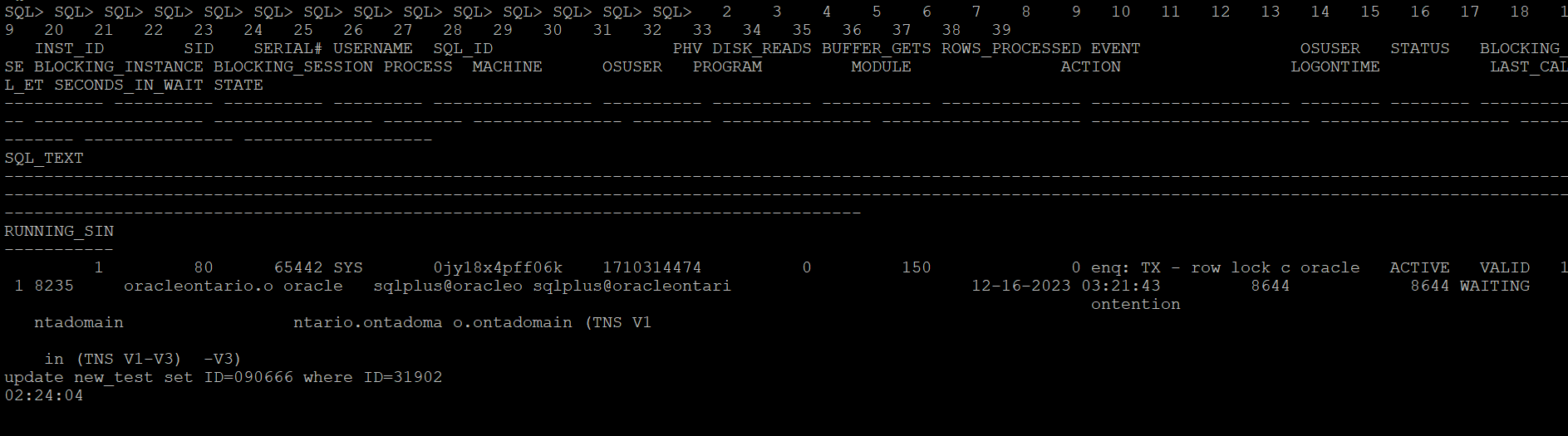
Let me create a row locking situation and see how it captures stats for a particular SQLID. Below is the row locking case that I have created to test how the scripts catches details for this SQLID ‘0jy18x4pff06k’

This is the modified version of the script which catches details for the SQL waiting on any specific wait event.

set serverout on
spool logit.sql
declare
waitevent varchar2(100):='enq: TX - row lock contention';
seconds number :=10;
w1 v$session%rowtype;
w2 v$session%rowtype;
tid number := 0;

begin

loop
dbms_lock.sleep(seconds);
begin
select * into w1
from v$session
where event=waitevent and wait_time=0 and sql_id='0jy18x4pff06k' and rownum=1;
dbms_lock.sleep(seconds);
select * into w2
from v$session
where wait_time=0
and sid=w1.sid
and event=waitevent
and seq#=w1.seq# ;
select spid into tid from v$process
where addr=(select paddr from v$session where sid=w2.blocking_session);
dbms_output.put_line('oradebug setospid '||tid);
dbms_output.put_line('oradebug unlimit');
dbms_output.put_line('oradebug dump errorstack 3');
dbms_output.put_line('oradebug event 10046 trace name context forever, level 8');
dbms_output.put_line('oradebug event 10200 trace name context forever, level 1');
dbms_output.put_line('oradebug event 10224 trace name context forever, level 1');
dbms_output.put_line('execute dbms_lock.sleep(20);');
dbms_output.put_line('oradebug event 10046 trace name context off');
dbms_output.put_line('oradebug event 10200 trace name context off');
dbms_output.put_line('oradebug event 10224 trace name context off');
dbms_output.put_line('exit');
exit;
exception
when no_data_found then null;
end;
end loop;
end;
/
exit


-- Result : 
SQL>  
oradebug setospid 6794
oradebug unlimit
oradebug dump errorstack 3
oradebug event 10046 trace name context forever, level 8
oradebug event 10200 trace name context forever, level 1
oradebug event 10224 trace name context forever, level 1
execute dbms_lock.sleep(20);
oradebug event 10046 trace name context off
oradebug event 10200 trace name context off
oradebug event 10224 trace name context off
exit

PL/SQL procedure successfully completed.

SQL> 

The next what we can do to trap any such wait events of interest when it exceeds the behnchmark, you can put eveything in a shell script and run it in the loop and execute the oradebug code. Once finished you can look it in the diagnostic_dest for the dump file. For 11g and above, look under subdirectory trace under home directory of ADR.

Next once you have put it in the shell script format, you can call it in the nohup mode and the script will run in background and sit in a loop for the defined condition to hit.

[oracle@oracleontario ~]$ more exec
#!/bin/bash
sqlplus -s '/ as sysdba' @waitdumpv1
[oracle@oracleontario ~]$
[oracle@oracleontario ~]$ chmod 777 exec
[oracle@oracleontario ~]$
[oracle@oracleontario ~]$

[oracle@oracleontario ~]$ nohup ./exec > waitdump2.log
nohup: ignoring input and redirecting stderr to stdout
[oracle@oracleontario ~]$

[oracle@oracleontario ~]$ more waitdump1.log
[oracle@oracleontario ~]$ nohup ./exec > waitdump2.log
nohup: ignoring input and redirecting stderr to stdout
[oracle@oracleontario ~]$ more waitdump2.log
oradebug setospid 6794
oradebug unlimit
oradebug hanganalyze 3
oradebug tracefile_name
exit

PL/SQL procedure successfully completed.

[oracle@oracleontario ~]$
[oracle@oracleontario ~]$

Hope It Helped!
Prashant Dixit

Posted in Uncategorized | Tagged: , , , , | Leave a Comment »

Some weirdness with V$DIAG_ALERT_EXT and magical support from Oracle Customer Support.

Posted by FatDBA on December 13, 2023

Hi All,

Recently, one of our custom monitoring scripts, which comprises more than 2000 lines of PL/SQL code covering all possible performance areas of the Oracle database, started behaving strangely on some 19c (19.15.0) databases. Usually, the report completes within 10-12 minutes on databases running version 12.2 and above, but it began taking approximately 30 minutes for a single run, with worst times exceeding 40 minutes. This issue seems to occur specifically on our 19c instances.

During analysis, we identified one of the underlying SQL queries in our script that queries V$DIAG_ALERT_EXT as the culprit, consuming most of the time and significantly exceeding average execution times. We utilize V$DIAG_ALERT_EXT to access the XML-formatted alert log from the Automatic Diagnostic Repository (ADR), particularly in cases where we can only access the database through integrated development environments (IDEs) like SQL Developer, and direct access to the databases is unavailable.

The SQL queries are straightforward, one of the simple one we used is focusing on capturing INCIDENT_ERROR and ERROR type codes. We have implemented filter conditions to select rows where the message_type is either 2 or 3 and where the originating_timestamp is within the last 8 hours (sysdate – 8/24 represents the current date and time minus 8 hours).

SELECT TO_CHAR(originating_timestamp,'DD/MM/YYYY HH24:MI:SS') AS time, message_text 

FROM v$diag_alert_ext
WHERE message_type IN (2, 3) AND originating_timestamp > sysdate - 8/24
ORDER BY RECORD_ID;

Initially, we were perplexed by the problem but were confident that it was specific to 21c databases, as all other versions where we had this script scheduled were working perfectly. After exhausting all optimization attempts and with no insights into what was happening with this specific dynamic view on this database version, we decided to engage Oracle support. They promptly confirmed that the issue was due to a known bug in Oracle 19c database – Bug 33513906, which is resolved in the 19.16.0.0.220719 (July 2022) Database Release Update (DB RU).

Oracle Database support stands out as one of the best I have worked with. They possess extensive knowledge about their products, provide comprehensive private and public documentation, and, in the presence of all diagnostic files, swiftly identify issues. Moreover, they offer both temporary and permanent fixes to problems.

Hope It Helped!
Prashant Dixit

Posted in Uncategorized | Tagged: , , , | Leave a Comment »

Why the Tablespace IO Stats are missing in my AWR report ?

Posted by FatDBA on October 22, 2023

Hi All,

In the past, I looked into a Database AWR performance report from a slow 19c where we suspected some IO issues and were looking into related metrics. “Tablespace IO Stats” was an important area and provided some important statistics like the average number of read requests per second, average read time in milliseconds, write waits, number of buffer waits, and average wait time in milliseconds for buffer waits for the tablespaces.

While looking into the report, I saw that the said section was not there and was missing for Tablespace IO stats. It appeared that the file IO statistics for Tablespaces had been disabled or were not collected. Below were the steps that you could do in such cases to get Tablespace IO stats data back in AWR reports in 19.X versions. Please run the following commands as SYS:

SQL> exec dbms_workload_repository.modify_table_settings(table_name => 'WRH$_FILESTATXS', flush_level => 'TYPICAL');
 
PL/SQL procedure successfully completed.
 
SQL> exec dbms_workload_repository.modify_table_settings(table_name => 'WRH$_DATAFILE', flush_level => 'TYPICAL');
 
PL/SQL procedure successfully completed.
 
SQL> exec dbms_workload_repository.modify_table_settings(table_name => 'Tempfile Group', flush_level => 'TYPICAL');
 
PL/SQL procedure successfully completed.
 
SQL> exec dbms_workload_repository.modify_table_settings(table_name => 'WRH$_TEMPFILE', flush_level => 'TYPICAL');
 
PL/SQL procedure successfully completed.
 
SQL> exec dbms_workload_repository.modify_table_settings(table_name => 'WRH$_TEMPSTATXS', flush_level => 'TYPICAL');
 
PL/SQL procedure successfully completed.
 
SQL>

When new AWR snapshots are generated, you will start getting Tablespace IO stats data for checking IO performance. You may have to run these commands in the PDBs also if you are generating AWR snapshots at PDB level and they are missing Tablespace IO stats data in AWR reports.

There is another way how you can force that data to the AWR, this is by using the new PL/SQL program called modify_table_settings() and that is recommended to be used to enable flushing of the tables WRH$_FILESTATXS, WRH$_DATAFILE and WRH$_TEMPSTATXS at TYPICAL or ALL depending on the flush_level of “Tempfile Group”.

Hope It Helped!
Prashant Dixit

Posted in Uncategorized | Tagged: , , , | Leave a Comment »