Tales From A Lazy Fat DBA

Its all about Databases, their performance, troubleshooting & much more …. ¯\_(ツ)_/¯

Archive for the ‘Advanced’ Category

Advance/Troubleshooting/Error-Bug Fixing

ORA-00845: MEMORY_TARGET not supported on this system

Posted by FatDBA on December 30, 2012

Today while working on one of my practice machine, I’ve started receiving error when tried to start-up one of the instance which is on Cooked File system. Error reads about MEMORY_TARGET.  To be precise about the error message and code, below is what i was getting second ago.

SQL> startup
ORA-00845: MEMORY_TARGET not supported on this system

Below are the steps in sequence what i performed to test and mitigate the error.

1. I’ve checked the pfile of the instance to check MEMORY_TARGET entires and values to discover if there is any problem with the values assigned (I have the AMM enabled in my machine)
*.memory_target=715128832

2. Then i’ve checked error details more closely using OERR utlity to find the cause of the problem and suggestions.

[oracle@localhost dbs]$ oerr ORA 845
00845, 00000, “MEMORY_TARGET not supported on this system”
// *Cause: The MEMORY_TARGET parameter was not supported on this operating system or /dev/shm was not sized correctly on Linux.
// *Action: Refer to documentation for a list of supported operating systems. Or, size /dev/shm to be at least the SGA_MAX_SIZE on each Oracle instance running on the system.

Error clearly points towards the /dev/shm size on OS and asking to set the size of it to atleast SGA_MAX_SIZE on instance running which is 684m.

3. Now when we have the Cause in hand let’s try to fix the problem.

let me check current settings.

[oracle@localhost dbs]$ df -h
Filesystem            Size    Used       Avail            Use%        Mounted on
/dev/mapper/VolGroup00-LogVol00
30G   23G        6.0G            80%         /
/dev/sda1              99M   55M       40M            58%          /boot
tmpfs                 664M  154M   510M         24%        /dev/shm        /*tmps (Temp File Storage area) is in MB’s – CAUSE CLEARED*/

And it’s 664M which is clearly below the SGA_MAX_SIZE = 684m

Some more checks:
[root@localhost ~]# more /etc/fstab
/dev/VolGroup00/LogVol00 /                       ext3    defaults        1 1
LABEL=/boot             /boot                   ext3    defaults        1 2
tmpfs                   /dev/shm                tmpfs   defaults        0 0
devpts                  /dev/pts                devpts  gid=5,mode=620  0 0
sysfs                   /sys                    sysfs   defaults        0 0
proc                    /proc                   proc    defaults        0 0
/dev/VolGroup00/LogVol01 swap                    swap    defaults        0 0

4. Let’s try to add up some memory space to tmpfs area.
I’ve added exact 1GB to /etc/fstab entry. Let me check the change

[root@localhost ~]# vi /etc/fstab

[root@localhost ~]# more /etc/fstab
/dev/VolGroup00/LogVol00 /                       ext3    defaults        1 1
LABEL=/boot             /boot                   ext3    defaults        1 2
tmpfs                   /dev/shm                tmpfs   defaults,size=1G        0 0
devpts                  /dev/pts                devpts  gid=5,mode=620  0 0
sysfs                   /sys                    sysfs   defaults        0 0
proc                    /proc                   proc    defaults        0 0
/dev/VolGroup00/LogVol01 swap                    swap    defaults        0 0

Alrighty, to fix the settings/changes let’s remount /dev/shm

[root@localhost ~]# mount -o remount /dev/shm
[root@localhost ~]# df -h
Filesystem            Size  Used Avail Use% Mounted on
/dev/mapper/VolGroup00-LogVol00
30G   23G  6.0G  80% /
/dev/sda1              99M   55M   40M  58% /boot
tmpfs                 1.0G  154M  4.9G   4% /dev/shm

D.O.N.E

5. Now we are done with the change, let’s try to start the instance once again.

[oracle@localhost ~]$ . oraenv
ORACLE_SID = [orcl] ? orcl
The Oracle base for ORACLE_HOME=/u01/app/oracle/product/11.2.0/dbhome_2 is /u01/app/oracle

SQL> startup
ORACLE instance started.

Total System Global Area  715616256 bytes
Fixed Size                  1338924 bytes
Variable Size             482345428 bytes
Database Buffers          226492416 bytes
Redo Buffers                5439488 bytes
Database mounted.
Database opened.

It’s UP!!
Posted in Advanced | Tagged: | Leave a Comment »

ASM: File Extensions

Posted by FatDBA on December 27, 2012

If you have the ASM configured in your environment, it’s always hard to remember the ASM file names unless you have aliased the entires. But this is what i discovered while working on one of my Test machine which has the ASM Configured. I found filenames and extensions fully qualified but not just another techical opaques.

These are some of the datafiles which are part of my ASM and available on the diskgroup.

SQL> select name from v$datafile;

NAME
——————————————————————————–
+TESTDB_DATA1/orcl/datafile/tesla.261.795016577
+TESTDB_DATA1/orcl/datafile/example12.256.794584325
+TESTDB_DATA1/orcl/datafile/dixy.257.794593881
+TESTDB_DATA1/orcl/datafile/users1111.258.794825249
+TESTDB_DATA1/orcl/datafile/text.259.794825753
+TESTDB_DATA1/orcl/datafile/test12345.260.794840557

eg:
Let’s dissect one of the file
+TESTDB_DATA1/orcl/datafile/dixy.257.794593881
Here if watch carefully:
+TESTDB_DATA1: DiskGroup Name (+ indicates the root of the ASM)
orcl: Name of the client database installed.
datafile: The File Type
dixy: Name of the Data File.
257: Unique File Number
794593881: Database Incarnation Number.

To conform you can also crosscheck and validate using v$database_incarnation.

Posted in Advanced | Tagged: | Leave a Comment »

Hot Backup & Fractured Blocks: Test

Posted by FatDBA on December 26, 2012

Fractured block in Oracle
A block in which the header and footer are not consistent at a given SCN. In a user-managed backup, an operating system utility can back up a datafile at the same time that DBWR is updating the file. It is possible for the operating system utility to read a block in a half-updated state, so that the block that is copied to the backup media is updated in its first half, while the second half contains older data. In this case, the block is fractured.
For non-RMAN backups, the ALTER TABLESPACE … BEGIN BACKUP or ALTER DATABASE BEGIN BACKUP command is the solution for the fractured block problem. When a tablespace is in backup mode, and a change is made to a data block, the database logs a copy of the entire block image before the change so that the database can reconstruct this block if media recovery finds that this block was fractured.
The block that the operating system reads can be split, that is, the top of the block is written at one point in time while the bottom of the block is written at another point in time. If you restore a file containing a fractured block and Oracle reads the block, then the block is considered a corrupt.

Let’s perform a test:

–> Before ‘Begin Backup Mode’:

SQL> set autotrace trace stat
SQL> update etr set team=’Oracle’ where id=’7′;

1 row updated.
Statistics
———————————————————-
          0  recursive calls
          1  db block gets
          1  consistent gets
          0  physical reads
        300  redo size
        669  bytes sent via SQL*Net to client
        580  bytes received via SQL*Net from client
          4  SQL*Net roundtrips to/from client
          1  sorts (memory)
          0  sorts (disk)
          1  rows processed

: It shows redo size=300 (Normal)

–> Let me put the tablespace in ‘Begin Backup’ Mode and try to executea DML again:
SQL> alter tablespace users begin backup;
Tablespace altered.

SQL> update etr set team=’Oracle’ where id=’1′;
1 row updated.
Statistics
———————————————————-
          1  recursive calls
          6  db block gets
          1  consistent gets
          0  physical reads
      17480  redo size
        669  bytes sent via SQL*Net to client
        580  bytes received via SQL*Net from client
          4  SQL*Net roundtrips to/from client
          1  sorts (memory)
          0  sorts (disk)
          1  rows processed
: Check the size of Redo here (17480),  it’s actually the size of the datablock (+Normal redo) where the table column exits and a copy of the block is moved to the redo log buffer .

 
–> Let me try to execute the same DML statement again on same table
SQL> /

1 row updated.
Statistics
———————————————————-
          0  recursive calls
          1  db block gets
          1  consistent gets
          0  physical reads
        300  redo size
        669  bytes sent via SQL*Net to client
        580  bytes received via SQL*Net from client
          4  SQL*Net roundtrips to/from client
          1  sorts (memory)
          0  sorts (disk)
          1  rows processed
: Now Redo size is again back to it’s original value (300).

Hence proved that rather pushing changed vectors/values in redo log buffer, oracle actually copies the entire block during initial operations (Reason of large REDO generation) and will not repeat the same for all subsequent operations on the same block.

ALTER TABLESPACE <> BEGIN BACKUP
is the solution to the Fractured Block problem which could have create inconsistencies in case of user managed backup’s which require OS commands to use.

Posted in Advanced | Tagged: , | Leave a Comment »

Export failed when trying using SYS user. * (ORA-28009: connection as SYS should be as SYSDBA or SYSOPER)

Posted by FatDBA on December 23, 2012

[oracle@localhost ~]$ expdp sys/oracle90 directory=dpump dumpfile=emp.dmp tables=larry.emp reuse_dumpfiles=true

Errors:
UDE-28009: operation generated ORACLE error 28009
ORA-28009: connection as SYS should be as SYSDBA or SYSOPER

SQL> show parameter dictionary

NAME                                 TYPE        VALUE
———————————— ———– ——————————
O7_DICTIONARY_ACCESSIBILITY          boolean     FALSE


With this parameter in False, it will not allow accessing anyone dictionary views, tables objects in SYS schema without SYSDBA/SYSOPER roles. O7_DICTIONARY_ACCESSIBILITY controls restrictions on SYSTEM privileges. If the parameter is set to true, access to objects in the SYS schema is allowed (Oracle7 behavior). The default setting of false ensures that system privileges that allow access to objects in “any schema” do not allow access to objects in the SYS schema.


SQL> alter system set O7_DICTIONARY_ACCESSIBILITY=TRUE scope=spfile;
System altered.

SQL> shutdown immediate;
Database closed.
Database dismounted.
ORACLE instance shut down.

SQL> startup
ORACLE instance started.

Total System Global Area  523108352 bytes
Fixed Size                  1337632 bytes
Variable Size             406849248 bytes
Database Buffers          109051904 bytes
Redo Buffers                5869568 bytes
Database mounted.
Database opened.

SQL> show parameter dictionary

NAME                                 TYPE        VALUE
———————————— ———– ——————————
O7_DICTIONARY_ACCESSIBILITY          boolean     TRUE

[oracle@localhost ~]$ expdp sys/oracle90 directory=dpump dumpfile=emp.dmp tables=larry.emp reuse_dumpfiles=true

Export: Release 11.2.0.1.0 – Production on Sun Dec 23 12:12:29 2012
Copyright (c) 1982, 2009, Oracle and/or its affiliates.  All rights reserved.

ORA-28002: the password will expire within 7 days            //   **** This error points to change password for user the table belongs to ‘Larry’****

Connected to: Oracle Database 11g Enterprise Edition Release 11.2.0.1.0 – Production
With the Partitioning, OLAP, Data Mining and Real Application Testing options
Starting “SYS”.”SYS_EXPORT_TABLE_01″:  sys/******** directory=dpump dumpfile=emp.dmp tables=larry.emp reuse_dumpfiles=true
Estimate in progress using BLOCKS method…
Processing object type TABLE_EXPORT/TABLE/TABLE_DATA
Total estimation using BLOCKS method: 64 KB
Processing object type TABLE_EXPORT/TABLE/TABLE
Processing object type TABLE_EXPORT/TABLE/STATISTICS/TABLE_STATISTICS
. . exported “LARRY”.”EMP”                               8.046 KB       2 rows
Master table “SYS”.”SYS_EXPORT_TABLE_01″ successfully loaded/unloaded
******************************************************************************
Dump file set for SYS.SYS_EXPORT_TABLE_01 is:
/tmp/emp.dmp
Job “SYS”.”SYS_EXPORT_TABLE_01″ successfully completed at 12:12:47


Or —->>>>
Export it with SYSDBA role.

[oracle@localhost ~]$ expdp \’sys/oracle90 as sysdba\’ directory=dpump dumpfile=emp.dmp tables=larry.emp reuse_dumpfiles=true

Export: Release 11.2.0.1.0 – Production on Sun Dec 23 16:42:15 2012

Copyright (c) 1982, 2009, Oracle and/or its affiliates.  All rights reserved.

Connected to: Oracle Database 11g Enterprise Edition Release 11.2.0.1.0 – Production
With the Partitioning, OLAP, Data Mining and Real Application Testing options
Starting “SYS”.”SYS_EXPORT_TABLE_01″:  “sys/******** AS SYSDBA” directory=dpump dumpfile=emp.dmp tables=larry.emp reuse_dumpfiles=true
Estimate in progress using BLOCKS method…

Posted in Advanced | Tagged: | 2 Comments »

11g Data Recovery Advisor: Diagnosing and Repairing Failures

Posted by FatDBA on December 9, 2012

Oracle’s 11g New Feature ‘Data Recovery Advisor’ is one of the most important tool introduced by The Red Giants with the release of r2. I will of course consider this functionality as one of the most impressive and best among others added in 11g r2 package. The Repair Advisor can take away lot of the stress associated with peforming backup and recovery by diagnosing what is wrong as well as presenting us with the syntax as well to execute the commands to restore and recover as the case may be. Under pressure, everyone can make mistakes and it is comforting to know that there is a tool which can really he;p the DBA.

The Data Recovery Advisor can be used via OEM Database or Grid Control or via the RMAN command line interface.


Let me Explain it using a real time issue: (Missed one of the control file).
Here I’ve intentionally deleted Control File 2 (Below provided was past status)

SQL> select name from v$controlfile;

NAME
——————————————————————————–
/u01/app/oracle/oradata/orcl/control01.ctl
/u01/app/oracle/flash_recovery_area/orcl/control02.ctl


Once the file is removed or corrupted it will start throwing below provided error message with code to check error log (Alert Log)

ORA-00205: error in identifying control file, check alert log for more info

Launch RMAN console and connect to the database (NO MOUNT Mode – Pretty Obvious!!) and check failures using ‘list failure’ command and will show you problem detected by DB engine.


RMAN> list failure;

List of Database Failures
=========================

Failure ID Priority Status    Time Detected Summary
———- ——– ——— ————- ——-
322        CRITICAL OPEN      09-DEC-12     Control file /u01/app/oracle/flash_recovery_area/orcl/control02.ctl is missi                                                                     ng

RMAN> advise failure;

List of Database Failures
=========================

Failure ID Priority Status    Time Detected Summary
———- ——– ——— ————- ——-
322        CRITICAL OPEN      09-DEC-12     Control file /u01/app/oracle/flash_recovery_area/orcl/control02.ctl is missing

analyzing automatic repair options; this may take some time
allocated channel: ORA_DISK_1
channel ORA_DISK_1: SID=21 device type=DISK
analyzing automatic repair options complete

Mandatory Manual Actions
========================
no manual actions available

Optional Manual Actions
=======================
no manual actions available

Automated Repair Options
========================
Option Repair Description
—— ——————
1      Use a multiplexed copy to restore control file /u01/app/oracle/flash_recovery_area/orcl/control02.ctl
Strategy: The repair includes complete media recovery with no data loss
Repair script: /u01/app/oracle/diag/rdbms/orcl/orcl/hm/reco_2219809221.hm


RMAN> repair failure;

Strategy: The repair includes complete media recovery with no data loss
Repair script: /u01/app/oracle/diag/rdbms/orcl/orcl/hm/reco_2219809221.hm

contents of repair script:
# restore control file using multiplexed copy
restore controlfile from ‘/u01/app/oracle/oradata/orcl/control01.ctl’;
sql ‘alter database mount’;

Do you really want to execute the above repair (enter YES or NO)? YES
executing repair script

Starting restore at 09-DEC-12
using channel ORA_DISK_1

channel ORA_DISK_1: copied control file copy
output file name=/u01/app/oracle/oradata/orcl/control01.ctl
output file name=/u01/app/oracle/flash_recovery_area/orcl/control02.ctl
Finished restore at 09-DEC-12

sql statement: alter database mount
released channel: ORA_DISK_1
repair failure complete

Do you want to open the database (enter YES or NO)? YES
database opened

It’s back!!!!

SQL> select name from v$controlfile;

NAME
——————————————————————————–
/u01/app/oracle/oradata/orcl/control01.ctl
/u01/app/oracle/flash_recovery_area/orcl/control02.ctl

Posted in Advanced | Tagged: , | Leave a Comment »

Standby Scenario: Recovering After a Network Failure

Posted by FatDBA on December 9, 2012

http://docs.oracle.com/cd/A84870_01/doc/server.816/a76995/standbys.htm#30520

Posted in Advanced | Tagged: , | Leave a Comment »

RMAN-06056: RMAN Engine failed to access any datafile (How to Skip)

Posted by FatDBA on December 9, 2012

Today when trying to backup full database, I’ve  encountered error which says RMAN failed to access one of the datafile. I found that datafile is not of any use, hence  I’ve  dropped the datafile offline but still RMAN not allowed me to backup database. Here is one of the resolution to fix such issue when you are sure that datafile is not of any use.

RMAN> backup database;

Starting backup at 09-DEC-12
using channel ORA_DISK_1
could not read file header for datafile 9 error reason 4
RMAN-00571: ===========================================================
RMAN-00569: =============== ERROR MESSAGE STACK FOLLOWS ===============
RMAN-00571: ===========================================================
RMAN-03002: failure of backup command at 12/09/2012 14:28:13
RMAN-06056: could not access datafile 9

RMAN> backup database skip inaccessible;

Starting backup at 09-DEC-12
using channel ORA_DISK_1
could not access datafile 9
skipping inaccessible file 9
RMAN-06060: WARNING: skipping datafile compromises tablespace RMAN recoverability
channel ORA_DISK_1: starting full datafile backupset
channel ORA_DISK_1: specifying datafile(s) in backupset
input datafile fno=00001 name=/u01/app/oracle/oradata/orcl/system01.dbf
input datafile fno=00003 name=/u01/app/oracle/oradata/orcl/sysaux01.dbf
input datafile fno=00006 name=/u01/app/oracle/aliflaila
input datafile fno=00005 name=/u01/app/oracle/oradata/orcl/example01.dbf
input datafile fno=00008 name=/u01/app/oracle/oradata/orcl/undotbs007.dbf
input datafile fno=00002 name=/u01/app/oracle/oradata/orcl/undotbs01.dbf
input datafile fno=00004 name=/u01/app/oracle/oradata/orcl/users01.dbf
input datafile fno=00007 name=/u01/app/oracle/oradata/orcl/users02.dbf
channel ORA_DISK_1: starting piece 1 at 09-DEC-12

Posted in Advanced | Tagged: , | Leave a Comment »

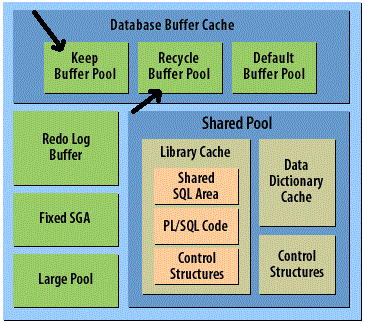
Keep Buffer Pool & Recycle Buffer Pool

Posted by FatDBA on December 9, 2012

sgadetail_mo

Let’s discuss about two of lesser known sections in Database Buffer Cache named: Keep Buffer Pool and Recycle Buffer Pool.

Keep Buffer Pool
Data which is frequently accessed should be kept in Keep buffer pool. Keep buffer pool retains data in the memory. So that next request for same data can be entertained from memory. This avoids disk read and increases performance. Usually small objects should be kept in Keep buffer. DB_KEEP_CACHE_SIZE initialization parameter is used to create Keep buffer Pool. If DB_KEEP_CACHE_SIZE is not used then no Keep buffer is created. Use following syntax to create a Keep buffer pool of 40 MB. Often times an application will have a few very critical objects, such as indexes, that are small enough to fit in the buffer cache but are quickly pushed out by other objects. This is the perfect case for using the initialization
parameter called DB_KEEP_CACHE_SIZE. The KEEP buffer pool is aptly named. It is intended to be used for objects that take absolute priority in the cache. For instance, critical indexes or small look-up tables.
DB_KEEP_CACHE_SIZE=40M

Recycle Buffer Pool
Blocks loaded in Recycle Buffer pool are immediate removed when they are not being used. It is useful for those objects which are accessed rarely. As there is no more need of these blocks so memory occupied by such blocks is made available for others data. The RECYCLE buffer pool is best utilized to “protect” the default buffer pool from being consumed by randomly accessed blocks of data.

For example if ASM is enabled then available memory can be assigned to other SGA components . Use following syntax to create a Recycle Buffer Pool

DB_RECYCLE_CACHE_SIZE=20M

Posted in Advanced | Tagged: | Leave a Comment »

NOFILENAMECHECK Parameter: RMAN Backup’s

Posted by FatDBA on December 9, 2012

NOFILENAMECHECK (RMAN Parameter) is used to handle Data Block’s corruptions during Backup’s.

By default a checksum is calculated for every block read from a datafile and stored in the backup or image copy. If you use the NOCHECKSUM option, then checksums are not calculated. If the block already contains a checksum, however, then the checksum is validated and stored in the backup. If the validation fails, then the block is marked corrupt in the backup.

By default, the BACKUP command computes a checksum for each block and stores it in the backup. The BACKUP command ignores the values of DB_BLOCK_CHECKSUM because this initialization parameter applies to data files in the database, not backups. If you specify the NOCHECKSUM option, then RMAN does not perform a checksum of the blocks when writing the backup.

You cannot disable checksums for data files in the SYSTEM tablespace even if DB_BLOCK_CHECKSUM=false.

“To speed up the process of copying, you can use the NOCHECKSUM parameter. By default, RMAN computes a checksum for each block backed up, and stores it with the backup. When the backup is restored, the checksum is verified.”

Posted in Advanced | Tagged: , | 2 Comments »

Scenario: Recovering a dropped Table.

Posted by FatDBA on December 7, 2012

One not-uncommon error is the accidental dropping of a table from your database. In general, the fastest and simplest solution is to use the flashback drop feature, to reverse the dropping of the table. However, if for some reason, such as flashback drop being disabled or the table having been dropped with the PURGE option, you cannot use flashback table.

To recover a table that has been accidentally dropped, use the following procedure:

1. If possible, keep the database that experienced the user error online and available for use. Back up all datafiles of the existing database in case an error is made during the remaining steps of this procedure.

2. Restore a database backup to an alternate location, then perform incomplete recovery of this backup using a restored backup control file, to the point just before the table was dropped.

3. Export the lost data from the temporary, restored version of the database using an Oracle export utility. In this case, export the accidentally dropped table.

4. Use an Oracle import utility to import the data back into the production database.

5. Delete the files of the temporary copy of the database to conserve space.

Posted in Advanced | Tagged: , | Leave a Comment »