Tales From A Lazy Fat DBA

Its all about Databases, their performance, troubleshooting & much more …. ¯\_(ツ)_/¯

Archive for the ‘Basics’ Category

Core/Basics/Theory

High-water Mark

Posted by FatDBA on June 30, 2012

High-water Mark —–

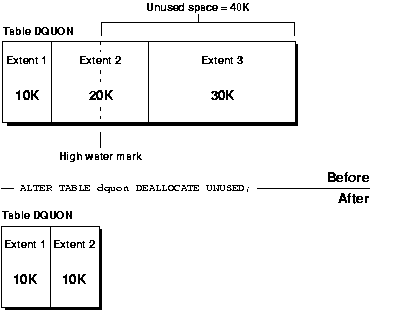
The high water mark level is just a line separate the used blocks and free blocks.

The blocks above the HWM level is free blocks, they are ready to use.
The blocks below the HWM level is used blocks, they are already used.

Example.
for example, if you delete some huge records from the database, that data will delete but the blocks are not ready to used, because that blocks are still below HWM level, so delete command never reset the HWM level,  At the same time you truncate the date, then the data will delete and that used blocks will goto above the HWM level, now its ready to used. now they consider has free blocks.

Posted in Advanced, Basics | Tagged: | Leave a Comment »

Difference between awrrpt.sql and awrrpti.sql ?

Posted by FatDBA on June 28, 2012

Difference between awrrpt.sql and awrrpti.sql?

The output of these reports is essentially the same, except that awrrpti.sql script allows you to define a specific instance to report on.

AWR Report types (Most Commonly used Reports):

  • The awrrpt.sql SQL script generates an HTML or text report that displays statistics for a range of snapshot Ids.
  • The awrrpti.sql SQL script generates an HTML or text report that displays statistics for a range of snapshot Ids on a specified database and instance.
  • The awrsqrpt.sql SQL script generates an HTML or text report that displays statistics of a particular SQL statement for a range of snapshot Ids. Run this report to inspect or debug the performance of a SQL statement.
  • The awrsqrpi.sql SQL script generates an HTML or text report that displays statistics of a particular SQL statement for a range of snapshot Ids on a specified database and instance. Run this report to inspect or debug the performance of a SQL statement on a specific database and instance.
  • The awrddrpt.sql SQL script generates an HTML or text report that compares detailed performance attributes and configuration settings between two selected time periods.
  • The awrddrpi.sql SQL script generates an HTML or text report that compares detailed performance attributes and configuration settings between two selected time periods on a specific database and instance.
  • The awrgrpt.sql  Generate AWR Cluster aggregated statistics from all the instances.
  • The awrgdrpt.sql  report compares the statistic results of differences between two different snapshot intervals, for the whole cluster database.

SQL> @awrsqrpt.sql —- Generate AWR Report Single Select Statement:

Run the awrsqrpt.sql script from $ORACLE_HOME/rdbms/admin/ as a sys user. The script will ask you for the output format of the report (HTML or TEXT), the the number of days (n) will result in the most recent
(n) days of snapshots being listed (If you hit enter, you will get all the available snapshots listed), begin and end snapshot interval Ids intervals and the SQL_ID for the specific SELECT statement …

To check SQL ID —

SQL> select SQL_ID  from V$SQLAREA where rownum =1 ;

SQL_ID
————-
1fkh93md0802n

Posted in Advanced, Basics, Uncategorized | Tagged: | Leave a Comment »

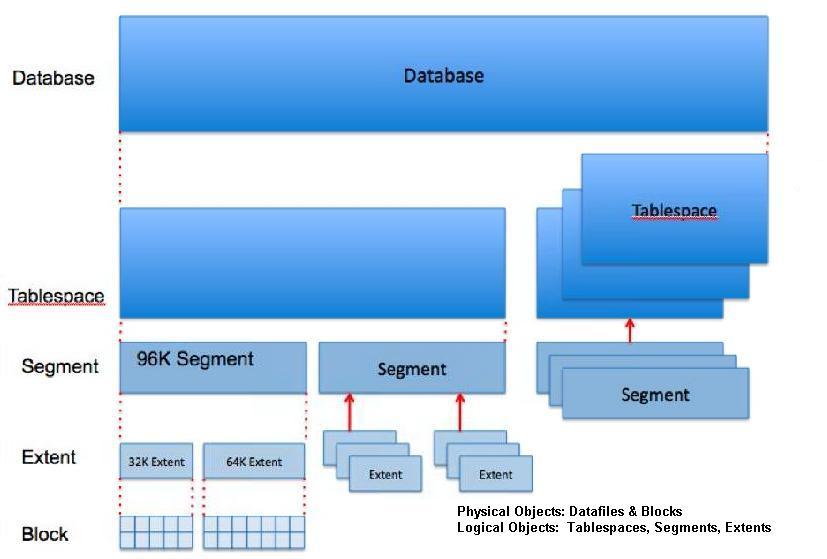
Oracle Storage Hierarchy

Posted by FatDBA on June 27, 2012

Image

Posted in Basics | Tagged: | Leave a Comment »

RMAN (Do’s & Dont’s)

Posted by FatDBA on June 26, 2012

No SPFILE before control file if both are backed up at the same time.

RMAN> backup current spfile controlfile;

RMAN-00571: ===========================================================
RMAN-00569: =============== ERROR MESSAGE STACK FOLLOWS ===============
RMAN-00571: ===========================================================
RMAN-00558: error encountered while parsing input commands
RMAN-01009: syntax error: found “spfile”: expecting one of: “controlfile”
RMAN-01007: at line 1 column 16 file: standard input

RMAN> backup current controlfile spfile;

Starting backup at 29-MAY-12
using channel ORA_DISK_1
….

================================================================
* RMAN don’t support PFILE backups. SPFILE is only support parameter type in RMAN.

* RMAN does not backup TEMP tablespaces.
That is because “TEMP” was not backed up at the outset. RMAN does not backup Temporary Tablespaces. Such tablespaces do NOT need to be backed up, and, therefore are not restored or cloned.

* Redo logs can’t be backed up using RMAN but REDO Archivelogs can.

Posted in Advanced, Basics, Uncategorized | Tagged: , | Leave a Comment »