Tales From A Lazy Fat DBA

Its all about Databases, their performance, troubleshooting & much more …. ¯\_(ツ)_/¯

Archive for the ‘Uncategorized’ Category

A simple script to automatically catch those intermittent database performance issues …

Posted by FatDBA on December 16, 2023

Hi All,

Occasionally, anticipating the occurrence of a problem becomes unpredictable, and simultaneously, dealing manually with a transient issue to extract necessary information may not always be feasible (mainly due to the rapid resolution of the problem before we can initiate the extraction process). Additionally, there is a requirement for adaptability in the content we aim to extract.

The ensuing approach allows us to attain our primary objectives without resorting to invasive measures. There could be multiple use cases, few of the scenarios would be :
Case 1 : With little changes to it, you can make it employable for gathering solely the system state upon encountering a specific wait event.
Case 2: Can be utilized for gathering 10046, error stack, etc., for the obstructing session when a designated wait event is triggered concurrently with the execution of a known SQL statement (SQL_ID).
Case 3: Utilizable for obtaining hang analysis, system state, and additionally, 10046, error stack for the session causing the obstruction when a specific wait event is encountered.

Let me explain how we can utilize this quick, short but handy code to generate the diagnostic dump like hanganalyze / systemstate / errorstack / 10046 trace etc if any session is found to be waiting on any specific wait event for any specific period of time.

This is the simple script to collect diagnostic information with few of the customizable parameters or inputs i.e. ‘waitevent’ which is for the event we know we have the problem with, ‘seconds’ is the amount of time we think a session can wait on that session before we decide it is stuck and want to trigger dumping and ‘tid’ which is the session we are going to attach to run oradebug against. This could be the waiting session, a blocking session.

In the example, I have modified the code to collect diag info if any session is found to be waiting on “enq: TX – row lock contention” waits above 10 seconds.

set serverout on
spool logit.sql
declare
waitevent varchar2(100):='enq: TX - row lock contention';
seconds number :=10;      
w1 v$session%rowtype;
w2 v$session%rowtype;
tid number := 0;

begin

loop
dbms_lock.sleep(seconds);
begin
select * into w1 
from v$session 
where event=waitevent and wait_time=0 and rownum=1;
dbms_lock.sleep(seconds);
select * into w2
from v$session
where wait_time=0
and sid=w1.sid
and event=waitevent
and seq#=w1.seq# ;
select spid into tid from v$process
where addr=(select paddr from v$session where sid=w2.blocking_session);
dbms_output.put_line('oradebug setospid '||tid);
dbms_output.put_line('oradebug unlimit');
dbms_output.put_line('oradebug hanganalyze 3');  /**If RAC then use -G all**/
dbms_output.put_line('oradebug tracefile_name');
dbms_output.put_line('exit');
exit;
exception
when no_data_found then null;
end;
end loop;
end;
/
exit


-- Result : 
SQL>  
oradebug setospid 6794
oradebug unlimit
oradebug hanganalyze 3
oradebug tracefile_name
exit

PL/SQL procedure successfully completed.

SQL> 

The subsequent instance is intricate yet showcases versatility of this simple script. In this scenario, I encounter an intermittent issue involving sessions experiencing wait times due to TX enqueue row lock contention. While I may not be overly concerned about these sessions, it is crucial for me to understand the actions of the session causing the blockage. Given that I am aware of the SQL being executed during that period, I can leverage this information to ensure accurate trapping of the relevant event.
Here is something that you can do to alter it accordingly.

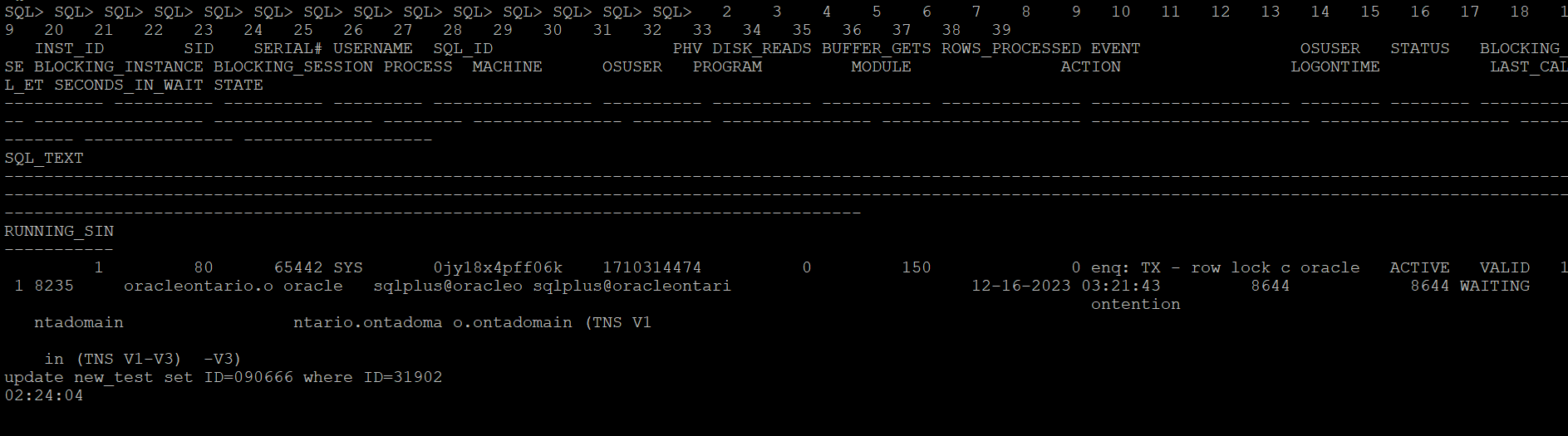
Let me create a row locking situation and see how it captures stats for a particular SQLID. Below is the row locking case that I have created to test how the scripts catches details for this SQLID ‘0jy18x4pff06k’

This is the modified version of the script which catches details for the SQL waiting on any specific wait event.

set serverout on
spool logit.sql
declare
waitevent varchar2(100):='enq: TX - row lock contention';
seconds number :=10;
w1 v$session%rowtype;
w2 v$session%rowtype;
tid number := 0;

begin

loop
dbms_lock.sleep(seconds);
begin
select * into w1
from v$session
where event=waitevent and wait_time=0 and sql_id='0jy18x4pff06k' and rownum=1;
dbms_lock.sleep(seconds);
select * into w2
from v$session
where wait_time=0
and sid=w1.sid
and event=waitevent
and seq#=w1.seq# ;
select spid into tid from v$process
where addr=(select paddr from v$session where sid=w2.blocking_session);
dbms_output.put_line('oradebug setospid '||tid);
dbms_output.put_line('oradebug unlimit');
dbms_output.put_line('oradebug dump errorstack 3');
dbms_output.put_line('oradebug event 10046 trace name context forever, level 8');
dbms_output.put_line('oradebug event 10200 trace name context forever, level 1');
dbms_output.put_line('oradebug event 10224 trace name context forever, level 1');
dbms_output.put_line('execute dbms_lock.sleep(20);');
dbms_output.put_line('oradebug event 10046 trace name context off');
dbms_output.put_line('oradebug event 10200 trace name context off');
dbms_output.put_line('oradebug event 10224 trace name context off');
dbms_output.put_line('exit');
exit;
exception
when no_data_found then null;
end;
end loop;
end;
/
exit


-- Result : 
SQL>  
oradebug setospid 6794
oradebug unlimit
oradebug dump errorstack 3
oradebug event 10046 trace name context forever, level 8
oradebug event 10200 trace name context forever, level 1
oradebug event 10224 trace name context forever, level 1
execute dbms_lock.sleep(20);
oradebug event 10046 trace name context off
oradebug event 10200 trace name context off
oradebug event 10224 trace name context off
exit

PL/SQL procedure successfully completed.

SQL> 

The next what we can do to trap any such wait events of interest when it exceeds the behnchmark, you can put eveything in a shell script and run it in the loop and execute the oradebug code. Once finished you can look it in the diagnostic_dest for the dump file. For 11g and above, look under subdirectory trace under home directory of ADR.

Next once you have put it in the shell script format, you can call it in the nohup mode and the script will run in background and sit in a loop for the defined condition to hit.

[oracle@oracleontario ~]$ more exec
#!/bin/bash
sqlplus -s '/ as sysdba' @waitdumpv1
[oracle@oracleontario ~]$
[oracle@oracleontario ~]$ chmod 777 exec
[oracle@oracleontario ~]$
[oracle@oracleontario ~]$

[oracle@oracleontario ~]$ nohup ./exec > waitdump2.log
nohup: ignoring input and redirecting stderr to stdout
[oracle@oracleontario ~]$

[oracle@oracleontario ~]$ more waitdump1.log
[oracle@oracleontario ~]$ nohup ./exec > waitdump2.log
nohup: ignoring input and redirecting stderr to stdout
[oracle@oracleontario ~]$ more waitdump2.log
oradebug setospid 6794
oradebug unlimit
oradebug hanganalyze 3
oradebug tracefile_name
exit

PL/SQL procedure successfully completed.

[oracle@oracleontario ~]$
[oracle@oracleontario ~]$

Hope It Helped!
Prashant Dixit

Posted in Uncategorized | Tagged: , , , , | Leave a Comment »

Some weirdness with V$DIAG_ALERT_EXT and magical support from Oracle Customer Support.

Posted by FatDBA on December 13, 2023

Hi All,

Recently, one of our custom monitoring scripts, which comprises more than 2000 lines of PL/SQL code covering all possible performance areas of the Oracle database, started behaving strangely on some 19c (19.15.0) databases. Usually, the report completes within 10-12 minutes on databases running version 12.2 and above, but it began taking approximately 30 minutes for a single run, with worst times exceeding 40 minutes. This issue seems to occur specifically on our 19c instances.

During analysis, we identified one of the underlying SQL queries in our script that queries V$DIAG_ALERT_EXT as the culprit, consuming most of the time and significantly exceeding average execution times. We utilize V$DIAG_ALERT_EXT to access the XML-formatted alert log from the Automatic Diagnostic Repository (ADR), particularly in cases where we can only access the database through integrated development environments (IDEs) like SQL Developer, and direct access to the databases is unavailable.

The SQL queries are straightforward, one of the simple one we used is focusing on capturing INCIDENT_ERROR and ERROR type codes. We have implemented filter conditions to select rows where the message_type is either 2 or 3 and where the originating_timestamp is within the last 8 hours (sysdate – 8/24 represents the current date and time minus 8 hours).

SELECT TO_CHAR(originating_timestamp,'DD/MM/YYYY HH24:MI:SS') AS time, message_text 

FROM v$diag_alert_ext
WHERE message_type IN (2, 3) AND originating_timestamp > sysdate - 8/24
ORDER BY RECORD_ID;

Initially, we were perplexed by the problem but were confident that it was specific to 21c databases, as all other versions where we had this script scheduled were working perfectly. After exhausting all optimization attempts and with no insights into what was happening with this specific dynamic view on this database version, we decided to engage Oracle support. They promptly confirmed that the issue was due to a known bug in Oracle 19c database – Bug 33513906, which is resolved in the 19.16.0.0.220719 (July 2022) Database Release Update (DB RU).

Oracle Database support stands out as one of the best I have worked with. They possess extensive knowledge about their products, provide comprehensive private and public documentation, and, in the presence of all diagnostic files, swiftly identify issues. Moreover, they offer both temporary and permanent fixes to problems.

Hope It Helped!
Prashant Dixit

Posted in Uncategorized | Tagged: , , , | Leave a Comment »

Why the Tablespace IO Stats are missing in my AWR report ?

Posted by FatDBA on October 22, 2023

Hi All,

In the past, I looked into a Database AWR performance report from a slow 19c where we suspected some IO issues and were looking into related metrics. “Tablespace IO Stats” was an important area and provided some important statistics like the average number of read requests per second, average read time in milliseconds, write waits, number of buffer waits, and average wait time in milliseconds for buffer waits for the tablespaces.

While looking into the report, I saw that the said section was not there and was missing for Tablespace IO stats. It appeared that the file IO statistics for Tablespaces had been disabled or were not collected. Below were the steps that you could do in such cases to get Tablespace IO stats data back in AWR reports in 19.X versions. Please run the following commands as SYS:

SQL> exec dbms_workload_repository.modify_table_settings(table_name => 'WRH$_FILESTATXS', flush_level => 'TYPICAL');
 
PL/SQL procedure successfully completed.
 
SQL> exec dbms_workload_repository.modify_table_settings(table_name => 'WRH$_DATAFILE', flush_level => 'TYPICAL');
 
PL/SQL procedure successfully completed.
 
SQL> exec dbms_workload_repository.modify_table_settings(table_name => 'Tempfile Group', flush_level => 'TYPICAL');
 
PL/SQL procedure successfully completed.
 
SQL> exec dbms_workload_repository.modify_table_settings(table_name => 'WRH$_TEMPFILE', flush_level => 'TYPICAL');
 
PL/SQL procedure successfully completed.
 
SQL> exec dbms_workload_repository.modify_table_settings(table_name => 'WRH$_TEMPSTATXS', flush_level => 'TYPICAL');
 
PL/SQL procedure successfully completed.
 
SQL>

When new AWR snapshots are generated, you will start getting Tablespace IO stats data for checking IO performance. You may have to run these commands in the PDBs also if you are generating AWR snapshots at PDB level and they are missing Tablespace IO stats data in AWR reports.

There is another way how you can force that data to the AWR, this is by using the new PL/SQL program called modify_table_settings() and that is recommended to be used to enable flushing of the tables WRH$_FILESTATXS, WRH$_DATAFILE and WRH$_TEMPSTATXS at TYPICAL or ALL depending on the flush_level of “Tempfile Group”.

Hope It Helped!
Prashant Dixit

Posted in Uncategorized | Tagged: , , , | Leave a Comment »

A story of Advance Queues mayhem … ORA-24002 ORA-04063

Posted by FatDBA on October 9, 2023

Hi Everyone,

Todays’ post was about an interesting scenario faced by my colleagues while they were doing an application upgrade and migration. Due to some reasons, the upgrade was supposed to be rolled back, and as a part of the strategy, they had to drop specific schemas touched by the failed upgrade and import a healthy backup taken just before the activity.

The steps were simple and were well discussed and vetted. While doing the import, they started getting errors which reported about the AQ (Oracle Advanced Queues). The error pointed out that the import job had failed to create the AQs with a ‘no data found’ message. Many of the AQs were not imported, and the queues were in an INVALID state.

21-SEPT-23 17:20:40.797: ORA-39083: Object type PROCDEPOBJ:"TESTDBSC"."DPF_OUT" failed to create with error:
ORA-01403: no data found
	
Failing sql is:
BEGIN
SYS.DBMS_AQ_IMP_INTERNAL.IMPORT_QUEUE(HEXTORAW('ASHQ18371NDDU1842NXXXXXXXXXXX'),
'AQTST_PTT_OUT','AQ$_AQTST_PTT_OUT_E',1,0,0,0,0,'exception queue');COMMIT; END;

We have even tried to drop the schema, but failed with errors reporting about missing advance queue tables. Tried to drop the the queue table and force all queues to be stopped and dropped by the system, but landed into all different errors.

SQL> drop user TESTDBSC cascade;
drop user TESTDBSC cascade
*
ERROR at line 1:
ORA-00604: error occurred at recursive SQL level 1
ORA-24002: QUEUE_TABLE TESTDBSC.AQTST_XXX does not exist
ORA-06512: at "SYS.DBMS_AQADM", line 707
ORA-06512: at "SYS.DBMS_AQADM_SYS", line 7735
ORA-06512: at "SYS.DBMS_SYS_ERROR", line 86
ORA-06512: at "SYS.DBMS_AQADM_SYS", line 7070
ORA-06512: at "SYS.DBMS_AQADM_SYS", line 7402
ORA-06512: at "SYS.DBMS_AQADM", line 702
ORA-06512: at line 1


begin dbms_aqadm.stop_queue (queue_name => 'AQ$_AQTST_PTT_IN_E', enqueue => TRUE, dequeue => FALSE); end;
*
ERROR at line 1:
ORA-04063: TESTDBSC.AQTST_XXX_IN has errors
ORA-06512: at "SYS.DBMS_AQADM", line 788
ORA-06512: at "SYS.DBMS_AQADM_SYS", line 8702
ORA-06512: at "SYS.DBMS_AQADM_SYSCALLS", line 926
ORA-06512: at "SYS.DBMS_AQADM_SYS", line 8687
ORA-06512: at "SYS.DBMS_AQADM", line 783
ORA-06512: at line 1

During the investigation, we found there were ~ 70 individual queue tables in the db that need to be cleared. There are no entries in DBA_QUEUE_TABLES so we can’t use the AQ api to force drop them. There were few child or orphan objects that still exist and need to be cleared. These child or dependent objects were – Views, Sequences, EVALUATION CONTEXT etc. apart from Queues and Tables.

OBJECT_ID	   OBJECT_NAME	                    OBJECT_TYPE
-----------    ------------------------------   --------------------------------------- 
124238	       AQ$_AQTST_FATDBA_UPD_V	        EVALUATION CONTEXT
124239	       AQ$_AQTST_FATDBA_UPD_N	        SEQUENCE
124259	       AQ$_AQTST_MONKEYINDC_UPD_N	    VIEW

As a breakthrough, we found all of the objects have the prefix AQTST, so it will be little easy to clean them.

SQL> select QUEUE_TABLE from dba_queue_tables where owner='TESTDBSC';

QUEUE_TABLE
------------------------------------------------------------
AQTST_XXXXXXXXXXXX_UPD
AQTST_XXXXXX_IN_UPD
AQTST_XXXXXXXXXXXX_UPD
AQTST_XXXXXX_IN_UPD
AQTST_XXXXXX_OUT_UPD

We first started dropping SEQUENCES, just to lower down number of elements followed by Views and Queue Tables. For Queue tables, we’ve set 10851 debugging event, this is to allow drop command to drop queue tables. This was kind of a last resort to drop queue table if all other options fail. This makes sense as we were manually cleaning AQ’s metadata after this operation.

select 'drop view "'||view_name||'";' as statements from user_views;

drop sequence AQ$_AQTST_XXXXXXXXXXXX_UPD_N;	
drop sequence AQ$_AQTST_XXXXXXXXXXXX_UPD_N;
drop sequence AQ$_AQTST_XXXX_XXXXX_IN_N;
.....
........

ALTER SESSION SET EVENTS '10851 trace name context forever, level 2';

-- Above command went fine, hence moved to the below step
-- Connected with the same schema that we tried to drop earlier and were failing 
select 'drop table "'||table_name|| ' cascade constraints";' as statements from user_tables;

Next, we need to manually start the cleanup.
Note: Take a valid backup before proceeding with the manual cleanup as it involves deleting from SYS objects.

We started the cleanup for remaining AQ objects related to %AQTST% from user # (TESTDBSC). First we deleted all object IDs of orphan objects from system tables i.e. SYSTEM.AQ$_QUEUES, SYS.OBJ$, SYSTEM.AQ$_QUEUE_TABLES etc.

Note: You can use Oracle’s provided AQ & MGW Health Check and Configuration Script (Doc ID 1193854.1) which will help you to quickly point out INVALID objects, object IDs and AQs consistency information.

SQL>  DELETE FROM SYSTEM.AQ$_QUEUES WHERE table_objno in (<object_id>,<object_id>,<object_id>,<object_id>,<object_id>);
1 rows deleted.

SQL>  DELETE FROM SYS.OBJ$ WHERE obj# IN (<object_id> ,<object_id>,<object_id>,<object_id>,
<object_id>,<object_id>,<object_id>,<object_id>);
34 rows deleted.

DELETE FROM SYSTEM.AQ$_QUEUE_TABLES where objno in (<object_id>,<object_id>,<object_id>,
<object_id>,<object_id>,<object_id><object_id>,<object_id>)
/

SQL> commit;
Commit complete.

Next we decided to drop the rule sets and rule evaluation contexts.

execute DBMS_RULE_ADM.DROP_EVALUATION_CONTEXT ('TESTDBSC.AQ$_AQTST_XXXXXXXXXXXX_UPD_V',TRUE)
execute DBMS_RULE_ADM.DROP_EVALUATION_CONTEXT ('TESTDBSC.AQ$_AQTST_XXXX_XXXX_V',TRUE)
..
....
execute DBMS_RULE_ADM.DROP_RULE_SET ('TESTDBSC.AWARD_XXX_XXXX_N',TRUE);
execute DBMS_RULE_ADM.DROP_RULE_SET ('TESTDBSC.AWARD_XXXX_XXXX_R',TRUE);
...
....

Now we have all of the queues named %AQTST% properly cleaned from the impacted schema. Just as a precautionary measure, we flushed our shared pool. We tried to drop the user after manual cleanup and were able to drop the schema which was earlier throwing AQ related errors.

So, in short this all happened because there was a AQ metadata mismatch which lead to failed import as it contained queues and we had to manually cleanup the advance queue’s metadata.

Hope It Helped!
Prashant Dixit

Posted in Uncategorized | Tagged: , , | Leave a Comment »

A simple lovely Python script to get complete row locking details in Oracle database …

Posted by FatDBA on August 12, 2023

Hi Guys,

Recently I was working on one row locking contention where the a particular row was locked in exclusive mode caused all subsequent sessions trying to modify that row went in to waiting mode and were were waiting on ‘enq: TX row lock contention‘ wait event. This was a classic pessimistic row locking scenario which was happening due to application design problem.

The situation is not new for most of the DBAs, and they know what is causing the block, the relationship of parent and child blockers, the blocking and block SIDs, lock modes etc., but things are sometimes difficult for non-DBA users who don’t know where to go, what to call and what to check where there is locking in the database stopping their program to finish and they are scratching their head.

I have tried to write a Python script which connects with the Oracle Database using cx_Oracle module using connection details and start executing blocking specific SQL statements embedded inside the python code. I have even tried to add exception handling for the cases when there is any syntax errors or any grammar issues. Tried to add color coding too with result seperators to make the output easy to read. The embedd code makes it self-reliant and complete and makes it very easy to run on any system.

The code is pasted below and is also available on my GitHub website. Here is the link to download the source code —> https://github.com/fatdba/OtherScripts/blob/main/Python-Locking-Main.py

We only have to make sure that we have Python, PIP and Python Module cx_Oracle installed on the server/host.

[oracle@fatdba ~]$ python --version
Python 2.7.5
[root@fatdba ~]# pip install cx_Oracle==7.3
Collecting cx_Oracle==7.3
  Downloading https://files.pythonhosted.org/packages/71/2a/91eb1ccb37a249772a93620ee0539a3f902b187ddb82978d8519abe03899/cx_Oracle-7.3.0-cp27-cp27mu-manylinux1_x86_64.whl (728kB)
    100% |████████████████████████████████| 737kB 1.3MB/s
Installing collected packages: cx-Oracle
Successfully installed cx-Oracle-7.3.0
You are using pip version 8.1.2, however version 23.2.1 is available.
You should consider upgrading via the 'pip install --upgrade pip' command.
[root@fatdba ~]#
[root@fatdba ~]$ pip --version
pip 8.1.2 from /usr/lib/python2.7/site-packages (python 2.7)


Here is the code of the tool.
import cx_Oracle

# Database connection details
db_username = "system"
db_password = "xxxx"
db_host = "hostname-fqdn"
db_port = "1521"
db_service = "xxxx"

bold_start = "\033[1m"
color_green = "\033[32m"
reset_format = "\033[0m"

def print_colored(text, color_code):
    colored_text = "{}{}{}".format(color_code, text, reset_format)
    print(colored_text)

# Define the SQL statements
sql_statements = [
'''
SELECT rpad(instance_name, 17) current_instance, status, STARTUP_TIME, HOST_NAME, version, DATABASE_STATUS FROM v$instance
''',
"""
alter session set nls_date_format = 'DD-MON-YYYY HH24:MI:SS'
""",
"""
SELECT
    OUTPUT || CHR(10) || RPAD('-', LENGTH(OUTPUT) - LENGTH(REPLACE(OUTPUT, CHR(10), '')), '-') AS OUTPUT
FROM (
    SELECT
    'INST_ID -->  '||x.INST_ID || CHR(10) ||
    'Serial ID -->  '||x.sid || CHR(10) ||
    'Serial Num -->  '||x.serial# || CHR(10) ||
    'User Name -->  '||x.username || CHR(10) ||
    'Session Status -->  '||x.status || CHR(10) ||
    'Program -->  '||x.program || CHR(10) ||
    'Module -->  '||x.Module || CHR(10) ||
    'Action -->  '||x.action || CHR(10) ||
    'Machine -->  '||x.machine || CHR(10) ||
    'OS_USER -->  '||x.OSUSER || CHR(10) ||
    'Process -->  '||x.process || CHR(10) ||
    'State -->  '||x.State || CHR(10) ||
    'EVENT -->  '||x.event || CHR(10) ||
    'SECONDS_IN_WAIT -->  '||x.SECONDS_IN_WAIT || CHR(10) ||
    'LAST_CALL_ET -->  '||x.LAST_CALL_ET || CHR(10) ||
    'SQL_PROFILE --> '||SQL_PROFILE || CHR(10) ||
    'ROWS_PROCESSED --> '||ROWS_PROCESSED || CHR(10) ||
    'BLOCKING_SESSION_STATUS --> '||BLOCKING_SESSION_STATUS || CHR(10) ||
    'BLOCKING_INSTANCE --> '||BLOCKING_INSTANCE || CHR(10) ||
    'BLOCKING_SESSION --> '||BLOCKING_SESSION || CHR(10) ||
    'FINAL_BLOCKING_SESSION_STATUS --> '||FINAL_BLOCKING_SESSION_STATUS || CHR(10) ||
    'SQL_ID -->  '||x.sql_id || CHR(10) ||
    'SQL_TEXT -->  '||SQL_TEXT || CHR(10) ||
    'Logon Time -->  '||TO_CHAR(x.LOGON_TIME, 'MM-DD-YYYY HH24MISS') || CHR(10) ||
    'RunTime -->  '||ltrim(to_char(floor(x.LAST_CALL_ET/3600), '09')) || ':'
    || ltrim(to_char(floor(mod(x.LAST_CALL_ET, 3600)/60), '09')) || ':'
    || ltrim(to_char(mod(x.LAST_CALL_ET, 60), '09')) || CHR(10) AS OUTPUT,
    x.LAST_CALL_ET AS RUNT
    FROM   gv$sqlarea sqlarea
    ,gv$session x
    WHERE  x.sql_hash_value = sqlarea.hash_value
    AND    x.sql_address    = sqlarea.address
    AND    x.status='ACTIVE'
    AND x.event like '%row lock contention%'
    AND SQL_TEXT not like '%SELECT     OUTPUT || CHR(10)%'
    AND x.USERNAME IS NOT NULL
    AND x.SQL_ADDRESS    = sqlarea.ADDRESS
    AND x.SQL_HASH_VALUE = sqlarea.HASH_VALUE
)
ORDER BY RUNT DESC
""",
"""
with lk as (select blocking_instance||'.'||blocking_session blocker, inst_id||'.'||sid waiter
 from gv$session where blocking_instance is not null and blocking_session is not null and username is not null)
 select lpad(' ',2*(level-1))||waiter lock_tree from
 (select * from lk
 union all
 select distinct 'root', blocker from lk
 where blocker not in (select waiter from lk))
 connect by prior waiter=blocker start with blocker='root'
""",
"""
SELECT DECODE (l.BLOCK, 0, 'Waiting', 'Blocking ->') user_status
,CHR (39) || s.SID || ',' || s.serial# || CHR (39) sid_serial
,(SELECT instance_name FROM gv$instance WHERE inst_id = l.inst_id)
conn_instance
,s.SID
,s.PROGRAM
,s.inst_id
,s.osuser
,s.machine
,DECODE (l.TYPE,'RT', 'Redo Log Buffer','TD', 'Dictionary'
,'TM', 'DML','TS', 'Temp Segments','TX', 'Transaction'
,'UL', 'User','RW', 'Row Wait',l.TYPE) lock_type
,DECODE (l.lmode,0, 'None',1, 'Null',2, 'Row Share',3, 'Row Excl.'
,4, 'Share',5, 'S/Row Excl.',6, 'Exclusive'
,LTRIM (TO_CHAR (lmode, '990'))) lock_mode
,ctime
,object_name
FROM
   gv$lock l
JOIN
   gv$session s
ON (l.inst_id = s.inst_id
AND l.SID = s.SID)
JOIN gv$locked_object o
ON (o.inst_id = s.inst_id
AND s.SID = o.session_id)
JOIN dba_objects d
ON (d.object_id = o.object_id)
WHERE (l.id1, l.id2, l.TYPE) IN (SELECT id1, id2, TYPE
FROM gv$lock
WHERE request > 0)
ORDER BY id1, id2, ctime DESC
""",
"""
select l1.sid, ' IS BLOCKING ', l2.sid
from gv$lock l1, gv$lock l2 where l1.block =1 and l2.request > 0
and l1.id1=l2.id1
and l1.id2=l2.id2
""",
"""
select s2.inst_id,s1.username || '@' || s1.machine
 || ' ( SID=' || s1.sid || ' )  is blocking '
 || s2.username || '@' || s2.machine || ' ( SID=' || s2.sid || ' ) ' AS blocking_status
  from gv$lock l1, gv$session s1, gv$lock l2, gv$session s2
  where s1.sid=l1.sid and s2.sid=l2.sid and s1.inst_id=l1.inst_id and s2.inst_id=l2.inst_id
  and l1.BLOCK=1 and l2.request > 0
  and l1.id1 = l2.id1
  and l2.id2 = l2.id2
order by s1.inst_id
""",
"""
SELECT sid,
                                TYPE,
                                DECODE( block, 0, 'NO', 'YES' ) BLOCKER,
        DECODE( request, 0, 'NO', 'YES' ) WAITER,
        decode(LMODE,1,'    ',2,'RS',3,'RX',4,'S',5,'SRX',6,'X','NONE') lmode,
                                 decode(REQUEST,1,'    ',2,'RS',3,'RX',4,'S',5,'SRX',6,'X','NONE') request,
                                TRUNC(CTIME/60) MIN ,
                                ID1,
                                ID2,
        block
                        FROM  gv$lock
      where request > 0 OR block =1
""",
"""
select  sn.USERNAME,
        m.SID,
        sn.SERIAL#,
        m.TYPE,
        decode(LMODE,
                0, 'None',
                1, 'Null',
                2, 'Row-S (SS)',
                3, 'Row-X (SX)',
                4, 'Share',
                5, 'S/Row-X (SSX)',
                6, 'Exclusive') lock_type,
        decode(REQUEST,
                0, 'None',
                1, 'Null',
                2, 'Row-S (SS)',
                3, 'Row-X (SX)',
                4, 'Share',
                5, 'S/Row-X (SSX)',
                6, 'Exclusive') lock_requested,
        m.ID1,
        m.ID2,
        t.SQL_TEXT
from    v$session sn,
        v$lock m ,
        v$sqltext t
where   t.ADDRESS = sn.SQL_ADDRESS
and     t.HASH_VALUE = sn.SQL_HASH_VALUE
and     ((sn.SID = m.SID and m.REQUEST != 0)
or      (sn.SID = m.SID and m.REQUEST = 0 and LMODE != 4 and (ID1, ID2) in
        (select s.ID1, s.ID2
         from   gv$lock S
         where  REQUEST != 0
         and    s.ID1 = m.ID1
         and    s.ID2 = m.ID2)))
order by sn.USERNAME, sn.SID, t.PIECE
"""
]

banner = """
=========================================================
      Locking Stats Report
        Author: Prashant Dixit
        Version : 1.0
       Date : 2023-August-11
========================================================
"""
print_colored(banner, color_green)

try:
    # Establishing a database connection
    dsn = cx_Oracle.makedsn(db_host, db_port, service_name=db_service)
    connection = cx_Oracle.connect(user=db_username, password=db_password, dsn=dsn)

    # Executing each SQL statement
    cursor = connection.cursor()
    for idx, statement in enumerate(sql_statements):
        statement = statement.strip()
        if statement:
            try:
                cursor.execute(statement)

                if statement.upper().startswith("SELECT"):
                    result = cursor.fetchall()
                    if result:
                        column_names = [desc[0] for desc in cursor.description]
                        print_colored("Column Headers: " + ", ".join(column_names), color_green)
                        print("Results:")

                        for row in result:
                            print("Row:")
                            for col_name, col_value in zip(column_names, row):
                                print("{}: {}".format(col_name, col_value))
                            print("\n")

                    else:
                        print("No results.")

                    # Add a newline after the output of the first two SQL statements
                    #if idx == 1:
                     #   print("\n")

                #print("\n" * 1)  # Add a gap of one  lines

            except Exception as e:
                print("Error executing statement:", statement)
                print("Error details:", str(e))

    connection.commit()
    print("SQL statements execution completed.")

except Exception as e:
    connection.rollback()
    print("An error occurred:", str(e))

finally:
    if connection:
        connection.close()

…..

……

……

The output will look like this.

[oracle@fatdbatest ~]$ python locking.py

=========================================================
      Locking Stats Report
        Author: Prashant Dixit 
        Version : 1.0
       Date : 2023-August-11
========================================================

Column Headers: CURRENT_INSTANCE, STATUS, STARTUP_TIME, HOST_NAME, VERSION, BLOCKED, DATABASE_STATUS
Results:
Row:
CURRENT_INSTANCE: fatdba
STATUS: OPEN
STARTUP_TIME: 2023-06-03 19:42:57
HOST_NAME: fatdba.com
VERSION: 19.0.0.0.0
BLOCKED: NO
DATABASE_STATUS: ACTIVE


Column Headers: OUTPUT
Results:
Row:
OUTPUT: INST_ID -->  1
Serial ID -->  5065
Serial Num -->  17982
User Name -->  SYS
Session Status -->  ACTIVE
Program -->  sqlplus@fatdba.com (TNS V1-V3)
Module -->  sqlplus@fatdba.com (TNS V1-V3)
Action -->
Machine -->  fatdba.com
OS_USER -->  oracle
Process -->  6873
State -->  WAITING
EVENT -->  enq: TX - row lock contention
SECONDS_IN_WAIT -->  3
LAST_CALL_ET -->  4
SQL_PROFILE -->
ROWS_PROCESSED --> 0
BLOCKING_SESSION_STATUS --> VALID
BLOCKING_INSTANCE --> 1
BLOCKING_SESSION --> 5062
FINAL_BLOCKING_SESSION_STATUS --> VALID
SQL_ID -->  vdksq7js9b0cp
SQL_TEXT -->  update locking set id=100
Logon Time -->  08-11-2023 215112
RunTime -->  00:00:04

-------------------------

Column Headers: USER_STATUS, SID_SERIAL, CONN_INSTANCE, SID, PROGRAM, INST_ID, OSUSER, MACHINE, LOCK_TYPE, LOCK_MODE, CTIME, OBJECT_NAME
Results:
Row:
USER_STATUS: Blocking ->
SID_SERIAL: '5062,50729'
CONN_INSTANCE: fatdba
SID: 5062
PROGRAM: sqlplus@fatdba.com (TNS V1-V3)
INST_ID: 1
OSUSER: oracle
MACHINE: fatdba.com
LOCK_TYPE: Transaction
LOCK_MODE: Exclusive
CTIME: 9241
OBJECT_NAME: LOCKING


Row:
USER_STATUS: Waiting
SID_SERIAL: '5065,17982'
CONN_INSTANCE: fatdba
SID: 5065
PROGRAM: sqlplus@fatdba.com (TNS V1-V3)
INST_ID: 1
OSUSER: oracle
MACHINE: fatdba.com
LOCK_TYPE: Transaction
LOCK_MODE: None
CTIME: 5
OBJECT_NAME: LOCKING

Column Headers: SID, 'ISBLOCKING', SID
Results:
Row:
SID: 5062
'ISBLOCKING':  IS BLOCKING
SID: 5065


Column Headers: INST_ID, BLOCKING_STATUS
Results:
Row:
INST_ID: 1
BLOCKING_STATUS: SYS@fatdba.com ( SID=5062 )  is blocking SYS@fatdba.com ( SID=5065 )


Column Headers: SID, TYPE, BLOCKER, WAITER, LMODE, REQUEST, MIN, ID1, ID2, BLOCK
Results:
Row:
SID: 5062
TYPE: TX
BLOCKER: YES
WAITER: NO
LMODE: X
REQUEST: NONE
MIN: 154
ID1: 327688
ID2: 5988830
BLOCK: 1


Row:
SID: 5065
TYPE: TX
BLOCKER: NO
WAITER: YES
LMODE: NONE
REQUEST: X
MIN: 0
ID1: 327688
ID2: 5988830
BLOCK: 0


Column Headers: USERNAME, SID, SERIAL#, TYPE, LOCK_TYPE, LOCK_REQUESTED, ID1, ID2, SQL_TEXT
Results:
Row:
USERNAME: SYS
SID: 5065
SERIAL#: 17982
TYPE: TX
LOCK_TYPE: None
LOCK_REQUESTED: Exclusive
ID1: 327688
ID2: 5988830
SQL_TEXT: update locking set id=100

Hope It Helped!
Prashant Dixit

Posted in Uncategorized | Tagged: , , , | 1 Comment »

Golden Gate Classic Version 21 with XAG Agents failed to start

Posted by FatDBA on July 25, 2023

Hi Guys,

Recently while working on a Golden Gate setup Classic version 21 with XAG GI bundled agents version 9.1 (standalone deployment) on the top of Oracle 21.3.0 faced a strange issues where the GG failed to start and throwing errors ..

CRS-2672: Attempting to start 'xag.ggtest.goldengate' on 'host'
CRS-2674: Start of 'xag.ggtest.goldengate' on 'host' failed
CRS-2679: Attempting to clean 'xag.ggtest.goldengate' on 'host'
CRS-2681: Clean of 'xag.ggtest.goldengate' on 'host' succeeded
CRS-4000: Command Start failed, or completed with errors.

I checked for XAG errors in /diag/crs/crs_scriptagent_oracle.trc and I have observed that every time I try to start the GG, it prints “DATASTORETYPE 0 not found” in the logs but giving no hint about the cause.
Next I have checked for the version of XAG pointing to ($GRID_HOME/bin/crsctl stat res xag.ggtest.goldengate -f ) and it was pointing to the older version of the GG. It says 9.x was registered with the CRS even when the PATH is pointing to the new GG version 10.x

As an action next you will have to remove the GG resource from clusterware registry which is pointing to the old or incorrect version (9.x in my case).

[oracle@fatdba-07-test bin]$ /u01/app/grid/xag/bin/agctl remove goldengate ggtest

[oracle@fatdba-07-test bin]$

Once it is removed from the clusterware registry, next add the new version while pointing to the correct version.

[oracle@fatdba-07-test bin]$ ./agctl add goldengate ggtest --gg_home /ogg/newgg/version10.2 --nodes rac01,rac02 --vip_name ogg_vip --filesystems ora.acfs.oggvol.acfs --databases ora.racdb.db --oracle_home /u01/app/oracle/product/21.3.0/dbhome_1 --mo nitor_extracts ext1 --critical_extracts ext1

Start your Golden Gate now ... 

[oracle@fatdba-07-test bin]$ ./agctl status goldengate ogg_ha
Goldengate instance 'ggtest' is running on rac01

I highly recommend that you totally remove the old 9.x or any previous version to avoid such cases if they are no longer in use and there is no dependency on previous version.

Hope It Helped!
Prashant Dixit

Posted in Uncategorized | Tagged: , , | Leave a Comment »

FatDBA Free Stickers Are Here …

Posted by FatDBA on July 25, 2023

Hey Guys,

FatDBA free stickers are here. Share me your address on fatdba@fatdba.com and I will send them free to your address and would love to see them shining on your laptop … 🙂

Thanks

The ‘FatDBA’

Posted in Uncategorized | Leave a Comment »

Slow PSU apply or rollback when using BSU Utility ?

Posted by FatDBA on June 25, 2023

Recently while applying a WebLogic PSU Patch in an Oracle Hyperion-Essbase 14.x environment we encountered a weird issue where the patching utility was exceptionally slow while doing a rollback. We were using BSU (BEA Smart Update) utility to patch middleware homes and It took almost 95 minutes to rollback a patch in one of the lower environment. The slowness was most noticeable when its checking for conflicts in the system. It was surprising, I mean though BSU is an old utility (pre OPatch) but still is still the times are quite high to rollback a patch and was not acceptable.

I have even increased the memory for the BSU and few more things, but none of them worked and was dead slow. I was lucky that I found an old metalink note (ID 2271366.1) which is about the same issue where the WLS BSU (Smart Update) may take a very long time to apply patches. This is especially true with larger patches such as the Patch Set Update (PSU).

As per recommendation, we’d applied two of below mentioned smart update utility patches and next time it took hardly 5 minutes to rollback the same patch in a different environment. Both of the patches updates some of the critical BSU program modules (patch clients, patch common and common dev modules) and corrected their codepatch issues by applying a smart update V4.

Patch 12426828 (SMARTUPDATE 3.3 INSTALLER PLACEHOLDER)
Patch 31136426 (SMART UPDATE TOOL ENHANCEMENT V4)

Hope It Helped!
Prashant Dixit

Posted in Uncategorized | Leave a Comment »

I will be speaking at Oracle Enterprise Manager Technology Forum 2023 …

Posted by FatDBA on June 24, 2023

I am excited to share that I will be speaking this year in Oracle Enterprise Manager Technology Forum 2023 😀 🤘

I will present on how to leverage Database Real Application Testing features to speed up adoption of new technologies or during database and infrastructure upgrades, migration, consolidation, and configuration changes without worrying about the performance and stability of your production workload.

Its going to be interesting. Register for all 3 days!
https://go.oracle.com/LP=136586?elqCampaignId=448599

Hope It Helped!
Prashant Dixit

Posted in Uncategorized | 1 Comment »

Oracle 23c Cross Shard Resiliency

Posted by FatDBA on May 6, 2023

Hi All,

Oracle has added tons of new features into Oracle 23c. They have tried to add lot of cool features into different subjects or areas, Oracle sharding has also got one good addition in the new version. One of the latest sharing related optimizer related parameter added into 23c is OPTIMIZER_CROSS_SHARD_RESILIENCY which enables flexible execution of cross-shard SQL statements.

SQL> select name, value, DESCRIPTION from v$parameter where name like 'optimizer_cross_shard_resiliency';

NAME                                  VALUE        DESCRIPTION
------------------------------------  ------------ ---------------------------------------------------------------- 
optimizer_cross_shard_resiliency      FALSE        enables resilient execution of cross shard queries

As far as a cross-shard statements, It is a query that must scan data from more than one shard, and the processing on each shard is independent of any other shard. A multi-shard query maps to more than one shard and the coordinator might need to do some processing before sending the result to the client. Horizontally scalable cross-shard query coordinators can improve performance and availability of read-intensive cross-shard queries.

Coming back to the parameter, when this parameter is set to TRUE then and a cross-shard query fails on one or more shards, the query execution continues on the Oracle Data Guard standbys of the failed shards, but this should be well tested before implementing in production environment as there might be some performance overhead associated with cross shard resiliency.

For example, in below sharding configuration we have two primary shards and each of them has its READ ONLY standby available in a different zone and shards.

GDSCTL>config shard

Name  Shard Group          Status  State     Region    Availability
----- -------------------- ------- --------- -------- ---------------
sh1   primary_canada_shg   Ok      Deployed  canada   ONLINE
sh2   primary_canada_shg   Ok      Deployed  canada   ONLINE
sh3   standby_india_shg    Ok      Deployed  india    READ ONLY
sh4   standby_india_shg    Ok      Deployed  india    READ ONLY

GDSCTL>

In case when doing a multi-shard query, the query coordinator will assist queries that need data from more than one shard, and in case if any of the primary shard fails to respond, the coordinator will check its DG Standby to furnish the request.

Hope It Helped!
Prashant Dixit

Posted in Uncategorized | Tagged: | Leave a Comment »