Tales From A Lazy Fat DBA

Its all about Databases, their performance, troubleshooting & much more …. ¯\_(ツ)_/¯

Scenario: Recovering a dropped Table.

Posted by FatDBA on December 7, 2012

One not-uncommon error is the accidental dropping of a table from your database. In general, the fastest and simplest solution is to use the flashback drop feature, to reverse the dropping of the table. However, if for some reason, such as flashback drop being disabled or the table having been dropped with the PURGE option, you cannot use flashback table.

To recover a table that has been accidentally dropped, use the following procedure:

1. If possible, keep the database that experienced the user error online and available for use. Back up all datafiles of the existing database in case an error is made during the remaining steps of this procedure.

2. Restore a database backup to an alternate location, then perform incomplete recovery of this backup using a restored backup control file, to the point just before the table was dropped.

3. Export the lost data from the temporary, restored version of the database using an Oracle export utility. In this case, export the accidentally dropped table.

4. Use an Oracle import utility to import the data back into the production database.

5. Delete the files of the temporary copy of the database to conserve space.

Posted in Advanced | Tagged: , | Leave a Comment »

Redo Logs

Posted by FatDBA on December 7, 2012

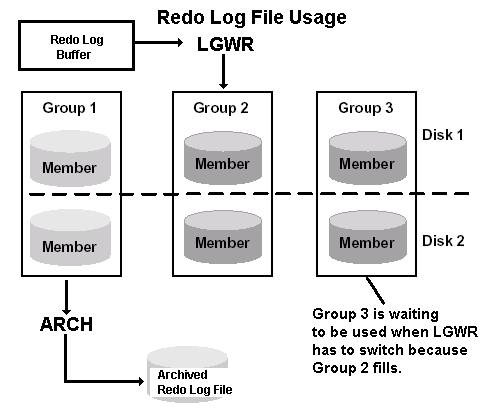
Redo Log Files are used in a circular fashion.

  • One log file is written in sequential fashion until it is filled, and then the second redo log begins to fill.  This is known as a Log Switch.
  • When the last redo log is written, the database begins overwriting the first redo log again.

image008


  • The Redo Log file to which LGWR is actively writing is called the current log file.
  • Log files required for instance recovery are categorized as active log files.
  • Log files no longer needed for instance recovery are categorized as inactive log files.

·        Active log files cannot be overwritten by LGWR until ARCn has archived the data when archiving is enabled.


Log Writer Failure

What if LGWR cannot write to a Redo Log File or Group?  Possible failures and the results are:

  1. At least one Redo Log File in a Group can be written – Unavailable Redo Log Group members are marked as Invalid, a LGWR trace file is generated, and an entry is written to the alert file – processing of the database proceeds normally while ignoring the invalid Redo Log Group members.
  2. LGWR cannot write to a Redo Log Group because it is pending archiving – Database operation halts until the Redo Log Group becomes available (could be through turning off archiving) or is archived.
  3. A Redo Log Group is unavailable due to media failure – Oracle generates an error message and the database instance shuts down.  During media recovery, if the database did not archive the bad Redo Log, use this command to disable archiving so the bad Redo Log can be dropped:

ALTER DATABASE CLEAR UNARCHIVED LOG

  1. A Redo Log Group fails while LGWR is writing to the members – Oracle generates an error message and the database instance shuts down.  Check to see if the disk drive needs to be turned back on or if media recovery is required.  In this situation, just turn on the disk drive and Oracle will perform automatic instance recovery.

Sometimes a Redo Log File in a Group becomes corrupted while a database instance is in operation.

  • Database activity halts because archiving cannot continue.
  • Clear the Redo Log Files in a Group (here Group #2) with the statement:

ALTER DATABASE CLEAR LOGFILE GROUP 2;


Minimum size for an On-line Redo Log File is 4MB.


Posted in Basics | Tagged: | Leave a Comment »

Something Default: Control Files Backup

Posted by FatDBA on December 7, 2012

If trying to create a backup of your control file and you have not mentioned TO clause which allows you to choose any directory of your choice to move the backup of CF. If using 10g default location is always User Dump Destination and for 11g it’s DIAG (Automatic Diagnostic Repository).

Snippets from one of my Alert Log soon after i fired command.

alter database backup controlfile to trace
Backup controlfile written to trace file /u01/app/oracle/diag/rdbms/orcl/orcl/trace/orcl_ora_12795.trc
Completed: alter database backup controlfile to trace

Posted in Advanced | Tagged: , | Leave a Comment »

Limit of ARCn and DBWRn processes.

Posted by FatDBA on December 2, 2012

Maximum number of Archiver (ARCn) processes allowed in Oracle 11g DB id 1-30.  Let’s try and check changing the parameter  log_archive_max_processes

SQL> alter system set log_archive_max_processes=35;
alter system set log_archive_max_processes=35
*
ERROR at line 1:
ORA-00068: invalid value 35 for parameter log_archive_max_processes, must be
between 1 and 30

Maximum number of Database Writer (DBWRn)

DB_WRITER_PROCESSES = 2 * number of CPU
Range of value in Oracle 10g- 1 to 20 but in Oracle 11g – 1 to 36.

SQL> alter system set db_writer_processes=20 scope=spfile sid=’orcl’;
System altered.

Posted in Basics | Tagged: | Leave a Comment »

10g VS 11g – Differences i’ve noticed so far.

Posted by FatDBA on November 29, 2012

Differences:

1. by default datafiles and flash recovery options are located one level beloe the ORACLE BASE location but in 10g it is used to be saved under oracle home directory.

2. ADR (Automatic Diagnostic Repository) – is a single directory location for all error and trace data in the database. disgnostic directories such as bdump, cdump and udump is replaced with this option in 11g.

3. Deprecated: iSQL*Plus, Oracle Enterprise Manager Java Console.

4. New Paramaters: Memory_max_target –> sets the maximum value for Memory_Target parameter.
SEC_CASE_SENSITIVE_LOGON: enable or disable password case sensitivity Default: True.
SEC_MAX_FAILED_LOGIN_ATTEMPTS: drops the connection after specified number of login attempts     fail for any user (Default – 10)

5. Oracle SQL Developer.

6. Oracle Database Vault: enabled you to secure business data even from DBA’s.

7. Oracle Wrehouse Builder: BI tool.

8. New privelage SYSASM – Should be granted to user’s who perform ASM related tasks.
The CONNECT command in Oracle 11g SQL*Plus is enhanced to allow connecting as ASM administrator.
CONN[ECT] [{logon | / } [AS {SYSOPER | SYSDBA | SYSASM}]]

SYSASM Privilege and OSASM Group
This feature introduces a new SYSASM privilege that is specifically intended for performing ASM administration tasks.

9. ‘Connect‘ role has now only create CREATE SESSION provilege.

Oracle 9i

SQL> SELECT * FROM DBA_SYS_PRIVS WHERE GRANTEE = ‘CONNECT’;

GRANTEE                        PRIVILEGE                                ADM
—————————— —————————————- —
CONNECT                        CREATE VIEW                              NO
CONNECT                        CREATE TABLE                             NO
CONNECT                        ALTER SESSION                            NO
CONNECT                        CREATE CLUSTER                           NO
CONNECT                        CREATE SESSION                           NO
CONNECT                        CREATE SYNONYM                           NO
CONNECT                        CREATE SEQUENCE                          NO
CONNECT                        CREATE DATABASE LINK                     NO
Oracle 11g/10g

SQL> SELECT * FROM DBA_SYS_PRIVS WHERE GRANTEE = ‘CONNECT’;

GRANTEE                        PRIVILEGE                                ADM
—————————— —————————————- —
CONNECT                        CREATE SESSION                           NO

For security consideration, Oracle change right scheme of CONNECT in oracle 11g (The same was available in 10g as well) 

10. Use ALTER FLASHBACK command to alter a flashback archive object. Below are examples of using this command:
ALTER FLASHBACK ARCHIVE myflash SET DEFAULT;

11. Read-Only Tables
In Oracle 11g, you can set a table to be read only, i.e. users can only query from the table but no DML statement is allowed on     the table. Following are the commands to achieve this:
ALTER TABLE employees READ ONLY;
ALTER TABLE employees READ WRITE;

12. Shrinking Temporary Tablespaces and Tempfiles
In Oracle 11g, you can shrink temporary tablespaces and tempfiles. Following are the commands to achieve that:
ALTER TABLESPACE temp SHRINK SPACE KEEP 100M; — the KEEP keyword is optional.
ALTER TABLESPACE temp SHRINK TEMPFILE ‘/u01/app/oracle/oradata/ora11g/temp01.dbf’;

13. Creating an Initialization Parameter File from Memory
In Oracle 11g, you can create a pfile or spfile from the current values of the initialization parameters (active in the  instance). Following is the code example to do so:
CREATE PFILE FROM MEMORY;
CREATE SPFILE FROM MEMORY;

14. Restore Point Enhancements
Creating Restore Point “as of” an SCN or a Timestamp
With Oracle 11g, you can create a restore point for a specific SCN in the past or a past point in time.
CREATE RESTORE POINT res_jun08 AS OF SCN 2340009;

15. When a client process or thread connects to the database, the connection is established between the client and the connection broker (it is a new background process named as connection monitor CMON) in Oracle database.

16. SQL*Plus Error Logging
In Oracle 11g SQL*Plus, the new command SET ERRORLOGGIN can be used to store all errors resulting from executed SQL, PL/SQL and     SQL*Plus commands in special error logging table (by default it is SPERRORLOG).
Following are the commands to enable and disable error logging in SQL*Plus:
SQL>SHOW ERRORLOGGING
SQL>SET ERRORLOGGIN ON
SQL>SET ERRORLOGGIN OFF

The SET ERRORLOGGIN ON command creates the error log table. To view the error stored in the table, use a query like the following:
SELECT USERNAME, STATEMENT, MESSAGE
FROM SPERRORLOG;

17. Oracle Database 11g has new option named as Oracle Advanced Table Compression option which aims at reducing space occupied by     data for both OLTP and warehouse databases.
<<<Using Advanced Compression Option in Oracle 11g requires a separate license from Oracle.>>>
Compression in RMAN Backups
The Oracle Advanced Compression option reduces the compression ratio in RMAN backup (by 20%) and increases the backup performance (by 40%) than it does in Oracle 10g.

18. Enhanced TRUNCATE Statement
DROP ALL STORAGE is a new option added to TRUNCATE statement in Oracle 11g R2. It drops the whole segment. In addition to the     TRUNCATE TABLE statement, DROP ALL STORAGE also applies to the ALTER TABLE TRUNCATE (SUB)PARTITION statement.
TRUNCATE TABLE emp DROP ALL STORAGE;

19. Default Retention of AWR Snapshots Changed
By default, Oracle Database 11g will now retain eight days of AWR snapshot information (as opposed to seven in Oracle 10g).

20. Stronger Password Hash Algorithm
In Oracle Database 11g, the SHA-1 standard became the new algorithm for password hashing.

21. Case-Sensitive Passwords
Oracle 11g introduces case-sensitive passwords for databases created with the default Oracle Database 11g enhanced security.
The SEC_CASE_SENTITIVE_LOGON parameter must be set to TRUE to enable case-sensitive database passwords.
alter system set SEC_CASE_SENSITIVE_LOGON = TRUE;

22. Enhanced Block Media Recovery
In Oracle Database 11g, there is a new command to perform block media recovery, named the recover … block command replacing the old blockrecover command. The new command is more efficient since because it searches the flashback logs for older uncorrupted     versions of the corrupt blocks. This requires the database to work in archivelog mode and has the Database Flashback enabled.
Following are examples of using the new command:
RECOVER DATAFILE 2 BLOCK 24 DATAFILE 4 BLOCK 10;
RECOVER DATAFILE 2 BLOCK 24 DATAFILE 4 BLOCK 10 FROM TAG = sundaynight;
RECOVER DATAFILE 2 BLOCK 24 DATAFILE 4 BLOCK 10 FROM BACKUPSET = 11;

23. New RMAN Configuration Parameters
The COMPRESSION ALGORITHM and ARCHIVELOG DELETION POLICY parameters are new RMAN configuration parameters in the Oracle Database 11g.

You can use RMAN to create a persistent configuration that controls when archived redo logs are eligible for deletion from disk or tape. This deletion policy applies to all archiving destinations, including the flash recovery area. When
Following are examples:

— archived redo logs are eligible for deletion when there are at least two backups of them on the tape
CONFIGURE ARCHIVELOG DELETION POLICY TO BACKED UP 2 TIMES TO SBT;

24. VALIDATE Command
You can use the new command VALIDATE to manually check for physical and logical corruptions in datafiles, backup sets, and even     individual data blocks. The command by default checks for physical corruption. You can optionally specify CHECK LOGICAL.     Corrupted blocks are reported in V$DATABASE_BLOCK_CORRUPTION.
Following are examples of some VALIDATE command options:
validate [CHECK LOGICAL] database;
validate SKIP INACCESSIBLE database;
validate copy of database;
validate tablespace hr_tbs;
validate copy of tablespace hr_tbs;
validate backupset 17,18;
validate datafile 3 block 24;

25. Active Database Duplication
In Oracle Database 11g, you can directly duplicate a database over the network without having to back up and provide the source  database files. This direct database duplication is called active database duplication. It can be done either with Database  Control or through RMAN.

Create a password file in the destination server with the same SYSDBA password as the source database. You can create the password file manually or by specifying the PASSWORD FILE option on the DUPLICATE command.

— use PASSWORD FILE option
RMAN>DUPLICATE TARGET DATABASE … PASSWORD FILE …

— duplicating a database to a remote host with the same directory structure
DUPLICATE TARGET DATABASE
TO dupdb
PASSWORD FILE — RMAN should duplicate the password file from the source
FROM ACTIVE DATABASE
SPFILE
NOFILENAMECHECK;

26. Data Pump Utilities
Compression Enhancement
In Oracle Database 11g, Oracle provides the mechanism to compress both data and metadata during the extract operation. The     available options for the COMPRESSION parameter are as follows:
compression={all | data_only | metadata_only | none}

27. Reusing a Dump File
In Oracle 11g data pump export utility, the new parameter REUSE_DUMPFILES enables you to overwrite a preexisting dump file.
Following is an example:
expdp hr DIRECTORY=dp_dir DUMPFILE=hr.dmp TABLES=employees REUSE_DUMPFILES=y

Posted in Basics | Tagged: | Leave a Comment »

Faster Incremental Backup’s: Enable Change Tracking (Block Change Tracking)

Posted by FatDBA on November 26, 2012

Prior to version 10g, however, incremental backups required a scan of an entire datafile to detect which blocks in it had changed. For very large databases, this made the time required for incrementals not much better than for full backups, even though space was saved.

Change Tracking, sometimes called Block Change Tracking, provides a solution by recording to a separate Change Tracking file which blocks have changed. The changes are written in real time by a background process CTWR (Change Tracking Writer).

The first level 0 incremental backup still requires a complete scan. Thereafter, the Change Tracking file is consulted during backups and the required blocks are accessed directly.

To create the Change Tracking file and enable Change Tracking, make sure the database is either open or mounted. Then issue an ALTER DATABASE command:

ALTER DATABASE
ENABLE BLOCK CHANGE TRACKING
USING FILE <pathname>;

where <pathname> is the operating system pathname to the location where you want the Change Tracking file to be stored. (If you have Oracle Managed Files enabled, the USING clause is optional, and the file will be created in the directory pointed to by DB_CREATE_FILE_DEST.)

Posted in Advanced | Tagged: | Leave a Comment »

UGA (User Global Area) & PGA (Program Global Area)

Posted by FatDBA on November 18, 2012

Before i start explain UGA & PGA areas of Oracle Server one should always has better understanding about Shared Server (Multi Threaded Server – MTS) and Dedicated Server architecture.Let’s start with the basic knowledge about MTS and Dedicated Server Architecture.

Each user process is associated to a single server process. The server process can be Dedicated or Shared. A dedicated process has one to one relationship with user process. A dedicated process occupies certain amount of memory. In oracle database 10g, a dedicated server process consumes about 5 MB of memory. In large scale application, memory requirements for dedicated server can be a serious issue. On the other hand, a shared server process is shared by multiple user processes. We do not need a dedicated server process for every user process, so less memory is required and performance increases. At a given time, Shared server process can serve only one user process. Multiple shared server processes are configured to handle multiple user processes.

Shared server architecture consists of Listener Process, Dispatcher Process, Request Queue, Shared server process and Response Queue.

After deciding MTS is right for your environment, it is now time to dig into the implementation details. The DBA will need to consider the following two issues: User Session-Specific Data (UGA) and Routing Client Requests to Shared Server Processes.

User Session-Specific Data (UGA)
Every connection to the Oracle database has a “session-specific” memory associated with it. This memory is referred to as the User Global Area (UGA) and is used to hold the values of PL/SQL variables, the values of bind variables and other items specific to a session.

With a dedicated server connection, the UGA is stored within the dedicated server process’s Program Global Area (PGA). When an MTS connection is made though, the UGA is stored in either the “LARGE POOL” or the “SHARED POOL”.

In an MTS environment, the UGA needs to be moved into a common memory structure like the large pool or shared pool since it contains “session-specific” data.

Posted in Advanced | Tagged: | 3 Comments »

Background Processes – Revisited

Posted by FatDBA on November 18, 2012

SMON
The System Monitor carries out a crash recovery when a crashed instance is started up again. It also cleans temporary segments. SMON checks the SCN in all datafile headers when the database is started. Everything is OK if all of these SCNs matches the SCN found in the controlfile. If the SCNs don’t match, the database is in an inconsistent state. SCN Number is the System Change Number provided by Oracle for each committed transaction. When the database in inconsistent state while the database is opened, crash recovery is done. Crash recovery is the recovery of a database in a single-instance configuration or an Oracle Real Application Clusters configuration in which all instances have crashed. In contrast, instance recovery is the recovery of one failed instance by a live instance in an Oracle Real Application Clusters configuration. SMON wakes up every 5 minutes to perform housekeeping activities. SMON must always be running for an instance. If not, the instance will terminate.

SMON_SCN_TIME is the metadata table populated for every five minutes by SMON, If column_tracking_level is set to 1 SMON also updates sys.col_usage$ another metadata table.

PMON
The Process Monitor checks if a user process fails and if so, do all cleaning up of resources that the user process has acquired. In the case of shared server configuration, PMON checks dispatchers and server processes and restarts them if they have failed. It also does another important thing. During service registration, PMON provides the listener with Names of the database services provided by the database. However, if there is no listener at startup, PMON can obviously not register those information. Therefore, PMON tries then periodically to register with the listener, which might take up to 60 seconds. During service registration it provides listener with the following information:

– Name of the associated instance
– Current load and maximum load on instance
– Names of DB services provided by database.
– Information about dedicated servers and dispatchers (depends on database server mode i.e dedicated/shared server mode)

PMON process wakes up at every 60 seconds and provide information to the listener. If any problem arises and your PMON process fails then it’s not possible to register information to listener periodically. In this case you can do ‘Manual service registration’ using command:

ALTER SYSTEM REGISTER;

This command forces the registration of database information to the listener.

MMAN (Memory Manager) is a background process that manages the dynamic resizing of SGA memory areas as the workload increases or decreases.
This process was introduced in Oracle 10g.

DBWR

The Database Writer writes dirty blocks from the database buffer to the datafiles. is determined by the Initialization parameter Initialization parameter DB_WRITER_PROCESSES determines on how many DBWn Processes are started . DBWR also writes the actual SCN with the Block and flushes datafile blocks.

LGWR
The Log Writer writes the redo log buffer from the SGA to the online redo log file. It wakes up for every three seconds to flush from the redo log buffer to the online redo logs or Whenever the redo log buffer is filled up to _log_io_size defaults to 1/3 of the log buffer size) and LGWR is not currently writing. This parameter is defined in units measured in physical operating system blocks, not DB blocks. The operating system block size is (obviously) OS dependent. It can be retrieved through x$kccle. This is called X$ table owned by SYS. The entire X$ tables are memory structures generated by Oracle when instance is spawned. They die with Instance. This is a separate discussion which we do later at another point of time.

RECO
The Distributed Transaction Recovery Process finds pending (distributed) transaction and resolves them.

CKPT
The Checkpoint Process regularly initiates a checkpoint, which uses DBWR to write all dirty blocks back to the datafiles, thus ensuring a consistent state to the database. Since a Checkpoint records the current SCN, in a recovery only redo records with a SCN higher than that of the last checkpoint need to be applied. The ckpt process also updates the datafile headers. The ckeckpoint process was optional in Oracle 7 (set CHECKPOINT_PROCESS=TRUE) and could be enabled to speed-up checkpointing on databases with a large number of files. Starting with Oracle 8i, the checkpoint process is automatically started with the other Oracle processes at instance startup.

ARCH
The Archiver Process archives redo log files if ARCHIVELOG is enabled. This means you have the capability of Media Recovery in case of failure.
Dnnn
The Dispatcher Process is used in a shared server environment. Dispatcher Processes, suppor multi-threaded configuration by allowing user processes to share limited number of server processes.

Snnn
The Shared Server Process is used in a shared server environment. shared Server Processes serve multiple client requests in the multi-threaded server configuration

LMON
The lock manager.

LMD0
AQ Time Manager

TRWR
Trace writer. The System Tracking process.

WMON
The wakeup monitor process.

LCKnnn
Inter-instance locking process.

SNPnnn
The snapshot process.

Qmnn (Queue Monitor)
Optional for Oracle Advanced Queuing which monitors the message queues. Used by Oracle Streams Advanced Queuing.
MMON
It makes snapshots of the database health (statistics) and stores this information in the automatic workload repository. MMON is also responsible for issuing alerts for metrics that exceed their thresholds.  This process was introduced in Oracle 10g.

Automated Storage Management ASM Instance Background Processes(10g)
Below provided are some new background processes added for an ASM instance

RBAL
This processes coordinates re-balance activity for disk groups. In an ASM instance coordinated rebalancing operations. In a DB instance, opens and mount diskgroups from the local ASM instance.

ARBx – Oracle backgroud processes. In an ASM instance, a slave for rebalancing operations

GMON – Oracle backgroud processes. In an ASM instance, diskgroup monitor.

ASMB – Oracle backgroud process. In an DB instance, keeps a (bequeath) persistent DB connection to the local ASM instance. Provides hearthbeat and ASM statistics. During a diskgroup rebalancing operation ASM communicates to the DB AU changes via this connection.

list of the new background processes in Oracle 11g:

VKTM
The virtual keeper of time provides wall-clock time and reference time for other sessions/processes.

FBAR  
The flashback data archiver writes old row-versions of tables with ‘flashback archive’ enabled into flashback data archives on commit.

DIAG
The diagnosibility process (DIAG) runs oradebug commands and triggers diagnostic dumps as part of the new ADR (automatic diagnostic repository) feature.

DIA0
The “other” diagnosibility process detects hangs then triggers DIAG do take diagnostics.

SMCO/Wnnn
The space management coordinator and slaves perform space allocation and reclamation.

There are many more. Please check below link to check various other back-end processes.

http://docs.oracle.com/cd/E14072_01/server.112/e10820/bgprocesses.htm


Posted in Basics | Tagged: | 1 Comment »

ALTER SYSTEM SWITCH LOGFILE vs ALTER SYSTEM ARCHIVELOG CURRENT vs ALTER SYSTEM ARCHIVE LOG ALL

Posted by FatDBA on November 18, 2012

Both ALTER SYSTEM SWITCH LOGFILE and ALTER SYSTEM ARCHIVELOG CURRENT will force a log switch, but they do it in different ways.

ARCHIVELOG CURRENT waits for the writing to complete.  This can take several minutes for multi-gigabyte redo logs.  Conversely, the ALTER SYSTEM SWITCH LOGFILE command is very fast and returns control to the caller in less than a second while ALTER SYSTEM ARCHIVELOG CURRENT pauses.

  • ALTER SYSTEM  SWITCH LOGFILE is asynchronous:  This command is fast to return to the invoking program because the writing of the redo log to the OS filesystem is done in the background.  There is a very small risk in cases where the ARCH process cannot complete writing the redo log, such as cases where the OS archivelog file directory is out of space.  It is also risky because the calling script may move on to a subsequent step, assuming that the redo has been written.  Some scripts will place a SLEEP 60 command in their backup script to allow time for the redo to complete writing, but this is not a best practice.
  • ALTER SYSTEM ARCHIVELOG CURRENT is synchronous:  This is faster to return because this command waits until the online redo log has completed the writing of the redo log file to the filesystem.  This command is safer because it waits for the OS to acknowledge (ACK) that the redo log has been successfully written.  Hence, ALTER SYSTEM ARCHIVELOG CURRENT is the best practice for production backup scripts with RMAN.
  • ALTER SYSTEM ARCHIVE LOG ALL triggers an archive process if your DB (System) has archive logs that needs to be apply if still you try using the command you’ll receive below provided error message.

*
ERROR at line 1:
ORA-00271: there are no logs that need archiving

Posted in Advanced | Tagged: | 1 Comment »

SQLPLUS: Command Prompt customizied.

Posted by FatDBA on November 15, 2012

Some tips and tricks for SQLPLUS terminal:

———————————————————-
SQL Prompt With Time
———————————————————-
SQL> set time on
09:50:16 SQL>
09:50:19 SQL> select sysdate from dual;

SYSDATE
———
20-APR-11

09:50:34 SQL>

———————————————————-
SQL Prompt With USER
———————————————————-
SQL> set sqlprompt “_USER> ”
SCOTT>
SCOTT>
SCOTT> select sysdate from dual;

SYSDATE
———
20-APR-11

SCOTT>

———————————————————-
SQL Prompt With SID
———————————————————-
SQL> set sqlprompt “_CONNECT_IDENTIFIER> ”
mydb>
mydb>
mydb> select sysdate from dual;

SYSDATE
———
20-APR-11

mydb>

———————————————————-
SQL Prompt With USER@SID
———————————————————-
SQL> set sqlprompt “_USER’@’_CONNECT_IDENTIFIER SQL> ”
SCOTT@mydb SQL>
SCOTT@mydb SQL>
SCOTT@mydb SQL> select sysdate from dual;

SYSDATE
———
20-APR-11

SCOTT@mydb SQL>

———————————————————-
SQL Prompt With DATE
———————————————————-
SQL> set sqlprompt “_DATE SQL> ”
20-APR-11 SQL>
20-APR-11 SQL>
20-APR-11 SQL> select sysdate from dual;

SYSDATE
———
20-APR-11

20-APR-11 SQL>

 
Many More Soon!!!

Posted in Basics | Tagged: | Leave a Comment »