Tales From A Lazy Fat DBA

Its all about Databases, their performance, troubleshooting & much more …. ¯\_(ツ)_/¯

Data Pump Troubleshooting Tips – My favorite 6

Posted by FatDBA on October 26, 2024

There are numerous utilities, options, and methods available for migrating and moving data between Oracle databases, yet Oracle Data Pump remains one of the most widely used tools. A significant number of DBAs are very comfortable with Data Pump, as it has been a trusted utility for a long time (originally as exp and imp). Its stability, user-friendliness, and robust capabilities make it a top choice for handling large data migrations, backup, and restore operations.

However, one area where DBAs still often face challenges is troubleshooting when issues arise. When a Data Pump job fails, performs poorly, or behaves unexpectedly, it can be unclear where to start, what logs to review, or what checks to perform. Many find it difficult to pinpoint the source of the problem and make adjustments to optimize performance or resolve issues.

Today’s post focuses on troubleshooting Data Pump performance and functionality issues, sharing the steps I typically follow when diagnosing problems. We’ll cover key areas to investigate, like log file analysis, parameter tuning, network considerations, and common bottlenecks. These steps aim to provide a practical guide to understanding and resolving Data Pump issues and optimizing your data movement processes.

Option 1: Generate an AWR Report to Assess Database Performance

Start by generating an AWR (Automatic Workload Repository) report to gain insight into the database’s overall performance during the relevant period. Adjusting the AWR snapshot interval to 15 minutes is recommended for a more granular view. This approach reduces the chances of averaging out short performance spikes, allowing you to capture transient issues more effectively.

exec dbms_workload_repository.modify_snapshot_settings(null, 15);
exec dbms_workload_repository.create_snapshot;

Option 2: Enable SQL Trace for Data Pump Processes or Specific SQL IDs
Optionally, you can enable SQL trace for the Data Pump processes (dm for the master process and dw for worker processes) or for specific SQL statements by SQL ID. This will help isolate SQL-level performance issues affecting the Data Pump job.

alter system set events 'sql_trace {process: pname = dw | process: pname = dm} level=8';
alter system set events 'sql_trace[SQL: 8krc88r46raff]';

Option 3: Run Data Pump Job with Detailed Trace Enabled
For enhanced tracing, run the Data Pump job with additional trace options, which provide more comprehensive output. Including metrics=yes, logtime=all, and trace=1FF0300 in the command enables detailed logging of both timing and activity metrics. Tracing can be enabled by specifying an 7 digit hexadecimal mask in the TRACE parameter of Export DataPump (expdp) or Import DataPump (impdp). The first three digits enable tracing for a specific Data Pump component, while the last four digits are usually: 0300.

expdp ... metrics=yes logtime=all trace=1FF0300
impdp ... metrics=yes logtime=all trace=1FF0300

Data Pump tracing can also be started with a line with EVENT 39089 in the initialization parameter file. This method should only be used to trace the Data Pump calls in an early state, e.g. if details are needed about the DBMS_DATAPUMP.OPEN API call. Trace level 0x300 will trace all Data Pump client processes.

-- Enable event
ALTER SYSTEM SET EVENTS = '39089 trace name context forever, level 0x300' ;
-- Disable event
ALTER SYSTEM SET EVENTS = '39089 trace name context off' ;

Option 4: Review Data Pump Trace Files
Locate and analyze the Data Pump trace files stored in the Oracle trace directory. The master control process file names typically contain *dm*, while worker process files include *dw*. These files provide insights into the processes, job details, and potential error sources during execution.

Option 5: Activate SQL_TRACE on specific Data Pump process with higher trace level.
Lets assume we see that the Data Pump Master process (DM00) has SID: 143 and serial#: 50 and the Data Pump Worker process (DW01) has SID: 150 and serial#: 17. These details can be used to activate SQL tracing in SQL*Plus with DBMS_SYSTEM.SET_EV, e.g.:

-- In SQL*Plus, activate SQL tracing with DBMS_SYSTEM and SID/SERIAL#  
-- Syntax: DBMS_SYSTEM.SET_EV([SID],[SERIAL#],[EVENT],[LEVEL],'') 

-- Example to SQL_TRACE Worker process with level 4 (Bind values):   
execute sys.dbms_system.set_ev(150,17,10046,4,''); 

-- and stop tracing: 
execute sys.dbms_system.set_ev(150,17,10046,0,'');  


-- Example to SQL_TRACE Master Control process with level 8 (Waits):  
execute sys.dbms_system.set_ev(143,50,10046,8,'');  

-- and stop tracing:  
execute sys.dbms_system.set_ev(143,50,10046,0,'');

Option 6: Use the Data Pump Log Analyzer

I’ve personally used the Data Pump Log Analyzer for some time and have found it to be incredibly user-friendly, making it simple to understand the performance and runtime statistics of Data Pump jobs. This tool is highly effective in streamlining troubleshooting efforts, quickly identifying bottlenecks, and delivering clear insights into job performance. It’s a fantastic addition to a DBA’s toolkit and provides valuable capabilities that aren’t typically found in standard scripts. The Data Pump Log Analyzer has been tested with Data Pump log files across various database versions, including those generated by Data Pump client (expdp/impdp), Zero Downtime Migration (ZDM), OCI Database Migration Service (DMS), and Data Pump API (DBMS_DATAPUMP).The Data Pump Log Analyzer is a Python-based command-line utility designed for in-depth analysis of Oracle Data Pump log files. It goes beyond basic log review by offering detailed, structured insights into key performance metrics, errors, and process details. This tool can be particularly useful for DBAs needing a quick and comprehensive view of Data Pump job behavior, helping with issue diagnosis and performance optimization. Link to read and download or a more detailed guide on it’s usage Link

With the Data Pump Log Analyzer, you get:

  • Detailed Operations and Processing Metrics: Granular information on data operations for pinpoint analysis.
  • Error and ORA- Code Analysis: Summaries and explanations of encountered errors for easier troubleshooting.
  • Object-Type Breakdown and Processing Times: Insight into performance by object type, aiding in performance tuning.
  • Data Pump Worker Performance: Analyzes individual worker processes for any lagging tasks.
  • Summarized Schema, Table, Partition Details: Overview of data handled by each schema, table, or partition.
  • Instance-Based Data Analysis (for Oracle 21c and later): Statistics by instance for performance evaluation in multitenant setups.
  • Flexible Output Options: Filter, sort, and export analysis results to text or HTML for efficient sharing and record-keeping.

One below is with basic syntax to get operational details.

$ python3 dpla.py import.log
========================
Data Pump Log Analyzer
========================
...
Operation Details
~~~~~~~~~~~~~~~~~
Operation: Import
Data Pump Version: 19.23.0.0.0
DB Info: Oracle Database 19c EE Extreme Perf Release 19.0.0.0.0
Job Name: FATDBAJOB1
Status: COMPLETED
 Processing: -
Errors: 1301
 ORA- Messages: 1267
Start Time: 2024-08-21 01:30:45
End Time: 2024-08-21 11:43:11
Runtime: 35:03:06
Data Processing
~~~~~~~~~~~~~~~
Parallel Workers: 104
Schemas: 47
Objects: 224718
Data Objects: 188131
Overall Size: 19.11 TB

Use flag ‘-e’ to view all ORA- messages encountered during the Data Pump operation, or optionally you can filter our specific errors as well i.e. ‘-e ORA-39082 ORA-31684′.

python3 dpla.py import.log -e
========================
Data Pump Log Analyzer
========================
...
ORA- MESSAGES DETAILS
~~~~~~~~~~~~~~~~~~~~~
(sorted by count):
Message Count
--------------------------------------------------------------------------------------------------- ---------
ORA-39346: data loss in character set conversion for object COMMENT 919
ORA-39082: Object type PACKAGE BODY created with compilation warnings 136
ORA-39346: data loss in character set conversion for object PACKAGE_BODY 54
ORA-39082: Object type TRIGGER created with compilation warnings 36
ORA-39082: Object type PROCEDURE created with compilation warnings 29
ORA-31684: Object type USER already exists 27
ORA-39111: Dependent object type PASSWORD_HISTORY skipped, base object type USER already exists 27
ORA-39346: data loss in character set conversion for object PACKAGE 18
ORA-39082: Object type PACKAGE created with compilation warnings 10
ORA-39082: Object type VIEW created with compilation warnings 7
ORA-39346: data loss in character set conversion for object PROCEDURE 2
ORA-39082: Object type FUNCTION created with compilation warnings 2
--------------------------------------------------------------------------------------------------- ---------
Total 1267
--------------------------------------------------------------------------------------------------- ---------


Use flag ‘-o’ to see details about which types of database objects were involved in the Data Pump operation.

python3 dpla.py import.log -o
========================
Data Pump Log Analyzer
========================
...
Object                                  Count      Seconds      Workers     Duration
----------------------------------      ---------- -----------  ----------- ------------
SCHEMA_EXPORT/TABLE/TABLE_DATA             188296    6759219         128       6759219
CONSTRAINT                                    767      37253           1         37253
TABLE                                        2112       3225          51           156
COMMENT                                     26442        639         128            18
PACKAGE_BODY                                  197        125         128             5
OBJECT_GRANT                                 5279         25           1            25
TYPE                                          270          6           1             6
ALTER_PROCEDURE                               149          5           2             3
ALTER_PACKAGE_SPEC                            208          4           3             2
PACKAGE                                       208          3           3             1
PROCEDURE                                     149          2           2             1

...
---------------------------------- ---------- ----------- ----------- ------------
Total 224755 6800515 128 6796697
---------------------------------- ---------- ----------- ----------- ------------


Hope It Helped!
Prashant Dixit

Posted in Uncategorized | Tagged: , , , , , , , , , , , | Leave a Comment »

AWR Report Improvements in Oracle 23AI : New Replication Performance Sections

Posted by FatDBA on October 20, 2024

Oracle 23AI is undoubtedly packed with a range of both small and significant features. Every now and then, I stumble upon some standout additions, and this time, it’s the improvements in AWR reports that caught my attention. One of the key enhancements is the inclusion of more replication-related information captured and presented in these reports.

With this new update, AWR queries and reports are now streamlined and enhanced, offering a simplified yet detailed view of the replication process. This makes troubleshooting replication performance issues much easier. You can now categorize problems into workload-related issues, database-side misconfigurations (such as slow replication SQL due to missing indexes or incorrect database parameter settings), or performance bottlenecks either within the database or in Oracle GoldenGate processes.

The enhanced replication section includes a more comprehensive “Replication System Resource Usage” area. This shows the system resource consumption for all Oracle GoldenGate replication processes, whether they are foreground or background, and breaks it down for each Extract and Replicat process.

Additionally, a dedicated section for replication-related Top SQL statistics has been added, making it much easier to identify performance issues tied to specific SQL statements.

There’s also a separate section for top wait events related to replication processes, enabling faster identification and resolution of replication-related performance bottlenecks.

Lastly, the replication-related sections have been reorganized to present statistics by individual Extracts and different Replicat types, offering clearer insights into replication performance.

These enhancements are really great when it comes to monitoring and improving the performance of replication processes.

Replication System Resource Usage:
Metrics for Oracle GoldenGate replication now include detailed information such as the process name, type, and the number of sessions for each sub-component. Performance statistics are categorized based on the specific functionality of these sub-components and grouped by the process name. This enhancement allows for more granular monitoring of resource usage, giving visibility into the performance of each Extract and Replicat process, along with their individual sub-components.

Replication Wait Events:
There is a dedicated section within the report for replication related wait events (both foreground and background types).

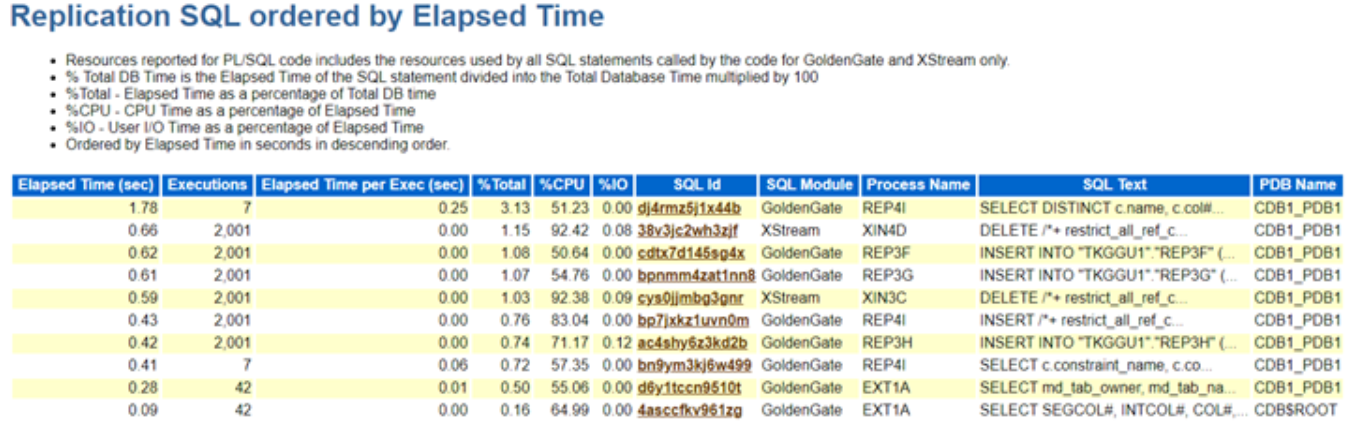
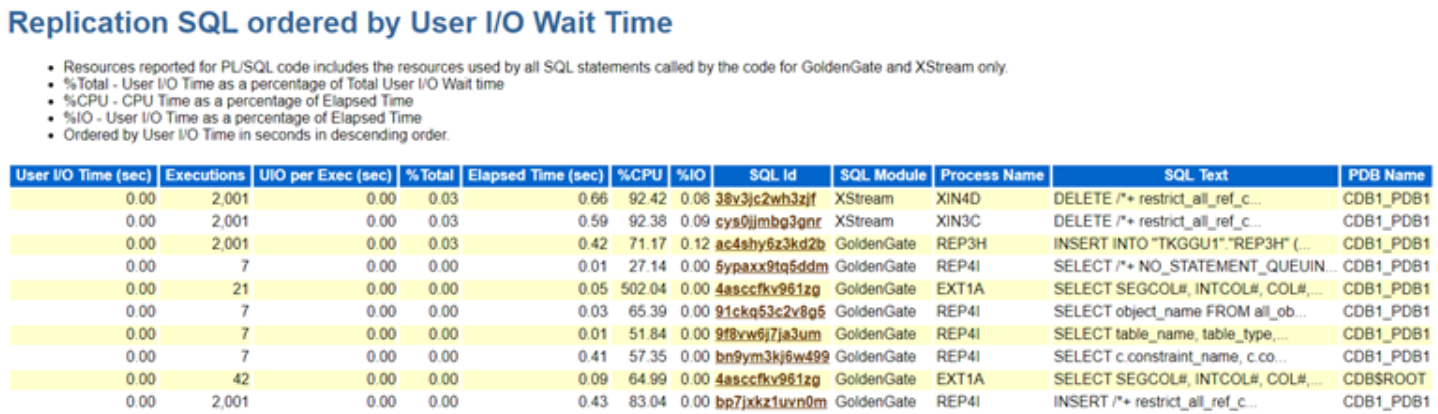
Replication Top SQLs: This highlights the SQL statements executed by various replication processes, organized by key performance metrics such as Elapsed Time, CPU Time, and Execution Count. These sections in the Top SQL report provide a detailed breakdown, allowing administrators to quickly identify the most resource-intensive SQL queries impacting replication performance.

In addition, the replication process name is included for each SQL statement, making it easy to trace which process—whether Extract or Replicat—is responsible for executing the query. This level of granularity helps streamline troubleshooting efforts, as it enables pinpointing of inefficient SQL statements and their impact on replication. The inclusion of these metrics ensures that administrators have the necessary visibility to optimize SQL execution within replication processes, leading to improved overall system performance.

Oracle GoldenGate Extract Performance Metrics : This section explains more in Extract and Capture processes. It provides some really valuable information like ..

  • Lag (in seconds) derived by the time when the most recent LCR was created and received (measured both at the beginning and end)
  • The amount of redo data mined (in bytes).
  • Redo Mined Rate
  • Number of bytes sent by the Capture process to the Extract process since the last time the Extract process attached to the Capture process.
  • Number of LCRs delivered to the Capture from Logminer …. and much more … ….

Oracle GoldenGate Integrated Replicat:

Oracle GoldenGate Replicat: This section presents comprehensive performance statistics for Oracle GoldenGate’s classic, coordinated, and parallel Replicat processes. The SQL operation statistics are aggregated and displayed for each individual Replicat process, providing an overall view of their performance.

Hope It Helped!
Prashant Dixit

Posted in Uncategorized | Tagged: , , , , , , | Leave a Comment »

Addressing Stuck Undo Segments : How to Safely Drop Problematic Undo Segments

Posted by FatDBA on October 14, 2024

Hi All,

This post discusses an intriguing issue we encountered recently on a 19.22 Oracle database following a CDB restart. After the restart, we observed a peculiar problem where all sessions performing DDL commands were getting locked and hung at the PDB level. This behavior was affecting the entire database, essentially halting all DDL operations.

During our analysis, we discovered that the SMON process was waiting on a latch, leading to high CPU resource consumption. Furthermore, we noticed that the MMON process was blocking SMON, causing additional delays. The alert log revealed multiple error messages, which further complicated the diagnosis.

This issue required a deep dive into Oracle’s background processes and system-level contention to resolve, as it was causing a significant disruption to database operations.

-- Fragments from alert log, smon/mmon process logs and standard diag traces.
kcbzib: encounter logical error ORA-1410, try re-reading from other mirror..
TRCMIR:kcf_reread     :start:3722012:0:+DATA/CDBMONKEY/AA82C21DD440449FE053B4146E0AA55B/DATAFILE/tablespace_test_dataaa.xxx.xxxx
TRCMIR:kcf_reread     :done :3722012:0:+DATA/CDBMONKEY/AA82C21DD440449FE053B4146E0AA55B/DATAFILE/tablespace_test_dataaa.xxx.xxxxx
kcbzibmlt: encounter logical error ORA-1410, try re-reading from other mirror..

---> SMON: Parallel transaction recovery tried
30317 error message received from server=1.70(P01Y) qref:0x8de103cf0 qrser:5121 qrseq:3 mh:0x97fdf9460
Parallel Transaction recovery caught exception 12801
Parallel Transaction recovery caught error 30317

*** 2024-08-19T20:38:23.297997-04:00 (PWS1E(3))
Parallel Transaction recovery caught exception 30319
Parallel Transaction recovery caught error 30319

*** 2024-08-19T20:38:50.613855-04:00 (PWS1E(3))
30317 error message received from server=1.57(P01L) qref:0x8de109fe8 qrser:11265 qrseq:3 mh:0x95fccd3c8
Parallel Transaction recovery caught exception 12801
Parallel Transaction recovery caught error 30317
Parallel Transaction recovery caught exception 30319

TEST1E(3):about to recover undo segment 98 status:6 inst:0
TEST1E(3):mark undo segment 98 as available status:6 ret:1

TEST1E(3):about to recover undo segment 46 status:6 inst:0
TEST1E(3):mark undo segment 46 as available status:6 ret:1

The logs and trace files also highlighted an issue with two specific undo segments, identified by segment numbers 98 and 46, from the UNDO tablespace. Upon further investigation, we found that both segments were in a ‘RECOVERING’ state. What was particularly concerning was that the recovery process for these segments was progressing extremely slowly, with the v$fast_start_transactions view showing an unusually high estimated recovery time.

In fact, based on the progress we monitored, it seemed like the recovery process wasn’t moving forward at all and appeared to be stuck in some kind of loop. This stagnation in recovery added to the overall system’s delay, compounding the performance issues we were already facing. It became clear that this problem was a significant bottleneck in restoring the database to normal operation.

SQL> select * from V$FAST_START_TRANSACTIONS;

USN SLT SEQ STATE UNDOBLOCKSDONE UNDOBLOCKSTOTAL PID CPUTIME PARENTUSN PARENTSLT PARENTSEQ XID PXID RCVSERVERS CON_ID
---------- ---------- ---------- ---------------- -------------- --------------- ---------- ---------- ---------- ---------- 
46 46 2313064 RECOVERING 505 24992423 77 5586 0 0 0 10001000684B2300 0000000000000000 1 0
98 25 1352150 RECOVERING 0 226231 78 5586 0 0 0 30001900D6A11400 0000000000000000 1 0
	

SQL> SELECT segment_name, tablespace_name  FROM dba_rollback_segs  WHERE segment_id IN (98, 46);

SEGMENT_NAME		       TABLESPACE_NAME
------------------------------ ------------------------------
_SYSSMU46_5249279471$	       UNDOTEST1
_SYSSMU98_5249279471$	       UNDOTEST1

We attempted to take the segments offline and ultimately drop them, as they were associated with a materialized view (MV) refresh and a bulk insert statement. These operations were part of an ad-hoc activity, so it was acceptable for them to be missed. However, despite our efforts, the segments remained in a ‘PARTLY AVAILABLE’ state, leaving us with no option to drop or take them offline. This left us in a situation where we were essentially stuck, unable to proceed with dropping the segments or the associated tablespace. The inability to release these segments further complicated our recovery efforts.

We’d even checked the status of the those two undo segments using base table x$ktuxe and the KTUXESTA (Status) was coming as ‘DEAD’, means the transaction has failed but is still holding resources and that gave ius more confidence about what happened under the hood.

SQL> select min(sample_time), max(sample_time), sql_id, xid, count(1) from dba_hist_active_sess_history 
where xid in ('10001000684B2300','30001900D6A11400') group by sql_id, xid;

MIN(SAMPLE_TIME) MAX(SAMPLE_TIME) SQL_ID XID COUNT(1)
--------------------------------------------------------------------------- -------------------
15-SEP-24 01.22.25.446 PM 15-SEP-24 05.51.22.340 PM 30001900D6A11400 3213
15-SEP-24 10.22.46.218 AM 15-SEP-24 01.22.15.440 PM ac5hhandj9fh1 30001980D6A11400 2158 --------------> 
13-SEP-24 08.31.54.374 PM 14-SEP-24 02.53.45.723 AM annqr822no0a1 10001090684B2300 4578 -------------->
14-SEP-24 02.53.55.731 AM 15-SEP-24 05.51.22.340 PM 10001000684B2300 27781

SQL> select sql_id, sql_text from dba_hist_sqltext where sql_id in ('annqr822no0a1','ac5hhandj9fh1o');

SQL_ID SQL_TEXT
------------- --------------------------------------------------------------------------------
annqr822no0a1 INSERT INTO monkey.ah_ah3_xaa_131C (
ac5hhandj9fh1o /* MV_REFRESH (INS) */INSERT /*+ BYPASS_RECURSIVE_CHECK */ INTO "monkey"."test_


SQL> ALTER ROLLBACK SEGMENT "_SYSSMU46_5249279471$" offline;

Rollback segment altered.

SQL> ALTER ROLLBACK SEGMENT "_SYSSMU98_5249279471$" offline;

Rollback segment altered.


SQL> SELECT segment_name, status, tablespace_name
FROM dba_rollback_segs
WHERE segment_name IN ('_SYSSMU98_5249279471$', '_SYSSMU46_5249279471$');
  2    3
SEGMENT_NAME		       STATUS		TABLESPACE_NAME
------------------------------ ---------------- ------------------------------
_SYSSMU46_5249279471$	       PARTLY AVAILABLE UNDOTEST1
_SYSSMU98_5249279471$	       PARTLY AVAILABLE UNDOTEST1


SQL> SELECT KTUXEUSN, KTUXESLT, KTUXESQN, /* Transaction ID */ KTUXESTA Status, KTUXECFL Flags FROM x$ktuxe 
WHERE ktuxesta!='INACTIVE' AND ktuxeusn=98;

KTUXEUSN KTUXESLT KTUXESQN STATUS FLAGS
---------- ---------- ---------- ---------------- ------------------------
98 25 1352150 ACTIVE DEAD

SQL> SELECT KTUXEUSN, KTUXESLT, KTUXESQN, /* Transaction ID */ KTUXESTA Status, KTUXECFL Flags FROM x$ktuxe 
WHERE ktuxesta!='INACTIVE' AND ktuxeusn=46;

KTUXEUSN KTUXESLT KTUXESQN STATUS FLAGS
---------- ---------- ---------- ---------------- ------------------------
46 46 2313064 ACTIVE DEAD


Given that this is a critical production system, we couldn’t afford to wait for a complete recovery of the affected undo segments. To mitigate the issue, we created a new undo tablespace and designated it as the default for the database. This action enabled us to resume normal operations while the recovery of the problematic segments continued in the background.

However, the underlying mystery remains: why are we unable to drop these segments in the production environment? To investigate further, we cloned the production database and set up a test instance. To our surprise, we replicated the same situation, where both segments 46 and 98 appeared again in a ‘PARTLY AVAILABLE’ state, providing no options for us to drop them.

In our exploration, we first enabled the FAST_START_PARALLEL_ROLLBACK parameter, which determines the number of processes that participate in parallel rollback during transaction rollbacks, typically following an instance failure or a large manual rollback. We set this parameter to HIGH, as it significantly accelerates the rollback process for large transactions, particularly in scenarios involving instance failures or extensive operations requiring manual rollback.

Additionally, we experimented with the undocumented parameter _OFFLINE_ROLLBACK_SEGMENTS, which is intended to control the state of rollback segments.
Note: When dealing with hidden or undocumented parameters, it’s crucial to consult with Oracle support or rely on prior experience, as these settings can lead to unforeseen consequences in production environments.

Ran below query to dynamically get alter statements for segments which we need to set offline.

SQL>  select 'ALTER SYSTEM SET "_OFFLINE_ROLLBACK_SEGMENTS"='||listagg(''''||segment_name||'''',',') WITHIN GROUP (ORDER BY segment_name)||' scope=spfile;' from dba_rollback_segs 
where tablespace_name='UNDOTBS1' and status ='NEEDS RECOVERY'; 

Alter System set "_OFFLINE_ROLLBACK_SEGMENTS"="_SYSSMU98_5249279471$" scope=spfile;
Alter System set "_OFFLINE_ROLLBACK_SEGMENTS"="_SYSSMU46_5249279471$" scope=spfile;

Shutdown the database and startup as normal after setting the above parameter. 

shutdown immediate;
startup;

and finally the drop statements. 
SQL> select 'drop rollback segment "'||segment_name||'";' from dba_rollback_segs 
where tablespace_name='UNDOTBS1' and status ='NEEDS RECOVERY';

drop rollback segment "_SYSSMU98_5249279471$";
drop rollback segment "_SYSSMU46_5249279471$";
 

Issue above two drop rollback segemnts from the dfatabase and bounce the database again anf finally drop the problematic undo tablespace. Do not forget to reset the ‘_OFFLINE_ROLLBACK_SEGMENTS’ parameter and a one more bounce again.

SQL>  shutdown immediate;
Database closed.
Database dismounted.
ORACLE instance shut down.
SQL>  startup;


SQL>  drop tablespace UNDOTEST1;
Tablespace dropped.


SQL>  Alter System reset "_OFFLINE_ROLLBACK_SEGMENTS";
System altered.

SQL>  shutdown immediate;
Database closed.
Database dismounted.
ORACLE instance shut down.
SQL>  startup;

Although it was a lengthy and demanding process involving numerous experiments, the results were ultimately positive. We encountered no errors and successfully dropped the problematic segments, freeing the database from the issues that had plagued it. This experience not only resolved our immediate concerns but also provided valuable insights into managing similar challenges in the future.

Hope It Helped!
Prashant Dixit

Posted in Uncategorized | Tagged: , , , , , , | Leave a Comment »

Detecting SQL Elapsed Time Variations – A Script to identify potential plan flips

Posted by FatDBA on October 11, 2024

In the world of database management, one of the most important aspect is understanding and optimizing SQL performance. A common challenge that we DBAs face is runtime variations, particularly in elapsed times of SQL executions. These variations often stem from plan flips, where the database optimizer chooses different execution plans for the same query under similar conditions. This can lead to unpredictable performance and inefficiencies. To tackle this issue, I have developed a script that systematically identifies SQL queries with significant runtime variations, providing valuable insights for performance tuning.

The primary objective of the script is to analyze SQL execution statistics to identify queries that exhibit runtime elapsed time variations. By focusing on these variations, we can pinpoint potential performance bottlenecks, allowing us to take corrective action before they impact application performance. The script achieves this through a series of well-structured SQL queries that aggregate execution statistics, helping to reveal patterns that might indicate plan flips.

The script utilizes cursors to fetch SQL execution statistics from the DBA_HIST_SQLSTAT and DBA_HIST_SNAPSHOT views. It only considers SQLs that have been executed a sufficient number of times, ensuring that we focus on queries that significantly impact performance. By calculating the standard deviation of elapsed times, the script identifies queries that experience substantial fluctuations. A high standard deviation in execution time often points to inconsistencies, potentially indicating plan flips.

The output from the script is structured and formatted for readability, presenting crucial metrics like SQL_ID, execution counts, minimum and maximum elapsed times, and normalized standard deviation values. This makes it easy to spot queries that may require further investigation or optimization.

Talking about the PHV/Plan flips, it occur when the optimizer selects different plans for executing the same query, often leading to varied performance. This can happen due to several reasons, including (some of the top ones) :

  • Changes in Statistics: Outdated or inaccurate statistics can mislead the optimizer into choosing suboptimal plans.
  • Variable Bind Values: Different bind values can cause the optimizer to generate different execution plans.
  • Dynamic Data Changes: Changes in the underlying data can affect the choice of execution plans.
  • Index changes, parameter ‘sniffings’, skewness of data and many more …


Once identified, we can further analyze and delve deeper on reasons behind the flips and if required can consider SQL Profiles or SQL Plan Baselines to stabilize execution plans for critical queries.

SET SERVEROUTPUT ON;
SET LINESIZE 155
COL execs FOR 999,999,999
COL min_etime FOR 999,999.99
COL max_etime FOR 999,999.99
COL avg_etime FOR 999,999.999
COL avg_lio FOR 999,999,999.9
COL norm_stddev FOR 999,999.9999
COL begin_interval_time FOR A30
COL node FOR 99999
SET PAGESIZE 50000 
SET LINESIZE 150
BREAK ON report
BREAK ON plan_hash_value ON startup_time SKIP 1
 
-- Main PL/SQL Block
DECLARE
    -- Cursor for the first SQL query to get SQL_IDs
    CURSOR sql_cursor IS
        SELECT sql_id
        FROM (
            SELECT sql_id, SUM(execs) AS execs,
                   MIN(avg_etime) AS min_etime,
                   MAX(avg_etime) AS max_etime,
                   stddev_etime / MIN(avg_etime) AS norm_stddev
            FROM (
                SELECT sql_id, plan_hash_value, execs, avg_etime,
                       stddev(avg_etime) OVER (PARTITION BY sql_id) AS stddev_etime
                FROM (
                    SELECT sql_id, plan_hash_value,
                           SUM(NVL(executions_delta, 0)) AS execs,
                           (SUM(elapsed_time_delta) / DECODE(SUM(NVL(executions_delta, 0)), 0, 1, SUM(executions_delta)) / 1000000) AS avg_etime
                    FROM DBA_HIST_SQLSTAT S
                    JOIN DBA_HIST_SNAPSHOT SS ON ss.snap_id = S.snap_id
                    WHERE ss.instance_number = S.instance_number
                      AND executions_delta > 0
                      AND elapsed_time_delta > 0
                      AND ss.begin_interval_time >= SYSDATE - 7  -- Last 7 days
                      AND s.snap_id > NVL('&earliest_snap_id', 0)
                    GROUP BY sql_id, plan_hash_value
                )
            )
            GROUP BY sql_id, stddev_etime
            HAVING stddev_etime / MIN(avg_etime) > NVL(TO_NUMBER('&min_stddev'), 2)
            AND MAX(avg_etime) > NVL(TO_NUMBER('&min_etime'), .1)
            ORDER BY norm_stddev
        );
 
    sql_record sql_cursor%ROWTYPE;
    found_sql_id BOOLEAN := FALSE;  -- Declare the variable here
 
BEGIN
    -- Print results of the additional query
    DBMS_OUTPUT.PUT_LINE('****************************************************************************************************'); -- Add two blank lines after each result set
    DBMS_OUTPUT.PUT_LINE('****************************************************************************************************'); -- Add two blank lines after each result set
	
    DBMS_OUTPUT.PUT_LINE('Top SQLs in last 7 days with change in elapsed times and with standard deviation >= 2.');
    DBMS_OUTPUT.PUT_LINE('****************************************************************************************************'); -- Add two blank lines after each result set
    DBMS_OUTPUT.PUT_LINE('****************************************************************************************************'); -- Add two blank lines after each result set
	
    DBMS_OUTPUT.PUT_LINE('SQL_ID         | Execs     | Min Elapsed Time | Max Elapsed Time | Norm Stddev');
    DBMS_OUTPUT.PUT_LINE('----------------|-----------|------------------|------------------|------------');
    -- DBMS_OUTPUT.PUT_LINE('............'); -- Add two blank lines after each result set
    -- DBMS_OUTPUT.PUT_LINE('............'); -- Add two blank lines after each result set

 
    FOR r IN (
        SELECT sql_id, SUM(execs) AS execs,
               MIN(avg_etime) AS min_etime,
               MAX(avg_etime) AS max_etime,
               stddev_etime / MIN(avg_etime) AS norm_stddev
        FROM (
            SELECT sql_id, plan_hash_value, execs, avg_etime,
                   stddev(avg_etime) OVER (PARTITION BY sql_id) AS stddev_etime
            FROM (
                SELECT sql_id, plan_hash_value,
                       SUM(NVL(executions_delta, 0)) AS execs,
                       (SUM(elapsed_time_delta) / DECODE(SUM(NVL(executions_delta, 0)), 0, 1, SUM(executions_delta)) / 1000000) AS avg_etime
                FROM DBA_HIST_SQLSTAT S
                JOIN DBA_HIST_SNAPSHOT SS ON ss.snap_id = S.snap_id
                WHERE ss.instance_number = S.instance_number 
                  AND executions_delta > 0
                  AND elapsed_time_delta > 0
                  AND ss.begin_interval_time >= SYSDATE - 7  -- Last 7 days
                  AND s.snap_id > NVL('&earliest_snap_id', 0)
                GROUP BY sql_id, plan_hash_value
            )
        )
        GROUP BY sql_id, stddev_etime
        HAVING stddev_etime / MIN(avg_etime) > NVL(TO_NUMBER('&min_stddev'), 2)
        AND MAX(avg_etime) > NVL(TO_NUMBER('&min_etime'), .1)
        ORDER BY norm_stddev  -- Sort by Norm Stddev
    ) LOOP
        DBMS_OUTPUT.PUT_LINE(
            RPAD(NVL(r.sql_id, 'N/A'), 15) || ' | ' ||
            LPAD(r.execs, 9) || ' | ' ||
            LPAD(r.min_etime, 17) || ' | ' ||
            LPAD(r.max_etime, 17) || ' | ' ||
            LPAD(r.norm_stddev, 12)
        );
    END LOOP;
 
    -- Print a separator
    DBMS_OUTPUT.PUT_LINE('----------------|-----------|------------------|------------------|------------');
    DBMS_OUTPUT.PUT_LINE('****************************************************************************************************'); -- Add two blank lines after each result set
    DBMS_OUTPUT.PUT_LINE('****************************************************************************************************'); -- Add two blank lines after each result set
	
 
    -- Print results of the first query
    DBMS_OUTPUT.PUT_LINE('Each of above identified top SQL with runtime details:');
    DBMS_OUTPUT.PUT_LINE('****************************************************************************************************'); -- Add two blank lines after each result set
    DBMS_OUTPUT.PUT_LINE('****************************************************************************************************'); -- Add two blank lines after each result set
	
    DBMS_OUTPUT.PUT_LINE('SQL_ID');
    DBMS_OUTPUT.PUT_LINE('-------');
 
    FOR sql_record IN sql_cursor LOOP
        DBMS_OUTPUT.PUT_LINE(sql_record.sql_id);
        found_sql_id := TRUE;  -- Set flag to true if we found any SQL_IDs
 
        -- Execute the second query for each SQL_ID
        DECLARE
            v_sql_id VARCHAR2(13) := sql_record.sql_id;  -- Assuming SQL_ID is 13 characters long
 
            CURSOR sql_details_cursor IS
                SELECT sql_id, plan_hash_value,
                       SUM(execs) AS execs,
                       SUM(etime) AS etime,
                       CASE
                           WHEN SUM(execs) > 0 THEN SUM(etime) / SUM(execs) 
                           ELSE 0 
                       END AS avg_etime,
                       CASE
                           WHEN SUM(execs) > 0 THEN SUM(cpu_time) / SUM(execs) 
                           ELSE 0 
                       END AS avg_cpu_time,
                       CASE
                           WHEN SUM(execs) > 0 THEN SUM(lio) / SUM(execs) 
                           ELSE 0 
                       END AS avg_lio,
                       CASE
                           WHEN SUM(execs) > 0 THEN SUM(pio) / SUM(execs) 
                           ELSE 0 
                       END AS avg_pio
                FROM (
                    SELECT ss.snap_id, ss.instance_number AS node, begin_interval_time, sql_id, plan_hash_value,
                           NVL(executions_delta, 0) AS execs,
                           elapsed_time_delta / 1000000 AS etime,
                           buffer_gets_delta AS lio,
                           disk_reads_delta AS pio,
                           cpu_time_delta / 1000000 AS cpu_time
                    FROM DBA_HIST_SQLSTAT S
                    JOIN DBA_HIST_SNAPSHOT SS ON ss.snap_id = S.snap_id AND ss.instance_number = S.instance_number
                    WHERE sql_id = v_sql_id
                )
                GROUP BY sql_id, plan_hash_value;
 
            sql_details_record sql_details_cursor%ROWTYPE;
 
        BEGIN
            DBMS_OUTPUT.PUT_LINE('Results for SQL_ID: ' || v_sql_id);
            DBMS_OUTPUT.PUT_LINE('Plan Hash Value | Execs     | Total Elapsed Time | Avg Elapsed Time | Avg CPU Time | Avg LIO | Avg PIO');
            DBMS_OUTPUT.PUT_LINE('----------------|-----------|--------------------|------------------|--------------|---------|-----------------');
            -- DBMS_OUTPUT.PUT_LINE('............'); -- Add two blank lines after each result set
            -- DBMS_OUTPUT.PUT_LINE('............'); -- Add two blank lines after each result set
 
            FOR sql_details_record IN sql_details_cursor LOOP
                DBMS_OUTPUT.PUT_LINE(
                    RPAD(NVL(sql_details_record.plan_hash_value, 0), 12) || ' | ' ||  -- Use RPAD for formatting
                    LPAD(sql_details_record.execs, 9) || ' | ' ||
                    LPAD(sql_details_record.etime, 20) || ' | ' ||
                    LPAD(sql_details_record.avg_etime, 17) || ' | ' ||
                    LPAD(sql_details_record.avg_cpu_time, 13) || ' | ' ||
                    LPAD(sql_details_record.avg_lio, 9) || ' | ' ||
                    LPAD(sql_details_record.avg_pio, 9)
                );
            END LOOP;
 
            DBMS_OUTPUT.PUT_LINE('----------------|-----------|--------------------|------------------|--------------|---------|------------------');
            DBMS_OUTPUT.PUT_LINE('.'); -- Add two blank lines after each result set
            DBMS_OUTPUT.PUT_LINE('.'); -- Add two blank lines after each result set
        EXCEPTION
            WHEN NO_DATA_FOUND THEN
                DBMS_OUTPUT.PUT_LINE('No details found for SQL_ID: ' || v_sql_id);
        END;
    END LOOP;
 
    -- If no SQL_IDs were found
    IF NOT found_sql_id THEN
        DBMS_OUTPUT.PUT_LINE('No SQL_IDs found in the first query.');
    END IF;
 
EXCEPTION
    WHEN OTHERS THEN
        DBMS_OUTPUT.PUT_LINE('An error occurred: ' || SQLERRM);
END;
/

Output is below!

Results from the additional SQL query:
SQL_ID	       | Execs	   | Min Elapsed Time | Max Elapsed Time | Norm Stbaev
----------------|-----------|------------------|------------------|------------
gs13vrvs094aw	|	  6 |		.781872 |	   3.178186 | 2.1671704310
0446bazbat9w7	|	  9 | 4.487090285714285 |	  22.554485 | 2.8471852597
2sbdv4y1gh8bz	|	 14 |	       3.971391 |	  24.408304 | 3.6387955174
3svaaatxjqug1w	|	328 | .0508694430379746 |	   4.806558 | 49.192010432
cc1w6bkm0h6ad	|	 21 | .0244223333333333 | 226.5182148888888 | 6557.7393620
----------------|-----------|------------------|------------------|------------
Results from the first query:
SQL_ID
-------
gs13vrvs094aw
Results For SQL_ID: gs13vrvs094aw
Plan Hash Value | Execs     | Total Elapsed Time | avg Elapsed Time | avg CPU Time | avg LIO | avg PIO
----------------|-----------|--------------------|------------------|--------------|---------|--------
1162885451   |	       4 |	       3.127488 |	    .781872 |	   .7762915 |	98945.5 |	  0
3903115306   |	       2 |	       6.356372 |	   3.178186 |	   1.711877 |	  98947 |     97416
----------------|-----------|--------------------|------------------|--------------|---------|--------
0446bazbat9w7
Results For SQL_ID: 0446bazbat9w7
Plan Hash Value | Execs     | Total Elapsed Time | avg Elapsed Time | avg CPU Time | avg LIO | avg PIO
----------------|-----------|--------------------|------------------|--------------|---------|--------
2464618362   |	      58 |	     264.766837 | 4.564945465517241 | 2.08845824137 | 169552.56 | 160914.13
4156457883   |	      14 |	     322.396623 | 23.02833021428571 | 6.21442542857 | 284598.42 | 183070.85
----------------|-----------|--------------------|------------------|--------------|---------|--------
2sbdv4y1gh8bz
Results For SQL_ID: 2sbdv4y1gh8bz
Plan Hash Value | Execs     | Total Elapsed Time | avg Elapsed Time | avg CPU Time | avg LIO | avg PIO
----------------|-----------|--------------------|------------------|--------------|---------|--------
4156457883   |	      17 |	     391.210815 | 23.01241188235294 | 5.98843517647 | 270550.17 | 182924.47
2464618362   |	      86 |	     359.926889 | 4.185196383720930 | 1.91583161627 | 163897.87 | 143981.62
----------------|-----------|--------------------|------------------|--------------|---------|--------
3svaaatxjqug1w
Results For SQL_ID: 3svaaatxjqug1w
Plan Hash Value | Execs     | Total Elapsed Time | avg Elapsed Time | avg CPU Time | avg LIO | avg PIO
----------------|-----------|--------------------|------------------|--------------|---------|--------
0	     |	       0 |		 .11113 |		  0 |		  0 |	      0 |	  0
583453783    |	      14 |	      65.427144 | 4.673367428571428 | 4.49858178571 | 1657010.7 | 1518.6428
2113578721   |	       5 |	       8.748638 |	  1.7497276 |	  1.7271034 |	13059.8 |      65.8
1103538090   |	      95 |	     101.131242 | 1.064539389473684 | 1.05525206315 | 14415.842 | 8.2631578
2328623641   |	    2221 |	     107.231117 | .0482805074290859 | .047307577667 | 7646.0702 | 5.4416929
4064119247   |	       5 |	       8.352578 |	  1.6705156 |	  1.6569552 |	   8235 |	 .8
----------------|-----------|--------------------|------------------|--------------|---------|--------
cc1w6bkm0h6ad
Results For SQL_ID: cc1w6bkm0h6ad
Plan Hash Value | Execs     | Total Elapsed Time | avg Elapsed Time | avg CPU Time | avg LIO | avg PIO
----------------|-----------|--------------------|------------------|--------------|---------|--------
3180225096   |	      20 |	       6.046942 |	   .3023471 |	   .1745638 |	28967.6 |    1114.6
4118768231   |	    2581 |	  280148.114248 | 108.5424270623789 | 72.4430339841 | 1789335.7 | 39453.911
----------------|-----------|--------------------|------------------|--------------|---------|--------


Hope It Helped!
Prashant Dixit

Posted in Uncategorized | Tagged: , , , , , | Leave a Comment »

Oracle 23ai DBMS_HCHECK is your new best friend for Data Dictionary health

Posted by FatDBA on September 22, 2024

Today, while experimenting with Oracle 23ai new features, I came across a particularly helpful feature called DBMS_DICTIONARY_CHECK (referred to as DBMS_HCHECK in Oracle 23c). This tool proves to be both critical and incredibly useful for identifying and resolving data dictionary issues, which can sometimes be indirectly linked to errors like ORA-00600 or any inconsistencies or changes in DD.

I tested both options—FULL and CRITICAL—and found them highly effective. Both procedures are quick and performs a deep validation of the data dictionary, and while they print the results on the screen, they also write the output to a file on the operating system for further review. The FULL procedure conducts an exhaustive check, while the CRITICAL option focuses on only the most essential checks, making it quicker to execute. One of the most valuable aspects of these procedures is their ability not just to identify issues but also to repair them if you set the repair=>TRUE parameter.

The results of the execution are reported as:

CRITICAL: Requires immediate attention and fixing.
FAIL: High-priority issue that needs resolution.
WARN: Non-urgent but worth resolving.
PASS: No issues detected.

It brings back memories of the days when you had to manually download Oracle’s hcheck.sql script to analyze your data dictionary for known problems. Now, with this feature integrated directly into the database, it makes the process significantly more convenient and efficient.

Note: In Oracle 23c, this package is called DBMS_HCHECK, while in earlier versions (like Oracle 23.3ai), it’s referred to as DBMS_DICTIONARY_CHECK.

This integrated approach makes monitoring and maintaining the database’s health much simpler and more automated.

Below is how you perform a full check on the data dictionary.

SQL>  set serveroutput on size unlimited
SQL> execute dbms_dictionary_check.full
dbms_dictionary_check on 22-SEP-2024 05:04:51
----------------------------------------------
Catalog Version 23.0.0.0.0 (2300000000)
db_name: FREE
Is CDB?: YES CON_ID: 3 Container: FREEPDB1
Trace File: /opt/oracle/diag/rdbms/free/FREE/trace/FREE_ora_3941_DICTCHECK.trc

                                   Catalog       Fixed
Procedure Name                     Version    Vs Release    Timestamp
Result
------------------------------ ... ---------- -- ---------- --------------
------
.- OIDOnObjCol                 ... 2300000000 <=  *All Rel* 09/22 05:04:51 PASS
.- LobNotInObj                 ... 2300000000 <=  *All Rel* 09/22 05:04:51 PASS
.- SourceNotInObj              ... 2300000000 <=  *All Rel* 09/22 05:04:51 PASS
.- OversizedFiles              ... 2300000000 <=  *All Rel* 09/22 05:04:51 PASS
.- PoorDefaultStorage          ... 2300000000 <=  *All Rel* 09/22 05:04:51 PASS
.- PoorStorage                 ... 2300000000 <=  *All Rel* 09/22 05:04:51 PASS
.- TabPartCountMismatch        ... 2300000000 <=  *All Rel* 09/22 05:04:51 PASS
.- TabComPartObj               ... 2300000000 <=  *All Rel* 09/22 05:04:51 PASS
.- Mview                       ... 2300000000 <=  *All Rel* 09/22 05:04:51 PASS
.- ValidDir                    ... 2300000000 <=  *All Rel* 09/22 05:04:51 PASS
.- DuplicateDataobj            ... 2300000000 <=  *All Rel* 09/22 05:04:51 PASS
.- ObjSyn                      ... 2300000000 <=  *All Rel* 09/22 05:04:52 PASS
.- ObjSeq                      ... 2300000000 <=  *All Rel* 09/22 05:04:52 PASS
.- ValidateSeg                 ... 2300000000 <=  *All Rel* 09/22 05:04:52 PASS
.- UndoSeg                     ... 2300000000 <=  *All Rel* 09/22 05:04:52 PASS
.- IndexSeg                    ... 2300000000 <=  *All Rel* 09/22 05:04:52 PASS
.- IndexPartitionSeg           ... 2300000000 <=  *All Rel* 09/22 05:04:52 PASS
.- IndexSubPartitionSeg        ... 2300000000 <=  *All Rel* 09/22 05:04:52 PASS
.- TableSeg                    ... 2300000000 <=  *All Rel* 09/22 05:04:52 PASS
.- TablePartitionSeg           ... 2300000000 <=  *All Rel* 09/22 05:04:52 PASS
.- TableSubPartitionSeg        ... 2300000000 <=  *All Rel* 09/22 05:04:52 PASS
.- PartCol                     ... 2300000000 <=  *All Rel* 09/22 05:04:52 PASS
.- IndPartObj                  ... 2300000000 <=  *All Rel* 09/22 05:04:52 PASS
.- DuplicateBlockUse           ... 2300000000 <=  *All Rel* 09/22 05:04:52 PASS
.- FetUet                      ... 2300000000 <=  *All Rel* 09/22 05:04:52 PASS
.- Uet0Check                   ... 2300000000 <=  *All Rel* 09/22 05:04:52 PASS
.- SeglessUET                  ... 2300000000 <=  *All Rel* 09/22 05:04:52 PASS
.- ValidInd                    ... 2300000000 <=  *All Rel* 09/22 05:04:52 PASS
.- ValidTab                    ... 2300000000 <=  *All Rel* 09/22 05:04:52 PASS
.- IcolDepCnt                  ... 2300000000 <=  *All Rel* 09/22 05:04:52 PASS
.- ObjIndDobj                  ... 2300000000 <=  *All Rel* 09/22 05:04:52 PASS
.- TrgAfterUpgrade             ... 2300000000 <=  *All Rel* 09/22 05:04:52 PASS
.- ObjType0                    ... 2300000000 <=  *All Rel* 09/22 05:04:52 PASS
.- ValidOwner                  ... 2300000000 <=  *All Rel* 09/22 05:04:52 PASS
.- StmtAuditOnCommit           ... 2300000000 <=  *All Rel* 09/22 05:04:52 PASS
.- PublicObjects               ... 2300000000 <=  *All Rel* 09/22 05:04:52 PASS
.- SegFreelist                 ... 2300000000 <=  *All Rel* 09/22 05:04:52 PASS
.- ValidDepends                ... 2300000000 <=  *All Rel* 09/22 05:04:52 PASS
.- CheckDual                   ... 2300000000 <=  *All Rel* 09/22 05:04:52 PASS
.- ObjectNames                 ... 2300000000 <=  *All Rel* 09/22 05:04:52 PASS
.- ChkIotTs                    ... 2300000000 <=  *All Rel* 09/22 05:04:53 PASS
.- NoSegmentIndex              ... 2300000000 <=  *All Rel* 09/22 05:04:53 PASS
.- NextObject                  ... 2300000000 <=  *All Rel* 09/22 05:04:53 PASS
.- DroppedROTS                 ... 2300000000 <=  *All Rel* 09/22 05:04:53 PASS
.- FilBlkZero                  ... 2300000000 <=  *All Rel* 09/22 05:04:53 PASS
.- DbmsSchemaCopy              ... 2300000000 <=  *All Rel* 09/22 05:04:53 PASS
.- IdnseqObj                   ... 2300000000 >  1201000000 09/22 05:04:53 PASS
.- IdnseqSeq                   ... 2300000000 >  1201000000 09/22 05:04:53 PASS
.- ObjError                    ... 2300000000 >  1102000000 09/22 05:04:53 PASS
.- ObjNotLob                   ... 2300000000 <=  *All Rel* 09/22 05:04:53 PASS
.- MaxControlfSeq              ... 2300000000 <=  *All Rel* 09/22 05:04:53 PASS
.- SegNotInDeferredStg         ... 2300000000 >  1102000000 09/22 05:04:53 PASS
.- SystemNotRfile1             ... 2300000000 <=  *All Rel* 09/22 05:04:53 PASS
.- DictOwnNonDefaultSYSTEM     ... 2300000000 <=  *All Rel* 09/22 05:04:53 PASS
.- ValidateTrigger             ... 2300000000 <=  *All Rel* 09/22 05:04:53 PASS
.- ObjNotTrigger               ... 2300000000 <=  *All Rel* 09/22 05:04:53 PASS
.- InvalidTSMaxSCN             ... 2300000000 >  1202000000 09/22 05:04:53 PASS
.- OBJRecycleBin               ... 2300000000 <=  *All Rel* 09/22 05:04:53 PASS
.- LobSeg                      ... 2300000000 <=  *All Rel* 09/22 05:04:53 PASS
.- ObjLogicalConstraints       ... 2300000000 <=  *All Rel* 09/22 05:04:53 PASS
.- SysSequences                ... 2300000000 <=  *All Rel* 09/22 05:04:53 PASS
.- ValidateFile                ... 2300000000 <=  *All Rel* 09/22 05:04:53 PASS
---------------------------------------
22-SEP-2024 05:04:53  Elapsed: 2 secs
---------------------------------------
Found 0 potential problem(s) and 0 warning(s)
Trace File: /opt/oracle/diag/rdbms/free/FREE/trace/FREE_ora_3941_DICTCHECK.trc
dbms_dictionary_check on 22-SEP-2024 05:05:17
----------------------------------------------
Catalog Version 23.0.0.0.0 (2300000000)
db_name: FREE
Is CDB?: YES CON_ID: 3 Container: FREEPDB1
Trace File: /opt/oracle/diag/rdbms/free/FREE/trace/FREE_ora_3941_DICTCHECK.trc

                                   Catalog       Fixed
Procedure Name                     Version    Vs Release    Timestamp
Result
------------------------------ ... ---------- -- ---------- --------------
------
.- UndoSeg                     ... 2300000000 <=  *All Rel* 09/22 05:05:17 PASS
.- MaxControlfSeq              ... 2300000000 <=  *All Rel* 09/22 05:05:17 PASS
.- InvalidTSMaxSCN             ... 2300000000 >  1202000000 09/22 05:05:17 PASS
.- SysSequences                ... 2300000000 <=  *All Rel* 09/22 05:05:17 PASS
---------------------------------------
22-SEP-2024 05:05:17  Elapsed: 0 secs
---------------------------------------
Found 0 potential problem(s) and 0 warning(s)
Trace File: /opt/oracle/diag/rdbms/free/FREE/trace/FREE_ora_3941_DICTCHECK.trc
dbms_dictionary_check on 22-SEP-2024 05:06:45
----------------------------------------------
Catalog Version 23.0.0.0.0 (2300000000)
db_name: FREE
Is CDB?: YES CON_ID: 3 Container: FREEPDB1
Trace File: /opt/oracle/diag/rdbms/free/FREE/trace/FREE_ora_3941_DICTCHECK.trc

                                   Catalog       Fixed
Procedure Name                     Version    Vs Release    Timestamp
Result
------------------------------ ... ---------- -- ---------- --------------
------
.- OIDOnObjCol                 ... 2300000000 <=  *All Rel* 09/22 05:06:45 PASS
.- LobNotInObj                 ... 2300000000 <=  *All Rel* 09/22 05:06:45 PASS
.- SourceNotInObj              ... 2300000000 <=  *All Rel* 09/22 05:06:45 PASS
.- OversizedFiles              ... 2300000000 <=  *All Rel* 09/22 05:06:45 PASS
.- PoorDefaultStorage          ... 2300000000 <=  *All Rel* 09/22 05:06:45 PASS
.- PoorStorage                 ... 2300000000 <=  *All Rel* 09/22 05:06:45 PASS
.- TabPartCountMismatch        ... 2300000000 <=  *All Rel* 09/22 05:06:45 PASS
.- TabComPartObj               ... 2300000000 <=  *All Rel* 09/22 05:06:45 PASS
.- Mview                       ... 2300000000 <=  *All Rel* 09/22 05:06:45 PASS
.- ValidDir                    ... 2300000000 <=  *All Rel* 09/22 05:06:45 PASS
.- DuplicateDataobj            ... 2300000000 <=  *All Rel* 09/22 05:06:45 PASS
.- ObjSyn                      ... 2300000000 <=  *All Rel* 09/22 05:06:46 PASS
.- ObjSeq                      ... 2300000000 <=  *All Rel* 09/22 05:06:46 PASS
.- ValidateSeg                 ... 2300000000 <=  *All Rel* 09/22 05:06:46 PASS
.- UndoSeg                     ... 2300000000 <=  *All Rel* 09/22 05:06:46 PASS
.- IndexSeg                    ... 2300000000 <=  *All Rel* 09/22 05:06:46 PASS
.- IndexPartitionSeg           ... 2300000000 <=  *All Rel* 09/22 05:06:46 PASS
.- IndexSubPartitionSeg        ... 2300000000 <=  *All Rel* 09/22 05:06:46 PASS
.- TableSeg                    ... 2300000000 <=  *All Rel* 09/22 05:06:46 PASS
.- TablePartitionSeg           ... 2300000000 <=  *All Rel* 09/22 05:06:46 PASS
.- TableSubPartitionSeg        ... 2300000000 <=  *All Rel* 09/22 05:06:46 PASS
.- PartCol                     ... 2300000000 <=  *All Rel* 09/22 05:06:46 PASS
.- IndPartObj                  ... 2300000000 <=  *All Rel* 09/22 05:06:46 PASS
.- DuplicateBlockUse           ... 2300000000 <=  *All Rel* 09/22 05:06:46 PASS
.- FetUet                      ... 2300000000 <=  *All Rel* 09/22 05:06:46 PASS
.- Uet0Check                   ... 2300000000 <=  *All Rel* 09/22 05:06:46 PASS
.- SeglessUET                  ... 2300000000 <=  *All Rel* 09/22 05:06:46 PASS
.- ValidInd                    ... 2300000000 <=  *All Rel* 09/22 05:06:46 PASS
.- ValidTab                    ... 2300000000 <=  *All Rel* 09/22 05:06:46 PASS
.- IcolDepCnt                  ... 2300000000 <=  *All Rel* 09/22 05:06:46 PASS
.- ObjIndDobj                  ... 2300000000 <=  *All Rel* 09/22 05:06:46 PASS
.- TrgAfterUpgrade             ... 2300000000 <=  *All Rel* 09/22 05:06:46 PASS
.- ObjType0                    ... 2300000000 <=  *All Rel* 09/22 05:06:46 PASS
.- ValidOwner                  ... 2300000000 <=  *All Rel* 09/22 05:06:46 PASS
.- StmtAuditOnCommit           ... 2300000000 <=  *All Rel* 09/22 05:06:46 PASS
.- PublicObjects               ... 2300000000 <=  *All Rel* 09/22 05:06:46 PASS
.- SegFreelist                 ... 2300000000 <=  *All Rel* 09/22 05:06:46 PASS
.- ValidDepends                ... 2300000000 <=  *All Rel* 09/22 05:06:46 PASS
.- CheckDual                   ... 2300000000 <=  *All Rel* 09/22 05:06:46 PASS
.- ObjectNames                 ... 2300000000 <=  *All Rel* 09/22 05:06:46 PASS
.- ChkIotTs                    ... 2300000000 <=  *All Rel* 09/22 05:06:47 PASS
.- NoSegmentIndex              ... 2300000000 <=  *All Rel* 09/22 05:06:47 PASS
.- NextObject                  ... 2300000000 <=  *All Rel* 09/22 05:06:47 PASS
.- DroppedROTS                 ... 2300000000 <=  *All Rel* 09/22 05:06:47 PASS
.- FilBlkZero                  ... 2300000000 <=  *All Rel* 09/22 05:06:47 PASS
.- DbmsSchemaCopy              ... 2300000000 <=  *All Rel* 09/22 05:06:47 PASS
.- IdnseqObj                   ... 2300000000 >  1201000000 09/22 05:06:47 PASS
.- IdnseqSeq                   ... 2300000000 >  1201000000 09/22 05:06:47 PASS
.- ObjError                    ... 2300000000 >  1102000000 09/22 05:06:47 PASS
.- ObjNotLob                   ... 2300000000 <=  *All Rel* 09/22 05:06:47 PASS
.- MaxControlfSeq              ... 2300000000 <=  *All Rel* 09/22 05:06:47 PASS
.- SegNotInDeferredStg         ... 2300000000 >  1102000000 09/22 05:06:47 PASS
.- SystemNotRfile1             ... 2300000000 <=  *All Rel* 09/22 05:06:47 PASS
.- DictOwnNonDefaultSYSTEM     ... 2300000000 <=  *All Rel* 09/22 05:06:47 PASS
.- ValidateTrigger             ... 2300000000 <=  *All Rel* 09/22 05:06:47 PASS
.- ObjNotTrigger               ... 2300000000 <=  *All Rel* 09/22 05:06:47 PASS
.- InvalidTSMaxSCN             ... 2300000000 >  1202000000 09/22 05:06:47 PASS
.- OBJRecycleBin               ... 2300000000 <=  *All Rel* 09/22 05:06:47 PASS
.- LobSeg                      ... 2300000000 <=  *All Rel* 09/22 05:06:47 PASS
.- ObjLogicalConstraints       ... 2300000000 <=  *All Rel* 09/22 05:06:47 PASS
.- SysSequences                ... 2300000000 <=  *All Rel* 09/22 05:06:47 PASS
.- ValidateFile                ... 2300000000 <=  *All Rel* 09/22 05:06:47 PASS
---------------------------------------
22-SEP-2024 05:06:47  Elapsed: 2 secs
---------------------------------------
Found 0 potential problem(s) and 0 warning(s)
Trace File: /opt/oracle/diag/rdbms/free/FREE/trace/FREE_ora_3941_DICTCHECK.trc
dbms_dictionary_check on 22-SEP-2024 05:09:29
----------------------------------------------
Catalog Version 23.0.0.0.0 (2300000000)
db_name: FREE
Is CDB?: YES CON_ID: 3 Container: FREEPDB1
Trace File: /opt/oracle/diag/rdbms/free/FREE/trace/FREE_ora_3941_DICTCHECK.trc

                                   Catalog       Fixed
Procedure Name                     Version    Vs Release    Timestamp
Result
------------------------------ ... ---------- -- ---------- --------------
------
.- OIDOnObjCol                 ... 2300000000 <=  *All Rel* 09/22 05:09:29 PASS
.- LobNotInObj                 ... 2300000000 <=  *All Rel* 09/22 05:09:29 PASS
.- SourceNotInObj              ... 2300000000 <=  *All Rel* 09/22 05:09:29 PASS
.- OversizedFiles              ... 2300000000 <=  *All Rel* 09/22 05:09:29 PASS
.- PoorDefaultStorage          ... 2300000000 <=  *All Rel* 09/22 05:09:29 PASS
.- PoorStorage                 ... 2300000000 <=  *All Rel* 09/22 05:09:29 PASS
.- TabPartCountMismatch        ... 2300000000 <=  *All Rel* 09/22 05:09:29 PASS
.- TabComPartObj               ... 2300000000 <=  *All Rel* 09/22 05:09:29 PASS
.- Mview                       ... 2300000000 <=  *All Rel* 09/22 05:09:29 PASS
.- ValidDir                    ... 2300000000 <=  *All Rel* 09/22 05:09:29 PASS
.- DuplicateDataobj            ... 2300000000 <=  *All Rel* 09/22 05:09:29 PASS
.- ObjSyn                      ... 2300000000 <=  *All Rel* 09/22 05:09:30 PASS
.- ObjSeq                      ... 2300000000 <=  *All Rel* 09/22 05:09:30 PASS
.- ValidateSeg                 ... 2300000000 <=  *All Rel* 09/22 05:09:30 PASS
.- UndoSeg                     ... 2300000000 <=  *All Rel* 09/22 05:09:30 PASS
.- IndexSeg                    ... 2300000000 <=  *All Rel* 09/22 05:09:30 PASS
.- IndexPartitionSeg           ... 2300000000 <=  *All Rel* 09/22 05:09:30 PASS
.- IndexSubPartitionSeg        ... 2300000000 <=  *All Rel* 09/22 05:09:30 PASS
.- TableSeg                    ... 2300000000 <=  *All Rel* 09/22 05:09:30 PASS
.- TablePartitionSeg           ... 2300000000 <=  *All Rel* 09/22 05:09:30 PASS
.- TableSubPartitionSeg        ... 2300000000 <=  *All Rel* 09/22 05:09:30 PASS
.- PartCol                     ... 2300000000 <=  *All Rel* 09/22 05:09:30 PASS
.- IndPartObj                  ... 2300000000 <=  *All Rel* 09/22 05:09:30 PASS
.- DuplicateBlockUse           ... 2300000000 <=  *All Rel* 09/22 05:09:30 PASS
.- FetUet                      ... 2300000000 <=  *All Rel* 09/22 05:09:30 PASS
.- Uet0Check                   ... 2300000000 <=  *All Rel* 09/22 05:09:30 PASS
.- SeglessUET                  ... 2300000000 <=  *All Rel* 09/22 05:09:30 PASS
.- ValidInd                    ... 2300000000 <=  *All Rel* 09/22 05:09:30 PASS
.- ValidTab                    ... 2300000000 <=  *All Rel* 09/22 05:09:30 PASS
.- IcolDepCnt                  ... 2300000000 <=  *All Rel* 09/22 05:09:30 PASS
.- ObjIndDobj                  ... 2300000000 <=  *All Rel* 09/22 05:09:30 PASS
.- TrgAfterUpgrade             ... 2300000000 <=  *All Rel* 09/22 05:09:30 PASS
.- ObjType0                    ... 2300000000 <=  *All Rel* 09/22 05:09:30 PASS
.- ValidOwner                  ... 2300000000 <=  *All Rel* 09/22 05:09:30 PASS
.- StmtAuditOnCommit           ... 2300000000 <=  *All Rel* 09/22 05:09:30 PASS
.- PublicObjects               ... 2300000000 <=  *All Rel* 09/22 05:09:30 PASS
.- SegFreelist                 ... 2300000000 <=  *All Rel* 09/22 05:09:30 PASS
.- ValidDepends                ... 2300000000 <=  *All Rel* 09/22 05:09:30 PASS
.- CheckDual                   ... 2300000000 <=  *All Rel* 09/22 05:09:30 PASS
.- ObjectNames                 ... 2300000000 <=  *All Rel* 09/22 05:09:30 PASS
.- ChkIotTs                    ... 2300000000 <=  *All Rel* 09/22 05:09:30 PASS
.- NoSegmentIndex              ... 2300000000 <=  *All Rel* 09/22 05:09:30 PASS
.- NextObject                  ... 2300000000 <=  *All Rel* 09/22 05:09:30 PASS
.- DroppedROTS                 ... 2300000000 <=  *All Rel* 09/22 05:09:30 PASS
.- FilBlkZero                  ... 2300000000 <=  *All Rel* 09/22 05:09:30 PASS
.- DbmsSchemaCopy              ... 2300000000 <=  *All Rel* 09/22 05:09:30 PASS
.- IdnseqObj                   ... 2300000000 >  1201000000 09/22 05:09:30 PASS
.- IdnseqSeq                   ... 2300000000 >  1201000000 09/22 05:09:30 PASS
.- ObjError                    ... 2300000000 >  1102000000 09/22 05:09:30 PASS
.- ObjNotLob                   ... 2300000000 <=  *All Rel* 09/22 05:09:30 PASS
.- MaxControlfSeq              ... 2300000000 <=  *All Rel* 09/22 05:09:30 PASS
.- SegNotInDeferredStg         ... 2300000000 >  1102000000 09/22 05:09:30 PASS
.- SystemNotRfile1             ... 2300000000 <=  *All Rel* 09/22 05:09:30 PASS
.- DictOwnNonDefaultSYSTEM     ... 2300000000 <=  *All Rel* 09/22 05:09:30 PASS
.- ValidateTrigger             ... 2300000000 <=  *All Rel* 09/22 05:09:30 PASS
.- ObjNotTrigger               ... 2300000000 <=  *All Rel* 09/22 05:09:30 PASS
.- InvalidTSMaxSCN             ... 2300000000 >  1202000000 09/22 05:09:30 PASS
.- OBJRecycleBin               ... 2300000000 <=  *All Rel* 09/22 05:09:30 PASS
.- LobSeg                      ... 2300000000 <=  *All Rel* 09/22 05:09:30 PASS
.- ObjLogicalConstraints       ... 2300000000 <=  *All Rel* 09/22 05:09:30 PASS
.- SysSequences                ... 2300000000 <=  *All Rel* 09/22 05:09:31 PASS
.- ValidateFile                ... 2300000000 <=  *All Rel* 09/22 05:09:31 PASS
---------------------------------------
22-SEP-2024 05:09:31  Elapsed: 2 secs
---------------------------------------
Found 0 potential problem(s) and 0 warning(s)
Trace File: /opt/oracle/diag/rdbms/free/FREE/trace/FREE_ora_3941_DICTCHECK.trc
dbms_dictionary_check on 22-SEP-2024 05:11:55
----------------------------------------------
Catalog Version 23.0.0.0.0 (2300000000)
db_name: FREE
Is CDB?: YES CON_ID: 3 Container: FREEPDB1
Trace File: /opt/oracle/diag/rdbms/free/FREE/trace/FREE_ora_3941_DICTCHECK.trc

                                   Catalog       Fixed
Procedure Name                     Version    Vs Release    Timestamp
Result
------------------------------ ... ---------- -- ---------- --------------
------
.- OIDOnObjCol                 ... 2300000000 <=  *All Rel* 09/22 05:11:55 PASS
.- LobNotInObj                 ... 2300000000 <=  *All Rel* 09/22 05:11:55 PASS
.- SourceNotInObj              ... 2300000000 <=  *All Rel* 09/22 05:11:55 PASS
.- OversizedFiles              ... 2300000000 <=  *All Rel* 09/22 05:11:55 PASS
.- PoorDefaultStorage          ... 2300000000 <=  *All Rel* 09/22 05:11:55 PASS
.- PoorStorage                 ... 2300000000 <=  *All Rel* 09/22 05:11:55 PASS
.- TabPartCountMismatch        ... 2300000000 <=  *All Rel* 09/22 05:11:55 PASS
.- TabComPartObj               ... 2300000000 <=  *All Rel* 09/22 05:11:55 PASS
.- Mview                       ... 2300000000 <=  *All Rel* 09/22 05:11:55 PASS
.- ValidDir                    ... 2300000000 <=  *All Rel* 09/22 05:11:55 PASS
.- DuplicateDataobj            ... 2300000000 <=  *All Rel* 09/22 05:11:55 PASS
.- ObjSyn                      ... 2300000000 <=  *All Rel* 09/22 05:11:56 PASS
.- ObjSeq                      ... 2300000000 <=  *All Rel* 09/22 05:11:56 PASS
.- ValidateSeg                 ... 2300000000 <=  *All Rel* 09/22 05:11:56 PASS
.- UndoSeg                     ... 2300000000 <=  *All Rel* 09/22 05:11:56 PASS
.- IndexSeg                    ... 2300000000 <=  *All Rel* 09/22 05:11:56 PASS
.- IndexPartitionSeg           ... 2300000000 <=  *All Rel* 09/22 05:11:56 PASS
.- IndexSubPartitionSeg        ... 2300000000 <=  *All Rel* 09/22 05:11:56 PASS
.- TableSeg                    ... 2300000000 <=  *All Rel* 09/22 05:11:56 PASS
.- TablePartitionSeg           ... 2300000000 <=  *All Rel* 09/22 05:11:56 PASS
.- TableSubPartitionSeg        ... 2300000000 <=  *All Rel* 09/22 05:11:56 PASS
.- PartCol                     ... 2300000000 <=  *All Rel* 09/22 05:11:56 PASS
.- IndPartObj                  ... 2300000000 <=  *All Rel* 09/22 05:11:56 PASS
.- DuplicateBlockUse           ... 2300000000 <=  *All Rel* 09/22 05:11:56 PASS
.- FetUet                      ... 2300000000 <=  *All Rel* 09/22 05:11:56 PASS
.- Uet0Check                   ... 2300000000 <=  *All Rel* 09/22 05:11:56 PASS
.- SeglessUET                  ... 2300000000 <=  *All Rel* 09/22 05:11:56 PASS
.- ValidInd                    ... 2300000000 <=  *All Rel* 09/22 05:11:56 PASS
.- ValidTab                    ... 2300000000 <=  *All Rel* 09/22 05:11:56 PASS
.- IcolDepCnt                  ... 2300000000 <=  *All Rel* 09/22 05:11:56 PASS
.- ObjIndDobj                  ... 2300000000 <=  *All Rel* 09/22 05:11:56 PASS
.- TrgAfterUpgrade             ... 2300000000 <=  *All Rel* 09/22 05:11:56 PASS
.- ObjType0                    ... 2300000000 <=  *All Rel* 09/22 05:11:56 PASS
.- ValidOwner                  ... 2300000000 <=  *All Rel* 09/22 05:11:56 PASS
.- StmtAuditOnCommit           ... 2300000000 <=  *All Rel* 09/22 05:11:56 PASS
.- PublicObjects               ... 2300000000 <=  *All Rel* 09/22 05:11:56 PASS
.- SegFreelist                 ... 2300000000 <=  *All Rel* 09/22 05:11:56 PASS
.- ValidDepends                ... 2300000000 <=  *All Rel* 09/22 05:11:56 PASS
.- CheckDual                   ... 2300000000 <=  *All Rel* 09/22 05:11:56 PASS
.- ObjectNames                 ... 2300000000 <=  *All Rel* 09/22 05:11:56 PASS
.- ChkIotTs                    ... 2300000000 <=  *All Rel* 09/22 05:11:56 PASS
.- NoSegmentIndex              ... 2300000000 <=  *All Rel* 09/22 05:11:56 PASS
.- NextObject                  ... 2300000000 <=  *All Rel* 09/22 05:11:56 PASS
.- DroppedROTS                 ... 2300000000 <=  *All Rel* 09/22 05:11:56 PASS
.- FilBlkZero                  ... 2300000000 <=  *All Rel* 09/22 05:11:56 PASS
.- DbmsSchemaCopy              ... 2300000000 <=  *All Rel* 09/22 05:11:56 PASS
.- IdnseqObj                   ... 2300000000 >  1201000000 09/22 05:11:56 PASS
.- IdnseqSeq                   ... 2300000000 >  1201000000 09/22 05:11:56 PASS
.- ObjError                    ... 2300000000 >  1102000000 09/22 05:11:56 PASS
.- ObjNotLob                   ... 2300000000 <=  *All Rel* 09/22 05:11:56 PASS
.- MaxControlfSeq              ... 2300000000 <=  *All Rel* 09/22 05:11:56 PASS
.- SegNotInDeferredStg         ... 2300000000 >  1102000000 09/22 05:11:56 PASS
.- SystemNotRfile1             ... 2300000000 <=  *All Rel* 09/22 05:11:56 PASS
.- DictOwnNonDefaultSYSTEM     ... 2300000000 <=  *All Rel* 09/22 05:11:56 PASS
.- ValidateTrigger             ... 2300000000 <=  *All Rel* 09/22 05:11:56 PASS
.- ObjNotTrigger               ... 2300000000 <=  *All Rel* 09/22 05:11:56 PASS
.- InvalidTSMaxSCN             ... 2300000000 >  1202000000 09/22 05:11:56 PASS
.- OBJRecycleBin               ... 2300000000 <=  *All Rel* 09/22 05:11:56 PASS
.- LobSeg                      ... 2300000000 <=  *All Rel* 09/22 05:11:56 PASS
.- ObjLogicalConstraints       ... 2300000000 <=  *All Rel* 09/22 05:11:56 PASS
.- SysSequences                ... 2300000000 <=  *All Rel* 09/22 05:11:56 PASS
.- ValidateFile                ... 2300000000 <=  *All Rel* 09/22 05:11:56 PASS
---------------------------------------
22-SEP-2024 05:11:56  Elapsed: 1 secs
---------------------------------------
Found 0 potential problem(s) and 0 warning(s)
Trace File: /opt/oracle/diag/rdbms/free/FREE/trace/FREE_ora_3941_DICTCHECK.trc

PL/SQL procedure successfully completed.

SQL>

This is how you can run a quick CRITICAL check on the data dictionary.

SQL> set serveroutput on size unlimited
SQL> execute dbms_dictionary_check.critical
dbms_dictionary_check on 22-SEP-2024 05:15:42
----------------------------------------------
Catalog Version 23.0.0.0.0 (2300000000)
db_name: FREE
Is CDB?: YES CON_ID: 3 Container: FREEPDB1
Trace File: /opt/oracle/diag/rdbms/free/FREE/trace/FREE_ora_3941_DICTCHECK.trc

                                   Catalog       Fixed
Procedure Name                     Version    Vs Release    Timestamp
Result
------------------------------ ... ---------- -- ---------- --------------
------
.- UndoSeg                     ... 2300000000 <=  *All Rel* 09/22 05:15:42 PASS
.- MaxControlfSeq              ... 2300000000 <=  *All Rel* 09/22 05:15:42 PASS
.- InvalidTSMaxSCN             ... 2300000000 >  1202000000 09/22 05:15:42 PASS
.- SysSequences                ... 2300000000 <=  *All Rel* 09/22 05:15:42 PASS
---------------------------------------
22-SEP-2024 05:15:42  Elapsed: 0 secs
---------------------------------------
Found 0 potential problem(s) and 0 warning(s)
Trace File: /opt/oracle/diag/rdbms/free/FREE/trace/FREE_ora_3941_DICTCHECK.trc

PL/SQL procedure successfully completed.

It also creates a report within your DIAG directory as well.

-rw-r-----. 1 oracle oinstall  15K Sep 22 05:15 FREE_ora_3941_DICTCHECK.trm
-rw-r-----. 1 oracle oinstall  35K Sep 22 05:15 FREE_ora_3941_DICTCHECK.trc

And below is how you can even repair issues or inconsistencies with the data dictionary. In my case there isn’t any, but this is how you can do it.

SQL>
SQL>
SQL> EXECUTE dbms_dictionary_check.full(repair=>TRUE)
dbms_dictionary_check on 22-SEP-2024 05:13:36
----------------------------------------------
Catalog Version 23.0.0.0.0 (2300000000)
db_name: FREE
Is CDB?: YES CON_ID: 3 Container: FREEPDB1
Trace File: /opt/oracle/diag/rdbms/free/FREE/trace/FREE_ora_3941_DICTCHECK.trc

                                   Catalog       Fixed
Procedure Name                     Version    Vs Release    Timestamp
Result
------------------------------ ... ---------- -- ---------- --------------
------
.- OIDOnObjCol                 ... 2300000000 <=  *All Rel* 09/22 05:13:36 PASS
.- LobNotInObj                 ... 2300000000 <=  *All Rel* 09/22 05:13:36 PASS
.- SourceNotInObj              ... 2300000000 <=  *All Rel* 09/22 05:13:36 PASS
.- OversizedFiles              ... 2300000000 <=  *All Rel* 09/22 05:13:36 PASS
.- PoorDefaultStorage          ... 2300000000 <=  *All Rel* 09/22 05:13:36 PASS
.- PoorStorage                 ... 2300000000 <=  *All Rel* 09/22 05:13:36 PASS
.- TabPartCountMismatch        ... 2300000000 <=  *All Rel* 09/22 05:13:36 PASS
.- TabComPartObj               ... 2300000000 <=  *All Rel* 09/22 05:13:36 PASS
.- Mview                       ... 2300000000 <=  *All Rel* 09/22 05:13:36 PASS
.- ValidDir                    ... 2300000000 <=  *All Rel* 09/22 05:13:36 PASS
.- DuplicateDataobj            ... 2300000000 <=  *All Rel* 09/22 05:13:36 PASS
.- ObjSyn                      ... 2300000000 <=  *All Rel* 09/22 05:13:36 PASS
.- ObjSeq                      ... 2300000000 <=  *All Rel* 09/22 05:13:36 PASS
.- ValidateSeg                 ... 2300000000 <=  *All Rel* 09/22 05:13:36 PASS
.- UndoSeg                     ... 2300000000 <=  *All Rel* 09/22 05:13:36 PASS
.- IndexSeg                    ... 2300000000 <=  *All Rel* 09/22 05:13:36 PASS
.- IndexPartitionSeg           ... 2300000000 <=  *All Rel* 09/22 05:13:36 PASS
.- IndexSubPartitionSeg        ... 2300000000 <=  *All Rel* 09/22 05:13:36 PASS
.- TableSeg                    ... 2300000000 <=  *All Rel* 09/22 05:13:36 PASS
.- TablePartitionSeg           ... 2300000000 <=  *All Rel* 09/22 05:13:36 PASS
.- TableSubPartitionSeg        ... 2300000000 <=  *All Rel* 09/22 05:13:36 PASS
.- PartCol                     ... 2300000000 <=  *All Rel* 09/22 05:13:36 PASS
.- IndPartObj                  ... 2300000000 <=  *All Rel* 09/22 05:13:36 PASS
.- DuplicateBlockUse           ... 2300000000 <=  *All Rel* 09/22 05:13:36 PASS
.- FetUet                      ... 2300000000 <=  *All Rel* 09/22 05:13:36 PASS
.- Uet0Check                   ... 2300000000 <=  *All Rel* 09/22 05:13:36 PASS
.- SeglessUET                  ... 2300000000 <=  *All Rel* 09/22 05:13:36 PASS
.- ValidInd                    ... 2300000000 <=  *All Rel* 09/22 05:13:36 PASS
.- ValidTab                    ... 2300000000 <=  *All Rel* 09/22 05:13:36 PASS
.- IcolDepCnt                  ... 2300000000 <=  *All Rel* 09/22 05:13:36 PASS
.- ObjIndDobj                  ... 2300000000 <=  *All Rel* 09/22 05:13:36 PASS
.- TrgAfterUpgrade             ... 2300000000 <=  *All Rel* 09/22 05:13:36 PASS
.- ObjType0                    ... 2300000000 <=  *All Rel* 09/22 05:13:36 PASS
.- ValidOwner                  ... 2300000000 <=  *All Rel* 09/22 05:13:36 PASS
.- StmtAuditOnCommit           ... 2300000000 <=  *All Rel* 09/22 05:13:36 PASS
.- PublicObjects               ... 2300000000 <=  *All Rel* 09/22 05:13:36 PASS
.- SegFreelist                 ... 2300000000 <=  *All Rel* 09/22 05:13:36 PASS
.- ValidDepends                ... 2300000000 <=  *All Rel* 09/22 05:13:36 PASS
.- CheckDual                   ... 2300000000 <=  *All Rel* 09/22 05:13:36 PASS
.- ObjectNames                 ... 2300000000 <=  *All Rel* 09/22 05:13:36 PASS
.- ChkIotTs                    ... 2300000000 <=  *All Rel* 09/22 05:13:36 PASS
.- NoSegmentIndex              ... 2300000000 <=  *All Rel* 09/22 05:13:36 PASS
.- NextObject                  ... 2300000000 <=  *All Rel* 09/22 05:13:36 PASS
.- DroppedROTS                 ... 2300000000 <=  *All Rel* 09/22 05:13:36 PASS
.- FilBlkZero                  ... 2300000000 <=  *All Rel* 09/22 05:13:36 PASS
.- DbmsSchemaCopy              ... 2300000000 <=  *All Rel* 09/22 05:13:36 PASS
.- IdnseqObj                   ... 2300000000 >  1201000000 09/22 05:13:36 PASS
.- IdnseqSeq                   ... 2300000000 >  1201000000 09/22 05:13:36 PASS
.- ObjError                    ... 2300000000 >  1102000000 09/22 05:13:36 PASS
.- ObjNotLob                   ... 2300000000 <=  *All Rel* 09/22 05:13:36 PASS
.- MaxControlfSeq              ... 2300000000 <=  *All Rel* 09/22 05:13:36 PASS
.- SegNotInDeferredStg         ... 2300000000 >  1102000000 09/22 05:13:36 PASS
.- SystemNotRfile1             ... 2300000000 <=  *All Rel* 09/22 05:13:36 PASS
.- DictOwnNonDefaultSYSTEM     ... 2300000000 <=  *All Rel* 09/22 05:13:36 PASS
.- ValidateTrigger             ... 2300000000 <=  *All Rel* 09/22 05:13:36 PASS
.- ObjNotTrigger               ... 2300000000 <=  *All Rel* 09/22 05:13:36 PASS
.- InvalidTSMaxSCN             ... 2300000000 >  1202000000 09/22 05:13:36 PASS
.- OBJRecycleBin               ... 2300000000 <=  *All Rel* 09/22 05:13:36 PASS
.- LobSeg                      ... 2300000000 <=  *All Rel* 09/22 05:13:36 PASS
.- ObjLogicalConstraints       ... 2300000000 <=  *All Rel* 09/22 05:13:36 PASS
.- SysSequences                ... 2300000000 <=  *All Rel* 09/22 05:13:36 PASS
.- ValidateFile                ... 2300000000 <=  *All Rel* 09/22 05:13:36 PASS
---------------------------------------
22-SEP-2024 05:13:36  Elapsed: 0 secs
---------------------------------------
Found 0 potential problem(s) and 0 warning(s)
Trace File: /opt/oracle/diag/rdbms/free/FREE/trace/FREE_ora_3941_DICTCHECK.trc

PL/SQL procedure successfully completed.

SQL>

Hope It Helped!
Prashant Dixit
Posted in Uncategorized | Tagged: , , , , | Leave a Comment »

Key Parameter Renaming for Auto Transaction Rollback Feature in 23ai

Posted by FatDBA on July 14, 2024

Hi Everyone,

With Oracle 23ai, the ‘auto transaction rollback‘ feature has undergone some parameter renaming. For more details on this feature, please refer to my previous blog post – Link

The parameter “TXN_AUTO_ROLLBACK_HIGH_PRIORITY_WAIT_TARGET”, which specifies the maximum number of seconds a HIGH priority transaction will wait for a row lock before the Priority Transactions feature rolls back a lower priority transaction holding the lock, is now renamed to PRIORITY_TXNS_HIGH_WAIT_TARGET“.

Similarly, “TXN_AUTO_ROLLBACK_MEDIUM_PRIORITY_WAIT_TARGET“, which specifies the maximum number of seconds a MEDIUM priority transaction will wait for a row lock before the Priority Transactions feature rolls back a lower priority transaction holding the lock, is now renamed to PRIORITY_TXNS_MEDIUM_WAIT_TARGET“.

Finally, TXN_AUTO_ROLLBACK_MODE, which specifies the mode for Priority Transactions (ROLLBACK or TRACK), is now renamed toPRIORITY_TXNS_MODE“.

Hope It Helped.
Prashant Dixit

Posted in Uncategorized | Tagged: , , , | Leave a Comment »

Optimizing PL/SQL Profiler for EBS After Oracle 19c PDB Upgrade

Posted by FatDBA on July 14, 2024

Hi All,

Today’s post covers an intriguing issue I encountered last year after upgrading a system to 19c PDB (19.6) from 12c Non-PDB for an EBS-based application. Our developers frequently run code against the database and use PL/SQL Profilers to identify performance bottlenecks. Running the profiler.sql script generates a detailed HTML report highlighting the top time-consuming operations based on the PL/SQL Profiler’s analysis. While I won’t delve into the specifics of its purpose or how to call the core scripts, you can find more information in my previous blog posts.

After the upgrade to 19c PDB, we noticed that the PL/SQL profiler, which had previously worked fine with the 12c Non-PDB database, started taking an excessively long time and would hang. We experimented with different arguments to determine if the issue was isolated to specific flags or options but found that the slowness was pervasive.

As this was a novel problem, we were the first to report it, prompting quick involvement from Oracle’s development, testing, and R&D divisions. Following several days of analysis with Oracle support, it was confirmed that the new database was affected by a buggy behavior while querying the ALL_ARGUMENTS view, which caused significant slowdowns in 19.6 PDB. The ALL_ARGUMENTS view, which lists the arguments of accessible procedures and functions, is frequently used by the profiler.

After intensive analysis, Oracle’s development team provided patch 31142749. Unfortunately, the issue persisted even after applying the patch. Subsequently, they suggested a solution using the CONTAINER_DATA parameter. This parameter restricts data fetching to the current container only when selecting from views defined as extended data link views, which typically fetch data from CDB$ROOT and can cause performance issues. For cases where fetching data from the current PDB suffices, this method avoids unnecessary overhead.

We applied the following fix:

ALTER SESSION SET CONTAINER_DATA=CURRENT_DICTIONARY;
This solution yielded excellent results, restoring the PL/SQL Profiler’s performance to the levels we experienced with 12c.

This experience underscores the importance of thorough testing and collaboration with vendor support when upgrading critical systems. It also highlights how new features and configurations in database management systems can impact performance in unexpected ways. By sharing this solution, I hope to assist others who might face similar challenges with their PL/SQL Profiler after upgrading to 19c PDB. If you have any questions or need further details, feel free to leave a comment or reach out to me directly. Stay tuned for more insights and solutions in my upcoming posts!

Hope It Helped!
Prashant Dixit

Posted in Uncategorized | Tagged: , , , | Leave a Comment »

Oracle ACE Program: My Personal Journey …

Posted by FatDBA on June 23, 2024

Hi All,

This year has been incredibly successful in terms of professional achievements and personal growth. One of the major milestones of my career was being recognized as an Oracle Ace Pro for 2023-2024. This honor was awarded for my contributions to the database community through my blogs, YouTube channels, code repositories, social media posts, Oracle forums, and in-person presentations. Receiving this recognition has not only validated my efforts but also inspired me to further deepen my engagement and share more knowledge with the community.

I remember how it all happened – I have been blogging since 2010 when I started my blog, fatdba.com, originally known as oracleant.com. Initially, the blog served as a personal archive where I documented the issues I encountered daily and the innovative solutions I devised. It was a convenient reference for recurring problems. However, as more people began to use my blog and post questions, I started taking it more seriously. Blogging transitioned from a simple tool for self-help into my passion and hobby.

Over time, I began posting about some of the trickiest performance and stability issues, which were greatly appreciated by the community. This positive feedback motivated me to expand my presence to other platforms. I launched YouTube channels where I share videos focused mainly on database performance and tuning. As code repositories gained popularity, I created a GitHub repository to share all my Oracle codes and scripts that I use for performance and administrative tasks. This too was well-received by the community, further fueling my dedication to sharing knowledge and helping others in the field.

I always remember when one of my professional friends from India was awarded and posted that shiny crystal trophy on social media. At that time, I had not much idea about selection criteria’s, how to get involved, or how to get referred. I wondered if I was even eligible for such an honor. Intrigued and inspired, I started researching the program and reaching out to community members. Through consistent effort, learning, and sharing my knowledge, I gradually became more involved in the Oracle community. I still vividly remember joining this esteemed group of like-minded individuals in 2022 (for period 2021-2022) as an Ace Associate, thanks to a referral from a friend Nassyam who is an Oracle Ace Director.

Something more about the program and other areas ..

The Oracle ACE Program is a prestigious recognition initiative setup by Oracle Corporation to acknowledge and reward members of the Oracle community who are experts and enthusiasts of Oracle technologies. The program aims to foster a network of highly skilled professionals who actively share their knowledge and expertise through various channels. Here are the key details about the Oracle ACE Program:

There are different levels of Recognition:

  • Oracle ACE Associate: The entry-level recognition for individuals who demonstrate strong knowledge and contributions to the Oracle community.
  • Oracle ACE Pro: Mid-level recognition for professionals who have consistently contributed through writing, presenting, and sharing their expertise. This advanced recognition is for those who have demonstrated a significant level of expertise and contribution over time, often including speaking at major conferences and publishing detailed technical content.
  • Oracle ACE Director: The highest level of recognition, awarded to individuals who not only contribute extensively to the community but also influence the direction of Oracle technologies and engage directly with Oracle’s product management and development teams.

The selection criteia is simple and some of the examples are :

  • Community Contributions: Active involvement in the Oracle community through blogging, social media, forums, technical articles, webinars, and public speaking.
  • Technical Expertise: Demonstrated deep technical knowledge and skills in Oracle products and technologies.
  • Leadership and Mentorship: Providing guidance and mentorship to other community members and helping to grow the community.

Benefits of the Program:

  • Recognition: Acknowledgment of one’s expertise and contributions, enhancing professional credibility and reputation. You will get your profile listed on Oracle’s Ace portal.
  • Networking Opportunities: Access to a global network of Oracle experts, enabling collaboration and knowledge exchange.
  • Exclusive Opportunities: Invitations to Oracle events, webinars, and meetings with Oracle product teams, as well as early access to Oracle products and updates.
  • Professional Growth: Opportunities to further enhance skills and knowledge through interaction with other experts and participation in advanced technical discussions and events. Free OCI credits, Certification credits etc.

The main motive of the program is to create a vibrant community of advocates who help promote the use and understanding of Oracle technologies worldwide.

If you have any questions about the Oracle ACE Program, feel free to reach out. I will do my best to explain the selection criteria and address any other queries related to the topic. You can email me at prashant@fatdba.com or send me a message on LinkedIn.

Oracle Ace Page : https://ace.oracle.com/pls/apex/ace_program/r/oracle-aces/home
Quick short video : https://www.youtube.com/watch?v=z57AD7en-BY&t=1s

Hope It Helped!
Prashant Dixit
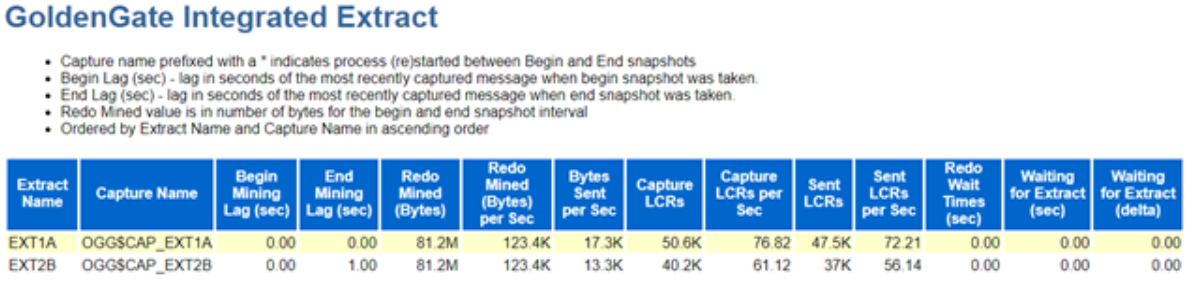
Posted in Uncategorized | Tagged: , , | Leave a Comment »

Replication between Oracle & PostgreSQL using Oracle Golden Gate.

Posted by FatDBA on May 31, 2024

Hi Mates,

Recently I was doing one migration where Golden Gate was used for data movement/migration between this source which is was Oracle 19.1 database to target, that was PostgreSQL 12. This was the first time I was doing this for PostgreSQL, I earlier tried with MySQL, Teradata and Cassandra and they were little tricky, specially the one with Cassandra. Let’s see how this one with PostgreSQL goes …

Okay, so this post is all about setting a test replication setup between Oracle and PostgreSQL database. Without further ado, let’s get started!

Details:
Source: Oracle 19c (19.3.0) database
Target: Vanilla/Open-Source PostgreSQL 12.6.7
Golden Gate Version: Golden Gate 19.1 for Oracle (Source), Golden Gate 19.1 for PostgreSQL Database (Target Host).
Source Hostname: canttowinsec.quebecdomain (IP 192.168.154.129)
Target Hostname: canttowin.ontadomain (192.168.154.128)

ON SOURCE:

Let’s first create the user and one test table on the source database which we will use to do this demo.

sqlplus / as sysdba

SQL*Plus: Release 19.0.0.0.0 - Production on Wed Jun 23 15:21:01 2021
Version 19.3.0.0.0
Copyright (c) 1982, 2019, Oracle.  All rights reserved.
Connected to:
Oracle Database 19c Enterprise Edition Release 19.0.0.0.0 - Production Version 19.3.0.0.0

SQL> create user opeth identified by opeth;

User created.

SQL> grant connect to opeth;

Grant succeeded.

SQL> conn opeth/opeth
Connected.

SQL>  create table testtable (col1 number, col2 varchar2(20));

Table created.

SQL> alter table testtable add primary key (col1);

Table altered.

Next I will install Golden Gate using a response file (silent method to install).

[oracle@canttowin Disk1]$ ./runInstaller -silent -nowait -responseFile /home/oracle/ggdirpsql/Disk1/response/oggcore.rsp
Starting Oracle Universal Installer...

Checking Temp space: must be greater than 120 MB.   Actual 6549 MB    Passed
Checking swap space: must be greater than 150 MB.   Actual 3945 MB    Passed
Preparing to launch Oracle Universal Installer from /tmp/OraInstall2021-06-18_04-33-50AM. Please wait ...[oracle@canttowin Disk1]$ You can find the log of this install session at:
 /u01/app/oraInventory/logs/installActions2021-06-18_04-33-50AM.log
The installation of Oracle GoldenGate Core was successful.
Please check '/u01/app/oraInventory/logs/silentInstall2021-06-18_04-33-50AM.log' for more details.
Successfully Setup Software.

Next, I will set the environmental variables to avoid any errors while calling the GG cli and will create the manager process.

[oracle@canttowinsec ggdirpsql]$ pwd
/home/oracle/ggdirpsql
[oracle@canttowinsec ggdirpsql]$ export PATH=$PATH:/home/oracle/ggdirpsql
[oracle@canttowinsec ggdirpsql]$ export LD_LIBRARY_PATH=$ORACLE_HOME/lib:/home/oracle/ggdirpsql
[oracle@canttowinsec ggdirpsql]$


[oracle@canttowin ggdir]$ ./ggsci

Oracle GoldenGate Command Interpreter for Oracle
Version 19.1.0.0.4 OGGCORE_19.1.0.0.0_PLATFORMS_191017.1054_FBO
Linux, x64, 64bit (optimized), Oracle 19c on Oct 17 2019 21:16:29
Operating system character set identified as UTF-8.

Copyright (C) 1995, 2019, Oracle and/or its affiliates. All rights reserved.


GGSCI (canttowinsec.quebecdomain) 7> view param mgr

PORT 7810


GGSCI (canttowinsec.quebecdomain) 1> start mgr
Manager started


GGSCI (canttowinsec.quebecdomain) 1> info all

Program     Status      Group       Lag at Chkpt  Time Since Chkpt

MANAGER     RUNNING

Now when manager process is running, next will login to the source database using Golden Gate and will list the table what we have created in the beginning, this is just to assure if everything is okay at the source.

GGSCI (canttowinsec.quebecdomain) 6> dblogin userid opeth, password opeth
Successfully logged into database.


GGSCI (canttowinsec.quebecdomain as opeth@dhavaldb) 10> list tables opeth.*
opeth.testtable

Found 1 tables matching list criteria.


All good, lets's create the EXTRACT process on the source system.

GGSCI (canttowinsec.quebecdomain) 2> edit param EORPSQL

GGSCI (canttowinsec.quebecdomain) 1> view params EORPSQL

EXTRACT EORPSQL
USERID opeth, password opeth
RMTHOST 192.168.154.128, MGRPORT 7810
RMTTRAIL ./dirdat/ep
TABLE opeth.testtable;


GGSCI (canttowinsec.quebecdomain) 4> add extract EORPSQL, tranlog, begin now
EXTRACT added.


GGSCI (canttowinsec.quebecdomain) 5> add exttrail ./dirdat/ep, extract EORPSQL, megabytes 5
EXTTRAIL added.

GGSCI (canttowinsec.quebecdomain) 6> start EORPSQL

Sending START request to MANAGER ...
EXTRACT EORPSQL starting


GGSCI (canttowinsec.quebecdomain) 11> info EORPSQL

EXTRACT    EORPSQL   Last Started 2021-06-23 15:10   Status RUNNING
Checkpoint Lag       00:00:00 (updated 00:00:07 ago)
Process ID           10714
Log Read Checkpoint  Oracle Redo Logs
                     2021-06-23 15:11:11  Seqno 15, RBA 31941120
                     SCN 0.2711866 (2711866)

ON TARGET:

Now we are done with all prerequisites, installation and configurations at the source end, let’s move to the target system now where we have our PostgreSQL database running. I will create the same table what we have created on Oracle database (source).

[postgres@canttowin ggdirpsql]$ psql -p 5432
psql (12.6.7)
Type "help" for help.

postgres=# \c opeth opeth
You are now connected to database "opeth" as user "opeth".

opeth=# CREATE TABLE "public"."testtable"
opeth-# (
opeth(#   "col1" integer NOT NULL,
opeth(#   "col2" varchar(20),
opeth(#   CONSTRAINT "PK_Col111" PRIMARY KEY ("col1")
opeth(# )
opeth-# ;
CREATE TABLE
opeth=#
opeth=#
opeth=# \dt+
                     List of relations
 Schema |  Name  | Type  |  Owner   |  Size   | Description
--------+--------+-------+----------+---------+-------------
 public | testtable | table | postgres | 0 bytes |
(1 row)

Next comes the most important part, that is to create the odbc.ini file, Golden Gate uses an ODBC connection to connect to the Postgres database. The ODBC driver is shipped with the installation and on Unix you have to create the ODBC configuration file which is commonly called odbc.ini on your own. You need to create this file in GG_HOME directory on the target system.

[postgres@canttowin ggdirpsql]$ more odbc.ini
[ODBC Data Sources]
PostgreSQL on pgsql
[ODBC]
IANAAppCodePage=4
InstallDir=/home/postgres/ggdirpsql
[pg12db]
Driver=/home/postgres/ggdirpsql/lib/GGpsql25.so
Description=Postgres driver
Database=opeth
HostName=canttowin.ontadomain
PortNumber=5432
LogonID=opeth
Password=opeth


Reference:
Driver=<your goldengate home directory>/lib/GGpsql25.so
InstallDir= <where you have installed your GG software on target server.
IANAAppCodePage= <The value 4 represents the ISO-8859-1 character set>
Database=<Postgres Database Name>
HostName=<Hostname of the Postgres database>
PortNumber=<Port number of the Postgres database>
LogonID=<Username of the Postgres database>
Password=<Password of the Postgres database>

Now, let’s set the environmental variables to point locations for odbc file along with lib directory and installation dir and create all required GG specific directories on the target database server.

[postgres@canttowin ggdirpsql]$ export ODBCINI=/home/postgres/ggdirpsql/odbc.ini
[postgres@canttowin ggdirpsql]$ export PATH=$PATH:/home/postgres/ggdirpsql
[postgres@canttowin ggdirpsql]$  export LD_LIBRARY_PATH=/home/postgres/ggdirpsql/lib


[postgres@canttowin ggdirpsql]$ ./ggsci

Oracle GoldenGate Command Interpreter for PostgreSQL
Version 19.1.0.0.200714 OGGCORE_19.1.0.0.0OGGBP_PLATFORMS_200628.2141
Linux, x64, 64bit (optimized), PostgreSQL on Jun 29 2020 03:59:15
Operating system character set identified as UTF-8.

Copyright (C) 1995, 2019, Oracle and/or its affiliates. All rights reserved.


GGSCI (canttowin.ontadomain) 1> create subdirs

Creating subdirectories under current directory /home/postgres/ggdirpsql

Parameter file                 /home/postgres/ggdirpsql/dirprm: created.
Report file                    /home/postgres/ggdirpsql/dirrpt: created.
Checkpoint file                /home/postgres/ggdirpsql/dirchk: created.
Process status files           /home/postgres/ggdirpsql/dirpcs: created.
SQL script files               /home/postgres/ggdirpsql/dirsql: created.
Database definitions files     /home/postgres/ggdirpsql/dirdef: created.
Extract data files             /home/postgres/ggdirpsql/dirdat: created.
Temporary files                /home/postgres/ggdirpsql/dirtmp: created.
Credential store files         /home/postgres/ggdirpsql/dircrd: created.
Masterkey wallet files         /home/postgres/ggdirpsql/dirwlt: created.
Dump files                     /home/postgres/ggdirpsql/dirdmp: created.


Now, time to create all GG related processes, will start with manager process, followed by replicat 
GGSCI (canttowin.ontadomain) 2> edit param mgr

GGSCI (canttowin.ontadomain) 3> start mgr
Manager started.


GGSCI (canttowin.ontadomain) 2> dblogin sourcedb pg12db userid opeth
Password:

2021-06-23 15:00:58  INFO    OGG-03036  Database character set identified as UTF-8. Locale: en_US.UTF-8.

2021-06-23 15:00:58  INFO    OGG-03037  Session character set identified as UTF-8.
Successfully logged into database.


GGSCI (canttowin.ontadomain as opeth@pg12db) 5> list tables public.*
public.testtable

Found 1 tables matching list criteria.


GGSCI (canttowin.ontadomain as opeth@pg12db) 15> view params RORPSQL

REPLICAT RORPSQL
SOURCEDEFS ./dirdef/testtable.def
SETENV ( PGCLIENTENCODING = "UTF8" )
SETENV (ODBCINI="/home/postgres/ggdirpsql/odbc.ini" )
SETENV (NLS_LANG="AMERICAN_AMERICA.AL32UTF8")
TARGETDB pg12db, USERID opeth, PASSWORD opeth
DISCARDFILE ./dirrpt/diskg.dsc, purge
MAP opeth.testtable, TARGET public.testtable, COLMAP (COL1=col1,COL2=col2);


GGSCI (canttowin.ontadomain as opeth@pg12db) 7> add replicat RORPSQL, NODBCHECKPOINT, exttrail ./dirdat/ep
REPLICAT added.


GGSCI (canttowin.ontadomain as opeth@pg12db) 8> start RORPSQL

Sending START request to MANAGER ...
REPLICAT RORPSQL starting


GGSCI (canttowin.ontadomain as opeth@pg12db) 9> info all

Program     Status      Group       Lag at Chkpt  Time Since Chkpt

MANAGER     RUNNING
REPLICAT    RUNNING     RORPSQL     00:00:59      00:00:03


GGSCI (canttowin.ontadomain as opeth@pg12db) 13>

GGSCI (canttowin.ontadomain as opeth@pg12db) 13> info RORPSQL

REPLICAT   RORPSQL   Last Started 2021-06-23 15:20   Status RUNNING
Checkpoint Lag       00:00:00 (updated 00:00:03 ago)
Process ID           97138
Log Read Checkpoint  File ./dirdat/ep000000000
                     2021-06-23 15:21:41.005117  RBA 29169

All set, we have all processes running at both source and target system. Now, if you running on Golden gate version 12.3 and above, no need to do generate the definition of tables, as the metadata is now present in the trail file itself, like in this demo I am using GG 19.1.

So, only if you running on GG version < 12.3 you need to generate the definition (using defgen file) of the table on source system and move it to the DIRDAT directory on target so that replicat considers that.

Now, let’s do some testing to see if records are flowing from source to target database.

ON SOURCE:

[oracle@canttowinsec dirdef]$ !sql
sqlplus / as sysdba

SQL*Plus: Release 19.0.0.0.0 - Production on Wed Jun 23 15:21:01 2021
Version 19.3.0.0.0
Copyright (c) 1982, 2019, Oracle.  All rights reserved.
Connected to:
Oracle Database 19c Enterprise Edition Release 19.0.0.0.0 - Production Version 19.3.0.0.0

SQL> conn opeth/opeth
Connected.
SQL> insert into testtable values (1,'hello world!');

1 row created.

SQL> select * from testtable;

      COL1 COL2
---------- --------------------
         1 hello world!

SQL>
SQL> commit;

Commit complete.

Let’s see if the same record is reached the target side.

ON TARGET:

[postgres@canttowin ggdirpsql]$ psql -p 5432
psql (12.6.7)
Type "help" for help.

postgres=# \c opeth opeth
You are now connected to database "opeth" as user "opeth".

psql (12.6.7)
Type "help" for help.

opeth=# select * from testtable;
 col1 |  col2
------+---------
   10 | hello world!

(1 rows)

opeth=# 

Cool! it’s pretty easy to setup this solution to migrate your data from Oracle to PostgreSQL database.

Few things to note here
–> You don’t need to install Golden Gate for PostgreSQL, on source system which is where your oracle database is, requires Golden Gate for Oracle.
–> Only on target database is where you have to install Golden Gate for PostgreSQL
–> odbc.ini is the file which you have to create on target end (where your postgresql server is).
–> Always before calling ggsci, set PATH and LD_LIBRARY_PATH, else you might get an error message while calling the cli.
–> Be very careful while creating the odbc.ini file otherwise you will end up with some obscure errors,

Hope It Helped!
Prashant Dixit

Posted in Uncategorized | Tagged: , , , | Leave a Comment »

Toronto Oracle Users Group (TOUG) Spring Meetup 2024 Slide deck

Posted by FatDBA on May 16, 2024

I appreciate Toronto Oracle Users Group (TOUG) for providing me with this fantastic opportunity to present. I trust that the audience enjoyed my presentation “Unveiling My Top 5 Favorites: Oracle 23ai Performance!

The meetup was fantastic, featuring some great presentations from Simo Vilmulen (Accenture – Enkitec Group) and Oleksiy Razborshchuk (from Oracle Corp).

Attached is the slide deck I utilized during the session. Please don’t hesitate to inquire about any of the six features or improvements we covered.

Posted in Uncategorized | Tagged: , , | Leave a Comment »