Tales From A Lazy Fat DBA

Its all about Databases, their performance, troubleshooting & much more …. ¯\_(ツ)_/¯

Posts Tagged ‘oracle’

Database Migration Challenges : JServer JAVA Virtual Machine gets INVALID or UPGRADING during manual upgrade

Posted by FatDBA on December 14, 2024

Migrations can be a horrifying experience —tricky, complex, time-intensive, and often riddled with unexpected challenges. This becomes even more evident when you’re migrating between older database versions, where architectural and component-level changes are significant. I remember one such encounter during a migration from Oracle 11g to 19c on a new infrastructure. Using RMAN DUPLICATE with the NOOPEN clause to restore source database backup in target before calling manual upgrade procedures, the process seemed smooth initially but soon wrapped into a host of issues with key database components.

The Problem

During the upgrade process, several critical components failed, leaving the database in an inconsistent state. The errors revolved around the following components:

COMP_IDCOMP_NAMEVERSIONSTATUS
JAVAVMJServer JAVA Virtual Machine11.2.0.4.0UPGRADING
XMLOracle XDK19.0.0.0.0INVALID
CATJAVAOracle Database Java Packages19.0.0.0.0INVALID

The errors observed in dbupgrade runtime logs included:

ORA-29554: unhandled Java out of memory condition
ORA-06512: at "SYS.INITJVMAUX", line 230
ORA-06512: at line 5

ORA-06512: : at "SYS.INITJVMAUX", line 230 ORA-06512: at line 5
[ORA-29548: Java system class reported: release of Java system classes in the database (11.2.0.4.190115) does not match that of the oracle executable (19.0.0.0.0 1.8)

These errors stemmed from a failure to allocate sufficient memory during the upgrade process. The Java Virtual Machine (JVM) ran out of memory, causing cascading errors that invalidated other components like Oracle XDK and Java Database Packages (CATJAVA). This wasn’t a mere inconvenience—it meant that critical database functionality was broken, making the system unusable for applications relying on these components.

Root Cause

Upon investigation, we found that the issue was caused by using a temporary RMAN parameter file during the restore process. This parameter file contained a minimal set of initialization parameters, which were insufficient to handle the resource-intensive operations required during the upgrade, particularly for recompiling and validating Java components.

Key memory areas like the SGA, shared pool, large pool, and Java pool were inadequately configured. These areas play a crucial role during the execution of upgrade scripts such as dbupgrade, catctl.pl, or catupgrd.sql. Without sufficient memory, the upgrade process for these components failed midway, leaving them in an invalid state.

The Fix

To resolve these issues and ensure the migration proceeded smoothly, the following steps were taken:

Step 1: Adjust Initialization Parameters

The first step was to allocate adequate memory for the Java components to prevent out-of-memory conditions. Critical parameters like the Java pool and other memory pools were adjusted to handle the load during the upgrade process:

ALTER SYSTEM SET java_jit_enabled = TRUE;
ALTER SYSTEM SET "_system_trig_enabled" = TRUE;
ALTER SYSTEM SET java_pool_size = 180M; -- Ensure at least 150 MB is allocated

Step 2: Recreate the Java Component

The next step was to drop and recreate the Java component in the database. This ensured that any inconsistencies caused by the previous upgrade failure were cleaned up:

CREATE OR REPLACE JAVA SYSTEM;

Step 3: Restart the Upgrade Scripts

After fixing the memory settings and recreating the Java component, the upgrade process was restarted using Oracle’s upgrade utilities:

  • dbupgrade: The recommended tool for 19c migrations.
  • catctl.pl: For manual control over the upgrade process.
  • catupgrd.sql: A fallback script for older methods.

Logs such as upg_summary.log were closely monitored during the process to catch any errors or exceptions in real-time.

Step 4: Verify the Upgrade

Once the upgrade process was completed, the status of all components was verified using the DBA_REGISTRY and DBA_REGISTRY_HISTORY views:

SELECT SUBSTR(comp_name, 1, 30) comp_name, 
SUBSTR(version, 1, 20) version,
status
FROM dba_registry
ORDER BY comp_name;

Expected output:

COMP_NAME                      VERSION              STATUS
------------------------------ -------------------- ---------------
JServer JAVA Virtual Machine 19.0.0.0.0 UPGRADED

Key Takeaways

This experience highlighted several crucial lessons when handling database migrations, especially for major version upgrades like 11g to 19c:

1. Adequate Initialization Parameters Are Essential

The memory-related initialization parameters (java_pool_size, shared_pool_size, etc.) must be configured appropriately before starting the upgrade process. Using a minimal parameter file during RMAN DUPLICATE can lead to critical issues if not adjusted later.

2. Resource-Intensive Components Need Extra Attention

Components like JAVAVM, Oracle XDK, and CATJAVA are highly resource-intensive. Even slight memory misconfigurations can lead to cascading failures that disrupt the entire migration process.

3. Monitor Upgrade Logs Closely

Keeping an eye on upgrade runtime logs and the summary logs (upg_summary.log) is vital for catching errors early. This allows you to address issues promptly before they snowball into larger problems.

4. Understand Dependencies

Database components often have interdependencies. For instance, a failure in the Java Virtual Machine component affected both the Oracle XDK and CATJAVA packages. Understanding these dependencies is key to resolving issues effectively.

Conclusion

Database migrations are inherently challenging, especially when dealing with major version jumps. This particular experience from migrating Oracle 11g to 19c served as a valuable reminder of the importance of preparation, thorough testing, and paying close attention to resource configurations. With the right approach, even complex migrations can be navigated successfully, ensuring the database is ready for modern workloads and enhanced performance.

By addressing these pitfalls and being proactive, you can ensure a smoother upgrade process and avoid unnecessary downtime or functionality issues.

Let me know if this approach resonates with your migration experiences!

Hope It Helped!
Prashant Dixit

Posted in Uncategorized | Tagged: , , , , , , | Leave a Comment »

Enhancing Materialized View Refreshes with Oracle 12.1’s Out-of-Place Refresh

Posted by FatDBA on November 23, 2024

While addressing a recent materialized view refresh issue, I revisited a feature introduced in Oracle 12.1—out-of-place refresh. It’s a concept I’ve been familiar with for some time but hadn’t had the opportunity to explore practically until now. This innovation addresses key challenges faced during materialized view refreshes in data-heavy environments, offering a smarter and more efficient alternative to traditional methods.

Why Materialized Views Are Powerful (and Challenging) ?

Materialized views (MVs) simplify data retrieval by precomputing and storing query results as physical tables. They are especially useful for complex queries that join data from multiple tables. However, as materialized views grow in size, refreshing them becomes a major bottleneck.

The default refresh method, COMPLETE refresh, removes all existing data before repopulating the view. While effective for smaller datasets, this approach becomes painfully slow for large materialized views, as it relies on delete operations followed by insertions.

To mitigate this, some administrators opt for atomic_refresh = FALSE, which uses the faster TRUNCATE operation instead of delete statements. While truncate drastically improves performance, it comes with a trade-off: materialized views become inaccessible during refresh, impacting any dependent applications.

Out-of-Place Refresh to the Rescue

Oracle’s out-of-place refresh, introduced in 12.1, provides a great solution. Instead of working directly on the materialized view, the refresh process creates temporary outside tables. The necessary updates are performed on these temporary tables, which are then swapped with the materialized view once the refresh is complete. This approach minimizes downtime and ensures that materialized views remain accessible throughout the process.

Out-of-place refresh supports all major refresh methods, including FAST (‘F’), COMPLETE (‘C’), and PCT (‘P’). It is particularly effective in scenarios involving large data changes, where traditional methods struggle to scale. This feature also avoids issues like fragmentation or exposure of intermediate results during refresh.

Here’s how you can enable out-of-place refresh using the DBMS_MVIEW package:

DBMS_MVIEW.REFRESH('FATDBA.MY_TEST_MVIEW', method => '?', atomic_refresh => FALSE, out_of_place => TRUE);
or 
DBMS_MVIEW.REFRESH('FATDBA.MY_TEST_MVIEW', method => 'C', atomic_refresh => FALSE, out_of_place => TRUE);

In this example, Oracle first attempts an out-of-place FAST refresh. If that’s not possible, it tries PCT refresh and finally falls back to a complete refresh. In second example, it starts performing the complete refresh of MV.

During the refresh you will see some of the operations happening in the background on the auxiliary/temp table ..

/* MV_REFRESH (ITB) */INSERT /*+ APPEND */ INTO "FATDBA"."RV$B318VA"   (SELECT /*+ PARALLEL ("xxx",10) */ xxxxx
-- This is where it starts copying rows into this temp table. 

/* MV_REFRESH (CIDX) */ CREATE INDEX "FATDBA"."RV$KHA121" ON "FATDBA"."RV$B318VA" ("x", "y", "z")	PCTFREE 10 INITRANS 2 MAXTRANS 255 COMPUTE STATISTICS 
STORAGE( INITIAL 131072 NEXT 131072 MINEXTENTS 1 MAXEXTENTS 2147483645  PCTINCREASE 0  BUFFER_POOL DEFAULT FLASH_CACHE DEFAULT CELL_FLASH_CACHE DEFAULT) TABLESPACE "xxxx"  PARALLEL 10
-- Once done with the data insertion in the temp table, it starts to create same indexes that are there on the existing MV base table.


Note : 
The abbreviations ITB (Insert Temporary Table) and CIDX (Create Index) are typically used as internal identifiers in Oracle's materialized view refresh operations. 

Points to Consider

While the out-of-place refresh is a powerful tool, there are a few considerations to keep in mind:

  • Temporary Storage Needs: Adequate tablespace is required to hold two copies of the materialized view during refresh.
  • Recycle Bin Impact: If enabled, the recycle bin retains older copies of the table. It’s recommended to disable the recycle bin to avoid unnecessary space consumption.
  • Statistics Management: While index statistics are automatically computed during refresh, table statistics are not. Manual intervention may be needed.
  • Parallelism on Indexes : During the out-of-place refresh it always tries to recreate same indexes what you have on your existing MV base table, so its good to add some DOP (removed them later on once refresh is done), otherwise the creation process will go serial and the entire process will take lot of time to finish in case of bulky MVs.
  • Errors during table swap : If you have a very busy environment, you might hit ‘ORA_08103: object no longer exists‘ error message when the out-of-place method doing the swap of tables & its indexes.
  • Compatibility:
    • Unsupported for remote, cube, or object materialized views.
    • Not compatible with LOB columns.
    • Requires atomic_refresh = FALSE.

Final Thoughts

The out-of-place refresh feature in Oracle 12.1 is a significant improvement for managing materialized views in large databases. By executing refresh operations on temporary tables, it optimizes performance and ensures continuous availability, making it an invaluable tool for data-intensive environments.

If your materialized views are becoming cumbersome to manage, consider leveraging out-of-place refresh. It not only streamlines the refresh process but also enhances the overall efficiency and reliability of your database operations.

Hope It Helped!
Prashant Dixit

Posted in Uncategorized | Tagged: , , , , , , , | Leave a Comment »

How I see vector indexing and search in Oracle 23ai

Posted by FatDBA on November 1, 2024

Hi everyone!

It’s been a while since Oracle 23c (or 23c AI) was released, and there’s already a ton of great content out there on one of its coolest new features: Vector Indexes and Searches. This feature has opened up exciting possibilities for AI-driven applications, from advanced recommendations to similarity searches within databases. Now, it’s finally my turn to dive in and put it to the test!

Vector search in Oracle 23c AI is a feature designed for searching, comparing, and finding similarities between data represented as vectors (numerical arrays). This capability is particularly useful for AI and machine learning applications, where data like images, text, and products are often encoded as vector embeddings. Oracle’s vector search enables the database to efficiently process these embeddings, allowing users to perform similarity-based queries within the database. Oracle’s vector search in 23c AI makes it possible to bring advanced similarity-based search and recommendation capabilities directly into the database, facilitating powerful new applications that leverage the latest in AI and machine learning.

The base or the foundation of this feature is VECTOR data type, a powerful tool for storing and managing vector embeddings directly within the database. This capability allows Oracle to support advanced AI and machine learning applications, such as similarity searches and recommendation engines, by efficiently handling multi-dimensional arrays that represent data features, semantics, or other complex characteristics.

Key Advantages of the VECTOR Data Type

  1. Compact Multi-Dimensional Array Storage:
  • VECTOR allows fixed-length arrays of numbers (often floating-point) to be stored compactly in a single column. A 100-dimensional vector, for instance, might represent an embedding for text, an image, or a user profile, capturing nuanced data in a manageable form.
  1. Efficient Similarity Calculations:
  • With Oracle 23c AI, VECTOR data can be processed for similarity searches directly in the database. Functions like VECTOR_DISTANCE make it easy to calculate similarity scores or distances between vectors, enabling Oracle to quickly identify similar items without needing external tools or complex data transformations.
  1. Tailored for AI and Machine Learning:
  • VECTOR is ideal for applications that require semantic searches, such as finding similar products, media, or documents, and for AI-driven recommendations. This makes it well-suited for Natural Language Processing (NLP), recommendation engines, and image recognition tasks.
  1. Support for Various Distance Metrics:
  • Oracle’s VECTOR data type is compatible with common distance metrics, such as Euclidean and cosine similarity, which measure how close or far two vectors are from each other. This enables efficient and flexible similarity calculations, essential for applications relying on vector comparisons.
  1. Scalability with Vector Indexing:
  • Oracle 23c AI allows for VECTOR data indexing through VECTOR_INDEX, optimizing performance for vector-based queries. This makes real-time similarity searches on large datasets feasible, supporting applications that need quick response times, such as real-time AI insights and personalized recommendations.

The VECTOR data type in Oracle 23c AI is a robust addition for data scientists and developers, enabling high-performance similarity searches, efficient data storage, and a foundation for complex AI and machine learning workloads directly within the Oracle database.

Alright, so now when the stage is set, lets stay tuned as I explore how Vector Indexes and Searches can bring a whole new dimension to Oracle 23c. Here’s a detailed, step-by-step demo to help you showcase vector search and indexes in Oracle Database 23c AI, which will be ideal for your blog post. This example will simulate a product recommendation system using vector embeddings to represent product features.

1. Set Up the Environment

Ensure you’re using Oracle 23c AI, as vector indexes and the VECTOR data type are new features available in this release.

2. Create a Table with Vector Embeddings

In this example, each product is represented by a 10-dimensional vector embedding. This vector could represent a combination of product attributes, like color, category, brand, and other numerical encodings.

CREATE TABLE products (
    product_id NUMBER PRIMARY KEY,
    product_name VARCHAR2(100),
    product_description VARCHAR2(255),
    product_embedding VECTOR(10) -- Vector with 10 dimensions
);

3. Insert Sample Data

Populate the table with sample products and their vector embeddings. Here’s an example where each vector represents the product’s characteristics:

INSERT INTO products (product_id, product_name, product_description, product_embedding) VALUES 
    (1, 'Laptop A', 'High-performance laptop for professionals', VECTOR(0.5, 0.2, 0.7, 0.1, 0.4, 0.3, 0.8, 0.6, 0.9, 0.3)),
    (2, 'Smartphone B', 'Latest smartphone with advanced features', VECTOR(0.6, 0.1, 0.8, 0.5, 0.2, 0.7, 0.4, 0.3, 0.6, 0.1)),
    (3, 'Tablet C', 'Compact and powerful tablet for multimedia', VECTOR(0.4, 0.9, 0.5, 0.7, 0.3, 0.6, 0.2, 0.8, 0.1, 0.9)),
    (4, 'Laptop D', 'Affordable laptop with reliable performance', VECTOR(0.7, 0.6, 0.4, 0.9, 0.8, 0.2, 0.5, 0.3, 0.1, 0.4)),
    (5, 'Headphones E', 'Noise-canceling headphones with high fidelity', VECTOR(0.3, 0.8, 0.1, 0.9, 0.6, 0.4, 0.7, 0.2, 0.5, 0.6));

4. Create a Vector Index for Efficient Searches

Creating a vector index allows Oracle to search these embeddings efficiently based on similarity, which is ideal for recommendation systems, image retrieval, and text similarity searches.

CREATE INDEX product_vector_idx ON products (product_embedding)
    INDEXTYPE IS VECTOR_INDEX;

5. Perform a Vector Similarity Search

With the vector index in place, you can now perform searches to find products that are similar to a given vector. For example, suppose a user has shown interest in products that correspond to a vector representation of [0.6, 0.2, 0.5, 0.4, 0.3, 0.5, 0.7, 0.8, 0.2, 0.6]. You can use this vector to find products with similar embeddings.

SELECT product_name, product_description, product_embedding
FROM products
ORDER BY VECTOR_DISTANCE(product_embedding, VECTOR(0.6, 0.2, 0.5, 0.4, 0.3, 0.5, 0.7, 0.8, 0.2, 0.6)) ASC
FETCH FIRST 5 ROWS ONLY;

In this query:

  • The VECTOR_DISTANCE function calculates the similarity (distance) between the target vector and each product’s embedding. Sorting by VECTOR_DISTANCE allows you to retrieve the closest matches.
  • This example fetches the top 5 most similar products.

6. Use Case: Personalized Product Recommendation

This setup is ideal for applications such as a product recommendation engine. Suppose you have a user profile represented as a vector, you could use a vector search to find products similar to that profile, offering highly relevant recommendations.

7. Handling Updates to Vector Embeddings

If a product’s features change, you may need to update its embedding. Here’s how you could update the vector for a specific product:

UPDATE products
SET product_embedding = VECTOR(0.7, 0.3, 0.9, 0.5, 0.6, 0.4, 0.8, 0.2, 0.3, 0.5)
WHERE product_id = 2;

8. Advanced Use Case: Nearest Neighbor Search with Filtering

Let’s extend the search by filtering for specific criteria. For example, if you only want to recommend products that contain “Laptop” in the name, you can add a WHERE clause to the query.

SELECT product_name, product_description, product_embedding
FROM products
WHERE product_name LIKE '%Laptop%'
ORDER BY VECTOR_DISTANCE(product_embedding, VECTOR(0.6, 0.2, 0.5, 0.4, 0.3, 0.5, 0.7, 0.8, 0.2, 0.6)) ASC
FETCH FIRST 5 ROWS ONLY;

9. Explain the Vector Distance Metric

For your blog, it’s useful to explain the concept of vector similarity:

  • Vector Distance (Similarity): This metric measures how similar or dissimilar two vectors are. A smaller distance implies a higher similarity. Oracle 23c AI’s VECTOR_DISTANCE function calculates this distance to identify closely related items, making it ideal for applications in recommendations, content search, and clustering.

10. Additional Notes for Optimization and Use Cases

  • Index Maintenance: Like other indexes, a vector index should be maintained for performance. Ensure to monitor the index usage and rebuild if necessary for large datasets.
  • Scalability: Oracle 23c AI’s vector search is optimized for large-scale deployments, making it suitable for extensive recommendation systems, content-based searches, and personalized user experiences.

This detailed walkthrough should provide a comprehensive demo for your blog post, showcasing Oracle 23c AI’s new vector search and indexing features. Let me know if you need any additional details or further customization!

Hope It Helped!
Prashant Dixit

Posted in Uncategorized | Tagged: , , , , , , , , , | Leave a Comment »

Adapting Data Pump for the Cloud: Trailer Blocks in 23ai

Posted by FatDBA on November 1, 2024

Oracle Database 23c AI introduces a new trailer block format for Data Pump dump files, moving away from the traditional header block approach used in earlier versions like 21c. This new structure is designed specifically to support cloud storage environments, particularly within Oracle Cloud Infrastructure (OCI), and makes it easier to manage and transfer Data Pump files to object stores.

What’s Different with Trailer Blocks?

Trailer blocks are written only once the export process completes, contrasting with header blocks, which required upfront metadata and continuous updates throughout the job. This deferred approach means trailer blocks accumulate necessary metadata during the export process, allowing it to be stored in a more cloud-compatible format at the end. The switch to trailer blocks by default enables seamless storage of dump files in cloud object stores and reduces the limitations associated with local-only file systems.

Note : Trailer block files are compatible only with Oracle Database 23c AI and later. To ensure backward compatibility for previous Oracle versions, you can use the VERSION parameter to revert to the legacy header block format.

How to Use Trailer Blocks with Cloud Object Storage

When running Data Pump in Oracle 23c AI, trailer blocks allow straightforward use with object storage by configuring these essential parameters:

  1. Authenticate with Cloud Credentials: Ensure you have a credential object in place to establish the required connection with your object store.
  2. Configure DUMPFILE and CREDENTIAL Parameters: List export files using DUMPFILE and specify the credential to direct these files to the cloud.
  3. Set Log File Storage: Use the DEFAULT_DIRECTORY parameter to control log file storage. Failing to set up a valid cloud credential for object store URIs will lead to errors in dump file writing.

Steps for Cloud Storage Access

To export files directly to a cloud object store, ensure you have cloud credentials stored in an Oracle Wallet, with the location specified in your sqlnet.ora configuration. You will also need to add a certificate for authentication using orapki:

orapki wallet add -wallet <path_to_wallet> -trusted_cert -cert <certificate_file> -pwd <wallet_password>

This setup allows the Data Pump to use the CREDENTIAL parameter with the export command, establishing secure access to cloud storage.

Header Blocks vs. Trailer Blocks

In Oracle Database versions prior to 23c, Data Pump files used header blocks, where metadata was embedded at the start of each dump file. This format was limited to local storage and required metadata updates during export, which could be resource-intensive.

With Oracle Database 23c AI, trailer blocks are the default. This approach shifts metadata to the end of the file, streamlining the process for cloud storage. By using the VERSION parameter, you can control whether to retain the newer trailer block format or revert to header blocks based on compatibility needs.

Types of Trailer Blocks in Oracle 23c AI

Oracle 23c AI introduces two types of trailer blocks for handling Data Pump files:

  • Disk-Based Trailer Blocks: Directly written at the end of each primary table’s data in the dump file, providing a compact storage format.
  • Table-Based Trailer Blocks: Stored externally within the export’s primary table, conserving space by omitting individual trailer blocks for each data object. This approach efficiently manages storage while maintaining essential metadata for cloud-based and local export jobs.

Trailer blocks make Data Pump in Oracle Database 23c AI a flexible and cloud-ready solution, enabling efficient data movement across hybrid and cloud infrastructures. This updated approach supports larger cloud-based workflows by improving performance and storage efficiency for Data Pump exports.

Hope It Helped!
Prashant Dixit

Posted in Uncategorized | Tagged: , , , , , , , | Leave a Comment »

Data Pump Troubleshooting Tips – My favorite 6

Posted by FatDBA on October 26, 2024

There are numerous utilities, options, and methods available for migrating and moving data between Oracle databases, yet Oracle Data Pump remains one of the most widely used tools. A significant number of DBAs are very comfortable with Data Pump, as it has been a trusted utility for a long time (originally as exp and imp). Its stability, user-friendliness, and robust capabilities make it a top choice for handling large data migrations, backup, and restore operations.

However, one area where DBAs still often face challenges is troubleshooting when issues arise. When a Data Pump job fails, performs poorly, or behaves unexpectedly, it can be unclear where to start, what logs to review, or what checks to perform. Many find it difficult to pinpoint the source of the problem and make adjustments to optimize performance or resolve issues.

Today’s post focuses on troubleshooting Data Pump performance and functionality issues, sharing the steps I typically follow when diagnosing problems. We’ll cover key areas to investigate, like log file analysis, parameter tuning, network considerations, and common bottlenecks. These steps aim to provide a practical guide to understanding and resolving Data Pump issues and optimizing your data movement processes.

Option 1: Generate an AWR Report to Assess Database Performance

Start by generating an AWR (Automatic Workload Repository) report to gain insight into the database’s overall performance during the relevant period. Adjusting the AWR snapshot interval to 15 minutes is recommended for a more granular view. This approach reduces the chances of averaging out short performance spikes, allowing you to capture transient issues more effectively.

exec dbms_workload_repository.modify_snapshot_settings(null, 15);
exec dbms_workload_repository.create_snapshot;

Option 2: Enable SQL Trace for Data Pump Processes or Specific SQL IDs
Optionally, you can enable SQL trace for the Data Pump processes (dm for the master process and dw for worker processes) or for specific SQL statements by SQL ID. This will help isolate SQL-level performance issues affecting the Data Pump job.

alter system set events 'sql_trace {process: pname = dw | process: pname = dm} level=8';
alter system set events 'sql_trace[SQL: 8krc88r46raff]';

Option 3: Run Data Pump Job with Detailed Trace Enabled
For enhanced tracing, run the Data Pump job with additional trace options, which provide more comprehensive output. Including metrics=yes, logtime=all, and trace=1FF0300 in the command enables detailed logging of both timing and activity metrics. Tracing can be enabled by specifying an 7 digit hexadecimal mask in the TRACE parameter of Export DataPump (expdp) or Import DataPump (impdp). The first three digits enable tracing for a specific Data Pump component, while the last four digits are usually: 0300.

expdp ... metrics=yes logtime=all trace=1FF0300
impdp ... metrics=yes logtime=all trace=1FF0300

Data Pump tracing can also be started with a line with EVENT 39089 in the initialization parameter file. This method should only be used to trace the Data Pump calls in an early state, e.g. if details are needed about the DBMS_DATAPUMP.OPEN API call. Trace level 0x300 will trace all Data Pump client processes.

-- Enable event
ALTER SYSTEM SET EVENTS = '39089 trace name context forever, level 0x300' ;
-- Disable event
ALTER SYSTEM SET EVENTS = '39089 trace name context off' ;

Option 4: Review Data Pump Trace Files
Locate and analyze the Data Pump trace files stored in the Oracle trace directory. The master control process file names typically contain *dm*, while worker process files include *dw*. These files provide insights into the processes, job details, and potential error sources during execution.

Option 5: Activate SQL_TRACE on specific Data Pump process with higher trace level.
Lets assume we see that the Data Pump Master process (DM00) has SID: 143 and serial#: 50 and the Data Pump Worker process (DW01) has SID: 150 and serial#: 17. These details can be used to activate SQL tracing in SQL*Plus with DBMS_SYSTEM.SET_EV, e.g.:

-- In SQL*Plus, activate SQL tracing with DBMS_SYSTEM and SID/SERIAL#  
-- Syntax: DBMS_SYSTEM.SET_EV([SID],[SERIAL#],[EVENT],[LEVEL],'') 

-- Example to SQL_TRACE Worker process with level 4 (Bind values):   
execute sys.dbms_system.set_ev(150,17,10046,4,''); 

-- and stop tracing: 
execute sys.dbms_system.set_ev(150,17,10046,0,'');  


-- Example to SQL_TRACE Master Control process with level 8 (Waits):  
execute sys.dbms_system.set_ev(143,50,10046,8,'');  

-- and stop tracing:  
execute sys.dbms_system.set_ev(143,50,10046,0,'');

Option 6: Use the Data Pump Log Analyzer

I’ve personally used the Data Pump Log Analyzer for some time and have found it to be incredibly user-friendly, making it simple to understand the performance and runtime statistics of Data Pump jobs. This tool is highly effective in streamlining troubleshooting efforts, quickly identifying bottlenecks, and delivering clear insights into job performance. It’s a fantastic addition to a DBA’s toolkit and provides valuable capabilities that aren’t typically found in standard scripts. The Data Pump Log Analyzer has been tested with Data Pump log files across various database versions, including those generated by Data Pump client (expdp/impdp), Zero Downtime Migration (ZDM), OCI Database Migration Service (DMS), and Data Pump API (DBMS_DATAPUMP).The Data Pump Log Analyzer is a Python-based command-line utility designed for in-depth analysis of Oracle Data Pump log files. It goes beyond basic log review by offering detailed, structured insights into key performance metrics, errors, and process details. This tool can be particularly useful for DBAs needing a quick and comprehensive view of Data Pump job behavior, helping with issue diagnosis and performance optimization. Link to read and download or a more detailed guide on it’s usage Link

With the Data Pump Log Analyzer, you get:

  • Detailed Operations and Processing Metrics: Granular information on data operations for pinpoint analysis.
  • Error and ORA- Code Analysis: Summaries and explanations of encountered errors for easier troubleshooting.
  • Object-Type Breakdown and Processing Times: Insight into performance by object type, aiding in performance tuning.
  • Data Pump Worker Performance: Analyzes individual worker processes for any lagging tasks.
  • Summarized Schema, Table, Partition Details: Overview of data handled by each schema, table, or partition.
  • Instance-Based Data Analysis (for Oracle 21c and later): Statistics by instance for performance evaluation in multitenant setups.
  • Flexible Output Options: Filter, sort, and export analysis results to text or HTML for efficient sharing and record-keeping.

One below is with basic syntax to get operational details.

$ python3 dpla.py import.log
========================
Data Pump Log Analyzer
========================
...
Operation Details
~~~~~~~~~~~~~~~~~
Operation: Import
Data Pump Version: 19.23.0.0.0
DB Info: Oracle Database 19c EE Extreme Perf Release 19.0.0.0.0
Job Name: FATDBAJOB1
Status: COMPLETED
 Processing: -
Errors: 1301
 ORA- Messages: 1267
Start Time: 2024-08-21 01:30:45
End Time: 2024-08-21 11:43:11
Runtime: 35:03:06
Data Processing
~~~~~~~~~~~~~~~
Parallel Workers: 104
Schemas: 47
Objects: 224718
Data Objects: 188131
Overall Size: 19.11 TB

Use flag ‘-e’ to view all ORA- messages encountered during the Data Pump operation, or optionally you can filter our specific errors as well i.e. ‘-e ORA-39082 ORA-31684′.

python3 dpla.py import.log -e
========================
Data Pump Log Analyzer
========================
...
ORA- MESSAGES DETAILS
~~~~~~~~~~~~~~~~~~~~~
(sorted by count):
Message Count
--------------------------------------------------------------------------------------------------- ---------
ORA-39346: data loss in character set conversion for object COMMENT 919
ORA-39082: Object type PACKAGE BODY created with compilation warnings 136
ORA-39346: data loss in character set conversion for object PACKAGE_BODY 54
ORA-39082: Object type TRIGGER created with compilation warnings 36
ORA-39082: Object type PROCEDURE created with compilation warnings 29
ORA-31684: Object type USER already exists 27
ORA-39111: Dependent object type PASSWORD_HISTORY skipped, base object type USER already exists 27
ORA-39346: data loss in character set conversion for object PACKAGE 18
ORA-39082: Object type PACKAGE created with compilation warnings 10
ORA-39082: Object type VIEW created with compilation warnings 7
ORA-39346: data loss in character set conversion for object PROCEDURE 2
ORA-39082: Object type FUNCTION created with compilation warnings 2
--------------------------------------------------------------------------------------------------- ---------
Total 1267
--------------------------------------------------------------------------------------------------- ---------


Use flag ‘-o’ to see details about which types of database objects were involved in the Data Pump operation.

python3 dpla.py import.log -o
========================
Data Pump Log Analyzer
========================
...
Object                                  Count      Seconds      Workers     Duration
----------------------------------      ---------- -----------  ----------- ------------
SCHEMA_EXPORT/TABLE/TABLE_DATA             188296    6759219         128       6759219
CONSTRAINT                                    767      37253           1         37253
TABLE                                        2112       3225          51           156
COMMENT                                     26442        639         128            18
PACKAGE_BODY                                  197        125         128             5
OBJECT_GRANT                                 5279         25           1            25
TYPE                                          270          6           1             6
ALTER_PROCEDURE                               149          5           2             3
ALTER_PACKAGE_SPEC                            208          4           3             2
PACKAGE                                       208          3           3             1
PROCEDURE                                     149          2           2             1

...
---------------------------------- ---------- ----------- ----------- ------------
Total 224755 6800515 128 6796697
---------------------------------- ---------- ----------- ----------- ------------


Hope It Helped!
Prashant Dixit

Posted in Uncategorized | Tagged: , , , , , , , , , , , | Leave a Comment »

AWR Report Improvements in Oracle 23AI : New Replication Performance Sections

Posted by FatDBA on October 20, 2024

Oracle 23AI is undoubtedly packed with a range of both small and significant features. Every now and then, I stumble upon some standout additions, and this time, it’s the improvements in AWR reports that caught my attention. One of the key enhancements is the inclusion of more replication-related information captured and presented in these reports.

With this new update, AWR queries and reports are now streamlined and enhanced, offering a simplified yet detailed view of the replication process. This makes troubleshooting replication performance issues much easier. You can now categorize problems into workload-related issues, database-side misconfigurations (such as slow replication SQL due to missing indexes or incorrect database parameter settings), or performance bottlenecks either within the database or in Oracle GoldenGate processes.

The enhanced replication section includes a more comprehensive “Replication System Resource Usage” area. This shows the system resource consumption for all Oracle GoldenGate replication processes, whether they are foreground or background, and breaks it down for each Extract and Replicat process.

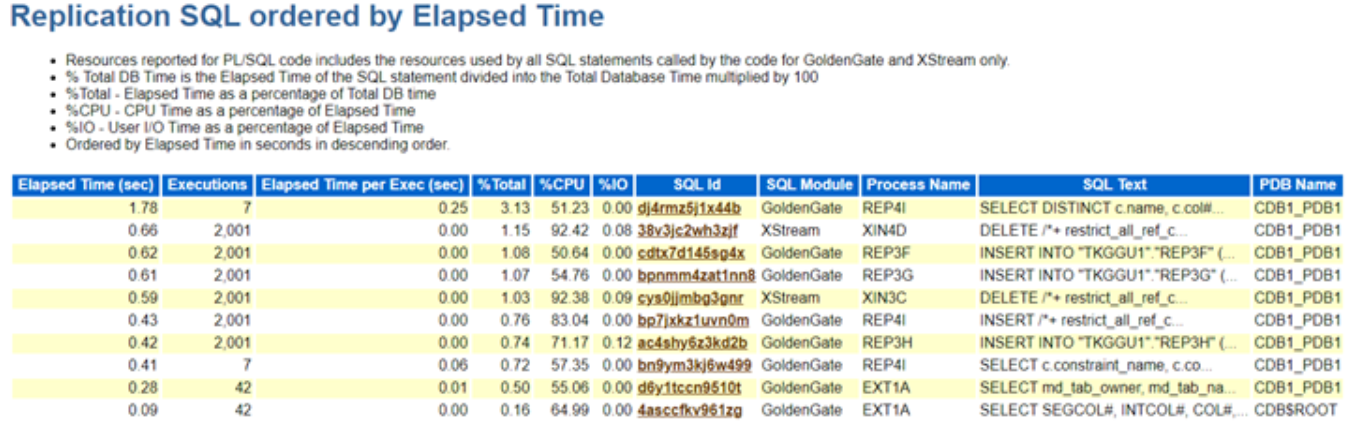
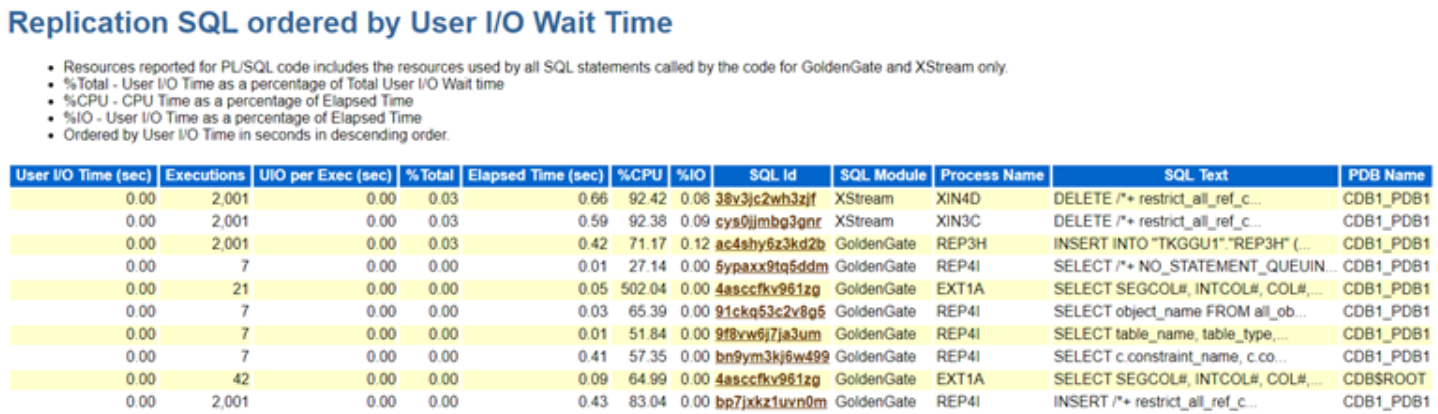
Additionally, a dedicated section for replication-related Top SQL statistics has been added, making it much easier to identify performance issues tied to specific SQL statements.

There’s also a separate section for top wait events related to replication processes, enabling faster identification and resolution of replication-related performance bottlenecks.

Lastly, the replication-related sections have been reorganized to present statistics by individual Extracts and different Replicat types, offering clearer insights into replication performance.

These enhancements are really great when it comes to monitoring and improving the performance of replication processes.

Replication System Resource Usage:
Metrics for Oracle GoldenGate replication now include detailed information such as the process name, type, and the number of sessions for each sub-component. Performance statistics are categorized based on the specific functionality of these sub-components and grouped by the process name. This enhancement allows for more granular monitoring of resource usage, giving visibility into the performance of each Extract and Replicat process, along with their individual sub-components.

Replication Wait Events:
There is a dedicated section within the report for replication related wait events (both foreground and background types).

Replication Top SQLs: This highlights the SQL statements executed by various replication processes, organized by key performance metrics such as Elapsed Time, CPU Time, and Execution Count. These sections in the Top SQL report provide a detailed breakdown, allowing administrators to quickly identify the most resource-intensive SQL queries impacting replication performance.

In addition, the replication process name is included for each SQL statement, making it easy to trace which process—whether Extract or Replicat—is responsible for executing the query. This level of granularity helps streamline troubleshooting efforts, as it enables pinpointing of inefficient SQL statements and their impact on replication. The inclusion of these metrics ensures that administrators have the necessary visibility to optimize SQL execution within replication processes, leading to improved overall system performance.

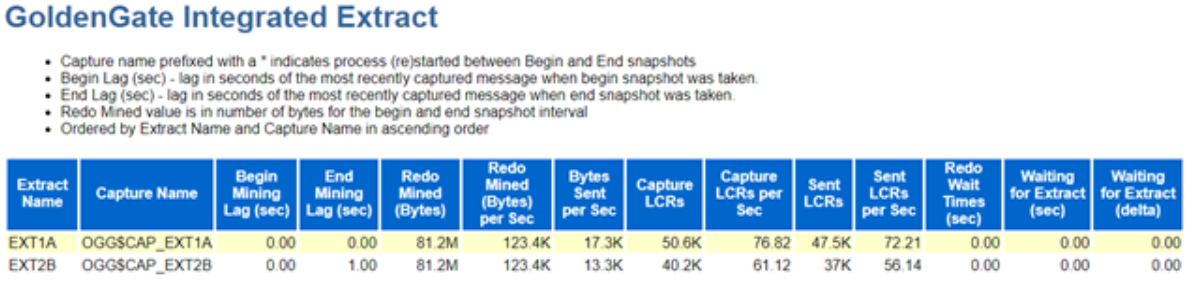
Oracle GoldenGate Extract Performance Metrics : This section explains more in Extract and Capture processes. It provides some really valuable information like ..

  • Lag (in seconds) derived by the time when the most recent LCR was created and received (measured both at the beginning and end)
  • The amount of redo data mined (in bytes).
  • Redo Mined Rate
  • Number of bytes sent by the Capture process to the Extract process since the last time the Extract process attached to the Capture process.
  • Number of LCRs delivered to the Capture from Logminer …. and much more … ….

Oracle GoldenGate Integrated Replicat:

Oracle GoldenGate Replicat: This section presents comprehensive performance statistics for Oracle GoldenGate’s classic, coordinated, and parallel Replicat processes. The SQL operation statistics are aggregated and displayed for each individual Replicat process, providing an overall view of their performance.

Hope It Helped!
Prashant Dixit

Posted in Uncategorized | Tagged: , , , , , , | Leave a Comment »

Addressing Stuck Undo Segments : How to Safely Drop Problematic Undo Segments

Posted by FatDBA on October 14, 2024

Hi All,

This post discusses an intriguing issue we encountered recently on a 19.22 Oracle database following a CDB restart. After the restart, we observed a peculiar problem where all sessions performing DDL commands were getting locked and hung at the PDB level. This behavior was affecting the entire database, essentially halting all DDL operations.

During our analysis, we discovered that the SMON process was waiting on a latch, leading to high CPU resource consumption. Furthermore, we noticed that the MMON process was blocking SMON, causing additional delays. The alert log revealed multiple error messages, which further complicated the diagnosis.

This issue required a deep dive into Oracle’s background processes and system-level contention to resolve, as it was causing a significant disruption to database operations.

-- Fragments from alert log, smon/mmon process logs and standard diag traces.
kcbzib: encounter logical error ORA-1410, try re-reading from other mirror..
TRCMIR:kcf_reread     :start:3722012:0:+DATA/CDBMONKEY/AA82C21DD440449FE053B4146E0AA55B/DATAFILE/tablespace_test_dataaa.xxx.xxxx
TRCMIR:kcf_reread     :done :3722012:0:+DATA/CDBMONKEY/AA82C21DD440449FE053B4146E0AA55B/DATAFILE/tablespace_test_dataaa.xxx.xxxxx
kcbzibmlt: encounter logical error ORA-1410, try re-reading from other mirror..

---> SMON: Parallel transaction recovery tried
30317 error message received from server=1.70(P01Y) qref:0x8de103cf0 qrser:5121 qrseq:3 mh:0x97fdf9460
Parallel Transaction recovery caught exception 12801
Parallel Transaction recovery caught error 30317

*** 2024-08-19T20:38:23.297997-04:00 (PWS1E(3))
Parallel Transaction recovery caught exception 30319
Parallel Transaction recovery caught error 30319

*** 2024-08-19T20:38:50.613855-04:00 (PWS1E(3))
30317 error message received from server=1.57(P01L) qref:0x8de109fe8 qrser:11265 qrseq:3 mh:0x95fccd3c8
Parallel Transaction recovery caught exception 12801
Parallel Transaction recovery caught error 30317
Parallel Transaction recovery caught exception 30319

TEST1E(3):about to recover undo segment 98 status:6 inst:0
TEST1E(3):mark undo segment 98 as available status:6 ret:1

TEST1E(3):about to recover undo segment 46 status:6 inst:0
TEST1E(3):mark undo segment 46 as available status:6 ret:1

The logs and trace files also highlighted an issue with two specific undo segments, identified by segment numbers 98 and 46, from the UNDO tablespace. Upon further investigation, we found that both segments were in a ‘RECOVERING’ state. What was particularly concerning was that the recovery process for these segments was progressing extremely slowly, with the v$fast_start_transactions view showing an unusually high estimated recovery time.

In fact, based on the progress we monitored, it seemed like the recovery process wasn’t moving forward at all and appeared to be stuck in some kind of loop. This stagnation in recovery added to the overall system’s delay, compounding the performance issues we were already facing. It became clear that this problem was a significant bottleneck in restoring the database to normal operation.

SQL> select * from V$FAST_START_TRANSACTIONS;

USN SLT SEQ STATE UNDOBLOCKSDONE UNDOBLOCKSTOTAL PID CPUTIME PARENTUSN PARENTSLT PARENTSEQ XID PXID RCVSERVERS CON_ID
---------- ---------- ---------- ---------------- -------------- --------------- ---------- ---------- ---------- ---------- 
46 46 2313064 RECOVERING 505 24992423 77 5586 0 0 0 10001000684B2300 0000000000000000 1 0
98 25 1352150 RECOVERING 0 226231 78 5586 0 0 0 30001900D6A11400 0000000000000000 1 0
	

SQL> SELECT segment_name, tablespace_name  FROM dba_rollback_segs  WHERE segment_id IN (98, 46);

SEGMENT_NAME		       TABLESPACE_NAME
------------------------------ ------------------------------
_SYSSMU46_5249279471$	       UNDOTEST1
_SYSSMU98_5249279471$	       UNDOTEST1

We attempted to take the segments offline and ultimately drop them, as they were associated with a materialized view (MV) refresh and a bulk insert statement. These operations were part of an ad-hoc activity, so it was acceptable for them to be missed. However, despite our efforts, the segments remained in a ‘PARTLY AVAILABLE’ state, leaving us with no option to drop or take them offline. This left us in a situation where we were essentially stuck, unable to proceed with dropping the segments or the associated tablespace. The inability to release these segments further complicated our recovery efforts.

We’d even checked the status of the those two undo segments using base table x$ktuxe and the KTUXESTA (Status) was coming as ‘DEAD’, means the transaction has failed but is still holding resources and that gave ius more confidence about what happened under the hood.

SQL> select min(sample_time), max(sample_time), sql_id, xid, count(1) from dba_hist_active_sess_history 
where xid in ('10001000684B2300','30001900D6A11400') group by sql_id, xid;

MIN(SAMPLE_TIME) MAX(SAMPLE_TIME) SQL_ID XID COUNT(1)
--------------------------------------------------------------------------- -------------------
15-SEP-24 01.22.25.446 PM 15-SEP-24 05.51.22.340 PM 30001900D6A11400 3213
15-SEP-24 10.22.46.218 AM 15-SEP-24 01.22.15.440 PM ac5hhandj9fh1 30001980D6A11400 2158 --------------> 
13-SEP-24 08.31.54.374 PM 14-SEP-24 02.53.45.723 AM annqr822no0a1 10001090684B2300 4578 -------------->
14-SEP-24 02.53.55.731 AM 15-SEP-24 05.51.22.340 PM 10001000684B2300 27781

SQL> select sql_id, sql_text from dba_hist_sqltext where sql_id in ('annqr822no0a1','ac5hhandj9fh1o');

SQL_ID SQL_TEXT
------------- --------------------------------------------------------------------------------
annqr822no0a1 INSERT INTO monkey.ah_ah3_xaa_131C (
ac5hhandj9fh1o /* MV_REFRESH (INS) */INSERT /*+ BYPASS_RECURSIVE_CHECK */ INTO "monkey"."test_


SQL> ALTER ROLLBACK SEGMENT "_SYSSMU46_5249279471$" offline;

Rollback segment altered.

SQL> ALTER ROLLBACK SEGMENT "_SYSSMU98_5249279471$" offline;

Rollback segment altered.


SQL> SELECT segment_name, status, tablespace_name
FROM dba_rollback_segs
WHERE segment_name IN ('_SYSSMU98_5249279471$', '_SYSSMU46_5249279471$');
  2    3
SEGMENT_NAME		       STATUS		TABLESPACE_NAME
------------------------------ ---------------- ------------------------------
_SYSSMU46_5249279471$	       PARTLY AVAILABLE UNDOTEST1
_SYSSMU98_5249279471$	       PARTLY AVAILABLE UNDOTEST1


SQL> SELECT KTUXEUSN, KTUXESLT, KTUXESQN, /* Transaction ID */ KTUXESTA Status, KTUXECFL Flags FROM x$ktuxe 
WHERE ktuxesta!='INACTIVE' AND ktuxeusn=98;

KTUXEUSN KTUXESLT KTUXESQN STATUS FLAGS
---------- ---------- ---------- ---------------- ------------------------
98 25 1352150 ACTIVE DEAD

SQL> SELECT KTUXEUSN, KTUXESLT, KTUXESQN, /* Transaction ID */ KTUXESTA Status, KTUXECFL Flags FROM x$ktuxe 
WHERE ktuxesta!='INACTIVE' AND ktuxeusn=46;

KTUXEUSN KTUXESLT KTUXESQN STATUS FLAGS
---------- ---------- ---------- ---------------- ------------------------
46 46 2313064 ACTIVE DEAD


Given that this is a critical production system, we couldn’t afford to wait for a complete recovery of the affected undo segments. To mitigate the issue, we created a new undo tablespace and designated it as the default for the database. This action enabled us to resume normal operations while the recovery of the problematic segments continued in the background.

However, the underlying mystery remains: why are we unable to drop these segments in the production environment? To investigate further, we cloned the production database and set up a test instance. To our surprise, we replicated the same situation, where both segments 46 and 98 appeared again in a ‘PARTLY AVAILABLE’ state, providing no options for us to drop them.

In our exploration, we first enabled the FAST_START_PARALLEL_ROLLBACK parameter, which determines the number of processes that participate in parallel rollback during transaction rollbacks, typically following an instance failure or a large manual rollback. We set this parameter to HIGH, as it significantly accelerates the rollback process for large transactions, particularly in scenarios involving instance failures or extensive operations requiring manual rollback.

Additionally, we experimented with the undocumented parameter _OFFLINE_ROLLBACK_SEGMENTS, which is intended to control the state of rollback segments.
Note: When dealing with hidden or undocumented parameters, it’s crucial to consult with Oracle support or rely on prior experience, as these settings can lead to unforeseen consequences in production environments.

Ran below query to dynamically get alter statements for segments which we need to set offline.

SQL>  select 'ALTER SYSTEM SET "_OFFLINE_ROLLBACK_SEGMENTS"='||listagg(''''||segment_name||'''',',') WITHIN GROUP (ORDER BY segment_name)||' scope=spfile;' from dba_rollback_segs 
where tablespace_name='UNDOTBS1' and status ='NEEDS RECOVERY'; 

Alter System set "_OFFLINE_ROLLBACK_SEGMENTS"="_SYSSMU98_5249279471$" scope=spfile;
Alter System set "_OFFLINE_ROLLBACK_SEGMENTS"="_SYSSMU46_5249279471$" scope=spfile;

Shutdown the database and startup as normal after setting the above parameter. 

shutdown immediate;
startup;

and finally the drop statements. 
SQL> select 'drop rollback segment "'||segment_name||'";' from dba_rollback_segs 
where tablespace_name='UNDOTBS1' and status ='NEEDS RECOVERY';

drop rollback segment "_SYSSMU98_5249279471$";
drop rollback segment "_SYSSMU46_5249279471$";
 

Issue above two drop rollback segemnts from the dfatabase and bounce the database again anf finally drop the problematic undo tablespace. Do not forget to reset the ‘_OFFLINE_ROLLBACK_SEGMENTS’ parameter and a one more bounce again.

SQL>  shutdown immediate;
Database closed.
Database dismounted.
ORACLE instance shut down.
SQL>  startup;


SQL>  drop tablespace UNDOTEST1;
Tablespace dropped.


SQL>  Alter System reset "_OFFLINE_ROLLBACK_SEGMENTS";
System altered.

SQL>  shutdown immediate;
Database closed.
Database dismounted.
ORACLE instance shut down.
SQL>  startup;

Although it was a lengthy and demanding process involving numerous experiments, the results were ultimately positive. We encountered no errors and successfully dropped the problematic segments, freeing the database from the issues that had plagued it. This experience not only resolved our immediate concerns but also provided valuable insights into managing similar challenges in the future.

Hope It Helped!
Prashant Dixit

Posted in Uncategorized | Tagged: , , , , , , | Leave a Comment »

Detecting SQL Elapsed Time Variations – A Script to identify potential plan flips

Posted by FatDBA on October 11, 2024

In the world of database management, one of the most important aspect is understanding and optimizing SQL performance. A common challenge that we DBAs face is runtime variations, particularly in elapsed times of SQL executions. These variations often stem from plan flips, where the database optimizer chooses different execution plans for the same query under similar conditions. This can lead to unpredictable performance and inefficiencies. To tackle this issue, I have developed a script that systematically identifies SQL queries with significant runtime variations, providing valuable insights for performance tuning.

The primary objective of the script is to analyze SQL execution statistics to identify queries that exhibit runtime elapsed time variations. By focusing on these variations, we can pinpoint potential performance bottlenecks, allowing us to take corrective action before they impact application performance. The script achieves this through a series of well-structured SQL queries that aggregate execution statistics, helping to reveal patterns that might indicate plan flips.

The script utilizes cursors to fetch SQL execution statistics from the DBA_HIST_SQLSTAT and DBA_HIST_SNAPSHOT views. It only considers SQLs that have been executed a sufficient number of times, ensuring that we focus on queries that significantly impact performance. By calculating the standard deviation of elapsed times, the script identifies queries that experience substantial fluctuations. A high standard deviation in execution time often points to inconsistencies, potentially indicating plan flips.

The output from the script is structured and formatted for readability, presenting crucial metrics like SQL_ID, execution counts, minimum and maximum elapsed times, and normalized standard deviation values. This makes it easy to spot queries that may require further investigation or optimization.

Talking about the PHV/Plan flips, it occur when the optimizer selects different plans for executing the same query, often leading to varied performance. This can happen due to several reasons, including (some of the top ones) :

  • Changes in Statistics: Outdated or inaccurate statistics can mislead the optimizer into choosing suboptimal plans.
  • Variable Bind Values: Different bind values can cause the optimizer to generate different execution plans.
  • Dynamic Data Changes: Changes in the underlying data can affect the choice of execution plans.
  • Index changes, parameter ‘sniffings’, skewness of data and many more …


Once identified, we can further analyze and delve deeper on reasons behind the flips and if required can consider SQL Profiles or SQL Plan Baselines to stabilize execution plans for critical queries.

SET SERVEROUTPUT ON;
SET LINESIZE 155
COL execs FOR 999,999,999
COL min_etime FOR 999,999.99
COL max_etime FOR 999,999.99
COL avg_etime FOR 999,999.999
COL avg_lio FOR 999,999,999.9
COL norm_stddev FOR 999,999.9999
COL begin_interval_time FOR A30
COL node FOR 99999
SET PAGESIZE 50000 
SET LINESIZE 150
BREAK ON report
BREAK ON plan_hash_value ON startup_time SKIP 1
 
-- Main PL/SQL Block
DECLARE
    -- Cursor for the first SQL query to get SQL_IDs
    CURSOR sql_cursor IS
        SELECT sql_id
        FROM (
            SELECT sql_id, SUM(execs) AS execs,
                   MIN(avg_etime) AS min_etime,
                   MAX(avg_etime) AS max_etime,
                   stddev_etime / MIN(avg_etime) AS norm_stddev
            FROM (
                SELECT sql_id, plan_hash_value, execs, avg_etime,
                       stddev(avg_etime) OVER (PARTITION BY sql_id) AS stddev_etime
                FROM (
                    SELECT sql_id, plan_hash_value,
                           SUM(NVL(executions_delta, 0)) AS execs,
                           (SUM(elapsed_time_delta) / DECODE(SUM(NVL(executions_delta, 0)), 0, 1, SUM(executions_delta)) / 1000000) AS avg_etime
                    FROM DBA_HIST_SQLSTAT S
                    JOIN DBA_HIST_SNAPSHOT SS ON ss.snap_id = S.snap_id
                    WHERE ss.instance_number = S.instance_number
                      AND executions_delta > 0
                      AND elapsed_time_delta > 0
                      AND ss.begin_interval_time >= SYSDATE - 7  -- Last 7 days
                      AND s.snap_id > NVL('&earliest_snap_id', 0)
                    GROUP BY sql_id, plan_hash_value
                )
            )
            GROUP BY sql_id, stddev_etime
            HAVING stddev_etime / MIN(avg_etime) > NVL(TO_NUMBER('&min_stddev'), 2)
            AND MAX(avg_etime) > NVL(TO_NUMBER('&min_etime'), .1)
            ORDER BY norm_stddev
        );
 
    sql_record sql_cursor%ROWTYPE;
    found_sql_id BOOLEAN := FALSE;  -- Declare the variable here
 
BEGIN
    -- Print results of the additional query
    DBMS_OUTPUT.PUT_LINE('****************************************************************************************************'); -- Add two blank lines after each result set
    DBMS_OUTPUT.PUT_LINE('****************************************************************************************************'); -- Add two blank lines after each result set
	
    DBMS_OUTPUT.PUT_LINE('Top SQLs in last 7 days with change in elapsed times and with standard deviation >= 2.');
    DBMS_OUTPUT.PUT_LINE('****************************************************************************************************'); -- Add two blank lines after each result set
    DBMS_OUTPUT.PUT_LINE('****************************************************************************************************'); -- Add two blank lines after each result set
	
    DBMS_OUTPUT.PUT_LINE('SQL_ID         | Execs     | Min Elapsed Time | Max Elapsed Time | Norm Stddev');
    DBMS_OUTPUT.PUT_LINE('----------------|-----------|------------------|------------------|------------');
    -- DBMS_OUTPUT.PUT_LINE('............'); -- Add two blank lines after each result set
    -- DBMS_OUTPUT.PUT_LINE('............'); -- Add two blank lines after each result set

 
    FOR r IN (
        SELECT sql_id, SUM(execs) AS execs,
               MIN(avg_etime) AS min_etime,
               MAX(avg_etime) AS max_etime,
               stddev_etime / MIN(avg_etime) AS norm_stddev
        FROM (
            SELECT sql_id, plan_hash_value, execs, avg_etime,
                   stddev(avg_etime) OVER (PARTITION BY sql_id) AS stddev_etime
            FROM (
                SELECT sql_id, plan_hash_value,
                       SUM(NVL(executions_delta, 0)) AS execs,
                       (SUM(elapsed_time_delta) / DECODE(SUM(NVL(executions_delta, 0)), 0, 1, SUM(executions_delta)) / 1000000) AS avg_etime
                FROM DBA_HIST_SQLSTAT S
                JOIN DBA_HIST_SNAPSHOT SS ON ss.snap_id = S.snap_id
                WHERE ss.instance_number = S.instance_number 
                  AND executions_delta > 0
                  AND elapsed_time_delta > 0
                  AND ss.begin_interval_time >= SYSDATE - 7  -- Last 7 days
                  AND s.snap_id > NVL('&earliest_snap_id', 0)
                GROUP BY sql_id, plan_hash_value
            )
        )
        GROUP BY sql_id, stddev_etime
        HAVING stddev_etime / MIN(avg_etime) > NVL(TO_NUMBER('&min_stddev'), 2)
        AND MAX(avg_etime) > NVL(TO_NUMBER('&min_etime'), .1)
        ORDER BY norm_stddev  -- Sort by Norm Stddev
    ) LOOP
        DBMS_OUTPUT.PUT_LINE(
            RPAD(NVL(r.sql_id, 'N/A'), 15) || ' | ' ||
            LPAD(r.execs, 9) || ' | ' ||
            LPAD(r.min_etime, 17) || ' | ' ||
            LPAD(r.max_etime, 17) || ' | ' ||
            LPAD(r.norm_stddev, 12)
        );
    END LOOP;
 
    -- Print a separator
    DBMS_OUTPUT.PUT_LINE('----------------|-----------|------------------|------------------|------------');
    DBMS_OUTPUT.PUT_LINE('****************************************************************************************************'); -- Add two blank lines after each result set
    DBMS_OUTPUT.PUT_LINE('****************************************************************************************************'); -- Add two blank lines after each result set
	
 
    -- Print results of the first query
    DBMS_OUTPUT.PUT_LINE('Each of above identified top SQL with runtime details:');
    DBMS_OUTPUT.PUT_LINE('****************************************************************************************************'); -- Add two blank lines after each result set
    DBMS_OUTPUT.PUT_LINE('****************************************************************************************************'); -- Add two blank lines after each result set
	
    DBMS_OUTPUT.PUT_LINE('SQL_ID');
    DBMS_OUTPUT.PUT_LINE('-------');
 
    FOR sql_record IN sql_cursor LOOP
        DBMS_OUTPUT.PUT_LINE(sql_record.sql_id);
        found_sql_id := TRUE;  -- Set flag to true if we found any SQL_IDs
 
        -- Execute the second query for each SQL_ID
        DECLARE
            v_sql_id VARCHAR2(13) := sql_record.sql_id;  -- Assuming SQL_ID is 13 characters long
 
            CURSOR sql_details_cursor IS
                SELECT sql_id, plan_hash_value,
                       SUM(execs) AS execs,
                       SUM(etime) AS etime,
                       CASE
                           WHEN SUM(execs) > 0 THEN SUM(etime) / SUM(execs) 
                           ELSE 0 
                       END AS avg_etime,
                       CASE
                           WHEN SUM(execs) > 0 THEN SUM(cpu_time) / SUM(execs) 
                           ELSE 0 
                       END AS avg_cpu_time,
                       CASE
                           WHEN SUM(execs) > 0 THEN SUM(lio) / SUM(execs) 
                           ELSE 0 
                       END AS avg_lio,
                       CASE
                           WHEN SUM(execs) > 0 THEN SUM(pio) / SUM(execs) 
                           ELSE 0 
                       END AS avg_pio
                FROM (
                    SELECT ss.snap_id, ss.instance_number AS node, begin_interval_time, sql_id, plan_hash_value,
                           NVL(executions_delta, 0) AS execs,
                           elapsed_time_delta / 1000000 AS etime,
                           buffer_gets_delta AS lio,
                           disk_reads_delta AS pio,
                           cpu_time_delta / 1000000 AS cpu_time
                    FROM DBA_HIST_SQLSTAT S
                    JOIN DBA_HIST_SNAPSHOT SS ON ss.snap_id = S.snap_id AND ss.instance_number = S.instance_number
                    WHERE sql_id = v_sql_id
                )
                GROUP BY sql_id, plan_hash_value;
 
            sql_details_record sql_details_cursor%ROWTYPE;
 
        BEGIN
            DBMS_OUTPUT.PUT_LINE('Results for SQL_ID: ' || v_sql_id);
            DBMS_OUTPUT.PUT_LINE('Plan Hash Value | Execs     | Total Elapsed Time | Avg Elapsed Time | Avg CPU Time | Avg LIO | Avg PIO');
            DBMS_OUTPUT.PUT_LINE('----------------|-----------|--------------------|------------------|--------------|---------|-----------------');
            -- DBMS_OUTPUT.PUT_LINE('............'); -- Add two blank lines after each result set
            -- DBMS_OUTPUT.PUT_LINE('............'); -- Add two blank lines after each result set
 
            FOR sql_details_record IN sql_details_cursor LOOP
                DBMS_OUTPUT.PUT_LINE(
                    RPAD(NVL(sql_details_record.plan_hash_value, 0), 12) || ' | ' ||  -- Use RPAD for formatting
                    LPAD(sql_details_record.execs, 9) || ' | ' ||
                    LPAD(sql_details_record.etime, 20) || ' | ' ||
                    LPAD(sql_details_record.avg_etime, 17) || ' | ' ||
                    LPAD(sql_details_record.avg_cpu_time, 13) || ' | ' ||
                    LPAD(sql_details_record.avg_lio, 9) || ' | ' ||
                    LPAD(sql_details_record.avg_pio, 9)
                );
            END LOOP;
 
            DBMS_OUTPUT.PUT_LINE('----------------|-----------|--------------------|------------------|--------------|---------|------------------');
            DBMS_OUTPUT.PUT_LINE('.'); -- Add two blank lines after each result set
            DBMS_OUTPUT.PUT_LINE('.'); -- Add two blank lines after each result set
        EXCEPTION
            WHEN NO_DATA_FOUND THEN
                DBMS_OUTPUT.PUT_LINE('No details found for SQL_ID: ' || v_sql_id);
        END;
    END LOOP;
 
    -- If no SQL_IDs were found
    IF NOT found_sql_id THEN
        DBMS_OUTPUT.PUT_LINE('No SQL_IDs found in the first query.');
    END IF;
 
EXCEPTION
    WHEN OTHERS THEN
        DBMS_OUTPUT.PUT_LINE('An error occurred: ' || SQLERRM);
END;
/

Output is below!

Results from the additional SQL query:
SQL_ID	       | Execs	   | Min Elapsed Time | Max Elapsed Time | Norm Stbaev
----------------|-----------|------------------|------------------|------------
gs13vrvs094aw	|	  6 |		.781872 |	   3.178186 | 2.1671704310
0446bazbat9w7	|	  9 | 4.487090285714285 |	  22.554485 | 2.8471852597
2sbdv4y1gh8bz	|	 14 |	       3.971391 |	  24.408304 | 3.6387955174
3svaaatxjqug1w	|	328 | .0508694430379746 |	   4.806558 | 49.192010432
cc1w6bkm0h6ad	|	 21 | .0244223333333333 | 226.5182148888888 | 6557.7393620
----------------|-----------|------------------|------------------|------------
Results from the first query:
SQL_ID
-------
gs13vrvs094aw
Results For SQL_ID: gs13vrvs094aw
Plan Hash Value | Execs     | Total Elapsed Time | avg Elapsed Time | avg CPU Time | avg LIO | avg PIO
----------------|-----------|--------------------|------------------|--------------|---------|--------
1162885451   |	       4 |	       3.127488 |	    .781872 |	   .7762915 |	98945.5 |	  0
3903115306   |	       2 |	       6.356372 |	   3.178186 |	   1.711877 |	  98947 |     97416
----------------|-----------|--------------------|------------------|--------------|---------|--------
0446bazbat9w7
Results For SQL_ID: 0446bazbat9w7
Plan Hash Value | Execs     | Total Elapsed Time | avg Elapsed Time | avg CPU Time | avg LIO | avg PIO
----------------|-----------|--------------------|------------------|--------------|---------|--------
2464618362   |	      58 |	     264.766837 | 4.564945465517241 | 2.08845824137 | 169552.56 | 160914.13
4156457883   |	      14 |	     322.396623 | 23.02833021428571 | 6.21442542857 | 284598.42 | 183070.85
----------------|-----------|--------------------|------------------|--------------|---------|--------
2sbdv4y1gh8bz
Results For SQL_ID: 2sbdv4y1gh8bz
Plan Hash Value | Execs     | Total Elapsed Time | avg Elapsed Time | avg CPU Time | avg LIO | avg PIO
----------------|-----------|--------------------|------------------|--------------|---------|--------
4156457883   |	      17 |	     391.210815 | 23.01241188235294 | 5.98843517647 | 270550.17 | 182924.47
2464618362   |	      86 |	     359.926889 | 4.185196383720930 | 1.91583161627 | 163897.87 | 143981.62
----------------|-----------|--------------------|------------------|--------------|---------|--------
3svaaatxjqug1w
Results For SQL_ID: 3svaaatxjqug1w
Plan Hash Value | Execs     | Total Elapsed Time | avg Elapsed Time | avg CPU Time | avg LIO | avg PIO
----------------|-----------|--------------------|------------------|--------------|---------|--------
0	     |	       0 |		 .11113 |		  0 |		  0 |	      0 |	  0
583453783    |	      14 |	      65.427144 | 4.673367428571428 | 4.49858178571 | 1657010.7 | 1518.6428
2113578721   |	       5 |	       8.748638 |	  1.7497276 |	  1.7271034 |	13059.8 |      65.8
1103538090   |	      95 |	     101.131242 | 1.064539389473684 | 1.05525206315 | 14415.842 | 8.2631578
2328623641   |	    2221 |	     107.231117 | .0482805074290859 | .047307577667 | 7646.0702 | 5.4416929
4064119247   |	       5 |	       8.352578 |	  1.6705156 |	  1.6569552 |	   8235 |	 .8
----------------|-----------|--------------------|------------------|--------------|---------|--------
cc1w6bkm0h6ad
Results For SQL_ID: cc1w6bkm0h6ad
Plan Hash Value | Execs     | Total Elapsed Time | avg Elapsed Time | avg CPU Time | avg LIO | avg PIO
----------------|-----------|--------------------|------------------|--------------|---------|--------
3180225096   |	      20 |	       6.046942 |	   .3023471 |	   .1745638 |	28967.6 |    1114.6
4118768231   |	    2581 |	  280148.114248 | 108.5424270623789 | 72.4430339841 | 1789335.7 | 39453.911
----------------|-----------|--------------------|------------------|--------------|---------|--------


Hope It Helped!
Prashant Dixit

Posted in Uncategorized | Tagged: , , , , , | Leave a Comment »

Oracle 23ai DBMS_HCHECK is your new best friend for Data Dictionary health

Posted by FatDBA on September 22, 2024

Today, while experimenting with Oracle 23ai new features, I came across a particularly helpful feature called DBMS_DICTIONARY_CHECK (referred to as DBMS_HCHECK in Oracle 23c). This tool proves to be both critical and incredibly useful for identifying and resolving data dictionary issues, which can sometimes be indirectly linked to errors like ORA-00600 or any inconsistencies or changes in DD.

I tested both options—FULL and CRITICAL—and found them highly effective. Both procedures are quick and performs a deep validation of the data dictionary, and while they print the results on the screen, they also write the output to a file on the operating system for further review. The FULL procedure conducts an exhaustive check, while the CRITICAL option focuses on only the most essential checks, making it quicker to execute. One of the most valuable aspects of these procedures is their ability not just to identify issues but also to repair them if you set the repair=>TRUE parameter.

The results of the execution are reported as:

CRITICAL: Requires immediate attention and fixing.
FAIL: High-priority issue that needs resolution.
WARN: Non-urgent but worth resolving.
PASS: No issues detected.

It brings back memories of the days when you had to manually download Oracle’s hcheck.sql script to analyze your data dictionary for known problems. Now, with this feature integrated directly into the database, it makes the process significantly more convenient and efficient.

Note: In Oracle 23c, this package is called DBMS_HCHECK, while in earlier versions (like Oracle 23.3ai), it’s referred to as DBMS_DICTIONARY_CHECK.

This integrated approach makes monitoring and maintaining the database’s health much simpler and more automated.

Below is how you perform a full check on the data dictionary.

SQL>  set serveroutput on size unlimited
SQL> execute dbms_dictionary_check.full
dbms_dictionary_check on 22-SEP-2024 05:04:51
----------------------------------------------
Catalog Version 23.0.0.0.0 (2300000000)
db_name: FREE
Is CDB?: YES CON_ID: 3 Container: FREEPDB1
Trace File: /opt/oracle/diag/rdbms/free/FREE/trace/FREE_ora_3941_DICTCHECK.trc

                                   Catalog       Fixed
Procedure Name                     Version    Vs Release    Timestamp
Result
------------------------------ ... ---------- -- ---------- --------------
------
.- OIDOnObjCol                 ... 2300000000 <=  *All Rel* 09/22 05:04:51 PASS
.- LobNotInObj                 ... 2300000000 <=  *All Rel* 09/22 05:04:51 PASS
.- SourceNotInObj              ... 2300000000 <=  *All Rel* 09/22 05:04:51 PASS
.- OversizedFiles              ... 2300000000 <=  *All Rel* 09/22 05:04:51 PASS
.- PoorDefaultStorage          ... 2300000000 <=  *All Rel* 09/22 05:04:51 PASS
.- PoorStorage                 ... 2300000000 <=  *All Rel* 09/22 05:04:51 PASS
.- TabPartCountMismatch        ... 2300000000 <=  *All Rel* 09/22 05:04:51 PASS
.- TabComPartObj               ... 2300000000 <=  *All Rel* 09/22 05:04:51 PASS
.- Mview                       ... 2300000000 <=  *All Rel* 09/22 05:04:51 PASS
.- ValidDir                    ... 2300000000 <=  *All Rel* 09/22 05:04:51 PASS
.- DuplicateDataobj            ... 2300000000 <=  *All Rel* 09/22 05:04:51 PASS
.- ObjSyn                      ... 2300000000 <=  *All Rel* 09/22 05:04:52 PASS
.- ObjSeq                      ... 2300000000 <=  *All Rel* 09/22 05:04:52 PASS
.- ValidateSeg                 ... 2300000000 <=  *All Rel* 09/22 05:04:52 PASS
.- UndoSeg                     ... 2300000000 <=  *All Rel* 09/22 05:04:52 PASS
.- IndexSeg                    ... 2300000000 <=  *All Rel* 09/22 05:04:52 PASS
.- IndexPartitionSeg           ... 2300000000 <=  *All Rel* 09/22 05:04:52 PASS
.- IndexSubPartitionSeg        ... 2300000000 <=  *All Rel* 09/22 05:04:52 PASS
.- TableSeg                    ... 2300000000 <=  *All Rel* 09/22 05:04:52 PASS
.- TablePartitionSeg           ... 2300000000 <=  *All Rel* 09/22 05:04:52 PASS
.- TableSubPartitionSeg        ... 2300000000 <=  *All Rel* 09/22 05:04:52 PASS
.- PartCol                     ... 2300000000 <=  *All Rel* 09/22 05:04:52 PASS
.- IndPartObj                  ... 2300000000 <=  *All Rel* 09/22 05:04:52 PASS
.- DuplicateBlockUse           ... 2300000000 <=  *All Rel* 09/22 05:04:52 PASS
.- FetUet                      ... 2300000000 <=  *All Rel* 09/22 05:04:52 PASS
.- Uet0Check                   ... 2300000000 <=  *All Rel* 09/22 05:04:52 PASS
.- SeglessUET                  ... 2300000000 <=  *All Rel* 09/22 05:04:52 PASS
.- ValidInd                    ... 2300000000 <=  *All Rel* 09/22 05:04:52 PASS
.- ValidTab                    ... 2300000000 <=  *All Rel* 09/22 05:04:52 PASS
.- IcolDepCnt                  ... 2300000000 <=  *All Rel* 09/22 05:04:52 PASS
.- ObjIndDobj                  ... 2300000000 <=  *All Rel* 09/22 05:04:52 PASS
.- TrgAfterUpgrade             ... 2300000000 <=  *All Rel* 09/22 05:04:52 PASS
.- ObjType0                    ... 2300000000 <=  *All Rel* 09/22 05:04:52 PASS
.- ValidOwner                  ... 2300000000 <=  *All Rel* 09/22 05:04:52 PASS
.- StmtAuditOnCommit           ... 2300000000 <=  *All Rel* 09/22 05:04:52 PASS
.- PublicObjects               ... 2300000000 <=  *All Rel* 09/22 05:04:52 PASS
.- SegFreelist                 ... 2300000000 <=  *All Rel* 09/22 05:04:52 PASS
.- ValidDepends                ... 2300000000 <=  *All Rel* 09/22 05:04:52 PASS
.- CheckDual                   ... 2300000000 <=  *All Rel* 09/22 05:04:52 PASS
.- ObjectNames                 ... 2300000000 <=  *All Rel* 09/22 05:04:52 PASS
.- ChkIotTs                    ... 2300000000 <=  *All Rel* 09/22 05:04:53 PASS
.- NoSegmentIndex              ... 2300000000 <=  *All Rel* 09/22 05:04:53 PASS
.- NextObject                  ... 2300000000 <=  *All Rel* 09/22 05:04:53 PASS
.- DroppedROTS                 ... 2300000000 <=  *All Rel* 09/22 05:04:53 PASS
.- FilBlkZero                  ... 2300000000 <=  *All Rel* 09/22 05:04:53 PASS
.- DbmsSchemaCopy              ... 2300000000 <=  *All Rel* 09/22 05:04:53 PASS
.- IdnseqObj                   ... 2300000000 >  1201000000 09/22 05:04:53 PASS
.- IdnseqSeq                   ... 2300000000 >  1201000000 09/22 05:04:53 PASS
.- ObjError                    ... 2300000000 >  1102000000 09/22 05:04:53 PASS
.- ObjNotLob                   ... 2300000000 <=  *All Rel* 09/22 05:04:53 PASS
.- MaxControlfSeq              ... 2300000000 <=  *All Rel* 09/22 05:04:53 PASS
.- SegNotInDeferredStg         ... 2300000000 >  1102000000 09/22 05:04:53 PASS
.- SystemNotRfile1             ... 2300000000 <=  *All Rel* 09/22 05:04:53 PASS
.- DictOwnNonDefaultSYSTEM     ... 2300000000 <=  *All Rel* 09/22 05:04:53 PASS
.- ValidateTrigger             ... 2300000000 <=  *All Rel* 09/22 05:04:53 PASS
.- ObjNotTrigger               ... 2300000000 <=  *All Rel* 09/22 05:04:53 PASS
.- InvalidTSMaxSCN             ... 2300000000 >  1202000000 09/22 05:04:53 PASS
.- OBJRecycleBin               ... 2300000000 <=  *All Rel* 09/22 05:04:53 PASS
.- LobSeg                      ... 2300000000 <=  *All Rel* 09/22 05:04:53 PASS
.- ObjLogicalConstraints       ... 2300000000 <=  *All Rel* 09/22 05:04:53 PASS
.- SysSequences                ... 2300000000 <=  *All Rel* 09/22 05:04:53 PASS
.- ValidateFile                ... 2300000000 <=  *All Rel* 09/22 05:04:53 PASS
---------------------------------------
22-SEP-2024 05:04:53  Elapsed: 2 secs
---------------------------------------
Found 0 potential problem(s) and 0 warning(s)
Trace File: /opt/oracle/diag/rdbms/free/FREE/trace/FREE_ora_3941_DICTCHECK.trc
dbms_dictionary_check on 22-SEP-2024 05:05:17
----------------------------------------------
Catalog Version 23.0.0.0.0 (2300000000)
db_name: FREE
Is CDB?: YES CON_ID: 3 Container: FREEPDB1
Trace File: /opt/oracle/diag/rdbms/free/FREE/trace/FREE_ora_3941_DICTCHECK.trc

                                   Catalog       Fixed
Procedure Name                     Version    Vs Release    Timestamp
Result
------------------------------ ... ---------- -- ---------- --------------
------
.- UndoSeg                     ... 2300000000 <=  *All Rel* 09/22 05:05:17 PASS
.- MaxControlfSeq              ... 2300000000 <=  *All Rel* 09/22 05:05:17 PASS
.- InvalidTSMaxSCN             ... 2300000000 >  1202000000 09/22 05:05:17 PASS
.- SysSequences                ... 2300000000 <=  *All Rel* 09/22 05:05:17 PASS
---------------------------------------
22-SEP-2024 05:05:17  Elapsed: 0 secs
---------------------------------------
Found 0 potential problem(s) and 0 warning(s)
Trace File: /opt/oracle/diag/rdbms/free/FREE/trace/FREE_ora_3941_DICTCHECK.trc
dbms_dictionary_check on 22-SEP-2024 05:06:45
----------------------------------------------
Catalog Version 23.0.0.0.0 (2300000000)
db_name: FREE
Is CDB?: YES CON_ID: 3 Container: FREEPDB1
Trace File: /opt/oracle/diag/rdbms/free/FREE/trace/FREE_ora_3941_DICTCHECK.trc

                                   Catalog       Fixed
Procedure Name                     Version    Vs Release    Timestamp
Result
------------------------------ ... ---------- -- ---------- --------------
------
.- OIDOnObjCol                 ... 2300000000 <=  *All Rel* 09/22 05:06:45 PASS
.- LobNotInObj                 ... 2300000000 <=  *All Rel* 09/22 05:06:45 PASS
.- SourceNotInObj              ... 2300000000 <=  *All Rel* 09/22 05:06:45 PASS
.- OversizedFiles              ... 2300000000 <=  *All Rel* 09/22 05:06:45 PASS
.- PoorDefaultStorage          ... 2300000000 <=  *All Rel* 09/22 05:06:45 PASS
.- PoorStorage                 ... 2300000000 <=  *All Rel* 09/22 05:06:45 PASS
.- TabPartCountMismatch        ... 2300000000 <=  *All Rel* 09/22 05:06:45 PASS
.- TabComPartObj               ... 2300000000 <=  *All Rel* 09/22 05:06:45 PASS
.- Mview                       ... 2300000000 <=  *All Rel* 09/22 05:06:45 PASS
.- ValidDir                    ... 2300000000 <=  *All Rel* 09/22 05:06:45 PASS
.- DuplicateDataobj            ... 2300000000 <=  *All Rel* 09/22 05:06:45 PASS
.- ObjSyn                      ... 2300000000 <=  *All Rel* 09/22 05:06:46 PASS
.- ObjSeq                      ... 2300000000 <=  *All Rel* 09/22 05:06:46 PASS
.- ValidateSeg                 ... 2300000000 <=  *All Rel* 09/22 05:06:46 PASS
.- UndoSeg                     ... 2300000000 <=  *All Rel* 09/22 05:06:46 PASS
.- IndexSeg                    ... 2300000000 <=  *All Rel* 09/22 05:06:46 PASS
.- IndexPartitionSeg           ... 2300000000 <=  *All Rel* 09/22 05:06:46 PASS
.- IndexSubPartitionSeg        ... 2300000000 <=  *All Rel* 09/22 05:06:46 PASS
.- TableSeg                    ... 2300000000 <=  *All Rel* 09/22 05:06:46 PASS
.- TablePartitionSeg           ... 2300000000 <=  *All Rel* 09/22 05:06:46 PASS
.- TableSubPartitionSeg        ... 2300000000 <=  *All Rel* 09/22 05:06:46 PASS
.- PartCol                     ... 2300000000 <=  *All Rel* 09/22 05:06:46 PASS
.- IndPartObj                  ... 2300000000 <=  *All Rel* 09/22 05:06:46 PASS
.- DuplicateBlockUse           ... 2300000000 <=  *All Rel* 09/22 05:06:46 PASS
.- FetUet                      ... 2300000000 <=  *All Rel* 09/22 05:06:46 PASS
.- Uet0Check                   ... 2300000000 <=  *All Rel* 09/22 05:06:46 PASS
.- SeglessUET                  ... 2300000000 <=  *All Rel* 09/22 05:06:46 PASS
.- ValidInd                    ... 2300000000 <=  *All Rel* 09/22 05:06:46 PASS
.- ValidTab                    ... 2300000000 <=  *All Rel* 09/22 05:06:46 PASS
.- IcolDepCnt                  ... 2300000000 <=  *All Rel* 09/22 05:06:46 PASS
.- ObjIndDobj                  ... 2300000000 <=  *All Rel* 09/22 05:06:46 PASS
.- TrgAfterUpgrade             ... 2300000000 <=  *All Rel* 09/22 05:06:46 PASS
.- ObjType0                    ... 2300000000 <=  *All Rel* 09/22 05:06:46 PASS
.- ValidOwner                  ... 2300000000 <=  *All Rel* 09/22 05:06:46 PASS
.- StmtAuditOnCommit           ... 2300000000 <=  *All Rel* 09/22 05:06:46 PASS
.- PublicObjects               ... 2300000000 <=  *All Rel* 09/22 05:06:46 PASS
.- SegFreelist                 ... 2300000000 <=  *All Rel* 09/22 05:06:46 PASS
.- ValidDepends                ... 2300000000 <=  *All Rel* 09/22 05:06:46 PASS
.- CheckDual                   ... 2300000000 <=  *All Rel* 09/22 05:06:46 PASS
.- ObjectNames                 ... 2300000000 <=  *All Rel* 09/22 05:06:46 PASS
.- ChkIotTs                    ... 2300000000 <=  *All Rel* 09/22 05:06:47 PASS
.- NoSegmentIndex              ... 2300000000 <=  *All Rel* 09/22 05:06:47 PASS
.- NextObject                  ... 2300000000 <=  *All Rel* 09/22 05:06:47 PASS
.- DroppedROTS                 ... 2300000000 <=  *All Rel* 09/22 05:06:47 PASS
.- FilBlkZero                  ... 2300000000 <=  *All Rel* 09/22 05:06:47 PASS
.- DbmsSchemaCopy              ... 2300000000 <=  *All Rel* 09/22 05:06:47 PASS
.- IdnseqObj                   ... 2300000000 >  1201000000 09/22 05:06:47 PASS
.- IdnseqSeq                   ... 2300000000 >  1201000000 09/22 05:06:47 PASS
.- ObjError                    ... 2300000000 >  1102000000 09/22 05:06:47 PASS
.- ObjNotLob                   ... 2300000000 <=  *All Rel* 09/22 05:06:47 PASS
.- MaxControlfSeq              ... 2300000000 <=  *All Rel* 09/22 05:06:47 PASS
.- SegNotInDeferredStg         ... 2300000000 >  1102000000 09/22 05:06:47 PASS
.- SystemNotRfile1             ... 2300000000 <=  *All Rel* 09/22 05:06:47 PASS
.- DictOwnNonDefaultSYSTEM     ... 2300000000 <=  *All Rel* 09/22 05:06:47 PASS
.- ValidateTrigger             ... 2300000000 <=  *All Rel* 09/22 05:06:47 PASS
.- ObjNotTrigger               ... 2300000000 <=  *All Rel* 09/22 05:06:47 PASS
.- InvalidTSMaxSCN             ... 2300000000 >  1202000000 09/22 05:06:47 PASS
.- OBJRecycleBin               ... 2300000000 <=  *All Rel* 09/22 05:06:47 PASS
.- LobSeg                      ... 2300000000 <=  *All Rel* 09/22 05:06:47 PASS
.- ObjLogicalConstraints       ... 2300000000 <=  *All Rel* 09/22 05:06:47 PASS
.- SysSequences                ... 2300000000 <=  *All Rel* 09/22 05:06:47 PASS
.- ValidateFile                ... 2300000000 <=  *All Rel* 09/22 05:06:47 PASS
---------------------------------------
22-SEP-2024 05:06:47  Elapsed: 2 secs
---------------------------------------
Found 0 potential problem(s) and 0 warning(s)
Trace File: /opt/oracle/diag/rdbms/free/FREE/trace/FREE_ora_3941_DICTCHECK.trc
dbms_dictionary_check on 22-SEP-2024 05:09:29
----------------------------------------------
Catalog Version 23.0.0.0.0 (2300000000)
db_name: FREE
Is CDB?: YES CON_ID: 3 Container: FREEPDB1
Trace File: /opt/oracle/diag/rdbms/free/FREE/trace/FREE_ora_3941_DICTCHECK.trc

                                   Catalog       Fixed
Procedure Name                     Version    Vs Release    Timestamp
Result
------------------------------ ... ---------- -- ---------- --------------
------
.- OIDOnObjCol                 ... 2300000000 <=  *All Rel* 09/22 05:09:29 PASS
.- LobNotInObj                 ... 2300000000 <=  *All Rel* 09/22 05:09:29 PASS
.- SourceNotInObj              ... 2300000000 <=  *All Rel* 09/22 05:09:29 PASS
.- OversizedFiles              ... 2300000000 <=  *All Rel* 09/22 05:09:29 PASS
.- PoorDefaultStorage          ... 2300000000 <=  *All Rel* 09/22 05:09:29 PASS
.- PoorStorage                 ... 2300000000 <=  *All Rel* 09/22 05:09:29 PASS
.- TabPartCountMismatch        ... 2300000000 <=  *All Rel* 09/22 05:09:29 PASS
.- TabComPartObj               ... 2300000000 <=  *All Rel* 09/22 05:09:29 PASS
.- Mview                       ... 2300000000 <=  *All Rel* 09/22 05:09:29 PASS
.- ValidDir                    ... 2300000000 <=  *All Rel* 09/22 05:09:29 PASS
.- DuplicateDataobj            ... 2300000000 <=  *All Rel* 09/22 05:09:29 PASS
.- ObjSyn                      ... 2300000000 <=  *All Rel* 09/22 05:09:30 PASS
.- ObjSeq                      ... 2300000000 <=  *All Rel* 09/22 05:09:30 PASS
.- ValidateSeg                 ... 2300000000 <=  *All Rel* 09/22 05:09:30 PASS
.- UndoSeg                     ... 2300000000 <=  *All Rel* 09/22 05:09:30 PASS
.- IndexSeg                    ... 2300000000 <=  *All Rel* 09/22 05:09:30 PASS
.- IndexPartitionSeg           ... 2300000000 <=  *All Rel* 09/22 05:09:30 PASS
.- IndexSubPartitionSeg        ... 2300000000 <=  *All Rel* 09/22 05:09:30 PASS
.- TableSeg                    ... 2300000000 <=  *All Rel* 09/22 05:09:30 PASS
.- TablePartitionSeg           ... 2300000000 <=  *All Rel* 09/22 05:09:30 PASS
.- TableSubPartitionSeg        ... 2300000000 <=  *All Rel* 09/22 05:09:30 PASS
.- PartCol                     ... 2300000000 <=  *All Rel* 09/22 05:09:30 PASS
.- IndPartObj                  ... 2300000000 <=  *All Rel* 09/22 05:09:30 PASS
.- DuplicateBlockUse           ... 2300000000 <=  *All Rel* 09/22 05:09:30 PASS
.- FetUet                      ... 2300000000 <=  *All Rel* 09/22 05:09:30 PASS
.- Uet0Check                   ... 2300000000 <=  *All Rel* 09/22 05:09:30 PASS
.- SeglessUET                  ... 2300000000 <=  *All Rel* 09/22 05:09:30 PASS
.- ValidInd                    ... 2300000000 <=  *All Rel* 09/22 05:09:30 PASS
.- ValidTab                    ... 2300000000 <=  *All Rel* 09/22 05:09:30 PASS
.- IcolDepCnt                  ... 2300000000 <=  *All Rel* 09/22 05:09:30 PASS
.- ObjIndDobj                  ... 2300000000 <=  *All Rel* 09/22 05:09:30 PASS
.- TrgAfterUpgrade             ... 2300000000 <=  *All Rel* 09/22 05:09:30 PASS
.- ObjType0                    ... 2300000000 <=  *All Rel* 09/22 05:09:30 PASS
.- ValidOwner                  ... 2300000000 <=  *All Rel* 09/22 05:09:30 PASS
.- StmtAuditOnCommit           ... 2300000000 <=  *All Rel* 09/22 05:09:30 PASS
.- PublicObjects               ... 2300000000 <=  *All Rel* 09/22 05:09:30 PASS
.- SegFreelist                 ... 2300000000 <=  *All Rel* 09/22 05:09:30 PASS
.- ValidDepends                ... 2300000000 <=  *All Rel* 09/22 05:09:30 PASS
.- CheckDual                   ... 2300000000 <=  *All Rel* 09/22 05:09:30 PASS
.- ObjectNames                 ... 2300000000 <=  *All Rel* 09/22 05:09:30 PASS
.- ChkIotTs                    ... 2300000000 <=  *All Rel* 09/22 05:09:30 PASS
.- NoSegmentIndex              ... 2300000000 <=  *All Rel* 09/22 05:09:30 PASS
.- NextObject                  ... 2300000000 <=  *All Rel* 09/22 05:09:30 PASS
.- DroppedROTS                 ... 2300000000 <=  *All Rel* 09/22 05:09:30 PASS
.- FilBlkZero                  ... 2300000000 <=  *All Rel* 09/22 05:09:30 PASS
.- DbmsSchemaCopy              ... 2300000000 <=  *All Rel* 09/22 05:09:30 PASS
.- IdnseqObj                   ... 2300000000 >  1201000000 09/22 05:09:30 PASS
.- IdnseqSeq                   ... 2300000000 >  1201000000 09/22 05:09:30 PASS
.- ObjError                    ... 2300000000 >  1102000000 09/22 05:09:30 PASS
.- ObjNotLob                   ... 2300000000 <=  *All Rel* 09/22 05:09:30 PASS
.- MaxControlfSeq              ... 2300000000 <=  *All Rel* 09/22 05:09:30 PASS
.- SegNotInDeferredStg         ... 2300000000 >  1102000000 09/22 05:09:30 PASS
.- SystemNotRfile1             ... 2300000000 <=  *All Rel* 09/22 05:09:30 PASS
.- DictOwnNonDefaultSYSTEM     ... 2300000000 <=  *All Rel* 09/22 05:09:30 PASS
.- ValidateTrigger             ... 2300000000 <=  *All Rel* 09/22 05:09:30 PASS
.- ObjNotTrigger               ... 2300000000 <=  *All Rel* 09/22 05:09:30 PASS
.- InvalidTSMaxSCN             ... 2300000000 >  1202000000 09/22 05:09:30 PASS
.- OBJRecycleBin               ... 2300000000 <=  *All Rel* 09/22 05:09:30 PASS
.- LobSeg                      ... 2300000000 <=  *All Rel* 09/22 05:09:30 PASS
.- ObjLogicalConstraints       ... 2300000000 <=  *All Rel* 09/22 05:09:30 PASS
.- SysSequences                ... 2300000000 <=  *All Rel* 09/22 05:09:31 PASS
.- ValidateFile                ... 2300000000 <=  *All Rel* 09/22 05:09:31 PASS
---------------------------------------
22-SEP-2024 05:09:31  Elapsed: 2 secs
---------------------------------------
Found 0 potential problem(s) and 0 warning(s)
Trace File: /opt/oracle/diag/rdbms/free/FREE/trace/FREE_ora_3941_DICTCHECK.trc
dbms_dictionary_check on 22-SEP-2024 05:11:55
----------------------------------------------
Catalog Version 23.0.0.0.0 (2300000000)
db_name: FREE
Is CDB?: YES CON_ID: 3 Container: FREEPDB1
Trace File: /opt/oracle/diag/rdbms/free/FREE/trace/FREE_ora_3941_DICTCHECK.trc

                                   Catalog       Fixed
Procedure Name                     Version    Vs Release    Timestamp
Result
------------------------------ ... ---------- -- ---------- --------------
------
.- OIDOnObjCol                 ... 2300000000 <=  *All Rel* 09/22 05:11:55 PASS
.- LobNotInObj                 ... 2300000000 <=  *All Rel* 09/22 05:11:55 PASS
.- SourceNotInObj              ... 2300000000 <=  *All Rel* 09/22 05:11:55 PASS
.- OversizedFiles              ... 2300000000 <=  *All Rel* 09/22 05:11:55 PASS
.- PoorDefaultStorage          ... 2300000000 <=  *All Rel* 09/22 05:11:55 PASS
.- PoorStorage                 ... 2300000000 <=  *All Rel* 09/22 05:11:55 PASS
.- TabPartCountMismatch        ... 2300000000 <=  *All Rel* 09/22 05:11:55 PASS
.- TabComPartObj               ... 2300000000 <=  *All Rel* 09/22 05:11:55 PASS
.- Mview                       ... 2300000000 <=  *All Rel* 09/22 05:11:55 PASS
.- ValidDir                    ... 2300000000 <=  *All Rel* 09/22 05:11:55 PASS
.- DuplicateDataobj            ... 2300000000 <=  *All Rel* 09/22 05:11:55 PASS
.- ObjSyn                      ... 2300000000 <=  *All Rel* 09/22 05:11:56 PASS
.- ObjSeq                      ... 2300000000 <=  *All Rel* 09/22 05:11:56 PASS
.- ValidateSeg                 ... 2300000000 <=  *All Rel* 09/22 05:11:56 PASS
.- UndoSeg                     ... 2300000000 <=  *All Rel* 09/22 05:11:56 PASS
.- IndexSeg                    ... 2300000000 <=  *All Rel* 09/22 05:11:56 PASS
.- IndexPartitionSeg           ... 2300000000 <=  *All Rel* 09/22 05:11:56 PASS
.- IndexSubPartitionSeg        ... 2300000000 <=  *All Rel* 09/22 05:11:56 PASS
.- TableSeg                    ... 2300000000 <=  *All Rel* 09/22 05:11:56 PASS
.- TablePartitionSeg           ... 2300000000 <=  *All Rel* 09/22 05:11:56 PASS
.- TableSubPartitionSeg        ... 2300000000 <=  *All Rel* 09/22 05:11:56 PASS
.- PartCol                     ... 2300000000 <=  *All Rel* 09/22 05:11:56 PASS
.- IndPartObj                  ... 2300000000 <=  *All Rel* 09/22 05:11:56 PASS
.- DuplicateBlockUse           ... 2300000000 <=  *All Rel* 09/22 05:11:56 PASS
.- FetUet                      ... 2300000000 <=  *All Rel* 09/22 05:11:56 PASS
.- Uet0Check                   ... 2300000000 <=  *All Rel* 09/22 05:11:56 PASS
.- SeglessUET                  ... 2300000000 <=  *All Rel* 09/22 05:11:56 PASS
.- ValidInd                    ... 2300000000 <=  *All Rel* 09/22 05:11:56 PASS
.- ValidTab                    ... 2300000000 <=  *All Rel* 09/22 05:11:56 PASS
.- IcolDepCnt                  ... 2300000000 <=  *All Rel* 09/22 05:11:56 PASS
.- ObjIndDobj                  ... 2300000000 <=  *All Rel* 09/22 05:11:56 PASS
.- TrgAfterUpgrade             ... 2300000000 <=  *All Rel* 09/22 05:11:56 PASS
.- ObjType0                    ... 2300000000 <=  *All Rel* 09/22 05:11:56 PASS
.- ValidOwner                  ... 2300000000 <=  *All Rel* 09/22 05:11:56 PASS
.- StmtAuditOnCommit           ... 2300000000 <=  *All Rel* 09/22 05:11:56 PASS
.- PublicObjects               ... 2300000000 <=  *All Rel* 09/22 05:11:56 PASS
.- SegFreelist                 ... 2300000000 <=  *All Rel* 09/22 05:11:56 PASS
.- ValidDepends                ... 2300000000 <=  *All Rel* 09/22 05:11:56 PASS
.- CheckDual                   ... 2300000000 <=  *All Rel* 09/22 05:11:56 PASS
.- ObjectNames                 ... 2300000000 <=  *All Rel* 09/22 05:11:56 PASS
.- ChkIotTs                    ... 2300000000 <=  *All Rel* 09/22 05:11:56 PASS
.- NoSegmentIndex              ... 2300000000 <=  *All Rel* 09/22 05:11:56 PASS
.- NextObject                  ... 2300000000 <=  *All Rel* 09/22 05:11:56 PASS
.- DroppedROTS                 ... 2300000000 <=  *All Rel* 09/22 05:11:56 PASS
.- FilBlkZero                  ... 2300000000 <=  *All Rel* 09/22 05:11:56 PASS
.- DbmsSchemaCopy              ... 2300000000 <=  *All Rel* 09/22 05:11:56 PASS
.- IdnseqObj                   ... 2300000000 >  1201000000 09/22 05:11:56 PASS
.- IdnseqSeq                   ... 2300000000 >  1201000000 09/22 05:11:56 PASS
.- ObjError                    ... 2300000000 >  1102000000 09/22 05:11:56 PASS
.- ObjNotLob                   ... 2300000000 <=  *All Rel* 09/22 05:11:56 PASS
.- MaxControlfSeq              ... 2300000000 <=  *All Rel* 09/22 05:11:56 PASS
.- SegNotInDeferredStg         ... 2300000000 >  1102000000 09/22 05:11:56 PASS
.- SystemNotRfile1             ... 2300000000 <=  *All Rel* 09/22 05:11:56 PASS
.- DictOwnNonDefaultSYSTEM     ... 2300000000 <=  *All Rel* 09/22 05:11:56 PASS
.- ValidateTrigger             ... 2300000000 <=  *All Rel* 09/22 05:11:56 PASS
.- ObjNotTrigger               ... 2300000000 <=  *All Rel* 09/22 05:11:56 PASS
.- InvalidTSMaxSCN             ... 2300000000 >  1202000000 09/22 05:11:56 PASS
.- OBJRecycleBin               ... 2300000000 <=  *All Rel* 09/22 05:11:56 PASS
.- LobSeg                      ... 2300000000 <=  *All Rel* 09/22 05:11:56 PASS
.- ObjLogicalConstraints       ... 2300000000 <=  *All Rel* 09/22 05:11:56 PASS
.- SysSequences                ... 2300000000 <=  *All Rel* 09/22 05:11:56 PASS
.- ValidateFile                ... 2300000000 <=  *All Rel* 09/22 05:11:56 PASS
---------------------------------------
22-SEP-2024 05:11:56  Elapsed: 1 secs
---------------------------------------
Found 0 potential problem(s) and 0 warning(s)
Trace File: /opt/oracle/diag/rdbms/free/FREE/trace/FREE_ora_3941_DICTCHECK.trc

PL/SQL procedure successfully completed.

SQL>

This is how you can run a quick CRITICAL check on the data dictionary.

SQL> set serveroutput on size unlimited
SQL> execute dbms_dictionary_check.critical
dbms_dictionary_check on 22-SEP-2024 05:15:42
----------------------------------------------
Catalog Version 23.0.0.0.0 (2300000000)
db_name: FREE
Is CDB?: YES CON_ID: 3 Container: FREEPDB1
Trace File: /opt/oracle/diag/rdbms/free/FREE/trace/FREE_ora_3941_DICTCHECK.trc

                                   Catalog       Fixed
Procedure Name                     Version    Vs Release    Timestamp
Result
------------------------------ ... ---------- -- ---------- --------------
------
.- UndoSeg                     ... 2300000000 <=  *All Rel* 09/22 05:15:42 PASS
.- MaxControlfSeq              ... 2300000000 <=  *All Rel* 09/22 05:15:42 PASS
.- InvalidTSMaxSCN             ... 2300000000 >  1202000000 09/22 05:15:42 PASS
.- SysSequences                ... 2300000000 <=  *All Rel* 09/22 05:15:42 PASS
---------------------------------------
22-SEP-2024 05:15:42  Elapsed: 0 secs
---------------------------------------
Found 0 potential problem(s) and 0 warning(s)
Trace File: /opt/oracle/diag/rdbms/free/FREE/trace/FREE_ora_3941_DICTCHECK.trc

PL/SQL procedure successfully completed.

It also creates a report within your DIAG directory as well.

-rw-r-----. 1 oracle oinstall  15K Sep 22 05:15 FREE_ora_3941_DICTCHECK.trm
-rw-r-----. 1 oracle oinstall  35K Sep 22 05:15 FREE_ora_3941_DICTCHECK.trc

And below is how you can even repair issues or inconsistencies with the data dictionary. In my case there isn’t any, but this is how you can do it.

SQL>
SQL>
SQL> EXECUTE dbms_dictionary_check.full(repair=>TRUE)
dbms_dictionary_check on 22-SEP-2024 05:13:36
----------------------------------------------
Catalog Version 23.0.0.0.0 (2300000000)
db_name: FREE
Is CDB?: YES CON_ID: 3 Container: FREEPDB1
Trace File: /opt/oracle/diag/rdbms/free/FREE/trace/FREE_ora_3941_DICTCHECK.trc

                                   Catalog       Fixed
Procedure Name                     Version    Vs Release    Timestamp
Result
------------------------------ ... ---------- -- ---------- --------------
------
.- OIDOnObjCol                 ... 2300000000 <=  *All Rel* 09/22 05:13:36 PASS
.- LobNotInObj                 ... 2300000000 <=  *All Rel* 09/22 05:13:36 PASS
.- SourceNotInObj              ... 2300000000 <=  *All Rel* 09/22 05:13:36 PASS
.- OversizedFiles              ... 2300000000 <=  *All Rel* 09/22 05:13:36 PASS
.- PoorDefaultStorage          ... 2300000000 <=  *All Rel* 09/22 05:13:36 PASS
.- PoorStorage                 ... 2300000000 <=  *All Rel* 09/22 05:13:36 PASS
.- TabPartCountMismatch        ... 2300000000 <=  *All Rel* 09/22 05:13:36 PASS
.- TabComPartObj               ... 2300000000 <=  *All Rel* 09/22 05:13:36 PASS
.- Mview                       ... 2300000000 <=  *All Rel* 09/22 05:13:36 PASS
.- ValidDir                    ... 2300000000 <=  *All Rel* 09/22 05:13:36 PASS
.- DuplicateDataobj            ... 2300000000 <=  *All Rel* 09/22 05:13:36 PASS
.- ObjSyn                      ... 2300000000 <=  *All Rel* 09/22 05:13:36 PASS
.- ObjSeq                      ... 2300000000 <=  *All Rel* 09/22 05:13:36 PASS
.- ValidateSeg                 ... 2300000000 <=  *All Rel* 09/22 05:13:36 PASS
.- UndoSeg                     ... 2300000000 <=  *All Rel* 09/22 05:13:36 PASS
.- IndexSeg                    ... 2300000000 <=  *All Rel* 09/22 05:13:36 PASS
.- IndexPartitionSeg           ... 2300000000 <=  *All Rel* 09/22 05:13:36 PASS
.- IndexSubPartitionSeg        ... 2300000000 <=  *All Rel* 09/22 05:13:36 PASS
.- TableSeg                    ... 2300000000 <=  *All Rel* 09/22 05:13:36 PASS
.- TablePartitionSeg           ... 2300000000 <=  *All Rel* 09/22 05:13:36 PASS
.- TableSubPartitionSeg        ... 2300000000 <=  *All Rel* 09/22 05:13:36 PASS
.- PartCol                     ... 2300000000 <=  *All Rel* 09/22 05:13:36 PASS
.- IndPartObj                  ... 2300000000 <=  *All Rel* 09/22 05:13:36 PASS
.- DuplicateBlockUse           ... 2300000000 <=  *All Rel* 09/22 05:13:36 PASS
.- FetUet                      ... 2300000000 <=  *All Rel* 09/22 05:13:36 PASS
.- Uet0Check                   ... 2300000000 <=  *All Rel* 09/22 05:13:36 PASS
.- SeglessUET                  ... 2300000000 <=  *All Rel* 09/22 05:13:36 PASS
.- ValidInd                    ... 2300000000 <=  *All Rel* 09/22 05:13:36 PASS
.- ValidTab                    ... 2300000000 <=  *All Rel* 09/22 05:13:36 PASS
.- IcolDepCnt                  ... 2300000000 <=  *All Rel* 09/22 05:13:36 PASS
.- ObjIndDobj                  ... 2300000000 <=  *All Rel* 09/22 05:13:36 PASS
.- TrgAfterUpgrade             ... 2300000000 <=  *All Rel* 09/22 05:13:36 PASS
.- ObjType0                    ... 2300000000 <=  *All Rel* 09/22 05:13:36 PASS
.- ValidOwner                  ... 2300000000 <=  *All Rel* 09/22 05:13:36 PASS
.- StmtAuditOnCommit           ... 2300000000 <=  *All Rel* 09/22 05:13:36 PASS
.- PublicObjects               ... 2300000000 <=  *All Rel* 09/22 05:13:36 PASS
.- SegFreelist                 ... 2300000000 <=  *All Rel* 09/22 05:13:36 PASS
.- ValidDepends                ... 2300000000 <=  *All Rel* 09/22 05:13:36 PASS
.- CheckDual                   ... 2300000000 <=  *All Rel* 09/22 05:13:36 PASS
.- ObjectNames                 ... 2300000000 <=  *All Rel* 09/22 05:13:36 PASS
.- ChkIotTs                    ... 2300000000 <=  *All Rel* 09/22 05:13:36 PASS
.- NoSegmentIndex              ... 2300000000 <=  *All Rel* 09/22 05:13:36 PASS
.- NextObject                  ... 2300000000 <=  *All Rel* 09/22 05:13:36 PASS
.- DroppedROTS                 ... 2300000000 <=  *All Rel* 09/22 05:13:36 PASS
.- FilBlkZero                  ... 2300000000 <=  *All Rel* 09/22 05:13:36 PASS
.- DbmsSchemaCopy              ... 2300000000 <=  *All Rel* 09/22 05:13:36 PASS
.- IdnseqObj                   ... 2300000000 >  1201000000 09/22 05:13:36 PASS
.- IdnseqSeq                   ... 2300000000 >  1201000000 09/22 05:13:36 PASS
.- ObjError                    ... 2300000000 >  1102000000 09/22 05:13:36 PASS
.- ObjNotLob                   ... 2300000000 <=  *All Rel* 09/22 05:13:36 PASS
.- MaxControlfSeq              ... 2300000000 <=  *All Rel* 09/22 05:13:36 PASS
.- SegNotInDeferredStg         ... 2300000000 >  1102000000 09/22 05:13:36 PASS
.- SystemNotRfile1             ... 2300000000 <=  *All Rel* 09/22 05:13:36 PASS
.- DictOwnNonDefaultSYSTEM     ... 2300000000 <=  *All Rel* 09/22 05:13:36 PASS
.- ValidateTrigger             ... 2300000000 <=  *All Rel* 09/22 05:13:36 PASS
.- ObjNotTrigger               ... 2300000000 <=  *All Rel* 09/22 05:13:36 PASS
.- InvalidTSMaxSCN             ... 2300000000 >  1202000000 09/22 05:13:36 PASS
.- OBJRecycleBin               ... 2300000000 <=  *All Rel* 09/22 05:13:36 PASS
.- LobSeg                      ... 2300000000 <=  *All Rel* 09/22 05:13:36 PASS
.- ObjLogicalConstraints       ... 2300000000 <=  *All Rel* 09/22 05:13:36 PASS
.- SysSequences                ... 2300000000 <=  *All Rel* 09/22 05:13:36 PASS
.- ValidateFile                ... 2300000000 <=  *All Rel* 09/22 05:13:36 PASS
---------------------------------------
22-SEP-2024 05:13:36  Elapsed: 0 secs
---------------------------------------
Found 0 potential problem(s) and 0 warning(s)
Trace File: /opt/oracle/diag/rdbms/free/FREE/trace/FREE_ora_3941_DICTCHECK.trc

PL/SQL procedure successfully completed.

SQL>

Hope It Helped!
Prashant Dixit

Posted in Uncategorized | Tagged: , , , , | Leave a Comment »

Key Parameter Renaming for Auto Transaction Rollback Feature in 23ai

Posted by FatDBA on July 14, 2024

Hi Everyone,

With Oracle 23ai, the ‘auto transaction rollback‘ feature has undergone some parameter renaming. For more details on this feature, please refer to my previous blog post – Link

The parameter “TXN_AUTO_ROLLBACK_HIGH_PRIORITY_WAIT_TARGET”, which specifies the maximum number of seconds a HIGH priority transaction will wait for a row lock before the Priority Transactions feature rolls back a lower priority transaction holding the lock, is now renamed to PRIORITY_TXNS_HIGH_WAIT_TARGET“.

Similarly, “TXN_AUTO_ROLLBACK_MEDIUM_PRIORITY_WAIT_TARGET“, which specifies the maximum number of seconds a MEDIUM priority transaction will wait for a row lock before the Priority Transactions feature rolls back a lower priority transaction holding the lock, is now renamed to PRIORITY_TXNS_MEDIUM_WAIT_TARGET“.

Finally, TXN_AUTO_ROLLBACK_MODE, which specifies the mode for Priority Transactions (ROLLBACK or TRACK), is now renamed toPRIORITY_TXNS_MODE“.

Hope It Helped.
Prashant Dixit

Posted in Uncategorized | Tagged: , , , | Leave a Comment »