Tales From A Lazy Fat DBA

Its all about Databases, their performance, troubleshooting & much more …. ¯\_(ツ)_/¯

Archive for the ‘Advanced’ Category

Advance/Troubleshooting/Error-Bug Fixing

Something Default: Control Files Backup

Posted by FatDBA on December 7, 2012

If trying to create a backup of your control file and you have not mentioned TO clause which allows you to choose any directory of your choice to move the backup of CF. If using 10g default location is always User Dump Destination and for 11g it’s DIAG (Automatic Diagnostic Repository).

Snippets from one of my Alert Log soon after i fired command.

alter database backup controlfile to trace
Backup controlfile written to trace file /u01/app/oracle/diag/rdbms/orcl/orcl/trace/orcl_ora_12795.trc
Completed: alter database backup controlfile to trace

Posted in Advanced | Tagged: , | Leave a Comment »

Faster Incremental Backup’s: Enable Change Tracking (Block Change Tracking)

Posted by FatDBA on November 26, 2012

Prior to version 10g, however, incremental backups required a scan of an entire datafile to detect which blocks in it had changed. For very large databases, this made the time required for incrementals not much better than for full backups, even though space was saved.

Change Tracking, sometimes called Block Change Tracking, provides a solution by recording to a separate Change Tracking file which blocks have changed. The changes are written in real time by a background process CTWR (Change Tracking Writer).

The first level 0 incremental backup still requires a complete scan. Thereafter, the Change Tracking file is consulted during backups and the required blocks are accessed directly.

To create the Change Tracking file and enable Change Tracking, make sure the database is either open or mounted. Then issue an ALTER DATABASE command:

ALTER DATABASE
ENABLE BLOCK CHANGE TRACKING
USING FILE <pathname>;

where <pathname> is the operating system pathname to the location where you want the Change Tracking file to be stored. (If you have Oracle Managed Files enabled, the USING clause is optional, and the file will be created in the directory pointed to by DB_CREATE_FILE_DEST.)

Posted in Advanced | Tagged: | Leave a Comment »

UGA (User Global Area) & PGA (Program Global Area)

Posted by FatDBA on November 18, 2012

Before i start explain UGA & PGA areas of Oracle Server one should always has better understanding about Shared Server (Multi Threaded Server – MTS) and Dedicated Server architecture.Let’s start with the basic knowledge about MTS and Dedicated Server Architecture.

Each user process is associated to a single server process. The server process can be Dedicated or Shared. A dedicated process has one to one relationship with user process. A dedicated process occupies certain amount of memory. In oracle database 10g, a dedicated server process consumes about 5 MB of memory. In large scale application, memory requirements for dedicated server can be a serious issue. On the other hand, a shared server process is shared by multiple user processes. We do not need a dedicated server process for every user process, so less memory is required and performance increases. At a given time, Shared server process can serve only one user process. Multiple shared server processes are configured to handle multiple user processes.

Shared server architecture consists of Listener Process, Dispatcher Process, Request Queue, Shared server process and Response Queue.

After deciding MTS is right for your environment, it is now time to dig into the implementation details. The DBA will need to consider the following two issues: User Session-Specific Data (UGA) and Routing Client Requests to Shared Server Processes.

User Session-Specific Data (UGA)
Every connection to the Oracle database has a “session-specific” memory associated with it. This memory is referred to as the User Global Area (UGA) and is used to hold the values of PL/SQL variables, the values of bind variables and other items specific to a session.

With a dedicated server connection, the UGA is stored within the dedicated server process’s Program Global Area (PGA). When an MTS connection is made though, the UGA is stored in either the “LARGE POOL” or the “SHARED POOL”.

In an MTS environment, the UGA needs to be moved into a common memory structure like the large pool or shared pool since it contains “session-specific” data.

Posted in Advanced | Tagged: | 3 Comments »

ALTER SYSTEM SWITCH LOGFILE vs ALTER SYSTEM ARCHIVELOG CURRENT vs ALTER SYSTEM ARCHIVE LOG ALL

Posted by FatDBA on November 18, 2012

Both ALTER SYSTEM SWITCH LOGFILE and ALTER SYSTEM ARCHIVELOG CURRENT will force a log switch, but they do it in different ways.

ARCHIVELOG CURRENT waits for the writing to complete.  This can take several minutes for multi-gigabyte redo logs.  Conversely, the ALTER SYSTEM SWITCH LOGFILE command is very fast and returns control to the caller in less than a second while ALTER SYSTEM ARCHIVELOG CURRENT pauses.

  • ALTER SYSTEM  SWITCH LOGFILE is asynchronous:  This command is fast to return to the invoking program because the writing of the redo log to the OS filesystem is done in the background.  There is a very small risk in cases where the ARCH process cannot complete writing the redo log, such as cases where the OS archivelog file directory is out of space.  It is also risky because the calling script may move on to a subsequent step, assuming that the redo has been written.  Some scripts will place a SLEEP 60 command in their backup script to allow time for the redo to complete writing, but this is not a best practice.
  • ALTER SYSTEM ARCHIVELOG CURRENT is synchronous:  This is faster to return because this command waits until the online redo log has completed the writing of the redo log file to the filesystem.  This command is safer because it waits for the OS to acknowledge (ACK) that the redo log has been successfully written.  Hence, ALTER SYSTEM ARCHIVELOG CURRENT is the best practice for production backup scripts with RMAN.
  • ALTER SYSTEM ARCHIVE LOG ALL triggers an archive process if your DB (System) has archive logs that needs to be apply if still you try using the command you’ll receive below provided error message.

*
ERROR at line 1:
ORA-00271: there are no logs that need archiving

Posted in Advanced | Tagged: | 1 Comment »

ORA-01555: Snapshot Too Old

Posted by FatDBA on November 7, 2012

Reasons:
The ORA-01555 error can occur when a long read only transaction is run against database
and there are many DML transactions being executed on database (on same data).
The longer query runs, there are more chances of encountering ORA-01555 exception.

The ORA-01555 is caused by Oracle “Read Consistency Mechanism”.
Oracle provides read consistency by reading the “before image” of updated data
from “Online UNDO Segments”. If there are lots of updates, long running read-only SQL
and a small UNDO, the ORA-01555 error may encounter.

ORA-01555 can be avoided by following precautions:
1. Database should be in Automatic Undo Management mode.
2. Use a large optimal value for undo_retention.
3. Use a large optimal size of rollback segment (undo) size.
4. Should Commit less often at the time of long running query, to reduce Undo Segment slot reuse.
5. Try to run long running queries on off peak hours, when there is less DML transactions

You can use the retention guarantee parameter (introduced in Oracle 10g) of the create UNDO Tablespace or alter UNDO Tablespace command, as shown in these examples:

-- Assumes OMF is configured.
Create UNDO Tablespace undotbs01
size 200m autoextend on
retention guarantee;

alter tablespace undotbs01 retention guarantee;

Use the alter tablespace retention noguarantee command to reset an UNDO Tablespace so that undo retention is no longer guaranteed.

Example:

— Reset the undo low threshold.
ALTER SYSTEM SET UNDO_RETENTION = 2400;

— Guarantee the minimum threshold is maintained.
ALTER TABLESPACE undotbs1 RETENTION GUARANTEE;

SELECT tablespace_name, retention FROM dba_tablespaces;

TABLESPACE_NAME                RETENTION
—————————— —————————————————————–
SYSTEM                             NOT APPLY
UNDOTBS1                       GUARANTEE
SYSAUX                            NOT APPLY
TEMP                               NOT APPLY
USERS                             NOT APPLY

5 rows selected.

— Switch back to the default mode.
ALTER TABLESPACE undotbs1 RETENTION NOGUARANTEE;

TABLESPACE_NAME                RETENTION
—————————— —————————————————————-
SYSTEM                            NOT APPLY
UNDOTBS1                       NOGUARANTEE
SYSAUX                            NOT APPLY
TEMP                               NOT APPLY
USERS                             NOT APPLY

5 rows selected.

Posted in Advanced | Tagged: | Leave a Comment »

Recovery: Types ?

Posted by FatDBA on November 5, 2012

What Are the Types of Recovery?

There are three basic types of recovery: instance recovery, crash recovery, and media recovery. Oracle performs the first two types of recovery automatically at instance startup; only media recovery requires you to issue commands.

Instance Recovery
Instance recovery, which is only possible in an OPS (Oracle Parallel Server) configuration, occurs in an open database when one instance discovers that another instance has crashed. A surviving instance automatically uses the redo log to recover the committed data in the database buffers that was lost when the instance failed. Further, Oracle undoes any transactions that were in progress on the failed instance when it crashed and then clears any locks held by the crashed instance after recovery is complete.
Crash Recovery
Crash recovery occurs when either a single-instance database crashes or all instances of a multi-instance database crash. In crash recovery, an instance must first open the database and then execute recovery operations. In general, the first instance to open the database after a crash or SHUTDOWN ABORT automatically performs crash recovery.
Media Recovery
Unlike crash and instance recovery, media recovery is executed on your command. In media recovery, you use online and archived redo logs and (if using RMAN) incremental backups to make a restored backup current or to update it to a specific time. It is called media recovery because you usually perform it in response to media failure. Media recovery is a process of restoring the physical backups and making all the restored datafiles consistent with each other by having same SCN’s in their header’s.

If you do not use Recovery Manager (RMAN) to perform recovery, then you should use the SQL*Plus RECOVER command. It is also possible to use the SQL statement ALTER DATABASE RECOVER, but it is highly recommended that you use the SQL*Plus RECOVER command instead.

When using SQL*Plus to perform media recovery, the easiest strategy is to perform automatic recovery. Automatic recovery initiates recovery without manually prompting SQL*Plus to apply each individual archived log.

When using SQL*Plus, you have two options for automating the application of the default filenames of archived redo logs needed during recovery:

  • Issuing SET AUTORECOVERY ON before issuing the RECOVER command – SET AUTORECOVERY ON  – >  RECOVER DATABASE
  • Specifying the AUTOMATIC keyword as an option of the RECOVER command   – RECOVER AUTOMATIC DATABASE


what are the types of media recovery in oracle database?

  1. Complete recovery
  2. Incomplete recovery

Though it is complete recovery or incomplete recovery, the recovery types classified based on what type of failure we are going to recover.

  1. Full database recovery
  2. Tablespace recovery
  3. Datafile recovery
Types of Media recovery
Complete Recovery Incomplete Recovery
Complete Recovery involves recovery of database with out any data loss i.e full recovery. Making all datafiles consistent with each other i.e having latest SCN and opening database normally with out resetlogs option. Incomplete Recovery means recovering database to a specified time, SCN no, log sequence no or using cancel. In this type of recovery the database can open only with RESETLOG option and database can not open normally.

What is complete media recovery?

Complete media recovery is process of restoring full database, a tablespace or a datafile from backup based upon media failure and applying the redo log files to the most current time with of loosing any data’s.

To determine which files to recover:

SQL> SELECT * FROM v$recover_file;

FILE#      ONLINE  ERROR              CHANGE#    TIME     
---------- ------- ------------------ ---------- ---------
        14 ONLINE                              0          
        15 ONLINE  FILE NOT FOUND              0          
        21 OFFLINE OFFLINE NORMAL              0

When you perform complete recovery, you can either recover the whole database at once or recover individual tablespaces or datafiles. Because you do not have to open the database with the RESETLOGS option after complete recovery as you do after incomplete recovery, you have the option of recovering some datafiles at one time and the remaining datafiles later. Types of recoveries comes under Complete Media Recovery:

  • Performing Closed Database Recovery
  • Performing Open Database Recovery

How complete full database media recovery are made (Performing CLOSED DATABASE Recovery)?

Following way of complete full database recovery is used in both operating system command along with sqlplus recovery command or RMAN utility.

    • Shutdown your database using SHUTDOWN ABORT option
    • Mount the Database using STARTUP MOUNT
    • Restore all the datafiles from the backup and make all datafiles online.
    • Apply online redo log files or archived redo log files or both.
    • open the database with below command.

sql>alter database open;

How complete tablespace or datafile recovery made (Performing  OPEN DATABASE recovery) ?

Following methods applies to both operating system commands along with Sqlplus RECOVERY command or RMAN utility method to recover datafile or tablespace.

    • During database open take tablespace or datafile which need recovery offline.
    • Restore the backup tablespace or datafile.
    • Apply the online redo log files or archive redo log files or both.
    • Open the database with below command.

sql>alter database open;

How incomplete recovery done in oracle database?

Incomplete recovery in oracle database are done using following option when applying archived redo log files and online redo log files.

  1. Time based recovery
  2. Cancel based recovery
  3. Change based recovery
  4. Log sequence recovery

The recover database until  command supports three clauses that will abort the recovery process at a specified point:

  • recover database until time  ‘YYYY-MM-DD:HH24:MI:SS’ recovers the database to a specified point in time.
  • recover database until cancel recovers the database applying one log file at a time until the recovery process is manually canceled
  • recover database until change <scn>recovers the database to a specified system change number ( SCN)

After using any one option open the database with following commands,

sql>alter database open resetlogs;

The above statement reset the log sequence to 0 and this command is used when we need incomplete recovery.

What are the methods of media recovery available in oracle database?

  1. Recovery using operating system.
  2. RMAN Recovery Manager.
Methods of Media recovery
Using Operating system commands and sqlplus RECOVERY command RMAN (Recovery Manager)
This old traditional method of physical backup and recovery available in oracle. From oracle 9i onwards oracle recommends to use RMAN which overcomes the disadvantages in backup and recovery using operating system commands. Since backup taken with OS commands can be used with RMAN utility. But backup taken with RMAN cannot used with OS commands for media recovery directly. RMAN means recovery manager to define it in simple words like logical utility (import,impdp) this is physical backup and recovery utility comes along with oracle database software. This makes oracle database server itself to take backup and recovery it during failure. This backup information are stored in target(backup) database control file and catalog database scheme(optional one if it is used).

Posted in Advanced | Tagged: | Leave a Comment »

Oracle Big Data: What’s the Hype …

Posted by FatDBA on November 5, 2012

“Oracle Big Data: A revolution that has already begun … ”

Read About It:

wp-bigdatawithoracle-1453236

bigdataappliance-datasheet-1453665

big-data-strategy-guide-1536569

managing_bd_w_hadoop_exadata

Posted in Advanced | Tagged: , | Leave a Comment »

Point-In-Time Recovery Tablespaces (Using RMAN)

Posted by FatDBA on November 4, 2012

Point In Time recovery for Tablespaces also known as TSPITR allows you to recover one of more tablespaces to any past time.

Deciding When to Use TSPITR
Like a table import, RMAN TSPITR enables you to recover a consistent data set; however, the data set recovered includes an entire tablespace rather than one object.

RMAN TSPITR is most useful for situations such as these:

  • Recovering data lost after an erroneous TRUNCATE TABLE statement;
  • Recovering from logical corruption of a table;
  • Recovering a logical schema to a point different from the rest of the physical database, when multiple schemas exist in separate tablespaces of one physical database.

Note that, as with database point-in-time recovery (DBPITR), you cannot perform TSPITR if you do not have your archived redo logs. For databases running in NOARCHIVELOG mode, you cannot perform TSPITR. You can only restore your entire database from a consistent backup.

Limitations of TSPITR
There are a number of situations which you cannot resolve by using TSPITR.

  • You cannot recover dropped tablespaces.
  • You cannot recover a renamed tablespace to a point in time before it was renamed. If you try to perform a TSPITR to an SCN earlier than the rename operation, RMAN cannot find the new tablespace name in the repository as of that earlier SCN (because the tablespace did not have that name at that SCN).
  • You cannot recover tables without their associated constraints, or constraints without the associated tables.
  • Tablespaces that contain objects owned by SYS, including rollback segments..

RMAN > Recover tablespace DIXIT until time
“to_date(‘2009-08-04 12:15:00’,’YYYY-MM-DD HH24:MI:SS’)”
auxiliary destination ’/opt/oracle/temp’;

Once the above statement is executed, RMAN does the following for us:

  • Creates auxiliary instance (including the pfile etc..)
  • Mounts the auxiliary instance
  • Makes the candidate tablespace into OFFLINE
  • Restores the basic tablespace UNDO, SYTEM,SYSAUX and then the required tablespace
  • Applies archives (completes recovery)
  • Opens the database
  • Performs an export of the objects residing in the tablespace
  • Shutdown aux instance
  • Import the objects into the target database
  • Remove aux instance and cleanup


That’s all and you now have all the objects back in the tablespace lost!.

Posted in Advanced | Tagged: | Leave a Comment »

Oracle Secure Backup ?

Posted by FatDBA on October 31, 2012

What is Oracle Secure backup ?
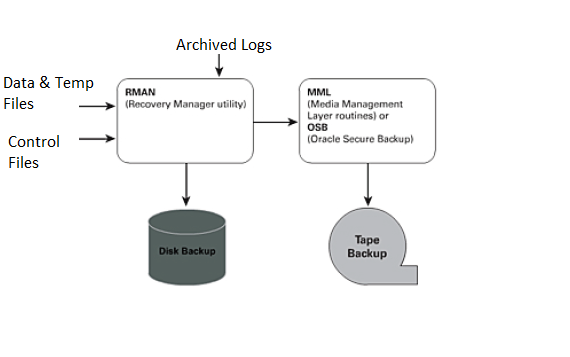
Oracle Secure Backup is centralized tape backup management software providing secure data protection for heterogeneous file systems and the Oracle Database. Oracle has its own media management software solution, Oracle Secure Backup (OSB). OSB is a fully integrated, RMAN-to-tape solution that does not require any third-party vendor software plug-in, and OSB has come a long way since its introduction in 10gR2.

In Oracle 10gR2 and Oracle 11g, you can utilize OSB to provide free backup to tape functionality, provided that you have a single tape head and it is attached directly to the server that contains the Oracle database that you want to back up. In addition to tape backup, OSB delivers an integrated Oracle database backup to third-party cloud (Internet) storage, through the Oracle Secure Backup Cloud Module. Oracle Secure Backup offers two tape management editions: OSB and OSB Express.

Oracle Secure Backup Interfaces:
You can interact with Oracle Secure Backup by means of the following tools:
– Oracle Secure Backup Web tool
– Oracle Secure Backup command-line interface
– Oracle Enterprise Manager

OSB Roles and Admin Domains:
Administrative server:
Each administrative domain must have exactly one administrative server. This server stores data pertinent to the operation of the administrative domain in a set of configuration files. Metadata relating to backup and restore operations is also stored on the administrative server in a backup catalog.
The administrative server runs the scheduler, which starts and monitors jobs within the administrative domain.

Media Server
A media server has one or more secondary storage devices, such as a library and tape drives, connected to it. At a minimum, a media server must have one standalone tape drive. Many media servers utilize robotic tape libraries.

Client
A client host is a host that has locally-accessed data that is backed up or restored by Oracle Secure Backup. Any host where Oracle Secure Backup is installed, or that contains data that Oracle Secure Backup accesses through Network Data Management Protocol (NDMP), can act as a client. Each client host is associated with one administrative server.


Posted in Advanced | Tagged: | Leave a Comment »

Standby: Protection Modes.

Posted by FatDBA on October 30, 2012

The protection modes run in the order from highest (most data protection) to the lowest (least data protection):

Minimum Requirements for Data Protection Modes
Maximum Protection Maximum Availability Maximum Performance
Redo Archival Process LGWR LGWR LGWR or ARCH
Network Transmission Mode SYNC SYNC ASYNC when using LGWR process. Not applicable when using ARCH process.
Disk Write Option AFFIRM AFFIRM NOAFFIRM
Standby Redo Logs Required? Yes Required for physical standby databases only. Standby redo logs are not supported for logical standby databases. Required for physical standby databases using the LGWR process.
Database Type Physical only Physical and Logical Physical and Logical

Posted in Advanced | Tagged: , | Leave a Comment »