Tales From A Lazy Fat DBA

Its all about Databases, their performance, troubleshooting & much more …. ¯\_(ツ)_/¯

Redis cluster node with status DISCONNECTED – [ERR] Not all 16384 slots are covered by nodes, and a crude method to deal that …

Posted by FatDBA on November 8, 2021

Hi All,

Today’s post doesn’t follow the usual problem-solution approach, but about a hit and trial that fixed my problem on Redis. This is about a strange problem which I’d encountered while doing a POC, when one of the cluster node, after reboot stopped responding and coming with status as ‘disconnected‘. This was a multi master configuration (4 master nodes) with no slaves, Redis version was 6.2.6 on RHEL7. For simulation purposes, I have invoked four different Redis server instances on the same node/machine using separate ports. One running on port 6391 is not responding.

Note: This is just a test I did on one sandbox environment and it’s might not match your problem, I recommend not to try these steps in production as they are just part of hit-and-trial that I did.

-- Four different Redis Server Instances running on same host.
[root@fatdba redis-cluster]# ps -ef|grep redis
root       3337   3177  0 23:14 pts/1    00:00:03 redis-server 127.0.0.1:6391 [cluster]
root       3763   3177  0 23:20 pts/1    00:00:01 redis-server 127.0.0.1:6392 [cluster]
root       3814   3177  0 23:21 pts/1    00:00:01 redis-server 127.0.0.1:6394 [cluster]
root       4001   3177  0 23:24 pts/1    00:00:01 redis-server 127.0.0.1:6390 [cluster]


-- one with port 6391 is with status 'disconnected'.
[root@fatdba node0]# redis-cli -a secret -p 6390 cluster nodes
bdcc3381941e141c89110bbcffe66c73bc927054 :0@0 master,noaddr - 1635737041203 1635737041203 2 disconnected 4096-8191
8751bde72e08fd1b08cc34c82cd5868475320a6a 127.0.0.1:6392@16392 master - 0 1635737634979 3 connected 8192-12287
a2b89ff5be2eafeba1ae3aea78f871d0ccc16283 127.0.0.1:6390@16390 myself,master - 0 1635737633000 1 connected 0-4095
c548fe11041b636d627cafffd23f8ad642ac4085 127.0.0.1:6394@16394 master - 0 1635737634000 4 connected 12288-16383
[root@fatdba node0]#

Cluster check command is showing details only for three healthy masters and throwing error at the end of the check '[ERR] Not all 16384 slots are covered by nodes'. I tried to remove the problematic node using CLUSTER FORGET and re-add it to the cluster using addnode but even that didn’t worked, ideally it should, but it didn’t, and it was still coming with status ‘disconnected‘.

Meanwhile the 'cluster info' command showing known nodes as 4 with cluster state as OK.

[root@fatdba redis-cluster]# redis-cli -a secret --cluster check 127.0.0.1:6394
127.0.0.1:6394 (c548fe11...) -> 0 keys | 4096 slots | 0 slaves.
127.0.0.1:6390 (a2b89ff5...) -> 0 keys | 4096 slots | 0 slaves.
127.0.0.1:6392 (8751bde7...) -> 0 keys | 4096 slots | 0 slaves.
[OK] 0 keys in 3 masters.
0.00 keys per slot on average.
>>> Performing Cluster Check (using node 127.0.0.1:6394)
M: c548fe11041b636d627cafffd23f8ad642ac4085 127.0.0.1:6394
   slots:[12288-16383] (4096 slots) master
M: a2b89ff5be2eafeba1ae3aea78f871d0ccc16283 127.0.0.1:6390
   slots:[0-4095] (4096 slots) master
M: 8751bde72e08fd1b08cc34c82cd5868475320a6a 127.0.0.1:6392
   slots:[8192-12287] (4096 slots) master
[OK] All nodes agree about slots configuration.
>>> Check for open slots...
>>> Check slots coverage...
[ERR] Not all 16384 slots are covered by nodes.


127.0.0.1:6391> cluster info
cluster_state:ok
cluster_slots_assigned:16384
cluster_slots_ok:16384
cluster_slots_pfail:0
cluster_slots_fail:0
cluster_known_nodes:4
cluster_size:4
cluster_current_epoch:4
cluster_my_epoch:1
cluster_stats_messages_ping_sent:3342
cluster_stats_messages_pong_sent:3732
cluster_stats_messages_sent:7074
cluster_stats_messages_ping_received:3732
cluster_stats_messages_pong_received:3339
cluster_stats_messages_received:7071

So, we tried all possibilities but still our problem endured …

Now, if you have carefully checked the syntax that I’ve used to connect with any of the nodes is via -a option, as there was the password set, so every time it asks me to input the passcode. Just for the trial purpose I removed the password (PassThru parameter in Redis config file) and recreated the cluster, and oddly that trick worked. Of course that is something you will never do in production setups, but can try when learning the database or if not running on production and you’ve the luxury to play around with the database – Just a crude method to deal the issue 🙂

Still it’s incomprehensible for me about how this password removal thing fixed the issue 😦 or maybe I was doing some mistake, I am perplexed and will be troubleshooting it further …

[root@fatdba node0]# redis-cli --cluster create 127.0.0.1:6390 127.0.0.1:6391 127.0.0.1:6392 127.0.0.1:6394 --cluster-replicas 0
>>> Performing hash slots allocation on 4 nodes...
Master[0] -> Slots 0 - 4095
Master[1] -> Slots 4096 - 8191
Master[2] -> Slots 8192 - 12287
Master[3] -> Slots 12288 - 16383
M: 4c9785e37002cf340842ee176d21244497898d4a 127.0.0.1:6390
   slots:[0-4095] (4096 slots) master
M: ce3c377b47d78f45cf824355926a4763eb4eb6fa 127.0.0.1:6391
   slots:[4096-8191] (4096 slots) master
M: 08f772eab05b03b5559b15af0848822a383093d9 127.0.0.1:6392
   slots:[8192-12287] (4096 slots) master
M: 923df80e2201c6c35de10560dc04420b5742ea58 127.0.0.1:6394
   slots:[12288-16383] (4096 slots) master
Can I set the above configuration? (type 'yes' to accept): yes
>>> Nodes configuration updated
>>> Assign a different config epoch to each node
>>> Sending CLUSTER MEET messages to join the cluster
Waiting for the cluster to join
...
>>> Performing Cluster Check (using node 127.0.0.1:6390)
M: 4c9785e37002cf340842ee176d21244497898d4a 127.0.0.1:6390
   slots:[0-4095] (4096 slots) master
M: 923df80e2201c6c35de10560dc04420b5742ea58 127.0.0.1:6394
   slots:[12288-16383] (4096 slots) master
M: ce3c377b47d78f45cf824355926a4763eb4eb6fa 127.0.0.1:6391
   slots:[4096-8191] (4096 slots) master
M: 08f772eab05b03b5559b15af0848822a383093d9 127.0.0.1:6392
   slots:[8192-12287] (4096 slots) master
[OK] All nodes agree about slots configuration.
>>> Check for open slots...
>>> Check slots coverage...
[OK] All 16384 slots covered.

-- Let's check once again the cluster status
127.0.0.1:6391> cluster nodes
4c9785e37002cf340842ee176d21244497898d4a 127.0.0.1:6390@16390 master - 0 1635742000349 1 connected 0-4095
923df80e2201c6c35de10560dc04420b5742ea58 127.0.0.1:6394@16394 master - 0 1635741998338 4 connected 12288-16383
ce3c377b47d78f45cf824355926a4763eb4eb6fa 127.0.0.1:6391@16391 myself,master - 0 1635741998000 2 connected 4096-8191
08f772eab05b03b5559b15af0848822a383093d9 127.0.0.1:6392@16392 master - 0 1635741999344 3 connected 8192-12287
127.0.0.1:6391>


127.0.0.1:6391> cluster keyslot prashant
(integer) 6942

127.0.0.1:6391> keys *
(empty array)

-- No keys, let me try to create one string type key.
127.0.0.1:6391> set prashant dixit
OK

127.0.0.1:6391> get prashant
"dixit"

Hope It Helped
Prashant Dixit

Posted in troubleshooting | Tagged: , , , | 2 Comments »

Confused about using PURGE_ALL to remove optimizer statistics from the SYSAUX ?

Posted by FatDBA on November 7, 2021

Hi All,

Recently while working in one for the project where SYSAUX was growing at an alarming rate, customer operations team decided to purge old stats from the SYSAUX as that was occupying around 50% of the total occupancies. Though MMON purges these stats regularly from the OPTSTAT tables, but due to a known bug (14373728) it failed to that. I mean ideally it should purge these statistics according to the default retention, which is 30 days in this case, but it seem it can not due to that bug. MMON performs these purge activities automatically, but it has a limit of 5 minutes to perform these activities. So if the purging takes more than 5 mins, then the activities are aborted and as a result the stats are not purged.

Due to some reasons they don’t want to apply the patch, but agreed to purge all stats from the OPTSTAT related tables within SYSAUX. But, the team was very perplexed to perform the PURGE_ALL as a big-bang (not using sysdate-x) approach, as they weren’t sure if PURGE_ALL will remove all the stats including current statistics on objects (Tables, Indexes etc.) or it only touches OPTSTAT tables and truncates them.

About optimizer stats tables (OPTSTAT in short), they contain backup information about stats collection and involves tables like WRI$_OPTSTAT_OPR, WRI$_OPTSTAT_AUX_HISTORY, WRI$_OPTSTAT_TAB_HISTORY, WRI$_OPTSTAT_IND_HISTORY, WRI$_OPTSTAT_HISTGRM_HISTORY, WRI$_OPTSTAT_HISTHEAD_HISTORY.

Even the comments from Oracle customer support has raised the confusion, as their explanation was too hazy and with lot of muddiness about using EXEC DBMS_STATS.PURGE_STATS(DBMS_STATS.PURGE_ALL). So, I decided to do a quick demo to clear all the doubts around this subject.

All below mentioned tests were performed on Oracle 21c database.

-- Here I first created a sample table and generated 10000 random rows. 
[oracle@fatdba ~]$ sqlplus / as sysdba

SQL*Plus: Release 21.0.0.0.0 - Production on Wed Nov 3 23:53:14 2021
Version 21.3.0.0.0


SQL> CREATE TABLE tab1 AS
SELECT level AS id,
       CASE
         WHEN MOD(level, 2) = 0 THEN 0
         ELSE TRUNC(DBMS_RANDOM.value(1,10))
       END AS record_type,
       'Description for ' || level AS description
FROM   dual
CONNECT BY level <= 10000;

Table created.


SQL> select count(*) from tab1;

  COUNT(*)
----------
     10000


SQL> ALTER TABLE tab1 ADD CONSTRAINT tab1_pk PRIMARY KEY (id);

Table altered.


SQL> CREATE INDEX tab1_record_type_idx ON tab1(record_type);

Index created.

SQL> EXEC DBMS_STATS.gather_table_stats(USER, 'TAB1');

PL/SQL procedure successfully completed.


SQL> EXEC DBMS_STATS.gather_index_stats(USER, 'TAB1_RECORD_TYPE_IDX');

PL/SQL procedure successfully completed.

Okay, so we have a table ready with 10000 random rows with a primary key constraint and have created one index on record_type column and have gathered stats on the table and the index. Next, I will purge all stats from OPTSTAT tables using PURGE_ALL function

23:13:05 SQL> EXEC DBMS_STATS.PURGE_STATS(DBMS_STATS.PURGE_ALL);

PL/SQL procedure successfully completed.

Elapsed: 00:00:01.13
23:13:09 SQL>


-- Now the same can be confirmed by querying OPTSTAT tables WRI$_OPTSTAT_IND_HISTORY and  WRI$_OPTSTAT_TAB_HISTORY for Tables and Indexes, 
-- And they all are gone, no more data is there in these tables after flush.

23:15:55 SQL> select OBJ#, flags, rowcnt, ANALYZETIME from WRI$_OPTSTAT_IND_HISTORY where obj#=77267;

no rows selected

23:16:01 SQL> select FLAGS,ROWCNT, OBJ#,ANALYZETIME from WRI$_OPTSTAT_TAB_HISTORY where obj#=77256;

no rows selected

Now, lets check if tables and index has the stats collection date coming or not, and yes they are there! means still the table has their current stats and didn’t got purged after we executed PURGE_ALL on OPTSTAT tables.

23:13:37 SQL> select index_name, index_type, last_analyzed from dba_indexes where index_name='TAB1_RECORD_TYPE_IDX';

INDEX_NAME                     INDEX_TYPE                  LAST_ANALYZED
------------------------------ --------------------------- --------------------
TAB1_RECORD_TYPE_IDX           NORMAL                      03-NOV-2021 23:12:07

Elapsed: 00:00:00.00

23:13:50 SQL> select table_name, last_analyzed from dba_tables where table_name='TAB1';

TABLE_NAME           LAST_ANALYZED
-------------------- --------------------
TAB1                 03-NOV-2021 23:08:32

Elapsed: 00:00:00.00

I am now going to recollect stats on both of them, Tables and its Index, and with that, the last_analyzed date/time is refreshed with the latest timestamp.

repeating same steps for TABLE. And one more time, I see that the TABLE HISTORY related OPTSTAT table has only previous/historical values not the latest timestamp from stats collection.
I mean it should should have ’03-NOV-2021 23:26:07′ as a latest entry in the table, but has only got ’03-NOV-2021 23:17:28′ when last stats were collected.

23:25:54 SQL> EXEC DBMS_STATS.gather_table_stats(USER, 'TAB1');

PL/SQL procedure successfully completed.


23:26:15 SQL> select table_name, last_analyzed from dba_tables where table_name='TAB1';

TABLE_NAME           LAST_ANALYZED
-------------------- --------------------
TAB1                 03-NOV-2021 23:26:07


23:26:08 SQL> select FLAGS,ROWCNT, OBJ#,ANALYZETIME from WRI$_OPTSTAT_TAB_HISTORY where obj#=77256;

     FLAGS     ROWCNT       OBJ# ANALYZETIME
---------- ---------- ---------- --------------------
        10      10000      77256 03-NOV-2021 23:08:32
        10      10000      77256 03-NOV-2021 23:17:28 ----> previous value, not the latest timestamp of 03-NOV-2021 23:26:07


-- One more time, for Table ....

23:29:05 SQL> EXEC DBMS_STATS.gather_table_stats(USER, 'TAB1');

PL/SQL procedure successfully completed.


23:29:11 SQL> 23:29:11 SQL>  select table_name, last_analyzed from dba_tables where table_name='TAB1';


TABLE_NAME           LAST_ANALYZED
-------------------- --------------------
TAB1                 03-NOV-2021 23:29:07


23:29:07 SQL> select FLAGS,ROWCNT, OBJ#,ANALYZETIME from WRI$_OPTSTAT_TAB_HISTORY where obj#=77256;


     FLAGS     ROWCNT       OBJ# ANALYZETIME
---------- ---------- ---------- --------------------
        10      10000      77256 03-NOV-2021 23:08:32
        10      10000      77256 03-NOV-2021 23:17:28
        10      10000      77256 03-NOV-2021 23:26:07 ----> previous value, not the latest timestamp of 03-NOV-2021 23:29:0

Let’s do this on Indexes!

23:32:26 SQL> EXEC DBMS_STATS.gather_index_stats(USER, 'TAB1_RECORD_TYPE_IDX');

PL/SQL procedure successfully completed.

23:32:34 SQL> select index_name, index_type, last_analyzed from dba_indexes where index_name='TAB1_RECORD_TYPE_IDX';

INDEX_NAME                     INDEX_TYPE                  LAST_ANALYZED
------------------------------ --------------------------- --------------------
TAB1_RECORD_TYPE_IDX           NORMAL                      03-NOV-2021 23:32:27


23:32:33 SQL> select OBJ#, flags, rowcnt, ANALYZETIME from WRI$_OPTSTAT_IND_HISTORY where obj#=77267;

      OBJ#      FLAGS     ROWCNT ANALYZETIME
---------- ---------- ---------- --------------------
     77267         10      10000 03-NOV-2021 23:12:07
     77267         10      10000 03-NOV-2021 23:31:37 ---> Has only got '03-NOV-2021 23:31:37' which is a previous timestamp/history, not the latest of 03-NOV-2021 23:32:27

So, from above tests it’s clear that the PURGE_ALL only touches and truncates WRI$_OPTSTAT_XXXX tables and as they always have the previous stats collection details, your present stats on objects will always be there, untouched and safe. So, this command is very safe to run and is best when you are thinking of doing an iterative purge using SYSDATE-X as it’s always very slow as compared to PURGE_ALL which truncates the table and doesn’t delete records from it, and the reason of its agility.

Hope It Helped!
Prashant Dixit

Posted in Advanced, troubleshooting | Tagged: , , | Leave a Comment »

DDL stalled Golden Gate replicat : A quick damage control !

Posted by FatDBA on October 31, 2021

Hi Everyone,

Recently I was asked to check a mono-directional Integrated Golden Gate (Version 12.3.0.1.2) replication problem where the replicat was not processing the data and got struck with a huge lag of ~ 3.5 hours. Customer reported that the GG stuck due to CREATE INDEX statements running from last 3 hours and want to skip those transactions.

This being an ad-hoc request, I didn’t had any direct access to their systems and can only ask for files or outputs from their operations team. And as per reports shared, yes, there was a delay of around 3.5 hours for the replicat and was showing in RUNNING state.

-- Process stats on the target
GGSCI (cana01db66664b.prod.sdt.monkey12.se) 1> info all
Program     Status      Group       Lag at Chkpt  Time Since Chkpt
MANAGER     RUNNING
REPLICAT    RUNNING     TORONTO       03:29:11      00:00:03


-- From replicat parameter file
--DDL Options Used --
DDL INCLUDE MAPPED OBJNAME PDIXIT.*
DDLERROR DEFAULT IGNORE
DDLERROR 942 IGNORE
DDLERROR 955 IGNORE
DDLERROR 1435 IGNORE INCLUDE OPTYPE ALTER OBJTYPE SESSION
DDLERROR 904 IGNORE
DDLERROR 1430 IGNORE

While I was examining their parameter file saw they’re using BATCHSQL and HANDLECOLLISIONS to improve performance. Updated them that the use of the HANDLECOLLISIONS parameter can also cause performance issues if there are collisions since there needs to be additional processing done with those records. Hence, It is recommended to remove this parameter, if you are “not doing your initial load” for your tables. Most of transactions are happening in normal mode, hence, asked them to remove BATCHSQL parameter too.

Next, I asked them to try with DDLOPTIONS REPORT to be set in the parameter file, as this settings causes Integrated Extract to write a step-by-step history of all DDL operations captured to it’s report file; which is very useful when troubleshooting DDL replication issues. After they made a change to the parameter file and a bounce of replicat, I checked the logs, and per logs, below DDL was already executed

--> 2021-10-20 08:19:30 INFO OGG-00489 DDL is of mapped scope, after mapping new operation [create index "PDIXIT"."IDX_TEST121" on "PDIXIT"."TAB12"(C1666600563,C737666607) (size 82)]. 

However , DDL error ignored due to ORA-04021 and as they have DDLERROR ignore parameters in parameter file.

--> 2021-10-20 08:34:32 INFO OGG-00492 DDL error ignored: error code [DEFAULT], filter [include all (default)], error text [Error code [4021], ORA-04021: timeout occurred while waiting to lock object PDIXIT.IDX_TEST121 SQL create index "PDIXIT"."IDX_TEST121" on "PDIXIT"."TAB12"(C1666600563,C737666607) /* GOLDENGATE_DDL_REPLICATION */].

Asked them to check whether the index “PDIXIT”.”IDX_TEST121″ has been created on the target. If not then they may manually need to create this index on the target, but as per them, the index statement can be ignored and they only want to move the GG further, as their entire processing system was stopped and caused a massive delay.

Sid,Ser#      USERNAME      STATUS          SQL_ID          SQL_CHILD_NUMBER SQL_HASH_VALUE Logon Time    OSUser@Machine         pid   
TERMINAL PROGRAM                            MODULE
------------- ------------- --------------- --------------- ---------------- -------------- ------------- -------------------- ------- 
-------- ----------------------------------- -----------------------------------
6781,54621    GGGTEST       ACTIVE          u52csv8kcnb34                  0      617229321 23-AUG 06:55  oracle@cana01db66664 33329  r
eplicat@cana01db66664b.prod.sdt.er OGG-RCITSA00-CANA_DAIS_GREATC
                                                                                                          b.prod.sdt.monkey12.
                                                                                                          se

SQL> select sql_fulltext from gv$sql where sql_id='u52csv8kcnb34';


SQL_FULLTEXT
--------------------------------------------------------------------------------
create index "PDIXIT"."IDX_TEST121" on "PDIXIT"."TAB12"(C1666600563,C737666607
)  /* GOLDENGATE_DDL_REPLICATION */

create index "PDIXIT"."IDX_TEST121" on "PDIXIT"."TAB12"(C1666600563,C737666607
)  /* GOLDENGATE_DDL_REPLICATION */


                                    Locking                                                         Object                 Object            Lock
 SID     SER# STATUS                  User               Os user              Os Proc               Owner                   Name             Mode
------ ------ --------------- -------------------- -------------------- -------------------- -------------------- ------------------------- ----------
  6781  54621 ACTIVE          GGGTEST              oracle               33329                SYS                  OBJ$                    Row-X (SX)
  6781  54621 ACTIVE          GGGTEST              oracle               33329                PDIXIT               TAB12                   Share
 

I immediately asked them to kill those database session which was running above DDLs, and the lock issue got resolved the moment they killed them the lag was drained in few seconds. Next we added below parameter in to the replicat to exclude CREATE INDEX statements.

DDL INCLUDE MAPPED OBJNAME PDIXIT.* exclude INSTR 'CREATE INDEX' 

Customer also wanted to remove few of the rebuild online index DDLs, since those are taking too much time and causing lag in replicat, so we tried one more parameter to exclude INDEX REBUILD ONLINE operations from the specific user to happen on the target

DDL INCLUDE MAPPED OBJNAME PDIXIT.* exclude optype alter objtype 'INDEX' instr 'rebuild online'

And told them to remove added parameters to IGNORE DDLs and revert back to original once lag is zero and go back to original parameter of

DDL INCLUDE MAPPED OBJNAME PDIXIT.*

So, that’s how we fixed the issue and the flow we adopted to handle the situation.

Hope It Helped!
Prashant Dixit

Posted in Advanced, troubleshooting | Tagged: , , | 4 Comments »

Another 10053 trace viewer : Best of the Best …

Posted by FatDBA on October 21, 2021

Finally, I’ve got a working copy of my favorite 10053 optimizer trace viewer from one of my connection. This one was written by Sergei Romanenko. I love it because it allows direct jumps to the most important parts of the trace and also uses highlighter to improve the readability of the trace and optionally formats the final query after transformations. It’s pretty easy to use, and you can directly search the keywords within these big thumping traces. And you can also wrap your text and can also format the final query.

Click here to download!

This is how the interface looks like.

Hope It Helped!
Prashant Dixit

Posted in Uncategorized | Tagged: , , , | 17 Comments »

10053 Trace Viewer : A life savior when handling colossal optimizer traces

Posted by FatDBA on October 18, 2021

Hi Everyone,

I am sure that my last post about 10053 debug traces has sparked some interest in optimizer cost calculations and estimations 🙂 As you guys are familiar that these traces aren’t that easy to digest and interpret, as they are pretty complicated, a humongous pile of internal cryptic information’s. One of the reader asked – If there are any tool that can help to at least format the trace and its sections ? Yes, there are few and one of my favorite is the 10053 viewer, and is what I am using from last few years now (lucky that I found that great blog post by Jonathan Lewis).

Click here if want to download it!

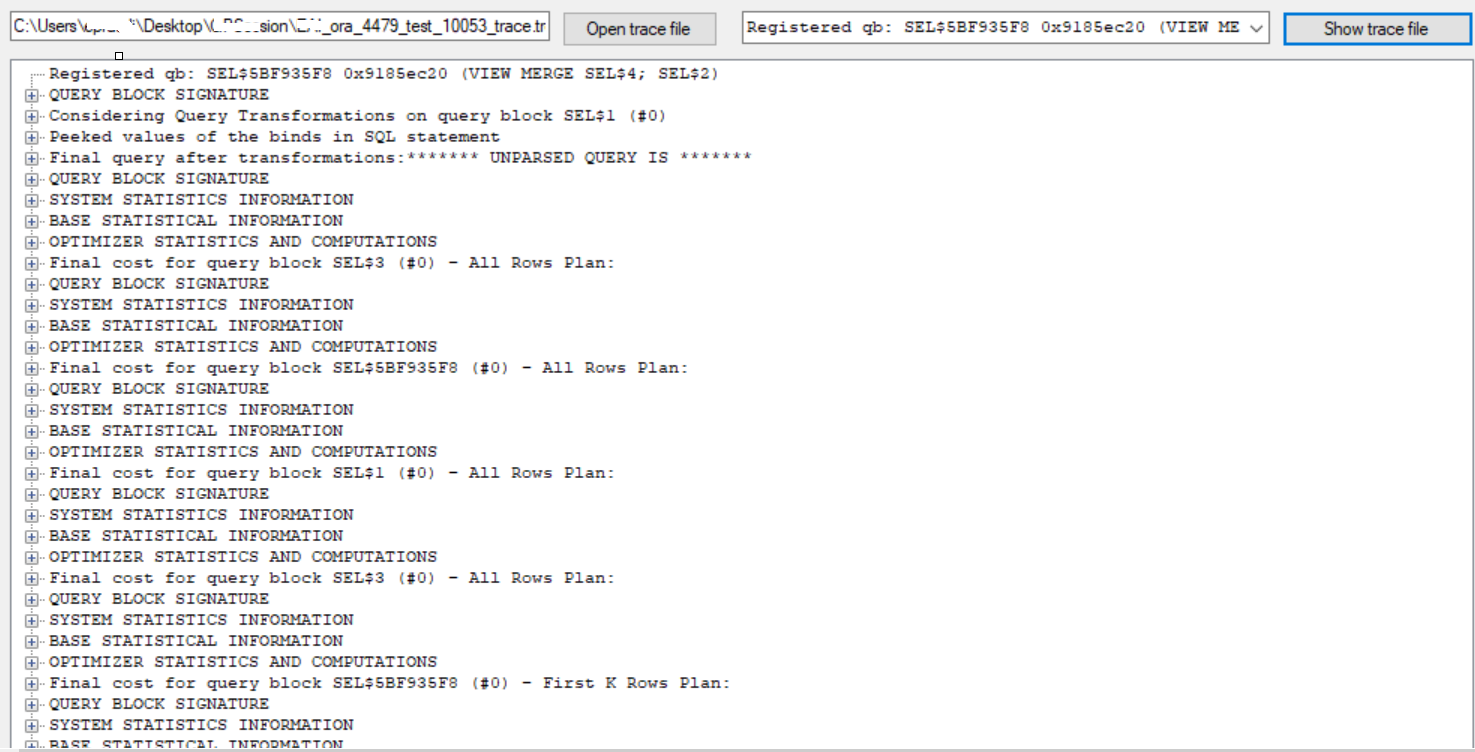
The tool is pretty easy to use! You have to click on ‘open trace file’ button and browse the 10053 trace from the system and click on ‘show trace file’ (next button).

Now load the trace file.

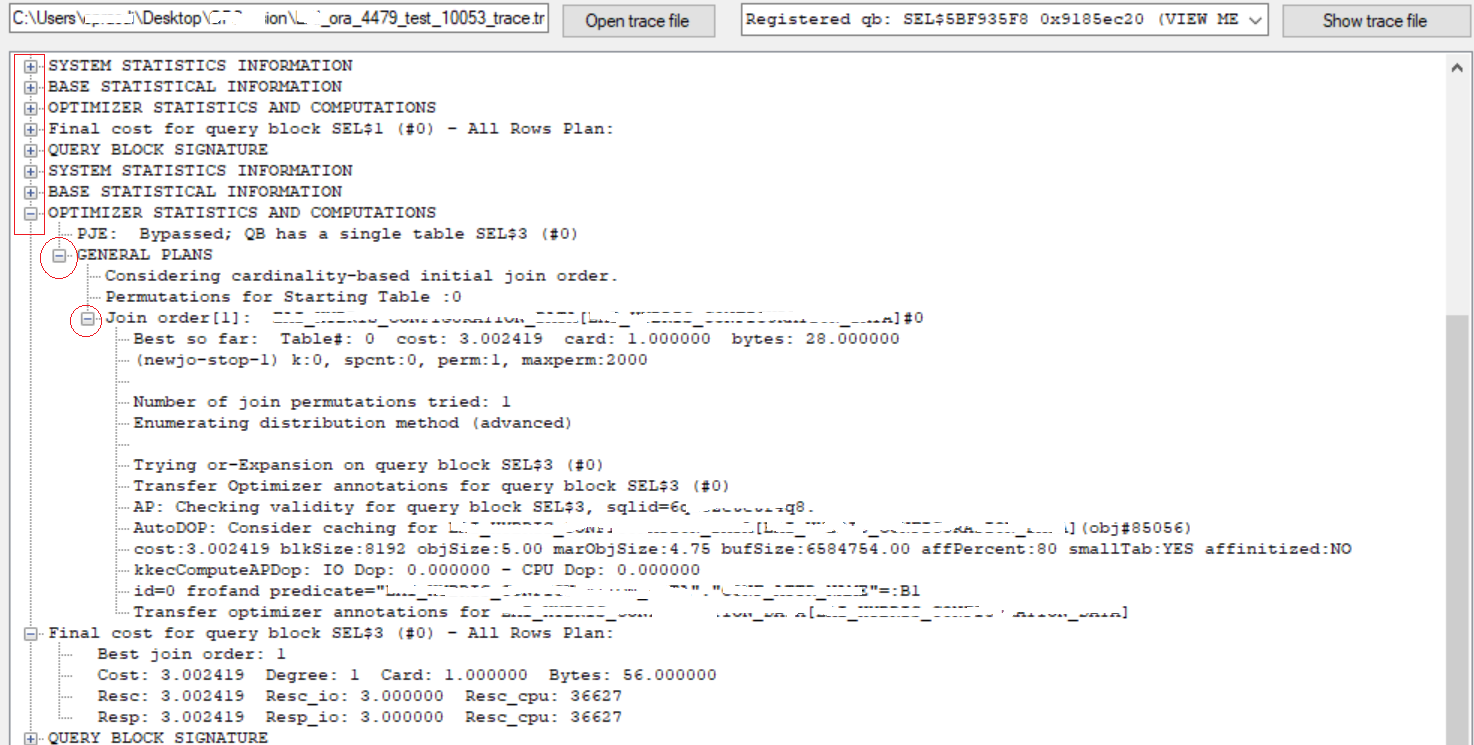
Now you’ll have a drop down view to select from. Once the trace is loaded, you can access sections by using ‘+’ to expand and ‘‘-‘ to minimize the section.

Expand to get more details about any particular section.

Hope It Helped!
Prashant Dixit

Posted in Uncategorized | Tagged: , , , | Leave a Comment »

Oracle event 10046 debug traces, they really aren’t that ‘complicated’ as we think – A 10046 trace break apart!

Posted by FatDBA on October 16, 2021

Hi Everyone,

Oracle has a long list of internal debug codes and this tracing is an art and a real craft. 10046 debug traces is one of the popular method for collecting extended SQL trace (like SQL_TRACE=TRUE) information for Oracle sessions. This we specially use to determine or distinguish the nature of a SQL Tuning problem. By setting this event, you can get detailed trace information of Oracle’s internal execution system analysis, call, wait, and bind variables, which plays a very important role in analyzing the performance of the system. This provides a great source and different levels of details about SQLs.

This post is all about breaking the parts of the trace and understand some of the critical sections to help understanding about SQL stats that it captures. I am not going to show how to generate them as the steps are pretty straight forward and are available on metalink.

Though there are multiple use cases of 10046, but I recently used them to understand a complicated and costly PL/SQL program which has got more than 1000 different SQL’s inside that it calls and I was interested to check on the costliest among them and why is that …. Though there are surely other ways to get the details of same level like using SQL Profiler, SQL Traces etc. but none of them provides the level of details what 10046 gives) and elapsed time parsing (prsela).

Above used snippet is from live 10046 sorted traces from a production system running on 10.2.0.5.0 (Yes, an old application). There isn’t much different that you will notice if you execute it on any new version of database too, there are very few changes that you will notice in case running on a latest oracle DB version. Okay let’s first understand few of the keywords or column names used in the result.

TKPROF: Release 10.2.0.5.0 - Production on Fri Sep 27 03:31:42 2021

Copyright (c) 1982, 2007, Oracle.  All rights reserved.

Trace file: dixitdb_ora_28282_10046_for_spdixitM.trc
Sort options: exeela  fchela  prsela  
********************************************************************************

SELECT COUNT(*) 
FROM
 CANONTALAB.DIXIT1_SAMPLE WHERE DIXIT1_SAMPLE_NO=:B1 


call     count       cpu    elapsed       disk      query    current        rows
------- ------  -------- ---------- ---------- ---------- ----------  ----------
Parse      134      0.00       0.00          0          0          0           0
Execute    862      0.03       0.03          0          0          0           0
Fetch      862     46.59      45.52          0    1235246          0         862
------- ------  -------- ---------- ---------- ---------- ----------  ----------
total     1858     46.63      45.55          0    1235246          0         862

Misses in library cache during parse: 1
Misses in library cache during execute: 1
Optimizer mode: ALL_ROWS
Parsing user id: 296  (CANONTALAB)   (recursive depth: 3)

Rows     Row Source Operation
-------  ---------------------------------------------------
      2  SORT AGGREGATE (cr=2866 pr=0 pw=0 time=114898 us)
      2   INDEX FAST FULL SCAN PK_DIXIT1_SAMPLE (cr=2866 pr=0 pw=0 time=114888 us)(object id 125001)


Rows     Execution Plan
-------  ---------------------------------------------------
      0  SELECT STATEMENT   MODE: ALL_ROWS
      2   SORT (AGGREGATE)
      2    INDEX   MODE: ANALYZED (UNIQUE SCAN) OF 'PK_DIXIT1_SAMPLE' 
               (INDEX (UNIQUE))

Elapsed times include waiting on following events:
  Event waited on                             Times   Max. Wait  Total Waited
  ----------------------------------------   Waited  ----------  ------------
  db file sequential read                        60       12.17         43.54
  
********************************************************************************

COUNT – Represents the umber of times a SQL statement was parsed, executed, or was fetched.
CPU – Total CPU time in seconds for all parse, execute, or fetch calls for the SQL.
ELAPSED – Total elapsed time in seconds for all parse, execute, or fetch calls for the SQL statement.
DISK – Total number of data blocks physically read from the datafiles on disk for all parse, execute, or fetch calls.
QUERY – Total number of buffers retrieved in consistent mode for all parse, execute, or fetch calls. Usually, buffers are retrieved in consistent mode for queries. A Consistent Get is where oracle returns a block from the block buffer cache but has to take into account checking to make sure it is the block current at the time the query started. Or is a normal reading of a block from the buffer cache. A check will be made if the data needs reconstructing from rollback info to give you a consistent view
CURRENT – Total number of buffers retrieved in current mode. Buffers are retrieved in current mode for statements such as INSERT, UPDATE, and DELETE. A DB block get (or current get in TKPROF) not only gets the block as it is right now, but it stops anyone else from getting that block (in current mode!) until we change it and release it. If someone else got there first, we wait.
ROWS – Total number of rows processed by the SQL statement. This total does not include rows processed by subqueries of the SQL statement. Also the rows gives statistics about 3 calls: Parse, Execute & Fetch
PARSE – Translates the SQL statement into an execution plan, including checks for proper security authorization and checks for the existence of tables, columns, and other referenced objects. This is where the physical and logical transformations and optimizations happens.
EXECUTE – Actual execution of the statement by Oracle. For INSERT, UPDATE, and DELETE statements, this modifies the data. For SELECT statements, this identifies the selected rows.
FETCH – Retrieves rows returned by a query. Fetches are only performed for SELECT statements.

Okay, now when all the column names and table entries are explained, let me try to explain what it represents in the form of those numbers.

It says 1235246 blocks were received in consistent mode during fetch operation. Since this is a SELECT statement, the blocks are shown during Fetch operation. If its a DML statement then blocks will be shown during Execute operation. Misses in library cache during each call. If there is no miss then it wont be mentioned. The 1 miss for the SQL is very much acceptable since when a SQL runs for the first time it need to be parsed and executed and execution plan will be stored. So parse and execute call will have 1 misses. If you see the statement parse call happened 134 times but the miss count is only 1, meaning that the statement was parsed only once and was stored in library cache. For next 133 parses the same parsed statement from library cache was used. So we have miss 1 and hit 133. Similarly execution plan was made only once and 861 times Oracle used same execution plan from library cache.

Now next jump to the row source operations and codes that it uses. cr = Consistent Reads, pr = Physical Reads, pw = Physical Writes, time = time taken by this step in microseconds. You might see some other codes used i.e. cost = cost incured by the step, size = represent the size of data in that step and card = cardinality.

So, the query was found doing an UNIQUE SCAN on it’s primary key index with name PK_DIXIT1_SAMPLE in ALL_ROWS mode and which is pretty understood as an equality predicate was used and the unique or primary key constraint was sufficient by itself to produce an index unique scan. And finally it shows wait event details and is pretty straight forward and says that it waits on ‘db file sequential read‘ with max wait time of 12.17

With the values above we need make a decision to whether to tune the SQL or not. Unless we have a locking problem or bad performing SQLs we shouldn’t worry about CPU time or the elapsed time. because timings come into consideration only when we have bad performing SQLs. The important factor is the number of block visits, both query (that is, subject to read consistency) and current (that is, not subject to read consistency). Segment headers and blocks that are going to be updated are acquired in current mode, but all query and subquery processing requests the data in query mode.

Hope It Helped
Prashant Dixit

Posted in Uncategorized | Tagged: , , , | 4 Comments »

A ‘simple’ dissection of an optimizer decision and cost using Oracle 10053 trace event … Yes, it’s simple!

Posted by FatDBA on October 10, 2021

Hi Guys,

In today’s post I will try to explain the cost, stats (system & object level), join order, cardinality & the selectivity calculations about execution plan entries and will take help of the infamous 10053 optimizer traces. Though 10053 is notoriously complicated, detailed and extensive even for simple SQL statements but always has the wealth of information about optimizer decisions like plan directives, peeked bind values, predicate move around, Join elimination stats, query transformations, fix controls, join eliminations, join orders (easily complicated) & other computations or calculations. So, I will try to keep it as simple as I can.

About ways of generating the report, you can access it via ALTER SESSION, ORADEBUG or even through DBMS_SQLDIAG.DUMP_TRACE (does not require diagnostic pack). There are multiple use cases of using 10053, but the most common is when you want to compare any best or worst plans and you want to see the difference in cost calculations.

Alright, so this is the complete SQL statement followed up by its execution plan and predicate details.

SELECT * FROM (SELECT n.object_inst_id, n.name, n.type, rownum idx
FROM testsch.PDI_FBI_HASHAH1 n join testsch.PDI_FBI_HASHAH1_b on  TESTID_name = :"SYS_B_00"  and owning_object_id = n.object_inst_id
and n.name = NVL(null, n.name) AND n.status = NVL(:"SYS_B_01", :"SYS_B_02")
AND n.type = NVL(:"SYS_B_03", n.type) AND NVL(n.test_allocation,:"SYS_B_04") = NVL(NVL(null, n.test_allocation),:"SYS_B_05")
AND  NVL(n.number_usage, :"SYS_B_06")=:"SYS_B_07" AND ( n.owner IS NULL OR instr(lower(n.owner), :"SYS_B_08") > :"SYS_B_09" )
AND n.assigned_csn_id IS NULL AND n.locked_on IS NULL AND n.lock_owner IS NULL
AND (n.lock_id IS NULL OR n.LOCK_DATE <= (sysdate - NVL(n.lock_period,
(SELECT dixi_trait_values FROM testsch.PDI_HASHIS_MERGEDINFO_DATA WHERE HASH_BATTR_SHA = :"SYS_B_10")) / :"SYS_B_11" / :"SYS_B_12"))
AND target_object_id = :"SYS_B_13" ORDER BY TO_NUMBER(n.name)) OUTPUTS WHERE OUTPUTS.idx between :"SYS_B_14" and :"SYS_B_15"


----------------------------------------------------------------------------------------------------------------
| Id  | Operation                      | Name                          | Rows  | Bytes | Cost (%CPU)| Time     |
----------------------------------------------------------------------------------------------------------------
|   0 | SELECT STATEMENT               |                               |     2 |   364 |   107   (0)| 00:00:01 |
|*  1 |  VIEW                          |                               |     2 |   364 |   107   (0)| 00:00:01 |
|   2 |   COUNT                        |                               |       |       |            |          |
|   3 |    NESTED LOOPS                |                               |     2 |   340 |   107   (0)| 00:00:01 |
|*  4 |     TABLE ACCESS BY INDEX ROWID| PDI_FBI_HASHAH1               |  6719 |   505K|   106   (0)| 00:00:01 |
|*  5 |      INDEX FULL SCAN           | PDI_FBI_NNAME_UTYPE_STA_NPFIX |  3065 |       |     7   (0)| 00:00:01 |
|*  6 |      TABLE ACCESS FULL         | PDI_HASHIS_MERGEDINFO_DATA    |     1 |    28 |     3   (0)| 00:00:01 | --> How the CBO decided cost 3 ? 
|*  7 |     INDEX RANGE SCAN           | IDX_TRNNUMBERB_SMOKE          |     1 |    93 |     1   (0)| 00:00:01 |
----------------------------------------------------------------------------------------------------------------


Predicate Information (identified by operation id):
---------------------------------------------------
   1 - filter("OUTPUTS"."IDX"<=10 AND "OUTPUTS"."IDX">=1)
   4 - filter("N"."TYPE"='MOBILE' AND ("N"."OWNER" IS NULL OR INSTR(LOWER("N"."OWNER"),'dna oyj')>0)
              AND NVL("N"."NUMBER_USAGE",'External')='Internal' AND "N"."ASSIGNED_CSN_ID" IS NULL AND
              NVL("N"."TEST_ALLOCATION",'EAI')=NVL(NVL(NULL,"N"."TEST_ALLOCATION"),'EAI') AND "N"."LOCKED_ON" IS NULL
              AND "N"."LOCK_OWNER" IS NULL AND ("N"."LOCK_ID" IS NULL OR
              "N"."LOCK_DATE"<=SYSDATE@!-NVL("N"."LOCK_PERIOD", (SELECT "DIXI_TRAIT_VALUES" FROM
              "TESTSCH"."PDI_HASHIS_MERGEDINFO_DATA" "PDI_HASHIS_MERGEDINFO_DATA" WHERE
              "HASH_BATTR_SHA"='MY_CALL_DURATION'))/60/24))
   5 - access("N"."STATUS"='Available')
       filter("N"."STATUS"='Available')
   6 - filter("HASH_BATTR_SHA"='MY_CALL_DURATION')
   7 - access("TESTID_NAME"='ind.fatdba.application.dss.more.production.BESTID.PDINumberBestSubClass'
               AND "OWNING_OBJECT_ID"="N"."OBJECT_INST_ID" AND "TARGET_OBJECT_ID"=21)

Let’s try to understand how optimizer come up with the cost numbers, how it derives these values, on what basis and what all it considers during the calculations. I will explaining about one of the access operation at Line ID 6 of the plan where it’s doing a TABLE ACCESS FULL on table PDI_HASHIS_MERGEDINFO_DATA and has a final cost of 3 associated with it.

So, what it is ? what all was happened under the hood by the optimizer to get this value of 3 for this operation ?

This is the subquery for which we will be checking the cost calculations within 10053 trace files.

(SELECT dixi_trait_values FROM testsch.PDI_HASHIS_MERGEDINFO_DATA WHERE HASH_BATTR_SHA = :"SYS_B_10")) / :"SYS_B_11" / :"SYS_B_12"))

Let me replace the sys generated values with their original values, for this I will be checking under “Peeked values of the binds in SQL statement” section. The same you can get from ‘predicate information’ section of the execution plan too, but let’s stick to 10053 for the moment.

*******************************************
Peeked values of the binds in SQL statement
*******************************************
----- Bind Info (kkscoacd) -----
 Bind#0
  oacdty=01 mxl=128(73) mxlc=00 mal=00 scl=00 pre=00
  oacflg=10 fl2=0100 frm=01 csi=873 siz=128 off=0
  kxsbbbfp=7f3791745ee0  bln=128  avl=73  flg=09
  value="ind.fatdba.application.dss.more.production.BESTID.PDINumberBestSubClass"
...
......
........

 Bind#10
  oacdty=01 mxl=32(19) mxlc=00 mal=00 scl=00 pre=00
  oacflg=10 fl2=0100 frm=01 csi=873 siz=32 off=0
  kxsbbbfp=7f3791745d48  bln=32  avl=19  flg=09
  value="MY_CALL_DURATION"
 Bind#11
  oacdty=02 mxl=22(02) mxlc=00 mal=00 scl=00 pre=00
  oacflg=10 fl2=0100 frm=00 csi=00 siz=24 off=0
  kxsbbbfp=7f3791745d20  bln=22  avl=02  flg=09
  value=60
 Bind#12
  oacdty=02 mxl=22(02) mxlc=00 mal=00 scl=00 pre=00
  oacflg=10 fl2=0100 frm=00 csi=00 siz=24 off=0
  kxsbbbfp=7f3791745cf8  bln=22  avl=02  flg=09
  value=24

Okay, let’s place them in the subquery.

SELECT dixi_trait_values FROM testsch.PDI_HASHIS_MERGEDINFO_DATA WHERE HASH_BATTR_SHA='MY_CALL_DURATION/60/24';

These are the contents of the column.

SQL> SELECT dixi_trait_values FROM testsch.PDI_HASHIS_MERGEDINFO_DATA;

DIXI_TRAIT_VALUES
-----------------
             60
            120
            200
             10
             60

Let’s check for access path analysis for this SQL.

***************************************
BASE STATISTICAL INFORMATION
***********************
Table Stats::
  Table: PDI_HASHIS_MERGEDINFO_DATA  Alias: PDI_HASHIS_MERGEDINFO_DATA
  #Rows: 5  SSZ: 0  LGR: 0  #Blks:  5  AvgRowLen:  31.00  NEB: 0  ChainCnt:  0.00  SPC: 0  RFL: 0  RNF: 0  CBK: 0  CHR: 0  KQDFLG: 1
  #IMCUs: 0  IMCRowCnt: 0  IMCJournalRowCnt: 0  #IMCBlocks: 0  IMCQuotient: 0.000000
try to generate single-table filter predicates from ORs for query block SEL$3 (#0)
finally: "PDI_HASHIS_MERGEDINFO_DATA"."DIXI_TRAIT_VALUES"=:B1

=======================================
SPD: BEGIN context at query block level
=======================================
Query Block SEL$3 (#0)
Applicable DS directives:
Return code in qosdSetupDirCtx4QB: NODIR
=====================================
SPD: END context at query block level
=====================================
Access path analysis for PDI_HASHIS_MERGEDINFO_DATA
***************************************
SINGLE TABLE ACCESS PATH 
  Single Table Cardinality Estimation for PDI_HASHIS_MERGEDINFO_DATA[PDI_HASHIS_MERGEDINFO_DATA] 
  SPD: Return code in qosdDSDirSetup: NOQBCTX, estType = TABLE
  Column (#1): CONF_ATTR_NAME(VARCHAR2)
    AvgLen: 24 NDV: 5 Nulls: 0 Density: 0.200000
  Table: PDI_HASHIS_MERGEDINFO_DATA  Alias: PDI_HASHIS_MERGEDINFO_DATA
    Card: Original: 5.000000  Rounded: 1  Computed: 1.000000  Non Adjusted: 1.000000
  Scan IO  Cost (Disk) =   3.000000
  Scan CPU Cost (Disk) =   36377.200000
  Total Scan IO  Cost  =   3.000000 (scan (Disk))
                         + 0.000000 (io filter eval) (= 0.000000 (per row) * 5.000000 (#rows))
                       =   3.000000
  Total Scan CPU  Cost =   36377.200000 (scan (Disk))
                         + 250.000000 (cpu filter eval) (= 50.000000 (per row) * 5.000000 (#rows))
                       =   36627.200000
  Access Path: TableScan
    Cost:  3.002419  Resp: 3.002419  Degree: 0
      Cost_io: 3.000000  Cost_cpu: 36627
      Resp_io: 3.000000  Resp_cpu: 36627
  Best:: AccessPath: TableScan
         Cost: 3.002419  Degree: 1  Resp: 3.002419  Card: 1.000000  Bytes: 0.000000

.....
.......

OPTIMIZER STATISTICS AND COMPUTATIONS
PJE:  Bypassed; QB has a single table SEL$3 (#0)
***************************************
GENERAL PLANS
***************************************
Considering cardinality-based initial join order.
Permutations for Starting Table :0
Join order[1]:  PDI_HASHIS_MERGEDINFO_DATA[PDI_HASHIS_MERGEDINFO_DATA]#0
***********************
Best so far:  Table#: 0  cost: 3.002419  card: 1.000000  bytes: 28.000000
***********************

If you check above you will see it considers the CPU & IO to generate the final cost values and that’s what we already know. Cost is the amount of work the optimizer estimates to run your query via a specific plan. The optimizer generally prefers lower cost plans. The optimizer’s cost model accounts for the IO, CPU, and network resources that will be used by the query.
IO_COST: I/O cost of the operation as estimated by the query optimizer’s approach. The value of this column is proportional to the number of data blocks read by the operation. For statements that use the rule-based approach, this column is null.
CPU_COST: CPU cost of the operation as estimated by the query optimizer’s approach. The value of this column is proportional to the number of machine cycles required for the operation. For statements that use the rule-based approach, this column is null.

At the same time it checks for dictionary stats to get table level information i.e. average row lenght, blocks, total rows and takes help of metrics NDV (nuber of distinct values), nulls, density of rows etc. to calculate the original cardinality of 5 (number of distinct entries) and the rounded cardinality of 1 – this SQL has resulted only into 1 row as an output, hence 1 is the rounded cardinality.

So, the main elements are ‘Scan IO Cost (Disk)’, ‘Scan CPU Cost (Disk)’ which finally derives the ‘Total Scan IO Cost’ value of 3.

That’s how the optimizer has calculated this value of 3 for this specific access operation, similarly you understand any of the other access entries in plan, and their associated costs.

If you want to read more on 10053 traces, I recommend you a great article by Wolfgang Breitling, Jonathan Lewis (his book cost-based Oracle fundamentals) & few posts from Maria Colgan.

Hope It Helped
Prashant Dixit

Posted in Uncategorized | Tagged: , | 1 Comment »

Migrated to RAC and getting ‘row cache locks’ or ‘enq: SQ – contention’ ?

Posted by FatDBA on September 24, 2021

Hi Everyone,

Recently I was working on a performance issue where customer reported frequent slowness and hang issues with their newly migrated 12.2 2-Node RAC cluster. I was involved at the time when issue was already gone and now I had to dig out the data the history either from AWR or via DBA_HIST_XX views. I started glancing over AWR reports for the probe period (~ 2 hours). I saw especially node 1 was swamped with excessive ‘row cache lock’ wait events, and that’s too with very high average wait time of 7973.47 ms (~ 8 seconds per wait). Though similar waits were found happening on instance 2, but quite less as compared to node1 (take a look at the AWR snip below)

You can also see ‘enq: SQ – contention’ in place of ‘row cache locks’ as this got renamed.

Below is the snippet from AWR that states it spend ~ 99% of DB Time% on sequence loading.

While checking ‘enqueue stats’ I saw ‘SQ-Sequence Cache’ type enqueues with very high overall wait period of 545 seconds (~ 9 minutes).

Next target was to find out the source SQL or the statements waiting on these row cache lock waits. And as expected, it was a SQL that interacts with the sequence to generate the NEXTVAL and feed that information to another statements that inserts records to a frequently accessed application log table. You can think of that statement something like below …

-- Generating next available value from the sequence
SELECT TEST_SEQ.NEXTVAL FROM DUAL; 

And source being a sequence, I thought of generating the DDL to see all its options or properties. And as expected, this sequence has NOCACHE option because this was recently upgraded from a standalone 12.1 database to a new 12.2 2-Node RAC cluster. The main reason for specifying NOCACHE earlier was to avoid gaps in sequence number as the value is not lost when the instance abnormally terminates.

CREATE SEQUENCE  "DIXIT"."TEST_SEQ"  MINVALUE 1 MAXVALUE 9999999999999999999999999999 INCREMENT BY 1 START WITH 1673163 NOCACHE  NOORDER  NOCYCLE  NOKEEP  NOSCALE  GLOBAL ;

And we complety missed to modify sequences as per the best practice of having CACHE + NOORDER combination in case of RAC. With this combo, each instances caches a distinct set of numbers in the shared pool & Sequences will not be globally ordered.

When caching is used, then the dictionary cache (the row cache) is updated only once with the new high watermark, e.g. when a caching of 20 is used and a nextval is requested the first time, then the row cache value of the sequence is changed in the dictionary cache and increased by 20. The LAST_NUMBER of the DBA_SEQUENCES get increased with the cache value or 20. The extracted 20 values, stored in the shared pool, will be distributed to the sessions requesting the nextval of it.

When no caching is used, then the dictionary cache has to be updated for any nextval request. It means the row cache has to be locked and updated with a nextval request. Multiple sessions requesting a nextval will hence be blocked on a ‘row cache lock’ wait. Each instance allocates numbers by access to the database but cache fusion may delay sending current seq$ block to a requesting instance if the block is busy owing to many sequence number allocations from the instance owning the current block image.

But there is a caveat when you use CACHE option and that is that the gaps in the sequence numbering occur when the sequence cache is lost e.g. any shared pool flush or instance shutdown like an single instance databases. When the sequence caching is used and the cached values are flushed from the shared pool. The same happen in RAC as in single instance databases. Any flush on any shared pool is enough to invalidate the cache value on RAC systems. And I don’t see any problem having a gap in the sequence, if not using a banking application.

Let me explain it through an example ..

-- Will create a sequence, default is to cache 20 sequence values in memory.

SQL> create sequence mytest_seq start with 1 increment by 1;

Sequence created.

SQL> select mytest_seq.nextval from dual;

  NEXTVAL
----------

         1

SQL> select mytest_seq.nextval from dual;

  NEXTVAL
----------

         2


-- The database is terminated and after startup, the next value of the sequence is selected.


SQL> select mytest_seq.nextval from dual;

  NEXTVAL
----------

        21

-- The first 20 values were in the cache, but only the first two were actually used. 
-- When the instance got terminated, sequence values 3 through 20 were lost as they were in cache. 

So, we decided to use caching, considering the average modifications and sequence generation requests to the main table, we planned to go with 500 sequence to be cached that Oracle will pre-allocate and keep in the memory for faster access.

ALTER SEQUENCE TEST_SEQ cache 500; 

And yup, the issue got fixed as soon we made sufficient sequences numbers available in the cache and no more ‘row cache lock’ waits afterwards.

Hope It Helped!
Prashant Dixit

Posted in Uncategorized | Tagged: , , | 2 Comments »

Are you suffering from excessive ‘cursor: mutex X’ & ‘cursor: mutex S’ waits after the upgrade ?

Posted by FatDBA on September 15, 2021

Hi Everyone,

Recently, I was contacted by one of my friend who was battling with some performance issues, since they moved from 12c to 19c. He was mostly strained about a particular problem with the new 19c database where he was getting excessive concurrency classed waits of “cursor: mutex X” (> 92% of the DB Time) and some “cursor: mutex S” events in the database. This was leading to frequent database hang instances.

As per the above snippet from AWR report for the period, ‘cursor: mutex X’ was consuming more than 170 ms per wait or an average wait time and was responsible for more than 91% of the total DB Time consumption.

Initially I though it was a case of classic hard parsing issue, as Cursor: mutex S wait usually occurs when Oracle is serializing parsing of multiple SQL statements. I mean there must be SQLs which are going through excessive hard parsing and has too many child cursors in the library cache. So, I immediately checked section ‘SQL Ordered by Version Count’ and saw one individual statement was there with 7,201 versions or Childs within a period of 2 hours.

Same was confirmed through ASH report too (see below pasted snippet). This particular SELECT statement was waiting on both on these two concurrency classed events specific to library cache.

I further drilled down on this issue to identify the cause behind this problem by querying V$SQL_SHARED_CURSOR (for reasons) to know why a particular child cursor was not shared with existing child cursors, and I was getting BIND_EQUIV_FAILURE as a reason. The database has the ACS(Adaptive Cursor Sharing) and CFB(Cardinality Feedback) enabled and seemed a ‘cursor leak’ issue.

I also noted huge sleeps for CP type mutexes on functions kkscsAddChildNode & kkscsPruneChild, below is the snippet from AWR, take a look at the first two in red.

And when I was about to prepare the strategy (i.e. specific plan purges etc.) to handle the situation, I thought to generate the hang analyze to identify if there are any known/familiar hang chains within stack traces. And I saw most of the chains running the same cursor from different processes waiting on ‘cursor: mutex X’ with below error stack … I mean there were multiple unique sessions waiting for a parent cursor mutex in exclusive mode on the same cursor under the following stack.

<-kgxExclusive<-kkscsAddChildNode<-kxscod<-kkscsCompareBinds<-kkscscid_bnd_eval<-kkscsCheckCriteria<-kkscsCheckCursor<-kkscsSearchChildList<-kksfbc<-

So, we had an error stack showing wait chains running the same cursor from different processes waiting on ‘cursor: mutex X’ and with BIND_EQUIV_FAILURE=Y in V$SQL_SHARED_CURSOR and CFB & ACS enabled, it was appearing that this was happening due to some bug.

Oracle support confirmed my doubt. They affirmed that this was happening all due to two unpublished bugs 28889389 and 28794230. For first one we need to apply patch 28889389, which has the optimized code for cursor mutex while searching the parent cursor for the match, for second one 28794230, they recommended few alternatives .given below …

_optimizer_use_feedback=false
_optimizer_adaptive_cursor_sharing=false
_optimizer_extended_cursor_sharing_rel=none

But even after setting above three undocumented parameters, which is to disable cardinality feedback and adaptive & extended cursor sharing, we only saw ~30% reduction in total waits. Later on they recommended us to apply the optimizer related bug fix control

_fix_control='23596611:OFF

and that completely resolved the issue.

Hope It Helped!
Prashant Dixit

Posted in Uncategorized | Tagged: , , , | Leave a Comment »

Installing and configuring Oracle 21c using RPM method.

Posted by FatDBA on September 6, 2021

Hi Folks,

I know there are already few posts there explaining how to install Oracle 21c database using RPMs, but this one is to explicate both installing the software and creating a test PDB database after RPM installation using ‘configure’ command.

Alright, so let me first install the oracle-database-preinstall-21c package which will do all pre-work for you.

[root@localhost ~]#
[root@localhost ~]# yum install oracle-database-preinstall-21c.x86_64
BDB2053 Freeing read locks for locker 0x829: 3296/140273180206912
Loaded plugins: langpacks, ulninfo
Resolving Dependencies
--> Running transaction check
---> Package oracle-database-preinstall-21c.x86_64 0:1.0-1.el7 will be installed
--> Processing Dependency: ksh for package: oracle-database-preinstall-21c-1.0-1.el7.x86_64
--> Running transaction check
---> Package ksh.x86_64 0:20120801-142.0.1.el7 will be installed
--> Finished Dependency Resolution

Dependencies Resolved

=============================================================================================================================================================
 Package                                            Arch                       Version                                  Repository                      Size
=============================================================================================================================================================
Installing:
 oracle-database-preinstall-21c                     x86_64                     1.0-1.el7                                ol7_latest                      26 k
Installing for dependencies:
 ksh                                                x86_64                     20120801-142.0.1.el7                     ol7_latest                     882 k

Transaction Summary
=============================================================================================================================================================
Install  1 Package (+1 Dependent package)

Total download size: 908 k
Installed size: 3.2 M
Is this ok [y/d/N]: y
Downloading packages:
warning: /var/cache/yum/x86_64/7Server/ol7_latest/packages/oracle-database-preinstall-21c-1.0-1.el7.x86_64.rpm: Header V3 RSA/SHA256 Signature, key ID ec551f03: NOKEY
Public key for oracle-database-preinstall-21c-1.0-1.el7.x86_64.rpm is not installed
(1/2): oracle-database-preinstall-21c-1.0-1.el7.x86_64.rpm                                                                            |  26 kB  00:00:01
(2/2): ksh-20120801-142.0.1.el7.x86_64.rpm                                                                                            | 882 kB  00:00:02
-------------------------------------------------------------------------------------------------------------------------------------------------------------
Total                                                                                                                        350 kB/s | 908 kB  00:00:02
Retrieving key from file:///etc/pki/rpm-gpg/RPM-GPG-KEY-oracle
Importing GPG key 0xEC551F03:
 Userid     : "Oracle OSS group (Open Source Software group) <build@oss.oracle.com>"
 Fingerprint: 4214 4123 fecf c55b 9086 313d 72f9 7b74 ec55 1f03
 Package    : 7:oraclelinux-release-7.7-1.0.5.el7.x86_64 (@anaconda/7.7)
 From       : /etc/pki/rpm-gpg/RPM-GPG-KEY-oracle
Is this ok [y/N]: y
Running transaction check
Running transaction test
Transaction test succeeded
Running transaction
  Installing : ksh-20120801-142.0.1.el7.x86_64                                                                                                           1/2
  Installing : oracle-database-preinstall-21c-1.0-1.el7.x86_64                                                                                           2/2
  Verifying  : oracle-database-preinstall-21c-1.0-1.el7.x86_64                                                                                           1/2
  Verifying  : ksh-20120801-142.0.1.el7.x86_64                                                                                                           2/2

Installed:
  oracle-database-preinstall-21c.x86_64 0:1.0-1.el7

Dependency Installed:
  ksh.x86_64 0:20120801-142.0.1.el7

Complete!
[root@localhost ~]#

Now when all pre-work is done, time to install the software using RPM package which I’ve downloaded from Oracle’s website.

[root@localhost ~]#
[root@localhost ~]#
[root@localhost ~]# yum -y localinstall  oracle-database-ee-21c-1.0-1.ol7.x86_64.rpm
Loaded plugins: langpacks, ulninfo
Examining oracle-database-ee-21c-1.0-1.ol7.x86_64.rpm: oracle-database-ee-21c-1.0-1.x86_64
Marking oracle-database-ee-21c-1.0-1.ol7.x86_64.rpm to be installed
Resolving Dependencies
--> Running transaction check
---> Package oracle-database-ee-21c.x86_64 0:1.0-1 will be installed
--> Finished Dependency Resolution

Dependencies Resolved

=============================================================================================================================================================
 Package                                  Arch                     Version                  Repository                                                  Size
=============================================================================================================================================================
Installing:
 oracle-database-ee-21c                   x86_64                   1.0-1                    /oracle-database-ee-21c-1.0-1.ol7.x86_64                   7.1 G

Transaction Summary
=============================================================================================================================================================
Install  1 Package

Total size: 7.1 G
Installed size: 7.1 G
Downloading packages:
Running transaction check
Running transaction test
Transaction test succeeded
Running transaction
  Installing : oracle-database-ee-21c-1.0-1.x86_64                                                                                                       1/1
[INFO] Executing post installation scripts...
[INFO] Oracle home installed successfully and ready to be configured.
To configure a sample Oracle Database you can execute the following service configuration script as root: /etc/init.d/oracledb_ORCLCDB-21c configure
  Verifying  : oracle-database-ee-21c-1.0-1.x86_64                                                                                                       1/1

Installed:
  oracle-database-ee-21c.x86_64 0:1.0-1

Complete!
[root@localhost ~]#

Installation of software is finished! Next we will create a test database with name ORCLCDB and a pluggable database with name ORCLPDB1.

[root@localhost ~]# /etc/init.d/oracledb_ORCLCDB-21c configure
Configuring Oracle Database ORCLCDB.
Prepare for db operation
8% complete
Copying database files
31% complete
Creating and starting Oracle instance
32% complete
36% complete
40% complete
43% complete
46% complete
Completing Database Creation
51% complete
54% complete
Creating Pluggable Databases
58% complete
77% complete
Executing Post Configuration Actions
100% complete
Database creation complete. For details check the logfiles at:
 /opt/oracle/cfgtoollogs/dbca/ORCLCDB.
Database Information:
Global Database Name:ORCLCDB
System Identifier(SID):ORCLCDB
Look at the log file "/opt/oracle/cfgtoollogs/dbca/ORCLCDB/ORCLCDB.log" for further details.

Database configuration completed successfully. The passwords were auto generated, you must change them by connecting to the database using 'sqlplus / as sysdba' as the oracle user.
[root@localhost ~]#

Okay, its all set. Lets connect with the CDB and the pluggable database that we’ve created above.

[oracle@localhost ~]$ sqlplus / as sysdba

SQL*Plus: Release 21.0.0.0.0 - Production on Thu Sep 2 12:03:22 2021
Version 21.3.0.0.0

Copyright (c) 1982, 2021, Oracle.  All rights reserved.


Connected to:
Oracle Database 21c Enterprise Edition Release 21.0.0.0.0 - Production
Version 21.3.0.0.0

SQL>
SQL> alter session set container = ORCLPDB1;

Session altered.


SQL> show con_name

CON_NAME
------------------------------
ORCLPDB1
SQL>

Hope It Helped!
Prashant Dixit

Posted in Uncategorized | Tagged: , | Leave a Comment »