Tales From A Lazy Fat DBA

Its all about Databases, their performance, troubleshooting & much more …. ¯\_(ツ)_/¯

EDB PostgreSQL BART Error: tablespace_path is not set

Posted by FatDBA on October 16, 2020

Today would like to discuss about the issue that we faced while doing a BART restore operation of one of the EDB 11 PostgreSQL instance. This was a new system under realization phase (before delivery to customer). So, during one of the test we saw the restore got failed with a message which says something about the value ‘tablespace_path’. I know I have a tablespace in this system, but I initially though that BART will take care of it by its own, but its was not the case.

Below was the error what I have encountered during the test.


[enterprisedb@fatdba archived_wals]$ bart -c /usr/edb-bart-1.1/etc/bart.cfg RESTORE -s edbserver -i 1602187005158 -p /edb/as10/as10/data/
INFO:  restoring backup '1602187005158' of server 'edbserver'
ERROR: "tablespace_path" is not set
[enterprisedb@fatdba archived_wals]$
 

Okay, let’s first check tablespace details, we use the metacommand of ‘db’ to get that info about tablespaces. Okay, so we have it’s location, size details.
Let’s go inside the said directoy and see what all is there.
Note: Last two are the default tablespaces so need to worry about them.


enterprisedb=# \db+
                                              List of tablespaces
    Name    |    Owner     |           Location           | Access privileges | Options |  Size   | Description
------------+--------------+------------------------------+-------------------+---------+---------+-------------
 newtblspc  | dixit        | /home/enterprisedb/newtblspc |                   |         | 52 kB   |
 pg_default | enterprisedb |                              |                   |         | 1362 MB |
 pg_global  | enterprisedb |                              |                   |         | 774 kB  |
(3 rows)

[enterprisedb@fatdba pg_tblspc]$ pwd
/edb/as10/as10/data_test/pg_tblspc
[enterprisedb@fatdba pg_tblspc]$ ls -ltrh
total 4.0K
lrwxrwxrwx. 1 enterprisedb enterprisedb   28 May  5 17:58 42250 -> /home/enterprisedb/newtblspc
drwx------. 3 enterprisedb enterprisedb 4.0K Oct  8 21:56 PG_10_201707211
 

Okay, so we have a soft-link created for the tablespace under PG_TBLSPC directory under DATA dir with OID 42250.
Now when we have all the information, time to add requisite parameter in bart.cfg file to consider tablespaces, just like below.
Format: OID_1=tablespace_path_1;OID_2=tablespace_path_2 …
example: tablespace_path = 42250=/edb/as10/as10/data_test/pg_tblspc
Note: tablespace_path parameter must exist or to be empty at the time you perform the BART RESTORE operation.

Now let’s modify our bart confguration file, will look something like below with the ‘tablespace_path’ option set.


[EDBSERVER]
host = 10.0.0.144
port = 5444
user = enterprisedb
backup_name = mktg_%year-%month-%dayT%hour:%minute
cluster_owner = enterprisedb
description = "EDB PROD server"
archive_command='scp %p enterprisedb@10.0.0.144:/edbbackup/edbserver/archived_wals/%f'
tablespace_path = 42250=/edb/as10/as10/data_test/pg_tblspc
allow_incremental_backups=enabled
 

All set for the restore now, let’s try that.


[enterprisedb@fatdba pg_tblspc]$ bart -c /usr/edb-bart-1.1/etc/bart.cfg RESTORE -s edbserver -i 1602187005158 -p /edb/as10/as10/data/
INFO:  restoring backup '1602187005158' of server 'edbserver'
WARNING: tablespace restore path is not empty (/edb/as10/as10/data_test/pg_tblspc), restoring anyway
INFO:  base backup restored
INFO:  writing recovery.conf file
INFO:  WAL file(s) will be streamed from the BART host
INFO:  archiving is disabled
INFO:  permissions set on $PGDATA
INFO:  restore completed successfully
[enterprisedb@fatdba pg_tblspc]$
[enterprisedb@fatdba pg_tblspc]$
 

This is fixed.

Hope That Helped!
Prashant Dixit

Posted in Uncategorized | Tagged: , , | Leave a Comment »

Dockers – OCI runtime create failed: container_linux.go:349: starting container process caused – process_linux.go:449: container init caused \ – write /proc/self/attr/keycreate: permission denied\’

Posted by FatDBA on September 29, 2020

Hi Guys,

Today I would be discussing about one of the problem that I have encountered while starting PostgreSQL on a docker container. This is the very first time we are calling any container to run on this machine. The error says something like ‘OCI runtime create failed: container_linux.go:349’, followed by “process_linux.go:449: container init caused: permission denied”.I was totally dumbstruck as the error doesn’t give us any clue or idea where and what is failing.

The exact error is given below, and is simulated case on my personal sandbox, but with exact error and issue.


[root@fatdba-doccass ~]# docker images
REPOSITORY          TAG                 IMAGE ID            CREATED             SIZE
postgres            latest              817f2d3d51ec        4 days ago          314MB
[root@fatdba-doccass ~]# docker run --name postgres -e POSTGRES_PASSWORD=postgres -d postgres
c90d92ea603044d72ffed2449e550bfd39d328beacb6a55e17c4515861f86140
docker: Error response from daemon: OCI runtime create failed: container_linux.go:349: starting container process caused "process_linux.go:449: container init caused 
\"write /proc/self/attr/keycreate: permission denied\"": unknown.


I remember we fixed something similar, not exactly the same on one another docker setup, where we disabled the SELINUX and that worked for me. So, we planned to give it a try to see if that works, this being a test setup, we didn’t hesitate to try the said option. It was set up to value ‘ENFORCING’ and we will have to set it to value ‘disabled’ and reboot the machine.


[root@fatdba-doccass ~]# more /etc/selinux/config |grep "SELINUX="
SELINUX=disabled
[root@fatdba-doccass ~]# reboot


Now, when the system is back, we are all set to run the postgresql image.


[root@fatdba-doccass ~]# docker run --name postgres -e POSTGRES_PASSWORD=postgres -d postgres
6aebd2ea4304202980daeff761857f5aa53deaf51cf7d13b1d00974219b6f80c
[root@fatdba-doccass ~]#
[root@fatdba-doccass ~]#


Awesome, it worked, let’s check the status of the container.


[root@fatdba-doccass ~]# docker ps -a
CONTAINER ID        IMAGE               COMMAND                  CREATED             STATUS              PORTS               NAMES
6aebd2ea4304        postgres            "docker-entrypoint.s…"   8 seconds ago       Up 4 seconds        5432/tcp            postgres
[root@fatdba-doccass ~]#
[root@fatdba-doccass ~]#


Next, we tried to connect with the host and psql terminal and that worked too!


[root@fatdba-doccass ~]# docker exec -it fatdba_psql bash
Error: No such container: fatdba_psql
[root@fatdba-doccass ~]# docker exec -it postgres bash
root@6aebd2ea4304:/#
root@6aebd2ea4304:/# psql -U postgres postgres
psql (13.0 (Debian 13.0-1.pgdg100+1))
Type "help" for help.

postgres=#
postgres=# select version();
                                                     version
------------------------------------------------------------------------------------------------------------------
 PostgreSQL 13.0 (Debian 13.0-1.pgdg100+1) on x86_64-pc-linux-gnu, compiled by gcc (Debian 8.3.0-6) 8.3.0, 64-bit
(1 row)

postgres=#
postgres=#
postgres-# \dt+
                             List of relations
 Schema | Name  | Type  |  Owner   | Persistence |    Size    | Description
--------+-------+-------+----------+-------------+------------+-------------
 public | dixit | table | postgres | permanent   | 8192 bytes |


Hope That Helped!
Prashant Dixit

Posted in Advanced | Tagged: , , , | Leave a Comment »

oracle.net.ns.NetException: Got minus one from a read call

Posted by FatDBA on September 3, 2020

Hi Guys,

Would like to discuss one problem that I was facing today in on one of the Oracle 12c Release 1 standalone database where application team started explaining the problem that they are getting when doing application restart, specially oracle NET exception of ‘Got minus one from a read call


Caused by: java.lang.RuntimeException: java.sql.SQLException: javax.resource.ResourceException: IJ000453: Unable to get managed connection for java:/jdbc/ProdMonkeyPD
    Caused by: java.sql.SQLException: javax.resource.ResourceException: IJ000453: Unable to get managed connection for java:/jdbc/ProdMonkeyPD
    Caused by: javax.resource.ResourceException: IJ000453: Unable to get managed connection for java:/jdbc/ProdMonkeyPD
    Caused by: javax.resource.ResourceException: IJ031084: Unable to create connection
    Caused by: java.sql.SQLRecoverableException: IO Error: Got minus one from a read call
    Caused by: oracle.net.ns.NetException: Got minus one from a read call"}}
 

They were suspecting the issue with the high number of opened files on OS. The files count was too high when listing using lsof command on this RHEL7 system and the count goes down once the services are stopped. well I was able to explain the difference that exists between RHEL6 & RHEL7 when doing count using lsof. It was in RHEL7/EL7 that shows output including TID as default compared to RHEL6/OL6. Hence the number of open files count increases in RHEL7 as compared to RHEL6. So, it has nothing to do with the error that they have reported.

So, next we have checked database alert log and it was all good, all clean, no errors nothing. I immediately checked the value of “OS_AUTHENT_PREFIX” parameter as it specifies a prefix that Oracle uses to authenticate users attempting to connect to the system. Oracle simply appends this value to the beginning of user’s operating system account name and password and which it later on compares. So, it was set to its default value that is OPS$ and was set for the backward compatibility with previous versions.

So, I have two solutions for the problem

– Set “OS_AUTHENT_PREFIX” to “” (a null string), thereby eliminating the addition of any prefix to operating system account names.
– Set “tcp.validnode_checking = no” in SQLNET.ora file
This is to enable and disable valid node checking for incoming connections. If this parameter is set to yes, then incoming connections are allowed only if they originate from a node that conforms to list specified by TCP.INVITED_NODES or TCP.EXCLUDED_NODES parameters.

So, I tried with the first option and rebooted the database to make changes persistent (this parameter is static) and asked application team to give it a try again, and as expected it worked. The error or the ORACLE NET exception ‘Got minus one from a read call‘ was resolved after applying the first fix itself.

Here the second option is valid too as that also does the same thing, but one fix at a time.

Hope It Helps
Prashant Dixit

Posted in Advanced, troubleshooting | Tagged: , | Leave a Comment »

Connecting Oracle database from PostgreSQL using Public DB Links.

Posted by FatDBA on August 31, 2020

Hi Guys,

This post is in continuation of my last post where I showed how to connect to Oracle database from an PostgreSQL instance. Last post was all about accessing Oracle database using Foreign data wrappers. This post is about accessing/querying Oracle database from PostgreSQL using DB Links.

Software Used:
Oracle Instant Clients (Need both BASIC and DEVEL packages)
Link: https://www.oracle.com/database/technologies/instant-client/linux-x86-64-downloads.html

For this method too, you have to install Oracle instant basic and devel packages.


[enterprisedb@fatdba ~]$ sudo rpm -Uvh oracle-instantclient12.2-basic-12.2.0.1.0-1.x86_64.rpm
[sudo] password for enterprisedb:
Preparing...                ########################################### [100%]
   1:oracle-instantclient12.########################################### [100%]
[enterprisedb@fatdba ~]$
[enterprisedb@fatdba ~]$ sudo rpm -Uvh oracle-instantclient12.2-devel-12.2.0.1.0-1.x86_64.rpm
Preparing...                ########################################### [100%]
   1:oracle-instantclient12.########################################### [100%]
[enterprisedb@fatdba ~]$

[enterprisedb@fatdba ~]$
[enterprisedb@fatdba ~]$ ls -ll /usr/lib/oracle/12.2/client64/lib
total 216568
lrwxrwxrwx. 1 root root        21 Aug 27 22:59 libclntshcore.so -> libclntshcore.so.12.1
-rw-rwxr--. 1 root root   8033199 Jan 26  2017 libclntshcore.so.12.1
lrwxrwxrwx. 1 root root        17 Aug 27 22:59 libclntsh.so -> libclntsh.so.12.1
-rw-rwxr--. 1 root root  71638263 Jan 26  2017 libclntsh.so.12.1
-rw-rwxr--. 1 root root   2981501 Jan 26  2017 libipc1.so
-rw-rwxr--. 1 root root    539065 Jan 26  2017 libmql1.so
-rw-rwxr--. 1 root root   6568149 Jan 26  2017 libnnz12.so
lrwxrwxrwx. 1 root root        15 Aug 27 22:59 libocci.so -> libocci.so.12.1
-rw-rwxr--. 1 root root   2218687 Jan 26  2017 libocci.so.12.1
-rw-rwxr--. 1 root root 124771800 Jan 26  2017 libociei.so
-rw-rwxr--. 1 root root    158543 Jan 26  2017 libocijdbc12.so
-rw-rwxr--. 1 root root    380996 Jan 26  2017 libons.so
-rw-rwxr--. 1 root root    116563 Jan 26  2017 liboramysql12.so
-rw-r--r--. 1 root root   3984814 Jan 26  2017 ojdbc8.jar
-rw-rwxr--. 1 root root    312974 Jan 26  2017 ottclasses.zip
-rw-r--r--. 1 root root     37494 Jan 26  2017 xstreams.jar
[enterprisedb@fatdba ~]$


Cool, let’s connect with the PostgreSQL instance and create the DBLink. To create that you need Oracle username and its password which you want to connect and its IP address along with SID or database name, and you are done. And yes, don’t forget to set the LD_LIBRARY_PATH to the location of your Oracle instant client.


[enterprisedb@fatdba ~]$ export LD_LIBRARY_PATH=/usr/lib/oracle/12.2/client64/lib
[enterprisedb@fatdba ~]$
[enterprisedb@fatdba ~]$ psql -d enterprisedb -U enterprisedb
psql.bin (10.12.20)
Type "help" for help.
enterprisedb=#
enterprisedb=#
enterprisedb=# select version();
                                                    version
---------------------------------------------------------------------------------------------------------------
 EnterpriseDB 10.12.20 on x86_64-pc-linux-gnu, compiled by gcc (GCC) 4.4.7 20120313 (Red Hat 4.4.7-23), 64-bit
(1 row)

enterprisedb=#
enterprisedb=# CREATE DATABASE LINK dixdroid CONNECT TO migr IDENTIFIED BY 'oracle90' USING oci '//10.0.0.130/fatdb';
CREATE DATABASE LINK
enterprisedb=#


Great, now time to test. Lets do a query on Oracle’s table from Postgresql instance using DB Link named ‘dixdroid’ which we have created earlier.


enterprisedb=# select * from migr.bigtab1@dixdroid;
  id  |    created_date    | lookup_id |            data
------+--------------------+-----------+----------------------------
  320 | 19-MAY-19 02:10:38 |         1 | This is some data for 320
  321 | 19-MAY-18 02:10:38 |         2 | This is some data for 321
  322 | 19-MAY-19 02:10:38 |         1 | This is some data for 322
  323 | 19-MAY-20 02:10:38 |         3 | This is some data for 323
  324 | 19-MAY-18 02:10:38 |         2 | This is some data for 324
  325 | 19-MAY-20 02:10:38 |         3 | This is some data for 325
  326 | 19-MAY-19 02:10:38 |         1 | This is some data for 326
  327 | 19-MAY-18 02:10:38 |         2 | This is some data for 327
  328 | 19-MAY-19 02:10:38 |         1 | This is some data for 328
  329 | 19-MAY-20 02:10:38 |         3 | This is some data for 329
  330 | 19-MAY-18 02:10:38 |         2 | This is some data for 330
  331 | 19-MAY-20 02:10:38 |         3 | This is some data for 331
 

Great, it worked like a charm!

Hope It Helps
Prashant Dixit

Posted in Basics | Tagged: , | 1 Comment »

Connecting Oracle database from PostgreSQL using ORACLE_FDW (Foreign Data Wrappers)

Posted by FatDBA on August 27, 2020

Hi All,

Today when I received a call from my team mate where he was facing issues with PostgreSQL when trying to access a remote table that exists on an Oracle database, I I instantly recalled something similar I tried few years back using Oracle Foreign Data Wrappers (oracle_FDW). So, I tried to perform a quick demo showing steps on how to do that using FDW.

Source: EnterpriseDB 10.12.20 on x86_64-pc-linux-gnu
Target: Oracle Enterprise 12c Release 2 (12.2.0.1.0)

Software Used:
Oracle Instant Clients (Need both BASIC and DEVEL packages)
Link: https://www.oracle.com/database/technologies/instant-client/linux-x86-64-downloads.html

Oracle FDW Software: Version 2.2.1)
Link: https://pgxn.org/dist/oracle_fdw/2.2.1/

Below are the files that I have downloaded.


-rw-rw-r--.  1 enterprisedb enterprisedb 143K Aug 27 17:12 oracle_fdw-2.2.1.zip
-rw-rw-r--.  1 enterprisedb enterprisedb  51M Aug 27 17:26 oracle-instantclient12.2-basic-12.2.0.1.0-1.x86_64.rpm
-rw-rw-r--.  1 enterprisedb enterprisedb 593K Aug 27 17:27 oracle-instantclient12.2-devel-12.2.0.1.0-1.x86_64.rpm
drwxrwxr-x.  5 enterprisedb enterprisedb 4.0K Aug 27 22:43 oracle_fdw-2.2.1

[enterprisedb@fatdba ~]$
[enterprisedb@fatdba ~]$


Let’s install both if the two instant clients on the server.


[enterprisedb@fatdba ~]$ sudo rpm -Uvh oracle-instantclient12.2-basic-12.2.0.1.0-1.x86_64.rpm
[sudo] password for enterprisedb:
Preparing...                ########################################### [100%]
   1:oracle-instantclient12.########################################### [100%]
[enterprisedb@fatdba ~]$
[enterprisedb@fatdba ~]$
[enterprisedb@fatdba ~]$ sudo -Uvh oracle-instantclient12.2-devel-12.2.0.1.0-1.x86_64.rpm
sudo: unknown user: vh
[enterprisedb@fatdba ~]$ sudo rpm -Uvh oracle-instantclient12.2-devel-12.2.0.1.0-1.x86_64.rpm
Preparing...                ########################################### [100%]
   1:oracle-instantclient12.########################################### [100%]
[enterprisedb@fatdba ~]$
[enterprisedb@fatdba ~]$
[enterprisedb@fatdba ~]$


now let’s quickly check if all required libraries are created.


[oracle@fatdba client64]$ cd lib/
[oracle@fatdba lib]$ pwd
/usr/lib/oracle/12.2/client64/lib
[oracle@fatdba lib]$
[oracle@fatdba lib]$
[oracle@fatdba lib]$ ls -ll
total 216568
lrwxrwxrwx. 1 root root        21 Aug 27 22:59 libclntshcore.so -> libclntshcore.so.12.1
-rw-rwxr--. 1 root root   8033199 Jan 26  2017 libclntshcore.so.12.1
lrwxrwxrwx. 1 root root        17 Aug 27 22:59 libclntsh.so -> libclntsh.so.12.1
-rw-rwxr--. 1 root root  71638263 Jan 26  2017 libclntsh.so.12.1
-rw-rwxr--. 1 root root   2981501 Jan 26  2017 libipc1.so
-rw-rwxr--. 1 root root    539065 Jan 26  2017 libmql1.so
-rw-rwxr--. 1 root root   6568149 Jan 26  2017 libnnz12.so
lrwxrwxrwx. 1 root root        15 Aug 27 22:59 libocci.so -> libocci.so.12.1
-rw-rwxr--. 1 root root   2218687 Jan 26  2017 libocci.so.12.1
-rw-rwxr--. 1 root root 124771800 Jan 26  2017 libociei.so
-rw-rwxr--. 1 root root    158543 Jan 26  2017 libocijdbc12.so
-rw-rwxr--. 1 root root    380996 Jan 26  2017 libons.so
-rw-rwxr--. 1 root root    116563 Jan 26  2017 liboramysql12.so
-rw-r--r--. 1 root root   3984814 Jan 26  2017 ojdbc8.jar
-rw-rwxr--. 1 root root    312974 Jan 26  2017 ottclasses.zip
-rw-r--r--. 1 root root     37494 Jan 26  2017 xstreams.jar
[oracle@fatdba lib]$


Yup, they all are there, perfect!
Now lets set the installation library path using variable LD_LIBRARY_PATH, same as below.
This is to avoid errors i.e.

ERROR:  could not load library "/opt/edb/as10/lib/oracle_fdw.so": libclntsh.so.12.1: cannot open shared object file: No such file or directory 


[enterprisedb@fatdba oracle_fdw-2.2.1]$
[enterprisedb@fatdba oracle_fdw-2.2.1]$
[enterprisedb@fatdba oracle_fdw-2.2.1]$ export LD_LIBRARY_PATH=/usr/lib/oracle/12.2/client64/lib
[enterprisedb@fatdba oracle_fdw-2.2.1]$


Now let’s do a quick restart of the postgresql instance.


[enterprisedb@fatdba oracle_fdw-2.2.1]$
[enterprisedb@fatdba oracle_fdw-2.2.1]$ pg_ctl -D /opt/edb/as10/data restart -m fast
waiting for server to shut down.... done
server stopped
waiting for server to start....2020-08-27 23:06:33 CEST [3641]: [1-1] user=,db=,remote= LOG:  listening on IPv4 address "0.0.0.0", port 5444
2020-08-27 23:06:33 CEST [3641]: [2-1] user=,db=,remote= LOG:  listening on IPv6 address "::", port 5444
2020-08-27 23:06:33 CEST [3641]: [3-1] user=,db=,remote= LOG:  listening on Unix socket "/tmp/.s.PGSQL.5444"
2020-08-27 23:06:33 CEST [3641]: [4-1] user=,db=,remote= LOG:  redirecting log output to logging collector process
2020-08-27 23:06:33 CEST [3641]: [5-1] user=,db=,remote= HINT:  Future log output will appear in directory "custompg_logdir".
 done
server started
[enterprisedb@fatdba oracle_fdw-2.2.1]$
[enterprisedb@fatdba oracle_fdw-2.2.1]$
[enterprisedb@fatdba oracle_fdw-2.2.1]$ psql -d enterprisedb -U enterprisedb
psql.bin (10.12.20)
Type "help" for help.


All good, lets created the EXTENSION in postgresql.


enterprisedb=#
enterprisedb=#
enterprisedb=# create extension oracle_fdw;
CREATE EXTENSION
enterprisedb=#


Now next will create the foreign server for the remote database which I need to connect to, Oracle 12.2 in my case.
Note: Here 10.0.0.130 is the oracle_server machine IP address where Oracle is running and ‘fatdb’ is the instance name.


enterprisedb=#
enterprisedb=#
enterprisedb=#
enterprisedb=# create server oracle foreign data wrapper oracle_fdw options (dbserver '//10.0.0.130/fatdb' );
CREATE SERVER
enterprisedb=#


Next is to create the USER MAPPING for the specific user which I would like to access, in my case it was ‘migr’ user, and finally pass the password of the user.


enterprisedb=# create user mapping for enterprisedb server oracle options (user 'migr', password 'oracle90');
CREATE USER MAPPING
enterprisedb=#
enterprisedb=#


All set, you can now try to query the remote table.


enterprisedb=#
enterprisedb=# select * from migr.bigtab1;
  id  |    created_date    | lookup_id |            data
------+--------------------+-----------+----------------------------
  320 | 19-MAY-19 02:10:38 |         1 | This is some data for 320
  321 | 19-MAY-18 02:10:38 |         2 | This is some data for 321
  322 | 19-MAY-19 02:10:38 |         1 | This is some data for 322
  323 | 19-MAY-20 02:10:38 |         3 | This is some data for 323
  324 | 19-MAY-18 02:10:38 |         2 | This is some data for 324
  325 | 19-MAY-20 02:10:38 |         3 | This is some data for 325
  326 | 19-MAY-19 02:10:38 |         1 | This is some data for 326
  327 | 19-MAY-18 02:10:38 |         2 | This is some data for 327
  328 | 19-MAY-19 02:10:38 |         1 | This is some data for 328
  329 | 19-MAY-20 02:10:38 |         3 | This is some data for 329
  330 | 19-MAY-18 02:10:38 |         2 | This is some data for 330
  331 | 19-MAY-20 02:10:38 |         3 | This is some data for 331
  332 | 19-MAY-19 02:10:38 |         1 | This is some data for 332


Let’s do some more fun, lets try to do one insertion.


enterprisedb=#
enterprisedb=# select count(*) from migr.bigtab1;
 count
-------
  1000
(1 row)

enterprisedb=# insert into migr.bigtab1 values(1001, '19-MAY-19 02:10:38', 4, 'This is some data for prashant');
INSERT 0 1
enterprisedb=# select count(*) from migr.bigtab1;
 count
-------
  1001
(1 row)

enterprisedb=# select * from migr.bigtab1 where id=1001;
  id  |    created_date    | lookup_id |              data
------+--------------------+-----------+--------------------------------
 1001 | 19-MAY-19 02:10:38 |         4 | This is some data for prashant
(1 row)

enterprisedb=#
enterprisedb=#
 

Hope It Helps
Prashant Dixit

Posted in Advanced | Tagged: | 1 Comment »

Datastax Certified Cassandra Administrator, some tips & more

Posted by FatDBA on August 21, 2020

Hi Guys,

With a sharp rise in NoSQL databases, many of the organizations are making a transition from traditional databases to distributed and high performance databases like ‘Cassandra’. Cassandra has become Apache’s one of the most popular projects. Though there are multiple NoSQL databases available in the market but no one has the features like peer-to-peer architecture, HA and Fault tolerant, Column based, Highly perform-ant, Schema Less, tunable consistency, great analytical possibilities, easy to scale-up & scale-down, distributed and the list goes on and on and on.

Cassandra already proved it’s mettle and is magical for IoT, Sensor data, Event based, Time series data, voucher generation systems and with other data models. Datastax provides best in class database management software and wide-range services with 24×7 support to get more from your Cassandra. Alongside comes some really cool features and tools i.e. opscenter (GUI), Nodesync (for enti entropy repairs), great SOLR integration, dsetool (similar to nodetool with more capabilities), sstableloader, pre-flight check tool, yaml file compare tools, stress tools, extra commands i.e. dsefs and many more.

DataStax is a pioneer and they have their own Cassandra certification path/track to prove you have valid credentials to work with Cassandra database either as a developer or an administrator. Now question comes where to start ?? – In fact many of you have asked me about my latest credentials ‘Datastax Apache Cassandra 3.x Administrator Associate‘, I was getting questions like how to prepare, how to book the exam and many other related questions. So, this post will be all about covering topics like how to prepare and book exam along with few tips.

I would always prefer to go point wise to make things more ordered and easy to digest.

1. Create your account on Datastax Academy.
Link: https://auth.cloud.datastax.com/auth/realms/CloudUsers/login-actions/registration?client_id=absorb&tab_id=lv4-57nRbu4

2. Go to the option ‘Catalog’ to lookout for courses available.
You have to choose between the Administrator (3 course based curriculum) or Developer (3 Courses based curriculum) track. I have completed the ADMIN path and it has three courses DS101 (Introduction), DS201 (Foundations) and DS210 (Operations with Apache Cassandra). All of the courses are beautifully designed, contains large numbers of demos, presentations, guides, quiz and a pre-build Ubuntu VM where you can all exercises.

Though the presentations and program covers every topic and all major parameters and topics but still if you want to read in depth, they have their own document collection and can be accessed through their website https://docs.datastax.com/en/landing_page/doc/landing_page/current.html or from https://cassandra.apache.org/doc/latest/

Note: There are few other specialized courses available too within the catalog i.e. Kafka connectors, DSE Graph, DSE Analytics, DSE Search etc.

3. Other learning platforms
Github: https://github.com/datastax
Can be very useful specially if you are preparing for developer track.
Youtube: Full of some great presentations, videos and some precious workshops and demos.
https://www.youtube.com/user/DataStaxMedia
Twitter: For news (about webinars etc.), press releases and other exciting information.
https://twitter.com/DataStax (@DataStax)

4. All set!
Once you are done with your all three of your courses under ADMIN track, you are done and ready for the certification. Go to ‘Datastax Certification’ widget within catalog and book your exam by creating your profile on their certification website.
https://certification.mettl.com/datastax/applicant/signup

Currently they are giving one free exam vouchers and those will be issued at the end of the series for participants of the workshop.

5. Once registered you have to choose your exam type – Admin or Developer.
Both of the exams has 60 questions that you have to complete within 90 minutes, exam fees (right now) is $145
Note: It’s good that you check your system comparability before the exam, for more details follow their official guidelines.

So, don’t wait, go and enroll for the course and grab a chance for giving free certification and more importantly stand out from the crowd. These widely accepted and recognized credentials will help you in your continued professional development and is an ideal way to gain a greater understanding of your industry, and to enhance your knowledge and skills. It also offers excellent chances to network among Cassandra geeks.

Hope It Helps!
Prashant Dixit

Posted in Basics, Uncategorized | Tagged: | Leave a Comment »

Passed ‘Datastax Apache Cassandra 3.x Administrator Associate’ Certification

Posted by FatDBA on August 21, 2020

Hi Guys,

News to share, today itself I’ve cleared the ‘Datastax Apache Cassandra 3.x Administrator Associate‘ Certification. Was working towards Cassandra from past few months now, and it’s always good to get certified from the market leaders. Good way to stand out from the crowd!

Will soon write a blog about the preparation and the process to get certified from Datastax, stay tuned!

Hope It Helps!
Prashant D

Posted in Basics | Tagged: | Leave a Comment »

Cassandra node refused to start – MismatchedInputException: No content to map due to end-of-input

Posted by FatDBA on August 5, 2020

Hi All,

This one will be a quick one, kind of error and solution approach.
This time it’s about Cassandra statup error which I have faced while doing some testing on a POC box and how I resolved it.

In this case I was using Datastax Cassandra 6.8.1 on RHEL6, I tried starting the instance but failed with error which says “MismatchedInputException: No content to map due to end-of-input”.
I’ve attempted to start it few more times but ended up with the same error message. Below is the complete/full error details.


WARN  [main] 2020-08-05 13:43:46,277  DatabaseDescriptor.java:1517 - JMX is not enabled to receive remote connections. Please see cassandra-env.sh for more info.
INFO  [main] 2020-08-05 13:43:46,281  DseDelegateSnitch.java:39 - Setting my workloads to [Cassandra]
INFO  [main] 2020-08-05 13:43:46,358  YamlConfigurationLoader.java:77 - Configuration location: file:/home/cassandra/dse-6.8.1_node1/resources/cassandra/conf/cassandra.yaml
INFO  [main] 2020-08-05 13:43:46,360  DseDelegateSnitch.java:41 - Initialized DseDelegateSnitch with workloads [Cassandra], delegating to com.datastax.bdp.snitch.DseSimpleSnitch
INFO  [main] 2020-08-05 13:43:46,424  YamlConfigurationLoader.java:77 - Configuration location: file:/home/cassandra/dse-6.8.1_node1/resources/cassandra/conf/cassandra.yaml
ERROR [main] 2020-08-05 13:43:47,904  DseModule.java:126 - Unable to start server. Exiting...
org.apache.cassandra.io.FSReadError: com.fasterxml.jackson.databind.exc.MismatchedInputException: No content to map due to end-of-input
 at [Source: (BufferedInputStream); line: -1, column: 0]
        at com.datastax.bdp.db.nodes.Nodes.transactionalRead(Nodes.java:195)
        at com.datastax.bdp.db.nodes.Nodes.access$100(Nodes.java:76)
        at com.datastax.bdp.db.nodes.Nodes$Local.(Nodes.java:477)
        at com.datastax.bdp.db.nodes.Nodes.(Nodes.java:97)
        at com.datastax.bdp.db.nodes.Nodes$Instance.setup(Nodes.java:911)
        at org.apache.cassandra.config.DatabaseDescriptor.applyMetadata(DatabaseDescriptor.java:587)
        at org.apache.cassandra.config.DatabaseDescriptor.daemonInitialization(DatabaseDescriptor.java:234)
        at org.apache.cassandra.config.DatabaseDescriptor.daemonInitialization(DatabaseDescriptor.java:249)
        at com.datastax.bdp.DseCoreModule.(DseCoreModule.java:84)
        at com.datastax.bdp.DseModule.getRequiredModules(DseModule.java:163)
        at com.datastax.bdp.server.AbstractDseModule.configure(AbstractDseModule.java:27)
        at com.datastax.bdp.DseModule.configure(DseModule.java:89)
        at com.google.inject.AbstractModule.configure(AbstractModule.java:62)
        at com.google.inject.spi.Elements$RecordingBinder.install(Elements.java:340)
        at com.google.inject.spi.Elements.getElements(Elements.java:110)
        at com.google.inject.internal.InjectorShell$Builder.build(InjectorShell.java:138)
        at com.google.inject.internal.InternalInjectorCreator.build(InternalInjectorCreator.java:104)
        at com.google.inject.Guice.createInjector(Guice.java:96)
        at com.google.inject.Guice.createInjector(Guice.java:73)
        at com.google.inject.Guice.createInjector(Guice.java:62)
        at com.datastax.bdp.ioc.DseInjector.get(DseInjector.java:36)
        at com.datastax.bdp.DseModule.main(DseModule.java:103)
Caused by: com.fasterxml.jackson.databind.exc.MismatchedInputException: No content to map due to end-of-input
 at [Source: (BufferedInputStream); line: -1, column: 0]


Now, let’s talk about the fix that I have applied to get rid of the problem, but before that I recalled that the database was abruptly shutdown last time due to server/hsot crashed. This file contains local startup information like data center, release info, scheam version, native transport address, port info (JMX, storage etc.), broadcast address etc.


[cassandra@fatdba-doccass bin]$ cd /var/lib/cassandra/metadata/nodes/
[cassandra@fatdba-doccass nodes]$ ls
local  peers  snapshots
[cassandra@fatdba-doccass nodes]$ rm -rf local
[cassandra@fatdba-doccass nodes]$
[cassandra@fatdba-doccass nodes]$
[cassandra@fatdba-doccass nodes]$ ls -ltrh
total 4.0K
drwxrwxr-x. 2 cassandra cassandra 6 Jul 27 16:07 snapshots
-rw-rw-r--. 1 cassandra cassandra 1 Aug  4 18:29 peers
 

Now let’s try to start the node once again.


[cassandra@fatdba-doccass bin]$
[cassandra@fatdba-doccass bin]$ ./dse cassandra


And it got started after clearning the local details/information which was there when node was crashed.

Hope It Helps
Prashant Dixit

Posted in Advanced, troubleshooting | Tagged: , | Leave a Comment »

High Latch Free waits due to Result Cache: RC Latch contention

Posted by FatDBA on June 16, 2020

Hi Everyone,

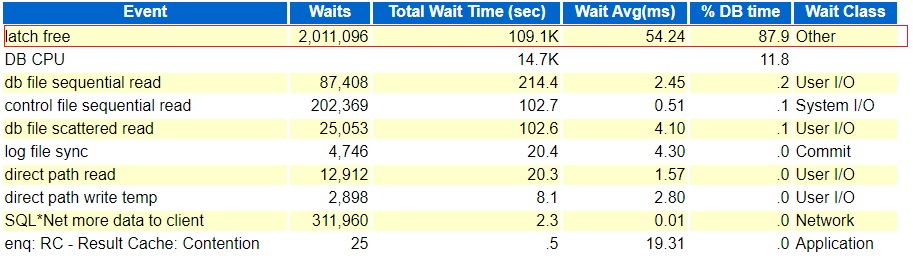
This is one of the latest issue that I will be discussing next where in one of the 12c (12.1.0.2.0) Non-RAC production box we suddenly started seeing a huge spike in database workload (or AAS). As usual I started with some live monitoring using scripts, OEM Performance page and tools and saw huge numbers of sessions waiting on ‘Latch Free’ (Others classed event) waits. Next I saw the event wait were contributing more than 87% of the total DBTime % with exceptionally high latch wait times of 54 ms (Yes, that’s too much for latch gets) and what else caught my eye was ‘enq: RC – Result Cache: Contention’ with average wait times of 19.31 ms.

But lets not jump directly to the conclusion, next I checked SQLs with excessive buffer scans (SQL Ordered by Gets) and saw the source statement that caused the mess with exceptionally high number of buffer scan requests and as you must be aware that each scan that you do in memory buffers (db buffer cache) you will have to acquire a latch for your scan. This one SQL was responsible for around 85% of total buffer reads or gets and interestingly within three hours of AWR report not even a single execution was completed.

Alright now next task was to identify the type of latch which was causing ‘latch free’ or latch shortage in the database. And for that I checked ‘Latch Statistics’ section and ‘Latch Sleep Breakdown’ subsection to see what latch was frequently missed to get and with more sleep requests, and I have got the culprit, ‘Result Cache: RC Latch’ was coming with huge Miss and sleep ratio. The latch was sleeping mainly for ‘Result Cache: Serialization12’ and little bit on ‘Result Cache: Serialization01’.

Next just to be double sure, I checked for P2 value for ‘Latch Free’ event which was coming as 559. So I queried V$Latchname to see if it’s matching the same what we identified so far. And yes, it was same RC Latch!


> SELECT latch#,name FROM gv$latchname WHERE latch#=559;

    LATCH# NAME
---------- ----------------------------------------------------------------
       559 Result Cache: RC Latch
 

You can do more deep down analysis and troubleshooting on such issues, Tanel Poder has written a great presentation for all who want to dig deep and want to pin point the addresses, code etc.
Download the copy of the document, click next –> Oracle_Latch_And_Mutex_Contention_Troubleshooting

Alright, now when the latch name, SQL is identified lets check more about the RESULT CACHE, and it’s set to MANUAL (parameter result_cache_mode) and this is strange. Next we saw that the SQL using the RC contains DS_SVC hints and are part of dynamic statistics activity.
Then I thought to look out for some official documentation on the same, and luckily found one official note from Oracle Doc ID 2002089.1 which is matching almost same with my problem.

And as per the document the workload we can apply is to disable the Adaptive Dynamic Statistics mechanism.


alter system set "_optimizer_ads_use_result_cache" = FALSE;
 

or else One-off Patch 26436717 can be requested and applied to fix the issue for a permanent fix.

Hope It Helps
Prashant Dixit

Posted in Advanced | Tagged: , | Leave a Comment »

Golden Gate 19.1.0 – VIEW REPORT & VIEW PARAMS command failed

Posted by FatDBA on March 24, 2020

Hi Folks,

Would like to share one of the latest problem that I’ve faced with Golden Gate release 19.1.0 where two of the most frequently used commands, VIEW REPORT and VIEW PARAMS command simply fails in the administration client console. This is a Windows server environment where I was doing some testing with this new release.
I mean it produces no additional logs or information while doing that, it simply tries to wake up and crashes in next few seconds.

So, with no idea about the problem, plus this being a new release of Oracle GG (19.1) there wasn’t any metalink note or public documentation available, so reached Oracle support. They gave a very simple but logical solution to handle this issue. They asked me to once again set the default text viewer program for viewing parameter and report files by passing following command and it worked


SET PAGER notepad 


They later on declared this issue as a BUG with code 30427030, but bug details are yet to be published on Metalink website.


Stay inside, learn something new during this self isolation & stop the spread of Covid-19.
Stay Healthy and Safe Everyone!

Prashant Dixit
 

Posted in troubleshooting | Tagged: , | Leave a Comment »