Tales From A Lazy Fat DBA

Its all about Databases, their performance, troubleshooting & much more …. ¯\_(ツ)_/¯

Posts Tagged ‘Tuning’

When Linux Swaps Away My Sleep – MySQL, RHEL8, and the Curious Case of High Swap Usage

Posted by FatDBA on December 12, 2025

I remember an old instance where I’d got an alert that one of production MySQL servers had suddenly gone sluggish after moved to RHEL 8 from RHEL7. On checking, I found something odd … the system was consuming swap heavily, even though there was plenty of physical memory free.

Someone who did the first time deployment years before, left THP as enabled and with default swapiness … but this setting that had worked perfectly for years on RHEL 7, but now, after the upgrade to RHEL 8.10, the behavior was completely different.

This post is about how that small OS level change turned into a real performance headache, and what we found after some deep digging.

The server in question was a MySQL 8.0.43 instance running on a VMware VM with 16 CPUs and 64 GB RAM. When the issue began, users complained that the database was freezing randomly, and monitoring tools were throwing high load average and slow query alerts.

Let’s take a quick look at the environment … It was a pretty decent VM, nothing under sized.

$ cat /etc/redhat-release
Red Hat Enterprise Linux release 8.10 (Ootpa)

$ uname -r
4.18.0-553.82.1.el8_10.x86_64

$ uptime
11:20:24 up 3 days, 10:57,  2 users,  load average: 4.34, 3.15, 3.63

$ grep ^CPU\(s\) sos_commands/processor/lscpu
CPU(s): 16

When I pulled the SAR data for that morning, the pattern was clear ..There were long stretches on CPU where %iowait spiked above 20-25%, and load averages crossed 400+ during peak time! The 09:50 slot looked particularly suspicious .. load average jumped to 464 and remained high for several minutes.

09:00:01 %usr=26.08  %iowait=22.78  %idle=46.67
09:40:01 %usr=29.04  %iowait=24.43  %idle=40.11
09:50:01 %usr=7.55   %iowait=10.07  %idle=80.26
10:00:01 %usr=38.53  %iowait=19.54  %idle=35.32

Here’s what the memory and swap stats looked like:

# Memory Utilization
%memused ≈ 99.3%
Free memory ≈ 400 MB (on a 64 GB box)
Swap usage ≈ 85% average, hit 100% at 09:50 AM

That was confusing.. MySQL was not leaking memory, and there was still >10 GB available for cache and buffers. The system was clearly pushing pages to swap even though it didn’t need to. That was the turning point in the investigation.

At the same time, the reporting agent started reporting MySQL timeouts:

 09:44:09 [mysql] read tcp xxx.xx.xx.xx:xxx->xxx.xxx.xx.xx:xxxx: i/o timeout
 09:44:14 [mysql] read tcp xx.xx.xx.xxxx:xxx->xx.xx.xx.xx.xx:xxx: i/o timeout

And the system kernel logs showed the familiar horror lines for every DBA .. MySQL threads were being stalled by the OS. This aligned perfectly with the time when swap usage peaked.

 09:45:34 kernel: INFO: task mysqld:5352 blocked for more than 120 seconds.
 09:45:34 kernel: INFO: task ib_pg_flush_co:9435 blocked for more than 120 seconds.
 09:45:34 kernel: INFO: task connection:10137 blocked for more than 120 seconds.

I double-checked the swappiness configuration:

$ cat /proc/sys/vm/swappiness
1

So theoretically, swap usage should have been minimal. But the system was still paging aggressively. Then I checked the cgroup configuration (a trick I learned from a Red Hat note) .. And there it was more than 115 cgroups still using the default value of 60! … In RHEL 8, memory management moved more toward cgroup v2, which isolates memory parameters by control group.

So even if /proc/sys/vm/swappiness is set to 1, processes inside those cgroups can still follow their own default value (60) and this explained why the system was behaving like swappiness=60 even though the global value was 1.

$ find /sys/fs/cgroup/memory/ -name *swappiness -exec cat {} \; | uniq -c
      1 1
    115 60

In RHEL 8, memory management moved more toward cgroup v2, which isolates memory parameters by control group. So even if /proc/sys/vm/swappiness is set to 1, processes inside those cgroups can still follow their own default value (60). This explained why the system was behaving like swappiness=60 even though the global value was 1.

Once the root cause was identified, the fix was straightforward — Enforced global swapiness across CGroups

Add this to /etc/sysctl.conf:

vm.force_cgroup_v2_swappiness = 1

Then reload:
sysctl -p

This forces the kernel to apply the global swappiness value to all cgroups, ensuring consistent behavior. Next, we handled THP that is always expected to cause intermittent fragmentation and stalls in memory intensive workloads like MySQL, Oracle, PostgreSQL and even in non RDBMSs like Cassandra etc., we disabled the transparent huge pages and rebooted the host.

In short what happened and was the root cause.

  • RHEL8 introduced a change in how swappiness interacts with cgroups.
  • The old /proc/sys/vm/swappiness setting no longer applies universally.
  • Unless explicitly forced, MySQL’s cgroup keeps the default swappiness (60).
  • Combined with THP and background I/O, this created severe page cache churn.

So the OS upgrade, not MySQL, was the real root cause.

Note: https://access.redhat.com/solutions/6785021

Hope It Helped!
Prashant Dixit
Posted in Uncategorized | Tagged: , , , , , , , | Leave a Comment »

Oracle AWR Scripts Decoded .. No More Guessing!

Posted by FatDBA on July 29, 2025

Recently, someone asked me why there are so many AWR-like files in the directory and whether they are as useful as the well-known awrrpt.sql. I took the opportunity to explain what I knew about them and their purpose. Since I thought it could be helpful, I decided to share this insight with my readers as well.

If you’re into performance tuning in Oracle, very likey you’ve already used AWR reports. But then you open this directory: $ORACLE_HOME/rdbms/admin …. …and boom – you’re hit with a list of cryptic scripts: awrrpt.sql, awrgdrpi.sql, awrsqrpt.sql, awrextr.sql

What do they all do?
When should you use which one?
Why are they named like 90s DOS files 🙂 ?

Let’s keep it short and sharp. Here’s your point-to-point breakdown of the most important AWR scripts.

Before you go running any of these scripts – make sure you have the Oracle Diagnostic Pack license.
AWR stuff is not free.

I grouped them into logical chunks – reports, comparisons, SQLs, data movement, etc.

Performance Reports

These are the most common AWR reports you run to analyze performance between 2 snapshots.

ScriptWhat it does
awrrpt.sqlGenerates AWR report for the current instance (for single instance DBs)
awrrpti.sqlSame as above, but lets you select another DBID or instance (useful for RAC)
awrgrpt.sqlAWR Global Report – gives a full RAC-wide view
awrgrpti.sqlSame as above, but lets you pick another DBID/instance

Example:
You’re troubleshooting high CPU on node 2 of your RAC? Use awrrpti.sql.

Comparison Reports

These help you compare two different time ranges – maybe before and after a patch, or different load periods.

ScriptWhat it does
awrddrpt.sqlCompares two AWR snapshots (date diff) – for a single instance
awrddrpi.sqlSame as above, for another dbid/instance
awrgdrpt.sqlGlobal RAC diff report (current RAC)
awrgdrpi.sqlGlobal RAC diff report (another dbid/instance)

Use these when you wanna say, “Hey, this new code made the DB slower… prove it!”

Want to see what a particular SQL is doing? These are your tools.

ScriptWhat it does
awrsqrpt.sqlSQL report for a specific SQL_ID in the current instance
awrsqrpi.sqlSame thing but lets you pick another dbid/instance

You’ll be surprised how useful this is when hunting bad queries.

Sometimes, you need to take AWR data from one system and analyze it somewhere else (like test or dev).

ScriptWhat it does
awrextr.sqlExport AWR data using datapump
awrload.sqlImport AWR data using datapump

This is actually gold when working on performance issues across environments.

Helper / Utility Scripts

These are mostly helper scripts to define input or make reports more automated or interactive.

ScriptWhat it does
perfhubrpt.sqlGenerates a fancy interactive Performance Hub report
awrinpnm.sqlInput name helper for AWR
awrinput.sqlGet inputs before running AWR reports
awrddinp.sqlInput helper for diff reports
awrgdinp.sqlInput helper for RAC diff reports

What’s with these weird script names?

Yeah, all these awrsqrpi.sql, awrgdrpt.sql, etc. – they look like random garbage at first.
But there’s actually some logic.

Here’s how to decode them:

AbbreviationMeans
awrAutomatic Workload Repository
rpt or rpReport
iLets you select specific instance or DBID
gGlobal report for RAC
d or ddDiff reports (comparing two snapshots)
sqSQL
inpInput helper

So awrsqrpi.sql = AWR SQL Report for a different instance
And awrgdrpi.sql = AWR Global Diff Report for another DBID/instance

So Which Script Should I Use?

Here’s a quick cheat sheet:

TaskScript
Normal AWR report (single instance)awrrpt.sql
AWR report for RAC (global view)awrgrpt.sql
SQL performance reportawrsqrpt.sql
Compare two AWR reportsawrddrpt.sql
Export/import AWR dataawrextr.sql and awrload.sql

If you’re doing anything with RAC – prefer the ones with g in them.
If you’re automating – use the *inp*.sql files.

Final Thoughts

Yes, the names are ugly.
Yes, the syntax is old-school.
But honestly? These AWR scripts are still some of the best tools you have for DB performance analysis.

Just remember:

  • Don’t use them without a valid license
  • Learn the naming pattern once – and it gets way easier
  • Practice running different ones on test systems

And next time someone complains, “The database is slow” … you know exactly which script to run.

Hope It Helped!
Prashant Dixit
Database Architect @RENAPS
Reach us at : https://renaps.com/

Posted in Uncategorized | Tagged: , , , , , , , | Leave a Comment »

fatdba explores Vector Search in Oracle 23ai

Posted by FatDBA on July 23, 2025

So Oracle rolled out 23ai a while back and like every major release, it came packed with some really cool and interesting features. One that definitely caught my eye was Vector Search. I couldn’t resist diving in… and recently I explored it in depth and would like to share a though on this subject.

You see, we’ve been doing LIKE '%tax policy%' since forever. But now, Oracle’s SQL has become more powerful. Not only does it match words … it matches meaning.

So here’s me trying to explain what vector search is, how Oracle does it, why you’d care, and some examples that’ll hopefully make it click.

What’s Vector Search, Anyway?

Alright, imagine this:

You have a table of products. You search for “lightweight laptop for travel”.
Some entries say “ultrabook”, others say “portable notebook”, and none mention “lightweight” or “travel”. Old-school SQL would’ve said: “No Matches Found”

But with vector search, it gets it. Oracle turns all that text into math .. basically, a long list of numbers called a vector … and compares meanings instead of words.

So What’s a Vector?

When we say “vector” in vector search, we’re not talking about geometry class. In the world of AI and databases, a vector is just a long list of numbers … each number representing some aspect or feature of the original input (like a sentence, product description, image, etc.).

Here’s a basic example:
[0.12, -0.45, 0.88, …, 0.03]
This is a vector … maybe a 512 or 1536-dimension one .. depending on the embedding model used (like OpenAI, Oracle’s built-in model, Cohere, etc.).

Each number in this list is abstract, but together they represent the essence or meaning of your data.

Let’s say you have these two phrases:
“Apple is a tech company”
“iPhone maker based in California”

Now, even though they don’t share many words, they mean nearly the same thing. When passed through an embedding model, both phrases are converted into vectors:

Vector A: [0.21, -0.32, 0.76, …, 0.02]
Vector B: [0.22, -0.30, 0.74, …, 0.01]

They look very close … and that’s exactly the point.

What Oracle 23ai Gives You

  • A new VECTOR datatype (yeah!)
  • AI_VECTOR() function to convert text into vectors
  • VECTOR_INDEX to make search blazing fast
  • VECTOR_DISTANCE() to measure similarity
  • It’s all native in SQL ..no need for another vector DB bolted on

Let’s Build Something Step-by-Step

We’ll build a simple product table and do a vector search on it.

Step 1: Create the table

CREATE TABLE products (
  product_id     NUMBER PRIMARY KEY,
  product_name   VARCHAR2(100),
  description    VARCHAR2(1000),
  embedding      VECTOR(1536)
);

1536? Yeah, that’s the number of dimensions from Oracle’s built-in embedding model. Depends on which one you use.

Step 2: Generate vector embeddings

UPDATE products
SET embedding = ai_vector('text_embedding', description);

This’ll take the description, pass it through Oracle’s AI model, and give you a vector. Magic.

Step 3: Create the vector index

CREATE VECTOR INDEX product_vec_idx
ON products (embedding)
WITH (DISTANCE METRIC COSINE);

This speeds up the similarity comparisons … much like an index does for normal WHERE clauses.

Step 4: Semantic Search in SQL

SELECT product_id, product_name, 
       VECTOR_DISTANCE(embedding, ai_vector('text_embedding', 'light laptop for designers')) AS score
FROM products
ORDER BY score
FETCH FIRST 5 ROWS ONLY;

Now we’re searching for meaning, not words.

VECTOR_DISTANCE Breakdown

You can use different math behind the scenes:

VECTOR_DISTANCE(v1, v2 USING COSINE)
VECTOR_DISTANCE(v1, v2 USING EUCLIDEAN)
VECTOR_DISTANCE(v1, v2 USING DOT_PRODUCT)

Cosine is the usual go-to for text. Oracle handles the rest for you.

Use Cases You’ll Actually Care About

1. Semantic Product Search — “Fast shoes for runners” => shows “Nike Vaporfly”, even if it doesn’t say “fast”.

2. Similar Document Retrieval — Find all NDAs that look like this one (even with totally different words).

3. Customer Ticket Suggestion — Auto-suggest resolutions from past tickets. Saves your support team hours.

4. Content Recommendation — “People who read this also read…” kind of stuff. Easy to build now.

5. Risk or Fraud Pattern Matching — Find transactions that feel like fraud ..even if the details don’t match 1:1.

I know it might sound little confusing .. lets do a Onwe more example : Legal Document Matching

CREATE TABLE legal_docs (
  doc_id       NUMBER PRIMARY KEY,
  title        VARCHAR2(255),
  content      CLOB,
  content_vec  VECTOR(1536)
);

Update vectors:

UPDATE legal_docs
SET content_vec = ai_vector('text_embedding', content);

Now find similar docs:

SELECT doc_id, title
FROM legal_docs
ORDER BY VECTOR_DISTANCE(content_vec, ai_vector('text_embedding', 'confidentiality in government contracts'))
FETCH FIRST 10 ROWS ONLY;

That’s it. You’re officially building an AI-powered legal search engine.

Things to Know

  • Creating vectors can be heavy .. batch it.
  • Indexing speeds up similarity search a lot.
  • Combine with normal filters for best results:
SELECT * FROM products
WHERE category = 'laptop'
ORDER BY VECTOR_DISTANCE(embedding, ai_vector('gaming laptop under 1kg'))
FETCH FIRST 5 ROWS ONLY;

Final Thoughts from fatdba

I’m honestly impressed. Oracle took something that felt like ML black magic and put it right in SQL. No external service. No complicated setups. Just regular SQL, but smater.

Hope It Helped!
Prashant Dixit
Database Architect @RENAPS
Reach us at : https://renaps.com/

Posted in Uncategorized | Tagged: , , , , , , , , , , , , , , | Leave a Comment »

Diagnosing a MySQL database performance Issue Using MySQLTuner.

Posted by FatDBA on July 20, 2025

A few weeks ago, we ran into a pretty nasty performance issue on one of our MySQL production-like grade databases. It started with slow application response times and ended with my phone blowing up with alerts. Something was clearly wrong, and while I suspected some bad queries or config mismatches, I needed a fast way to get visibility into what was really happening under the hood.

This is where MySQLTuner came to the rescue, again 🙂 I’ve used this tool in the past, and honestly, it’s one of those underrated gems for DBAs and sysadmins. It’s a Perl script that inspects your MySQL configuration and runtime status and then gives you a human-readable report with recommendations.

Let me walk you through how I used it to identify and fix the problem ..step by step .. including actual command output, what I changed, and the final outcome.

Step 1: Getting MySQLTuner

First things first, if you don’t already have MySQLTuner installed, just download it:

bashCopyEditwget https://raw.githubusercontent.com/major/MySQLTuner-perl/master/mysqltuner.pl
chmod +x mysqltuner.pl

You don’t need to install anything. Just run it like this:

bashCopyEdit./mysqltuner.pl --user=root --pass='YourStrongPassword'

(Note: Avoid running this in peak traffic hours on prod unless you’re sure about your load and risk.)

Step 2: Sample Output Snapshot

Here’s a portion of what I got when I ran it:

 >>  MySQLTuner 2.6.20 
 >>  Run with '--help' for additional options and output filtering

[OK] Currently running supported MySQL version 5.7.43
[!!] Switch to 64-bit OS - MySQL cannot use more than 2GB of RAM on 32-bit systems
[OK] Operating on 64-bit Linux

-------- Performance Metrics -------------------------------------------------
[--] Up for: 3d 22h 41m  (12M q [35.641 qps], 123K conn, TX: 92G, RX: 8G)
[--] Reads / Writes: 80% / 20%
[--] Binary logging is enabled (GTID MODE: ON)
[--] Total buffers: 3.2G global + 2.8M per thread (200 max threads)
[OK] Maximum reached memory usage: 4.2G (27.12% of installed RAM)
[!!] Slow queries: 15% (1M/12M)
[!!] Highest connection usage: 98% (197/200)
[!!] Aborted connections: 2.8K
[!!] Temporary tables created on disk: 37% (1M on disk / 2.7M total)

-------- MyISAM Metrics ------------------------------------------------------
[!!] Key buffer used: 17.2% (89M used / 512M cache)
[!!] Key buffer size / total MyISAM indexes: 512.0M/800.0M

-------- InnoDB Metrics ------------------------------------------------------
[OK] InnoDB buffer pool / data size: 2.0G/1.5G
[OK] InnoDB buffer pool instances: 1
[--] InnoDB Read buffer efficiency: 99.92% (925M hits / 926M total)
[!!] InnoDB Write log efficiency: 85.10% (232417 hits / 273000 total)
[!!] InnoDB log waits: 28

-------- Recommendations -----------------------------------------------------
General recommendations:
    Control warning line(s) size by reducing joins or increasing packet size
    Increase max_connections slowly if needed
    Reduce or eliminate persistent connections
    Enable the slow query log to troubleshoot bad queries
    Consider increasing the InnoDB log file size
    Query cache is deprecated and should be disabled

Variables to adjust:
    max_connections (> 200)
    key_buffer_size (> 512M)
    innodb_log_file_size (>= 512M)
    tmp_table_size (> 64M)
    max_heap_table_size (> 64M)

Step 3: What I Observed

Here’s what stood out for me:

1. Too many slow queries — 15% of all queries were slow. That’s a huge red flag. This wasn’t being logged properly either — the slow query log was off.

2. Disk-based temporary tables — 37% of temporary tables were being written to disk. This kills performance during joins and sorts.

3. Connections hitting limit — 197 out of 200 max connections used at peak. Close to saturation ..possibly causing application timeouts.

4. MyISAM key buffer inefficient — Key buffer was too small for the amount of MyISAM index data (yes, we still have a couple legacy MyISAM tables..

5. InnoDB log file too small — Frequent log flushing and waits were indicated, meaning innodb_log_file_size wasn’t enough for our write load.

Step 4: Actions I Took

Here’s what I changed based on the output and a quick double-check of our workload patterns:

– Enabled Slow Query Log

sqlCopyEditSET GLOBAL slow_query_log = 'ON';
SET GLOBAL long_query_time = 1;

And updated /etc/my.cnf:

iniCopyEditslow_query_log = 1
slow_query_log_file = /var/log/mysql-slow.log
long_query_time = 1

– Increased tmp_table_size and max_heap_table_size:

iniCopyEdittmp_table_size = 128M
max_heap_table_size = 128M

(This reduced the % of temp tables going to disk.)

– Raised innodb_log_file_size:

iniCopyEditinnodb_log_file_size = 512M
innodb_log_files_in_group = 2

Caution: You need to shut down MySQL cleanly and delete old redo logs before applying this change.

– Raised key_buffer_size:

iniCopyEditkey_buffer_size = 1G

We still had some legacy MyISAM usage and this definitely helped reduce read latency.

– Upped the max_connections a bit (but also discussed with devs about app-level connection pooling):

iniCopyEditmax_connections = 300

Step 5: Post-Change Observations

After making these changes and restarting MySQL (for some of the changes to take effect), here’s what I observed:

  • CPU dropped by ~15% at peak hours.
  • Threads_running dropped significantly, meaning less contention.
  • Temp table usage on disk dropped to 12%.
  • Slow query log started capturing some really bad queries, which were fixed in the app code within a few days.
  • No more aborted connections or connection errors from the app layer.

Final Thoughts

MySQLTuner is not a magic bullet, but it’s one of those tools that gives you quick, actionable insights without the need to install big observability stacks or pay for enterprise APM tools. I’d strongly suggest any MySQL admin or engineer dealing with production performance issues keep this tool handy.

It’s also good for periodic health checks, even if you’re not in a crisis. Run it once a month or so, and you’ll catch slow config drifts or usage pattern changes.

Resources

If you’ve had a similar experience or used MySQLTuner in your infra, would love to hear what kind of findings you had. Drop them in the comments or message me directly .. Want to know more 🙂 Happy tuning!

Hope It Helped!
Prashant Dixit
Database Architect @RENAPS
Reach us at : https://renaps.com/

Posted in Uncategorized | Tagged: , , , , , , , , , | Leave a Comment »

Enhancing Materialized View Refreshes with Oracle 12.1’s Out-of-Place Refresh

Posted by FatDBA on November 23, 2024

While addressing a recent materialized view refresh issue, I revisited a feature introduced in Oracle 12.1—out-of-place refresh. It’s a concept I’ve been familiar with for some time but hadn’t had the opportunity to explore practically until now. This innovation addresses key challenges faced during materialized view refreshes in data-heavy environments, offering a smarter and more efficient alternative to traditional methods.

Why Materialized Views Are Powerful (and Challenging) ?

Materialized views (MVs) simplify data retrieval by precomputing and storing query results as physical tables. They are especially useful for complex queries that join data from multiple tables. However, as materialized views grow in size, refreshing them becomes a major bottleneck.

The default refresh method, COMPLETE refresh, removes all existing data before repopulating the view. While effective for smaller datasets, this approach becomes painfully slow for large materialized views, as it relies on delete operations followed by insertions.

To mitigate this, some administrators opt for atomic_refresh = FALSE, which uses the faster TRUNCATE operation instead of delete statements. While truncate drastically improves performance, it comes with a trade-off: materialized views become inaccessible during refresh, impacting any dependent applications.

Out-of-Place Refresh to the Rescue

Oracle’s out-of-place refresh, introduced in 12.1, provides a great solution. Instead of working directly on the materialized view, the refresh process creates temporary outside tables. The necessary updates are performed on these temporary tables, which are then swapped with the materialized view once the refresh is complete. This approach minimizes downtime and ensures that materialized views remain accessible throughout the process.

Out-of-place refresh supports all major refresh methods, including FAST (‘F’), COMPLETE (‘C’), and PCT (‘P’). It is particularly effective in scenarios involving large data changes, where traditional methods struggle to scale. This feature also avoids issues like fragmentation or exposure of intermediate results during refresh.

Here’s how you can enable out-of-place refresh using the DBMS_MVIEW package:

DBMS_MVIEW.REFRESH('FATDBA.MY_TEST_MVIEW', method => '?', atomic_refresh => FALSE, out_of_place => TRUE);
or 
DBMS_MVIEW.REFRESH('FATDBA.MY_TEST_MVIEW', method => 'C', atomic_refresh => FALSE, out_of_place => TRUE);

In this example, Oracle first attempts an out-of-place FAST refresh. If that’s not possible, it tries PCT refresh and finally falls back to a complete refresh. In second example, it starts performing the complete refresh of MV.

During the refresh you will see some of the operations happening in the background on the auxiliary/temp table ..

/* MV_REFRESH (ITB) */INSERT /*+ APPEND */ INTO "FATDBA"."RV$B318VA"   (SELECT /*+ PARALLEL ("xxx",10) */ xxxxx
-- This is where it starts copying rows into this temp table. 

/* MV_REFRESH (CIDX) */ CREATE INDEX "FATDBA"."RV$KHA121" ON "FATDBA"."RV$B318VA" ("x", "y", "z")	PCTFREE 10 INITRANS 2 MAXTRANS 255 COMPUTE STATISTICS 
STORAGE( INITIAL 131072 NEXT 131072 MINEXTENTS 1 MAXEXTENTS 2147483645  PCTINCREASE 0  BUFFER_POOL DEFAULT FLASH_CACHE DEFAULT CELL_FLASH_CACHE DEFAULT) TABLESPACE "xxxx"  PARALLEL 10
-- Once done with the data insertion in the temp table, it starts to create same indexes that are there on the existing MV base table.


Note : 
The abbreviations ITB (Insert Temporary Table) and CIDX (Create Index) are typically used as internal identifiers in Oracle's materialized view refresh operations. 

Points to Consider

While the out-of-place refresh is a powerful tool, there are a few considerations to keep in mind:

  • Temporary Storage Needs: Adequate tablespace is required to hold two copies of the materialized view during refresh.
  • Recycle Bin Impact: If enabled, the recycle bin retains older copies of the table. It’s recommended to disable the recycle bin to avoid unnecessary space consumption.
  • Statistics Management: While index statistics are automatically computed during refresh, table statistics are not. Manual intervention may be needed.
  • Parallelism on Indexes : During the out-of-place refresh it always tries to recreate same indexes what you have on your existing MV base table, so its good to add some DOP (removed them later on once refresh is done), otherwise the creation process will go serial and the entire process will take lot of time to finish in case of bulky MVs.
  • Errors during table swap : If you have a very busy environment, you might hit ‘ORA_08103: object no longer exists‘ error message when the out-of-place method doing the swap of tables & its indexes.
  • Compatibility:
    • Unsupported for remote, cube, or object materialized views.
    • Not compatible with LOB columns.
    • Requires atomic_refresh = FALSE.

Final Thoughts

The out-of-place refresh feature in Oracle 12.1 is a significant improvement for managing materialized views in large databases. By executing refresh operations on temporary tables, it optimizes performance and ensures continuous availability, making it an invaluable tool for data-intensive environments.

If your materialized views are becoming cumbersome to manage, consider leveraging out-of-place refresh. It not only streamlines the refresh process but also enhances the overall efficiency and reliability of your database operations.

Hope It Helped!
Prashant Dixit

Posted in Uncategorized | Tagged: , , , , , , , | Leave a Comment »

Data Pump Troubleshooting Tips – My favorite 6

Posted by FatDBA on October 26, 2024

There are numerous utilities, options, and methods available for migrating and moving data between Oracle databases, yet Oracle Data Pump remains one of the most widely used tools. A significant number of DBAs are very comfortable with Data Pump, as it has been a trusted utility for a long time (originally as exp and imp). Its stability, user-friendliness, and robust capabilities make it a top choice for handling large data migrations, backup, and restore operations.

However, one area where DBAs still often face challenges is troubleshooting when issues arise. When a Data Pump job fails, performs poorly, or behaves unexpectedly, it can be unclear where to start, what logs to review, or what checks to perform. Many find it difficult to pinpoint the source of the problem and make adjustments to optimize performance or resolve issues.

Today’s post focuses on troubleshooting Data Pump performance and functionality issues, sharing the steps I typically follow when diagnosing problems. We’ll cover key areas to investigate, like log file analysis, parameter tuning, network considerations, and common bottlenecks. These steps aim to provide a practical guide to understanding and resolving Data Pump issues and optimizing your data movement processes.

Option 1: Generate an AWR Report to Assess Database Performance

Start by generating an AWR (Automatic Workload Repository) report to gain insight into the database’s overall performance during the relevant period. Adjusting the AWR snapshot interval to 15 minutes is recommended for a more granular view. This approach reduces the chances of averaging out short performance spikes, allowing you to capture transient issues more effectively.

exec dbms_workload_repository.modify_snapshot_settings(null, 15);
exec dbms_workload_repository.create_snapshot;

Option 2: Enable SQL Trace for Data Pump Processes or Specific SQL IDs
Optionally, you can enable SQL trace for the Data Pump processes (dm for the master process and dw for worker processes) or for specific SQL statements by SQL ID. This will help isolate SQL-level performance issues affecting the Data Pump job.

alter system set events 'sql_trace {process: pname = dw | process: pname = dm} level=8';
alter system set events 'sql_trace[SQL: 8krc88r46raff]';

Option 3: Run Data Pump Job with Detailed Trace Enabled
For enhanced tracing, run the Data Pump job with additional trace options, which provide more comprehensive output. Including metrics=yes, logtime=all, and trace=1FF0300 in the command enables detailed logging of both timing and activity metrics. Tracing can be enabled by specifying an 7 digit hexadecimal mask in the TRACE parameter of Export DataPump (expdp) or Import DataPump (impdp). The first three digits enable tracing for a specific Data Pump component, while the last four digits are usually: 0300.

expdp ... metrics=yes logtime=all trace=1FF0300
impdp ... metrics=yes logtime=all trace=1FF0300

Data Pump tracing can also be started with a line with EVENT 39089 in the initialization parameter file. This method should only be used to trace the Data Pump calls in an early state, e.g. if details are needed about the DBMS_DATAPUMP.OPEN API call. Trace level 0x300 will trace all Data Pump client processes.

-- Enable event
ALTER SYSTEM SET EVENTS = '39089 trace name context forever, level 0x300' ;
-- Disable event
ALTER SYSTEM SET EVENTS = '39089 trace name context off' ;

Option 4: Review Data Pump Trace Files
Locate and analyze the Data Pump trace files stored in the Oracle trace directory. The master control process file names typically contain *dm*, while worker process files include *dw*. These files provide insights into the processes, job details, and potential error sources during execution.

Option 5: Activate SQL_TRACE on specific Data Pump process with higher trace level.
Lets assume we see that the Data Pump Master process (DM00) has SID: 143 and serial#: 50 and the Data Pump Worker process (DW01) has SID: 150 and serial#: 17. These details can be used to activate SQL tracing in SQL*Plus with DBMS_SYSTEM.SET_EV, e.g.:

-- In SQL*Plus, activate SQL tracing with DBMS_SYSTEM and SID/SERIAL#  
-- Syntax: DBMS_SYSTEM.SET_EV([SID],[SERIAL#],[EVENT],[LEVEL],'') 

-- Example to SQL_TRACE Worker process with level 4 (Bind values):   
execute sys.dbms_system.set_ev(150,17,10046,4,''); 

-- and stop tracing: 
execute sys.dbms_system.set_ev(150,17,10046,0,'');  


-- Example to SQL_TRACE Master Control process with level 8 (Waits):  
execute sys.dbms_system.set_ev(143,50,10046,8,'');  

-- and stop tracing:  
execute sys.dbms_system.set_ev(143,50,10046,0,'');

Option 6: Use the Data Pump Log Analyzer

I’ve personally used the Data Pump Log Analyzer for some time and have found it to be incredibly user-friendly, making it simple to understand the performance and runtime statistics of Data Pump jobs. This tool is highly effective in streamlining troubleshooting efforts, quickly identifying bottlenecks, and delivering clear insights into job performance. It’s a fantastic addition to a DBA’s toolkit and provides valuable capabilities that aren’t typically found in standard scripts. The Data Pump Log Analyzer has been tested with Data Pump log files across various database versions, including those generated by Data Pump client (expdp/impdp), Zero Downtime Migration (ZDM), OCI Database Migration Service (DMS), and Data Pump API (DBMS_DATAPUMP).The Data Pump Log Analyzer is a Python-based command-line utility designed for in-depth analysis of Oracle Data Pump log files. It goes beyond basic log review by offering detailed, structured insights into key performance metrics, errors, and process details. This tool can be particularly useful for DBAs needing a quick and comprehensive view of Data Pump job behavior, helping with issue diagnosis and performance optimization. Link to read and download or a more detailed guide on it’s usage Link

With the Data Pump Log Analyzer, you get:

  • Detailed Operations and Processing Metrics: Granular information on data operations for pinpoint analysis.
  • Error and ORA- Code Analysis: Summaries and explanations of encountered errors for easier troubleshooting.
  • Object-Type Breakdown and Processing Times: Insight into performance by object type, aiding in performance tuning.
  • Data Pump Worker Performance: Analyzes individual worker processes for any lagging tasks.
  • Summarized Schema, Table, Partition Details: Overview of data handled by each schema, table, or partition.
  • Instance-Based Data Analysis (for Oracle 21c and later): Statistics by instance for performance evaluation in multitenant setups.
  • Flexible Output Options: Filter, sort, and export analysis results to text or HTML for efficient sharing and record-keeping.

One below is with basic syntax to get operational details.

$ python3 dpla.py import.log
========================
Data Pump Log Analyzer
========================
...
Operation Details
~~~~~~~~~~~~~~~~~
Operation: Import
Data Pump Version: 19.23.0.0.0
DB Info: Oracle Database 19c EE Extreme Perf Release 19.0.0.0.0
Job Name: FATDBAJOB1
Status: COMPLETED
 Processing: -
Errors: 1301
 ORA- Messages: 1267
Start Time: 2024-08-21 01:30:45
End Time: 2024-08-21 11:43:11
Runtime: 35:03:06
Data Processing
~~~~~~~~~~~~~~~
Parallel Workers: 104
Schemas: 47
Objects: 224718
Data Objects: 188131
Overall Size: 19.11 TB

Use flag ‘-e’ to view all ORA- messages encountered during the Data Pump operation, or optionally you can filter our specific errors as well i.e. ‘-e ORA-39082 ORA-31684′.

python3 dpla.py import.log -e
========================
Data Pump Log Analyzer
========================
...
ORA- MESSAGES DETAILS
~~~~~~~~~~~~~~~~~~~~~
(sorted by count):
Message Count
--------------------------------------------------------------------------------------------------- ---------
ORA-39346: data loss in character set conversion for object COMMENT 919
ORA-39082: Object type PACKAGE BODY created with compilation warnings 136
ORA-39346: data loss in character set conversion for object PACKAGE_BODY 54
ORA-39082: Object type TRIGGER created with compilation warnings 36
ORA-39082: Object type PROCEDURE created with compilation warnings 29
ORA-31684: Object type USER already exists 27
ORA-39111: Dependent object type PASSWORD_HISTORY skipped, base object type USER already exists 27
ORA-39346: data loss in character set conversion for object PACKAGE 18
ORA-39082: Object type PACKAGE created with compilation warnings 10
ORA-39082: Object type VIEW created with compilation warnings 7
ORA-39346: data loss in character set conversion for object PROCEDURE 2
ORA-39082: Object type FUNCTION created with compilation warnings 2
--------------------------------------------------------------------------------------------------- ---------
Total 1267
--------------------------------------------------------------------------------------------------- ---------


Use flag ‘-o’ to see details about which types of database objects were involved in the Data Pump operation.

python3 dpla.py import.log -o
========================
Data Pump Log Analyzer
========================
...
Object                                  Count      Seconds      Workers     Duration
----------------------------------      ---------- -----------  ----------- ------------
SCHEMA_EXPORT/TABLE/TABLE_DATA             188296    6759219         128       6759219
CONSTRAINT                                    767      37253           1         37253
TABLE                                        2112       3225          51           156
COMMENT                                     26442        639         128            18
PACKAGE_BODY                                  197        125         128             5
OBJECT_GRANT                                 5279         25           1            25
TYPE                                          270          6           1             6
ALTER_PROCEDURE                               149          5           2             3
ALTER_PACKAGE_SPEC                            208          4           3             2
PACKAGE                                       208          3           3             1
PROCEDURE                                     149          2           2             1

...
---------------------------------- ---------- ----------- ----------- ------------
Total 224755 6800515 128 6796697
---------------------------------- ---------- ----------- ----------- ------------


Hope It Helped!
Prashant Dixit

Posted in Uncategorized | Tagged: , , , , , , , , , , , | Leave a Comment »

Experiencing ORA-15554 Error During Real Application Testing, Despite Database Being in PREPARE Mode

Posted by FatDBA on February 24, 2024

Recently, I was working to simulate a production workload on a new server and analyze the potential impact of changes made to the Oracle Database. Armed with my favorite testing tool from Oracle, Real Application Testing (RAT), everything seemed to progress smoothly until I encountered a roadblock during the replay phase on the target system via workload clients (wrc replay clients). This incident occurred while conducting workload replay on Oracle Database 21c Release 3 within one of the Pluggable Databases (PDB).

Yes, you read it right – replaying workload within a PDB! Since Oracle Release 19c, a significant enhancement allows capturing and replaying workloads at the individual PDB level. In the past, this capability was confined to capturing and replaying multitenant databases at the root multitenant container database (CDB) level. If you’re curious about this enhancement, I delved into it in a previous blog post, providing comprehensive details and explanations. You can explore it here: Real Application Testing for Capture and Replay in a PDB: A Great Addition Made in 19c.

Now, before we delve into the intricacies of the encountered issue, let’s acknowledge an observation. There were instances where, amidst the excitement of working with new options, we totally forgot to enable PREPARE mode for REPLAY within the PDB, especially when working with versions 19c & above. It might seem trivial, but it’s a common oversight that can lead to unexpected hurdles. In such cases, the CDB might be in PREPARE mode, but the oversight within the PDB can be the root cause.

Assuming you’ve ensured that PREPARE mode is correctly set up for your PDB, and you’re still facing issues, let’s dive into troubleshooting this error. The next steps involve a meticulous investigation to understand what’s happening behind the scenes.

SQL> select id, name, status from dba_workload_replays;

        ID NAME                                     STATUS
---------- ---------------------------------------- ----------------------------------------
         1 REPLAY_MYDB12_3HRS_252024                PREPARE

[oracle@testbox-fatdba ~]$ wrc rattest/rattest@pdb1 mode=replay replaydir=/home/oracle/replaydir
Workload Replay Client: Release 21.3.0.0.0 - Production on Sat Feb 24 12:51:50 2024
Copyright (c) 1982, 2021, Oracle and/or its affiliates.  All rights reserved.

(wrc_main_507216.trc) ORA-15554: cannot start workload replay client because the database server is not in PREPARE mode

Lets see if we have to redo of prepare mode solves the problem.

SQL> execute DBMS_WORKLOAD_REPLAY.PREPARE_REPLAY(synchronization => 'SCN');
BEGIN DBMS_WORKLOAD_REPLAY.PREPARE_REPLAY(synchronization => 'SCN'); END;

*
ERROR at line 1:
ORA-20223: Invalid input. Database already in PREPARE mode.
ORA-06512: at "SYS.DBMS_WORKLOAD_REPLAY_I", line 5519
ORA-06512: at "SYS.DBMS_WORKLOAD_REPLAY", line 153
ORA-06512: at line 1

No, lets try and create a separate user and assign all required permissions to it and see if that solves the issue.

SQL> show pdbs;

    CON_ID CON_NAME                       OPEN MODE  RESTRICTED
---------- ------------------------------ ---------- ----------
         3 PDB1                           READ WRITE NO
SQL>
SQL> create user appuser identified by oracle90;
User created.
SQL> grant ratuser to appuser;
Grant succeeded.
SQL>
SQL> grant create session to appuser;
Grant succeeded.
SQL>
SQL> Create role ratuser;
Role created.
SQL> Grant create session to ratuser;
Grant succeeded.
SQL> Grant execute on dbms_workload_repository to ratuser;
Grant succeeded.
SQL> Grant administer SQL tuning set to ratuser;
Grant succeeded.
SQL> Grant create job to ratuser;
Grant succeeded.
SQL> Grant execute on dbms_workload_capture to ratuser;
Grant succeeded.
SQL> Grant execute on dbms_workload_replay to ratuser;
Grant succeeded.
SQL> Grant oem_advisor to ratuser;
Grant succeeded.
SQL> Grant create session to ratuser;
Grant succeeded.
SQL> Grant become user to ratuser;
Grant succeeded.
SQL> Grant create any directory to ratuser;
Grant succeeded.
SQL> Grant select_catalog_role to ratuser;
Grant succeeded.
SQL>

SQL> grant ratuser to appuser;
Grant succeeded.

Let’s try now and see how it goes with this new application user that we just created with all right permissions.

[oracle@testbox-fatdba ~]$ wrc appuser/oracle90@pdb1 mode=replay replaydir=/home/oracle/replaydir
Workload Replay Client: Release 21.3.0.0.0 - Production on Sat Feb 24 13:14:19 2024
Copyright (c) 1982, 2021, Oracle and/or its affiliates.  All rights reserved.

Wait for the replay to start (13:14:19)

Yeah, and this is working fine.

Hope It Helped!
Prashant Dixit

Posted in Uncategorized | Tagged: , , , , | Leave a Comment »

A simple script to automatically catch those intermittent database performance issues …

Posted by FatDBA on December 16, 2023

Hi All,

Occasionally, anticipating the occurrence of a problem becomes unpredictable, and simultaneously, dealing manually with a transient issue to extract necessary information may not always be feasible (mainly due to the rapid resolution of the problem before we can initiate the extraction process). Additionally, there is a requirement for adaptability in the content we aim to extract.

The ensuing approach allows us to attain our primary objectives without resorting to invasive measures. There could be multiple use cases, few of the scenarios would be :
Case 1 : With little changes to it, you can make it employable for gathering solely the system state upon encountering a specific wait event.
Case 2: Can be utilized for gathering 10046, error stack, etc., for the obstructing session when a designated wait event is triggered concurrently with the execution of a known SQL statement (SQL_ID).
Case 3: Utilizable for obtaining hang analysis, system state, and additionally, 10046, error stack for the session causing the obstruction when a specific wait event is encountered.

Let me explain how we can utilize this quick, short but handy code to generate the diagnostic dump like hanganalyze / systemstate / errorstack / 10046 trace etc if any session is found to be waiting on any specific wait event for any specific period of time.

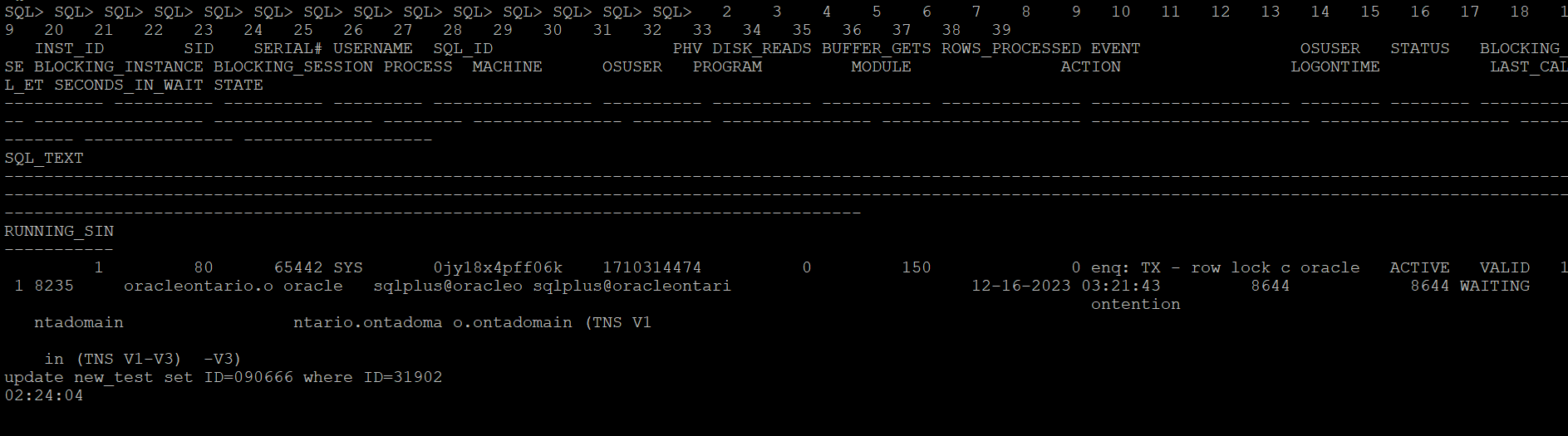
This is the simple script to collect diagnostic information with few of the customizable parameters or inputs i.e. ‘waitevent’ which is for the event we know we have the problem with, ‘seconds’ is the amount of time we think a session can wait on that session before we decide it is stuck and want to trigger dumping and ‘tid’ which is the session we are going to attach to run oradebug against. This could be the waiting session, a blocking session.

In the example, I have modified the code to collect diag info if any session is found to be waiting on “enq: TX – row lock contention” waits above 10 seconds.

set serverout on
spool logit.sql
declare
waitevent varchar2(100):='enq: TX - row lock contention';
seconds number :=10;      
w1 v$session%rowtype;
w2 v$session%rowtype;
tid number := 0;

begin

loop
dbms_lock.sleep(seconds);
begin
select * into w1 
from v$session 
where event=waitevent and wait_time=0 and rownum=1;
dbms_lock.sleep(seconds);
select * into w2
from v$session
where wait_time=0
and sid=w1.sid
and event=waitevent
and seq#=w1.seq# ;
select spid into tid from v$process
where addr=(select paddr from v$session where sid=w2.blocking_session);
dbms_output.put_line('oradebug setospid '||tid);
dbms_output.put_line('oradebug unlimit');
dbms_output.put_line('oradebug hanganalyze 3');  /**If RAC then use -G all**/
dbms_output.put_line('oradebug tracefile_name');
dbms_output.put_line('exit');
exit;
exception
when no_data_found then null;
end;
end loop;
end;
/
exit


-- Result : 
SQL>  
oradebug setospid 6794
oradebug unlimit
oradebug hanganalyze 3
oradebug tracefile_name
exit

PL/SQL procedure successfully completed.

SQL> 

The subsequent instance is intricate yet showcases versatility of this simple script. In this scenario, I encounter an intermittent issue involving sessions experiencing wait times due to TX enqueue row lock contention. While I may not be overly concerned about these sessions, it is crucial for me to understand the actions of the session causing the blockage. Given that I am aware of the SQL being executed during that period, I can leverage this information to ensure accurate trapping of the relevant event.
Here is something that you can do to alter it accordingly.

Let me create a row locking situation and see how it captures stats for a particular SQLID. Below is the row locking case that I have created to test how the scripts catches details for this SQLID ‘0jy18x4pff06k’

This is the modified version of the script which catches details for the SQL waiting on any specific wait event.

set serverout on
spool logit.sql
declare
waitevent varchar2(100):='enq: TX - row lock contention';
seconds number :=10;
w1 v$session%rowtype;
w2 v$session%rowtype;
tid number := 0;

begin

loop
dbms_lock.sleep(seconds);
begin
select * into w1
from v$session
where event=waitevent and wait_time=0 and sql_id='0jy18x4pff06k' and rownum=1;
dbms_lock.sleep(seconds);
select * into w2
from v$session
where wait_time=0
and sid=w1.sid
and event=waitevent
and seq#=w1.seq# ;
select spid into tid from v$process
where addr=(select paddr from v$session where sid=w2.blocking_session);
dbms_output.put_line('oradebug setospid '||tid);
dbms_output.put_line('oradebug unlimit');
dbms_output.put_line('oradebug dump errorstack 3');
dbms_output.put_line('oradebug event 10046 trace name context forever, level 8');
dbms_output.put_line('oradebug event 10200 trace name context forever, level 1');
dbms_output.put_line('oradebug event 10224 trace name context forever, level 1');
dbms_output.put_line('execute dbms_lock.sleep(20);');
dbms_output.put_line('oradebug event 10046 trace name context off');
dbms_output.put_line('oradebug event 10200 trace name context off');
dbms_output.put_line('oradebug event 10224 trace name context off');
dbms_output.put_line('exit');
exit;
exception
when no_data_found then null;
end;
end loop;
end;
/
exit


-- Result : 
SQL>  
oradebug setospid 6794
oradebug unlimit
oradebug dump errorstack 3
oradebug event 10046 trace name context forever, level 8
oradebug event 10200 trace name context forever, level 1
oradebug event 10224 trace name context forever, level 1
execute dbms_lock.sleep(20);
oradebug event 10046 trace name context off
oradebug event 10200 trace name context off
oradebug event 10224 trace name context off
exit

PL/SQL procedure successfully completed.

SQL> 

The next what we can do to trap any such wait events of interest when it exceeds the behnchmark, you can put eveything in a shell script and run it in the loop and execute the oradebug code. Once finished you can look it in the diagnostic_dest for the dump file. For 11g and above, look under subdirectory trace under home directory of ADR.

Next once you have put it in the shell script format, you can call it in the nohup mode and the script will run in background and sit in a loop for the defined condition to hit.

[oracle@oracleontario ~]$ more exec
#!/bin/bash
sqlplus -s '/ as sysdba' @waitdumpv1
[oracle@oracleontario ~]$
[oracle@oracleontario ~]$ chmod 777 exec
[oracle@oracleontario ~]$
[oracle@oracleontario ~]$

[oracle@oracleontario ~]$ nohup ./exec > waitdump2.log
nohup: ignoring input and redirecting stderr to stdout
[oracle@oracleontario ~]$

[oracle@oracleontario ~]$ more waitdump1.log
[oracle@oracleontario ~]$ nohup ./exec > waitdump2.log
nohup: ignoring input and redirecting stderr to stdout
[oracle@oracleontario ~]$ more waitdump2.log
oradebug setospid 6794
oradebug unlimit
oradebug hanganalyze 3
oradebug tracefile_name
exit

PL/SQL procedure successfully completed.

[oracle@oracleontario ~]$
[oracle@oracleontario ~]$

Hope It Helped!
Prashant Dixit

Posted in Uncategorized | Tagged: , , , , | Leave a Comment »

Why the Tablespace IO Stats are missing in my AWR report ?

Posted by FatDBA on October 22, 2023

Hi All,

In the past, I looked into a Database AWR performance report from a slow 19c where we suspected some IO issues and were looking into related metrics. “Tablespace IO Stats” was an important area and provided some important statistics like the average number of read requests per second, average read time in milliseconds, write waits, number of buffer waits, and average wait time in milliseconds for buffer waits for the tablespaces.

While looking into the report, I saw that the said section was not there and was missing for Tablespace IO stats. It appeared that the file IO statistics for Tablespaces had been disabled or were not collected. Below were the steps that you could do in such cases to get Tablespace IO stats data back in AWR reports in 19.X versions. Please run the following commands as SYS:

SQL> exec dbms_workload_repository.modify_table_settings(table_name => 'WRH$_FILESTATXS', flush_level => 'TYPICAL');
 
PL/SQL procedure successfully completed.
 
SQL> exec dbms_workload_repository.modify_table_settings(table_name => 'WRH$_DATAFILE', flush_level => 'TYPICAL');
 
PL/SQL procedure successfully completed.
 
SQL> exec dbms_workload_repository.modify_table_settings(table_name => 'Tempfile Group', flush_level => 'TYPICAL');
 
PL/SQL procedure successfully completed.
 
SQL> exec dbms_workload_repository.modify_table_settings(table_name => 'WRH$_TEMPFILE', flush_level => 'TYPICAL');
 
PL/SQL procedure successfully completed.
 
SQL> exec dbms_workload_repository.modify_table_settings(table_name => 'WRH$_TEMPSTATXS', flush_level => 'TYPICAL');
 
PL/SQL procedure successfully completed.
 
SQL>

When new AWR snapshots are generated, you will start getting Tablespace IO stats data for checking IO performance. You may have to run these commands in the PDBs also if you are generating AWR snapshots at PDB level and they are missing Tablespace IO stats data in AWR reports.

There is another way how you can force that data to the AWR, this is by using the new PL/SQL program called modify_table_settings() and that is recommended to be used to enable flushing of the tables WRH$_FILESTATXS, WRH$_DATAFILE and WRH$_TEMPSTATXS at TYPICAL or ALL depending on the flush_level of “Tempfile Group”.

Hope It Helped!
Prashant Dixit

Posted in Uncategorized | Tagged: , , , | Leave a Comment »

Auto Transaction Rollback in Oracle 23c – Is this the end of Row Lock Contention in Oracle Database ?

Posted by FatDBA on April 14, 2023

Hi Guys,

Oracle 23c is full of great features, one of the outstanding feature added to the version is the Automatic Transaction Rollback … Means no more long transaction level locking or the infamous event ‘enq: TX row lock contention‘ or the pessimistic locking 🙂

In case of a row level locking or pessimistic level locking where a single row of a table was locked by one of the following statements INSERT, UPDATE, DELETE, MERGE, and SELECT … FOR UPDATE. The row level lock from first session will exist it performs the rollback or a commit. This situation becomes severe in some case i.e. The application modifies some rows but doesn’t commit or terminate the transaction because of an exception in the application. Traditionally, in such cases the database administrator have to manually terminate the blocking transaction by killing the parent session.

Oracle 23c has come up with a brilliant feature which it implements through a session settings to control the transaction priority. Transaction priority (TXN_PRIORITY) is set at session level using ALTER SESSION command. Once the transaction priority is set, it will remain the same for all the transactions created in that session. This parameter specifies a priority (HIGH, MEDIUM, or LOW) for all transactions in a user session. When running in ROLLBACK mode, you can track the performance of Automatic Transaction Rollback by monitoring the following statistics:

TXN_AUTO_ROLLBACK_HIGH_PRIORITY_WAIT_TARGET This param specifies the max number of seconds that a HIGH priority txn will wait for a row lock. Similarly, there is another parameter for MEDIUM classed statements TXN_AUTO_ROLLBACK_MEDIUM_PRIORITY_WAIT_TARGET which specifies the max number of seconds that a MEDIUM priority txn will wait for a row lock.
NOTE : Some of these parameters has changed and are discussed in my latest port — https://fatdba.com/2024/07/14/key-parameter-renaming-for-auto-transaction-rollback-feature-in-23ai/

Lets do a quick demo to explain this behavior in details.

I have created a small table with two rows and two columns and will use it for this demo to test automatic txn rollback features. To show a quick demo, I will set txn_auto_rollback_high_priority_wait_target to a lower value of 15 seconds. Will issue an UPDATE statement from the first session after setting the TXN_PRIORITY to ‘LOW‘ at the session level and will open a parallel session (session 2) and issue the same statement where the it will try to modify the same row already in exclusive lock mode by session 1.


--------------------------------------
-- SESSION 1 
--------------------------------------

[oracle@mississauga ~]$ sqlplus / as sysdba
SQL*Plus: Release 23.0.0.0.0 - Developer-Release on Fri Apr 14 22:46:34 2023
Version 23.2.0.0.0
Copyright (c) 1982, 2023, Oracle.  All rights reserved.
Connected to:
Oracle Database 23c Free, Release 23.0.0.0.0 - Developer-Release
Version 23.2.0.0.0

SQL>
SQL> select * from dixit;

        ID NAME
---------- --------------------
       999 Fatdba
       101 Prashant

SQL> select to_number(substr(dbms_session.unique_session_id,1,4),'XXXX') mysid from dual;  

     MYSID
----------
        59

SQL> show parameter TXN_AUTO_ROLLBACK_HIGH_PRIORITY_WAIT_TARGET

NAME                                         TYPE        VALUE
-------------------------------------------- ----------- ------------------------------
txn_auto_rollback_high_priority_wait_target  integer     15

SQL> alter session set TXN_PRIORITY=LOW;

Session altered.

SQL> show parameter TXN_PRIORITY

NAME                                 TYPE        VALUE
------------------------------------ ----------- ------------------------------
txn_priority                         string      LOW


-- I will now issue update and don't issue ROLLBACK or COMMIT 
SQL> update dixit set id=101010101 where name='Fatdba';

1 row updated.

SQL > 

Okay so the stage is set! We’ve already ran an UPDATE statement on the table from SESSION 1 (SID : 59) and I will open a new session (session 2) and issue the same statement, but here the txn_priority is set to its default ‘HIGH‘ and we’ve already set txn_auto_rollback_high_priority_wait_target to 15 seconds earlier.


--------------------------------------
-- SESSION 2 
--------------------------------------

[oracle@mississauga ~]$ sqlplus / as sysdba

SQL*Plus: Release 23.0.0.0.0 - Developer-Release on Fri Apr 14 22:46:34 2023
Version 23.2.0.0.0
Copyright (c) 1982, 2023, Oracle.  All rights reserved.
Connected to:
Oracle Database 23c Free, Release 23.0.0.0.0 - Developer-Release
Version 23.2.0.0.0

SQL>
SQL> select to_number(substr(dbms_session.unique_session_id,1,4),'XXXX') mysid from dual; 

     MYSID
----------
       305

SQL> show parameter TXN_PRIORITY;

NAME                                 TYPE        VALUE
------------------------------------ ----------- ------------------------------
txn_priority                         string      HIGH

-- Now this session will go into blocking state. 
SQL> update dixit set id=0 where name='Fatdba';
...
.....


Alright, so session 2 (SID : 305) with txn_priority=HIGH is now blocked, as the row was first locked in exclusive mode by session 1 (SID : 59), but we’ve set TXN_PRIORITY=LOW (at session level) and system level change of TXN_AUTO_ROLLBACK_HIGH_PRIORITY_WAIT_TARGET to 15 seconds,

Lets query the database and see what is waiting on what ?? You will see SID 305 (session 2) is waiting for the txn level lock and waiting on event ‘enq: TX – row lock (HIGH priority)‘. BTW, this also a new event added into Oracle 23c for sessions waiting with HIGH priorities, other two are for LOW and MEDIUM priorities.

SQL>
SQL> select event#, name, WAIT_CLASS from v$event_name where name like '%TX - row%';

    EVENT# NAME                                                             WAIT_CLASS
---------- ---------------------------------------------------------------- ----------------------------------------------------------------
       340 enq: TX - row lock contention                                    Application
       341 enq: TX - row lock (HIGH priority)                               Application
       342 enq: TX - row lock (MEDIUM priority)                             Application
       343 enq: TX - row lock (LOW priority)                                Application

SQL>


-----------------------------------------------------------------
-- Contention details (What has blocked what ?)   
-----------------------------------------------------------------


SQL>

 INST_ID        SID    SERIAL# USERNAME                                                                                                                     SQL_ID PLAN_HASH_VALUE DISK_READS BUFFER_GETS ROWS_PROCESSED EVENT
---------- ---------- ---------- -------------------------------------------------------------------------------------------------------------------------------- ------------- --------------- ---------- ----------- -------------- ----------------------------------------------------------------
OSUSER                                                                                                                           STATUS   BLOCKING_SE BLOCKING_INSTANCE BLOCKING_SESSION PROCESS               MACHINE                                                          PROGRAM
-------------------------------------------------------------------------------------------------------------------------------- -------- ----------- ----------------- ---------------- ------------------------ ---------------------------------------------------------------- ------------------------------------------------------------------------------------
MODULE                                                           ACTION                                                           LOGONTIME           LAST_CALL_ET SECONDS_IN_WAIT STATE
---------------------------------------------------------------- ---------------------------------------------------------------- ------------------- ------------ --------------- -------------------
SQL_TEXT
----------------------------------------------------------------------------------------------------------------------------------------------------------------------------------------------------------------------------------------------------------------------------------------------------------------------------------------------------------------------------------------------------------------
RUNNING_SIN
-----------
         1        305      15926 SYS                                                                                                                          9jwbjqg195zdw      2635034114   0           6              0 enq: TX - row lock (HIGH priority)
oracle                                                                                                                           ACTIVE   VALID                   1        59 8808                     mississauga.candomain                                            sqlplus@mississauga.candomain (TNS V1-V3)
sqlplus@mississauga.candomain (TNS V1-V3)                                                                                         04-14-2023 22:46:35       12               13 WAITING
update dixit set id=00000000 where name='Fatdba'
00:00:12

The session 2 (SID 305) will wait for 15 seconds and database will automatically snipes session 1 (SID 59) due to LOW priority and UPDATE issued by Session 2 will persist, whereas session 1 (SID 59) and will throw “ORA-03135: connection lost contact”.

-- SESSION 1 with SID 59 
SQL>
SQL> select * from dixit;
select * from dixit
       *
ERROR at line 1:
ORA-03135: connection lost contact
Process ID: 8843
Session ID: 59 Serial number: 31129


-- SESSION 2 with SID 305 
SQL> update dixit set id=0 where name='Fatdba';

1 row updated.

SQL>    select * from dixit;

        ID NAME
---------- --------------------
         0 Fatdba
       101 Prashant

SQL>

Taking a moment to credit Kishy Kumar, Director of Development at Oracle Database and who also led the Priority Transactions project at Oracle, for giving me feedback on this post and helping me make necessary corrections. Link : https://www.linkedin.com/in/kishyk

Hope It Helped!
Prashant Dixit

Posted in Uncategorized | Tagged: , , , | 6 Comments »