Tales From A Lazy Fat DBA

Its all about Databases, their performance, troubleshooting & much more …. ¯\_(ツ)_/¯

Posts Tagged ‘Tuning’

How to fix SQL Plan issues using OUTLINE DATA.

Posted by FatDBA on November 30, 2017

Hi Mates,
Today would like to discuss about the ‘SQL Plan Stability’, specially situations when the performance of a SQL statement degrades and performs poor in one environment and working absolutely good in other spheres.
I experienced such issues a lot during past few years while working as a performance consultant for many of the projects, but recently i encountered similar issue and would like to discuss about the same.
In short the situation is given below for that problematic SQL

Same request they say takes in SIT 268 sec:
• I run in SIT again –> 500 secs
• I run also in DEV –> 20 secs
• I run in preSIT –> 5 secs

Below are the details for the given Ill-SQL.

SQL Text:
SELECT a.port_inst_id AS mdf_es_port_inst_id, a.status AS mdf_es_port_status, d.port_inst_id AS mdf_ls_port_inst_id, d.status AS mdf_ls_port_status, regexp_substr( c.descr, :"SYS_B_00", :"SYS_B_01", :"SYS_B_02" ) AS naming_area, a.status AS mdf_es_port_status2, DECODE( a.reservation_inst_id, NULL, :"SYS_B_03", :"SYS_B_04" ) AS mdf_es_active_reservation, a.port_access_id AS lic_identity, egi_get_uda_value( a.equip_inst_id, :"SYS_B_05", :"SYS_B_06", :"SYS_B_07" ) AS kc, b.name AS coordinate, a.port_hum_id egi_port_name, egi_get_uda_value( d.equip_inst_id, :"SYS_B_08", :"SYS_B_09", :"SYS_B_10" ) AS cabinet_name, e.name AS termination_block_name, d.port_access_ id AS pair_name, egi_get_uda_value( d.equip_inst_id, :"SYS_B_11", :"SYS_B_12", :"SYS_B_13" ) AS signing_system, egi_get_uda_value( a.port_inst_id, :"SYS_B_14", :"SYS_B_15", :"SYS_B_16" ) AS processor_exchange, a.circ_path_inst_id AS es_circ_path_inst_id, a.next_path_inst_id AS es_next_path_inst_id, d.circ_path_inst_id AS ls_circ_path_inst_id, d.next_path_inst_id AS ls_next_path_inst_id, DECODE( d.role, :"SYS_B_17", :"SYS_B_18", :"SYS_B_19", :"SYS_B_20", :"SYS_B_21", :"SYS_B_22", :"SYS_B_23", :"SYS_B_24", NULL ) AS cabling_type FROM epa a, card_inst b, equip_inst c, epa d, card_inst e, xxx_xxxx_xxxxxxxx f WHERE a.port_inst_id = f.port_inst_id AND f.val_attr_inst_id = ( SELECT val_attr_inst_id FROM xxx_xxxx_xxxxxxxx WHERE group_name = :"SYS_B_25" AND attr_name = :"SYS_B_26" ) AND a.card_inst_id = b.card_inst_id AND b.type = :"SYS_B_27" AND a.equip_inst_id = c.equip_inst_id AND a.z_wired_port_inst_id = d.port_inst_id (+) AND d.card_inst_id = e.card_inst_id (+) AND regexp_substr( a.port_access_id, :"SYS_B_28", :"SYS_B_29", :"SYS_B_30" ) = :"SYS_B_31" AND to_number(regexp_substr( a.port_access_id, :"SYS_B_32", :"SYS_B_33", :"SYS_B_34" ) ) >= to_number(: "SYS_B_35") AND to_number(regexp_substr( a.port_access_id, :"SYS_B_36", :"SYS_B_37", :"SYS_B_38" ) ) <= to_number(:"SYS_B_39") AND f.attr_value = :"SYS_B_40" ORDER BY :"SYS_B_41"
I see around 5 different PHV’s or plans coming for this statement and last two 18733286 and 2202641467 are the worst plans here, first one with PHV 1663132818 is the BEST among all others.
1663132818 is with very less elapsed time, CPU Usage, IO time, LIOs, Disk reads, Rows Processed and Cost.
** From DBA_HIST_SQLSTAT view.

Let’s collect the OUTLINE and QUERY Block details of the statement, and this can be collected using
select * from table(dbms_xplan.display_awr(‘SQL_ID’, PHV, format => ‘ADVANCED’));

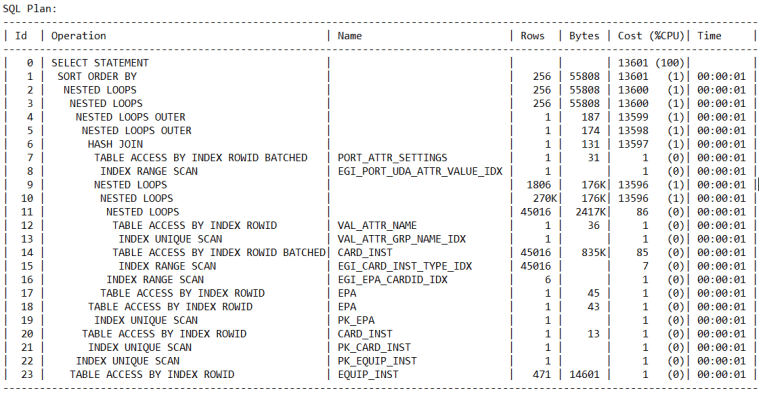
Query Block Name / Object Alias (identified by operation id):
————————————————————-

1 - SEL$841DDE77
10 - SEL$841DDE77 / VAL_ATTR_NAME@SEL$2
11 - SEL$841DDE77 / VAL_ATTR_NAME@SEL$2
12 - SEL$841DDE77 / F@SEL$1
13 - SEL$841DDE77 / F@SEL$1
14 - SEL$841DDE77 / A@SEL$1
15 - SEL$841DDE77 / A@SEL$1
16 - SEL$841DDE77 / C@SEL$1
17 - SEL$841DDE77 / C@SEL$1
18 - SEL$841DDE77 / D@SEL$1
19 - SEL$841DDE77 / D@SEL$1
20 - SEL$841DDE77 / E@SEL$1
21 - SEL$841DDE77 / E@SEL$1
22 - SEL$841DDE77 / B@SEL$1
23 - SEL$841DDE77 / B@SEL$1

Outline Data
————-

/*+
BEGIN_OUTLINE_DATA
IGNORE_OPTIM_EMBEDDED_HINTS
OPTIMIZER_FEATURES_ENABLE('12.1.0.2')
DB_VERSION('12.1.0.2')
OPT_PARAM('optimizer_index_cost_adj' 10)
FIRST_ROWS(1)
OUTLINE_LEAF(@"SEL$841DDE77")
MERGE(@"SEL$683B0107")
OUTLINE(@"SEL$C772B8D1")
UNNEST(@"SEL$2")
OUTLINE(@"SEL$683B0107")
OUTLINE(@"SEL$7511BFD2")
OUTLINE(@"SEL$2")
OUTLINE(@"SEL$1")
INDEX_RS_ASC(@"SEL$841DDE77" "VAL_ATTR_NAME"@"SEL$2" ("VAL_ATTR_NAME"."GROUP_NAME" "VAL_ATTR_NAME"."ATTR_NAME"))
INDEX_RS_ASC(@"SEL$841DDE77" "F"@"SEL$1" ("PORT_ATTR_SETTINGS"."ATTR_VALUE"))
BATCH_TABLE_ACCESS_BY_ROWID(@"SEL$841DDE77" "F"@"SEL$1")
INDEX_RS_ASC(@"SEL$841DDE77" "A"@"SEL$1" ("EPA"."PORT_INST_ID"))
INDEX_RS_ASC(@"SEL$841DDE77" "C"@"SEL$1" ("EQUIP_INST"."EQUIP_INST_ID"))
INDEX_RS_ASC(@"SEL$841DDE77" "D"@"SEL$1" ("EPA"."PORT_INST_ID"))
INDEX_RS_ASC(@"SEL$841DDE77" "E"@"SEL$1" ("CARD_INST"."CARD_INST_ID"))
INDEX(@"SEL$841DDE77" "B"@"SEL$1" ("CARD_INST"."CARD_INST_ID"))
LEADING(@"SEL$841DDE77" "VAL_ATTR_NAME"@"SEL$2" "F"@"SEL$1" "A"@"SEL$1" "C"@"SEL$1" "D"@"SEL$1" "E"@"SEL$1"
"B"@"SEL$1")
USE_NL(@"SEL$841DDE77" "F"@"SEL$1")
USE_NL(@"SEL$841DDE77" "A"@"SEL$1")
USE_NL(@"SEL$841DDE77" "C"@"SEL$1")
USE_NL(@"SEL$841DDE77" "D"@"SEL$1")
USE_NL(@"SEL$841DDE77" "E"@"SEL$1")
USE_NL(@"SEL$841DDE77" "B"@"SEL$1")
NLJ_BATCHING(@"SEL$841DDE77" "B"@"SEL$1")
END_OUTLINE_DATA
*/

Let’s use the outline of the good plan as a hint to force the good execution plan to be used and check the execution time for the query.
Run the query from SQLPLUS using the hint:

SELECT
/*+
BEGIN_OUTLINE_DATA
IGNORE_OPTIM_EMBEDDED_HINTS
OPTIMIZER_FEATURES_ENABLE(‘12.1.0.2’)
DB_VERSION(‘12.1.0.2’)
OPT_PARAM(‘optimizer_index_cost_adj’ 10)
FIRST_ROWS(1)
OUTLINE_LEAF(@”SEL$841DDE77″)
MERGE(@”SEL$683B0107″)
OUTLINE(@”SEL$C772B8D1″)
UNNEST(@”SEL$2″)
OUTLINE(@”SEL$683B0107″)
OUTLINE(@”SEL$7511BFD2″)
OUTLINE(@”SEL$2″)
OUTLINE(@”SEL$1″)
INDEX_RS_ASC(@”SEL$841DDE77″ “VAL_ATTR_NAME”@”SEL$2” (“VAL_ATTR_NAME”.”GROUP_NAME” “VAL_ATTR_NAME”.”ATTR_NAME”))
INDEX_RS_ASC(@”SEL$841DDE77″ “F”@”SEL$1” (“PORT_ATTR_SETTINGS”.”ATTR_VALUE”))
BATCH_TABLE_ACCESS_BY_ROWID(@”SEL$841DDE77″ “F”@”SEL$1″)
INDEX_RS_ASC(@”SEL$841DDE77” “A”@”SEL$1” (“EPA”.”PORT_INST_ID”))
INDEX_RS_ASC(@”SEL$841DDE77″ “C”@”SEL$1” (“EQUIP_INST”.”EQUIP_INST_ID”))
INDEX_RS_ASC(@”SEL$841DDE77″ “D”@”SEL$1” (“EPA”.”PORT_INST_ID”))
INDEX_RS_ASC(@”SEL$841DDE77″ “E”@”SEL$1” (“CARD_INST”.”CARD_INST_ID”))
INDEX(@”SEL$841DDE77″ “B”@”SEL$1” (“CARD_INST”.”CARD_INST_ID”))
LEADING(@”SEL$841DDE77″ “VAL_ATTR_NAME”@”SEL$2” “F”@”SEL$1” “A”@”SEL$1” “C”@”SEL$1” “D”@”SEL$1” “E”@”SEL$1”
“B”@”SEL$1″)
USE_NL(@”SEL$841DDE77” “F”@”SEL$1″)
USE_NL(@”SEL$841DDE77” “A”@”SEL$1″)
USE_NL(@”SEL$841DDE77” “C”@”SEL$1″)
USE_NL(@”SEL$841DDE77” “D”@”SEL$1″)
USE_NL(@”SEL$841DDE77” “E”@”SEL$1″)
USE_NL(@”SEL$841DDE77” “B”@”SEL$1″)
NLJ_BATCHING(@”SEL$841DDE77” “B”@”SEL$1”)
END_OUTLINE_DATA
*/

A.PORT_INST_ID AS MDF_ES_PORT_INST_ID, A.STATUS AS MDF_ES_PORT_STATUS, D.PORT_INST_ID AS MDF_LS_PORT_INST_ID, D.STATUS AS MDF_LS_PORT_STATUS, REGEXP_SUBSTR(C.DESCR,'[^ ]+’, 1,1) AS NAMING_AREA, A.STATUS AS MDF_ES_PORT_STATUS2, DECODE(A.RESERVATION_INST_ID, NULL, ‘N’, ‘Y’) AS MDF_ES_ACTIVE_RESERVATION, A.PORT_ACCESS_ID AS LIC_IDENTITY, EGI_GET_UDA_VALUE(A.EQUIP_INST_ID,’EQUIPMENT’,’Eqp Legacy Names’,’TAD-N’) AS KC, B.NAME AS COORDINATE, A.PORT_HUM_ID EGI_PORT_NAME, EGI_GET_UDA_VALUE(D.EQUIP_INST_ID,’EQUIPMENT’,’Eqp Legacy Names’,’TAD-N’) AS CABINET_NAME, E.NAME AS TERMINATION_BLOCK_NAME, D.PORT_ACCESS_ID AS PAIR_NAME, EGI_GET_UDA_VALUE(D.EQUIP_INST_ID,’EQUIPMENT’,’Eqp Legacy Names’,’SIGNSYST’) AS SIGNING_SYSTEM, EGI_GET_UDA_VALUE(A.PORT_INST_ID,’PORT’,’Copper Port Info’,’Processor Exchange’) AS PROCESSOR_EXCHANGE, A.CIRC_PATH_INST_ID AS ES_CIRC_PATH_INST_ID, A.NEXT_PATH_INST_ID AS ES_NEXT_PATH_INST_ID, D.CIRC_PATH_INST_ID AS LS_CIRC_PATH_INST_ID, D.NEXT_PATH_INST_ID AS LS_NEXT_PATH_INST_ID, DECODE(D.ROLE,’Primary’,’P’,’Secondary’,’S’,’Spare’,’R’,’Junction’,’F’,NULL) AS CABLING_TYPE FROM EPA A, CARD_INST B, EQUIP_INST C, EPA D, CARD_INST E, PORT_ATTR_SETTINGS F WHERE A.PORT_INST_ID =F.PORT_INST_ID AND F.VAL_ATTR_INST_ID= (SELECT VAL_ATTR_INST_ID FROM VAL_ATTR_NAME WHERE GROUP_NAME=’Copper Port Info’ AND ATTR_NAME =’Processor Exchange’ ) AND A.CARD_INST_ID =B.CARD_INST_ID AND B.TYPE =’ES’ AND A.EQUIP_INST_ID =C.EQUIP_INST_ID AND A.Z_WIRED_PORT_INST_ID =D.PORT_INST_ID(+) AND D.CARD_INST_ID =E.CARD_INST_ID(+) AND REGEXP_SUBSTR(A.PORT_ACCESS_ID,'[^-]+’, 1,1) =:B4 AND TO_NUMBER(REGEXP_SUBSTR(A.PORT_ACCESS_ID,'[^-]+’, 1,2))>=TO_NUMBER(:B3 ) AND TO_NUMBER(REGEXP_SUBSTR(A.PORT_ACCESS_ID,'[^-]+’, 1,2))<=TO_NUMBER(:B2 ) AND F.ATTR_VALUE =:B1 ORDER BY 8

I’ve executed the query in SIT and it’s taking no more than 5 seconds now with those OUTLINES, that is reeeeally good 😊

Now when the best plan is identified and tested, Question comes “HOW TO FIX THIS PERMANENTLY ??”

This can be done using one of the Oracle provided script named “coe_xfr_sql_profile.sql” which is part of popular SQLTXPLAIN/SQLT tool.
Download it from Metalink website (Direct Link: https://support.oracle.com/epmos/faces/DocumentDisplay?_afrLoop=458593899434965&parent=DOCUMENT&sourceId=1955195.1&id=215187.1&_afrWindowMode=0&_adf.ctrl-state=11co9htqxp_387#aref_section13)

In order to fix or correct the cost estimates for CBO to adopt a good execution plan we can follow below steps.
• Run the script coe_xfr_sql_profile.sql as SYSDBA user providing the sql_id and the good Plan Hash Value (PHV)
SQL> START coe_xfr_sql_profile.sql SQL_ID PHV

• Above step generates a script named in the format: “coe_xfr_sql_profile_SQL_ID_PLAN_HASH_VALUE.sql” i.e. including the sql_id and plan hash value.
Example: “coe_xfr_sql_profile_ SQLID_PHV.sql”

• If you like to use the profile for all literals, you can modify the force_match parameter in the generated script from false to true: force_match => TRUE
This will ensure the profile will be enabled even when different literals are used in the SQL query.

• Run the generated script as SYSDBA user in order to correct the optimizer cost estimates used in the execution plan for the sql_id and encourage it to use the desired plan obtained from the stated plan hash value.

• Next we can check if profile is accepted successfully
select SQL_ID, SQL_PROFILE,PLAN_HASH_VALUE from V$SQL where SQL_ID=’ SQL ID’;

• In case if profile is required to be disabled/dropped then do following steps.
The profile can be disabled or dropped as follows using the the SQL_PROFILE name returned from the query above:

EXEC DBMS_SQLTUNE.ALTER_SQL_PROFILE(Name => ”, Attribute_Name => ‘STATUS’, Value => ‘DISABLED’);

To Drop the Profile:
EXEC DBMS_SQLTUNE.DROP_SQL_PROFILE(Name => ”);

This way we can test and fix a Plan Stability issues with any SQL statement!

Hope It Helps!
Prashant Dixit

Posted in Advanced | Tagged: , , | 4 Comments »

Are the Cardinality Estimates Correct in my Execution Plan ?

Posted by FatDBA on September 26, 2017

Struck in a difficult performance issue related with a SQL and you have to verify if the Cardinality estimates made by the MIGHTY CBO are correct, No idea how t0 do that 😦 😦

Lets things make little easy for ourselves!
Let me take an example and explain how to do this.

SQL Statement (From my Personal Test Environment):
SELECT COUNT (DISTINCT SB_NO) FROM OPS$EXP.C_AL_SB WHERE SB_NO IN (SELECT DISTINCT SB_NO FROM OPS$EXP.C_AL_AWB WHERE EGM_DT BETWEEN :1 AND :1 ) AND ERR_MESG =’S’

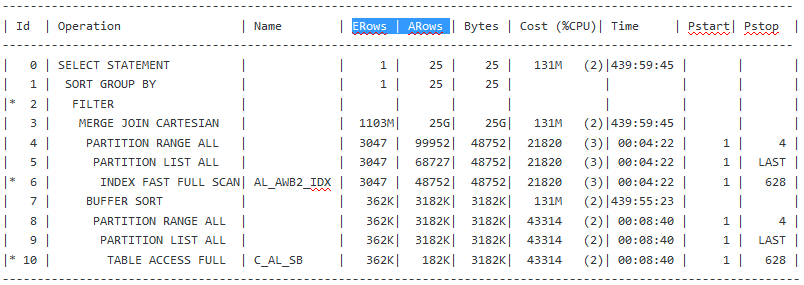
Below is the execution plan for the SQL (Lets forgot about the behemoth elapsed time and Cost and Rows Processed in the plan for a minute 🙂 ) ….

So the above plan doesn’t show any estimations or Cardinality details what it considered during the creation of the plan, But starting from 10g we have GATHER_PLAN_STATISTICS hint. The GATHER_PLAN_STATISTICS hint tells Oracle to collect execution statistics for a SQL statement.

These execution statistics are then shown next to the original Optimizer estimates in the execution plan if you use the function DBMS_XPLAN.DISPLAY_CURSOR to display the plan. You also have to set the FORMAT parameter to ‘ALLSTATS LAST’ (DBMS_XPLAN.DISPLAY_CURSOR(FORMAT=>’ALLSTATS LAST’)).

SELECT /*+ GATHER_PLAN_STATISTICS */ COUNT (DISTINCT SB_NO) FROM OPS$EXP.C_AL_SB WHERE SB_NO IN (SELECT DISTINCT SB_NO FROM OPS$EXP.C_AL_AWB WHERE EGM_DT BETWEEN :1 AND :1 ) AND ERR_MESG =’S’;

The execution plan for the query is as follows:

The original Optimizer estimates are shown in the E-Rows column while the actual statistics gathered during execution are shown in the A-Rows column.

Posted in Advanced | Tagged: | 2 Comments »

How to tune the IO contentions related with the Compaction in Cassandra ?

Posted by FatDBA on August 20, 2017

Hi Fellas,
Back and this time with some performance tuning scopes for Cassandra DB during the ‘Compaction’ process.
Before i proceed, would like to explain a bit about the compaction in Cassandra and what exactly is this and why a necessary evil …

Compaction in Cassandra refers to the operation of merging multiple SSTables into a single new one. Typically, compaction is done in a database for two primary reasons:

– To reduce the storage usage.
– To improve read performance by merging keys and obtaining a consolidated index.

For example, in Apache Cassandra, data files are merged periodically to form compacted SSTables.

There is a good chance of contention happening in database due to Compaction activity as the Compaction increases I/O contention on SSTable data read. Writing data in Cassandra database is generally fast and the write impacts may not be seen but reading data from SSTables will be slow in case when I/O contention increases due to compaction activities and degrades the performance of the database.

First would like to discuss how to identify the compaction related contentions on the database.
– We can use the “nodetool tablestats” or the old “nodetool cfstats” command to
monitor or watch-keep SSTables.
Below is a sample result from one of the Cassandra database server, here we need to check
– Check if the count is keep on growing, because that points out that there may be contention between reading SST
and the compaction process.
– Read generally slows down due to an obvious reason of data distributed or fragmented across many SSTs and
Compaction running continuous in the background.

%nodetool tablestats -H dixit.playlist
Keyspace: dixit
Read Count: 182849
Read Latency: 0.11363755339104945 ms.
Write Count: 435355
Write Latency: 0.01956930550929701 ms.
Pending Flushes: 0
Table: standard1
SSTable count: 2
Space used (live): 51.62 MB
Space used (total): 51.62 MB
Space used by snapshots (total): 0 bytes
Off heap memory used (total): 302.36 KB
SSTable Compression Ratio: 0.0
Number of keys (estimate): 376390
Memtable cell count: 200120
Memtable data size: 45.16 MB
Memtable off heap memory used: 0 bytes
Memtable switch count: 2
Local read count: 182849
Local read latency: 0.125 ms
Local write count: 435355
Local write latency: 0.022 ms
Pending flushes: 0
Bloom filter false positives: 11
Bloom filter false ratio: 0.00000
Bloom filter space used: 265.81 KB
Bloom filter off heap memory used: 265.8 KB
Index summary off heap memory used: 36.57 KB
Compression metadata off heap memory used: 0 bytes
Compacted partition minimum bytes: 216 bytes
Compacted partition maximum bytes: 258 bytes
Compacted partition mean bytes: 258 bytes
Average live cells per slice (last five minutes): 1.0
Maximum live cells per slice (last five minutes): 1
Average tombstones per slice (last five minutes): 1.0
Maximum tombstones per slice (last five minutes): 1

Below is the command that can be used to check for compaction statistics, here you need to look at the ‘pending tasks’, and ‘bytes total in progress’.

$ nodetool compactionstats
pending tasks: 5
compaction type keyspace table completed total unit progress
Compaction Keyspace1 Standard1 282310680 302170540 bytes 93.43%
Compaction Keyspace1 Standard1 58457931 307520780 bytes 19.01%
Active compaction remaining time : 0h00m16s

Solution to the problem
1. First one is quite simple – Avoid merging of update/delete requests.
2. Reduce the frequency of in-memory objects (In Memtables) flush.

This can be done by increasing the size of the memtables to avoid or stop database to perform frequent flushes.
– Less number of flushes leads to fewer SSTs compaction.
– Less Compaction reduces the I/Contentions and this in turn improve reads.
– There are couple of parameters that you can adjust in your cassandra.yaml file to control the flushing.
i.e. memtable_flush_after_mins, memtable_throughput_in_mb , memtable_operations_in_millions.

3. One more solution but that only applies on systems where this stress in IO is not much frequent, we can reduce
the “thread priority” which reduces the IOs.
As lowering the priority slows down the compaction writes but only applies if it doesn’t happen frequently.

Add below lines in cassandra-env.conf file (Under /conf folder) to lower the compaction priority.

JVM_OPTS=”$JVM_OPTS -XX:+UseThreadPriorities -XX:ThreadPriorityPolicy=42 -Dcassandra.compaction.priority=1″

One last line would like to add.
In case when the IO is a genuine problem, you will need to add more nodes or replace disks with better performing one’s or high IO disks.

Hope It Helps
Prashant Dixit

Posted in Advanced | Tagged: , , | Leave a Comment »

EXECUTION PLAN: “automatic DOP: skipped because of IO calibrate statistics are missing”

Posted by FatDBA on September 23, 2014

Recently during one Performance Problem i have attached one better SQL Profile to the statement which includes to add DOP (Degree Of Parallelism) to reduce the impacts of a definite FTS (Full Table Scan) but found one NOTE coming during the execution plan generation which reads
“automatic DOP: skipped because of IO calibrate statistics are missing”

SQL> execute dbms_sqltune.accept_sql_profile(task_name => ‘TASK_33935’,task_owner => ‘SYS’, replace => TRUE, profile_type =>DBMS_SQLTUNE.PX_PROFILE);

PL/SQL procedure successfully completed.

Elapsed: 00:00:00.86
SQL> explain plan for select count(*) from DIXIT_EVW_ETAILQ;

Explained.

Elapsed: 00:00:00.03
SQL> @xplan

PLAN_TABLE_OUTPUT
———————————————————————————————————————————————————————–

————————————————————————————————————————————-
Plan hash value: 584586630

—————————————————————————————————————-
| Id  | Operation              | Name             | Rows  | Cost (%CPU)| Time     |    TQ  |IN-OUT| PQ Distrib |
—————————————————————————————————————-
|   0 | SELECT STATEMENT       |                  |     1 | 36776   (1)| 00:07:22 |        |      |            |
|   1 |  SORT AGGREGATE        |                  |     1 |            |          |        |      |            |
|   2 |   PX COORDINATOR       |                  |       |            |          |        |      |            |
|   3 |    PX SEND QC (RANDOM) | :TQ10000         |     1 |            |          |  Q1,00 | P->S | QC (RAND)  |
|   4 |     SORT AGGREGATE     |                  |     1 |            |          |  Q1,00 | PCWP |            |
|   5 |      PX BLOCK ITERATOR |                  |   177M| 36776   (1)| 00:07:22 |  Q1,00 | PCWC |            |
|   6 |       TABLE ACCESS FULL| DIXIT_EVW_ETAILQ |   177M| 36776   (1)| 00:07:22 |  Q1,00 | PCWP |            |
—————————————————————————————————————-

Note
—–
   – automatic DOP: skipped because of IO calibrate statistics are missing
   – SQL profile “SYS_SQLPROF_0148a0b0821b0005” used for this statement

The ‘AUTOMATIC DOP’ is skipped because I/O calibration is not run to gather the required statistics. Required statistics can be collected using DBMS_RESOURCE_MANAGER.CALIBRATE_IO procedure.

SQL> select status from V$IO_CALIBRATION_STATUS;

STATUS
——————————-
NOT AVAILABLE

DECLARE
lat INTEGER;
iops INTEGER;
mbps INTEGER;
BEGIN
–DBMS_RESOURCE_MANAGER.CALIBRATE_IO(, ,iops, mbps, lat);
DBMS_RESOURCE_MANAGER.CALIBRATE_IO (28, 10, iops, mbps, lat);
DBMS_OUTPUT.PUT_LINE (‘max_iops = ‘ || iops);
DBMS_OUTPUT.PUT_LINE (‘latency = ‘ || lat);
DBMS_OUTPUT.PUT_LINE (‘max_mbps = ‘ || mbps);
end;
/

max_iops = 5944
latency = 9
max_mbps = 75

18 rows selected.

Elapsed: 00:00:00.11

Issue:
If using DBMS_RESOURCE_MANAGER.CALIBRATE_IO there are times when you might recieve beloe error message
ORA-56708: Could not find any datafiles with asynchronous i/o capability

Resolution:
Then we need to enable asynch I/O, set below two values to mentioned settings in the init.ora file.

disk_asynch_io = true
filesystemio_options = asynch

SQL> select status from V$IO_CALIBRATION_STATUS;

STATUS
——————–
AVAILABLE

Now you can implement the DOP for the query and this way you can reduce FTS impacts.

Hope That Helps
Prashant Dixit

Posted in Uncategorized | Tagged: , , | Leave a Comment »

Worst Execution Plan ever … Elapsed time of 999:59:59 :(

Posted by FatDBA on July 12, 2014

few days back i have came across with one of the worst execution plan that i have ever seen in whole life. Query talking 999 Hours – 59 Minutes and 59 Seconds to complete.

Look at this shock below.
1. Elapsed Time to complete PARENT Operation ‘UPDATE’ – 999:59:59
2. With only 167k rows to be processed.
3. Cost is coming huge too – 32G

ORIGINALPLAN:
——————
Plan hash value: 2191276670

--------------------------------------------------------------------------------------------------
| Id  | Operation                    | Name              | Rows  | Bytes | Cost (%CPU)| Time     |
--------------------------------------------------------------------------------------------------
|   0 | UPDATE STATEMENT             |                   |   167K|  7685K|    32G  (1)|999:59:59 |
|   1 |  UPDATE                      | XXXXX             |       |       |            |          |
|   2 |   NESTED LOOPS OUTER         |                   |   167K|  7685K| 16333   (1)| 00:03:49 |
|   3 |    TABLE ACCESS FULL         | XXXXX             |   167K|  5069K| 16317   (1)| 00:03:49 |
|*  4 |    INDEX UNIQUE SCAN         | IBXXXX            |     1 |    16 |     0   (0)| 00:00:01 |
|*  5 |   TABLE ACCESS BY INDEX ROWID| TXXXX             |     1 |    43 |   194K  (1)| 00:45:17 |
|*  6 |    INDEX SKIP SCAN           | IXXXX_490008000_1 |   191K|       |  2261   (1)| 00:00:32 |
--------------------------------------------------------------------------------------------------

Predicate Information (identified by operation id):
—————————————————

4 – access(“H”.”C1″=”BXXXX”.”C1″(+))
5 – filter(“XXXX01238500″=:B1 AND “XXXX00426800″=’Incident Resolution Time’)
6 – access(“XXXX00365100″=4)
filter(“XXXX00365100″=4)

I tried below mentioned steps to eradicate the problem.
1. Tried to restructure SQL statement but was of no use.

2. Made a composite index on the impacted table XXXXX, But with that i has only reduced to 2 hours and 40 minutes. Although we have considered the execution time but team still want to reduce the CHANGE WINDOW of as low as possible because in total it would take 5 hours 20 minutes during the run of 2 queries.

2. With a thought in our mind and after reading few of the performance documents we tried to apply some fixes in case if we have any bug during the run of queries.
After applying all possible fixes problems endures.

SQL> select optimizer_feature_enable,count(*) from v$system_fix_control group by optimizer_feature_enable order by 1 asc;

OPTIMIZER_FEATURE_ENABLE    COUNT(*)
------------------------- ----------
10.1.0                             3
10.1.0.3                           1
10.1.0.5                           2
10.2.0.1                           7
10.2.0.2                          12
10.2.0.3                          11
10.2.0.4                          73
10.2.0.5                         112
11.1.0.6                          40
11.1.0.7                          19
11.2.0.1                          67

OPTIMIZER_FEATURE_ENABLE    COUNT(*)
------------------------- ----------
11.2.0.2                         106
11.2.0.3                          75
8.0.0                             63
8.1.6                              1
8.1.7                              2
9.2.0                              8
9.2.0.8                            3
47

19 rows selected.

I tried some  blind-applies to get the exact bug and have ended applying few of the bug fixes.
Note: I advocate always execute the same on your test servers first or perform impact analysis before using hidden parameters.

SQL> select * from v$system_fix_control where optimizer_feature_enable=’11.2.0.3′ and description like ‘%skip%’;

BUGNO      VALUE SQL_FEATURE                              DESCRIPTION                                                      OPTIMIZER_FEATURE_ENABLE       EVENT IS_DEFAULT
---------- ---------- ---------------------------------------- ---------------------------------------------------------------- ------------------------- ---------- ----------
10080014          1 QKSFM_CBO_10080014                       allow skip scan costing for PRIOR join in CONNECT BY query       11.2.0.3                           0         1
9569678          1 QKSFM_CBO_9569678                        skip identity operator when generating NULL IS NOT NULL          11.2.0.3                           0         1
11744086          1 QKSFM_PLACE_GROUP_BY_11744086            skip SCG for query block with no aggregating columns             11.2.0.3                           0         1
9227576          1 QKSFM_CBO_9227576                        allow skip scan costing for semi/anti-join                       11.2.0.3                           0         1

SQL> alter session set “_fix_control”=’9814067:OFF’;
Session altered.

SQL> alter session set “_fix_control”=’10038373:OFF’;
Session altered.

SQL> alter session set “_fix_control”=’8893626:OFF’;
Session altered.

Ended up with no impact on the queries.

3.  Used one SQL HINT — optimizer_features_enable(‘10.1.0’)
Forcing the query optimizer to use compatible old version while creating the plan — version 10.1.0

Look at the plan soon after the change.

-------------------------------------------------------------------------------------------------------------------------------------
Plan hash value: 728359962

------------------------------------------------------------------------------
| Id  | Operation           | Name   | Rows  | Bytes | Cost (%CPU)| Time     |
------------------------------------------------------------------------------
|   0 | UPDATE STATEMENT    |        |   167K|  7685K| 16361   (1)| 00:03:50 |
|   1 |  UPDATE             | XXXXX  |       |       |            |          |
|   2 |   NESTED LOOPS OUTER|        |   167K|  7685K| 16361   (1)| 00:03:50 |
|   3 |    TABLE ACCESS FULL| XXXXX  |   167K|  5069K| 16268   (1)| 00:03:48 |
|*  4 |    INDEX UNIQUE SCAN| IBXXXX |     1 |    16 |     0   (0)| 00:00:01 |
|*  5 |   TABLE ACCESS FULL | TXXXX  |     1 |    43 |  7099   (1)| 00:01:40 |
------------------------------------------------------------------------------

WHOA!!! execution time with some realistic values — and the query got completed in only 3 minutes after using the HINT.

Thanks
Prashant Dixit

Posted in Advanced | Tagged: , | 3 Comments »

Index Fragmentation / Rebuild. When ?

Posted by FatDBA on August 13, 2013

How to find index is fragmented?

First analyze index
SQL>analyze index INDEX_NAME validate structure;

Then query INDEX_STATS view
1. If del_lf_rows/lf_rows is > .2 then index should be rebuild.
2. If height is 4 then index should be rebuild.
3. If lf_rows is lower than lf_blks then index should be rebuild.

SQL> column status format a10
SQL> select trunc((del_lf_rows/lf_rows)*100,2)||’%’ “status” from index_stats;
status
———-
21.83%

How to remove index fragmentation?
There are two way to remove fragmentation.
1. index coalesce
2. index rebuild

What is difference between coalesce and rebuild please go through below link for more details
http://download.oracle.com/docs/cd/B14117_01/server.101/b10739/indexes.htm#g1007548

SQL> alter index INDIA coalesce;
SQL> alter index INDIA rebuild;
SQL> alter index INDIA rebuild online;

Note: If any DML statement is running on base table then we have to use ONLINE keyword with index rebuilding.

SQL> analyze index idx_obj_id validate structure;
Index analyzed.

SQL> select trunc((del_lf_rows/lf_rows)*100,2)||’%’ “status” from index_stats;
status
——–
   0%

Note: Index rebuild when index is fragmented or it is needed, otherwise index rebuilding is myth for improve performance.

You can also enable Index Monitoring ‘ON’ to check if queries/statements are using index objects or not.

SQL> ALTER INDEX india MONITORING USAGE;
SQL> select index_name, table_name, monitoring, used, start_monitoring, end_monitoring from v$object_usage where index_name = ‘INDIA’ order by index_name;

INDEX_NAME                   TABLE_NAME               MON     USE        START_MONITORING       END_MONITORING
—————————— —————————— — — ——————- ———————————-  ———————————-
INDIA                       SYS_EXPORT_SCHEMA_01    YES       YES           06/01/2013                          23:31:34


To disable the monitoring:

SQL> ALTER INDEX my_index_i NOMONITORING USAGE;

Posted in Advanced | Tagged: | Leave a Comment »

ADDM Report Test Sample

Posted by FatDBA on April 4, 2013

Below provided is the sample ADDM (Automatic Database Diagnostic Monitor) from one of my Test Database. Before that i would like to explain what is this ADDM and it’s advantages:

To view in more efficient way, click the Link: My ADDM (Sample) Report.txt – Notepad

The Automatic Database Diagnostic Monitor (ADDM) analyzes data in the Automatic Workload Repository (AWR) to identify potential performance bottlenecks. For each of the identified issues it locates the root cause and provides recommendations for correcting the problem. An ADDM analysis task is performed and its findings and recommendations stored in the database every time an AWR snapshot is taken provided the STATISTICS_LEVEL parameter is set to TYPICAL or ALL. The ADDM analysis includes the following.

  • CPU load
  • Memory usage
  • I/O usage
  • Resource intensive SQL
  • Resource intensive PL/SQL and Java
  • RAC issues
  • Application issues
  • Database configuration issues
  • Concurrency issues
  • Object contention

ADDM Report for Task ‘TASK_964’
——————————-

Analysis Period
—————
AWR snapshot range from 99 to 105.
Time period starts at 03-APR-13 07.08.18 PM
Time period ends at 04-APR-13 07.20.18 PM

Analysis Target
—————
Database ‘REDANT’ with DB ID 629811920.
Database version 11.2.0.1.0.
ADDM performed an analysis of instance orcl, numbered 1 and hosted at
prashant.

Activity During the Analysis Period
———————————–
Total database time was 452 seconds.
The average number of active sessions was .01.

Summary of Findings
——————-
Description                          Active Sessions      Recommendations
Percent of Activity
———————————–  ——————-  —————
1  I/O Throughput                       .01 | 100            3
2  Undersized instance memory           0 | 7.75             1
3  Hard Parse Due to Invalidations      0 | 5.3              1
4  “Other” Wait Class                   0 | 4.95             0
5  Commits and Rollbacks                0 | 4.14             1
6  PL/SQL Compilation                   0 | 4.05             1
7  Checkpoints Due to MTTR              0 | 3.44             1
8  Checkpoints Due to DROP or TRUNCATE  0 | 3                0
9  Hard Parse Due to Sharing Criteria   0 | 2.14             1

~~~~~~~~~~~~~~~~~~~~~~~~~~~~~~~~~~~~~~~~~~~~~~~~~~~~~~~~~~~~~~~~~~~~~~~~~~~~~~
~~~~~~~~~~~~~~~~~~~~~~~~~~~~~~~~~~~~~~~~~~~~~~~~~~~~~~~~~~~~~~~~~~~~~~~~~~~~~~

Findings and Recommendations
—————————-

Finding 1: I/O Throughput
Impact is .01 active sessions, 100% of total activity.
——————————————————
The throughput of the I/O subsystem was significantly lower than expected.

Recommendation 1: Host Configuration
Estimated benefit is .01 active sessions, 100% of total activity.
—————————————————————–
Action
Consider increasing the throughput of the I/O subsystem. Oracle’s
recommended solution is to stripe all data files using the SAME
methodology. You might also need to increase the number of disks for
better performance.
Rationale
During the analysis period, the average data files’ I/O throughput was
14 K per second for reads and 3.2 K per second for writes. The average
response time for single block reads was 14 milliseconds.

Recommendation 2: Host Configuration
Estimated benefit is .01 active sessions, 100% of total activity.
—————————————————————–
Action
Consider slowing down RMAN or Data Pump activity, or scheduling these
jobs when user activity is lower.
Rationale
The I/O throughput on data and temp files was divided as follows: 0% by
RMAN, 29% by Data Pump, 0% by Recovery and 70% by all other activity.

Recommendation 3: Host Configuration
Estimated benefit is .01 active sessions, 100% of total activity.
—————————————————————–
Action
The performance of some data and temp files was significantly worse than
others. If striping all files using the SAME methodology is not
possible, consider striping these file over multiple disks.
Rationale
For file /u01/app/oracle/oradata/orcl/sysaux01.dbf, the average response
time for single block reads was 132 milliseconds, and the total excess
I/O wait was 479 seconds.
Related Object
Database file
“/u01/app/oracle/oradata/orcl/sysaux01.dbf”

Symptoms That Led to the Finding:
———————————
Wait class “User I/O” was consuming significant database time.
Impact is 0 active sessions, 19.25% of total activity.


Finding 2: Undersized instance memory
Impact is 0 active sessions, 7.75% of total activity.
—————————————————–
The Oracle instance memory (SGA and PGA) was inadequately sized, causing
additional I/O and CPU usage.
The value of parameter “memory_target” was “500 M” during the analysis period.

Recommendation 1: Database Configuration
Estimated benefit is 0 active sessions, 7.75% of total activity.
—————————————————————-
Action
Increase memory allocated to the instance by setting the parameter
“memory_target” to 875 M.

Symptoms That Led to the Finding:
———————————
Hard parsing of SQL statements was consuming significant database time.
Impact is 0 active sessions, 20.38% of total activity.
Contention for latches related to the shared pool was consuming
significant database time.
Impact is 0 active sessions, 2.69% of total activity.
Wait class “Concurrency” was consuming significant database time.
Impact is 0 active sessions, 2.94% of total activity.
Wait class “User I/O” was consuming significant database time.
Impact is 0 active sessions, 19.25% of total activity.


Finding 3: Hard Parse Due to In-validations
Impact is 0 active sessions, 5.3% of total activity.
—————————————————-
Cursors were getting invalidated due to DDL operations. This resulted in
additional hard parses which were consuming significant database time.

Recommendation 1: Application Analysis
Estimated benefit is 0 active sessions, 5.3% of total activity.
—————————————————————
Action
Investigate appropriateness of DDL operations.

Symptoms That Led to the Finding:
———————————
Hard parsing of SQL statements was consuming significant database time.
Impact is 0 active sessions, 20.38% of total activity.
Contention for latches related to the shared pool was consuming
significant database time.
Impact is 0 active sessions, 2.69% of total activity.
Wait class “Concurrency” was consuming significant database time.
Impact is 0 active sessions, 2.94% of total activity.


Finding 4: “Other” Wait Class
Impact is 0 active sessions, 4.95% of total activity.
—————————————————–
Wait class “Other” was consuming significant database time.
Database latches in the “Other” wait class were not consuming significant
database time.

No recommendations are available.


Finding 5: Commits and Rollbacks
Impact is 0 active sessions, 4.14% of total activity.
—————————————————–
Waits on event “log file sync” while performing COMMIT and ROLLBACK operations
were consuming significant database time.

Recommendation 1: Host Configuration
Estimated benefit is 0 active sessions, 4.14% of total activity.
—————————————————————-
Action
Investigate the possibility of improving the performance of I/O to the
online redo log files.
Rationale
The average size of writes to the online redo log files was 6 K and the
average time per write was 3 milliseconds.
Rationale
The total I/O throughput on redo log files was 1.3 K per second for
reads and 1.5 K per second for writes.
Rationale
The redo log I/O throughput was divided as follows: 0% by RMAN and
recovery, 52% by Log Writer, 0% by Archiver, 0% by Streams AQ and 47% by
all other activity.

Symptoms That Led to the Finding:
———————————
Wait class “Commit” was consuming significant database time.
Impact is 0 active sessions, 4.14% of total activity.


Finding 6: PL/SQL Compilation
Impact is 0 active sessions, 4.05% of total activity.
—————————————————–
PL/SQL compilation consumed significant database time.

Recommendation 1: Application Analysis
Estimated benefit is 0 active sessions, 4.05% of total activity.
—————————————————————-
Action
Investigate the appropriateness of PL/SQL compilation. PL/SQL
compilation can be caused by DDL on dependent objects.


Finding 7: Checkpoints Due to MTTR
Impact is 0 active sessions, 3.44% of total activity.
—————————————————–
Buffer cache writes due to setting of the obsolete parameters
“fast_start_io_target”, “log_checkpoint_interval” and “log_checkpoint_timeout”
were consuming significant database time.

Recommendation 1: Database Configuration
Estimated benefit is 0 active sessions, 3.44% of total activity.
—————————————————————-
Action
Oracle’s recommended solution is to control MTTR setting using the
“fast_start_mttr_target” parameter instead of the
“fast_start_io_target”, “log_checkpoint_interval” and
“log_checkpoint_timeout” parameters.

Symptoms That Led to the Finding:
———————————
The throughput of the I/O subsystem was significantly lower than
expected.
Impact is .01 active sessions, 100% of total activity.
Wait class “User I/O” was consuming significant database time.
Impact is 0 active sessions, 19.25% of total activity.


Finding 8: Checkpoints Due to DROP or TRUNCATE
Impact is 0 active sessions, 3% of total activity.
————————————————–
Buffer cache writes due to DROP and TRUNCATE operations had a significant
impact on the throughput of the I/O subsystem.

No recommendations are available.

Symptoms That Led to the Finding:
———————————
The throughput of the I/O subsystem was significantly lower than
expected.
Impact is .01 active sessions, 100% of total activity.
Wait class “User I/O” was consuming significant database time.
Impact is 0 active sessions, 19.25% of total activity.
Wait class “Application” was consuming significant database time.
Impact is 0 active sessions, 3.8% of total activity.


Finding 9: Hard Parse Due to Sharing Criteria
Impact is 0 active sessions, 2.14% of total activity.
—————————————————–
SQL statements with the same text were not shared because of cursor
environment mismatch. This resulted in additional hard parses which were
consuming significant database time.
Common causes of environment mismatch are session NLS settings, SQL trace
settings and optimizer parameters.

Recommendation 1: Application Analysis
Estimated benefit is 0 active sessions, 2.14% of total activity.
—————————————————————-
Action
Look for top reason for cursor environment mismatch in
V$SQL_SHARED_CURSOR.

Symptoms That Led to the Finding:
———————————
Hard parsing of SQL statements was consuming significant database time.
Impact is 0 active sessions, 20.38% of total activity.
Contention for latches related to the shared pool was consuming
significant database time.
Impact is 0 active sessions, 2.69% of total activity.
Wait class “Concurrency” was consuming significant database time.
Impact is 0 active sessions, 2.94% of total activity.

~~~~~~~~~~~~~~~~~~~~~~~~~~~~~~~~~~~~~~~~~~~~~~~~~~~~~~~~~~~~~~~~~~~~~~~~~~~~~~
~~~~~~~~~~~~~~~~~~~~~~~~~~~~~~~~~~~~~~~~~~~~~~~~~~~~~~~~~~~~~~~~~~~~~~~~~~~~~~

Additional Information
———————-

Miscellaneous Information
————————-
Wait class “Configuration” was not consuming significant database time.
CPU was not a bottleneck for the instance.
Wait class “Network” was not consuming significant database time.
Session connect and disconnect calls were not consuming significant database
time.

The database’s maintenance windows were active during 23% of the analysis
period.

End of Report
Report written to addmrpt_1_99_105.txt
SQL> !
[oracle@prashant ~]$ ls
addmrpt_1_99_105.txt  Desktop  on.lst
[oracle@prashant ~]$ vi addmrpt_1_99_105.txt
Wait class “Application” was consuming significant database time.
Impact is 0 active sessions, 3.8% of total activity.


Finding 9: Hard Parse Due to Sharing Criteria
Impact is 0 active sessions, 2.14% of total activity.
—————————————————–
SQL statements with the same text were not shared because of cursor
environment mismatch. This resulted in additional hard parses which were
consuming significant database time.
Common causes of environment mismatch are session NLS settings, SQL trace
settings and optimizer parameters.

Recommendation 1: Application Analysis
Estimated benefit is 0 active sessions, 2.14% of total activity.
—————————————————————-
Action
Look for top reason for cursor environment mismatch in
V$SQL_SHARED_CURSOR.

Symptoms That Led to the Finding:
———————————
Hard parsing of SQL statements was consuming significant database time.
Impact is 0 active sessions, 20.38% of total activity.
Contention for latches related to the shared pool was consuming
significant database time.
Impact is 0 active sessions, 2.69% of total activity.
Wait class “Concurrency” was consuming significant database time.
Impact is 0 active sessions, 2.94% of total activity.

~~~~~~~~~~~~~~~~~~~~~~~~~~~~~~~~~~~~~~~~~~~~~~~~~~~~~~~~~~~~~~~~~~~~~~~~~~~~~~
~~~~~~~~~~~~~~~~~~~~~~~~~~~~~~~~~~~~~~~~~~~~~~~~~~~~~~~~~~~~~~~~~~~~~~~~~~~~~~

Additional Information
———————-

Miscellaneous Information
————————-
Wait class “Configuration” was not consuming significant database time.
CPU was not a bottleneck for the instance.
Wait class “Network” was not consuming significant database time.
Session connect and disconnect calls were not consuming significant database
time.

The database’s maintenance windows were active during 23% of the analysis
period.

Posted in Advanced | Tagged: | 1 Comment »

TKProf Utility.

Posted by FatDBA on January 17, 2013

TKPROF:
————————–
TKProf is oracle provided trace reading utility which converts results in to more human readable format.
It required one to Enable SQL_Trace and set TIMED_Statistics which helps Oracle to create trace files with extra information.

Example:
SQL> alter session set timed_statistics = true;
Session altered.

SQL> alter session set sql_trace = true;
Session altered.

I’ve created a query to find my Oracle Server process id:
SELECT p.spid oracle_dedicated_process, s.process clientpid FROM v$process p, v$session s WHERE p.addr = s.paddr AND s.sid = (select sid from v$mystat where rownum = 1);

ORACLE_DEDIC CLIENTPID
———— ————
11653        11636

SQL> select * from scott.emp where job=’CLERK’;

EMPNO ENAME      JOB              MGR HIREDATE         SAL       COMM     DEPTNO
———- ———- ——— ———- ——— ———- ———- ———-
7369 SMITH      CLERK           7902 17-DEC-80        800                    20
7876 ADAMS      CLERK           7788 23-MAY-87       1100                    20
7900 JAMES      CLERK           7698 03-DEC-81        950                    30
7934 MILLER     CLERK           7782 23-JAN-82       1300                    10

[oracle@localhost udump]$ ls -ltr
total 128

-rw-r—– 1 oracle oinstall   635 Jan 17 23:05 orcl_ora_11331.trc
-rw-r—– 1 oracle oinstall   692 Jan 17 23:05 orcl_ora_11358.trc
-rw-r—– 1 oracle oinstall 21454 Jan 17 23:08 orcl_ora_11359.trc
-rw-r—– 1 oracle oinstall  2862 Jan 17 23:31 orcl_ora_11653.trc

[oracle@localhost udump]$ tkprof orcl_ora_11653.trc Prashant_tkprof_study.txt

TKPROF: Release 10.2.0.1.0 – Production on Thu Jan 17 23:32:41 2013
Copyright (c) 1982, 2005, Oracle.  All rights reserved.

[oracle@localhost udump]$ ls -ltr
total 145

-rw-r–r– 1 oracle oinstall  5925 Jan 17 23:32 Prashant_tkprof_study.txt

 
[oracle@localhost udump]$ cat Prashant_tkprof_study.txt

TKPROF: Release 10.2.0.1.0 – Production on Thu Jan 17 23:32:41 2013

Copyright (c) 1982, 2005, Oracle.  All rights reserved.

Trace file: orcl_ora_11653.trc
Sort options: default

********************************************************************************
count    = number of times OCI procedure was executed
cpu      = cpu time in seconds executing
elapsed  = elapsed time in seconds executing
disk     = number of physical reads of buffers from disk
query    = number of buffers gotten for consistent read
current  = number of buffers gotten in current mode (usually for update)
rows     = number of rows processed by the fetch or execute call
********************************************************************************

alter session set sql_trace = true

call     count       cpu    elapsed       disk      query    current        rows
——- ——  ——– ———- ———- ———- ———-  ———-
Parse        0      0.00       0.00          0          0          0           0
Execute      1      0.00       0.00          0          0          0           0
Fetch        0      0.00       0.00          0          0          0           0
——- ——  ——– ———- ———- ———- ———-  ———-
total        1      0.00       0.00          0          0          0           0

Misses in library cache during parse: 0
Misses in library cache during execute: 1
Optimizer mode: ALL_ROWS
Parsing user id: SYS
********************************************************************************

SELECT p.spid oracle_dedicated_process, s.process clientpid
FROM
v$process p, v$session s WHERE p.addr = s.paddr AND s.sid = (select sid from
v$mystat where rownum = 1)

call     count       cpu    elapsed       disk      query    current        rows
——- ——  ——– ———- ———- ———- ———-  ———-
Parse        1      0.01       0.01          0          0          0           0
Execute      1      0.00       0.00          0          0          0           0
Fetch        2      0.00       0.00          0          0          0           1
——- ——  ——– ———- ———- ———- ———-  ———-
total        4      0.01       0.01          0          0          0           1

Misses in library cache during parse: 1
Optimizer mode: ALL_ROWS
Parsing user id: SYS

Rows     Row Source Operation
——-  —————————————————
1  NESTED LOOPS  (cr=0 pr=0 pw=0 time=2133 us)
1   HASH JOIN  (cr=0 pr=0 pw=0 time=2511 us)
1    FIXED TABLE FULL X$KSUSE (cr=0 pr=0 pw=0 time=643 us)
1     COUNT STOPKEY (cr=0 pr=0 pw=0 time=20 us)
1      FIXED TABLE FULL X$KSUMYSTA (cr=0 pr=0 pw=0 time=14 us)
1       FIXED TABLE FULL X$KSUSGIF (cr=0 pr=0 pw=0 time=4 us)
20    FIXED TABLE FULL X$KSUPR (cr=0 pr=0 pw=0 time=43 us)
1   FIXED TABLE FIXED INDEX X$KSLED (ind:2) (cr=0 pr=0 pw=0 time=6 us)

********************************************************************************

select *
from
scott.emp where job=’CLERK’

call     count       cpu    elapsed       disk      query    current        rows
——- ——  ——– ———- ———- ———- ———-  ———-
Parse        1      0.00       0.00          0          0          0           0
Execute      1      0.00       0.00          0          0          0           0
Fetch        2      0.00       0.00          0          8          0           4
——- ——  ——– ———- ———- ———- ———-  ———-
total        4      0.00       0.00          0          8          0           4

Misses in library cache during parse: 1
Optimizer mode: ALL_ROWS
Parsing user id: SYS

Rows     Row Source Operation
——-  —————————————————
4  TABLE ACCESS FULL EMP (cr=8 pr=0 pw=0 time=388 us)

********************************************************************************

OVERALL TOTALS FOR ALL NON-RECURSIVE STATEMENTS

call     count       cpu    elapsed       disk      query    current        rows
——- ——  ——– ———- ———- ———- ———-  ———-
Parse        2      0.01       0.01          0          0          0           0
Execute      3      0.00       0.00          0          0          0           0
Fetch        4      0.00       0.00          0          8          0           5
——- ——  ——– ———- ———- ———- ———-  ———-
total        9      0.01       0.02          0          8          0           5

Misses in library cache during parse: 2
Misses in library cache during execute: 1

OVERALL TOTALS FOR ALL RECURSIVE STATEMENTS

call     count       cpu    elapsed       disk      query    current        rows
——- ——  ——– ———- ———- ———- ———-  ———-
Parse        0      0.00       0.00          0          0          0           0
Execute      0      0.00       0.00          0          0          0           0
Fetch        0      0.00       0.00          0          0          0           0
——- ——  ——– ———- ———- ———- ———-  ———-
total        0      0.00       0.00          0          0          0           0

Misses in library cache during parse: 0

3  user  SQL statements in session.
0  internal SQL statements in session.
3  SQL statements in session.
********************************************************************************
Trace file: orcl_ora_11653.trc
Trace file compatibility: 10.01.00
Sort options: default

1  session in tracefile.
3  user  SQL statements in trace file.
0  internal SQL statements in trace file.
3  SQL statements in trace file.
3  unique SQL statements in trace file.
48  lines in trace file.
35  elapsed seconds in trace file.

Posted in Advanced | Tagged: , , | Leave a Comment »

Explain Plan.

Posted by FatDBA on August 23, 2012

Explain Plan is a great way to tune your queries.
As a bonus for using Explain Plan, you will learn more about how the DBMS works “behind the scenes”, enabling you to write efficient queries the first time around.

Explain Plan executes your query and records the “plan” that Oracle devises to execute your query. By examining this plan, you can find out if Oracle is picking the right indexes and joining your tables in the most efficient manner. There are a few different ways to utilize Explain Plan.

The first thing you will need to do is make sure you have a table called plan_table available in your schema.

If this table is not there run this script provided by oracle to create that table
ORACLE_HOME/rdbms/admin/utlxplan.sql .. for UNIX plat formas and
ORACLE_HOME\rdbms\admin\utlxplan.sql .. for WINDOWS platforms

SQL> select * from plan_table;

no rows selected

SQL> explain plan for select * from etr where team=’cis’;
Explained.

SQL>  select * from table(dbms_xplan.display);

PLAN_TABLE_OUTPUT
——————————————————————————–
Plan hash value: 3490786915

—————————————————————————-
| Id  | Operation         | Name   | Rows  | Bytes | Cost (%CPU)| Time     |
—————————————————————————-
|   0 | SELECT STATEMENT  |        |     2 |    30 |     3   (0)| 00:00:01 |
|*  1 |  TABLE ACCESS FULL| ETR |     2 |    30 |     3   (0)| 00:00:01 |
—————————————————————————-

Predicate Information (identified by operation id):
—————————————————

PLAN_TABLE_OUTPUT
——————————————————————————–

1 – filter(“TEAM”=’cis’)

13 rows selected.
SQL> @$ORACLE_HOME/rdbms/admin/utlxpls.sql

PLAN_TABLE_OUTPUT
——————————————————————————–
Plan hash value: 3490786915

—————————————————————————-
| Id  | Operation         | Name   | Rows  | Bytes | Cost (%CPU)| Time     |
—————————————————————————-
|   0 | SELECT STATEMENT  |        |     2 |    30 |     3   (0)| 00:00:01 |
|*  1 |  TABLE ACCESS FULL| ETR |     2 |    30 |     3   (0)| 00:00:01 |
—————————————————————————-

Predicate Information (identified by operation id):
—————————————————

PLAN_TABLE_OUTPUT
——————————————————————————–

1 – filter(“TEAM”=’cis’)

13 rows selected.

Posted in Advanced | Tagged: , | Leave a Comment »

ADDR & AWR Detailed Study

Posted by FatDBA on August 6, 2012

This post gives an overview and understanding of  AWR and ADDM in Oracle 10g

AWR Architecture

Oracle 10g – awrArchitecture

AWR Features :

Automatic Workload Repository (AWR) collects processes and maintains performance statistics for problem detection & self tuning purposes.

The AWR is used to collect performance statistics including:

  • Wait events used to identify performance problems.
  • Time model statistics indicating the amount of DB time associated with a process from the V$SESS_TIME_MODEL and V$SYS_TIME_MODEL views.
  • Active Session History (ASH) statistics from the V$ACTIVE_SESSION_HISTORY view.
  • Some system and session statistics from the V$SYSSTAT and V$SESSTAT views.
  • Object usage statistics.
  • Resource intensive SQL statements.

The repository is a source of information for several other Oracle 10g features including:

  • Automatic Database Diagnostic Monitor
  • SQL Tuning Advisor
  • Undo Advisor
  • Segment Advisor

AWR Space Requirements

Space requirement for AWR depends on following:

Number of active sessions in system at given time.

  • Snapshot interval – Frequency at which snapshot are captured.
  • Historical data retention period.

Estimate:

Snapshot interval           : 1 hr

No of sessions               : 10

Retention period : 7 days

=======================================

Space for AWR              : 200 – 300 MB

=======================================

Initialization parameters & Grants

STATISTICS_LEVEL –> TYPICAL or ALL

Note: BASIC – turns off in-memory collection of many system statistics.

  • User running AWR packages needs DBA role.

Note:

  • For STATISTICS_LEVEL, default setting is TYPICAL which ensures collection of all major statistics required for database self-management functionality and provides best overall performance. The default value should be adequate for most environments.
  • When the STATISTICS_LEVEL parameter is set to ALL, additional statistics are added to the set of statistics collected with the TYPICAL setting. The additional statistics are timed OS statistics and plan execution statistics.
  • Setting the STATISTICS_LEVEL parameter to BASIC disables the collection of many of the important statistics required by Oracle Database features and functionality, including:

AWR Automated Snapshots

Oracle Database 10g uses a scheduled job, GATHER_STATS_JOB, to collect AWR statistics.

This job is created, and enabled automatically, when you create a new Oracle database under Oracle Database 10g.

Note: GATHER_STATS_JOB is Oracle defined automatic optimizer statistics collection job run by SYS. For more information refer DBA_SCHEDULER_JOBS, DBA_SCHEDULER_JOB_RUN_DETAILS

Checking current Configuration in database

  • Use following query to check the current settings of “GATHER_STATS_JOB” in any database:

SELECT a.job_name, a.enabled, c.window_name, c.schedule_name,

c.start_date, c.repeat_interval

FROM dba_scheduler_jobs a,

dba_scheduler_wingroup_members b,

dba_scheduler_windows c

WHERE job_name=’GATHER_STATS_JOB’

And a.schedule_name=b.window_group_name

And b.window_name=c.window_name;

  • To check the AWR snap interval & Retention time – use following query:

SELECT * FROM DBA_HIST_WR_CONTROL

Sample Result

DBID                            SNAP_INTERVAL                      RETENTION                  TOPNSQL

————————————————————————————————————————–

1195050809                  +00000 01:00:00.0                     +00007 00:00:00.0         DEFAULT

Generate AWR Report

Oracle provides two scripts to produce workload repository reports (awrrpt.sql and awrrpti.sql).

@$ORACLE_HOME/rdbms/admin/awrrpt.sql

@$ORACLE_HOME/rdbms/admin/awrrpti.sql

Note:  awrrpt.sql & awrrpti.sql are exactly same except that awrrpti report allows specific instance to report on. awrrpti.sql asks to enter dbid for particular instance of interest.

Execution of script

  • SQL> @$ORACLE_HOME/rdbms/admin/awrrpt.sql

DB Id                         DB Name          Inst Num           Instance

—————————————————————————————-

1195050809                 O01ABC0             1                   O01ABC0

  • Specify the Report Type : (html / txt)
  • Specify the number of days of snapshots to choose: This will show the snap id along with the time data.

Instance            DB Name           Snap Id            Snap Started                 Level

———————————————————————————————————-

O01ABC0          O01ABC0           5652                01 Apr 2008 00:00          1

5653               01 Apr 2008 01:00          1

5654                         01 Apr 2008 02:00          1

5655               01 Apr 2008 03:00          1

  • Specify the Begin and End Snapshot Ids: Choose from the list displayed due to previous point.
  • Specify the Report Name: If leave blank then it will take default file name.
  • FTP the result in the local drive and view the results

Changing AWR Configuration

  • Oracle Default Settings

è  Snap Time               : 1 hr

è  Snap Retention        : 7 days

  • Snapshot

Snapshots & Baselines are sets of historical data for a specific time period that are used for performance comparison.

è  Change snapshot default settings by using following package:

BEGIN

DBMS_WORKLOAD_REPOSITORY.modify_snapshot_settings (

retention => 43200,        — Minutes (= 30 Days). Current value retained if NULL.

interval  => 30);              – Minutes. Current value retained if NULL.

END;

/

è Extra snapshots can be taken and existing snapshots can be removed using:

EXEC DBMS_WORKLOAD_REPOSITORY.create_snapshot;

BEGIN

DBMS_WORKLOAD_REPOSITORY.drop_snapshot_range (

low_snap_id  => 22,

high_snap_id => 32);

END;

/

  • Baseline

A baseline is a pair of snapshots that represents a specific period of usage. Once baselines are defined they can be used to compare current performance against similar periods in the past.

è Create Baseline:

BEGIN

DBMS_WORKLOAD_REPOSITORY.create_baseline (

start_snap_id => 210,

end_snap_id   => 220,

baseline_name => ‘batch baseline’);

END;

/

è The pair of snapshots associated with a baseline is retained until the baseline is explicitly deleted:

BEGIN

DBMS_WORKLOAD_REPOSITORY.drop_baseline (

baseline_name => ‘batch baseline’,

cascade       => FALSE); — Deletes associated snapshots if TRUE.

END;

/

Workload Repository Views

View Name Description
V$ACTIVE_SESSION_HISTORY Displays the active session history (ASH) sampled every second.
V$METRIC Displays metric information.
V$METRICNAME Displays the metrics associated with each metric group.
V$METRIC_HISTORY Displays historical metrics.
V$METRICGROUP Displays all metrics groups
DBA_HIST_ACTIVE_SESS_HISTORY Displays the history contents of the active session history.
DBA_HIST_BASELINE Displays baseline information.
DBA_HIST_DATABASE_INSTANCE Displays database environment information.
DBA_HIST_SNAPSHOT Displays snapshot information.
DBA_HIST_SQL_PLAN Displays SQL execution plans.
DBA_HIST_WR_CONTROL Displays AWR settings.

Automatic Performance Diagnostics

The automatic database diagnostic monitor (ADDM) analyzes the AWR data on regular basis, then locates the root cause of performance problems, provides recommendation for correcting any problems, identifies non problem areas of the system.

  • ADDM analysis is performed every time AWR snapshot is taken and the results are saved in database.
  • The goal of ADDM analysis is to reduce a single throughput metric called DB time. DB time is the cumulative time spent by database server in processing user requests. (DB time includes CPU time and time of non-idle user sessions).
  • ADDM does not target individual user response times.

Types of Problems

Following are the types of problems ADDM report addresses:

è     CPU bottlenecks

è     Undersized memory structures

è     I/O capacity issues

è     High load SQL statements

è     RAC specific issues

è     Database configuration issues

è     Also provides recommendations on hardware changes, database configuration & schema changes.

ADDM Results

ADDM report has following sections:

è     Problem: Finding that describe the root cause of database performance issue.

è     Symptom: Finding that contain information that often lead to one or more problem finding.

è     Information: Findings that are used to report non-problem area of the system.

è     Recommendations: Composed of action & rationales.

Initialization parameters & Grants

  • User running the ADDM scripts needs “ADVISOR” privileges
  • STATISTICS_LEVEL should be set to TYPICAL or ALL
  • DBIO_EXPECTED – describes the expected performance of the I/O subsystem. The value of DBIO_EXPECTED is the average time that takes to read a single database block in microsecond. Default is 10millisecond.

Note:

To modify DBIO_EXPECTED value to 8000 microseconds, execute following as SYS user.

EXECUTE DBMS_ADVISOR.SET_DEFAULT_TASK_PARAMETER (

‘ADDM’, ‘DBIO_EXPECTED’, 8000);

Running ADDM

We can generate ADDM report in two ways:

  • By using oracle script $ORACLE_HOME/rdbms/admin/addmrpt.sql
  • DBMS_ADVISOR package.

Running ADDM using addmrpt.sql

  • SQL> @$ORACLE_HOME/rdbms/admin/addmrpt.sql

Current Instance

~~~~~~~~~~~~~~~~

DB Id    DB Name      Inst Num Instance

———– ———— ——– ————

1195050809 O01ABC0             1 O01ABC0

Instances in this Workload Repository schema

~~~~~~~~~~~~~~~~~~~~~~~~~~~~~~~~~~~~~~~~~~~~

DB Id     Inst Num DB Name      Instance     Host

———— ——– ———— ———— ————

* 1195050809        1 O01ABC0      O01ABC0      test01

Using 1195050809 for database Id

Using          1 for instance number

Specify the number of days of snapshots to choose from

~~~~~~~~~~~~~~~~~~~~~~~~~~~~~~~~~~~~~~~~~~~~~~~~~~~~~~

Entering the number of days (n) will result in the most recent

(n) days of snapshots being listed.  Pressing <return> without

specifying a number lists all completed snapshots.

Listing the last 3 days of Completed Snapshots

Automatic Workload Repository (AWR) in Oracle Database 10g

Automatic Workload Repository (AWR) in Oracle Database 10g

Snap

Instance DB Name Snap Id Snap Started Level

———————————————————————————————————————

O01ABC0 O01ABC0 6020 16 Apr 2008 08:00 1

6021 16 Apr 2008 09:00 1

6022 16 Apr 2008 10:00 1

  • Specify the Begin and End Snapshot Ids

~~~~~~~~~~~~~~~~~~~~~~~~~~~~~~~~~~~~~~

Enter value for begin_snap: 6020

Begin Snapshot Id specified: 6020

Enter value for end_snap: 6022

Running ADDM using DBMS_ADVISOR APIs

Steps:

  • Create advisor task. (DBMS_ADVISOR.CREATE_TASK)
  • Setting required parameters to run specific type of task, such as START_SNAPSHOT, END_SNAPSHOT parameters. (DBMS_ADVISOR.TASK_PARAMETER)
  • Execute task. (DBMS_ADVISOR.EXECUTE_TASK)
  • View results ((DBMS_ADVISOR.GET_TASK_REPORT)

Automatic Workload Repository (AWR) in Oracle Database 10g

ADDM Views

View Name Description
DBA_ADVISOR_TASKS Provides information about existing task, like – task id, name, etc.
DBA_ADVISOR_LOG Contain the current task information such as status, progress, error messages, and execution times.
DBA_ADVISOR_RECOMMENDATIONS Complete result of diagnostic task.
DBA_ADVISOR_FINDINGS Display all symptoms and specific recommendations.

Posted in Advanced | Tagged: | Leave a Comment »