Tales From A Lazy Fat DBA

Its all about Databases, their performance, troubleshooting & much more …. ¯\_(ツ)_/¯

Archive for the ‘Advanced’ Category

Advance/Troubleshooting/Error-Bug Fixing

‘ORA-12547: TNS:lost contact’ after OPATCH_PLATFORM_ID Reset in sqlplus.

Posted by FatDBA on July 5, 2012

Resolution:

1. De-install the deployed patch first  —

[oracle@prashant 8974084]$ opatch rollback -id 8974084   (Click Y/Yes when it asked you to select out of Yes/No).

Once the patch uninstalled unset the OPATCH_PLATFORM_ID

example:     [oracle@prashant 8974084]$ unset OPATCH_PLATFORM_ID

2. Stop all middle wares included e.g. ENTERPRISE MANAGER, LISTENER and shutdown the database.

3. Revert back the PLATFORM_ID back to it’s old value —

[oracle@prashant 8974084]$ export OPATCH_PLATFORM_ID=46   (46 was the old value of the machine)

4. Recheck all Network files located in $ORACLE_HOME/dbs     like listener.ora, tnsnames.ora and tnsnames.ora they might corrupted as well. Make sure you have the correct Host Name, Post Number, Service number defined in  tnsnames.ora. Check sqlnet,ora and verify if it has the EZCONNECT , TNSNAMES.

5. reboot your machine.

6.  Start listener and to give the database a try to start. Most probably  chances are there that you’ll receive LOCAL_LISTENER definition failure message during the start.

In that case you have to check your parameter file and perform requisite changes to the local listener definitions (*.LOCAL_LISTENER=’ ‘)

7. Re try to start the database and you’ll be able to start DB this time.

Feedbacks: If failed to start the DB box even after performing these steps and that will also motivate me to write about and research  🙂

Posted in Advanced | Tagged: , , | 2 Comments »

OraDose… (05-07-2012)

Posted by FatDBA on July 5, 2012

If getting error regarding Platform ID during prerequisite checks when applying any patch on database.

Below is the error code:

[oracle@prashant 8974084]$ opatch apply
Invoking OPatch 11.1.0.6.6

Oracle Interim Patch Installer version 11.1.0.6.6
Copyright (c) 2009, Oracle Corporation.  All rights reserved.

Oracle Home       : /u01/app/oracle/product/11.2.0/db_1
Central Inventory : /u01/app/oraInventory
from           : /etc/oraInst.loc
OPatch version    : 11.1.0.6.6
OUI version       : 11.2.0.1.0
OUI location      : /u01/app/oracle/product/11.2.0/db_1/oui
Log file location : /u01/app/oracle/product/11.2.0/db_1/cfgtoollogs/opatch/opatch2012-07-05_12-07-37PM.log

Patch history file: /u01/app/oracle/product/11.2.0/db_1/cfgtoollogs/opatch/opatch_history.txt

ApplySession applying interim patch ‘8974084’ to OH ‘/u01/app/oracle/product/11.2.0/db_1’

Running prerequisite checks…
Prerequisite check “CheckPatchApplicableOnCurrentPlatform” failed.
The details are:
Patch ( 8974084 ) is not applicable on current platform.
Platform ID needed is : 46
Platform IDs supported by patch are: 226
ApplySession failed during prerequisite checks: Prerequisite check “CheckPatchApplicableOnCurrentPlatform” failed.
System intact, OPatch will not attempt to restore the system

OPatch failed with error code 74

Resolution:

Reset Platform ID using OPATCH_PLATFORM_ID to desired ID.

(Note: Changing Platform ID sometimes affects machines networks and you might loose connections – TNS Error – No Connection

Please perform said steps on your own risk)

example: [oracle@prashant 8974084]$ export OPATCH_PLATFORM_ID=226

Let’s re-run the patch after we are done with the ID resets —

[oracle@prashant 8974084]$ opatch apply
Invoking OPatch 11.1.0.6.6

Oracle Interim Patch Installer version 11.1.0.6.6
Copyright (c) 2009, Oracle Corporation.  All rights reserved.

Oracle Home       : /u01/app/oracle/product/11.2.0/db_1
Central Inventory : /u01/app/oraInventory
from           : /etc/oraInst.loc
OPatch version    : 11.1.0.6.6
OUI version       : 11.2.0.1.0
OUI location      : /u01/app/oracle/product/11.2.0/db_1/oui
Log file location : /u01/app/oracle/product/11.2.0/db_1/cfgtoollogs/opatch/opatch2012-07-05_12-19-49PM.log

Patch history file: /u01/app/oracle/product/11.2.0/db_1/cfgtoollogs/opatch/opatch_history.txt

ApplySession applying interim patch ‘8974084’ to OH ‘/u01/app/oracle/product/11.2.0/db_1’

Running prerequisite checks…

Using user-defined value, OPatch will treat this system as platform ID ‘226’.

OPatch detected non-cluster Oracle Home from the inventory and will patch the local system only.

Please shutdown Oracle instances running out of this ORACLE_HOME on the local system.
(Oracle Home = ‘/u01/app/oracle/product/11.2.0/db_1’)

Is the local system ready for patching? [y|n]
y
User Responded with: Y
Backing up files and inventory (not for auto-rollback) for the Oracle Home
Backing up files affected by the patch ‘8974084’ for restore. This might take a while…
Backing up files affected by the patch ‘8974084’ for rollback. This might take a while…

Patching component oracle.rdbms, 11.2.0.1.0…
Updating archive file “/u01/app/oracle/product/11.2.0/db_1/lib/libserver11.a”  with “lib/libserver11.a/kcb.o”
Updating archive file “/u01/app/oracle/product/11.2.0/db_1/lib/libserver11.a”  with “lib/libserver11.a/kcbb.o”
Updating archive file “/u01/app/oracle/product/11.2.0/db_1/lib/libserver11.a”  with “lib/libserver11.a/kcbo.o”
Updating archive file “/u01/app/oracle/product/11.2.0/db_1/lib/libserver11.a”  with “lib/libserver11.a/kcbs.o”
Updating archive file “/u01/app/oracle/product/11.2.0/db_1/lib/libserver11.a”  with “lib/libserver11.a/kcbz.o”
Updating archive file “/u01/app/oracle/product/11.2.0/db_1/lib/libserver11.a”  with “lib/libserver11.a/kcl.o”
Updating archive file “/u01/app/oracle/product/11.2.0/db_1/lib/libserver11.a”  with “lib/libserver11.a/kcbi.o”
Updating archive file “/u01/app/oracle/product/11.2.0/db_1/lib/libserver11.a”  with “lib/libserver11.a/kcbr.o”
Updating archive file “/u01/app/oracle/product/11.2.0/db_1/lib/libserver11.a”  with “lib/libserver11.a/kjb.o”
Updating archive file “/u01/app/oracle/product/11.2.0/db_1/lib/libserver11.a”  with “lib/libserver11.a/kjbl.o”
Updating archive file “/u01/app/oracle/product/11.2.0/db_1/lib/libserver11.a”  with “lib/libserver11.a/kjbm.o”
Updating archive file “/u01/app/oracle/product/11.2.0/db_1/lib/libserver11.a”  with “lib/libserver11.a/kjbr.o”
Updating archive file “/u01/app/oracle/product/11.2.0/db_1/lib/libserver11.a”  with “lib/libserver11.a/kjfc.o”
Updating archive file “/u01/app/oracle/product/11.2.0/db_1/lib/libserver11.a”  with “lib/libserver11.a/kmgs.o”
Updating archive file “/u01/app/oracle/product/11.2.0/db_1/lib/libserver11.a”  with “lib/libserver11.a/kmgsb.o”
Updating archive file “/u01/app/oracle/product/11.2.0/db_1/lib/libserver11.a”  with “lib/libserver11.a/ksu.o”
Updating archive file “/u01/app/oracle/product/11.2.0/db_1/lib/libgeneric11.a”  with “lib/libgeneric11.a/skgvm.o”
Running make for target ioracle
ApplySession adding interim patch ‘8974084’ to inventory

Verifying the update…
Inventory check OK: Patch ID 8974084 is registered in Oracle Home inventory with proper meta-data.
Files check OK: Files from Patch ID 8974084 are present in Oracle Home.

The local system has been patched and can be restarted.

OPatch succeeded.

—— WE ARE DONE ——

Posted in Advanced | Tagged: , , | Leave a Comment »

High-water Mark

Posted by FatDBA on June 30, 2012

High-water Mark —–

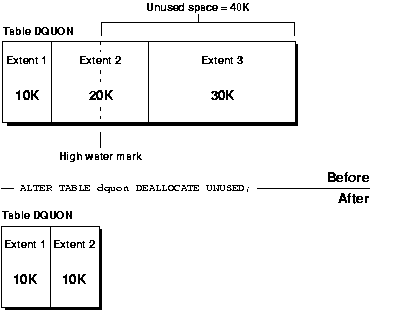
The high water mark level is just a line separate the used blocks and free blocks.

The blocks above the HWM level is free blocks, they are ready to use.
The blocks below the HWM level is used blocks, they are already used.

Example.
for example, if you delete some huge records from the database, that data will delete but the blocks are not ready to used, because that blocks are still below HWM level, so delete command never reset the HWM level,  At the same time you truncate the date, then the data will delete and that used blocks will goto above the HWM level, now its ready to used. now they consider has free blocks.

Posted in Advanced, Basics | Tagged: | Leave a Comment »

Dig AWR (Auto Workload Repository) …

Posted by FatDBA on June 28, 2012

Oracle 10g provides the AWR. The AWR is a repository of performance information collected by the database to aid in the tuning process for DBAs.

Historically people used bstat and estat to collect Oracle statistics over a time period and then compare them to each other. The bstat/estat approach was replaced with statspack available in Oracle 8i. Statspack was a package provided
by Oracle that did roughly the same thing but better. Statspack has now been surpassed in functionality by AWR which is always collecting execution statistics for future analysis and tuning performed by all of the expert components
provided by Oracle. Oracle recommends that all statspack users switch to AWR in 10g.

The metrics collected by AWR are easily obtained from v$metricname:

AWR is automatically installed and running with 10g. The new MMON process is responsible for collecting data and populating the AWR. The MMON process takes snapshots of performance data at regular intervals and inserts that data into the AWR tables. The tables containing AWR information are stored in the SYSAUX tablespace (also new in 10G) under the SYS schema. There are a ton of tables in this tablespace – 806 to be exact. However, the AWR related tables all begin with “WR”:

WRM$_WR_CONTROL       WRH$_TEMPFILE       WRI$_SQLSET_BINDS

The third letter of each table name signifies the type of data that it contains.
• I – advisory functions (SQL Advice, Space Advice, etc)
• M – metadata information
• H – historical data

The frequency of data collection is 60 minutes by default but that can be adjusted. All functionality for driving the workload repository is done via the Oracle supplied package DBMS_WORKLOAD_REPOSITORY. In 11g version, These snapshots are retained for 8 days. 7 days is the retention period in 10g.

The current settings for AWR retention and interval parameters can be viewed using dba_hist_wr_control.

Posted in Advanced | Tagged: | 2 Comments »

Difference between awrrpt.sql and awrrpti.sql ?

Posted by FatDBA on June 28, 2012

Difference between awrrpt.sql and awrrpti.sql?

The output of these reports is essentially the same, except that awrrpti.sql script allows you to define a specific instance to report on.

AWR Report types (Most Commonly used Reports):

  • The awrrpt.sql SQL script generates an HTML or text report that displays statistics for a range of snapshot Ids.
  • The awrrpti.sql SQL script generates an HTML or text report that displays statistics for a range of snapshot Ids on a specified database and instance.
  • The awrsqrpt.sql SQL script generates an HTML or text report that displays statistics of a particular SQL statement for a range of snapshot Ids. Run this report to inspect or debug the performance of a SQL statement.
  • The awrsqrpi.sql SQL script generates an HTML or text report that displays statistics of a particular SQL statement for a range of snapshot Ids on a specified database and instance. Run this report to inspect or debug the performance of a SQL statement on a specific database and instance.
  • The awrddrpt.sql SQL script generates an HTML or text report that compares detailed performance attributes and configuration settings between two selected time periods.
  • The awrddrpi.sql SQL script generates an HTML or text report that compares detailed performance attributes and configuration settings between two selected time periods on a specific database and instance.
  • The awrgrpt.sql  Generate AWR Cluster aggregated statistics from all the instances.
  • The awrgdrpt.sql  report compares the statistic results of differences between two different snapshot intervals, for the whole cluster database.

SQL> @awrsqrpt.sql —- Generate AWR Report Single Select Statement:

Run the awrsqrpt.sql script from $ORACLE_HOME/rdbms/admin/ as a sys user. The script will ask you for the output format of the report (HTML or TEXT), the the number of days (n) will result in the most recent
(n) days of snapshots being listed (If you hit enter, you will get all the available snapshots listed), begin and end snapshot interval Ids intervals and the SQL_ID for the specific SELECT statement …

To check SQL ID —

SQL> select SQL_ID  from V$SQLAREA where rownum =1 ;

SQL_ID
————-
1fkh93md0802n

Posted in Advanced, Basics, Uncategorized | Tagged: | Leave a Comment »

ORA-09925 – Fixed (Error during Instance Creation)

Posted by FatDBA on June 27, 2012

ERROR: ORA-09925: Unable to create audit trail file Linux-x86_64 Error: 2: No such file or directory Additional information:  9925 ORA-01075: you are currently logged on 

Resolution: Log in as Root and grant 775/777 mode (Permission) to audil_trail_dest=adump folder.

Posted in Advanced | Tagged: , | Leave a Comment »

RMAN (Do’s & Dont’s)

Posted by FatDBA on June 26, 2012

No SPFILE before control file if both are backed up at the same time.

RMAN> backup current spfile controlfile;

RMAN-00571: ===========================================================
RMAN-00569: =============== ERROR MESSAGE STACK FOLLOWS ===============
RMAN-00571: ===========================================================
RMAN-00558: error encountered while parsing input commands
RMAN-01009: syntax error: found “spfile”: expecting one of: “controlfile”
RMAN-01007: at line 1 column 16 file: standard input

RMAN> backup current controlfile spfile;

Starting backup at 29-MAY-12
using channel ORA_DISK_1
….

================================================================
* RMAN don’t support PFILE backups. SPFILE is only support parameter type in RMAN.

* RMAN does not backup TEMP tablespaces.
That is because “TEMP” was not backed up at the outset. RMAN does not backup Temporary Tablespaces. Such tablespaces do NOT need to be backed up, and, therefore are not restored or cloned.

* Redo logs can’t be backed up using RMAN but REDO Archivelogs can.

Posted in Advanced, Basics, Uncategorized | Tagged: , | Leave a Comment »