Tales From A Lazy Fat DBA

Its all about Databases, their performance, troubleshooting & much more …. ¯\_(ツ)_/¯

Archive for the ‘Basics’ Category

Core/Basics/Theory

SQLPLUS: Command Prompt customizied.

Posted by FatDBA on November 15, 2012

Some tips and tricks for SQLPLUS terminal:

———————————————————-
SQL Prompt With Time
———————————————————-
SQL> set time on
09:50:16 SQL>
09:50:19 SQL> select sysdate from dual;

SYSDATE
———
20-APR-11

09:50:34 SQL>

———————————————————-
SQL Prompt With USER
———————————————————-
SQL> set sqlprompt “_USER> ”
SCOTT>
SCOTT>
SCOTT> select sysdate from dual;

SYSDATE
———
20-APR-11

SCOTT>

———————————————————-
SQL Prompt With SID
———————————————————-
SQL> set sqlprompt “_CONNECT_IDENTIFIER> ”
mydb>
mydb>
mydb> select sysdate from dual;

SYSDATE
———
20-APR-11

mydb>

———————————————————-
SQL Prompt With USER@SID
———————————————————-
SQL> set sqlprompt “_USER’@’_CONNECT_IDENTIFIER SQL> ”
SCOTT@mydb SQL>
SCOTT@mydb SQL>
SCOTT@mydb SQL> select sysdate from dual;

SYSDATE
———
20-APR-11

SCOTT@mydb SQL>

———————————————————-
SQL Prompt With DATE
———————————————————-
SQL> set sqlprompt “_DATE SQL> ”
20-APR-11 SQL>
20-APR-11 SQL>
20-APR-11 SQL> select sysdate from dual;

SYSDATE
———
20-APR-11

20-APR-11 SQL>

 
Many More Soon!!!

Posted in Basics | Tagged: | Leave a Comment »

Database Links Explained ?

Posted by FatDBA on October 7, 2012

Database Links are objects which we create to establish a connection from one database to another. They are classified in to three parts:

1. Private Database Links: Belongs to specific schema. Only the owner of the link can use it and is default DB link type.
2. Public Database Links: Belongs to all users exists in Database.
3. Global database link – Defined in an OID or Oracle Names Server. Anyone on the network can use it.
Conditions:
1. User should have Privilege ‘CREATE DATABASE LINK’.

Format:
Create Database Link <DB Link> connect to < User > identified by < Password > using < Service Name >;
OR
Create Public Database Link <DB Link> connect to < User > identified by < Password > using < Service Name >;

Example:

Create Database Link <DB Link Name> connect to < User > identified by < Password > using < Service Name >;
SQL> create database link larry1 connect to larry identified by oracle90 using ‘ORCL’;
Database link created.

SQL> select * from dual@larry1;

D

X

SQL> update etr@larry1 set ID=7  where NAME=’prashant’ and TEAM=’cis’;

1 row updated.

SQL> select * from etr@larry1;

NAME         TEAM       ID
———— ———- —
prashant     cis        7
shantanu     cis        12
saurabh      oracle     19
ram          helpdesk   3
prashant     unix       5
tondu        security   1
amit         qa

7 rows selected.

Posted in Basics | 1 Comment »

ORA-00265: Cannot set archivelog (FIX)

Posted by FatDBA on August 28, 2012

Today while turning on Archivelog facility on one of my Oracle Database i recieved an error while reads “instance recovery required, cannot set ARCHIVELOG mode” and i find a very unique way to get rid of this problem.

SQL> alter database archivelog;
alter database archivelog
*
ERROR at line 1:
ORA-00265: instance recovery required, cannot set ARCHIVELOG mode


Resolution Steps:
SHUTDOWN -> STARTUP -> SHUTDOWN IMMEDIATE -> STARTUP MOUNT -> alter database archivelog


SQL> shutdown
ORA-01109: database not open
Database dismounted.
ORACLE instance shut down.

SQL> startup
ORACLE instance started.
Total System Global Area  306184192 bytes
Fixed Size                  1219112 bytes
Variable Size             104859096 bytes
Database Buffers          197132288 bytes
Redo Buffers                2973696 bytes
Database mounted.
Database opened.

SQL> shutdown immediate;
Database closed.
Database dismounted.
ORACLE instance shut down.

SQL> startup mount
ORACLE instance started.
Total System Global Area  306184192 bytes
Fixed Size                  1219112 bytes
Variable Size             109053400 bytes
Database Buffers          192937984 bytes
Redo Buffers                2973696 bytes
Database mounted.

SQL> alter database archivelog;
Database altered.

SQL> archive log list;
Database log mode              Archive Mode
Automatic archival             Enabled
Archive destination            USE_DB_RECOVERY_FILE_DEST
Oldest online log sequence     2
Next log sequence to archive   4
Current log sequence           4

Posted in Basics | Tagged: , | Leave a Comment »

Manual Creation of Database.

Posted by FatDBA on August 6, 2012

Below provided are Steps to create a Database manually 9Without using any GUI tool – DBCA)

Manual Creation Of Database
================================

Create Directories in ORACLE_BASE to install physical files.

[oracle@localhost root]$ mkdir -p /u01/app/oracle/admin/doom/adump
[oracle@localhost root]$ mkdir -p /u01/app/oracle/admin/doom/bdump
[oracle@localhost root]$ mkdir -p /u01/app/oracle/admin/doom/cdump
[oracle@localhost root]$ mkdir -p /u01/app/oracle/admin/doom/udump

[oracle@localhost root]$ mkdir -p /u01/app/oracle/oradata/doom

Create parameter file for new database
[oracle@prashant2 dbs]$ cp initarcl.ora initdoom.ora

Note: Use Find and Replace command in VI in order to replace all old SID terms from the param file.
ex: :%s/OLD/NEW/g
Capital ZZ to save all changes made.

create Password File using ORAPWD Utility.
[oracle@prashant2 dbs]$ orapwd file=orapwdoom password=oracle90 entries=19

Export newly created SID
[oracle@prashant2 dbs]$ export ORACLE_SID=doom

[oracle@prashant2 dbs]$ echo $ORACLE_SID
doom

Create a script/text file to create Database (Contains Steps to create all data-files, control files, System files, redo log files etc).
Something like:

create database doom
datafile ‘/u01/app/oracle/admin/doom/system.dbf’ size 250M
sysaux datafile ‘/u01/app/oracle/admin/doom/sysaux.dbf’ size 100m
undo tablespace undotbs1 datafile ‘/u01/app/oracle/admin/doom/undo.dbf’ size 100m
default temporary tablespace temp tempfile ‘/u01/app/oracle/admin/doom/tmp.dbf’ size 100m
logfile group 1 ‘/u01/app/oracle/admin/doom/log1.ora’ size 50m,group 2 ‘/u01/app/oracle/admin/doom/log2.ora’ size 50m;
Startup Database in ‘NOMOUNT’ Mode.
As we already created Parameter file for the Database but yet to create controlfiles so it’s not possibel to start DB in MOUNT mode.
Starting DB will allow us to run scripts from any locations.

[oracle@prashant2 dbs]$ sqlplus / as sysdba

SQL*Plus: Release 10.2.0.1.0 – Production on Mon Aug 6 15:24:59 2012

Copyright (c) 1982, 2005, Oracle.  All rights reserved.

Connected to an idle instance.

SQL> startup nomount;
ORACLE instance started.

Total System Global Area  306184192 bytes
Fixed Size                  1219112 bytes
Variable Size              96470488 bytes
Database Buffers          205520896 bytes
Redo Buffers                2973696 bytes
SQL> @dbcreate.sql

Database created.

SQL>

N.E.X.T is to load two sql scripts (files) which helps database to create all default tablespaces, views. rows, comments, indexes, packages, procedures, synonyms, libraries, grants and commits columns and other objects and create entries in data dictionary.

catalog.sql – create data dictionary views.
SQL> @/u01/app/oracle/product/10.2.0/db_1/rdbms/admin/catalog.sql

Grant succeeded.

Commit complete.

View created.

catproc.sql – run all sql scripts for the procedural option
SQL> @/u01/app/oracle/product/10.2.0/db_1/rdbms/admin/catproc.sql

@/u01/app/oracle/product/10.2.0/db_1/rdbms/admin/catproc.sql
DOC>######################################################################
DOC>The following PL/SQL block will cause an ORA-20000 error and
DOC>terminate the current SQLPLUS session if the user is not SYS.
DOC>Disconnect and reconnect with AS SYSDBA.
DOC>######################################################################
DOC>#

Once Created start Database and check Status of the Instance using:

SQL> select name, open_mode from v$database;

NAME      OPEN_MODE
——— ———-
DOOM      READ WRITE

1 row selected.

SQL>


Thanks for Reading.
Prash’ant’ Dixit

Posted in Basics | Tagged: , | Leave a Comment »

RMAN Command – (Host, Script & Spool)

Posted by FatDBA on July 20, 2012

============================
‘SCRIPT’ Command
============================

Create a stored script and store it in the recovery catalog

# creates recovery catalog script to back up database and archived logs
RMAN> CREATE SCRIPT backup_whole
COMMENT “backup whole database and logs”
{
BACKUP INCREMENTAL LEVEL 0 TAG b_whole_l0
DATABASE PLUS ARCHIVELOG;
}

RMAN> list script names;

List of Stored Scripts in Recovery Catalog

Scripts of Target Database QRCL

Script Name
Description
———————————————————————–
backup_whole
backup whole database and logs

RMAN>

The PRINT SCRIPT command is used to view the contents of a stored script.
The REPLACE SCRIPT command is used to update the contents of a stored script.
The EXECUTE SCRIPT command is used to execute the commands in the stored script.
The SCRIPT command line arguments for RMAN (described in “cmdLine”) runs a stored script automatically when starting RMAN.
The DELETE SCRIPT command is used to delete a stored script from the recovery catalog.

============================
‘HOST’ Command
============================
Invoke an operating system command-line subshell from within RMAN or run a specific operating system command.

RMAN> host;

[oracle@prashant1 tmp]$ ls
bkp.txt                  keyring-0ApY2V  keyring-bnJBhL  keyring-EU8HZP  keyring-gyrtQl  keyring-NhkTlq  keyring-TRWPLH

keyring-VRSr6r  mapping-root
df2log.f                 keyring-2DWGLn  keyring-BnLWvG  keyring-Fd4x0Y  keyring-hvDT3R  keyring-NkuSug  keyring-ud148y

keyring-yfJADW  VMwareDnD
gedit.oracle.1518151704  keyring-9YXYpF  keyring-bWWK07  keyring-FulTZv  keyring-M5RlDV  keyring-OKgmpF  keyring-VJRsde

keyring-z0NZhH  vmware-root
gedit.root.905835812     keyring-b0iCrd  keyring-edvXjr  keyring-GUQwrx  keyring-N7mw5M  keyring-tmfXqO  keyring-vMdOpj

mapping-oracle  vmware-tools-distrib

[oracle@prashant1 tmp]$ exit
exit
host command complete

RMAN>

=============================
‘SPOOL’  Command
=============================

Write RMAN output to a log file.

[oracle@prashant1 tmp]$ touch bkp.txt
[oracle@prashant1 tmp]$ ls
bkp.txt                  keyring-2DWGLn

[oracle@prashant1 tmp]$ rman target / catalog rman/oracle90@orcl;

Recovery Manager: Release 10.2.0.1.0 – Production on Fri Jul 20 15:43:23 2012

Copyright (c) 1982, 2005, Oracle.  All rights reserved.

connected to target database: QRCL (DBID=859215136)
connected to recovery catalog database

RMAN> @/tmp/bkp/txt;

RMAN> BACKUP DATAFILE 1;
Starting backup at 20-JUL-12
allocated channel: ORA_DISK_1
channel ORA_DISK_1: sid=159 devtype=DISK
channel ORA_DISK_1: starting full datafile backupset
channel ORA_DISK_1: specifying datafile(s) in backupset
input datafile fno=00001 name=/u01/app/oracle/oradata/qrcl/system01.dbf
channel ORA_DISK_1: starting piece 1 at 20-JUL-12
channel ORA_DISK_1: finished piece 1 at 20-JUL-12
piece handle=/u01/app/oracle/flash_recovery_area/QRCL/backupset/2012_07_20/o1_mf_nnndf_TAG20120720T154419_80lcvvwv_.bkp

tag=TAG20120720T154419 comment=NONE
channel ORA_DISK_1: backup set complete, elapsed time: 00:00:25
Finished backup at 20-JUL-12

Starting Control File and SPFILE Autobackup at 20-JUL-12
piece handle=/u01/app/oracle/flash_recovery_area/QRCL/autobackup/2012_07_20/o1_mf_s_789147885_80lcwos9_.bkp comment=NONE
Finished Control File and SPFILE Autobackup at 20-JUL-12

RMAN> SPOOL LOG TO ‘/tmp/df2log.f’;RMAN>
RMAN>
Spooling for log turned off

Recovery Manager10.2.0.1.0

RMAN> **end-of-file**

RMAN>
RMAN> exit

Recovery Manager complete.

[oracle@prashant1 tmp]$ cat df2log.f

Spooling started in log file: /tmp/df2log.f

Recovery Manager10.2.0.1.0

RMAN> BACKUP DATAFILE 2;
Starting backup at 20-JUL-12
using channel ORA_DISK_1
channel ORA_DISK_1: starting full datafile backupset
channel ORA_DISK_1: specifying datafile(s) in backupset
input datafile fno=00002 name=/u01/app/oracle/oradata/qrcl/undotbs01.dbf
channel ORA_DISK_1: starting piece 1 at 20-JUL-12
channel ORA_DISK_1: finished piece 1 at 20-JUL-12
piece handle=/u01/app/oracle/flash_recovery_area/QRCL/backupset/2012_07_20/o1_mf_nnndf_TAG20120720T154449_80lcwslb_.bkp

tag=TAG20120720T154449 comment=NONE
channel ORA_DISK_1: backup set complete, elapsed time: 00:00:03
Finished backup at 20-JUL-12

Starting Control File and SPFILE Autobackup at 20-JUL-12
piece handle=/u01/app/oracle/flash_recovery_area/QRCL/autobackup/2012_07_20/o1_mf_s_789147892_80lcwx78_.bkp comment=NONE
Finished Control File and SPFILE Autobackup at 20-JUL-12

RMAN> SPOOL LOG OFF;
[oracle@prashant1 tmp]$

Posted in Advanced, Basics | Tagged: , | Leave a Comment »

Database Version Details

Posted by FatDBA on July 14, 2012

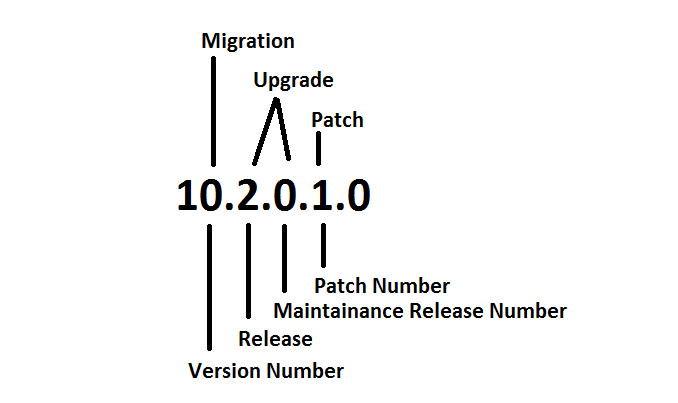
Below provided image is descriptive enough to explain the details of a Database Version.

Notes: Texts on the top of the number defined the name of the process/activity and below are the standard names. Last number in the range is shands for “Platform Specific Release Number” eg. the last zero out of 10.2.0.1.0

Posted in Basics | Tagged: , | 2 Comments »

Oracle Background Processes Explained – (10-07-2012)

Posted by FatDBA on July 10, 2012

Background Process Explained-
==========================================

[oracle@prashant1 2012_09_04]$ ps -ef | grep qrcl
oracle    3219  3176  0 20:31 pts/2    00:00:00 tail -f /u01/app/oracle/admin/qrcl/bdump/alert_qrcl.log
oracle    3545     1  0 20:43 ?        00:00:00 ora_pmon_qrcl
oracle    3547     1  0 20:43 ?        00:00:00 ora_psp0_qrcl
oracle    3549     1  0 20:43 ?        00:00:00 ora_mman_qrcl
oracle    3551     1  0 20:43 ?        00:00:00 ora_dbw0_qrcl
oracle    3553     1  0 20:43 ?        00:00:00 ora_lgwr_qrcl
oracle    3555     1  0 20:43 ?        00:00:00 ora_ckpt_qrcl
oracle    3557     1  0 20:43 ?        00:00:00 ora_smon_qrcl
oracle    3559     1  0 20:43 ?        00:00:00 ora_reco_qrcl
oracle    3561     1  0 20:43 ?        00:00:00 ora_cjq0_qrcl
oracle    3563     1  0 20:43 ?        00:00:00 ora_mmon_qrcl
oracle    3565     1  0 20:43 ?        00:00:00 ora_mmnl_qrcl
oracle    3567     1  0 20:43 ?        00:00:00 ora_d000_qrcl
oracle    3569     1  0 20:43 ?        00:00:00 ora_s000_qrcl
oracle    3573     1  0 20:43 ?        00:00:00 ora_arc0_qrcl
oracle    3575     1  0 20:43 ?        00:00:00 ora_arc1_qrcl
oracle    3579     1  0 20:43 ?        00:00:00 ora_qmnc_qrcl
oracle    3585     1  0 20:44 ?        00:00:00 ora_j000_qrcl
oracle    3589     1  0 20:44 ?        00:00:00 ora_q000_qrcl
oracle    3591     1  0 20:44 ?        00:00:00 ora_q001_qrcl
oracle    4137     1  0 21:05 ?        00:00:00 ora_q002_qrcl
oracle    4162  2694  0 21:06 pts/1    00:00:00 grep qrcl
[oracle@prashant1 2012_09_04]$

SMON :– SMON (System MONitor) is an Oracle background process created when you start a database instance. The SMON process performs instance recovery, cleans up after dirty shutdowns and coalesces adjacent free extents into larger free extents.  SMON wakes up every 5 minutes to perform housekeeping activities. SMON must always be running for an instance. If not, the instance will terminate.

$ ps -ef | grep smon
oracle   31144     1  0 11:10 ?        00:00:00 ora_smon_orcl

PMON (Process MONitor) is an Oracle background process created when you start a database instance. The PMON process will free up resources if a user process fails (eg. release database locks).
PMON is responsible to help listeners to determine if database service and it’s service handlers (Dispatchers) are available through registration.
During registration process PMON provides information like:
– Name of the database service provided by the database
– Service handlers (Dispatchers) available for the instance, including their type, protocol   address and current load details.

PMON normally wakes up every 3 seconds to perform its housekeeping activities. PMON must always be running for an instance. If not, the instance will terminate.
To speed-up housekeeping, one may also wake-up PMON (process 2 below) manually

SQL> oradebug setmypid
SQL> oradebug wakeup 2

MMON (Memory Monitor) is a background process that gathers memory statistics (snapshots) stores this information in the AWR (automatic workload repository). MMON is also responsible for issuing alerts for metrics that exceed their thresholds.  This process was introduced in Oracle 10g.

MMAN (Memory Manager) is a background process that manages the dynamic resizing of SGA memory areas as the workload increases or decreases.
This process was introduced in Oracle 10g.

ARCH (Oracle’s ARCHiver Process) is an Oracle background process created when you start an instance in ARCHIVE LOG MODE. The ARCH process will archive on-line redo log files to an archive destination, typically a directory on the database sever.

DBWR (DataBase WRiter) is an Oracle background process created when you start a database instance. The DBWR writes data from the SGA to the Oracle database files. When the SGA buffer cache fills the DBWR process selects buffers using an LRU algorithm and writes them to disk. From Dirty buffers to Data Files.

LGWR (LoG WRiter) is an Oracle background process created when you start a database instance. The LGWR writes the redo log buffers to the on-line redo log files. If the on-line redo log files are mirrored, all the members of the group will be written out simultaneously.

CKPT (Oracle Checkpoint Process) is an Oracle background process that timestamps all datafiles and control files to indicate that a checkpoint has occurred.
The ckeckpoint process was optional in Oracle 7 (set CHECKPOINT_PROCESS=TRUE) and could be enabled to speed-up checkpointing on databases with a large number of files. Starting with Oracle 8i, the checkpoint process is automatically started with the other Oracle processes at instance startup.

d000 (Dispatchers): Dispatchers are optional background processes, present only when the shared server configuration is used.

QMNC: A queue monitor process which monitors the message queues. Used by Oracle Streams Advanced Queuing.

MMNL Performs frequent and light-weight manageability-related tasks, such as session history capture and metrics computation.
Server Process (Not part of standard Oracle Architecutre) – Writes the data blocks from data file to DB Buffer Cache.

Oracle 11g Architecture (View Online)

Posted in Basics | Tagged: | Leave a Comment »

What is a Control File ?

Posted by FatDBA on July 10, 2012

What is a Control File ?
Every Oracle Database has a control file, which is a small binary file that records the physical structure of the database. The control file includes:

  • The database name
  • Names and locations of associated datafiles and redo log files
  • The timestamp of the database creation
  • The current log sequence number
  • Checkpoint information

The control file must be available for writing by the Oracle Database server whenever the database is open. Without the control file, the database cannot be mounted and recovery is difficult.

The control file of an Oracle Database is created at the same time as the database. By default, at least one copy of the control file is created during database creation. On some operating systems the default is to create multiple copies. You should create two or more copies of the control file during database creation. You can also create control files later, if you lose control files or want to change particular settings in the control files.

Backing it up in a binary format:
alter database backup controlfile to ‘/some/arbitrary/path’;
alter database backup controlfile to ‘/some/arbitrary/path’ reuse;

Backing it up in a human readable format:
alter database backup controlfile to trace;
alter database backup controlfile to trace as ‘/some/arbitrary/path’;
alter database backup controlfile to trace as ‘/some/arbitrary/path’ reuse;

Inside of a Control File (Contents):


STARTUP NOMOUNT
CREATE CONTROLFILE REUSE DATABASE “ORCL” NORESETLOGS  ARCHIVELOG
MAXLOGFILES 16
MAXLOGMEMBERS 3
MAXDATAFILES 100
MAXINSTANCES 8
MAXLOGHISTORY 292
LOGFILE
GROUP 1 ‘/u01/app/oracle/oradata/orcl/redo01.log’  SIZE 50M,
GROUP 2 ‘/u01/app/oracle/oradata/orcl/redo02.log’  SIZE 50M,
GROUP 3 ‘/u01/app/oracle/oradata/orcl/redo03.log’  SIZE 50M
— STANDBY LOGFILEDATAFILE
‘/u01/app/oracle/oradata/orcl/system01.dbf’,
‘/u01/app/oracle/oradata/orcl/undotbs01.dbf’,
‘/u01/app/oracle/oradata/orcl/sysaux01.dbf’,
‘/u01/app/oracle/oradata/orcl/users01.dbf’,
‘/u01/app/oracle/oradata/orcl/example01.dbf’
CHARACTER SET WE8ISO8859P1
;– Commands to re-create incarnation table
— Below log names MUST be changed to existing filenames on
— disk. Any one log file from each branch can be used to
— re-create incarnation records.
— ALTER DATABASE REGISTER LOGFILE ‘/u01/app/oracle/flash_recovery_area/ORCL/archivelog/2012_06_29/o1_mf_1_1_%u_.arc’;
— Recovery is required if any of the datafiles are restored backups,
— or if the last shutdown was not normal or immediate.
RECOVER DATABASE– All logs need archiving and a log switch is needed.
ALTER SYSTEM ARCHIVE LOG ALL;

— Database can now be opened normally.
ALTER DATABASE OPEN;

— Commands to add tempfiles to temporary tablespaces.
— Online tempfiles have complete space information.
— Other tempfiles may require adjustment.
ALTER TABLESPACE TEMP ADD TEMPFILE ‘/u01/app/oracle/oradata/orcl/temp01.dbf’
SIZE 20971520  REUSE AUTOEXTEND ON NEXT 655360  MAXSIZE 32767M;
— End of tempfile additions.

—     Set #2. RESETLOGS case

— The following commands will create a new control file and use it
— to open the database.
— Data used by Recovery Manager will be lost.
— The contents of online logs will be lost and all backups will
— be invalidated. Use this only if online logs are damaged.

— After mounting the created controlfile, the following SQL
— statement will place the database in the appropriate
— protection mode:
—  ALTER DATABASE SET STANDBY DATABASE TO MAXIMIZE PERFORMANCE

STARTUP NOMOUNT
CREATE CONTROLFILE REUSE DATABASE “ORCL” RESETLOGS  ARCHIVELOG
MAXLOGFILES 16
MAXLOGMEMBERS 3
MAXDATAFILES 100
MAXINSTANCES 8
MAXLOGHISTORY 292
LOGFILE
GROUP 1 ‘/u01/app/oracle/oradata/orcl/redo01.log’  SIZE 50M,
GROUP 2 ‘/u01/app/oracle/oradata/orcl/redo02.log’  SIZE 50M,
GROUP 3 ‘/u01/app/oracle/oradata/orcl/redo03.log’  SIZE 50M
— STANDBY LOGFILE

DATAFILE
‘/u01/app/oracle/oradata/orcl/system01.dbf’,
‘/u01/app/oracle/oradata/orcl/undotbs01.dbf’,
‘/u01/app/oracle/oradata/orcl/sysaux01.dbf’,
‘/u01/app/oracle/oradata/orcl/users01.dbf’,
‘/u01/app/oracle/oradata/orcl/example01.dbf’
CHARACTER SET WE8ISO8859P1
;

— Commands to re-create incarnation table
— Below log names MUST be changed to existing filenames on
— disk. Any one log file from each branch can be used to
— re-create incarnation records.
— ALTER DATABASE REGISTER LOGFILE ‘/u01/app/oracle/flash_recovery_area/ORCL/archivelog/2012_06_29/o1_mf_1_1_%u_.arc’;
— Recovery is required if any of the datafiles are restored backups,
— or if the last shutdown was not normal or immediate.
RECOVER DATABASE USING BACKUP CONTROLFILE

— Database can now be opened zeroing the online logs.
ALTER DATABASE OPEN RESETLOGS;

— Commands to add tempfiles to temporary tablespaces.
— Online tempfiles have complete space information.
— Other tempfiles may require adjustment.
ALTER TABLESPACE TEMP ADD TEMPFILE ‘/u01/app/oracle/oradata/orcl/temp01.dbf’
SIZE 20971520  REUSE AUTOEXTEND ON NEXT 655360  MAXSIZE 32767M;
— End of tempfile additions.

Posted in Advanced, Basics | Tagged: | Leave a Comment »

What are SYS and SYSTEM users ? — What are SYSDBA & SYSOPER Privileges?

Posted by FatDBA on July 10, 2012

What are SYS and SYSTEM users ?

SYS:

•automatically created when Oracle database is installed
•automatically granted the DBA role
•has a default password: CHANGE_ON_INSTALL
•owns the base tables and views for the database data dictionary

SYSTEM:

•automatically created when Oracle database is installed
•automatically granted the DBA role
•has a default password: MANAGER (make sure you change it)

When you create an Oracle Database, the user SYSTEM is also automatically created and granted the DBA role.
The SYSTEM username is used to create additional tables and views that display administrative information, and internal tables and views used by various Oracle Database options and tools. Never use the SYSTEM schema to store tables of interest to non-administrative users.

What are SYSDBA & SYSOPER Privileges?

SYSDBA role permissions:

CREATE DATABASE
CREATE SPFILE
STARTUP and SHUTDOWN
ALTER DATABASE: open, mount, back up, or change character set.
ARCHIVELOG and RECOVERY
Includes the RESTRICTED SESSION privilege

SYSOPER role permissions:

CREATE SPFILE
STARTUP and SHUTDOWN
ALTER DATABASE: open, mount, back up
ARCHIVELOG and RECOVERY
Includes the RESTRICTED SESSION privilege

Posted in Basics | Tagged: | Leave a Comment »

Alter database VS Alter system

Posted by FatDBA on June 30, 2012

Alter database VS Alter system

An “alter system” command is (mostly) only possible in status OPEN. The only exception from this I recall presently is  “alter system set param=value” to modify initialization parameters. That is already possible in NOMOUNT status.
“alter database” on the other hand is already possible in status MOUNT,

ALTER SYSTEM is an Instance Level command. Generally this applies for running processes, parameters etc. (however “ALTER SYSTEM DUMP” seems to be an exception).

ALTER DATABASE is a Database Level command. Generally, this applies to the physical structure of the database.

Think of an RAC environment. Most ALTER SYSTEM commands (ALTER SYSTEM DUMP is one exception) are local to the instance (although SET can set for multiple instances). The ALTER DATABASE commands are for the whole database.

Posted in Basics | Tagged: | Leave a Comment »