Tales From A Lazy Fat DBA

Its all about Databases, their performance, troubleshooting & much more …. ¯\_(ツ)_/¯

Oracle Real Application Testing (RAT) – Part 2: What is Capture & how to do it ?

Posted by FatDBA on February 10, 2020

Hi Folks,

Continuing the same subject/topic what I have started in my last post – Real Application Testing (RAT). This post is all about the ‘Capture‘ part what happens on the source database where we captures the workload which will later on replayed on the target database.

I have break it in to few easy steps to understand.

Step 1:
First we need to verify if the RAT option is installed and working fine. This you only need to verify upto 10Gr2 as all later versions comes with all features enabled by himself during the installation process, until you didn’t de-selected any specific feature during customized installation.
In case of 10g you need to check using v$option dynamic view for RAT parameter and there is a need to enable the parameter ‘pre_11g_enable_capture’.

Please see below the steps of verification!

Step 2:
Creating exclusion FILTERS (If Required) for capture.
This is the step where we create filters to exclude few of the system usernames and few of other schemas like SYSMAN, SYS and all of such schemas where you don’t want to capture load.
Please see the screenshot use to do the same.

Step 3:
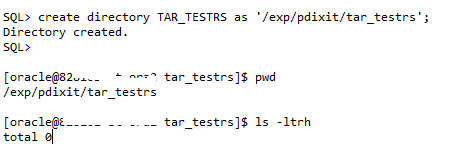
Creation of RAT specific OS based directory.
This is the place where all CAPTURE files will be saved and should be created like below.

Step 4:
Next, we can now start the CAPTURE process, this should be done using the main RAT specific procedure DBMS_WORKLOAD_CAPTURE and its function START_CAPTURE. Here the main parameter to pass is name (Name of the capture you want to name), dir (directory which will hold all workload files, the same what I have created above).
There are few parameters which I have intentionally not used i.e. DURATION as there is a BUG in 10Gr2 database which causes the capture not to stop even after specific time and had to manually stop the process. So in below example I will be capturing XXXXX minutes of load from this database and will stop it explicitly.

This being a staging setup I am taking around 30 minutes of workload but in real time this could be anything between 10 or 15 minutes of peak hours.

You can monitor the progress using DBA_WORKLOAD_CAPTURES view. See below.

Next, you can get more details about this ongoing capture activity. See below.

Step 5:
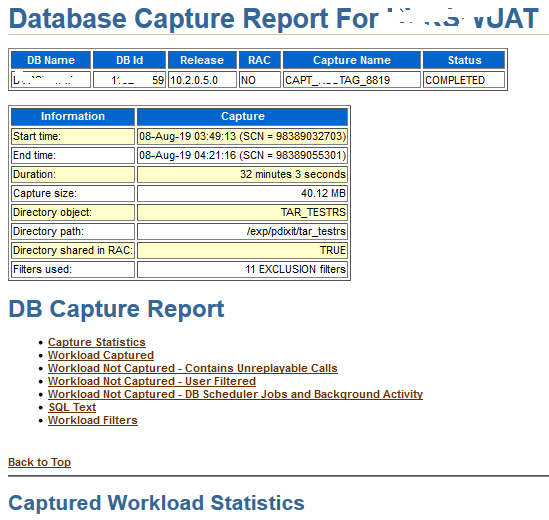
Next when we are done with the capturing of load for the specified time, we can go and stop it now. In my case on RS staging I left that running and capturing workload for ~ 32 Minutes.

Next, you can verify the contents by going to the RAT directory. There you will see .rec (recording) files, .wmd and a special report (TEXT/HTML format) will generate and is specific to CAPTURE process only.

Now we have BEGIN SNAP Id and END SNAP (time duration for the capture runtime) we can generate the AWR report as well.
The same report can be fetched via text method as well.

Step 6:
Next we will export the AWR data. This will be later on used to generate the comparison report from REPLAY side. This will create two more files under the capture directory wcr_ca.log and wcr_ca.dmp

Next steps starts at the target end or the host and deserves a separate post.
I will soon be writing about Replay process in my next post. Till that time keep learning!

Hope It Helps
Prashant Dixit

Posted in Advanced | Tagged: , | Leave a Comment »

Oracle Real Application Testing (RAT) – Part 1: What it is ?

Posted by FatDBA on January 31, 2020

Hi Guys,

As committed I am back with the first edition or the post on Oracle RAT (Real Application Testing) and there be couple more follow up chapters on the same in next few days or weeks.

Alright, recently during one of our mission-critical production database migration we reached a point where we had to perform the Load Test before pushing the real-time workload on to this new system. I was asked to prepare the strategy and to pick the best possible tool to access the performance of the performance of this new system and how it will respond to the current traffic.

Received lot’s of suggestions from rest of the team, i.e. Swingbench, Loadrunner, Orion etc. but most of them are with a predefined set of Supplied Benchmarks though few are customized but are more related to the server performance and bechmarking but not at the Database or SQL level. And considering the notorious behavior of many of the custom code and legacy application modules I was more leaned towards picking a tool which covers both Database and SQL, and we finally agreed on Oracle RAT.

Oracle Real Application Testing, an option that comes with Oracle Enterprise Edition. Oracle Real Application Testing helps you to test the real-life workload after changes on the database such as database upgrades, OS upgrades, parameter changes, hardware replacement, etc. So, in short the Oracle RAT will be system stress test tool to simulate production load. Introduced in Oracle 11g Release 1. But yes, it’s not free and comes with additional cost and licenses.

There are two features “Database Replay” and “SQL Performance Analyzer” will help fine-tuning on the database before passing production.
I will cover more about the ‘Database Replay’ feature here and might cover the ‘SQL Performance Analyzer’ feature later.

When can you use RAT – “Database Replay” feature?
System Changes
– Hardware replacement such as CPU, RAM, etc.
– Database and OS upgrades
– Storage changes (OCFS2 – ASM)
– OS changes (Windows – Linux)
Configuration Changes
– Single Instance – RAC– Patch installation– Database parameter change

Which database versions are supported?
The workload capture process is supported on the Oracle Database 10g R2 (10.2.0.4) and above versions. The worload replay process is supported on the Oracle Database 11g R1 and above versions.

How to do it, where to start and all ?
Well there are two different ways you can perform the RAT (DB Replay) testing
– Using Oracle Enterprise Manager (OEM) : This option is entirely GUI based where you select your source and target systems and by doing all those clicks performs this stress/load testing on the system.
– Using command line way (My preferred way of doing this, yes I am ‘old school’) using DBMS_WORKLOAD_CAPTURE & DBMS_WORKLOAD_REPLAY procedures.

Some High Level Steps:
– Capture workload into capture files (In the form of .rec files, are flat files)
– Copy files to test system and preprocess them (to make them machine understandable)
– Replay files on test system (play the recorded files)
– Perform detailed analysis of workload capture and replay using reports generated by Database Replay. (Reporting for bench markings)

ON SOURCE System:
dbms_workload_capture.start_capture 
dbms_workload_capture.finish_capture; 

Copy the workload files to the client system. For example: – /home/oracle/rat/test1

On TARGET System:
1. dbms_workload_replay.process_capture 
2. dbms_workload_replay.initialize_replay 
3. dbms_workload_replay.prepare_replay 
4. Run the workload client to calibrate the replay. The calibration process (mode=CALIBRATE) recommends the number of client processes required to perform the replay
5. Replay the workload using below command.
dbms_workload_replay.start_replay; 

Components: The ARCHITECTURE (Simplified)

DB REPLAY “The Big Picture”

What is a Workload Client ?
The REPLAY uses wrc clients – Which are multi-threaded JAVA clients and can be started on the same machine/host or on separate hosts.
Will cover about them more in depth in future posts.


[oracle@PDIXIT:RAT]$ wrc system/XXXX mode=calibrate replaydir=/DBCapture/RAT/RAT_13DEC15_19_17
 Workload Replay Client: Release 11.2.0.4.0 - Production on Sat Dec 16 05:50:39 2015
Copyright (c) 1982, 2011, Oracle and/or its affiliates.  All rights reserved.
 
 
Report for Workload in: /DBCapture/RAT/RAT_13DEC16_19_17
-----------------------
Recommendation:
Consider using at least 13 clients divided among 4 CPU(s)
You will need at least 168 MB of memory per client process.
If your machine(s) cannot match that number, consider using more clients.
 
Workload Characteristics:
- max concurrency: 575 sessions
- total number of sessions: 1729
 
Assumptions:
- 1 client process per 50 concurrent sessions
- 4 client process per CPU
- 256 KB of memory cache per concurrent session
- think time scale = 100
- connect time scale = 100
- synchronization = TRUE
 

Now how to compare/benchmark ?
At the end of both CAPTURE & REPLAY methods you need to generate few process specific report.
Few of the important files that help in benchmarking are:
AWR Reports: Generate the AWR reports for the same time interval when we have any of the two process were in progress. The BEGIN AND END Snaps can be collected from DBA_WORKLOAD_CAPTURES & DBA_WORKLOAD_REPLAYS
CAPTURE/REPLAY Reports: These reports are specific to workload capture and playing on target.
Capture Vs Replay reports.

Hope It Helps
Prashant Dixit
Posted in Advanced, troubleshooting | Tagged: , | Leave a Comment »

Disk Goes Offline after rebalance! – Is this due to a BUG ?

Posted by FatDBA on January 30, 2020

HI Everyone,

Today during one of the activity where we migrated the ASM Storage for one of our 2 Node RAC cluster (running on 11gR2), where we had to perform the disk rebalancing to copy/mirror the contents from older/existing storage to the new storage before we go and drop the older storage partitions, we faced some some weirdness. The disks goes offline in this multi-node ASM and we left stranded with initially no idea behind this behavior, but finally we were able to locate a metalink page for the same issue.

Yes, this was due to a known Bug with number 13476583
Oracle Server (Rdbms) Version
This problem is introduced in the
11.2.0.2.3 Patch Set Update
11.2.0.2.5 Patch Set Update
11.2.0.2.4 Patch Set Update
11.2.0.2.3 Patch Set Update
and in 11.2.0.3, by the fix for bug 10040921.

Problem:
When disks are dropped, a forcible diskgroup dismount is performed on other ASM instance/s.

Workaround or Fix:
1. The problem does not cause diskgroup corruption. So mostly diskgroup can be mounted again.
2. Apply fix
Interim patches here: Patch:13476583
11.2.0.2.6 Patch Set Update
11.2.0.2 Patch 17 on Windows Platforms

Oracle Notes: 245840.1

Hope That Helps
Prashant Dixit

Posted in Advanced, troubleshooting | Tagged: , | Leave a Comment »

CLSRSC-188: Failed to create keys in Oracle Local Registry

Posted by FatDBA on January 3, 2020

Hi Everyone,

Happy New Year!

So here goes my first post for Year 2020. This time I will be discussing an error that we encountered some time back while executing the important ‘root.sh’ script for a new 12cR2 Oracle Restart setup on RHEL7. The script was going smooth till the point where it tries to add keys in OLR for HASD and died with error “CLSRSC-188: Failed to create keys in Oracle Local Registry”.

Below is the exact error what we get during the root.sh run.
Here you will that it was throwing an error which says “Site name (1819181-monkeydb) is invalid.clscfg”.


[root@1819181-monkeydb gridhome]# ./root.sh

Performing root user operation.
Creating /etc/oratab file...
Entries will be added to the /etc/oratab file as needed by
Database Configuration Assistant when a database is created
Finished running generic part of root script.
Now product-specific root actions will be performed.
Using configuration parameter file: /u01/app/12.2.0.1/gridhome/crs/install/crsconfig_params
The log of current session can be found at:
  /u01/app/12.2.0.1/crsdata/1819181-monkeydb/crsconfig/roothas_2019-12-31_11-03-49AM.log
Site name (1819181-monkeydb) is invalid.clscfg -localadd -z  [-avlookup]
                 -p property1:value1,property2:value2...

  -avlookup       - Specify if the operation is during clusterware upgrade
  -z   - Specify the site GUID for this node
  -p propertylist - list of cluster properties and its value pairs

 Adds keys in OLR for the HASD.
WARNING: Using this tool may corrupt your cluster configuration. Do not
         use unless you positively know what you are doing.

Failed to create keys in the OLR, rc = 100, Message:

2019/12/31 11:03:56 CLSRSC-188: Failed to create keys in Oracle Local Registry
Died at /u01/app/12.2.0.1/gridhome/crs/install/oraolr.pm line 552.
The command '/u01/app/12.2.0.1/gridhome/perl/bin/perl -I/u01/app/12.2.0.1/gridhome/perl/lib -I/u01/app/12.2.0.1/gridhome/crs/install /u01/app/12.2.0.1/gridhome/crs/install/roothas.pl ' execution failed
 

It all happened because our hostname started with a number (1819181-monkeydb) and it’s a known bug that makes the hostname as invalid for root.sh and therefore the above error comes up.
There is a another condition as well, suppose your hostname starts with a alphabet (AHOST-TEXTIBOX-09) but as there is a limit of 15 characters which oracle considers for the hostname, and here in our example the 15th character is a hyphen (-).
So, even in such a case the root.sh will fail even when the hostname starts with a non-numeric character but it’s 15th character is a special character.

Now let’s discuss the solutions.
First, you can apply a merge patch 26751067 (which is merge of Bugs: Bug 25499276 Bug 26581118) and re-run the root.sh script.
Second, change the hostname right after the failure and re-run the script, this time it will go through with no error. Below is an example.

Let’s first change the hostname quickly before we and re-run root.sh


[root@1819181-monkeydb gridhome]# cat /etc/hostname
1819181-monkeydb
[root@1819181-monkeydb gridhome]# echo A1819181-monkeydb > /etc/hostname
[root@1819181-monkeydb gridhome]# cat /etc/hostname
A1819181-monkeydb
 

To update your command prompt simply re-login and to apply this change system wide execute below.


[root@1819181-monkeydb gridhome]# systemctl restart systemd-hostnamed
[root@A1819181-monkeydb gridhome]# 

[root@1819181-monkeydb gridhome]# ./root.sh
Performing root user operation.
Entries will be added to the /etc/oratab file as needed by
Database Configuration Assistant when a database is created
Finished running generic part of root script.
Now product-specific root actions will be performed.
Using configuration parameter file: /u01/app/12.2.0.1/gridhome/crs/install/crsconfig_params
The log of current session can be found at:
  /u01/app/12.2.0.1/crsdata/a1819181-monkeydb/crsconfig/roothas_2019-12-31_11-17-33AM.log
LOCAL ADD MODE
Creating OCR keys for user 'oracle', privgrp 'oinstall'..
Operation successful.
PROT-53: The file name [/u01/app/12.2.0.1/gridhome/cdata/localhost/local.ocr] specified for the 'ocrconfig -repair', 'ocrconfig -add' or 'ocrconfig -replace' command designates an invalid storage type for the Oracle Cluster Registry.
2019/12/31 11:17:43 CLSRSC-155: Replace of older local-only OCR failed
LOCAL ONLY MODE
Successfully accumulated necessary OCR keys.
Creating OCR keys for user 'root', privgrp 'root'..
Operation successful.
CRS-4664: Node a1819181-monkeydb successfully pinned.
2019/12/31 11:17:47 CLSRSC-330: Adding Clusterware entries to file 'oracle-ohasd.service'
CRS-2791: Starting shutdown of Oracle High Availability Services-managed resources on 'a1819181-monkeydb'
CRS-2673: Attempting to stop 'ora.evmd' on 'a1819181-monkeydb'
CRS-2677: Stop of 'ora.evmd' on 'a1819181-monkeydb' succeeded
CRS-2793: Shutdown of Oracle High Availability Services-managed resources on 'a1819181-monkeydb' has completed
CRS-4133: Oracle High Availability Services has been stopped.
CRS-4123: Oracle High Availability Services has been started.

a1819181-monkeydb     2019/12/31 11:18:41     /u01/app/12.2.0.1/gridhome/cdata/a1819181-monkeydb/backup_20191231_111841.olr     0
2019/12/31 11:18:42 CLSRSC-327: Successfully configured Oracle Restart for a standalone server


Hope It Helps
Prashant Dixit

Posted in Advanced | Tagged: | Leave a Comment »

FGA Error ORA-28138: Error in Policy Predicate

Posted by FatDBA on December 26, 2019

Hi Folks,

Today’s I am going to discuss one of the eerie issue that we faced recently while doing a Database Switch-over activity (From 10gR2 to 12cR2) where application team changed their application string or connection ways and started pointing to this new 12c database.
Before I proceed, let me give you a quick background about this activity, this was a test (Staging) database which was migrated on a new infrastructure and with version 12c, we’ve used data pump to move data from source to this new target and everything went well during all those steps.

Everything was successfully moved till the time the first test customer login to the application and reported that he failed to connect using his credentials. One error message that was captured in application server logs (this was a three tiered platform) which reads

"java.sql.SQLException: ORA-28138: Error in Policy Predicate". 

This error prevented all of the users to connect with the application after this switch-over. Well, apart from regular login procedures, rest all of was working fine.
The error immediately gave us an idea that the error was pointing to the FGA that we have tested on few of the tables some time back, including one of the base table which is used to insert login details before it authenticates access. So, we verified the FGA settings that migrated to this new database and found they are configured with some strange and complex AUDIT conditions
using a custom function where someone tried to define a subquery in the audit_condition, and didn’t tested the result.


i.e. sys.check_audited_user > 0  & sys.check_audited_user = 'XYS'. 

This being an invalid policy preicate and ultimately all operations got failed on said table which in turn stopping users to login.
So, this all happened due to complex precidates used in audit policies, this should be avoided. I mean it will allow you to create the policy but will fail with such errors related with FGA predicates. You cannot define a subquery in the audit_condition; it must be a simple predicate

So, now we have two solutions to avoid this situation.
One, you can simply go and drop the policy created on the said object to resume operations.
Else you can write a function that will evaluate the complex criteria and return a value that can be used in a simple predicate.


Hope It Helps
Prashant Dixit

Posted in Advanced | Tagged: | Leave a Comment »

RAT Reporting Error: ORA-06502: numeric or value error: character string buffer too small

Posted by FatDBA on December 16, 2019

Hi All,

Today’s topic of discussion is to handle/fix one of the issues that I’d faced while generating RAT (real application testing) reports on 10gR2 database. I know many of us are not yet aware about the tool, it’s purpose and functionality. Very soon I will be writing about this great product from Oracle for database load testing using real/genuine workload and is quite helpful to forecast your DB performance before you migrate.

Alright, coming back to the point – I was trying to generate the RAT Capture report (on target of course) to see what all was there in the capture, its observations, highlights and rest and that’s when we’ve encountered an error (pasted below)


DECLARE
l_report CLOB;
BEGIN
l_report := DBMS_WORKLOAD_CAPTURE.report(capture_id => 81,
format => DBMS_WORKLOAD_CAPTURE.TYPE_HTML);
END;
/ 2 3 4 5 6 7
DECLARE
*
ERROR at line 1:
ORA-06502: PL/SQL: numeric or value error: character string buffer too small
ORA-06512: at "SYS.DBMS_SWRF_REPORT_INTERNAL", line 7446
ORA-06512: at "SYS.DBMS_SWRF_REPORT_INTERNAL", line 8591
ORA-06512: at "SYS.DBMS_SWRF_REPORT_INTERNAL", line 8521
ORA-06512: at "SYS.DBMS_WORKLOAD_CAPTURE", line 486
ORA-06512: at "SYS.DBMS_WORKLOAD_CAPTURE", line 1214
ORA-06512: at line 4


There are two solutions to this problem:

1. First to drop the common (shared by capture and replay) schemas and their infrastructure tables using below two scripts.
That firstscript below drop schema tables shared by capture and replay and second drops the Capture infrastructure tables.
catwrr.sql – Catalog script for Workload Capture and Replay — this script then rebuilds all the capture and replay related tables.


@@?/rdbms/admin/catnowrr.sql
@@?/rdbms/admin/catwrr.sql
exec prvt_report_registry.register_clients(TRUE); --- This one registers clients 

Note: In that case you might loss all of your previous capture ID details from the system as it simply washes or wipes everything there related with RAT tables. Hence this is kind of a crude and a raw method to fix this issue. And I recommend to always connect with Oracle Support before going to run these scripts on your database!

2. I tried of another approach to avoid this error and generate the RAT capture report from the target instead of Source where we were getting the error.
Is that possible ?? — Yes, you can. After further analysis I found the issue is with the 10gR2 capture reporting code which sometimes throws this error.

So, the second way turned ut to be a better approach here as we have all of our previous stats and data untouched and nothing has been wiped out in this case, as we simply ran the reporting procedure from the target (12c R2 in our case) and that’s how avoided the issue.


Hope It Helps
Prashant Dixit

Posted in Advanced, troubleshooting | Tagged: | Leave a Comment »

root.sh failed on RHEL >7.3 — CLSRSC-400: A system reboot is required to continue installing,

Posted by FatDBA on November 14, 2019

Hi Everyone,

Was little occupied in few of the database migrations happened here at my end, so wasn’t able to post on regular basis. But the good thing is that I have a good list of issues that we faced during the course of this end of end migration and starting from today will try to share all them.

Alright, the one I am going to discuss next is the issue that we encountered while running root.sh script on this ‘Oracle Restart’ setup where the root.sh script failed with below set of errors


Creating /etc/oratab file...
Entries will be added to the /etc/oratab file as needed by
Database Configuration Assistant when a database is created
Finished running generic part of root script.
Now product-specific root actions will be performed.
Using configuration parameter file: /u01/app/12.2.0.1/grid_home/crs/install/crsconfig_params
The log of current session can be found at:
  /u01/app/12.2.0.1/crsdata/testserver-monkey/crsconfig/roothas_2019-11-12_10-56-56PM.log
LOCAL ADD MODE
Creating OCR keys for user 'oracle', privgrp 'oinstall'..
Operation successful.
LOCAL ONLY MODE
Successfully accumulated necessary OCR keys.
Creating OCR keys for user 'root', privgrp 'root'..
Operation successful.
CRS-4664: Node testserver-monkey successfully pinned.
2019/11/12 22:57:02 CLSRSC-330: Adding Clusterware entries to file 'oracle-ohasd.service'
 2019/11/12 22:59:06 CLSRSC-400: A system reboot is required to continue installing.
The command '/u01/app/12.2.0.1/grid_home/perl/bin/perl -I/u01/app/12.2.0.1/grid_home/perl/lib -I/u01/app/12.2.0.1/grid_home/crs/install /u01/app/12.2.0.1/grid_home/crs/install/roothas.pl ' execution failed 


To further understand what caused that failure we have checked the log file the above error pointing.
Below are few of the core/main lines when it got failed. So it shows that it failed to load the ADVM/ACFS drivers on the system while running the root.sh script.


>  ACFS-9504: Copying file '/u01/app/12.2.0.1/grid_home/lib/libacfs12.so' to the path '/opt/oracle/extapi/64/acfs/orcl/1/'
>  ACFS-9308: Loading installed ADVM/ACFS drivers.
>  ACFS-9321: Creating udev for ADVM/ACFS.
>  ACFS-9323: Creating module dependencies - this may take some time.
>  ACFS-9176: Entering 'ld usm drvs'
>  ACFS-9154: Loading 'oracleoks.ko' driver.
>  modprobe: FATAL: Module oracleoks not found.
>  ACFS-9109: oracleoks.ko driver failed to load.
>  ACFS-9178: Return code = USM_FAIL
>  ACFS-9177: Return from 'ld usm drvs'
 >  ACFS-9428: Failed to load ADVM/ACFS drivers. A system reboot is recommended.
>  ACFS-9310: ADVM/ACFS installation failed.


The solution to this problem is to apply the one off patch (25078431) to fix this issue with ACFS/ADVM drivers in RHEL > 7.3. Yes, there is a metalink not available for the same file too.
But in our setup even the patch failed to fix the issue as the the .gridSetup -applyoneoffs comes out within 1-2 seconds we ran this command, I mean in short it did nothing and pretends that it applied the patch but the ‘opatch lspatches‘ not showing anything.

Well, we raised this issue with Oracle and they passed it to their development team as there were lot’s of other things running on this DB.
And as you know their DEV team, they don’t have any fixed SLA. Well there is a reason too for them doing like that, as development team does lot’s of testing and regressions hence that is something acceptable.

Well, this problem we anyhow to fix as we had an important test that we planned to perform on this system.
So, comes the time to apply the temporary fix, of course a crude/raw one 🙂

Now, as on this system we don’t need the ACFS, so we can disable the feature right at the code/binary level.
Below are the two main files that when renamed disabled this feature and you are all good to bypass this root.sh check.


acfsdriverstate
acfsroot


You simply have to rename them and re-run the root.sh script it will pass this time and you are done with your GI installation.


Hope It Helps
Prashant Dixit

Posted in Advanced | Tagged: , | 6 Comments »

root.sh failing while installing 12cR2 on RHEL7 “Failed to create keys in the OLR” – Did your hostname starts with a number ?

Posted by FatDBA on July 29, 2019

Hi Guys,

I know its been too long since i last posted and it all happened due to some site authentication issues and some personal priorities. Here I am back with new issues, all related with performance, administration, troubleshooting, optimization and other subjects.

This time would like to share one of the issue that i have faced while installing Oracle 12c Release 2 (Yes, I still do installations, sometimes 🙂 ) on a brand new RHEL7 box where everything was good till I ran root.sh which got failed due to a weird error which initially got no hint behind the problem.
Initially i though if this qualifies to be a post and deserves a place here but actually I have spend few days identifying the cause and hours that I have spend with support, so just want to save all that time for you all who might facing the same issue and looking something on Google 🙂

So lets get started!
This is what exactly I got when ran the root.sh script


[root@8811913-monkey-db1:/u011/app1/12.2.0.1/grid]# ./root.sh
Performing root user operation.

The following environment variables are set as:
    ORACLE_OWNER= oracle
    ORACLE_HOME=  /u011/app1/12.2.0.1/grid

Enter the full pathname of the local bin directory: [/usr/local/bin]:
The contents of "dbhome" have not changed. No need to overwrite.
The contents of "oraenv" have not changed. No need to overwrite.
The contents of "coraenv" have not changed. No need to overwrite.

Entries will be added to the /etc/oratab file as needed by
Database Configuration Assistant when a database is created
Finished running generic part of root script.
Now product-specific root actions will be performed.
Using configuration parameter file: /u011/app1/12.2.0.1/grid/crs/install/crsconfig_params
The log of current session can be found at:
  /u011/app1/12.2.0.1/crsdata/8811913-monkey-db1/crsconfig/roothas_2019-02-18_00-59-22AM.log
Site name (8811913-monkey-db1) is invalid.clscfg -localadd -z  [-avlookup]
                 -p property1:value1,property2:value2...

  -avlookup       - Specify if the operation is during clusterware upgrade
  -z   - Specify the site GUID for this node
  -p propertylist - list of cluster properties and its value pairs

 Adds keys in OLR for the HASD.
WARNING: Using this tool may corrupt your cluster configuration. Do not
         use unless you positively know what you are doing.

 Failed to create keys in the OLR, rc = 100, Message:


2019/02/18 00:59:28 CLSRSC-188: Failed to create keys in Oracle Local Registry
Died at /u011/app1/12.2.0.1/grid/crs/install/oraolr.pm line 552.
The command '/u011/app1/12.2.0.1/grid/perl/bin/perl -I/u011/app1/12.2.0.1/grid/perl/lib -I/u011/app1/12.2.0.1/grid/crs/install /u011/app1/12.2.0.1/grid/crs/install/roothas.pl ' execution failed


The error simply said that the script failed to ‘create the keys in OLR’. These keys were for HASD that it was attempting to add. I verified all run time logs that got created the time but they too gave no idea about this problem. That is when I had to engage the Oracle customer support and came to know that this all happened due to a new BUG (BUG 26581118 – ALLOW HOSTNAME WITH NUMERIC VALUE) that comes in to picture when you have the hostname starts with a numeral or number and is an RHEL7 and is specific to Oracle 12c Release 2.

Oracle suggested a bug fix (Patch Number: 26751067) for this issue. This is a MERGE patch and fixes both Bug 25499276 & 26581118. One more thing, you have to apply this patch before the root.sh script.
So let me quickly show how to do that (removing all redundant and other sections).


[oracle@8811913-monkey-db1:/u011/app1/12.2.0.1/grid/OPatch]$ ./opatch napply -oh /u011/app1/12.2.0.1/grid -local 26751067/26751067/
Oracle Interim Patch Installer version 12.2.0.1.6
Copyright (c) 2019, Oracle Corporation.  All rights reserved.

...
......

Patch 26751067 successfully applied.
Log file location: /u011/app1/12.2.0.1/grid/cfgtoollogs/opatch/opatch2019-02-18_01-05-41AM_1.log

OPatch succeeded.
[oracle@8811913-monkey-db1:/u011/app1/12.2.0.1/grid/OPatch]$
[oracle@8811913-monkey-db1:/u011/app1/12.2.0.1/grid/OPatch]$


Ran the root.sh after patching and it went smooth.
BTW, in case you don’t want to do all this, simply change the hostname and put any alphabet in front of your hostname i.e. 8811913 –> A8811913 — That’s It!

Hope It Helps!

Thanks
Prashant Dixit

Posted in troubleshooting, Uncategorized | Tagged: | 1 Comment »

OPatch – Error occurred during initialization of VM, Could not reserve enough space for XXXXXXKB object heap

Posted by FatDBA on February 19, 2019

Hi Guys,

Disucssing a random issue what i’ve encountered few hours back, is a problem related with the new version of the OPatch which when unzipped generating a weird error and is discussed below.


[oracle@gunna:~/app/oracle/product/12.2.0/dbhome_1/OPatch/28822515]$ opatch prereq CheckConflictAgainstOHWithDetail -ph ./

Error occurred during initialization of VM
Could not reserve enough space for 39957221KB object heap


On OCS download page for OPatch, the auto version is set to 32-bit (Linux X86).
Check if the name of the downloaded file is something similar ‘p6880880_122010_LINUX.zip’. If yes, then you have downloaded the 32 bit version. Choose ‘Linux x86-64’ as the right vrsion and try again

Let’s try again.


[oracle@gunna:~/app/oracle/product/12.2.0/dbhome_1/OPatch/28822515]$ opatch prereq CheckConflictAgainstOHWithDetail -ph ./
Oracle Interim Patch Installer version 12.2.0.1.16
Copyright (c) 2018, Oracle Corporation.  All rights reserved.

PREREQ session

Oracle Home       : /home/oracle/app/oracle/product/12.2.0/dbhome_1
Central Inventory : /home/oracle/app/oraInventory
   from           : /home/oracle/app/oracle/product/12.2.0/dbhome_1/oraInst.loc
OPatch version    : 12.2.0.1.16
OUI version       : 12.2.0.1.4
Log file location : /home/oracle/app/oracle/product/12.2.0/dbhome_1/cfgtoollogs/opatch/opatch2018-12-24_00-46-02AM_1.log

Invoking prereq "checkconflictagainstohwithdetail"

Prereq "checkConflictAgainstOHWithDetail" passed.

OPatch succeeded.


All good now!

Hope It Helps
Prashant ‘Fatdba’ Dixit

Posted in troubleshooting | Tagged: | Leave a Comment »

Migrating from Oracle to PostgreSQL using ora2pg

Posted by FatDBA on October 26, 2018

Hey Everyone,

Nowadays lot’s of organizations are started looking to migrate their databases from Oracle to open source databases and specially when they are looking for such replacements they in general looks for cost efficiency, High performance, good data integrity and easy integration with cloud providers i.e. Amazon. PostgreSQL Database is the answer for most of them, i mean not only the cost but with PostgreSQL you are not compromising any of the good features like replication, clustering, NoSQL support and other features as well.

PostgreSQL has always been a popular database for about a decade now and currently the second most loved DB.
It’s gradually taking over many databases as it’s a true open source, flexible, standard-compliant, and highly extensible RDBMS solution. Recently it has gotten significantly better with features like full text search, logical replication, json support and lot of other cool features.

* Of course i love Oracle and will always remain my first love, it is just that i am a fan of PostgreSQL too! 🙂 🙂

Okay so coming back to the purpose of writing this post – How to do the from your existing Oracle Database to PostgreSQL using one of the popular open source software Ora2pg ?

During the post i will be discussing about one migration that i did using the tool.
Here during the post i won’t be discussing in depth checks and factors that you will be considering while adopting the right approach, tool, methodology or strategy. I am planning to cover these items during future posts.

Before the start i would like to give a short introduction about the tool and the approach. ora2pg is the most open-source tool used for migrating the Oracle database to PostgreSQL.
Most of the Schema migration can be done automatically using ora2pg. The Oracle database objects not supported by PostgreSQL must be identified and must be migrated manually. Ora2pg partially migrated PL/SQL objects. For example: PostgreSQL does not support objects like Packages and SCHEMA can be used as an alternative for Package definitions and Package Body must be converted to FUNCTION(S) as Package Body alternative.

Few of the features that are offered by its latest version (19.1)
– Export full database schema (tables, views, sequences, indexes), with unique, primary, foreign key and check constraints.
– Export grants/privileges for users and groups.
– Export range/list partitions and sub partitions.
– Export a table selection (by specifying the table names).
– Export Oracle schema to a PostgreSQL 8.4+ schema.
– Export predefined functions, triggers, procedures, packages and package bodies.
– Export full data or following a WHERE clause.
– Full support of Oracle BLOB object as PG BYTEA.
– Export Oracle views as PG tables.
– Provide some basic automatic conversion of PLSQL code to PLPGSQL.
– Export Oracle tables as foreign data wrapper tables.
– Export materialized view.
– Show a detailed report of an Oracle database content.
– Migration cost assessment of an Oracle database.
– Migration difficulty level assessment of an Oracle database.
– Migration cost assessment of PL/SQL code from a file.
– Migration cost assessment of Oracle SQL queries stored in a file.
– Export Oracle locator and spatial geometries into PostGis.
– Export DBLINK as Oracle FDW.
– Export SYNONYMS as views.
– Export DIRECTORY as external table or directory for external_file extension.

There are few other unsupported objects like Materialized Views, Public Synonyms IOT Tables and has other alternatives in PostgreSQL.

Okay now i will be jumping to the real execution.

Step 1: Installation
You need to install Oracle & postgres database drivers and perl db modules which is required by the ora2pg tool to run.

I will be using ora2pg version 19.1, PG Driver (DBD-Pg-3.7.4), Oracle Driver (DBD-Oracle-1.75_2) and Perl Module (DBI-1.641.tar.gz).
All pakages you can download from https://metacpan.org/ and for tool itself go to https://sourceforge.net/projects/ora2pg/
First i’ve installed Perl Modules and the usual steps to install all of the required three packages is given below. Unzip packages and call files mentioned below in same sequence.


perl Makefile.PL
make
make test
make install

Step 2: Next you have to install the ora2pg tool.
Like any other Perl Module Ora2Pg can be installed with the following commands.


tar xjf ora2pg-x.x.tar.bz2
cd ora2pg-x.x/
perl Makefile.PL
make && make install


Step 3: Configuring the tool as per need.
Ora2Pg consist of a Perl script (ora2pg) and a Perl module (Ora2Pg.pm), the only thing you have to modify is the configuration file ora2pg.conf by setting the DSN to the Oracle database and optionally the name of a schema. Once that’s done you just have to set the type of export you want: TABLE with constraints, VIEW, MVIEW, TABLESPACE, SEQUENCE, INDEXES, TRIGGER, GRANT, FUNCTION, PROCEDURE, PACKAGE, PARTITION, TYPE, INSERT or COPY, FDW, QUERY, SYNONYM.


Installation creates the configuration file under /etc directory i.e.
[root@gunna ora2pg]# pwd
/etc/ora2pg


Next you have to set few of the required parameters within the configuration file, for example.


# Set Oracle database connection (datasource, user, password)
ORACLE_DSN      dbi:Oracle:host=gunna.localdomain;sid=gunnadb;port=1539
ORACLE_USER     system
ORACLE_PWD      oracle90


# Oracle schema/owner to use
SCHEMA          soe


# Type of export. Values can be the following keyword:
-- Here i will be exporting the TABLES, PROCEDURES, FUNCTION and will be exporting from tables as INSERT statements (Or you can choose COPY as format).
TYPE            TABLE INSERT PROCEDURE FUNCTION

# Output file name
OUTPUT          oracletopgmigrationsoeschema.sql


Step 4: Now after the configuration set, we are all good to call the tool and take the export dump for Oracle’s SOE schema in our database.

The SOE schema in Oracle contains only 2 tables – ADDRESSES (1506152 Rows) and CARD_DETAILS (1505972 rows).
Let’s quickly verify it …


SQL> select count(*) from addresses;
 count
-------
 150615

Next you will be required to set the Oracle Library Path.
[root@gunna ora2pg]#  export LD_LIBRARY_PATH=/home/oracle/app/oracle/product/12.2.0/dbhome_1/lib


Now, call the tool


[root@gunna ora2pg]# ora2pg
[========================>] 2/2 tables (100.0%) end of scanning.
[========================>]  0/2 tables (0.0%) end of scanning.
[========================>] 2/2 tables (100.0%) end of table export.
[========================>] 1506152/1506152 rows (100.0%) Table ADDRESSES (9538 recs/sec)
[========================>]  3012124/3012124 total rows (100.0%) - (159 sec., avg: 9538 recs/sec).
[========================>] 1505972/1505972 rows (100.0%) Table CARD_DETAILS (16666 recs/sec)
[========================>] 1/1 Indexes(100.0%) end of output.
[========================>] 2/2 Tables(100.0%) end of output.
[root@gunna ora2pg]#
[root@gunna ora2pg]#


This will create the dump in the same directory from where you’ve called.


[root@gunna ora2pg]# ls -ltrh
-rw-r--r--. 1 root root  47K Sep 24 07:18 ora2pg.conf.dist_main
-rw-r--r--. 1 root root  47K Oct  8 05:04 ora2pg.conf
-rw-r--r--. 1 root root 668M Oct 10 03:49 oracletopgmigrationsoeschema.sql


Step 5: Let’s see what’s inside the dump.
Here you will see all data type conversions and Insert statements will be created by the tool itself.
example: integer to bigint, date to timestamp, varchar2 to varchar and etc.

Below are the contents copied from the dump.


CREATE TABLE addresses (
        address_id bigint NOT NULL,
        customer_id bigint NOT NULL,
        date_created timestamp NOT NULL,
        house_no_or_name varchar(60),
        street_name varchar(60),
        town varchar(60),
        county varchar(60),
        country varchar(60),
        post_code varchar(12),
        zip_code varchar(12)
) ;
ALTER TABLE addresses ADD PRIMARY KEY (address_id);


CREATE TABLE card_details (
        card_id bigint NOT NULL,
        customer_id bigint NOT NULL,
        card_type varchar(30) NOT NULL,
        card_number bigint NOT NULL,
        expiry_date timestamp NOT NULL,
        is_valid varchar(1) NOT NULL,
        security_code integer
) 
CREATE INDEX carddetails_cust_ix ON card_details (customer_id);
ALTER TABLE card_details ADD PRIMARY KEY (card_id);


BEGIN;
ALTER TABLE addresses DROP CONSTRAINT IF EXISTS add_cust_fk;

INSERT INTO addresses (address_id,customer_id,date_created,house_no_or_name,street_name,town,county,country,post_code,zip_code) VALUES (5876,984495,'2008-12-13 08:00:00',E'8',E'incompetent gardens',E'Armadale',E'West Lothian',E'Norway',E'4N2W7M',E'406013');
INSERT INTO addresses (address_id,customer_id,date_created,house_no_or_name,street_name,town,county,country,post_code,zip_code) VALUES (5877,166622,'2005-05-21 23:00:00',E'35',E'nasty road',E'Millport',E'Glasgow',E'Austria',NULL,NULL);
INSERT INTO addresses (address_id,customer_id,date_created,house_no_or_name,street_name,town,county,country,post_code,zip_code) VALUES (5878,221212,'2009-03-21 14:00:00',E'80',E'mushy road',E'Innerleithen',E'Flintshire',E'Germany',E'RIUMCV',E'813939');
INSERT INTO addresses (address_id,customer_id,date_created,house_no_or_name,street_name,town,county,country,post_code,zip_code) VALUES (5879,961529,'2004-01-02 08:00:00',E'73',E'obedient road',E'Milton',E'South Gloucestershire',E'Massachusetts',NULL,NULL);
INSERT INTO addresses (address_id,customer_id,date_created,house_no_or_name,street_name,town,county,country,post_code,zip_code) VALUES (5880,361999,'2000-04-16 22:00:00',E'56',E'chilly road',E'Cupar',E'Dorset',E'Philippines',NULL,NULL);

and so on ....


Step 5: Next, time to import the Oracle data to Postgres Database
Before import lets quickly create the sample database and schema.


postgres=# CREATE DATABASE migra;
CREATE DATABASE
postgres=#

dixit=# create schema soe;
CREATE SCHEMA


postgres=# \l
                                  List of databases
   Name    |  Owner   | Encoding |  Collation  |    Ctype    |   Access privileges
-----------+----------+----------+-------------+-------------+-----------------------
 migra     | postgres | UTF8     | en_US.UTF-8 | en_US.UTF-8 |
 postgres  | postgres | UTF8     | en_US.UTF-8 | en_US.UTF-8 |


Now i will be starting the import process.


dixit=# \i oracletopgmigrationsoeschema.sql
SET
CREATE TABLE
CREATE TABLE
CREATE INDEX
INSERT 1,0
.......
.........


dixit=# \dt+
                            List of relations
 Schema |         Name         | Type  |  Owner   |  Size   | Description
--------+----------------------+-------+----------+---------+-------------
 public | addresses            | table | postgres | 40 MB   |
 public | card_details         | table | postgres | 10 MB   |


postgres=# select count(*) from addresses;
 count
-------
 150615
(1 row)


There are whole lot of areas that i could cover, but just to keep the post simple and easy to digest for readers i will be covering issues that i faced or manual efforts that are needed during the migration and other areas.

Hope It Helps
Prashnt Dixit

Posted in Advanced | Tagged: | 2 Comments »