Tales From A Lazy Fat DBA

Its all about Databases, their performance, troubleshooting & much more …. ¯\_(ツ)_/¯

All about Oracle 12c Database In-Memory!

Posted by FatDBA on December 27, 2017

Hi Mates,

Today i will discuss about the Database In-Memory option of Oracle 12c databases. I know i am little late to add about this feature but recently I’ve implemented the option for one of my customer in Latin Americas region and there I’ve got more exposure to understand it better and implement the feature.

So, lets start with most probably my last post of the year!

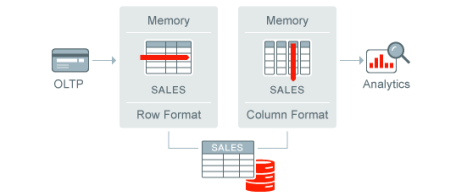
Recently i have got a chance to test and to benchmark the performance gains in one of out Pre-Prod environment. This feature applies on Tablespaces, Tables, MViews, (Sub) Partitions (Except objects owned by SYS, SYSTEM and SYSAUX). To understand the feature i would first like to shed some light on two of the ways how Oracle stores tables on both Disk and Memory using conventional ‘Row Format’ and with the all new In-Memory ‘Column’ format.

Row Arrangement: Is the same old traditional method to store data in row formats. This is best for OLTP systems as queries runs faster with this approach as it quickly fetches all of the columns in a record.
Column Based Arrangement: This way it stores records in a separate column store. This proves good for OLAP systems where large set of data is chosen but only for few number of columns.

Hence, based on above two methods or data arrangements in database it is clear that the row based method is best for DMLs and column based arrangement is good when selecting large portion of data, so both of the two methods have their own respective pros and cons. But starting from Oracle 12.1.0.2 we have the all new feature of ‘DB In-Memory’ which use best of both the approaches. I mean it uses both row and column arrangements to keep data in memory. Our smart optimizer automatically knows which query to route as per the workload (OLTP and for Analytical processing).

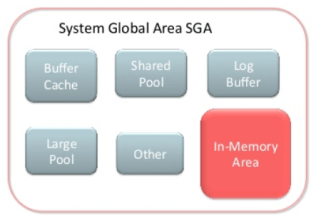
The In-Memory feature uses the IM Column store which is a new occupant of the SGA (In-Memory Area). This In-Memory Area is adjusted by a parameter INMEMORY_SIZE.

As far as IM Column Store it is filled by the information collected by worker processes e.g. w001, w002 etc.; each of the worker process updates the IM Compression Units or IMCUs.

So, enough the background and internals involved, lets jump to the real work and check how this thing practically works.
First check the minimum comparability of the database

COMPATIBLE = 12.1.0.0.0

Lets first enable the in-memory column store. There are many of the related parameters and are given below.

NAME                                 TYPE        VALUE
------------------------------------ ----------- ------------------------------
inmemory_adg_enabled                 boolean     TRUE
inmemory_clause_default              string
inmemory_expressions_usage           string      ENABLE
inmemory_force                       string      DEFAULT
inmemory_max_populate_servers        integer     0
inmemory_query                       string      ENABLE
inmemory_size                        big integer 0
inmemory_trickle_repopulate_servers_ integer     1
percent
inmemory_virtual_columns             string      MANUAL
optimizer_inmemory_aware             boolean     TRUE

Before i show next logs on how to enable it, i would first like to show you the database startup details with no In-Memory enabled.

SQL> startup
ORACLE instance started.

Total System Global Area 1191182336 bytes
Fixed Size                  8620032 bytes
Variable Size             771753984 bytes
Database Buffers          402653184 bytes
Redo Buffers                8155136 bytes
Database mounted.
Database opened.
SQL>

Okay now lets enable it!
Now a question might be asked about the criterion of adding objects to the pool. So in my opinion the best candidates would
be — Very hot data, large segments (not less than 1MB), collect these stats from sources like Oracle segment statistics, number of column scans, AWR reports etc. Analytical queries etc.

SQL> alter system set inmemory_size=250m scope=spfile;

System altered.

SQL> shut immediate
Database closed.
Database dismounted.
ORACLE instance shut down.
SQL> startup
ORACLE instance started.

Total System Global Area 1191182336 bytes
Fixed Size                  8620032 bytes
Variable Size             822085632 bytes
Database Buffers           83886080 bytes
Redo Buffers                8155136 bytes
In-Memory Area            268435456 bytes
Database mounted.
Database opened.

Now i will try to load some stuff in to the memory.

SELECT table_name,inmemory,inmemory_priority,inmemory_distribute,inmemory_compression,inmemory_duplicate 
FROM user_tables WHERE table_name='TEST1';

TABLE_NAME           INMEMORY INMEMORY INMEMORY_DISTRI INMEMORY_COMPRESS INMEMORY_DUPL
-------------------- -------- -------- --------------- ----------------- -------------
TEST1                DISABLED

00:14:42 SQL> select pool, alloc_bytes, used_bytes, populate_status from v$inmemory_area;

POOL                       ALLOC_BYTES USED_BYTES POPULATE_STATUS
-------------------------- ----------- ---------- --------------------------
1MB POOL                     200278016          0 DONE                         >>>>>>> 1MB pool is used to store the column formatted data.
64KB POOL                     50331648          0 DONE                         >>>>>>> 64 KB pool is used to store the metadata about its residents.

Now i am moving the discussed table to in memory.

exec DBMS_INMEMORY.POPULATE(schema_name => dixit, table_name => 'TEST1');
or Using

00:15:01 SQL> alter table test1 inmemory;

Table altered.


00:17:59 SQL> SELECT table_name,inmemory,inmemory_priority,inmemory_distribute,inmemory_compression,inmemory_duplicate
FROM user_tables WHERE table_name='TEST1';

TABLE_NAME           INMEMORY INMEMORY INMEMORY_DISTRI INMEMORY_COMPRESS INMEMORY_DUPL
-------------------- -------- -------- --------------- ----------------- -------------
TEST1                ENABLED  NONE     AUTO            FOR QUERY LOW     NO DUPLICATE


00:20:17 SQL> select pool, alloc_bytes, used_bytes, populate_status from v$inmemory_area;

POOL                       ALLOC_BYTES USED_BYTES POPULATE_STATUS
-------------------------- ----------- ---------- --------------------------
1MB POOL                     200278016          0 DONE
64KB POOL                     50331648          0 DONE


00:18:25 SQL> select owner, segment_name, populate_status from v$im_segments;

no rows selected

Above results shows that no segment is added to the pool. Now lets try to query the table and see the results again.

00:20:26 SQL> select count(*) from test1;

  COUNT(*)
----------
   1000000


00:20:48 SQL> select pool, alloc_bytes, used_bytes, populate_status from v$inmemory_area;

POOL                       ALLOC_BYTES USED_BYTES POPULATE_STATUS
-------------------------- ----------- ---------- --------------------------
1MB POOL                     200278016          0 POPULATING
64KB POOL                     50331648          0 POPULATING


Okay now it's doing something as status from DONE has changed to POLULATING. Lets repeat the same command again.

POOL                       ALLOC_BYTES USED_BYTES POPULATE_STATUS
-------------------------- ----------- ---------- --------------------------
1MB POOL                     200278016   49283072 DONE
64KB POOL                     50331648     458752 DONE

Okay its there in the pool now! Lets check the in memory area, what we have inside it.

00:23:56 SQL> select owner, segment_name, populate_status from v$im_segments;

OWNER      SEGMENT_NAME         POPULATE_STAT
---------- -------------------- -------------
DIXIT      TEST1                COMPLETED

Lets conform if table is fully populated we have to look at v$im_segments_detail which compares the number of blocks in In-Memory and in the TEST1 table.

SELECT m.inst_id, 
       m.blocksinmem, 
       m.datablocks 
FROM   v$im_segments_detail m, 
       user_objects o 
WHERE  m.dataobj = o.object_id 
AND    o.object_name = 'TEST1';

   INST_ID BLOCKSINMEM DATABLOCKS
---------- ----------- ----------
         1        6922       6922

Lets see if there is any changes captured in Execution plan of the query.

SQL> explain plan for select count(*) from test1;

Explained.

SQL> @xplan

PLAN_TABLE_OUTPUT
------------------------------------------------------------------------------------
Plan hash value: 3896847026

-----------------------------------------------------------------------------
| Id  | Operation                   | Name  | Rows  | Cost (%CPU)| Time     |
-----------------------------------------------------------------------------
|   0 | SELECT STATEMENT            |       |     1 |    71   (2)| 00:00:01 |
|   1 |  SORT AGGREGATE             |       |     1 |            |          |
|   2 |   TABLE ACCESS INMEMORY FULL| TEST1 |  1000K|    71   (2)| 00:00:01 |
-----------------------------------------------------------------------------

9 rows selected.

Now we have a new operation type added to the plan ‘TABLE ACCESS INMEMORY FULL’. It says that the object was accessed directly from the memory.

You can compare the response times with/without the In-Memory Store by simply disabling In-Memory functionality in your session:

ALTER SESSION SET inmemory_query = ENABLE;
ALTER SESSION SET inmemory_query = DISABLE;

You can anytime remove the objects from the pool. Other options to use with In memory.

SQL> ALTER TABLESPACE example INMEMORY;

Enabling the In-Memory attribute on the TEST1 table but excluding the “dest_id” column

SQL> ALTER TABLE TEST1 INMEMORY NO INMEMORY(dest_id);

Enabling the in memory option for table TEST1 and setting the priority to CRITICAL. With this option set on object (Other options are HIGH, MEDIUM, LOW), it will be populated immediately after the database is opened.

SQL> ALTER TABLE TEST1 INMEMORY PRIORITY CRITICAL;

There are few other options like Compression (Objects compressed during population) , Joins, Scans are also there and will be covered in a separate post or you can read the official documentation on in memory to understand them.

But i would like to discuss little about how the In-Memory option works in RAC environment.

In case of user querying the database in-memory in RAC, serial queries will only access a fraction of the data from its own node. IMCUs or IM Compression Units are not traveled using interconnect or using cache fusion. It fetches the remainder data from the disk itself.
Parallel execution helps as it starts multiple processes and ensures that at least one parallel server slave is allocated for each RAC instance. For that we have to set the parallel_degree_policy or Auto DOP to AUTO which makes the query coordinator ICMU aware and it (QC) automatically starts parallel server processes on correct server.

Now after all the discussion time to share my final words on the subject.
As we know that caching or pooling are the concepts there with Oracle RDBMS or with any of the databases from a very long time; then – why this in memory now ?
We already have few of the areas like KEEP/RECYCLE pools, Result cache etc. to keep cache data or results.
So my answer is that the Oracle In-Memory column store enables objects to load in memory in compressed columnar format which makes the scans to perform better that on-disk reads and leads to performance boosts. Use it when there is a SQL related performance issue and you’ve tried all tuning methods and each one of them are failed to fix the problem and yes If the In-Memory performance benefit can outperform the additional Oracle license costs.

Hope It Helps
Prashant Dixit

Posted in Advanced, Basics | Tagged: , | Leave a Comment »

Scripts: How to accurately calculate Database and Table growth.

Posted by FatDBA on December 26, 2017

Hi Pals,

Many of the times while doing sizing, capacity planning and requirement calculations you might have come across a point where you have to share database or table level growth stats to your customer for estimations. So – What should be the right and the accurate way or the method to track the database or table level growth in your databases ?

Today i will discuss about the ways to precisely calculate or track growth of your database we will surely come up with solutions like
– Do a join on V$DATAFILE, V$TEMPFILE, V$LOG and some help from DBA_FREE_SPACE.
– Else a different approach is using DBA_HIST views (DBA_HIST_SEG_STAT) in conjunction with dba_segments view.

As far as both of the approaches, second one (Using DBA_HIST views) is the most reliable,trusted and by far accurate way of tracking sizing information of the database But most of the DBA_HIST tables are part of Diagnostics Pack and should be accessed only if you have the license. So i advocate here another way which is manual method using customized PL/SQL code to monitor the growth trends of both your database and tables.

Here i would like to thank one of the best PL/SQL coder i know – Mr. Komal Chand Lilhare (Master Coder 🙂 ) who is the original author behind these scripts and i have only made few additions and customization’s as per my need.

DB GROWTH JOB:

Step 1. Create table to capture DB growth

create table db_growth
as select *
from (
select sysdate,t2.total "TOTAL_SIZE",t1.free "FREE_SPACE",(t1.free/t2.total)*100 "FREE% "
from
(select sum(bytes)/1024/1024 free
from dba_free_space) t1 ,
(select sum(bytes)/1024/1024 total
from dba_Data_files) t2
);

Step2. Create view to automate the capture process through DB jobs

create view v_db_growth
as select *
from
(
select sysdate,t2.total "TOTAL_SIZE",t1.free "FREE_SPACE",(t1.free/t2.total)*100 "FREE%"
from
(select sum(bytes)/1024/1024 free
from dba_free_space) t1 ,
(select sum(bytes)/1024/1024 total
from dba_Data_files) t2
);


Step3. Create DB Job to capture the growth on regular interval

declare
jobno number;
begin
dbms_job.submit(
jobno, 'begin insert into db_growth select * from v_db_growth;commit;end;', sysdate, 'trunc(SYSDATE)+1', TRUE);
commit;
end;
/

Step4. Data analysis. It’s all your SQL skills how you want to see and present the data trend.

set linesize 130;
col what for a30;
col log_user for a12;
col interval for a30;

select job,what,log_user, to_char(sysdate,'dd-mon-yyyy hh24:mi:ss') "Sysdate", 
to_char(next_date,'dd-mon-yyyy hh24:mi:ss') "Next Date",
interval from user_jobs;


       JOB WHAT                           LOG_USER     Sysdate              Next Date            INTERVAL
---------- ------------------------------ ------------ -------------------- -------------------- ------------------------------
        23 begin insert into db_growth se SYS          26-dec-2017 23:18:18 17-dec-2017 00:00:00 trunc(SYSDATE)+1
           lect * from v_db_growth;commit
           ;end;

        24 begin insert into table_growth SYS          26-dec-2017 23:18:18 27-dec-2017 00:00:00 trunc(SYSDATE)+1
           _MB select * from v_table_grow
           th_MB;commit;end;


select * from db_growth order by 1;

SYSDATE   TOTAL_SIZE FREE_SPACE     FREE%
--------- ---------- ---------- ----------
15-DEC-17 167935.125 36946.0625 22.0001995
16-DEC-17 167935.125 36944.9375 21.9995296


select trunc("SYSDATE") Dt,round("TOTAL_SIZE") "TOTAL_SIZE(M)", round("TOTAL_SIZE"- "FREE_SPACE")"USED_SPACE(M)" , 
round("FREE_SPACE") "FREE_SPACE(M)"  
from sys.db_growth order by 1;

DT        TOTAL_SIZE(M) USED_SPACE(M) FREE_SPACE(M)
--------- ------------- ------------- -------------
15-DEC-17        167935        130989         36946
16-DEC-17        167935        130990         36945

TABLE GROWTH (IN MBs) SCRIPT:

Step 1. Check if table table_growth_MB is present in the database;

Step 2. Create a table and view which captures database tables which are more then 100MB in size, you can change it as per need.

create table table_growth_MB as 
SELECT trunc(sysdate) DT, owner,table_name, TRUNC(sum(bytes)/1024/1024) size_MB , 0 row_count
FROM (SELECT segment_name table_name, owner, bytes 
FROM dba_segments WHERE segment_type = 'TABLE' 
UNION ALL 
SELECT i.table_name, i.owner, s.bytes FROM dba_indexes i, dba_segments s WHERE s.segment_name = i.index_name 
AND   s.owner = i.owner AND   s.segment_type = 'INDEX' 
UNION ALL 
SELECT l.table_name, l.owner, s.bytes FROM dba_lobs l, dba_segments s WHERE s.segment_name = l.segment_name 
AND   s.owner = l.owner AND   s.segment_type = 'LOBSEGMENT' 
UNION ALL 
SELECT l.table_name, l.owner, s.bytes FROM dba_lobs l, dba_segments s WHERE s.segment_name = l.index_name 
AND   s.owner = l.owner AND   s.segment_type = 'LOBINDEX')
where table_name = 'H304'
GROUP BY table_name, owner, trunc(sysdate)
HAVING SUM(bytes)/1024/1024 > 100 ;

Step 3.

create or replace view v_table_growth_MB as 
SELECT trunc(sysdate) DT, owner,table_name, TRUNC(sum(bytes)/1024/1024)  size_MB, 0 row_count
FROM (SELECT segment_name table_name, owner, bytes 
FROM dba_segments WHERE segment_type = 'TABLE' 
UNION ALL 
SELECT i.table_name, i.owner, s.bytes FROM dba_indexes i, dba_segments s WHERE s.segment_name = i.index_name 
AND   s.owner = i.owner AND   s.segment_type = 'INDEX' 
UNION ALL 
SELECT l.table_name, l.owner, s.bytes FROM dba_lobs l, dba_segments s WHERE s.segment_name = l.segment_name 
AND   s.owner = l.owner AND   s.segment_type = 'LOBSEGMENT' 
UNION ALL 
SELECT l.table_name, l.owner, s.bytes FROM dba_lobs l, dba_segments s WHERE s.segment_name = l.index_name 
AND   s.owner = l.owner AND   s.segment_type = 'LOBINDEX')
where table_name = 'T312'
GROUP BY table_name, owner, trunc(sysdate) 
HAVING SUM(bytes)/1024/1024 > 100 ;

Step 4. Create a job which will run daily and capture the table growth.

declare
jobno number;
begin
dbms_job.submit(
jobno, 'begin insert into table_growth_MB select * from v_table_growth_MB;commit;end;', sysdate, 'trunc(SYSDATE)+1', TRUE);
commit;
end;
/

Step 5. Analyze the data, it’s all your SQL skill how you want to see and present the trend analysis.

– Job Details:

set linesize 130;
col what for a30;
col log_user for a12;
col interval for a30;

select job,what,log_user, to_char(sysdate,'dd-mon-yyyy hh24:mi:ss') "Sysdate", 
to_char(next_date,'dd-mon-yyyy hh24:mi:ss') "Next Date",
interval from user_jobs;


ALTER SESSION SET NLS_DATE_FORMAT='dd-Month-yyyy';

set pages 0
set lines 120
col DT for a20 
col owner for a20 
col table_name format a30
col size_MB format 999999.99
col row_count for 999999999
select trunc(DT), owner,table_name, size_MB , row_count from table_growth_MB 
where table_name like '%SAMPLE%'
order by 1;


select TABLE_NAME, SIZE_MB , DT from table_growth_MB  where trunc(dt) = trunc(sysdate-45) 
and  table_name in (select TABLE_NAME  from table_growth_MB T1 where dt> sysdate-2
and exists (select 1 from table_growth_MB T2 where trunc(T2.dt) = trunc(sysdate-45) and T2.table_name= T1.table_name and T1.SIZE_MB>T2.SIZE_MB+400))
union all
select TABLE_NAME, SIZE_MB , DT from table_growth_MB T1 where dt> sysdate-1
and exists (select 1 from table_growth_MB T2 where trunc(T2.dt) = trunc(sysdate-45) and T2.table_name= T1.table_name and T1.SIZE_MB>T2.SIZE_MB+400)
order by  TABLE_NAME, DT;

Hope It Helps
Prashant Dixit

Posted in Advanced | Leave a Comment »

MySQL – How to use LOAD DATA INFILE and INTO OUTFILE

Posted by FatDBA on December 20, 2017

Today i will discuss about the the useful but script/SQL based data export/import method in MySQL database that is – LOAD DATA INFILE and INTO OUTFILE.

Lets first create an export file/script for the table using SELECT … INTO OUTFILE, here you can specify the location of the export file.

mysql> select * from country into outfile 'countrycreate.sql';
Query OK, 109 rows affected (0.00 sec)

-rw-rw-rw-. 1 mysql mysql 3.6K Dec 20 01:07 countrycreate.sql

As there is no table definition captured using SELECT INTO OUTFILE way, so you should always ensure that you have a copy of the table definition for restoration of the file.

bash-4.1$ mysqldump -u root -p --no-data dixit country > /var/lib/mysql/dixit/countryschemadef.sql
Enter password:

-rw-rw-rw-. 1 mysql mysql 3.6K Dec 20 01:07 countrycreate.sql
-rw-r--r--. 1 mysql mysql 1.6K Dec 20 01:10 countryschemadef.sql

Lets see the contents of this newly created file.

bash-4.1$ more countryschemadef.sql
-- MySQL dump 10.13  Distrib 5.7.20, for Linux (x86_64)
--
-- Host: localhost    Database: dixit
-- ------------------------------------------------------
-- Server version       5.7.20

/*!40101 SET @OLD_CHARACTER_SET_CLIENT=@@CHARACTER_SET_CLIENT */;
/*!40101 SET @OLD_CHARACTER_SET_RESULTS=@@CHARACTER_SET_RESULTS */;
/*!40101 SET @OLD_COLLATION_CONNECTION=@@COLLATION_CONNECTION */;
/*!40101 SET NAMES utf8 */;
/*!40103 SET @OLD_TIME_ZONE=@@TIME_ZONE */;
/*!40103 SET TIME_ZONE='+00:00' */;
/*!40014 SET @OLD_UNIQUE_CHECKS=@@UNIQUE_CHECKS, UNIQUE_CHECKS=0 */;
/*!40014 SET @OLD_FOREIGN_KEY_CHECKS=@@FOREIGN_KEY_CHECKS, FOREIGN_KEY_CHECKS=0 */;
/*!40101 SET @OLD_SQL_MODE=@@SQL_MODE, SQL_MODE='NO_AUTO_VALUE_ON_ZERO' */;
/*!40111 SET @OLD_SQL_NOTES=@@SQL_NOTES, SQL_NOTES=0 */;

--
-- Table structure for table `country`
--

DROP TABLE IF EXISTS `country`;
/*!40101 SET @saved_cs_client     = @@character_set_client */;
/*!40101 SET character_set_client = utf8 */;
CREATE TABLE `country` (
  `country_id` int(11) DEFAULT NULL,
  `country` text,
  `last_update` text
) ENGINE=InnoDB DEFAULT CHARSET=latin1;
/*!40101 SET character_set_client = @saved_cs_client */;
/*!40103 SET TIME_ZONE=@OLD_TIME_ZONE */;

/*!40101 SET SQL_MODE=@OLD_SQL_MODE */;
/*!40014 SET FOREIGN_KEY_CHECKS=@OLD_FOREIGN_KEY_CHECKS */;
/*!40014 SET UNIQUE_CHECKS=@OLD_UNIQUE_CHECKS */;
/*!40101 SET CHARACTER_SET_CLIENT=@OLD_CHARACTER_SET_CLIENT */;
/*!40101 SET CHARACTER_SET_RESULTS=@OLD_CHARACTER_SET_RESULTS */;
/*!40101 SET COLLATION_CONNECTION=@OLD_COLLATION_CONNECTION */;
/*!40111 SET SQL_NOTES=@OLD_SQL_NOTES */;

-- Dump completed on 2017-12-20  1:10:20

Lets create the new user and load the table data to it.


bash-4.1$ mysqladmin -u root -p create dixit2
Enter password:


bash-4.1$ mysql -u root -p dixit2  load data infile '/var/lib/mysql/dixit/countrycreate.sql' into table country;
Query OK, 109 rows affected (0.01 sec)
Records: 109  Deleted: 0  Skipped: 0  Warnings: 0

mysql>
mysql>
mysql> select count(*) from country;
+----------+
| count(*) |
+----------+
|      109 |
+----------+
1 row in set (0.00 sec)

All set!

Hope It Helps!
Prashant Dixit

Posted in Basics | Tagged: , | Leave a Comment »

Auto Stats Gathering in Oracle 12c & Something Interesting :)

Posted by FatDBA on December 14, 2017

Hi Fellas,
Starting from Oracle 12c there is a new feature added which collects the statistics when you perform the Bulk Loads when using any of the two methods:
– CREATE TABLE AS SELECT (CTAS)
– INSERT INTO … SELECT (Into an empty table using DPR or Direct Path Read).

SQL> explain plan for create table dixittab as select * from scottisdead;
Explained.
 
SQL> select * from table(DBMS_XPLAN.DISPLAY);
 
PLAN_TABLE_OUTPUT
----------------------------------------------------------------------------------------------------
Plan hash value: 14312189
 
--------------------------------------------------------------------------------------------------
| Id  | Operation                        | Name          | Rows  | Bytes | Cost (%CPU)| Time     |
--------------------------------------------------------------------------------------------------
|   0 | CREATE TABLE STATEMENT           |               |   500K|  8812K|   612   (1)| 00:00:01 |
|   1 |  LOAD AS SELECT                  | DIXITTAB      |       |       |            |          |
|   2 |   OPTIMIZER STATISTICS GATHERING |               |   500K|  8812K|   371   (1)| 00:00:01 |
|   3 |    TABLE ACCESS FULL             | SCOTTISDEAD   |   500K|  8812K|   371   (1)| 00:00:01 |
--------------------------------------------------------------------------------------------------
10 rows selected. 

Above in execution plan you’ll see the new operation named “OPTIMIZER STATISTICS GATHERING” at ID 2.
Lets verify if the stats are collected.

SQL> select table_name, last_analyzed from user_tables where table_name = 'DIXITTAB';
 
TABLE_NAME       LAST_ANALYZED
---------------- -------------
DIXITTAB         12-DEC-17

Yup, stats were collected!
Same way stats will be auto collected during the other type of Bulk Load method (INSERT INTO .. SELECT).

There may be times when you want to disable this feature, situations like.
– Long/Huge Insert operations which is taking huge time on STATS GATHERING.
– With an extremely large dataset where you don’t want to collect stats.

In order to achieve that we have the option, with the use of a hint which instructs oracle to not gather table statistics.

SQL> create table dixittab as select /*+NO_GATHER_OPTIMIZER_STATISTICS */* from scottisdead;

Now, something interesting i would like to discuss …..
Is there any other condition when the stats won’t be collected automatically except barring it using NO_GATHER_OPTIMIZER_STATISTICS Hint ?

Lets try to do some conventional bulk loading using INSERT INTO .. SELECT method.
To do some tests – I am intentionally commenting few of the columns both the tables. I’ve commented DATE_VAL column of newly created table TABLE1 and DATE_VALUE of the table selected SAMPLE.


SQL> create table table1 (ident number, date_val date, text_val varchar2(4000));
Table created.


SQL> insert /*+ append */ into table1
(IDENT
--, DATE_VAL
, TEXT_VAL)
SELECT ID
--, DATE_VALUE
, TEXT_VALUE
FROM SAMPLE; 

Explained.

SQL> @xplan

PLAN_TABLE_OUTPUT
-----------------------------------------------------------------------------------------

Plan hash value: 1523099961
-----------------------------------------------------------------------------
| Id  | Operation          | Name   | Rows  | Bytes | Cost (%CPU)| Time     |
-----------------------------------------------------------------------------
|   0 | INSERT STATEMENT   |        |   100K|  2539K|   154   (1)| 00:00:01 |
|   1 |  LOAD AS SELECT    | TABLE1 |       |       |            |          |
|   2 |   TABLE ACCESS FULL| SAMPLE |   100K|  2539K|   154   (1)| 00:00:01 |
-----------------------------------------------------------------------------

9 rows selected.

😦 😦 Why, the auto stats gathering behavior not repeated this time ??

This happened because Oracle needs inclusion of all the columns of a table in order to kick in the OPTIMIZER STATISTICS GATHERING operation —> Let me show you what i said in above statement.

SQL> insert /*+ append */ into table1
(IDENT
, DATE_VAL
, TEXT_VAL)
SELECT ID
, DATE_VALUE
, TEXT_VALUE
FROM SAMPLE;  

Explained.

SQL> @xplan

PLAN_TABLE_OUTPUT
------------------------------------------------------------------------------------------------------

Plan hash value: 1523099961
-------------------------------------------------------------------------------------------
| Id  | Operation                        | Name   | Rows  | Bytes | Cost (%CPU)| Time     |
-------------------------------------------------------------------------------------------
|   0 | INSERT STATEMENT                 |        |   100K|  3320K|   154   (1)| 00:00:01 |
|   1 |  LOAD AS SELECT                  | TABLE1 |       |       |            |          |
|   2 |   OPTIMIZER STATISTICS GATHERING |        |   100K|  3320K|   154   (1)| 00:00:01 |
|   3 |    TABLE ACCESS FULL             | SAMPLE |   100K|  3320K|   154   (1)| 00:00:01 |
-------------------------------------------------------------------------------------------

10 rows selected.

Yes, the the stats were collected this time when we’ve included all the columns of the tables.
I haven’t seen any documentation on this restriction on this new feature of Oracle 12c. Hope Oracle adds this soon this to their documentation 🙂 …..

Hope It Helps!
Prashant Dixit

Posted in Advanced, troubleshooting | Tagged: , , | Leave a Comment »

DB Upgrade Failed! :( – Have to start it from the scratch, Really ??

Posted by FatDBA on December 4, 2017

Hi Mates,

Lets recall the list of per-requisites that we have to perform before doing a database upgrade!
Few of them i quickly recall are – Full RMAN Backup, Creating Guaranteed Restore points etc.

But are these options allows us to resume any failed upgrade activity ? — NO

Let’s go back to time before Oracle 12c (Ex: 10g, 11g etc.)

Resuming of failed upgrade was not possible and you have to recall the catupgrd.sql and open the database in UPGRADE mode but this will only start it from the beginning and won’t resume from the point it got failed last time. So same amount of time we be consumed once again for the upgrade

SQL> startup upgrade
SQL> spool /home/dixit/upgradedir/catupgrdscriptout.log
SQL> @?/rdbms/admin/catupgrd.sql

Now lets discuss about 12c, starting from 12c Release 1 we have the all new parallel upgrade utility (catctl.pl). For this you still have to open your database in UPGRADE mode and will be controlled by this new perl script.
If talk about restarting of failed upgrade, here we’ve got a small relief as you will be able to restart the upgrade from the phase where it was crashed/stopped using -P option.

Example:

Serial Phase #:56 [UPGR] Files:1 Time: 3s
******************* Migration ******************
Restart Phase #:57 Files: 1 Time: 0s
Serial Phase #:58 Files: 1 Time: 102s
Restart Phase #:59 Files: 1 Time: 1s
Serial Phase #:60 Files: 1 Time: 221s
Restart Phase #:61 Files: 1 Time: 0s
Serial Phase #:62 Files: 1 Time: 25s
Restart Phase #:63 Files: 1 Time: 0s
Serial Phase #:64 Files: 1 Time: 2s
Serial Phase #:65 Files: 1 Calling sqlpatch with LD_LIBRARY_PATH=/u01/app/oracle/product/12.1.0/db_1/lib; export LD_LIBRARY_PATH;/u01/app/oracle/product/12.1.0/db_1/perl/bin/perl -I /u01/app/oracle/product/12.1.0/db_1/rdbms/admin -I /u01/app/oracle/product/12.1.0/db_1/rdbms/admin/../../sqlpatch /u01/app/oracle/product/12.1.0/db_1/rdbms/admin/../../sqlpatch/sqlpatch.pl -verbose -upgrade_mode_only > catupgrd_datapatch_upgrade.log 2> catupgrd_datapatch_upgrade.err FAILED

As we see the upgrade failed at phase number 65, so we can restart the upgrade mentioning the phase number (-P) to resume it from that phase and upgrade process won’t repeat steps happened successfully.

$ORACLE_HOME/perl/bin/perl catctl.pl -p 65 -l /home/dixit/upgradedir/catupgrd.sql

******************* Migration ******************
Serial Phase #:65 Files: 1 Time: 28s
Serial Phase #:66 Files: 1 Time: 3921s
Serial Phase #:68 Files: 1 Time: 0s
Serial Phase #:69 Files: 1 Time: 57s
Serial Phase #:70 Files: 1 Time: 1027s
Serial Phase #:71 Files: 1 Time: 3s
Serial Phase #:72 Files: 1 Time: 0s
Serial Phase #:73 Files: 1 Time: 18s
Grand Total Time: 6459s
LOG FILES: (catupgrd*.log)
Upgrade Summary Report Located in:
/u01/app/oracle/product/12.1.0/db_1/cfgtoollogs/JANI/upgrade/upg_summary.log
Grand Total Upgrade Time: [0d:0h:40m:39s]

Now, lets discuss the main objective of writing this new blog entry.
Starting from Oracle 12c Release 2 we have got more control over upgrade activities as with this latest release you will be able to resume the upgrade from where it got stopped last time. Oracle introduced a new flag -R with catctl.pl to achieve this, so don’t worry about the upgrade phases 🙂

$ORACLE_HOME/perl/bin/perl catctl.pl -R -l /home/dixit/upgradedir/catupgrd.sql

Hope It Helps
Prashant Dixit

Posted in Advanced | Tagged: , , | Leave a Comment »

Optimizer making wrong decisions. Histogram is that you ?

Posted by FatDBA on December 4, 2017

Hey Mates,

Would discuss a scenario that i faced some time back with one of the customer where one of the query (Part of Monthly application maintenance) started taking huge amount of time to complete.
During the analysis I’ve found it doing some extremely expensive Full Table Scans on a fat table when it shouldn’t. Let me elaborate what was the issue.

After reading the execution plan and the extended traces of Optimizer (10053) to understand the decisions made by the CBO.

Traces gave me a hint that the optimizer was able to accurately estimate the cardinality for all of the predicates as long as string is 32 bytes or less. But at one of the operation step in execution plan the estimations were wrong and crooked. I saw the CBO decided to ‘Return each of the row’ irrespective of strings and it was actually happening because the histogram contains only the first 32 characters of the string data.

So the histogram was considering only first 32 characters of the column value and the optimizer this particular value i.e “siebelm01-vip@2002:101:11f::101:1” is happening 5776 times in the table. So it ignored the index and used full table scan. Oracle will only consider the first 32 characters in the column in generating histograms and in such cases what we faced as a aftermath, the optimizer will make wrong decisions.

So as a immediate solution to the problem I’ve deleted the histogram on this specific column and this plan fixed this query plan change issue.

BEGIN
dbms_stats.delete_column_stats(ownname=>'SIEBELADMIN', tabname=>'TX2121', colname=>'C131HJA12', col_stat_type=>'HISTOGRAM');
END;
/

Other fixes:
– In case of longer strings (32 or more) in case of text search use Oracle Text or CONTAINS operator in SQL logic.

Hope That Helps!
Prashant Dixit

Posted in Advanced | Tagged: , , | Leave a Comment »

How to use “SQL Patch” technique to fix Query performance issues.

Posted by FatDBA on November 30, 2017

Hi Guys,

In my last post “How to fix SQL Plan issues using OUTLINE DATA.” where we learned how to fix wrong cost estimates by the CBO using OUTLINE DATA of optimal plan available. But there are few issues with the approach and only worked with ad-hoc statements, as failed to handle situations when

– How to deal with situations when the SQL is coming from bundled applications and cannot be modified ?
– How to look for less number of hints leading to better execution plan?
– How, if it’s not possible to use the SQL BASELINES.

As discussed in the same last post where we added the full list of OUTLINE DATA, it seems little complicated, dirty and disordered to add the full outline set to the SQL statement.
ex: select /*+ …full outline here…*/

So, how to add required set of HINTS to force the better plan for the SQL.

Lets do a test to explain this subject in detail.

SQL TEXT: select count(*) from dixit.test;
Problem Statement: Query taking huge time to complete the COUNT of rows for TEST table and doing a FULL TABLE SCAN despite of Indexes.

Now after querying the DBA_HIST_SQLSTAT view i saw a total of 2 execution plans available and query is somehow picking the wrong plan or the costliest plan.
So, lets grab the OUTLINE data of the better plan first.

select * from table(dbms_xplan.display_awr(‘SQL_ID’, PHV, format => ‘ADVANCED’));
OR
EXPLAIN PLAN for select count(*) from dixit.test;
select * from table(dbms_xplan.display(format=>’+OUTLINE’));

Outline Data
————-
/*+
BEGIN_OUTLINE_DATA
INDEX_RS_ASC(@"SEL$1" "TEST"@"SEL$1")
OUTLINE_LEAF(@"SEL$1")
ALL_ROWS
DB_VERSION('11.2.0.4')
OPTIMIZER_FEATURES_ENABLE('11.2.0.4')
IGNORE_OPTIM_EMBEDDED_HINTS
END_OUTLINE_DATA
*/

Lets create the SQL PATCH for the statement to force the SQL to use it with required number of HINTS.

begin
dbms_sqldiag_internal.i_create_patch(
sql_text => 'select count(*) from dixit.test',
hint_text => 'INDEX_RS_ASC(@"SEL$1" "STAGE"@"SEL$1")',
name => 'test_sql_patch_dixit');
end; /

I ran the query once again and as expected it ran this time with very less elapsed time and used Index Scan in place of expensive FTS.
I also noticed a new NOTE coming just below the execution plan.

Note
--------
- SQL patch "test_parallel_patch" used for this statement

In case if want to delete the patch.

begin
DBMS_SQLDIAG.DROP_SQL_PATCH(name => 'test_sql_patch_dixit');
end;
/


HOPE IT HELPS!
Prashant Dixit

Posted in Advanced | Tagged: , , , | Leave a Comment »

How to fix SQL Plan issues using OUTLINE DATA.

Posted by FatDBA on November 30, 2017

Hi Mates,
Today would like to discuss about the ‘SQL Plan Stability’, specially situations when the performance of a SQL statement degrades and performs poor in one environment and working absolutely good in other spheres.
I experienced such issues a lot during past few years while working as a performance consultant for many of the projects, but recently i encountered similar issue and would like to discuss about the same.
In short the situation is given below for that problematic SQL

Same request they say takes in SIT 268 sec:
• I run in SIT again –> 500 secs
• I run also in DEV –> 20 secs
• I run in preSIT –> 5 secs

Below are the details for the given Ill-SQL.

SQL Text:
SELECT a.port_inst_id AS mdf_es_port_inst_id, a.status AS mdf_es_port_status, d.port_inst_id AS mdf_ls_port_inst_id, d.status AS mdf_ls_port_status, regexp_substr( c.descr, :"SYS_B_00", :"SYS_B_01", :"SYS_B_02" ) AS naming_area, a.status AS mdf_es_port_status2, DECODE( a.reservation_inst_id, NULL, :"SYS_B_03", :"SYS_B_04" ) AS mdf_es_active_reservation, a.port_access_id AS lic_identity, egi_get_uda_value( a.equip_inst_id, :"SYS_B_05", :"SYS_B_06", :"SYS_B_07" ) AS kc, b.name AS coordinate, a.port_hum_id egi_port_name, egi_get_uda_value( d.equip_inst_id, :"SYS_B_08", :"SYS_B_09", :"SYS_B_10" ) AS cabinet_name, e.name AS termination_block_name, d.port_access_ id AS pair_name, egi_get_uda_value( d.equip_inst_id, :"SYS_B_11", :"SYS_B_12", :"SYS_B_13" ) AS signing_system, egi_get_uda_value( a.port_inst_id, :"SYS_B_14", :"SYS_B_15", :"SYS_B_16" ) AS processor_exchange, a.circ_path_inst_id AS es_circ_path_inst_id, a.next_path_inst_id AS es_next_path_inst_id, d.circ_path_inst_id AS ls_circ_path_inst_id, d.next_path_inst_id AS ls_next_path_inst_id, DECODE( d.role, :"SYS_B_17", :"SYS_B_18", :"SYS_B_19", :"SYS_B_20", :"SYS_B_21", :"SYS_B_22", :"SYS_B_23", :"SYS_B_24", NULL ) AS cabling_type FROM epa a, card_inst b, equip_inst c, epa d, card_inst e, xxx_xxxx_xxxxxxxx f WHERE a.port_inst_id = f.port_inst_id AND f.val_attr_inst_id = ( SELECT val_attr_inst_id FROM xxx_xxxx_xxxxxxxx WHERE group_name = :"SYS_B_25" AND attr_name = :"SYS_B_26" ) AND a.card_inst_id = b.card_inst_id AND b.type = :"SYS_B_27" AND a.equip_inst_id = c.equip_inst_id AND a.z_wired_port_inst_id = d.port_inst_id (+) AND d.card_inst_id = e.card_inst_id (+) AND regexp_substr( a.port_access_id, :"SYS_B_28", :"SYS_B_29", :"SYS_B_30" ) = :"SYS_B_31" AND to_number(regexp_substr( a.port_access_id, :"SYS_B_32", :"SYS_B_33", :"SYS_B_34" ) ) >= to_number(: "SYS_B_35") AND to_number(regexp_substr( a.port_access_id, :"SYS_B_36", :"SYS_B_37", :"SYS_B_38" ) ) <= to_number(:"SYS_B_39") AND f.attr_value = :"SYS_B_40" ORDER BY :"SYS_B_41"

I see around 5 different PHV’s or plans coming for this statement and last two 18733286 and 2202641467 are the worst plans here, first one with PHV 1663132818 is the BEST among all others.
1663132818 is with very less elapsed time, CPU Usage, IO time, LIOs, Disk reads, Rows Processed and Cost.
** From DBA_HIST_SQLSTAT view.

Let’s collect the OUTLINE and QUERY Block details of the statement, and this can be collected using
select * from table(dbms_xplan.display_awr(‘SQL_ID’, PHV, format => ‘ADVANCED’));

Query Block Name / Object Alias (identified by operation id):
————————————————————-

1 - SEL$841DDE77
10 - SEL$841DDE77 / VAL_ATTR_NAME@SEL$2
11 - SEL$841DDE77 / VAL_ATTR_NAME@SEL$2
12 - SEL$841DDE77 / F@SEL$1
13 - SEL$841DDE77 / F@SEL$1
14 - SEL$841DDE77 / A@SEL$1
15 - SEL$841DDE77 / A@SEL$1
16 - SEL$841DDE77 / C@SEL$1
17 - SEL$841DDE77 / C@SEL$1
18 - SEL$841DDE77 / D@SEL$1
19 - SEL$841DDE77 / D@SEL$1
20 - SEL$841DDE77 / E@SEL$1
21 - SEL$841DDE77 / E@SEL$1
22 - SEL$841DDE77 / B@SEL$1
23 - SEL$841DDE77 / B@SEL$1

Outline Data
————-

/*+
BEGIN_OUTLINE_DATA
IGNORE_OPTIM_EMBEDDED_HINTS
OPTIMIZER_FEATURES_ENABLE('12.1.0.2')
DB_VERSION('12.1.0.2')
OPT_PARAM('optimizer_index_cost_adj' 10)
FIRST_ROWS(1)
OUTLINE_LEAF(@"SEL$841DDE77")
MERGE(@"SEL$683B0107")
OUTLINE(@"SEL$C772B8D1")
UNNEST(@"SEL$2")
OUTLINE(@"SEL$683B0107")
OUTLINE(@"SEL$7511BFD2")
OUTLINE(@"SEL$2")
OUTLINE(@"SEL$1")
INDEX_RS_ASC(@"SEL$841DDE77" "VAL_ATTR_NAME"@"SEL$2" ("VAL_ATTR_NAME"."GROUP_NAME" "VAL_ATTR_NAME"."ATTR_NAME"))
INDEX_RS_ASC(@"SEL$841DDE77" "F"@"SEL$1" ("PORT_ATTR_SETTINGS"."ATTR_VALUE"))
BATCH_TABLE_ACCESS_BY_ROWID(@"SEL$841DDE77" "F"@"SEL$1")
INDEX_RS_ASC(@"SEL$841DDE77" "A"@"SEL$1" ("EPA"."PORT_INST_ID"))
INDEX_RS_ASC(@"SEL$841DDE77" "C"@"SEL$1" ("EQUIP_INST"."EQUIP_INST_ID"))
INDEX_RS_ASC(@"SEL$841DDE77" "D"@"SEL$1" ("EPA"."PORT_INST_ID"))
INDEX_RS_ASC(@"SEL$841DDE77" "E"@"SEL$1" ("CARD_INST"."CARD_INST_ID"))
INDEX(@"SEL$841DDE77" "B"@"SEL$1" ("CARD_INST"."CARD_INST_ID"))
LEADING(@"SEL$841DDE77" "VAL_ATTR_NAME"@"SEL$2" "F"@"SEL$1" "A"@"SEL$1" "C"@"SEL$1" "D"@"SEL$1" "E"@"SEL$1"
"B"@"SEL$1")
USE_NL(@"SEL$841DDE77" "F"@"SEL$1")
USE_NL(@"SEL$841DDE77" "A"@"SEL$1")
USE_NL(@"SEL$841DDE77" "C"@"SEL$1")
USE_NL(@"SEL$841DDE77" "D"@"SEL$1")
USE_NL(@"SEL$841DDE77" "E"@"SEL$1")
USE_NL(@"SEL$841DDE77" "B"@"SEL$1")
NLJ_BATCHING(@"SEL$841DDE77" "B"@"SEL$1")
END_OUTLINE_DATA
*/

Let’s use the outline of the good plan as a hint to force the good execution plan to be used and check the execution time for the query.
Run the query from SQLPLUS using the hint:

SELECT
/*+
BEGIN_OUTLINE_DATA
IGNORE_OPTIM_EMBEDDED_HINTS
OPTIMIZER_FEATURES_ENABLE(‘12.1.0.2’)
DB_VERSION(‘12.1.0.2’)
OPT_PARAM(‘optimizer_index_cost_adj’ 10)
FIRST_ROWS(1)
OUTLINE_LEAF(@”SEL$841DDE77″)
MERGE(@”SEL$683B0107″)
OUTLINE(@”SEL$C772B8D1″)
UNNEST(@”SEL$2″)
OUTLINE(@”SEL$683B0107″)
OUTLINE(@”SEL$7511BFD2″)
OUTLINE(@”SEL$2″)
OUTLINE(@”SEL$1″)
INDEX_RS_ASC(@”SEL$841DDE77″ “VAL_ATTR_NAME”@”SEL$2” (“VAL_ATTR_NAME”.”GROUP_NAME” “VAL_ATTR_NAME”.”ATTR_NAME”))
INDEX_RS_ASC(@”SEL$841DDE77″ “F”@”SEL$1” (“PORT_ATTR_SETTINGS”.”ATTR_VALUE”))
BATCH_TABLE_ACCESS_BY_ROWID(@”SEL$841DDE77″ “F”@”SEL$1″)
INDEX_RS_ASC(@”SEL$841DDE77” “A”@”SEL$1” (“EPA”.”PORT_INST_ID”))
INDEX_RS_ASC(@”SEL$841DDE77″ “C”@”SEL$1” (“EQUIP_INST”.”EQUIP_INST_ID”))
INDEX_RS_ASC(@”SEL$841DDE77″ “D”@”SEL$1” (“EPA”.”PORT_INST_ID”))
INDEX_RS_ASC(@”SEL$841DDE77″ “E”@”SEL$1” (“CARD_INST”.”CARD_INST_ID”))
INDEX(@”SEL$841DDE77″ “B”@”SEL$1” (“CARD_INST”.”CARD_INST_ID”))
LEADING(@”SEL$841DDE77″ “VAL_ATTR_NAME”@”SEL$2” “F”@”SEL$1” “A”@”SEL$1” “C”@”SEL$1” “D”@”SEL$1” “E”@”SEL$1”
“B”@”SEL$1″)
USE_NL(@”SEL$841DDE77” “F”@”SEL$1″)
USE_NL(@”SEL$841DDE77” “A”@”SEL$1″)
USE_NL(@”SEL$841DDE77” “C”@”SEL$1″)
USE_NL(@”SEL$841DDE77” “D”@”SEL$1″)
USE_NL(@”SEL$841DDE77” “E”@”SEL$1″)
USE_NL(@”SEL$841DDE77” “B”@”SEL$1″)
NLJ_BATCHING(@”SEL$841DDE77” “B”@”SEL$1”)
END_OUTLINE_DATA
*/

A.PORT_INST_ID AS MDF_ES_PORT_INST_ID, A.STATUS AS MDF_ES_PORT_STATUS, D.PORT_INST_ID AS MDF_LS_PORT_INST_ID, D.STATUS AS MDF_LS_PORT_STATUS, REGEXP_SUBSTR(C.DESCR,'[^ ]+’, 1,1) AS NAMING_AREA, A.STATUS AS MDF_ES_PORT_STATUS2, DECODE(A.RESERVATION_INST_ID, NULL, ‘N’, ‘Y’) AS MDF_ES_ACTIVE_RESERVATION, A.PORT_ACCESS_ID AS LIC_IDENTITY, EGI_GET_UDA_VALUE(A.EQUIP_INST_ID,’EQUIPMENT’,’Eqp Legacy Names’,’TAD-N’) AS KC, B.NAME AS COORDINATE, A.PORT_HUM_ID EGI_PORT_NAME, EGI_GET_UDA_VALUE(D.EQUIP_INST_ID,’EQUIPMENT’,’Eqp Legacy Names’,’TAD-N’) AS CABINET_NAME, E.NAME AS TERMINATION_BLOCK_NAME, D.PORT_ACCESS_ID AS PAIR_NAME, EGI_GET_UDA_VALUE(D.EQUIP_INST_ID,’EQUIPMENT’,’Eqp Legacy Names’,’SIGNSYST’) AS SIGNING_SYSTEM, EGI_GET_UDA_VALUE(A.PORT_INST_ID,’PORT’,’Copper Port Info’,’Processor Exchange’) AS PROCESSOR_EXCHANGE, A.CIRC_PATH_INST_ID AS ES_CIRC_PATH_INST_ID, A.NEXT_PATH_INST_ID AS ES_NEXT_PATH_INST_ID, D.CIRC_PATH_INST_ID AS LS_CIRC_PATH_INST_ID, D.NEXT_PATH_INST_ID AS LS_NEXT_PATH_INST_ID, DECODE(D.ROLE,’Primary’,’P’,’Secondary’,’S’,’Spare’,’R’,’Junction’,’F’,NULL) AS CABLING_TYPE FROM EPA A, CARD_INST B, EQUIP_INST C, EPA D, CARD_INST E, PORT_ATTR_SETTINGS F WHERE A.PORT_INST_ID =F.PORT_INST_ID AND F.VAL_ATTR_INST_ID= (SELECT VAL_ATTR_INST_ID FROM VAL_ATTR_NAME WHERE GROUP_NAME=’Copper Port Info’ AND ATTR_NAME =’Processor Exchange’ ) AND A.CARD_INST_ID =B.CARD_INST_ID AND B.TYPE =’ES’ AND A.EQUIP_INST_ID =C.EQUIP_INST_ID AND A.Z_WIRED_PORT_INST_ID =D.PORT_INST_ID(+) AND D.CARD_INST_ID =E.CARD_INST_ID(+) AND REGEXP_SUBSTR(A.PORT_ACCESS_ID,'[^-]+’, 1,1) =:B4 AND TO_NUMBER(REGEXP_SUBSTR(A.PORT_ACCESS_ID,'[^-]+’, 1,2))>=TO_NUMBER(:B3 ) AND TO_NUMBER(REGEXP_SUBSTR(A.PORT_ACCESS_ID,'[^-]+’, 1,2))<=TO_NUMBER(:B2 ) AND F.ATTR_VALUE =:B1 ORDER BY 8

I’ve executed the query in SIT and it’s taking no more than 5 seconds now with those OUTLINES, that is reeeeally good 😊

Now when the best plan is identified and tested, Question comes “HOW TO FIX THIS PERMANENTLY ??”

This can be done using one of the Oracle provided script named “coe_xfr_sql_profile.sql” which is part of popular SQLTXPLAIN/SQLT tool.
Download it from Metalink website (Direct Link: https://support.oracle.com/epmos/faces/DocumentDisplay?_afrLoop=458593899434965&parent=DOCUMENT&sourceId=1955195.1&id=215187.1&_afrWindowMode=0&_adf.ctrl-state=11co9htqxp_387#aref_section13)

In order to fix or correct the cost estimates for CBO to adopt a good execution plan we can follow below steps.
• Run the script coe_xfr_sql_profile.sql as SYSDBA user providing the sql_id and the good Plan Hash Value (PHV)
SQL> START coe_xfr_sql_profile.sql SQL_ID PHV

• Above step generates a script named in the format: “coe_xfr_sql_profile_SQL_ID_PLAN_HASH_VALUE.sql” i.e. including the sql_id and plan hash value.
Example: “coe_xfr_sql_profile_ SQLID_PHV.sql”

• If you like to use the profile for all literals, you can modify the force_match parameter in the generated script from false to true: force_match => TRUE
This will ensure the profile will be enabled even when different literals are used in the SQL query.

• Run the generated script as SYSDBA user in order to correct the optimizer cost estimates used in the execution plan for the sql_id and encourage it to use the desired plan obtained from the stated plan hash value.

• Next we can check if profile is accepted successfully
select SQL_ID, SQL_PROFILE,PLAN_HASH_VALUE from V$SQL where SQL_ID=’ SQL ID’;

• In case if profile is required to be disabled/dropped then do following steps.
The profile can be disabled or dropped as follows using the the SQL_PROFILE name returned from the query above:

EXEC DBMS_SQLTUNE.ALTER_SQL_PROFILE(Name => ”, Attribute_Name => ‘STATUS’, Value => ‘DISABLED’);

To Drop the Profile:
EXEC DBMS_SQLTUNE.DROP_SQL_PROFILE(Name => ”);

This way we can test and fix a Plan Stability issues with any SQL statement!

Hope It Helps!
Prashant Dixit

Posted in Advanced | Tagged: , , | 4 Comments »

MySQL ERROR 1054 (42S22): Unknown column ‘Password’ in ‘field list’ – Version 5.7

Posted by FatDBA on November 27, 2017

mysql> update mysql.user set Password = PASSWORD(‘mysql’) where user =’root’;
ERROR 1054 (42S22): Unknown column ‘Password’ in ‘field list’

WHY ??????
This was working all good in other instances of MySQL where i had earlier versions installed, why not this one – Puzzled, Perplexed!
Let me check version information of this instance.

mysql> show variables like "%version%";
+-------------------------+------------------------------+
| Variable_name | Value |
+-------------------------+------------------------------+
| innodb_version | 5.7.20 |
| protocol_version | 10 |
| slave_type_conversions | |
| tls_version | TLSv1,TLSv1.1 |
| version | 5.7.20 |
| version_comment | MySQL Community Server (GPL) |
| version_compile_machine | x86_64 |
| version_compile_os | Linux |
+-------------------------+------------------------------+
8 rows in set (0.01 sec)

Well, starting from MySQL version 5.7 the PASSWORD column from mysql.user table has been removed and now replaced with ‘authentication_string’.
So the all new syntax for this password reset would be like this …

mysql> use mysql;
Reading table information for completion of table and column names
You can turn off this feature to get a quicker startup with -A

Database changed
mysql>

mysql> update user set authentication_string=password(‘mysql’) where user=’root’;
Query OK, 2 rows affected, 1 warning (0.00 sec)
Rows matched: 3 Changed: 2 Warnings: 1


Hope That Helps
Prashant Dixit

Posted in Basics | Tagged: | 2 Comments »

MYSQL startup error: [ERROR] Fatal error: mysql.user table is damaged.

Posted by FatDBA on November 15, 2017

Hi Mates,

While working with one of the client for his brand new installation i’ve encountered a weird problem while starting the MYSQL (5.7.20) daemon on RHEL6 where the MYSQLD service failed to start with below errors or issues captured in error logs.

[root@dixitlab ~]# service mysqld start
MySQL Daemon failed to start.
Starting mysqld: [FAILED]

Snippet from the error Logs:

2017-11-15T10:21:03.957212Z 0 [Note] InnoDB: File ‘./ibtmp1’ size is now 12 MB.
2017-11-15T10:21:11.147615Z 0 [Note] InnoDB: 96 redo rollback segment(s) found. 96 redo rollback segment(s) are active.
2017-11-15T10:21:11.147902Z 0 [Note] InnoDB: 32 non-redo rollback segment(s) are active.
2017-11-15T10:21:11.291204Z 0 [Note] InnoDB: Creating sys_virtual system tables.
2017-11-15T10:21:11.300921Z 0 [Note] InnoDB: sys_virtual table created
2017-11-15T10:21:11.301245Z 0 [Note] InnoDB: Waiting for purge to start
2017-11-15T10:21:11.354201Z 0 [Note] InnoDB: 5.7.20 started; log sequence number 0
2017-11-15T10:21:11.354623Z 0 [Note] Plugin ‘FEDERATED’ is disabled.
2017-11-15T10:21:11.354976Z 0 [Note] InnoDB: page_cleaner: 1000ms intended loop took 9560ms. The settings might not be optimal. (flushed=0 and evicted=0, during the time.)
2017-11-15T10:21:11.355390Z 0 [Note] InnoDB: Loading buffer pool(s) from /var/lib/mysql/ib_buffer_pool
2017-11-15T10:21:11.569467Z 0 [Warning] System table ‘plugin’ is expected to be transactional.
2017-11-15T10:21:11.570388Z 0 [Note] Salting uuid generator variables, current_pid: 29102, server_start_time: 1510741261, bytes_sent: 0,
2017-11-15T10:21:11.570971Z 0 [Note] Generated uuid: ‘b3e664f7-c9ee-11e7-9b23-000c29593ffb’, server_start_time: 8191484773744281275, bytes_sent: 44900352
2017-11-15T10:21:11.571109Z 0 [Warning] No existing UUID has been found, so we assume that this is the first time that this server has been started. Generating a new UUID: b3e664f7-c9ee-11e7-9b23-000c29593ffb.
2017-11-15T10:21:11.573332Z 0 [Warning] Gtid table is not ready to be used. Table ‘mysql.gtid_executed’ cannot be opened.
2017-11-15T10:21:11.573745Z 0 [Warning] Failed to set up SSL because of the following SSL library error: SSL context is not usable without certificate and private key
2017-11-15T10:21:11.574116Z 0 [Note] Server hostname (bind-address): ‘*’; port: 3306
2017-11-15T10:21:11.574540Z 0 [Note] IPv6 is available.
2017-11-15T10:21:11.574745Z 0 [Note] – ‘::’ resolves to ‘::’;
2017-11-15T10:21:11.574891Z 0 [Note] Server socket created on IP: ‘::’.

2017-11-15T10:21:11.580607Z 0 [ERROR] Fatal error: mysql.user table is damaged. Please run mysql_upgrade.
2017-11-15T10:21:11.580879Z 0 [ERROR] Aborting

So after taking a look at the error log it’s quite clear that the startup failed with a ‘Fatal Error’ which in turn crashed the entire startup process for the instance with error message “mysql.user table is damaged”. At the same time it gives a solution or a fix to run the mysql_upgrade, but as the instance failed to start it was not possible to execute the command.

Here is what happened when i tried to execute the mysql_upgrade

bash-4.1$ mysql_upgrade
mysql_upgrade: Got error: 2002: Can’t connect to local MySQL server through socket ‘/var/lib/mysql/mysql.sock’ (2) while connecting to the MySQL server
Upgrade process encountered error and will not continue.

*******SOLUTION*********
As a fix to avoid this deadlock, I’ve started the server with skip-grant-tables option.
This can be done by adding the ‘skip-grant-tables’ line to the my.cnf (Configuration File) withing section [mysqld].

bash-4.1$ su –
Password:
[root@dixitlab ~]#
[root@dixitlab ~]# vi /etc/my.cnf

[mysqld]
#
# Remove leading # and set to the amount of RAM for the most important data
# cache in MySQL. Start at 70% of total RAM for dedicated server, else 10%.
# innodb_buffer_pool_size = 128M
#
# Remove leading # to turn on a very important data integrity option: logging
# changes to the binary log between backups.
# log_bin
#
# Remove leading # to set options mainly useful for reporting servers.
# The server defaults are faster for transactions and fast SELECTs.
# Adjust sizes as needed, experiment to find the optimal values.
# join_buffer_size = 128M
# sort_buffer_size = 2M
# read_rnd_buffer_size = 2M
datadir=/var/lib/mysql
socket=/var/lib/mysql/mysql.sock
innodb_data_file_path = ibdata1:10M:autoextend
skip-grant-tables

Now, lets try to start the mysql server now.

[root@dixitlab ~]# service mysqld start
Starting mysqld: [ OK ]
[root@dixitlab ~]#

Boom! It worked. Now quickly try to run the mysql_upgrade step to fix the initial problem.

-bash-4.1$ mysql_upgrade
Checking if update is needed.
Checking server version.
Running queries to upgrade MySQL server.
Checking system database.
mysql.columns_priv OK
mysql.db OK
mysql.engine_cost OK
mysql.event OK
mysql.func OK
mysql.general_log OK
mysql.gtid_executed OK
mysql.help_category OK
mysql.help_keyword OK
mysql.help_relation OK
mysql.help_topic OK
mysql.host OK
mysql.innodb_index_stats OK
mysql.innodb_table_stats OK
mysql.ndb_binlog_index OK
mysql.plugin OK
mysql.proc OK
mysql.procs_priv OK
mysql.proxies_priv OK
mysql.server_cost OK
mysql.servers OK
mysql.slave_master_info OK
mysql.slave_relay_log_info OK
mysql.slave_worker_info OK
mysql.slow_log OK
mysql.tables_priv OK
mysql.time_zone OK
mysql.time_zone_leap_second OK
mysql.time_zone_name OK
mysql.time_zone_transition OK
mysql.time_zone_transition_type OK
mysql.user OK
Upgrading the sys schema.
Checking databases.
sys.sys_config OK
Upgrade process completed successfully.
Checking if update is needed.
-bash-4.1$
-bash-4.1$

Now when it is done, lets revert the changes that we have made to the configuration file and remove the skip-grant-table entry from my.cnf file and restart the MYSQLD service.

[root@dixitlab ~]# vi /etc/my.cnf
[root@dixitlab ~]#
[root@dixitlab ~]#
[root@dixitlab ~]# service sqld restart
sqld: unrecognized service
[root@dixitlab ~]# service mysqld restart
Stopping mysqld: [ OK ]
Starting mysqld: [ OK ]
[root@dixitlab ~]#

Lets try to connect with the database now.

bash-4.1$
bash-4.1$ mysql
Welcome to the MySQL monitor. Commands end with ; or \g.
Your MySQL connection id is 5
Server version: 5.7.20 MySQL Community Server (GPL)

Copyright (c) 2000, 2017, Oracle and/or its affiliates. All rights reserved.

Oracle is a registered trademark of Oracle Corporation and/or its
affiliates. Other names may be trademarks of their respective
owners.

Type ‘help;’ or ‘\h’ for help. Type ‘\c’ to clear the current input statement.

mysql>

Hope This Helps
Prashant Dixit

Posted in Advanced | Tagged: | 1 Comment »