Tales From A Lazy Fat DBA

Its all about Databases, their performance, troubleshooting & much more …. ¯\_(ツ)_/¯

Why my ASM Command Line (ASMCMD) is so slow, How to make ASMCMD run faster ?

Posted by FatDBA on November 1, 2017

ASMCMD is a command-line utility that you can use to easily view and manipulate files and directories within Automatic Storage Management (ASM) disk groups. It can list the contents of disk groups, perform searches, create and remove directories and aliases, display space utilization, and more.

But some of the times i have noticed some errors or slowness in command executions with ASMCMD and i believe you guys have too faced the same in the past. And the problem with ASMCMD errors are that they are not much detailed and are obscure which makes the troubleshooting more complicated and direction less.

There are few of the methods or the ways that i follow to handle performance issues with the asmcmd command line are given below.

1. Use ORADEBUG
What happens when you connect with ASMCMD ?
It actually connects with the ASM instance with SYSASM privilege and the same moment a background local process spawns with name BEQ.
Now once you recognize the process using ps -ef commands you can bind it to the ORADEBUG with errostack flag.

2. Truss or STRACE of ASMCMD and its processes.

example:

$ strace -aeft -o /dixit/labtest/asmcmdtrbsst.log asmcmd
ASMCMD>

3. Set the DBI_TRACE for ASMCMD perl tracing
Asmcmd is a wrapper for asmcmdcore script which is a shell script that starts a Perl program. If you are a Perl programmer, you can easily extend this script to add additional commands and security checks. We can use the DBI_TRACE argument to collect more diagnostic information on asm command line.

$ export DBI_TRACE=1
ASMCMD>

Hope That Helps
Prashant Dixit

Posted in Advanced, troubleshooting | Tagged: , | Leave a Comment »

CKPT process blocking table gather stats session intermittently … Why ?

Posted by FatDBA on November 1, 2017

Hi Folks,
Today i would like to share one of the experience that we had while working in one of the production system with a customer with a weird situation where the Gather stats session getting intermittently blocked by CKPT database background process in database and sometimes stays as it is for more than 30 mins.

We were getting the “enq: RO – fast object reuse” wait contention when gathering schema/table statistics in parallel using DBMS_STATS package with DEGREE>1

During the analysis i’ve generated the System State dump and saw a clear blocking situation on object Enq RO-00010059-00000001 .

Snippet from SS Dump.

Resource Holder State
Enq RO-00010059-00000001 14: waiting for ‘rdbms ipc message’
Enq RO-00010059-00000001 89: 89: is waiting for 14: 89:

Workaround for the problem is either of the two solutions
– We can try flush the Buffer Cache.
Though flushing the buffer cache causes dirty blocks to be written to disk and will have some performance impact.
– Setting the parameter “_db_fast_obj_truncate” to FALSE.
This will revert back to 9i way of invalidating buffers in buffer cache.

Hope That Helps
Prashant Dixit

Posted in Advanced, troubleshooting | Tagged: , | Leave a Comment »

What’s new in coming few days here on FATDBA ….

Posted by FatDBA on October 24, 2017

Some of the performance troubleshooting that i have done using few of the specialized tools/scripts – SYSTEMTAP, CALIPER, STRACE, PTRACE, Few of the Profilers, Representation using PGraph, FlameGraphs and few of the beautifully written scripts/tools from legends like Brendan Gregg (www.brendangregg.com/), Luca Canali (cern.ch/canali) etc.

Posted in Advanced | Tagged: | Leave a Comment »

DB Sick/Hung/Slow :( …. How to troubleshoot using ‘Real Time ADDM’ ??

Posted by FatDBA on October 24, 2017

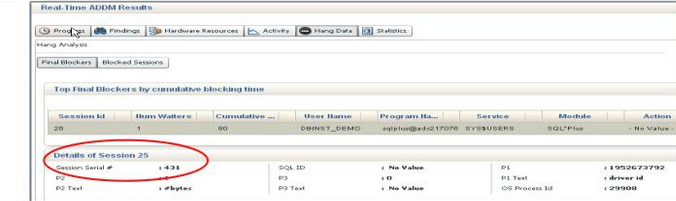
The new emergency monioring feature of “Real Time ADDM” or RT ADDM (Performance Menu within the EM Console) of Enterprise Manager Cloud provides a new feature which allows the DBAs to connect with the non responsive or hang/stalled database. Now someone might ask that this was earlier achieved using ‘-prelim’ option which allows the execution of ORADEBUG commands but if you remember it was not that flexible and allows only limited arguments like hanganalyze, ashdump etc.

This all new feature of 12c is one step ahead as it directly connects (Using the light weight lock/latch-free connection) with the SGA area and hits the hang Analysis and Active Session History tables and also helps to view the blockers etc. and other in-memory performance statistics.

So this is quite helpful at times when we have …
– Sick Systems
– DB is very slow
– DB Hung due to any contention for resources etc.
– DBAs are unable to login to Database.

So before that moment when we are all set to bounce the database there is this option available to take a look inside the database to understand the system.

Hope It Helps
Prashant Dixit

Posted in Advanced | Tagged: | Leave a Comment »

12c all new Parallel Upgrade utility.

Posted by FatDBA on October 24, 2017

With Oracle Database 12c enters the all new Parallel Upgrade Utility, catctl.pl. This utility exchanges the catupgrd.sql script that was used in earlier releases.
Although you can still use the catupgrd.sql script, it is vilipended starting with Oracle Database 12c and will be removed in future releases.
Oracle urges database upgrades be performed with the new Parallel Upgrade Utility, catctl.pl.

If you choose to run the catupgrd.sql script instead of running catctl.pl, doing so now requires an additional input argument as follows:

SQL> @catupgrd.sql PARALLEL=NO

If you run catupgrd.sql without the parameter, then Oracle displays the following error message:

NOTE:

The catupgrd.sql script is being deprecated in the 12.1 release of Oracle Database. Customers are encouraged to use catctl.pl as the replacement for catupgrd.sql when upgrading the database dictionary.

cd $ORACLE_HOME/rdbms/admin
$ORACLE_HOME/perl/bin/perl catctl.pl -n 4 catupgrd.sql

Refer to the Oracle Database Upgrade Guide for more information.

Hope It Helps
Prashant Dixit

Posted in Advanced | Tagged: | Leave a Comment »

Are the Cardinality Estimates Correct in my Execution Plan ?

Posted by FatDBA on September 26, 2017

Struck in a difficult performance issue related with a SQL and you have to verify if the Cardinality estimates made by the MIGHTY CBO are correct, No idea how t0 do that 😦 😦

Lets things make little easy for ourselves!
Let me take an example and explain how to do this.

SQL Statement (From my Personal Test Environment):
SELECT COUNT (DISTINCT SB_NO) FROM OPS$EXP.C_AL_SB WHERE SB_NO IN (SELECT DISTINCT SB_NO FROM OPS$EXP.C_AL_AWB WHERE EGM_DT BETWEEN :1 AND :1 ) AND ERR_MESG =’S’

Below is the execution plan for the SQL (Lets forgot about the behemoth elapsed time and Cost and Rows Processed in the plan for a minute 🙂 ) ….

So the above plan doesn’t show any estimations or Cardinality details what it considered during the creation of the plan, But starting from 10g we have GATHER_PLAN_STATISTICS hint. The GATHER_PLAN_STATISTICS hint tells Oracle to collect execution statistics for a SQL statement.

These execution statistics are then shown next to the original Optimizer estimates in the execution plan if you use the function DBMS_XPLAN.DISPLAY_CURSOR to display the plan. You also have to set the FORMAT parameter to ‘ALLSTATS LAST’ (DBMS_XPLAN.DISPLAY_CURSOR(FORMAT=>’ALLSTATS LAST’)).

SELECT /*+ GATHER_PLAN_STATISTICS */ COUNT (DISTINCT SB_NO) FROM OPS$EXP.C_AL_SB WHERE SB_NO IN (SELECT DISTINCT SB_NO FROM OPS$EXP.C_AL_AWB WHERE EGM_DT BETWEEN :1 AND :1 ) AND ERR_MESG =’S’;

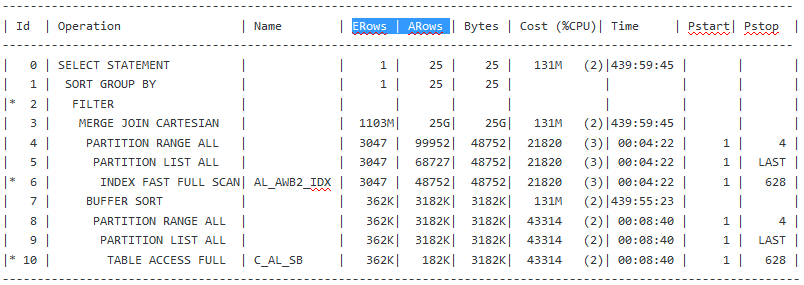
The execution plan for the query is as follows:

The original Optimizer estimates are shown in the E-Rows column while the actual statistics gathered during execution are shown in the A-Rows column.

Posted in Advanced | Tagged: | 2 Comments »

How to tune the IO contentions related with the Compaction in Cassandra ?

Posted by FatDBA on August 20, 2017

Hi Fellas,
Back and this time with some performance tuning scopes for Cassandra DB during the ‘Compaction’ process.
Before i proceed, would like to explain a bit about the compaction in Cassandra and what exactly is this and why a necessary evil …

Compaction in Cassandra refers to the operation of merging multiple SSTables into a single new one. Typically, compaction is done in a database for two primary reasons:

– To reduce the storage usage.
– To improve read performance by merging keys and obtaining a consolidated index.

For example, in Apache Cassandra, data files are merged periodically to form compacted SSTables.

There is a good chance of contention happening in database due to Compaction activity as the Compaction increases I/O contention on SSTable data read. Writing data in Cassandra database is generally fast and the write impacts may not be seen but reading data from SSTables will be slow in case when I/O contention increases due to compaction activities and degrades the performance of the database.

First would like to discuss how to identify the compaction related contentions on the database.
– We can use the “nodetool tablestats” or the old “nodetool cfstats” command to
monitor or watch-keep SSTables.
Below is a sample result from one of the Cassandra database server, here we need to check
– Check if the count is keep on growing, because that points out that there may be contention between reading SST
and the compaction process.
– Read generally slows down due to an obvious reason of data distributed or fragmented across many SSTs and
Compaction running continuous in the background.

%nodetool tablestats -H dixit.playlist
Keyspace: dixit
Read Count: 182849
Read Latency: 0.11363755339104945 ms.
Write Count: 435355
Write Latency: 0.01956930550929701 ms.
Pending Flushes: 0
Table: standard1
SSTable count: 2
Space used (live): 51.62 MB
Space used (total): 51.62 MB
Space used by snapshots (total): 0 bytes
Off heap memory used (total): 302.36 KB
SSTable Compression Ratio: 0.0
Number of keys (estimate): 376390
Memtable cell count: 200120
Memtable data size: 45.16 MB
Memtable off heap memory used: 0 bytes
Memtable switch count: 2
Local read count: 182849
Local read latency: 0.125 ms
Local write count: 435355
Local write latency: 0.022 ms
Pending flushes: 0
Bloom filter false positives: 11
Bloom filter false ratio: 0.00000
Bloom filter space used: 265.81 KB
Bloom filter off heap memory used: 265.8 KB
Index summary off heap memory used: 36.57 KB
Compression metadata off heap memory used: 0 bytes
Compacted partition minimum bytes: 216 bytes
Compacted partition maximum bytes: 258 bytes
Compacted partition mean bytes: 258 bytes
Average live cells per slice (last five minutes): 1.0
Maximum live cells per slice (last five minutes): 1
Average tombstones per slice (last five minutes): 1.0
Maximum tombstones per slice (last five minutes): 1

Below is the command that can be used to check for compaction statistics, here you need to look at the ‘pending tasks’, and ‘bytes total in progress’.

$ nodetool compactionstats
pending tasks: 5
compaction type keyspace table completed total unit progress
Compaction Keyspace1 Standard1 282310680 302170540 bytes 93.43%
Compaction Keyspace1 Standard1 58457931 307520780 bytes 19.01%
Active compaction remaining time : 0h00m16s

Solution to the problem
1. First one is quite simple – Avoid merging of update/delete requests.
2. Reduce the frequency of in-memory objects (In Memtables) flush.

This can be done by increasing the size of the memtables to avoid or stop database to perform frequent flushes.
– Less number of flushes leads to fewer SSTs compaction.
– Less Compaction reduces the I/Contentions and this in turn improve reads.
– There are couple of parameters that you can adjust in your cassandra.yaml file to control the flushing.
i.e. memtable_flush_after_mins, memtable_throughput_in_mb , memtable_operations_in_millions.

3. One more solution but that only applies on systems where this stress in IO is not much frequent, we can reduce
the “thread priority” which reduces the IOs.
As lowering the priority slows down the compaction writes but only applies if it doesn’t happen frequently.

Add below lines in cassandra-env.conf file (Under /conf folder) to lower the compaction priority.

JVM_OPTS=”$JVM_OPTS -XX:+UseThreadPriorities -XX:ThreadPriorityPolicy=42 -Dcassandra.compaction.priority=1″

One last line would like to add.
In case when the IO is a genuine problem, you will need to add more nodes or replace disks with better performing one’s or high IO disks.

Hope It Helps
Prashant Dixit

Posted in Advanced | Tagged: , , | Leave a Comment »

Golden Gate Logdump Utility: How to find RBA using TIMESTAMP.

Posted by FatDBA on July 28, 2017

Hey Mates,
Would like to discuss about the well known Golden Gate troubleshooting tool ‘Logdump’, specially about one of the command that is quite handy when you have million of records present in the Trail file and doing that Constant press of character ‘n’ on the keyboard could be a huge pain.
So, if you have the timestamp you will be able to do it using SFTS of SCANFORTIMESTAMP command of Logdump.

Logdump 885 > usertoken on
Logdump 886 > ggstoken on
Logdump 887 > ghdr on
Logdump 888 > detail on

Logdump 889 > open ./dirdat/pe000067

Logdump 889 > sfts 2017/07/28 11:15:30
Scan for timestamp >= 2017/07/28 11:15:30.000.000 CEST

Hdr-Ind : E (x45) Partition : . (x04)
UndoFlag : . (x00) BeforeAfter: A (x41)
RecLength : 705 (x02c1) IO Time : 2017/07/28 11:15:30.000.000
IOType : 5 (x05) OrigNode : 255 (xff)
TransInd : . (x03) FormatType : R (x52)
SyskeyLen : 0 (x00) Incomplete : . (x00)
AuditRBA : 101 AuditPos : 223086608
Continued : N (x00) RecCount : 1 (x01)

2014/04/07 10:06:16.000.000 Insert Len 705 RBA 63547
Name: EAST.ORDERS
After Image: Partition 4 G s
0000 000a 0000 0000 0000 0000 0001 0001 000a 0000 | ....................
0000 0000 0000 0001 0002 0010 0000 000c 4c6f 7265 | ................Lore
6e20 5065 6e74 6f6e 0003 0004 ffff 0000 0004 0014 | n Penton............
0000 0010 3338 3230 2042 7572 6775 6e64 7920 5374 | ....3820 Burgundy St
0005 0004 ffff 0000 0006 000f 0000 000b 4e65 7720 | ................New
4f72 6c65 616e 7300 0700 0900 0000 0537 3031 3137 | Orleans........70117
0008 000d 0000 0009 4c6f 7569 7369 616e 6100 0900 | ........Louisiana...

GGS tokens:
TokenID x52 'R' ORAROWID Info x00 Length 20
4141 4157 534c 4141 4541 4141 414a 3141 4141 0001 | AAAWSLAAEAAAAJ1AAA..
TokenID x4c 'L' LOGCSN Info x00 Length 7
3831 3633 3430 34 | 8163404
TokenID x36 '6' TRANID Info x00 Length 9
312e 3239 2e39 3835 30 | 1.29.9850

Filtering suppressed 12 records

Hope It Helps
Prashant Dixit

Posted in Advanced | Tagged: | Leave a Comment »

Installing Cassandra Cluster Manager (CCM) on Oracle Linux 7

Posted by FatDBA on July 20, 2017

Hi All,
Today going to discuss about the CCM or the Cassandra Cluster Manager, which is basically a tool that we can use to create a multi-node cluster of Cassandra database on a local machine. This can be easily used to mimic the production like clustering setup for Cassandra on a local machine. This will help you to understand how clustering works in case of Cassandra databases.

Below i am going to show how to create a 3 node Cassandra cluster on the top of OEL7 with Cassandra version 3.11.0

Step 1:
First download the the PIP and then install it along with PyYAML packages.

Download the ‘PIP’, ‘Wheel’ and ‘Python Setuptools’, follow the link
https://packaging.python.org/tutorials/installing-packages/#install-pip-setuptools-and-wheel

[root@fatdba ~]# ls -ltrh
total 168M
-rw-r–r–. 1 root root 163M Mar 16 01:35 jdk-8u131-linux-x64.rpm
-rw——-. 1 root root 1.4K Jun 17 12:59 anaconda-ks.cfg
-rw-r–r–. 1 root root 1.5K Jun 17 13:34 initial-setup-ks.cfg
-rw-r–r–. 1 root root 4.2M Jun 17 17:01 master.zip
drwxr-xr-x. 2 root root 6 Jul 17 11:08 Templates
drwxr-xr-x. 2 root root 6 Jul 17 11:08 Public
drwxr-xr-x. 2 root root 6 Jul 17 11:08 Downloads
drwxr-xr-x. 2 root root 6 Jul 17 11:08 Desktop
drwxr-xr-x. 2 root root 6 Jul 17 11:08 Videos
drwxr-xr-x. 2 root root 6 Jul 17 11:08 Pictures
drwxr-xr-x. 2 root root 6 Jul 17 11:08 Music
drwxr-xr-x. 2 root root 6 Jul 17 11:08 Documents
-rw-r–r–. 1 root root 1.6M Jul 17 13:44 get-pip.py

[root@fatdba ~]# python get-pip.py
Collecting pip
Downloading pip-9.0.1-py2.py3-none-any.whl (1.3MB)
100% ████████████████████████████████ 1.3MB 51kB/s
Collecting wheel
Downloading wheel-0.29.0-py2.py3-none-any.whl (66kB)
100% ████████████████████████████████ 71kB 430kB/s
Installing collected packages: pip, wheel
Successfully installed pip-9.0.1 wheel-0.29.0
[root@fatdba ~]#
[root@fatdba ~]#
[root@fatdba ~]# which pip
/usr/bin/pip
[root@fatdba ~]#

[root@fatdba ~]# pip install cql PyYAML
Collecting cql
Downloading cql-1.4.0.tar.gz (76kB)
100% ████████████████████████████████ 81kB 252kB/s
Collecting PyYAML
Downloading PyYAML-3.12.tar.gz (253kB)
100% ████████████████████████████████ 256kB 308kB/s
Collecting thrift (from cql)
Downloading thrift-0.10.0.zip (87kB)
100% ████████████████████████████████ 92kB 568kB/s
Requirement already satisfied: six>=1.7.2 in /usr/lib/python2.7/site-packages (from thrift->cql)
Building wheels for collected packages: cql, PyYAML, thrift
Running setup.py bdist_wheel for cql … done
Stored in directory: /root/.cache/pip/wheels/e6/b3/50/fdb7532df6817694ae467c7aaedb991c2104b463ab31f7a94f
Running setup.py bdist_wheel for PyYAML … done
Stored in directory: /root/.cache/pip/wheels/2c/f7/79/13f3a12cd723892437c0cfbde1230ab4d82947ff7b3839a4fc
Running setup.py bdist_wheel for thrift … done
Stored in directory: /root/.cache/pip/wheels/e7/f1/d3/b472914d95caa1781fb29b1257b85808324b0bfd1838961752
Successfully built cql PyYAML thrift
Installing collected packages: thrift, cql, PyYAML
Successfully installed PyYAML-3.12 cql-1.4.0 thrift-0.10.0

Step 2: Now using the PIP, install the CCM package.

[root@fatdba ~]# pip install ccm
Collecting ccm
Downloading ccm-2.7.0.tar.gz (68kB)
100% ████████████████████████████████ 71kB 186kB/s
Requirement already satisfied: pyYaml in /usr/lib64/python2.7/site-packages (from ccm)
Requirement already satisfied: six>=1.4.1 in /usr/lib/python2.7/site-packages (from ccm)
Building wheels for collected packages: ccm
Running setup.py bdist_wheel for ccm … done
Stored in directory: /root/.cache/pip/wheels/9d/ec/85/e971d86de3002809194d0c4bb7ee72f9fab55b428c8293cd79
Successfully built ccm
Installing collected packages: ccm
Successfully installed ccm-2.7.0
[root@fatdba ~]#

Step 3: Make required entries in your /etc/hosts file.

bash-4.2$ more /etc/hosts
#127.0.0.1 localhost localhost.localdomain localhost4 localhost4.localdomain4
::1 localhost localhost.localdomain localhost6 localhost6.localdomain6
192.168.40.131 fatdba.localdomain fatdba

#Cassandra Nodes for CCM
127.0.0.1 127.0.0.2
127.0.0.1 127.0.0.3
127.0.0.1 127.0.0.4

Step 4: Now, lets create the cluster using the CCM.
I will be creating this cluster with name ‘dixit’ with 3 nodes available.

-bash-4.2$ ccm create dixit -v 3.11.0
████████████████████████████████████████████████████████████████████████████████████████████████████████████████████████████████████████████████████████████████████████████████████████████████████████████████████████████████████████████████████████████████████████████████████████████████████████████████████████████████████████████████████████████████████████████████████████████████████████████████████████████████████████████████████████████████████████████████████████████████████████████████████████████████████████████████████████████████████████████████████████████████████████████████████████████████████████████████████████████████████████████████████████████████████████████████████████████████████████████████████████████████████████████████████████████████████████████████████████████████████████████████████████████████████████████████████████████████████████████████████████████████████████████████████████████████████████████████████████████████████████████████████████████████████████████████████████████████████████████████████████████████████████████████████████████████████████████████████████████████████████████████████████████████████████████████████████████████████████████████████████████████████████████████████████████████████████████████████████████████████████████████████████████████████████████████████████████████████████████████████████████████████████████████████████████████████████████████████████████████████████████████████████████████████████████████████████████████████████████████████████████████████████████████████████████████████████████████████████████████████████████████████████████████████████████████████████████████████████████████████████████████████████████████████████████████████████████████████████████████████████████████████████████████████████████████████████████████████████████████████████████████████████████████████████████████████████████████████████████████████████████████████████████████████████████████████████████████████████████████████████████████████████████████████████████████████████████████████████████████████████████████████████████████████████████████████████████████████████████████████████████████████████████████████████████████████████████████████████████████████████████████████████████████████████████████████████████████████████████████████████████████████████████████████████████████████████████████████████████████████████████████████████████████████████████████████████████████████████████████████████████████████████████████████████████████████████████████████████████████████████████████████████████████████████████████████████████████████████████████████████████████████████████████████████████████████████████████████████████████████████████████████████████████████████████████████████████████████████████████████████████████████████████████████████████████████████████████████████████████████████████████████████████████████████████████████████████████
-bash-4.2$ ccm status
Cluster: ‘dixit’
—————-
No node in this cluster yet
-bash-4.2$
-bash-4.2$ ccm populate -n 3

-bash-4.2$ ccm status
Cluster: ‘dixit’
—————-
node1: DOWN (Not initialized)
node3: DOWN (Not initialized)
node2: DOWN (Not initialized)

Lets start the cluster now when all the nodes are successfully added.
Just to make things little easier and more understandable, i will be starting each node one-by-one which otherwise can be enabled in a single command or in one go.

-bash-4.2$ ccm node1 start
-bash-4.2$ ccm node2 start
-bash-4.2$ ccm node3 start
-bash-4.2$
-bash-4.2$ ccm status
Cluster: 'dixit'
----------------
node1: UP
node3: UP
node2: UP


Step 5: Verify the cluster status.

bash-4.2$ ccm liveset
127.0.0.1,127.0.0.3,127.0.0.2

bash-4.2$ ccm cqlsh node1
Unknown node or command: cqlsh

bash-4.2$ ccm node1 cqlsh
Connected to dixit at 127.0.0.1:9042.
[cqlsh 5.0.1 | Cassandra 3.11.0 | CQL spec 3.4.4 | Native protocol v4]
Use HELP for help.
cqlsh>
cqlsh>

bash-4.2$
bash-4.2$ ccm node1 show
node1: UP
cluster=dixit
auto_bootstrap=False
thrift=(‘127.0.0.1’, 9160)
binary=(‘127.0.0.1’, 9042)
storage=(‘127.0.0.1’, 7000)
jmx_port=7100
remote_debug_port=0
byteman_port=0
initial_token=-9223372036854775808
pid=16852
bash-4.2$
bash-4.2$
bash-4.2$ ccm node2 show
node2: UP
cluster=dixit
auto_bootstrap=False
thrift=(‘127.0.0.2’, 9160)
binary=(‘127.0.0.2’, 9042)
storage=(‘127.0.0.2’, 7000)
jmx_port=7200
remote_debug_port=0
byteman_port=0
initial_token=-3074457345618258603
pid=16947
bash-4.2$
bash-4.2$
bash-4.2$ ccm node3 show
node3: UP
cluster=dixit
auto_bootstrap=False
thrift=(‘127.0.0.3’, 9160)
binary=(‘127.0.0.3’, 9042)
storage=(‘127.0.0.3’, 7000)
jmx_port=7300
remote_debug_port=0
byteman_port=0
initial_token=3074457345618258602
pid=17191
bash-4.2$

Some additional monitoring of Java processes and heap usage etc. can be done using Java Management Console.

Hope That Helps
Prashant Dixit

Posted in Advanced | Tagged: | Leave a Comment »

Cassandra NodeTool Utility

Posted by FatDBA on July 14, 2017

The nodetool utility gives a easy CLI to perform some of the admin activities and configure the database.
Today i would like to share few of the command/operations that i have tried and tested by my own, below mentioned are few of the commands with its syntax and usage details.

Let’s first explore all possible options or attributes of this utility.

Starting NodeTool
Missing required option: h
usage: java org.apache.cassandra.tools.NodeCmd --host

-h,--host node hostname or ip address
-p,--port remote jmx agent port number
-pw,--password remote jmx agent password
-u,--username remote jmx agent username

Available commands:
ring - Print informations on the token ring
join - Join the ring
info - Print node informations (uptime, load, ...)
cfstats - Print statistics on column families
clearsnapshot - Remove all existing snapshots
version - Print cassandra version
tpstats - Print usage statistics of thread pools
drain - Drain the node (stop accepting writes and flush all column families)
decommission - Decommission the node
loadbalance - Loadbalance the node
compactionstats - Print statistics on compactions
disablegossip - Disable gossip (effectively marking the node dead)
enablegossip - Reenable gossip
disablethrift - Disable thrift server
enablethrift - Reenable thrift server
snapshot [snapshotname] - Take a snapshot using optional name snapshotname
netstats [host] - Print network information on provided host (connecting node by default)
move - Move node on the token ring to a new token
removetoken status|force| - Show status of current token removal, force completion of pending removal or remove provided token
flush [keyspace] [cfnames] - Flush one or more column family
repair [keyspace] [cfnames] - Repair one or more column family
cleanup [keyspace] [cfnames] - Run cleanup on one or more column family
compact [keyspace] [cfnames] - Force a (major) compaction on one or more column family
scrub [keyspace] [cfnames] - Scrub (rebuild sstables for) one or more column family
invalidatekeycache [keyspace] [cfnames] - Invalidate the key cache of one or more column family
invalidaterowcache [keyspace] [cfnames] - Invalidate the key cache of one or more column family
getcompactionthreshold - Print min and max compaction thresholds for a given column family
cfhistograms - Print statistic histograms for a given column family
setcachecapacity - Set the key and row cache capacities of a given column family
setcompactionthreshold - Set the min and max compaction thresholds for a given column family

Provides a histogram of network statistics at the time you fired this command.

bash-4.2$ nodetool proxyhistograms
proxy histograms
Percentile Read Latency Write Latency Range Latency CAS Read Latency CAS Write Latency View Write Latency
(micros) (micros) (micros) (micros) (micros) (micros)
50% 0.00 0.00 0.00 0.00 0.00 0.00
75% 0.00 0.00 0.00 0.00 0.00 0.00
95% 0.00 0.00 0.00 0.00 0.00 0.00
98% 0.00 0.00 0.00 0.00 0.00 0.00
99% 0.00 0.00 0.00 0.00 0.00 0.00
Min 0.00 0.00 0.00 0.00 0.00 0.00
Max 0.00 0.00 0.00 0.00 0.00 0.00

Note: I haven’t done any activity on the database, so obvious we getting 0 for all the values or sections.

To do a sequential repair of all keyspaces on the current node:
bash-4.2$ nodetool repair -seq

Describe the cluster details.

bash-4.2$ nodetool describecluster
Cluster Information:
Name: Test Cluster
Snitch: org.apache.cassandra.locator.DynamicEndpointSnitch
Partitioner: org.apache.cassandra.dht.Murmur3Partitioner
Schema versions:
1852b5d8-f9ba-3549-b4b7-eaae1da39062: [127.0.0.1]

Status of the node.

bash-4.2$ nodetool status
Datacenter: datacenter1
=======================
Status=Up/Down
|/ State=Normal/Leaving/Joining/Moving
-- Address Load Tokens Owns (effective) Host ID Rack
UN 127.0.0.1 190.25 KiB 256 100.0% 0277aea4-d06c-4175-8d57-6100101f0491 rack1

History of database comp actions done in the DB.

bash-4.2$ nodetool compactionhistory
Compaction History:
id keyspace_name columnfamily_name compacted_at bytes_in bytes_out rows_merged
39d4ff90-66df-11e7-ba43-41553ec85c87 system size_estimates 2017-07-12T14:20:59.209 172588 42619 {4:4}
36186cc0-66df-11e7-ba43-41553ec85c87 system sstable_activity 2017-07-12T14:20:52.664 475 82 {1:8, 4:1}
05558d20-66c6-11e7-ba43-41553ec85c87 system size_estimates 2017-07-12T11:20:33.714 173036 43201 {4:4}
0424fc60-66c6-11e7-ba43-41553ec85c87 system sstable_activity 2017-07-12T11:20:31.718 548 83 {1:12, 4:1}
20b362b0-660b-11e7-ba43-41553ec85c87 system size_estimates 2017-07-11T13:02:43.739 166052 43228 {3:1, 4:3}
203ab040-660b-11e7-ba43-41553ec85c87 system sstable_activity 2017-07-11T13:02:42.948 687 82 {1:28, 3:1}
62569400-65fa-11e7-ba43-41553ec85c87 system local 2017-07-11T11:02:52.416 10157 5164 {4:1}
a1d34560-65f5-11e7-ba43-41553ec85c87 system_schema keyspaces 2017-07-11T10:28:51.446 668 277 {1:4, 2:2}
a1955200-65f5-11e7-ba43-41553ec85c87 system_schema tables 2017-07-11T10:28:51.040 5486 2689 {1:3, 2:2}
a0d906e0-65f5-11e7-ba43-41553ec85c87 system_schema columns 2017-07-11T10:28:49.806 10214 5654 {1:3, 2:2}
003788e0-65f2-11e7-ba43-41553ec85c87 system local 2017-07-11T10:02:51.822 5358 5170 {4:1}
fd05d0f0-65f1-11e7-ba43-41553ec85c87 system local 2017-07-11T10:02:46.463 5324 5199 {4:1}
fca0f4a0-65f1-11e7-ba43-41553ec85c87 system local 2017-07-11T10:02:45.802 5346 5171 {4:1}
c604f720-6551-11e7-9add-f1b60320c550 system local 2017-07-10T14:55:54.706 5166 5067 {4:1}
bd3430c0-6551-11e7-9add-f1b60320c550 system local 2017-07-10T14:55:39.916 301 148 {4:1}
bb8e9710-6551-11e7-9add-f1b60320c550 system local 2017-07-10T14:55:37.153 324 148 {4:1}

Statistics related to any ongoing compaction task, 0 if not any.

bash-4.2$ nodetool compactionstats
pending tasks: 0

Garbage collection statistics.

bash-4.2$ nodetool gcstats
Interval (ms) Max GC Elapsed (ms)Total GC Elapsed (ms)Stdev GC Elapsed (ms) GC Reclaimed (MB) Collections Direct Memory Bytes
36066339 9200 57107 2102 2612889352 32 -1
bash-4.2$

Log levels defined in database for all areas.

bash-4.2$ nodetool getlogginglevels

Logger Name Log Level
ROOT INFO
com.thinkaurelius.thrift ERROR
org.apache.cassandra DEBUG
bash-4.2$

Tracing probabilities currently set in DB.

bash-4.2$ nodetool gettraceprobability
Current trace probability: 0.0
bash-4.2$

Gossip protocol related statistics.

bash-4.2$ nodetool gossipinfo
localhost/127.0.0.1
generation:1499747570
heartbeat:36966
STATUS:15:NORMAL,-1019516550404639999
LOAD:36910:255305.0
SCHEMA:1623:1852b5d8-f9ba-3549-b4b7-eaae1da39062
DC:6:datacenter1
RACK:8:rack1
RELEASE_VERSION:4:3.11.0
RPC_ADDRESS:3:127.0.0.1
NET_VERSION:1:11
HOST_ID:2:0277aea4-d06c-4175-8d57-6100101f0491
RPC_READY:20:true
TOKENS:14:

Provides network information about the host machine.

bash-4.2$ nodetool netstats
Mode: NORMAL
Not sending any streams.
Read Repair Statistics:
Attempted: 0
Mismatch (Blocking): 0
Mismatch (Background): 0
Pool Name Active Pending Completed Dropped
Large messages n/a 0 0 0
Small messages n/a 0 4 0
Gossip messages n/a 0 0 0
bash-4.2$

Hope It Helps
Prashant Dixit

Posted in Basics | Tagged: | Leave a Comment »