Tales From A Lazy Fat DBA

Its all about Databases, their performance, troubleshooting & much more …. ¯\_(ツ)_/¯

Posts Tagged ‘replication’

Demo on how to use Oracle XStream Replication Setup Using Java Client

Posted by FatDBA on June 15, 2025

Oracle XStream is a feature of Oracle Database that allows for real-time data replication between databases. Unlike Oracle GoldenGate, which is more GUI-driven and feature-rich, XStream is more code-centric. This makes it highly customizable, especially suitable when you want a Java or C-based client to control how data flows.

XStream vs GoldenGate

  • XStream is older and less frequently updated compared to Oracle GoldenGate.
  • XStream is limited to Oracle-to-Oracle replication and does not support heterogeneous environments.
  • GoldenGate supports a wide range of sources and targets, is easier to manage with its GUI-based tools, and has better support for DDL replication, integrated capture, and coordinated replication.

When and Why to Use XStream

Use XStream when:

  • You need fine-grained control using custom applications written in Java or C.
  • Your environment is Oracle-to-Oracle only.
  • You want a lightweight, programmatic replication tool that can be embedded in your application logic.
  • Licensing or infrastructure limitations do not permit GoldenGate and licen sing fees is a concern.

Do not use XStream if:

  • You require GUI-driven replication monitoring and setup.
  • You need heterogeneous replication (e.g., Oracle to PostgreSQL, MySQL, etc.).
  • Your use case demands continuous support and new feature releases.

Lets do a quick demo on how to use it, I have setup a lab environment for the test.

  • Source Database: dixitdb on 192.168.68.79:1521
  • Target Database: targetdb on 192.168.68.85:1521

Java Application (xio.java) will:

  • Connect to XStream Outbound on the source DB
  • Connect to XStream Inbound on the target DB
  • Transfer changes using Logical Change Records (LCRs)

Source Database Setup (dixitdb)

Step 1: Enable Replication Features

ALTER SYSTEM SET enable_goldengate_replication = TRUE SCOPE=BOTH;

Step 2: Ensure Archive Logging is Enabled

archive log list;

Must show: Database log mode              Archive Mode

Step 3: Create and Grant User for XStream

CREATE USER xstream_admin IDENTIFIED BY Welcome123;
GRANT CONNECT, RESOURCE, DBA TO xstream_admin;

Step 4: Enable Supplemental Logging

ALTER DATABASE ADD SUPPLEMENTAL LOG DATA;
ALTER DATABASE ADD SUPPLEMENTAL LOG DATA (ALL) COLUMNS;

Step 5: Create Demo Table

CREATE TABLE xstream_admin.demo_table (
  id    NUMBER PRIMARY KEY,
  name  VARCHAR2(100),
  value NUMBER
);

Step 6: Grant XStream Admin Privilege

BEGIN
  DBMS_XSTREAM_AUTH.GRANT_ADMIN_PRIVILEGE(
    grantee => 'XSTREAM_ADMIN',
    privilege_type => 'CAPTURE',
    grant_select_privileges => TRUE
  );
END;
/

Step 7: Create Outbound Server

BEGIN
  DBMS_XSTREAM_ADM.CREATE_OUTBOUND(
    server_name => 'XOUT_SRV',
    connect_user => 'XSTREAM_ADMIN'
  );
END;
/

Check status:

SELECT capture_name, status FROM dba_capture;


Target Database Setup (targetdb)

Step 1: Create the Same User

CREATE USER xstream_admin IDENTIFIED BY Welcome123;
GRANT CONNECT, RESOURCE, UNLIMITED TABLESPACE TO xstream_admin;

Step 2: Setup Queue

BEGIN
  DBMS_XSTREAM_ADM.SET_UP_QUEUE(
    queue_table => 'xstream_admin.XIN_SRV',
    queue_name  => 'xstream_admin.XIN_SRV'
  );
END;
/

Step 3: Create Inbound Server

BEGIN
  DBMS_XSTREAM_ADM.CREATE_INBOUND(
    server_name =>'XIN_SRV',
    queue_name  =>'xstream_admin.XIN_SRV',
    apply_user  =>'xstream_admin',
    comment     =>'xstream_admin in'
  );
END;
/

Step 4: Create Target Table

CREATE TABLE xstream_admin.demo_table (
  id    NUMBER PRIMARY KEY,
  name  VARCHAR2(100),
  value NUMBER
);

Step 5: Add Table Rules

VAR dml_rule VARCHAR2(30);
VAR ddl_rule VARCHAR2(30);
BEGIN
  DBMS_XSTREAM_ADM.ADD_TABLE_RULES(
    table_name => 'xstream_admin.demo_table',
    streams_type => 'APPLY',
    streams_name => 'XIN_SRV',
    queue_name => 'xstream_admin.XIN_SRV',
    source_database => 'dixitdb',
    dml_rule_name => :dml_rule,
    ddl_rule_name => :ddl_rule
  );
END;
/

Step 6: Start Apply Process

BEGIN
  DBMS_APPLY_ADM.START_APPLY(apply_name => 'XIN_SRV');
END;
/

Check status:
SELECT apply_name, status FROM dba_apply;

Java Application: xio.java

The xio.java program acts as a custom replication engine. It:

  • Connects to XStream Inbound and Outbound
  • Receives LCRs (Logical Change Records) from the source
  • Sends them to the target

Pre-Requisites:

  • ojdbc8-19.15.0.0.jar (Oracle JDBC driver)
  • xstreams.jar (from $ORACLE_HOME/rdbms/jlib/)
import oracle.streams.*;
import oracle.jdbc.internal.OracleConnection;
import oracle.jdbc.*;
import oracle.sql.*;
import java.sql.*;
import java.util.*;

public class xio
{
public static String xsinusername = null;
public static String xsinpasswd = null;
public static String xsinName = null;
public static String xsoutusername = null;
public static String xsoutpasswd = null;
public static String xsoutName = null;
public static String in_url = null;
public static String out_url = null;
public static Connection in_conn = null;
public static Connection out_conn = null;
public static XStreamIn xsIn = null;
public static XStreamOut xsOut = null;
public static byte[] lastPosition = null;
public static byte[] processedLowPosition = null;

public static void main(String args[])
{
// get connection url to inbound and outbound server
in_url = parseXSInArguments(args);
out_url = parseXSOutArguments(args);

// create connection to inbound and outbound server
in_conn = createConnection(in_url, xsinusername, xsinpasswd);
out_conn = createConnection(out_url, xsoutusername, xsoutpasswd);

// attach to inbound and outbound server
xsIn = attachInbound(in_conn);
xsOut = attachOutbound(out_conn);

// main loop to get lcrs
get_lcrs(xsIn, xsOut);

// detach from inbound and outbound server
detachInbound(xsIn);
detachOutbound(xsOut);
}

// parse the arguments to get the conncetion url to inbound db
public static String parseXSInArguments(String args[])
{
String trace, pref;
String orasid, host, port;

if (args.length != 12)
{
printUsage();
System.exit(0);
}

orasid = args[0];
host = args[1];
port = args[2];
xsinusername = args[3];
xsinpasswd = args[4];
xsinName = args[5];

System.out.println("xsin_host = "+host);
System.out.println("xsin_port = "+port);
System.out.println("xsin_ora_sid = "+orasid);

String in_url = "jdbc:oracle:oci:@"+host+":"+port+":"+orasid;
System.out.println("xsin connection url: "+ in_url);

return in_url;
}

// parse the arguments to get the conncetion url to outbound db
public static String parseXSOutArguments(String args[])
{
String trace, pref;
String orasid, host, port;

if (args.length != 12)
{
printUsage();
System.exit(0);
}

orasid = args[6];
host = args[7];
port = args[8];
xsoutusername = args[9];
xsoutpasswd = args[10];
xsoutName = args[11];


System.out.println("xsout_host = "+host);
System.out.println("xsout_port = "+port);
System.out.println("xsout_ora_sid = "+orasid);

String out_url = "jdbc:oracle:oci:@"+host+":"+port+":"+orasid;
System.out.println("xsout connection url: "+ out_url);

return out_url;
}

// print out sample program usage message
public static void printUsage()
{
System.out.println("");
System.out.println("Usage: java xio "+"<xsin_oraclesid> " + "<xsin_host> "
+ "<xsin_port> ");
System.out.println(" "+"<xsin_username> " + "<xsin_passwd> "
+ "<xsin_servername> ");
System.out.println(" "+"<xsout_oraclesid> " + "<xsout_host> "
+ "<xsout_port> ");
System.out.println(" "+"<xsout_username> " + "<xsout_passwd> "
+ "<xsout_servername> ");
}

// create a connection to an Oracle Database
public static Connection createConnection(String url,
String username,
String passwd)
{
try
{
DriverManager.registerDriver(new oracle.jdbc.OracleDriver());
return DriverManager.getConnection(url, username, passwd);
}
catch(Exception e)
{
System.out.println("fail to establish DB connection to: " +url);
e.printStackTrace();
return null;
}
}

// attach to the XStream Inbound Server
public static XStreamIn attachInbound(Connection in_conn)
{
XStreamIn xsIn = null;
try
{
xsIn = XStreamIn.attach((OracleConnection)in_conn, xsinName,
"XSDEMOINCLIENT" , XStreamIn.DEFAULT_MODE);

// use last position to decide where should we start sending LCRs
lastPosition = xsIn.getLastPosition();
System.out.println("Attached to inbound server:"+xsinName);
System.out.print("Inbound Server Last Position is: ");
if (null == lastPosition)
{
System.out.println("null");
}
else
{
printHex(lastPosition);
}
return xsIn;
}
catch(Exception e)
{
System.out.println("cannot attach to inbound server: "+xsinName);
System.out.println(e.getMessage());
e.printStackTrace();
return null;
}
}

// attach to the XStream Outbound Server
public static XStreamOut attachOutbound(Connection out_conn)
{
XStreamOut xsOut = null;

try
{
// when attach to an outbound server, client needs to tell outbound
// server the last position.
xsOut = XStreamOut.attach((OracleConnection)out_conn, xsoutName,
lastPosition, XStreamOut.DEFAULT_MODE);
System.out.println("Attached to outbound server:"+xsoutName);
System.out.print("Last Position is: ");
if (lastPosition != null)
{
printHex(lastPosition);
}
else
{
System.out.println("NULL");
}
return xsOut;
}
catch(Exception e)
{
System.out.println("cannot attach to outbound server: "+xsoutName);
System.out.println(e.getMessage());
e.printStackTrace();
return null;
}
}

// detach from the XStream Inbound Server
public static void detachInbound(XStreamIn xsIn)
{
byte[] processedLowPosition = null;
try
{
processedLowPosition = xsIn.detach(XStreamIn.DEFAULT_MODE);
System.out.print("Inbound server processed low Position is: ");
if (processedLowPosition != null)
{
printHex(processedLowPosition);
}
else
{
System.out.println("NULL");
}
}
catch(Exception e)
{
System.out.println("cannot detach from the inbound server: "+xsinName);
System.out.println(e.getMessage());
e.printStackTrace();
}
}

// detach from the XStream Outbound Server
public static void detachOutbound(XStreamOut xsOut)
{
try
{
xsOut.detach(XStreamOut.DEFAULT_MODE);
}
catch(Exception e)
{
System.out.println("cannot detach from the outbound server: "+xsoutName);
System.out.println(e.getMessage());
e.printStackTrace();
}
}

public static void get_lcrs(XStreamIn xsIn, XStreamOut xsOut)
{
if (null == xsIn)
{
System.out.println("xstreamIn is null");
System.exit(0);
}

if (null == xsOut)
{
System.out.println("xstreamOut is null");
System.exit(0);
}

try
{
while(true)
{
// receive an LCR from outbound server
LCR alcr = xsOut.receiveLCR(XStreamOut.DEFAULT_MODE);

if (xsOut.getBatchStatus() == XStreamOut.EXECUTING) // batch is active
{
assert alcr != null;
// send the LCR to the inbound server
xsIn.sendLCR(alcr, XStreamIn.DEFAULT_MODE);

// also get chunk data for this LCR if any
if (alcr instanceof RowLCR)
{
// receive chunk from outbound then send to inbound
if (((RowLCR)alcr).hasChunkData())
{
ChunkColumnValue chunk = null;
do
{
chunk = xsOut.receiveChunk(XStreamOut.DEFAULT_MODE);
xsIn.sendChunk(chunk, XStreamIn.DEFAULT_MODE);
} while (!chunk.isEndOfRow());
}
}
processedLowPosition = alcr.getPosition();
}
else // batch is end
{
assert alcr == null;
// flush the network
xsIn.flush(XStreamIn.DEFAULT_MODE);
// get the processed_low_position from inbound server
processedLowPosition =
xsIn.getProcessedLowWatermark();
// update the processed_low_position at oubound server
if (null != processedLowPosition)
xsOut.setProcessedLowWatermark(processedLowPosition,
XStreamOut.DEFAULT_MODE);
}
}
}
catch(Exception e)
{
System.out.println("exception when processing LCRs");
System.out.println(e.getMessage());
e.printStackTrace();
}
}

public static void printHex(byte[] b)
{
for (int i = 0; i < b.length; ++i)
{
System.out.print(
Integer.toHexString((b[i]&0xFF) | 0x100).substring(1,3));
}
System.out.println("");
}
}


—-> Downloaded compatibile version of ojdbc driver ojdbc8-19.15.0.0.jar from oracle’s website
—- $ORACLE_HOME/rdbms/jlib/xstreams.jar
—-> copy ‘xstreams.jar’ from the ORACLE_HOME
—-> Compile the java code to create classes.
javac -cp “ojdbc8-19.15.0.0.jar:xstreams.jar:.” xio.java

— Once complied, call the java program now.
— Run Java Replication App
— This does: Connect to outbound server, Read LCRs (Logical Change Record), Send LCRs to inbound server and Confirm position/flush status

[oracle@oracleontario lib]$ java -cp "ojdbc8-19.15.0.0.jar:xstreams.jar:." xio targetdb
192.168.68.85 1521 XSTREAM_ADMIN Welcome123 XIN_SRV dixitdb 192.168.68.79 1521
XSTREAM_ADMIN Welcome123 XOUT_SRV
xsin_host = 192.168.68.85
xsin_port = 1521
xsin_ora_sid = targetdb
xsin connection url: jdbc:oracle:oci:@192.168.68.85:1521:targetdb
xsout_host = 192.168.68.79
xsout_port = 1521
xsout_ora_sid = dixitdb
xsout connection url: jdbc:oracle:oci:@192.168.68.79:1521:dixitdb
Attached to inbound server:XIN_SRV
Inbound Server Last Position is: null
Attached to outbound server:XOUT_SRV
Last Position is: NULL

Now when the code is running and source and target is ready. Lets try to do an insert and see if we gets it on the target.

-- on source database
SQL> select * from xstream_admin.demo_table;
ID
NAME
VALUE
----------
-----------------------------------------------------------------------------------------
----------- ----------
 10
Maine


SQL> insert into xstream_admin.demo_table (ID, NAME, VALUE) values (101, 'Calgary', 100);

1 row created.

SQL> commit;

Commit complete.

SQL> /

ID
NAME
VALUE
650 ----------
-----------------------------------------------------------------------------------------
----------- ----------
10
Maine
800
101
Calgary
100


--- on target database
SQL>
SQL> select * from xstream_admin.demo_table;
ID
NAME
VALUE
----------
-----------------------------------------------------------------------------------------
----------- ----------
10
Maine
800
101
Calgary
100

Hope It Helped!
Prashant Dixit

Posted in Uncategorized | Tagged: , , , , , , , , | Leave a Comment »

AWR Report Improvements in Oracle 23AI : New Replication Performance Sections

Posted by FatDBA on October 20, 2024

Oracle 23AI is undoubtedly packed with a range of both small and significant features. Every now and then, I stumble upon some standout additions, and this time, it’s the improvements in AWR reports that caught my attention. One of the key enhancements is the inclusion of more replication-related information captured and presented in these reports.

With this new update, AWR queries and reports are now streamlined and enhanced, offering a simplified yet detailed view of the replication process. This makes troubleshooting replication performance issues much easier. You can now categorize problems into workload-related issues, database-side misconfigurations (such as slow replication SQL due to missing indexes or incorrect database parameter settings), or performance bottlenecks either within the database or in Oracle GoldenGate processes.

The enhanced replication section includes a more comprehensive “Replication System Resource Usage” area. This shows the system resource consumption for all Oracle GoldenGate replication processes, whether they are foreground or background, and breaks it down for each Extract and Replicat process.

Additionally, a dedicated section for replication-related Top SQL statistics has been added, making it much easier to identify performance issues tied to specific SQL statements.

There’s also a separate section for top wait events related to replication processes, enabling faster identification and resolution of replication-related performance bottlenecks.

Lastly, the replication-related sections have been reorganized to present statistics by individual Extracts and different Replicat types, offering clearer insights into replication performance.

These enhancements are really great when it comes to monitoring and improving the performance of replication processes.

Replication System Resource Usage:
Metrics for Oracle GoldenGate replication now include detailed information such as the process name, type, and the number of sessions for each sub-component. Performance statistics are categorized based on the specific functionality of these sub-components and grouped by the process name. This enhancement allows for more granular monitoring of resource usage, giving visibility into the performance of each Extract and Replicat process, along with their individual sub-components.

Replication Wait Events:
There is a dedicated section within the report for replication related wait events (both foreground and background types).

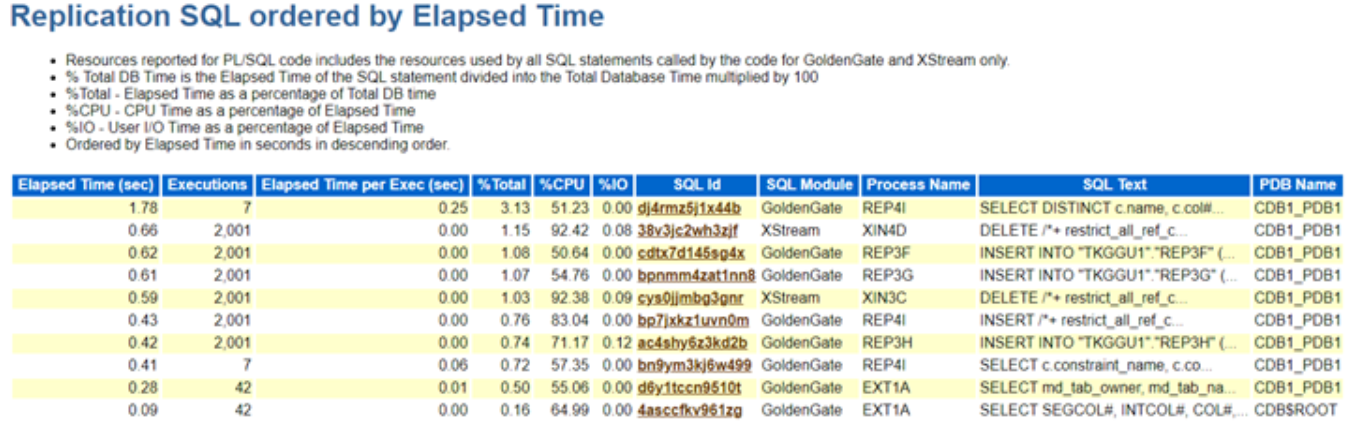
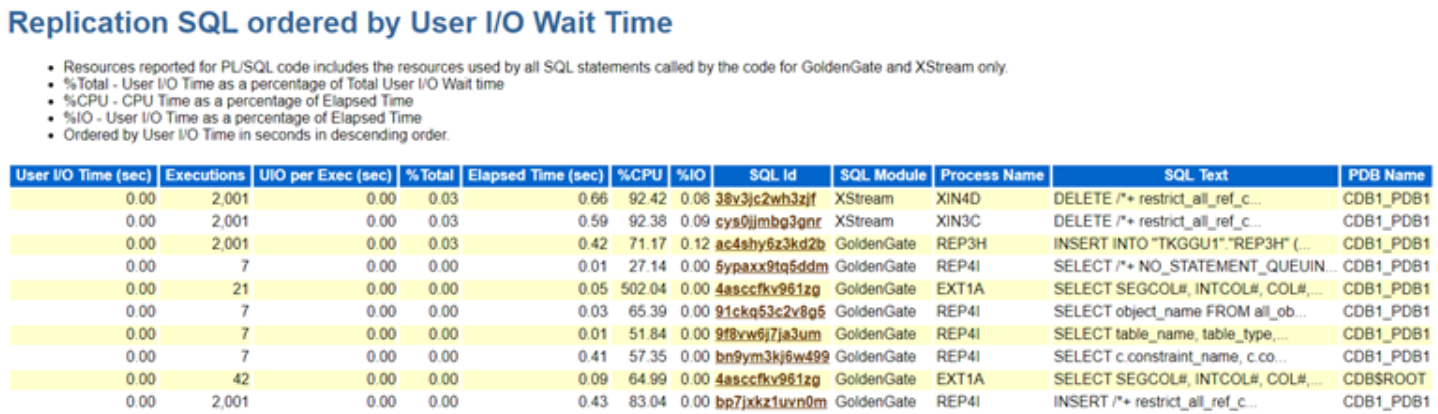
Replication Top SQLs: This highlights the SQL statements executed by various replication processes, organized by key performance metrics such as Elapsed Time, CPU Time, and Execution Count. These sections in the Top SQL report provide a detailed breakdown, allowing administrators to quickly identify the most resource-intensive SQL queries impacting replication performance.

In addition, the replication process name is included for each SQL statement, making it easy to trace which process—whether Extract or Replicat—is responsible for executing the query. This level of granularity helps streamline troubleshooting efforts, as it enables pinpointing of inefficient SQL statements and their impact on replication. The inclusion of these metrics ensures that administrators have the necessary visibility to optimize SQL execution within replication processes, leading to improved overall system performance.

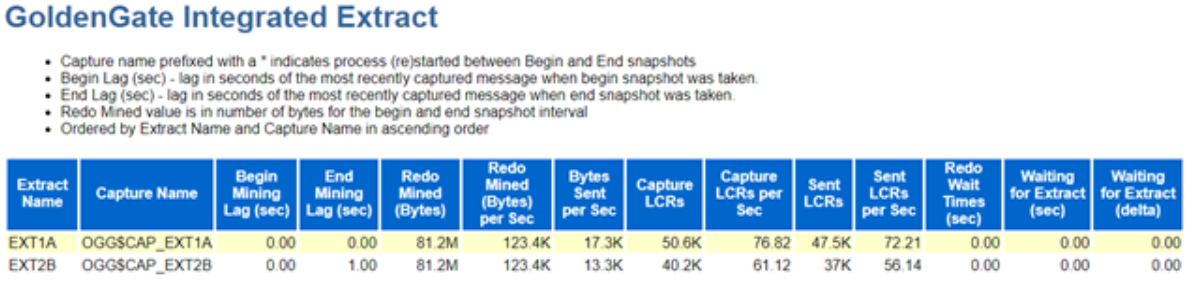
Oracle GoldenGate Extract Performance Metrics : This section explains more in Extract and Capture processes. It provides some really valuable information like ..

  • Lag (in seconds) derived by the time when the most recent LCR was created and received (measured both at the beginning and end)
  • The amount of redo data mined (in bytes).
  • Redo Mined Rate
  • Number of bytes sent by the Capture process to the Extract process since the last time the Extract process attached to the Capture process.
  • Number of LCRs delivered to the Capture from Logminer …. and much more … ….

Oracle GoldenGate Integrated Replicat:

Oracle GoldenGate Replicat: This section presents comprehensive performance statistics for Oracle GoldenGate’s classic, coordinated, and parallel Replicat processes. The SQL operation statistics are aggregated and displayed for each individual Replicat process, providing an overall view of their performance.

Hope It Helped!
Prashant Dixit

Posted in Uncategorized | Tagged: , , , , , , | Leave a Comment »

Replication between Oracle & PostgreSQL using Oracle Golden Gate.

Posted by FatDBA on May 31, 2024

Hi Mates,

Recently I was doing one migration where Golden Gate was used for data movement/migration between this source which is was Oracle 19.1 database to target, that was PostgreSQL 12. This was the first time I was doing this for PostgreSQL, I earlier tried with MySQL, Teradata and Cassandra and they were little tricky, specially the one with Cassandra. Let’s see how this one with PostgreSQL goes …

Okay, so this post is all about setting a test replication setup between Oracle and PostgreSQL database. Without further ado, let’s get started!

Details:
Source: Oracle 19c (19.3.0) database
Target: Vanilla/Open-Source PostgreSQL 12.6.7
Golden Gate Version: Golden Gate 19.1 for Oracle (Source), Golden Gate 19.1 for PostgreSQL Database (Target Host).
Source Hostname: canttowinsec.quebecdomain (IP 192.168.154.129)
Target Hostname: canttowin.ontadomain (192.168.154.128)

ON SOURCE:

Let’s first create the user and one test table on the source database which we will use to do this demo.

sqlplus / as sysdba

SQL*Plus: Release 19.0.0.0.0 - Production on Wed Jun 23 15:21:01 2021
Version 19.3.0.0.0
Copyright (c) 1982, 2019, Oracle.  All rights reserved.
Connected to:
Oracle Database 19c Enterprise Edition Release 19.0.0.0.0 - Production Version 19.3.0.0.0

SQL> create user opeth identified by opeth;

User created.

SQL> grant connect to opeth;

Grant succeeded.

SQL> conn opeth/opeth
Connected.

SQL>  create table testtable (col1 number, col2 varchar2(20));

Table created.

SQL> alter table testtable add primary key (col1);

Table altered.

Next I will install Golden Gate using a response file (silent method to install).

[oracle@canttowin Disk1]$ ./runInstaller -silent -nowait -responseFile /home/oracle/ggdirpsql/Disk1/response/oggcore.rsp
Starting Oracle Universal Installer...

Checking Temp space: must be greater than 120 MB.   Actual 6549 MB    Passed
Checking swap space: must be greater than 150 MB.   Actual 3945 MB    Passed
Preparing to launch Oracle Universal Installer from /tmp/OraInstall2021-06-18_04-33-50AM. Please wait ...[oracle@canttowin Disk1]$ You can find the log of this install session at:
 /u01/app/oraInventory/logs/installActions2021-06-18_04-33-50AM.log
The installation of Oracle GoldenGate Core was successful.
Please check '/u01/app/oraInventory/logs/silentInstall2021-06-18_04-33-50AM.log' for more details.
Successfully Setup Software.

Next, I will set the environmental variables to avoid any errors while calling the GG cli and will create the manager process.

[oracle@canttowinsec ggdirpsql]$ pwd
/home/oracle/ggdirpsql
[oracle@canttowinsec ggdirpsql]$ export PATH=$PATH:/home/oracle/ggdirpsql
[oracle@canttowinsec ggdirpsql]$ export LD_LIBRARY_PATH=$ORACLE_HOME/lib:/home/oracle/ggdirpsql
[oracle@canttowinsec ggdirpsql]$


[oracle@canttowin ggdir]$ ./ggsci

Oracle GoldenGate Command Interpreter for Oracle
Version 19.1.0.0.4 OGGCORE_19.1.0.0.0_PLATFORMS_191017.1054_FBO
Linux, x64, 64bit (optimized), Oracle 19c on Oct 17 2019 21:16:29
Operating system character set identified as UTF-8.

Copyright (C) 1995, 2019, Oracle and/or its affiliates. All rights reserved.


GGSCI (canttowinsec.quebecdomain) 7> view param mgr

PORT 7810


GGSCI (canttowinsec.quebecdomain) 1> start mgr
Manager started


GGSCI (canttowinsec.quebecdomain) 1> info all

Program     Status      Group       Lag at Chkpt  Time Since Chkpt

MANAGER     RUNNING

Now when manager process is running, next will login to the source database using Golden Gate and will list the table what we have created in the beginning, this is just to assure if everything is okay at the source.

GGSCI (canttowinsec.quebecdomain) 6> dblogin userid opeth, password opeth
Successfully logged into database.


GGSCI (canttowinsec.quebecdomain as opeth@dhavaldb) 10> list tables opeth.*
opeth.testtable

Found 1 tables matching list criteria.


All good, lets's create the EXTRACT process on the source system.

GGSCI (canttowinsec.quebecdomain) 2> edit param EORPSQL

GGSCI (canttowinsec.quebecdomain) 1> view params EORPSQL

EXTRACT EORPSQL
USERID opeth, password opeth
RMTHOST 192.168.154.128, MGRPORT 7810
RMTTRAIL ./dirdat/ep
TABLE opeth.testtable;


GGSCI (canttowinsec.quebecdomain) 4> add extract EORPSQL, tranlog, begin now
EXTRACT added.


GGSCI (canttowinsec.quebecdomain) 5> add exttrail ./dirdat/ep, extract EORPSQL, megabytes 5
EXTTRAIL added.

GGSCI (canttowinsec.quebecdomain) 6> start EORPSQL

Sending START request to MANAGER ...
EXTRACT EORPSQL starting


GGSCI (canttowinsec.quebecdomain) 11> info EORPSQL

EXTRACT    EORPSQL   Last Started 2021-06-23 15:10   Status RUNNING
Checkpoint Lag       00:00:00 (updated 00:00:07 ago)
Process ID           10714
Log Read Checkpoint  Oracle Redo Logs
                     2021-06-23 15:11:11  Seqno 15, RBA 31941120
                     SCN 0.2711866 (2711866)

ON TARGET:

Now we are done with all prerequisites, installation and configurations at the source end, let’s move to the target system now where we have our PostgreSQL database running. I will create the same table what we have created on Oracle database (source).

[postgres@canttowin ggdirpsql]$ psql -p 5432
psql (12.6.7)
Type "help" for help.

postgres=# \c opeth opeth
You are now connected to database "opeth" as user "opeth".

opeth=# CREATE TABLE "public"."testtable"
opeth-# (
opeth(#   "col1" integer NOT NULL,
opeth(#   "col2" varchar(20),
opeth(#   CONSTRAINT "PK_Col111" PRIMARY KEY ("col1")
opeth(# )
opeth-# ;
CREATE TABLE
opeth=#
opeth=#
opeth=# \dt+
                     List of relations
 Schema |  Name  | Type  |  Owner   |  Size   | Description
--------+--------+-------+----------+---------+-------------
 public | testtable | table | postgres | 0 bytes |
(1 row)

Next comes the most important part, that is to create the odbc.ini file, Golden Gate uses an ODBC connection to connect to the Postgres database. The ODBC driver is shipped with the installation and on Unix you have to create the ODBC configuration file which is commonly called odbc.ini on your own. You need to create this file in GG_HOME directory on the target system.

[postgres@canttowin ggdirpsql]$ more odbc.ini
[ODBC Data Sources]
PostgreSQL on pgsql
[ODBC]
IANAAppCodePage=4
InstallDir=/home/postgres/ggdirpsql
[pg12db]
Driver=/home/postgres/ggdirpsql/lib/GGpsql25.so
Description=Postgres driver
Database=opeth
HostName=canttowin.ontadomain
PortNumber=5432
LogonID=opeth
Password=opeth


Reference:
Driver=<your goldengate home directory>/lib/GGpsql25.so
InstallDir= <where you have installed your GG software on target server.
IANAAppCodePage= <The value 4 represents the ISO-8859-1 character set>
Database=<Postgres Database Name>
HostName=<Hostname of the Postgres database>
PortNumber=<Port number of the Postgres database>
LogonID=<Username of the Postgres database>
Password=<Password of the Postgres database>

Now, let’s set the environmental variables to point locations for odbc file along with lib directory and installation dir and create all required GG specific directories on the target database server.

[postgres@canttowin ggdirpsql]$ export ODBCINI=/home/postgres/ggdirpsql/odbc.ini
[postgres@canttowin ggdirpsql]$ export PATH=$PATH:/home/postgres/ggdirpsql
[postgres@canttowin ggdirpsql]$  export LD_LIBRARY_PATH=/home/postgres/ggdirpsql/lib


[postgres@canttowin ggdirpsql]$ ./ggsci

Oracle GoldenGate Command Interpreter for PostgreSQL
Version 19.1.0.0.200714 OGGCORE_19.1.0.0.0OGGBP_PLATFORMS_200628.2141
Linux, x64, 64bit (optimized), PostgreSQL on Jun 29 2020 03:59:15
Operating system character set identified as UTF-8.

Copyright (C) 1995, 2019, Oracle and/or its affiliates. All rights reserved.


GGSCI (canttowin.ontadomain) 1> create subdirs

Creating subdirectories under current directory /home/postgres/ggdirpsql

Parameter file                 /home/postgres/ggdirpsql/dirprm: created.
Report file                    /home/postgres/ggdirpsql/dirrpt: created.
Checkpoint file                /home/postgres/ggdirpsql/dirchk: created.
Process status files           /home/postgres/ggdirpsql/dirpcs: created.
SQL script files               /home/postgres/ggdirpsql/dirsql: created.
Database definitions files     /home/postgres/ggdirpsql/dirdef: created.
Extract data files             /home/postgres/ggdirpsql/dirdat: created.
Temporary files                /home/postgres/ggdirpsql/dirtmp: created.
Credential store files         /home/postgres/ggdirpsql/dircrd: created.
Masterkey wallet files         /home/postgres/ggdirpsql/dirwlt: created.
Dump files                     /home/postgres/ggdirpsql/dirdmp: created.


Now, time to create all GG related processes, will start with manager process, followed by replicat 
GGSCI (canttowin.ontadomain) 2> edit param mgr

GGSCI (canttowin.ontadomain) 3> start mgr
Manager started.


GGSCI (canttowin.ontadomain) 2> dblogin sourcedb pg12db userid opeth
Password:

2021-06-23 15:00:58  INFO    OGG-03036  Database character set identified as UTF-8. Locale: en_US.UTF-8.

2021-06-23 15:00:58  INFO    OGG-03037  Session character set identified as UTF-8.
Successfully logged into database.


GGSCI (canttowin.ontadomain as opeth@pg12db) 5> list tables public.*
public.testtable

Found 1 tables matching list criteria.


GGSCI (canttowin.ontadomain as opeth@pg12db) 15> view params RORPSQL

REPLICAT RORPSQL
SOURCEDEFS ./dirdef/testtable.def
SETENV ( PGCLIENTENCODING = "UTF8" )
SETENV (ODBCINI="/home/postgres/ggdirpsql/odbc.ini" )
SETENV (NLS_LANG="AMERICAN_AMERICA.AL32UTF8")
TARGETDB pg12db, USERID opeth, PASSWORD opeth
DISCARDFILE ./dirrpt/diskg.dsc, purge
MAP opeth.testtable, TARGET public.testtable, COLMAP (COL1=col1,COL2=col2);


GGSCI (canttowin.ontadomain as opeth@pg12db) 7> add replicat RORPSQL, NODBCHECKPOINT, exttrail ./dirdat/ep
REPLICAT added.


GGSCI (canttowin.ontadomain as opeth@pg12db) 8> start RORPSQL

Sending START request to MANAGER ...
REPLICAT RORPSQL starting


GGSCI (canttowin.ontadomain as opeth@pg12db) 9> info all

Program     Status      Group       Lag at Chkpt  Time Since Chkpt

MANAGER     RUNNING
REPLICAT    RUNNING     RORPSQL     00:00:59      00:00:03


GGSCI (canttowin.ontadomain as opeth@pg12db) 13>

GGSCI (canttowin.ontadomain as opeth@pg12db) 13> info RORPSQL

REPLICAT   RORPSQL   Last Started 2021-06-23 15:20   Status RUNNING
Checkpoint Lag       00:00:00 (updated 00:00:03 ago)
Process ID           97138
Log Read Checkpoint  File ./dirdat/ep000000000
                     2021-06-23 15:21:41.005117  RBA 29169

All set, we have all processes running at both source and target system. Now, if you running on Golden gate version 12.3 and above, no need to do generate the definition of tables, as the metadata is now present in the trail file itself, like in this demo I am using GG 19.1.

So, only if you running on GG version < 12.3 you need to generate the definition (using defgen file) of the table on source system and move it to the DIRDAT directory on target so that replicat considers that.

Now, let’s do some testing to see if records are flowing from source to target database.

ON SOURCE:

[oracle@canttowinsec dirdef]$ !sql
sqlplus / as sysdba

SQL*Plus: Release 19.0.0.0.0 - Production on Wed Jun 23 15:21:01 2021
Version 19.3.0.0.0
Copyright (c) 1982, 2019, Oracle.  All rights reserved.
Connected to:
Oracle Database 19c Enterprise Edition Release 19.0.0.0.0 - Production Version 19.3.0.0.0

SQL> conn opeth/opeth
Connected.
SQL> insert into testtable values (1,'hello world!');

1 row created.

SQL> select * from testtable;

      COL1 COL2
---------- --------------------
         1 hello world!

SQL>
SQL> commit;

Commit complete.

Let’s see if the same record is reached the target side.

ON TARGET:

[postgres@canttowin ggdirpsql]$ psql -p 5432
psql (12.6.7)
Type "help" for help.

postgres=# \c opeth opeth
You are now connected to database "opeth" as user "opeth".

psql (12.6.7)
Type "help" for help.

opeth=# select * from testtable;
 col1 |  col2
------+---------
   10 | hello world!

(1 rows)

opeth=# 

Cool! it’s pretty easy to setup this solution to migrate your data from Oracle to PostgreSQL database.

Few things to note here
–> You don’t need to install Golden Gate for PostgreSQL, on source system which is where your oracle database is, requires Golden Gate for Oracle.
–> Only on target database is where you have to install Golden Gate for PostgreSQL
–> odbc.ini is the file which you have to create on target end (where your postgresql server is).
–> Always before calling ggsci, set PATH and LD_LIBRARY_PATH, else you might get an error message while calling the cli.
–> Be very careful while creating the odbc.ini file otherwise you will end up with some obscure errors,

Hope It Helped!
Prashant Dixit

Posted in Uncategorized | Tagged: , , , | Leave a Comment »

OGG-01201 Error reported by MGR Access denied

Posted by FatDBA on August 22, 2021

Hi Guys,

Last week encountered a problem with one old GG setup running on v12.2 where the extract was failing with errors OGG-01201/OGG-01668 when doing Initial load.

ERROR   OGG-01201  Oracle GoldenGate Capture for Oracle, exld1.prm:  Error reported by MGR : Access denied
ERROR   OGG-01668  Oracle GoldenGate Capture for Oracle, exld1.prm:  PROCESS ABENDING

This ‘access denied’ error was there even when the login information was correct for both source and target systems. I was overly confused and wasn’t sure what was causing the issue!

What I come to know after reading a particular piece of documentation, in version 12.2 of GG, the default behavior is the MANAGER and related EXTRACT/REPLICAT cannot be started or stopped remotely as by default there is only deny rule. And while I was trying to do the initial load on the source server and attempts to starts the replicat on target server, I hit the error. This is a security feature and is to prevent unauthorized access to Oracle GoldenGate manager processes and the processes under its control.

Solution to the problem is add “ACCESSRULE, PROG *, IPADDR *, ALLOW” to your manager parameter file on the target system, something like below. The ACCESSRULE parameter restricts the remote system access.

-- GoldenGate Manager Parameter File (mgr.prm) on Target system
--
userid xxxxxxx, password xxxxxxx
PORT 7810
ACCESSRULE, PROG REPLICAT, IPADDR 10.11.01.15, ALLOW
PURGEOLDEXTRACTS ./dirdat/rp*, USECHECKPOINTS, MINKEEPHOURS 4

Here you can also set priority using PRI (0-99) which specifies the priority. The PROG parameter could be anything like GGSCI, GUI, MGR/MANAGER, REPLICAT, COLLECTOR|SERVER and * for all options (default). IPADDR specifies from which IP can access the specified program. Login_ID specifies with RMTHOST configuration and ALLOW | DENY specifies allow or deny the access.

Hope It Helped!
Prashant Dixit

Posted in Uncategorized | Tagged: , , | Leave a Comment »

What’s new in Golden Gate version 21c ?

Posted by FatDBA on August 20, 2021

Hi Guys,

Oracle has recently released Golden Gate version 21.1, this happened immediately after they released database version 21c (21.3) for on-prem. Today’s post is all about new features and changes happened with this new GG version.

  • Oracle GoldenGate is available with Microservices Architecture : This release of Oracle GoldenGate is available with Microservices Architecture only.
  • This release of Oracle GoldenGate is available with Microservices Architecture only.
  • Automatic Extract of tables with supplemental logging is supported : Oracle GoldenGate provides a new auto_capture mode to capture changes for all the tables that are enabled for logical replication. You can list the tables enabled for auto-capture using the LIST TABLES AUTO_CAPTURE command option. Use the TRANLOGOPTIONS INTEGRATEDPARAMS auto_capture option to set up automatic capture.
  • Oracle native JSON datatype is supported : Oracle GoldenGate capture and apply processes now support the new native JSON datatype, which is supported by Oracle Database 21c and higher.
  • Enhanced Automatic Conflict Detection and Resolution for Oracle Database 21c
  • Autonomous Database Extract is supported : Oracle GoldenGate can now capture from the Autonomous Databases in OCI.
  • Large DDL (greater than 4 MB) replication is supported : DDLs that are greater than 4 MB in size will be provided replication support.
  • DB_UNIQUE_NAME with heartbeat table : DB_UNIQUE_NAME is available with the heartbeat table to allow users to uniquely identify the source of the heartbeat.
  • Oracle GoldenGate binaries are no longer installed on a shared drive : Oracle always recommended installing the Oracle GoldenGate binaries (OGG_HOME) on a local file system as a best practice. From this release onward, it is a requirement. The binaries must be installed on local drives.
  • Partition Filtering
  • A new Extract needs to be created when the DB timezone is changed : You need to create new Extract if DB timezone is changed, especially in case of Oracle Cloud deployment.
  • DB_UNIQUE_NAME with trail file header : DB_UNIQUE_NAME is added in the trail file header along with DB_NAME, which helps in troubleshooting replication in active-active environments, where mostly all replicas have the same DB_NAME but identify each replica site uniquely using the DB_UNIQUE_NAME.
  • Per PDB Capture
  • Parallel Replicat Core Infrastructure Support for Heterogeneous Databases : Parallel Replicat is supported with SQL Server, DB2 z/OS, and MySQL.

Release announcement link : https://blogs.oracle.com/dataintegration/oracle-goldengate-21c-release-announcement

Hope It Helped
Prashant Dixit

Posted in Uncategorized | Tagged: , , | Leave a Comment »

Kafka Producer: Error while fetching metadata with correlation id INVALID_REPLICATION_FACTOR

Posted by FatDBA on August 14, 2021

Hi Guys,

Recently I was working on a replication project where we used Kafka to move data from source to target. I tried to create a test topic using Kafka producer console and immediately kicked out with error which says “INVALID_REPLICATION_FACTOR”. This we were doing on a test VM with single CPU and with limited system resources.

[root@cantowintert bin]#
[root@cantowintert bin]# kafka-console-producer.sh --broker-list 127.0.0.1:9092 --topic first_topic
OpenJDK 64-Bit Server VM warning: If the number of processors is expected to increase from one, then you should configure the number of parallel GC threads appropriately using -XX:ParallelGCThreads=N
>hello prashant
[2021-07-26 08:18:30,051] WARN [Producer clientId=console-producer] Error while fetching metadata with correlation id 40 : {first_topic=INVALID_REPLICATION_FACTOR} (org.apache.kafka.clients.NetworkClient)
[2021-07-26 08:18:30,154] WARN [Producer clientId=console-producer] Error while fetching metadata with correlation id 41 : {first_topic=INVALID_REPLICATION_FACTOR} (org.apache.kafka.clients.NetworkClient)
[2021-07-26 08:18:30,260] WARN [Producer clientId=console-producer] Error while fetching metadata with correlation id 42 : {first_topic=INVALID_REPLICATION_FACTOR} (org.apache.kafka.clients.NetworkClient)
[2021-07-26 08:18:30,367] WARN [Producer clientId=console-producer] Error while fetching metadata with correlation id 43 : {first_topic=INVALID_REPLICATION_FACTOR} (org.apache.kafka.clients.NetworkClient)
[2021-07-26 08:18:30,471] WARN [Producer clientId=console-producer] Error while fetching metadata with correlation id 44 : {first_topic=INVALID_REPLICATION_FACTOR} (org.apache.kafka.clients.NetworkClient)
[2021-07-26 08:18:30,576] WARN [Producer clientId=console-producer] Error while fetching metadata with correlation id 45 : {first_topic=INVALID_REPLICATION_FACTOR} (org.apache.kafka.clients.NetworkClient)
[2021-07-26 08:18:30,681] WARN [Producer clientId=console-producer] Error while fetching metadata with correlation id 46 : {first_topic=INVALID_REPLICATION_FACTOR} (org.apache.kafka.clients.NetworkClient)
[2021-07-26 08:18:30,788] WARN [Producer clientId=console-producer] Error while fetching metadata with correlation id 47 : {first_topic=INVALID_REPLICATION_FACTOR} (org.apache.kafka.clients.NetworkClient)
[2021-07-26 08:18:30,896] WARN [Producer clientId=console-producer] Error while fetching metadata with correlation id 48 : {first_topic=INVALID_REPLICATION_FACTOR} (org.apache.kafka.clients.NetworkClient)
[2021-07-26 08:18:31,000] WARN [Producer clientId=console-producer] Error while fetching metadata with correlation id 49 : {first_topic=INVALID_REPLICATION_FACTOR} (org.apache.kafka.clients.NetworkClient)
[2021-07-26 08:18:31,103] WARN [Producer clientId=console-producer] Error while fetching metadata with correlation id 50 : {first_topic=INVALID_REPLICATION_FACTOR} (org.apache.kafka.clients.NetworkClient)
[2021-07-26 08:18:31,221] WARN [Producer clientId=console-producer] Error while fetching metadata with correlation id 51 : {first_topic=INVALID_REPLICATION_FACTOR} (org.apache.kafka.clients.NetworkClient)
^Corg.apache.kafka.common.KafkaException: Producer closed while send in progress
        at org.apache.kafka.clients.producer.KafkaProducer.doSend(KafkaProducer.java:909)
        at org.apache.kafka.clients.producer.KafkaProducer.send(KafkaProducer.java:885)
        at kafka.tools.ConsoleProducer$.send(ConsoleProducer.scala:71)
        at kafka.tools.ConsoleProducer$.main(ConsoleProducer.scala:53)
        at kafka.tools.ConsoleProducer.main(ConsoleProducer.scala)
Caused by: org.apache.kafka.common.KafkaException: Requested metadata update after close
        at org.apache.kafka.clients.producer.internals.ProducerMetadata.awaitUpdate(ProducerMetadata.java:126)
        at org.apache.kafka.clients.producer.KafkaProducer.waitOnMetadata(KafkaProducer.java:1047)
        at org.apache.kafka.clients.producer.KafkaProducer.doSend(KafkaProducer.java:906)
        ... 4 more
[root@cantowintert bin]#

Lets check what is captured in Kafka server startup logs, and we found the hint that the RF is > than the available brokers.

org.apache.kafka.common.errors.InvalidReplicationFactorException: Replication factor: 1 larger than available brokers: 0.
[2021-07-26 08:24:45,723] WARN [Controller id=0, targetBrokerId=0] Connection to node 0 (cantowintert.bcdomain/192.168.20.129:9092) could not be established. Broker may not be available. (org.apache.kafka.clients.NetworkClient)
[2021-07-26 08:25:06,830] WARN [Controller id=0, targetBrokerId=0] Connection to node 0 (cantowintert.bcdomain/192.168.20.129:9092) could not be established. Broker may not be available. (org.apache.kafka.clients.NetworkClient)
[2021-07-26 08:25:27,950] WARN [Controller id=0, targetBrokerId=0] Connection to node 0 (cantowintert.bcdomain/192.168.20.129:9092) could not be established. Broker may not be available. 

Solution to the problem is to uncomment this line and restart and try to edit the topic all over again.

listeners=PLAINTEXT://:9092

changed this to

listeners=PLAINTEXT://127.0.0.1:9092

Hope It helped
Prashant Dixit

Posted in Uncategorized | Tagged: , | 1 Comment »

What is that strange looking TRANLOGOPTIONS EXCLUDETAG in parameter file ?

Posted by FatDBA on August 11, 2021

Hi Guys,

Recently someone asked why we have this strange looking entry in Golden Gate extract parameter file which reads ‘TRANLOGOPTIONS EXCLUDETAG 00‘. Why is that, what are those numbers ? I was able to explain him the purpose, would like to write a short post about it.

OGG v12.1.2 has a new EXTRACT parameter TRANLOGOPTIONS EXCLUDETAG. This is typically used to exclude the REPLICAT user in bi-directional configurations. When Extract is in classic or integrated capture mode, use the TRANLOGOPTIONS parameter with the EXCLUDETAG tag option. This parameter directs the Extract process to ignore transactions that are tagged with the specified redo tag. For example:

extract exttestpd
useridalias clouduser
EXTTRAIL ./dirdat/rp, format release 12.1
ddl include all
ddloptions addtrandata, report
tranlogoption excludetag 00 
TABLE dixituser.*;

Changes made by Integrated REP are tagged by default in redo as 00. So adding the EXTRACT parameter TRANLOGOPTIONS EXCLUDETAG 00 Would exclude those operations. The tag can also be explicitly set in REPLICAT using:

DBOPTIONS SETTAG 0885

Then in EXTRACT param:

TRANLOGOPTIONS EXCLUDETAG 0885

The TRANLOGOPTION EXCLUDETAG 00 prevents Golden Gate extract from capturing transactions from the replication which are by default tagged with “00”. The excludetag will ensure that the we don’t run into problems with ping-pong updates.

Some other possible examples of using this parameter are …

TRANLOGOPTIONS EXCLUDETAG 00
TRANLOGOPTIONS EXCLUDETAG +
TRANLOGOPTIONS EXCLUDETAG 0991
TRANLOGOPTIONS EXCLUDETAG 2222 4444

Hope It Helped
Prashant Dixit

Posted in Uncategorized | Tagged: , , | Leave a Comment »

Running on Oracle 19c ? – Why to enable full supplemental logging when SUBSET DATABASE REPLICATION is there

Posted by FatDBA on June 26, 2021

Hi Folks,

Today’s post is about one of the cool feature added in Oracle 19c, that is very useful and I recently discovered about it while working on one GG setup.

This is about Supplemental logging which enables database to capture extra logging for a redo-based application i.e. logical standby or Golden Gate, this may require that additional columns be logged in the redo log files and causes a great stress and overhead on the database. Things looks very unworthy specially if you are doing only a partial Golden Gate replication, I mean for only few tables.

Starting from Oracle 19c, this is something that you can now control. With this version, you can enable the fine grain supplemental logging (SUBSET DATABASE REPLICATION) which will reduce lot of logging overhead. This feature allows you to disable supplemental logging on the entire database and on all tables. So, if you are running on Oracle 19c and your have the COMPATIBLE parameter to 19.0.0.0.0 or greater and have enabled enable_goldengate_replication parameter to TRUE, you can use this option.

Note: I know few of the products where ‘Supplemental Log Data Subset Database Replication’ doesn’t work or the product doesn’t support it, i.e. HVR 6

SQL> select BANNER_FULL from v$version;

BANNER_FULL
--------------------------------------------------------------------------------
Oracle Database 19c Enterprise Edition Release 19.0.0.0.0 - Production
Version 19.3.0.0.0


SQL> SELECT  FORCE_LOGGING, supplemental_log_data_min, supplemental_log_data_sr from v$database;

FORCE_LOGGING                           SUPPLEMENTAL_LOG_DATA_MIN                                    SUPPLEMENTAL_LOG_DATA_SR
--------------------------------------- ------------------------------------------------------------ ----------------------------------------
YES                                     YES                                                          NO


SQL> ALTER DATABASE ADD SUPPLEMENTAL LOG DATA SUBSET DATABASE REPLICATION;

Database altered.

SQL> SELECT  FORCE_LOGGING, supplemental_log_data_min, supplemental_log_data_sr from v$database;

FORCE_LOGGING                           SUPPLEMENTAL_LOG_DATA_MIN                                    SUPPLEMENTAL_LOG_DATA_SR
--------------------------------------- ------------------------------------------------------------ ----------------------------------------
YES                                     YES                                                          YES

You can disable it anytime using below mentioned steps/commands.

SQL>
SQL> ALTER DATABASE ADD SUPPLEMENTAL LOG DATA;

Database altered.

SQL>  ALTER DATABASE DROP SUPPLEMENTAL LOG DATA SUBSET DATABASE REPLICATION;

Database altered.

SQL> SELECT  FORCE_LOGGING, supplemental_log_data_min, supplemental_log_data_sr from v$database;

FORCE_LOGGING                           SUPPLEMENTAL_LOG_DATA_MIN                                    SUPPLEMENTAL_LOG_DATA_SR
--------------------------------------- ------------------------------------------------------------ ----------------------------------------
YES                                     YES                                                          NO

Hope It Helps!
Prashant Dixit

Posted in Advanced | Tagged: , , | 2 Comments »

repmgr failover done, but where is my Standby ?

Posted by FatDBA on December 15, 2020

Hey Guys,

Last weekend I’ve got a call from one of my friend asking about a weird issue in his master-slave (primary-standby) setup where he’s using repmgr for automatic failover and switchover operations. He said after the failover (server crashed) with role reversal or promotion the old standby becomes new primary (expected, all good till here), but as soon as the old primary comes back online and rejoins the configuration, it started as a primary too. I mean you can imagine something like below, both of the two hosts becomes master and there is no sign of a new standby.


[postgresdb@fatdba ~]$ repmgr -f /etc/repmgr.conf cluster show

 ID | Name  | Role    | Status    | Upstream | Location | Connection string
----+-------+---------+-----------+----------+----------+-----------------------------------------
 1  | node1 | primary | * running |          | default  | host=db_node1 dbname=repmgr user=repmgr
 2  | node2 | primary |   running |          | default  | host=db_node2 dbname=repmgr user=repmgr
 

He checked repmgr logs on the standby node and everything looks okay, standby promotion was sucessfull. It seems something was stopping the repmgr to update the information and bring that crashed node (previous primary) back as a standby. So the final situation is there are two primary nodes at this point.

So, how to and where to start from ?
A quick solution to this problem is to create an UPDATE TRIGGER on one of the internal table EVENTS of repmgr database (it creates its own database with default name of repmgr). The logic of creating a trigger is to handle events “standby_promote”, I mean when it happens a script is triggered that will bring back the old primary as new standby.

Next we would be needing a script that will help to automate the standby promotion. For that purpose you can use this script (link) or you can write something similar. And now when we have to call a bash script or to write stored procedures in a shell, we need the ‘.plsh’ extension in the database. Let’s install one of the most popular extension to do that, petere/plsh (link)


[postgresdb@fatdba ~]$ cd /usr/share/postgresql/12/extension/
[postgresdb@fatdba ~]$ sudo git clone https://github.com/petere/plsh.git
[postgresdb@fatdba ~]$ cd plsh
[postgresdb@fatdba ~]$ sudo make PG_CONFIG=/usr/bin/pg_config
[postgresdb@fatdba ~]$ sudo apt-get install make
[postgresdb@fatdba ~]$ sudo apt-get install gcc
[postgresdb@fatdba ~]$ sudo apt-get install postgresql-server-dev-12
[postgresdb@fatdba ~]$ sudo make install PG_CONFIG=/usr/bin/pg_config
 

Now, next create the extension in the database.


[postgresdb@fatdba ~]$ psql -U repmgr
 

This one needs to be executed only n primary side.


repmgr=# create extension plsh;
 

Now, let’s create the function and a trigger to invoke the script failover_promote.sh


[postgresdb@fatdba ~]$ psql
postgres=# CREATE FUNCTION failover_promote() RETURNS trigger AS $$
#!/bin/sh
/bin/bash /tmp/psqlscripts/failover_promote.sh $1 $2
$$
LANGUAGE plsh;
 

And the UPDATE TRIGGER on EVENTS table to call function created above.


postgres=#  create trigger failover
after insert
on events
for each row
execute procedure failover_promote();
 

Yes, that’s it. All done!
Now you can mimic the failover scenario i.e by stopping the primary database and check repmgr logs on the standby server.
You will see the standby is promoted and becomes new primary and as soon it’s finished, it will start pinging the crashed node and the moment it is back it will be promoted as a new standby.

Hope It helped!
Prashant Dixit

Posted in Uncategorized | Tagged: , , | 1 Comment »