Tales From A Lazy Fat DBA

Its all about Databases, their performance, troubleshooting & much more …. ¯\_(ツ)_/¯

Posts Tagged ‘troubleshooting’

What is Cluster Health Advisor GUI or CHAG ?

Posted by FatDBA on January 4, 2023

CHA GUI (CHAG) is a graphical user interface for Cluster Health Advisor (CHA) which was earlier internal to Oracle teams but its now available to the customers. It is a standalone, interactive, real-time capable front-end/GUI to the classic CHA utility. Oracle 12.2 is the first version that is supported by CHA GUI (CHAG). You only require RAC license and there is no need for any additional license to use CHAG tool.

CHAG communicates directly with the Grid Infrastructure Management Repository (GIMR) using a JDBC connection.. GIMR is mandatory for CHAG to work as it fetches the data out of the GIMR repository. In case you don’t have the GIMR repo installed, for example on 19c databases as GIMR is optional there, you can use the local mode for CHAG to work, but in absence of GIMR mgmt repo you will not get the historical abilities to go back in time.

Installation is quite simple, you have to download and unzip the software on one of your cluster machines and I recommend not to dump it inside your ORACLE HOME, but in a separate place. CHAG requires X11 or XHost and Java as it uses Java Swing to open the GUI. CHAG can operate in several modes:

  • With a default connection to GIMR Database. This option initiate a live session and provide real-time monitoring.
  • With a user specified location of a GIMR Database (option -P). This option initiate a live session and provide real-time monitoring.
  • Read in a text file with monitoring data (option -f). This initiates a passive session, which allow to analyze textual data extracted from a GIMR, or data collected during a live session. This data is held in a “*.mdb” file.
  • Parse text file with data and generate JSON object with information similar to query “diagnosis” (option -C). This mode of operation ‘chag -C -f ‘ directs CHAG to parse a *.mdb file and to generate a summary of its content in JSON format.

For the offline mode you can get the “mdb” file to analyze using below command. Depending on the time model you will get n number of mdb files for the period.

chactl export repository -format mdb -start <timestamp> -end <timestamp>

About the usage, CHAG is invoked using the ‘chag’ script available in the bin directory of the CHA Home. CHAG is designed primarily for Cluster or Database experts. Usage is quite simple and straight forward, you can move the pointer/slider to choose any particular timeframe to catch problems, their cause and the corrective actions. You can use it both in real time and offline version, its just that for real time you have to be on any of the cluster node, for offline you can generate the MDB file (cha datafile) and can run it anywhere on the client machine with no need of oracle home and only Java will be needed.

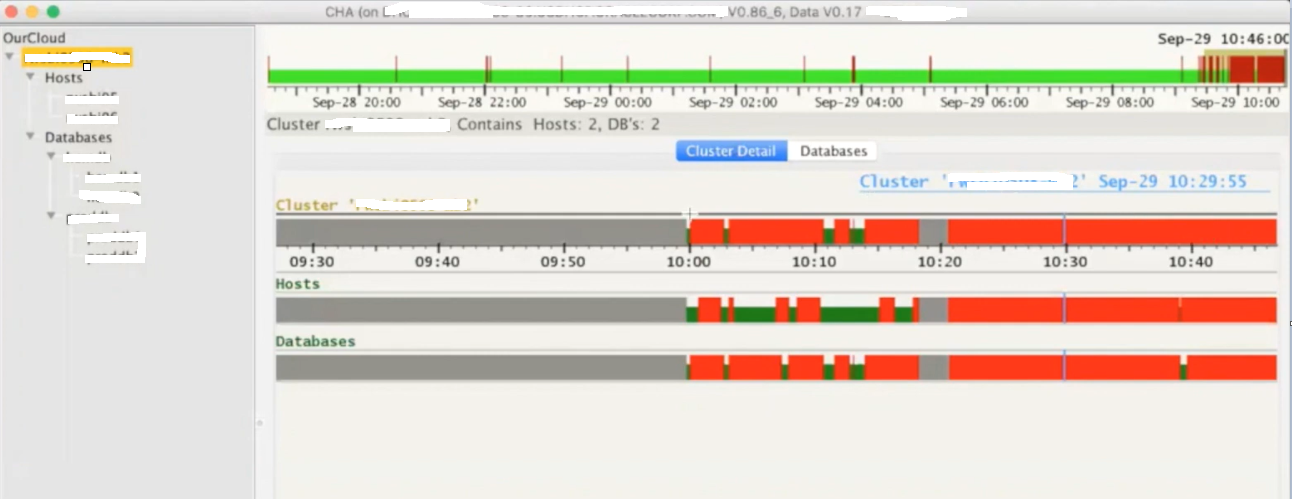
Below is the CHAG look and feel, its running on a 2 node RAC cluster where we have two databases installed. Here you see few color codes, where red colors means there were few problems during that interval.

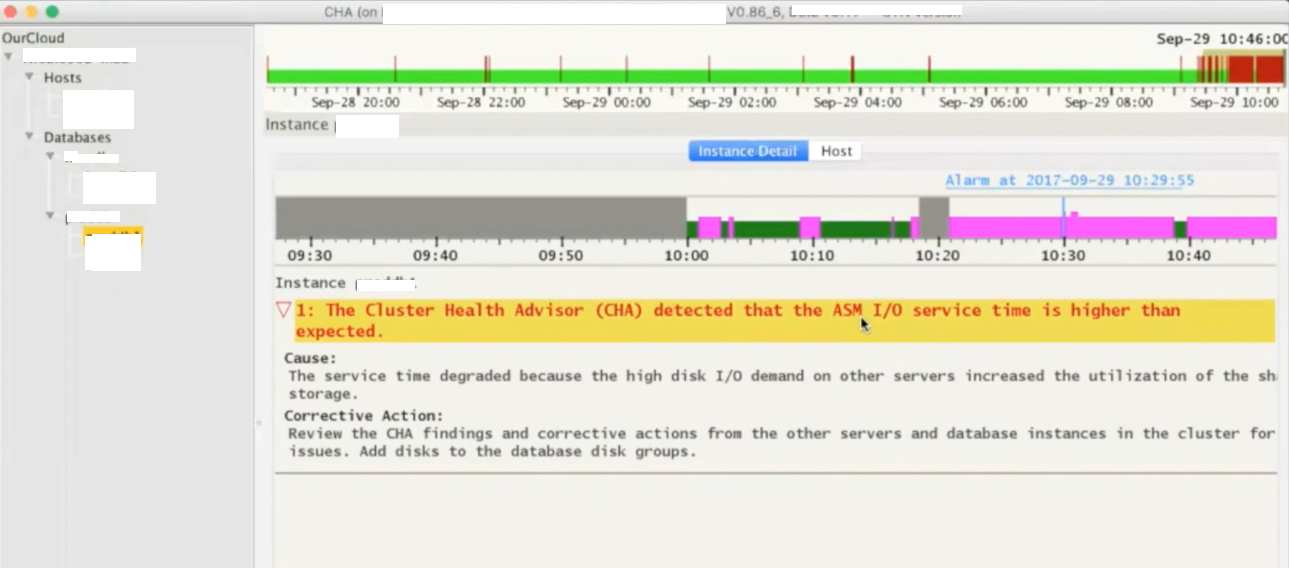
Next is how it explains more about any particular problem caught for the timeslot. Gives you cause and the corrective action, for example in below screenshot it has detected that the ASM IO service time is higher than the expected which points to the underlying IO Subsystem used by ASM disks.

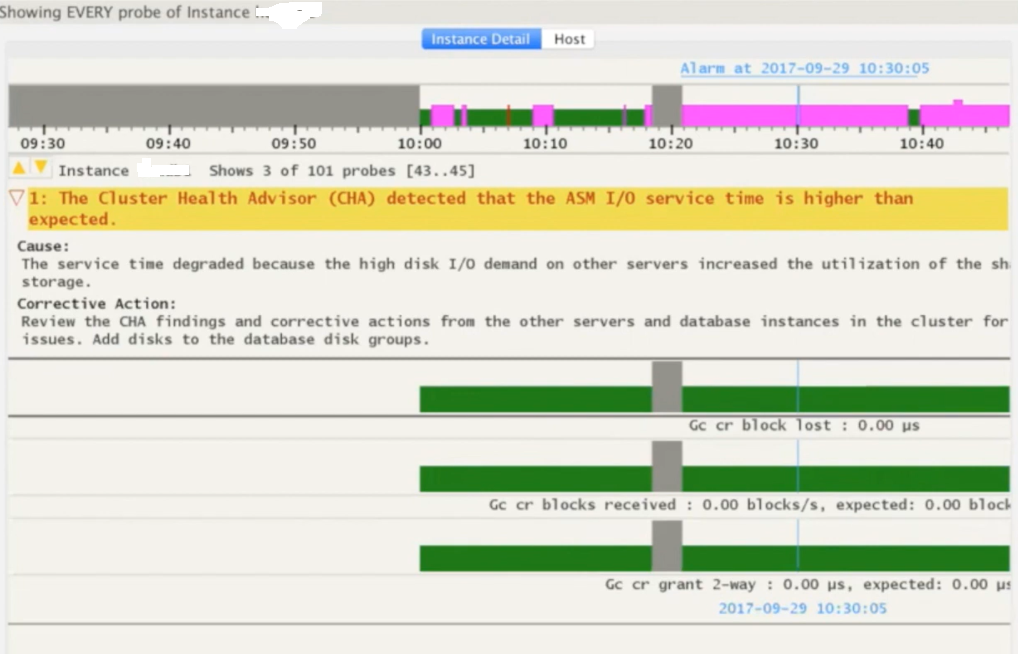
You can use SHIFT keys combinations to get wait event specific details for the selected time period.

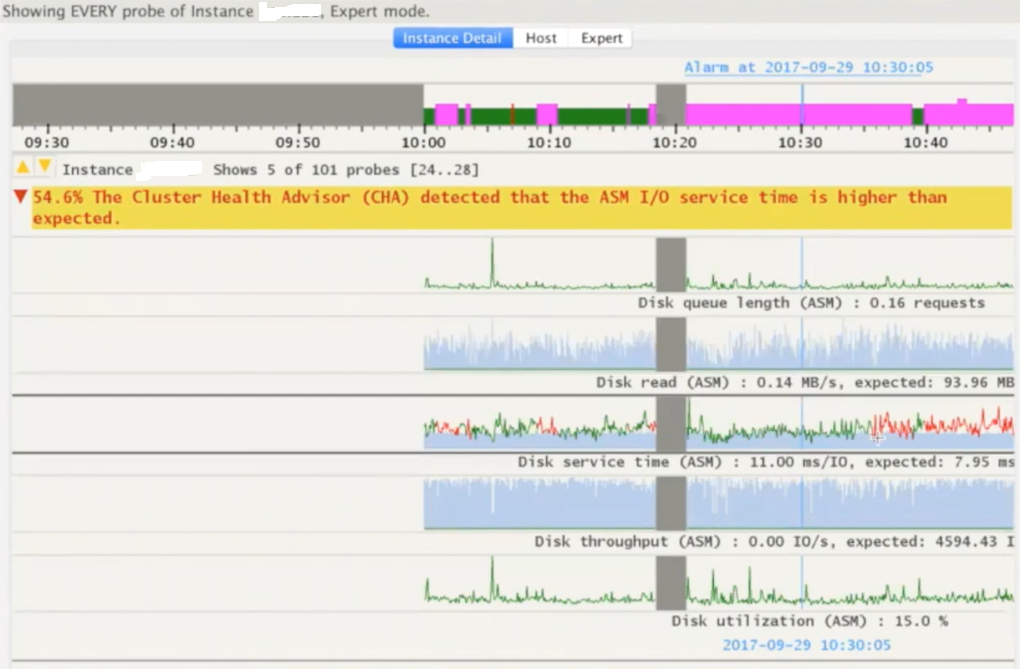
You can use few other SHIFT key combinations to present the same data in the form of line graphs.

Few more examples or problems detected by the CHAG. This time it was reporting for redo log writes which are slower and that is something expected as ASM IO is slow too means the entire IO subsystem is impacted.

I highly recommend all readers to go through Doc ID 2340062.1 on metalink for more details on Cluster Health Advisor Graphical User Interface – CHAG.

Hope It Helped!
Prashant Dixit
Posted in Advanced, troubleshooting | Tagged: , , , | Leave a Comment »

TRANLOGOPTIONS, a crucial performance parameter, Golden Gate 21c, a BUG and a quick workaround …

Posted by FatDBA on October 23, 2022

One of the crucial performance parameter for Golden gate extract process is TRANLOGOPTIONS which controls the way that it interacts with the transaction log. You can use multiple TRANLOGOPTIONS statements in the same parameter file, or you can specify multiple options within the same TRANLOGOPTIONS statement.

There are lot of performance related options i.e. INCLUDEAUX (AUX trails when reading audit trails), DBLOGREADERBUFSIZE etc. that you can use with TRANLOGOPTIONS parameter, but recently I’d tried one of the tuning parameter PERFORMANCEPROFILE with our medium intensity workload. It can be set to HIGH and MEDIUM (default). It helps achieve better performance by grouping the parameters that affect performance. Once the performance profile is set up, this option automatically configures the applicable parameters, to achieve the desired throughput and latency.

We’d used this parameter in one of our 21c (21.7.0) GG installation with TRANLOGOPTIONS PERFORMANCEPROFILE HIGH, but immediately we’d started seeing spikes in extract’s latency. This was might be because it increases the Extract’s read buffer size to 8MB and the rule to purge the extract read buffer is either when the buffer is full or there is no ingress records for 0.2 seconds. Therefore, any uninterrupted workload with Extract consumption rate below 8MB will result in integrated Extract latency to exceed 1 second.

We’d checked with Oracle support and as a quick temporary solution they’d suggested to not use PERFORMANCEPROFILE parameter with HIGH flag, as the Extract consumption/intake rates are below specific value, such as ~15 MB/sec to get ~0.5 second extract response times. Hence we’d set the buffer size to one-third of the redo generation rate in MB/sec to get ~0.3 second maximum Extract latency. They also marked this as Bug 33772499 for GG 21c for July 2022 release.

Hope It Helped!
Prashant Dixit
Posted in Advanced, troubleshooting | Tagged: , , , | Leave a Comment »

Differences I have noticed in the Query Block Registry section of an execution plan between Oracle 19c and 21c

Posted by FatDBA on October 10, 2022

Hi Guys,

Todays post is a quick one about the difference that I have noticed in one of the extended execution plan section ‘Query block registry‘ between Oracle 19c (19.8) and Oracle 21c (21.3). I am not going to explain about query blocks etc. here as I’ve already made few blog posts on those topics in the past, this one is about the difference that you will observe between two said database versions for QBR section in execution plans.

First I am going to use the option/flag ‘qbregistry‘ (for Query block registry info) in Oracle database version 19.16, and next will repeat same steps in Oracle 21.3. Query block registy information can also be collect from the 10053 optimizer traces, but I always notice that one’s there in CBO traces are more repetitive that what you see as a concise version through execution plans with ‘qbregistry‘ option.

So, I have already set the playground, for testing purpose, created two sample tables and have written two outer join queries. One for each table. Then combining the results of these using union all.

--
-- In Oracle 19.16 Database
--
SQL*Plus: Release 19.0.0.0.0 - Production on Sun Oct 9 03:17:19 2022
Version 19.8.0.0.0

SQL> explain plan for select /*+ GATHER_PLAN_STATISTICS */ *
from   toys, bricks
where  toy_id = brick_id (+)
union all
select *
from   toys, bricks
where  toy_id (+) = brick_id
and    toy_id is null;  

Explained.


SQL> select * from table(dbms_xplan.display('PLAN_TABLE',NULL,'+alias +outline +qbregistry'));

PLAN_TABLE_OUTPUT
--------------------------------------------------------------------------------
Plan hash value: 731550672

-------------------------------------------------------------------------------
| Id  | Operation            | Name   | Rows  | Bytes | Cost (%CPU)| Time     |
-------------------------------------------------------------------------------
|   0 | SELECT STATEMENT     |        |     6 |   354 |     8   (0)| 00:00:01 |
|   1 |  UNION-ALL           |        |       |       |            |          |
|*  2 |   HASH JOIN OUTER    |        |     3 |   177 |     4   (0)| 00:00:01 |
|   3 |    TABLE ACCESS FULL | TOYS   |     3 |    96 |     2   (0)| 00:00:01 |
|   4 |    TABLE ACCESS FULL | BRICKS |     3 |    81 |     2   (0)| 00:00:01 |
|*  5 |   FILTER             |        |       |       |            |          |
|*  6 |    HASH JOIN OUTER   |        |     3 |   177 |     4   (0)| 00:00:01 |
|   7 |     TABLE ACCESS FULL| BRICKS |     3 |    81 |     2   (0)| 00:00:01 |
|   8 |     TABLE ACCESS FULL| TOYS   |     3 |    96 |     2   (0)| 00:00:01 |
-------------------------------------------------------------------------------

Query Block Name / Object Alias (identified by operation id):
-------------------------------------------------------------

   1 - SET$1
   2 - SEL$1
   3 - SEL$1 / TOYS@SEL$1
   4 - SEL$1 / BRICKS@SEL$1
   5 - SEL$2
   7 - SEL$2 / BRICKS@SEL$2
   8 - SEL$2 / TOYS@SEL$2

Outline Data
-------------

  /*+
      BEGIN_OUTLINE_DATA
      USE_HASH(@"SEL$1" "BRICKS"@"SEL$1")
      LEADING(@"SEL$1" "TOYS"@"SEL$1" "BRICKS"@"SEL$1")
      FULL(@"SEL$1" "BRICKS"@"SEL$1")
      FULL(@"SEL$1" "TOYS"@"SEL$1")
      USE_HASH(@"SEL$2" "TOYS"@"SEL$2")
      LEADING(@"SEL$2" "BRICKS"@"SEL$2" "TOYS"@"SEL$2")
      FULL(@"SEL$2" "TOYS"@"SEL$2")
      FULL(@"SEL$2" "BRICKS"@"SEL$2")
      OUTLINE_LEAF(@"SET$1")
      OUTLINE_LEAF(@"SEL$2")
      OUTLINE_LEAF(@"SEL$1")
      ALL_ROWS
      DB_VERSION('19.1.0')
      OPTIMIZER_FEATURES_ENABLE('19.1.0')
      IGNORE_OPTIM_EMBEDDED_HINTS
      END_OUTLINE_DATA
  */

Predicate Information (identified by operation id):
---------------------------------------------------

   2 - access("TOY_ID"="BRICK_ID"(+))
   5 - filter("TOY_ID" IS NULL)
   6 - access("TOY_ID"(+)="BRICK_ID")

Note
-----
   - dynamic statistics used: dynamic sampling (level=2)

Query Block Registry:
---------------------
<q o="2" f="y"><n><![CDATA[SET$1]]></n><f><h><t><![CDATA[NULL_HALIAS]]></t><s><![CDATA[SET$1]]></s></h></f></q>
<q o="2" f="y"><n><![CDATA[SEL$1]]></n><f><h><t><![CDATA[BRICKS]]></t><s><![CDATA[SEL$1]]></s></h><h><t><![CDATA[TOYS]]></t><s><![CDATA[SEL$1]]> </s></h></f></q>
<q o="2" f="y"><n><![CDATA[SEL$2]]></n><f><h><t><![CDATA[BRICKS]]></t><s><![CDATA[SEL$2]]></s></h><h><t><![CDATA[TOYS]]></t><s><![CDATA[SEL$2]]> </s></h></f></q>

73 rows selected.

SQL>
SQL> 

Above ‘Query Block Registry’ XML translates to something like this
SET$1 NULL_HALIAS|SET$1
SEL$1 BRICKS|SEL$1|TOYS|SEL$1
SEL$2 BRICKS|SEL$2|TOYS|SEL$2

Considering we have a two SELECT statements, one for each table, internally optimizer has created two query blocks SEL$1 and SEL$2, one for each of the select. Here its using a hint alias name ‘NULL_HALIAS‘, and points to both of the two SELECT statements used in the original query.

Next, lets execute the same statement in Oracle 21c (21.3.0) version and see the difference in QBR section.

--
-- In Oracle 21.3 Database
--
-- Skipping few sections to have more clarity about discussed topic
SQL*Plus: Release 21.0.0.0.0 - Production on Sat Oct 8 23:57:12 2022
Version 21.3.0.0.0

SQL>  select * from table(dbms_xplan.display('PLAN_TABLE',NULL,'+alias +outline +qbregistry'));

PLAN_TABLE_OUTPUT
----------------------------------------------------------------------------------------------------------------------------------------------------------------------------------------------------------------------------------------------------------------------------------------------------------------------------------------------------------------------------------------------------------------
Plan hash value: 731550672
...
.....
Query Block Name / Object Alias (identified by operation id):
-------------------------------------------------------------

   1 - SET$1
   2 - SEL$1
   3 - SEL$1 / "TOYS"@"SEL$1"
   4 - SEL$1 / "BRICKS"@"SEL$1"
   5 - SEL$2
   7 - SEL$2 / "BRICKS"@"SEL$2"
   8 - SEL$2 / "TOYS"@"SEL$2"

Outline Data
-------------
......
Predicate Information (identified by operation id):
---------------------------------------------------
.....

Query Block Registry:
---------------------

  SEL$1 (PARSER) [FINAL]
  SEL$2 (PARSER) [FINAL]
  SET$1 (PARSER) [FINAL]

SQL>

Here with 21c (21.3), first thing is its no more coming in the form of an XML, The curious part out of the entire output is the ‘Query Block Registry‘ where the [FINAL] is the transformation that is chosen by the CBO. This assures that time was used on a query block which has been selected for an optimal plan.

That’s it, just a small tidbit this time! 🙂

Hope It Helped!
Prashant Dixit
Posted in Advanced, troubleshooting | Tagged: , , , , | Leave a Comment »

A cool perl script to generate AWR report time series in any given timeframe …

Posted by FatDBA on October 2, 2022

Hi All,

Recently I was doing an analysis on a slothful database where I had to generate multiple AWR reports to cover almost 12 hours of the problem period. I usually go with few of the SQL scripts or AWR generator tools for my trend analysis, but I was little lucky in making unexpected and fortunate discovery on Metalink, found a cool Doc ID 2857522.1 which explains about an Oracle provided perl script to generate AWR report time series in any given timeframe. The script works with RDBMS 12.1 and later.

The script generates all the AWR reports with [begin snapid:end snapid] equal to [n,n+1] with n falling into a given time interval. The script is very handy and interactive, gives you option to choose between standard Text or HTML format, report type (RAC or Non-RAC type reports). You can call it in both command line or interactive mode.

This script generates a timeseries of awr report for a given database in a awr repository. It connects to database via oracle sid on the db server or via tnsalias. To run the script just execute B . To connect via oracle sid do not specify username password and tnsalias. In order to have sixty minutes time-series reports do not specify frequency if awr snapshot is executed every 60 minutes (default awr setting), set frequency 2 if awr snapshot is executed every 30 mins , 4 if awr snapshot is executed every 15 mins and so on. Leaving frequency blank will generate a series based on the awr snapshot frequency. All reports generated during execution will be saved in dumpdir, if the directory does not exist it will be automatically created.

By default awr reports will be generated in text format. To generate pluggable database awr reports connect to database by specifying username , password and tns alias of the pluggable db.

-- Call perl script awrdmp.pl to run the AWR extraction.
[oracle@fatdba ~]$ perl ./awrdmp.pl 
Enter usrname: - 
Enter password: - 
Enter tnsalias: - 
Enter frequency - 
Enter mode
(text/html) - text
CONNECTED AS SYSDBA  
RDBMS VERSION: 19.0.0.0.0

---- ---------- ------- ---------- ---------- -------------------- ------
NUM       DBID  INSTID     DBNAME     INSTID              MACHINE CONTID
---- ---------- ------- ---------- ---------- -------------------- ------
0 2511273110       2      DIXITD       fat2             racnode2      0
1 2511273110       1      DIXITD       fat1             racnode1      0

Enter database num: [0,1] -: 0
 0 2511273110       2      DIXITD       fat2             racnode2
RANGE AVAILABLE IN REPOSITORY FOR DBID 2511273110 INST 2:
------------------------------------------------------
[191 04-SEP-22 07.58.34.180 AM : 420 05-SEP-22 06.28.18.307 AM] 
Enter the minimum date interval (DD/MM/YYYY) -: 04/09/2022
Enter the maximum date interval (DD/MM/YYYY) -: 05/09/2022
GENERATING FILES
[  12 %] writing file : report_2_DIXITD_191_192.text 


--
--
--
-- In case if want to execute it in command line format.
perl awrdmp.pl --batch --freq 1 --instid 1 --dbid 2511273110  --dbn DIXITD --begin 04/09/2022 --end 05/09/2022 --rac --mode html


--
--
--
-- Output under dumpdir directory.
ls -ltr ./dumpdir
[...]
-rw-r--r-- 1 oracle oinstall 145147 Sep 05 14:16 report_1_DIXITD_196_197.text
-rw-r--r-- 1 oracle oinstall 159775 Sep 05 14:16 report_1_DIXITD_197_198.text
-rw-r--r-- 1 oracle oinstall 157100 Sep 05 14:16 report_1_DIXITD_198_199.text
-rw-r--r-- 1 oracle oinstall 148216 Sep 05 14:16 report_1_DIXITD_199_200.text
-rw-r--r-- 1 oracle oinstall 144003 Sep 05 14:16 report_1_DIXITD_200_201.text
-rw-r--r-- 1 oracle oinstall 146216 Sep 05 14:16 report_1_DIXITD_201_202.text

Hope It Helped
Prashant Dixit

Posted in Advanced, troubleshooting | Tagged: , , , | Leave a Comment »

Are you looking for a method to stop automatic SQL quarantine without disabling the entire SQL Quarantine feature ? Welcome to Oracle 21c …

Posted by FatDBA on September 23, 2022

Hi All,

Recently I was working on a 21c database for a POC where at one point I want to disable automatic creation of SQL Quarantine, but without disabling the entire statement Quarantine feature. This 21.3.0.0.0 Database had got the resource manager enabled, and one of the SQL was taking long time to complete, longer than the allowed directive limits on IO & CPU TIME, and as expected the SQL was killed with message “ORA-00040: active time limit exceeded – call aborted” and the SQL plan was quarantined. I wanted to stop or disable the auto creation of SQL Quarantines for the SQL in question, after RM terminates the SQL.

If you want to read more about SQL Quarantine, please click this link to my earlier post with a demo about it.

I remember in 19c there wasn’t any way to achieve that and can only regulate behavior using two of the underscore parameters _quarantine_enabled or _optimizer_quarantine_sql. Oracle 21c has introduced two two new parameters to control the behavior of SQL Quarantine, and that specially solves this issue.

First one is optimizer_capture_sql_quarantine, if set to FALSE, would disable the automatic creation of SQL Quarantine configurations after RM termination of a SQL query execution. This is FALSE by default.

The second parameter is optimizer_use_sql_quarantine, if set to FALSE would disable the use of existing SQL Quarantine configurations in a database. This parameter determines whether the optimizer considers SQL Quarantine configurations when choosing an execution plan for a SQL statement. This is TRUE by default, thereby allowing users to manually create and use SQL Quarantine configurations.

Oracle Database 21c Enterprise Edition Release 21.0.0.0.0 - Production
Version 21.3.0.0.0

-- Default Setting
SQL> show parameter OPTIMIZER_CAPTURE_SQL_QUARANTINE

NAME                                 TYPE        VALUE
------------------------------------ ----------- ------------------------------
optimizer_capture_sql_quarantine     boolean     FALSE
SQL>
SQL>

-- Default Setting
SQL> sho parameter OPTIMIZER_USE_SQL_QUARANTINE

NAME                                 TYPE        VALUE
------------------------------------ ----------- ------------------------------
optimizer_use_sql_quarantine         boolean     TRUE
SQL>
SQL>

Hope It Helped!
Prashant Dixit

Posted in Uncategorized | Tagged: , , , | Leave a Comment »

FRA full with archives ORA-38706 ORA-38708 ? Not always think of a BUG … And when that proud little DBA in me missed common sense

Posted by FatDBA on September 11, 2022

Hi All,
Some time back I was working on an 19.16 database where I’d to enable FLASHBACK on a database, but immediately kicked out with an error “ORA-38706: Cannot turn on FLASHBACK DATABASE logging. ORA-38708: not enough space for first flashback database log file”. So, I’d tried to expand the FRA size, but thought to check what there inside the FRA, it was 99.9% full with 270 archive log files occupying 99.39% of the total allocated space. So, everything was good till that point.

[oracle@fatdba ~]$ sqlplus / as sysdba

SQL*Plus: Release 19.0.0.0.0 - Production on Mon Sep 5 19:07:28 2022
Version 19.16.0.0.0

Copyright (c) 1982, 2022, Oracle.  All rights reserved.


Connected to:
Oracle Database 19c Enterprise Edition Release 19.0.0.0.0 - Production
Version 19.16.0.0.0

SQL>
SQL> show parameter db_recovery_file_dest_size

NAME                                 TYPE        VALUE
------------------------------------ ----------- ------------------------------
db_recovery_file_dest_size           big integer 251G


NAME         SPACE_LIMIT_GB SPACE_AVAILABLE_GB PERCENT_FULL
------------ -------------- ------------------ ------------
+RECO                   251         .240234375         99.9


FILE_TYPE               PERCENT_SPACE_USED PERCENT_SPACE_RECLAIMABLE NUMBER_OF_FILES     CON_ID
----------------------- ------------------ ------------------------- --------------- ----------
CONTROL FILE                             0                         0               1          0
REDO LOG                                 0                         0               0          0
ARCHIVED LOG                         99.39                         0             270          0
BACKUP PIECE                           .01                         0               2          0
IMAGE COPY                               0                         0               0          0
FLASHBACK LOG                            0                         0               0          0
FOREIGN ARCHIVED LOG                     0                         0               0          0
AUXILIARY DATAFILE COPY                  0                         0               0          0

But I thought to check space at the ASM Level. I queried v$asm_diskgroup and results were totally opposite with what I saw with V$RECOVERY_FILE_DEST and v$flash_recovery_area_usage. RECO Disk Group (FRA location) was almost 100% free and only 0.54% was consumed. Same results were there when I’d queried RECO DG via asmcmd.

-- results from v$asm_diskgroup view
Disk Group            Sector   Block   Allocation
Name                    Size    Size    Unit Size State       Type   Total Size (MB) Used Size (MB) Pct. Used
-------------------- ------- ------- ------------ ----------- ------ --------------- -------------- ---------
DATA                     512   4,096    1,048,576 CONNECTED   EXTERN         691,197        356,322     51.55
OCRVFDG                  512   4,096    4,194,304 MOUNTED     EXTERN          25,596            100       .39
RECO                     512   4,096    1,048,576 CONNECTED   EXTERN       1,048,575          5,645       .54
                                                                     --------------- --------------
Grand Total:                                                               1,765,368        362,067


ASMCMD> lsdg
State    Type    Rebal  Sector  Logical_Sector  Block       AU  Total_MB  Free_MB  Req_mir_free_MB  Usable_file_MB  Offline_disks  Voting_files  Name
MOUNTED  EXTERN  N         512             512   4096  1048576    691197   334875                0          334875              0             N  DATA/
MOUNTED  EXTERN  N         512             512   4096  4194304     25596    25496                0           25496              0             N  OCRVFDG/
MOUNTED  EXTERN  N         512             512   4096  1048576   1048575  1043233                0         1043233              0             N  RECO/
ASMCMD>

At this point I’d started thinking about some kind of a BUG in the database, I know about few FRA related bugs in earlier Oracle versions. Just before I’d tried anything else, I thought to execute dbms_backup_restore.refreshagedfiles which refreshes the view. At the same time tried kra_options event which resets v$recovery_file_dest, but no luck 😦

SQL>
SQL> alter session set events 'immediate trace name kra_options level 1';

Session altered.

SQL>  execute dbms_backup_restore.refreshagedfiles;

PL/SQL procedure successfully completed.

SQL>

And right at that point I was very sure it was happening all due to a bug and was thinking to contact Oracle support. But just before that, that proud little DBA in me thought, Am I missing something ? Any other possible areas I should have explored before connecting with OCS ?

I’d checked RMAN to see if it still has any expired archivelog details and ran ‘crosscheck archivelog all’, and it identified exactly 270 older archivelogs which were non existent. So, that proud little DBA was wrong 🙂 .. When the count was matched exactly with the v$flash_recovery_area_usage, I’d deleted all of those expired archivelogs from catalog.

-- To Crosscheck all archivelog files present in the RMAN catalog.
RMAN> crosscheck archivelog all;

using target database control file instead of recovery catalog
allocated channel: ORA_DISK_1
channel ORA_DISK_1: SID=258 device type=DISK
validation failed for archived log
archived log file name=+RECO/FATDBA/ARCHIVELOG/2022_07_02/thread_1_seq_1.261.1109109619 RECID=1 STAMP=1109109620
validation failed for archived log
archived log file name=+RECO/FATDBA/ARCHIVELOG/2022_07_02/thread_1_seq_2.264.1109401205 RECID=2 STAMP=1109401206
validation failed for archived log
.....
........
..........
..............
validation failed for archived log
archived log file name=+RECO/FATDBA/ARCHIVELOG/2022_07_02/thread_1_seq_268.463.1114203831 RECID=268 STAMP=1114203829
validation failed for archived log
archived log file name=+RECO/FATDBA/ARCHIVELOG/2022_07_02/thread_1_seq_269.469.1114207455 RECID=269 STAMP=1114207454
validation succeeded for archived log
archived log file name=+RECO/FATDBA/ARCHIVELOG/2022_07_02/thread_1_seq_321.531.1114624193 RECID=270 STAMP=1114624193
Crosschecked 270 objects


-- Delete expired archivelog files
RMAN>
RMAN>
RMAN> delete expired archivelog all;
...
.......
270     1    270     X 31-AUG-22
        Name: +RECO/FATDBA/ARCHIVELOG/2022_07_02/thread_1_seq_268.463.1114203831 RECID=268 STAMP=1114203829
..
.......
Do you really want to delete the above objects (enter YES or NO)? YES
deleted archived log
archived log file name=+RECO/FATDBA/ARCHIVELOG/2022_07_02/thread_1_seq_1.261.1109109619 RECID=1 STAMP=1109109620
deleted archived log
archived log file name=+RECO/FATDBA/ARCHIVELOG/2022_07_02/thread_1_seq_2.264.1109401205 RECID=2 STAMP=1109401206
deleted archived log
archived log file name=+RECO/FATDBA/ARCHIVELOG/2022_07_02/thread_1_seq_3.265.1109671797 RECID=3 STAMP=1109671799
deleted archived log
archived log file name=+RECO/FATDBA/ARCHIVELOG/2022_07_02/thread_1_seq_4.266.1109955617 RECID=4 STAMP=1109955618
deleted archived log
archived log file name=+RECO/FATDBA/ARCHIVELOG/2022_07_02/thread_1_seq_5.267.1110233333 RECID=5 STAMP=1110233334
deleted archived log
archived log file name=+RECO/FATDBA/ARCHIVELOG/2022_07_02/thread_1_seq_6.268.1110485231 RECID=6 STAMP=1110485232
deleted archived log
Deleted 270 EXPIRED objects

RMAN>
RMAN>

And immediately I saw the change in FRA related dynamic views (V$RECOVERY_FILE_DEST and v$flash_recovery_area_usage) and matched the genuine utilization at the ASM level.

[oracle@fatdba ~]$ sqlplus / as sysdba

SQL*Plus: Release 19.0.0.0.0 - Production on Mon Sep 5 19:07:28 2022
Version 19.16.0.0.0

Copyright (c) 1982, 2022, Oracle.  All rights reserved.


Connected to:
Oracle Database 19c Enterprise Edition Release 19.0.0.0.0 - Production
Version 19.16.0.0.0

SQL>
SQL>
SQL> SELECT NAME,
       (SPACE_LIMIT / 1024 / 1024 / 1024) SPACE_LIMIT_GB,
         ((SPACE_LIMIT - SPACE_USED + SPACE_RECLAIMABLE) / 1024 / 1024 / 1024) AS SPACE_AVAILABLE_GB,
       ROUND((SPACE_USED - SPACE_RECLAIMABLE) / SPACE_LIMIT * 100, 1) AS PERCENT_FULL
  FROM V$RECOVERY_FILE_DEST;  

NAME         SPACE_LIMIT_GB SPACE_AVAILABLE_GB PERCENT_FULL
------------ -------------- ------------------ ------------
+RECO                   200          197.59082          1.2

SQL> select * from v$flash_recovery_area_usage;

FILE_TYPE               PERCENT_SPACE_USED PERCENT_SPACE_RECLAIMABLE NUMBER_OF_FILES     CON_ID
----------------------- ------------------ ------------------------- --------------- ----------
CONTROL FILE                           .01                         0               1          0
REDO LOG                                 0                         0               0          0
ARCHIVED LOG                           .57                         0               2          0
BACKUP PIECE                           .01                       .01               2          0
IMAGE COPY                               0                         0               0          0
FLASHBACK LOG                            0                         0               0          0
FOREIGN ARCHIVED LOG                     0                         0               0          0
AUXILIARY DATAFILE COPY                  0                         0               0          0

8 rows selected.

Hope It Helped!
Prashant Dixit

Posted in Uncategorized | Tagged: , , | Leave a Comment »

A new 21c dynamic view securefile_shrink, and possibly a new BUG in 21.3. I guess I have identified a BUG

Posted by FatDBA on September 1, 2022

Recently I was doing a POC on Oracle 21c, and I had to shrink an LOB secure file column, and I was aware about a new dynamic view added to Oracle 21c called V$SECUREFILE_SHRINK, which is very useful to monitor securefiles shrink operations. This gives you some great details like start time, end time, status of the operation etc. I shrank one of the required securefile LOB column of a table and I was interested to see what all was captured by V$SECUREFILE_SHRINK … But It was empty!! got ‘no rows selected’, Why is that ??

Let me try to replicate the scenario and explain what I was doing that day.

-- Let me create a test scenario
-- Will create a brand new playground to test all things
[oracle@witnessalberta ~]$ !sq
sqlplus / as sysdba

SQL*Plus: Release 21.0.0.0.0 - Production on Sun Aug 28 10:50:26 2022
Version 21.3.0.0.0

Copyright (c) 1982, 2021, Oracle.  All rights reserved.


Connected to:
Oracle Database 21c Enterprise Edition Release 21.0.0.0.0 - Production
Version 21.3.0.0.0

SQL>
SQL>
SQL>
SQL> CREATE PLUGGABLE DATABASE pdb2 ADMIN USER pdb_adm IDENTIFIED BY oracle90 CREATE_FILE_DEST='/opt/oracle/oradata';

Pluggable database created.

SQL> show pdbs;

    CON_ID CON_NAME                       OPEN MODE  RESTRICTED
---------- ------------------------------ ---------- ----------
         2 PDB$SEED                       READ ONLY  NO
         3 ORCLPDB1                       MOUNTED
         4 PDB2                           MOUNTED
SQL> ALTER PLUGGABLE DATABASE pdb2 OPEN READ WRITE;

Pluggable database altered.

SQL>  ALTER SESSION SET CONTAINER = PDB2;

Session altered.

SQL> SHOW CON_NAME;

CON_NAME
------------------------------
PDB2

SQL>
SQL> conn fatdba/oracle90@PDB2
Connected.
SQL>
SQL>
SQL>
SQL> show user
USER is "FATDBA"
SQL>
SQL>
SQL>
SQL>

-- Created a Table with a SECUREFILE LOB 
SQL> CREATE TABLE secure_file_tab (rid  NUMBER(5), bcol BLOB) LOB (bcol) STORE AS SECUREFILE bcol_lob 
(TABLESPACE users DISABLE  STORAGE IN ROW CHUNK 8192 RETENTION MIN 3600 KEEP_DUPLICATES NOCOMPRESS DECRYPT CACHE READS); 

Table created.

SQL>

SQL>
-- Inserted some 100000 random rows into the table
insert into secure_file_tab VALUES(101, utl_raw.cast_to_raw('hello, this is the first review'));
...
......
........

SQL> select count(*) from secure_file_tab;

  COUNT(*)
----------
    100001

SQL>
SQL>
-- Lets check the size of the table.
SQL> select segment_name, bytes/1024 from dba_segments where segment_name='SECURE_FILE_TAB';

SEGMENT_NAME         BYTES/1024
-------------------- ----------
SECURE_FILE_TAB      4096

-- Have deleted all rows from the table
SQL> delete from secure_file_tab where RID=101;

100000 rows deleted.

SQL> COMMIT;

SQL> select count(*) from secure_file_tab;

COUNT(*)
----------
1

-- Gathered table stats
SQL> exec dbms_stats.gather_table_stats(null, 'secure_file_tab');

PL/SQL procedure successfully completed.


SQL> select segment_name, bytes/1024 from dba_segments where segment_name='SECURE_FILE_TAB';

SEGMENT_NAME         BYTES/1024
-------------------- ----------
SECURE_FILE_TAB      113


SQL> alter table secure_file_tab modify lob(bcol) (shrink space);

Table altered.

Now time to check if anything captured in the v$securefile_shrink or gv$securefile_shrink dynamic view about the securefile shrink operation.

-- Lets check if anything captured by the view
SQL> desc v$securefile_shrink
 Name                                      Null?    Type
 ----------------------------------------- -------- ----------------------------
 LOB_OBJD                                           NUMBER
 SHRINK_STATUS                                      VARCHAR2(40)
 START_TIME                                         TIMESTAMP(3) WITH TIME ZONE
 END_TIME                                           TIMESTAMP(3) WITH TIME ZONE
 BLOCKS_MOVED                                       NUMBER
 BLOCKS_FREED                                       NUMBER
 BLOCKS_ALLOCATED                                   NUMBER
 EXTENTS_ALLOCATED                                  NUMBER
 EXTENTS_FREED                                      NUMBER
 EXTENTS_SEALED                                     NUMBER
 CON_ID                                             NUMBER


SQL> select * from v$securefile_shrink;

no rows selected

SQL> select * from gv$securefile_shrink;

no rows selected

SQL>

Nothing!!! Why ? Why ? Let me try the other way (MOVE LOB) and see if that populates anything in v$securefile_shrink or gv$securefile_shrink. Repopulated the same table again with 100000 rows, deleted all rows from the table, committed changes, regathered stats and verified table size, same what we did in Test 1.

-- Changed the LOB SHRINK technique this time.
SQL> ALTER TABLE secure_file_tab MOVE LOB(BCOL) STORE AS (TABLESPACE test);

Table altered.


-- Lets check if anything captured by the view
SQL> select * from v$securefile_shrink;

no rows selected

SQL> select * from gv$securefile_shrink;

no rows selected

SQL>

Nothing!!! Why ? Why ? Let me try the with one more way (SHRINK SPACE CASCADE) again and see if that populates anything in v$securefile_shrink or gv$securefile_shrink. Repopulated the same table again with 100000 rows, deleted all rows from the table, committed changes, regathered stats and verified table size, same what we did in Test 1.

--Let me try the other way
SQL> alter table secure_file_tab MODIFY LOB(BCOL) (SHRINK SPACE CASCADE);

Table altered.

-- Lets check if anything captured by the view
SQL> select * from v$securefile_shrink;

no rows selected

SQL> select * from gv$securefile_shrink;

no rows selected

SQL>

Nothing!!! Why ? Why ? This is super strange now. Then finally, I decided to check with Oracle support and asked them to try at their end in 21c and from their end also it was getting populated. I guess I have identified a BUG in 21.3.0.0.0!! 🙂 🙂 Currently the case is with development team and they are taking a look on this buggy behavior on Oracle 21.5 on Red Hat Linux 7 x86_64 … Let’s see how it goes from here, will post the solution or the cause behind this ill behavior soon.

Hope It Helped!
Prashant Dixit

Posted in Advanced, troubleshooting | Tagged: , , , , | Leave a Comment »

‘Error rendering element. Exception: ORA-00942: table or view does not exist’ with OEM 13c Information Publisher Reports

Posted by FatDBA on August 20, 2022

Hi Guys,

Recently while working on a custom OEM 13c Information Publisher Report to automate monitoring production database I’d encountered an error which says “Error rendering element. Exception: ORA-00942: table or view does not exist” while previewing an underlying custom SQL. The SQL was a join between multiple OEM repository views (mgmt$target_properties, gc_metric_values, mgmt_targets, mgmt$db_datafiles, mgmt$metric_current, mgmt$db_init_params etc.) and throws an error whenever I tried to run the code. Interestingly the SQL working absolutely when I ran it directly on the OEM repository database, but failed when I tried to call the same SQL via Information report on OEM.

I was confused as I was connected with the SYSMAN, passing the same SQL which I’d tested on OMS database directly, all OMS logs were clean, then why its failing for Information Reports. Though from error it was evident that those objects belongs to another schema but I was already connected using SYSMAN in OEM …

I did a quick test to verify if this the reason. As a test ran this simple query as a report first from the EM reports.

select target_name,target_type from mgmt_targets where target_name ='FATDB';

Next, I tried from the repo and granted SELECT ON privilege on mgmt_target view to report owner MGMT_VIEW, and re ran the query, and this time it worked 🙂

SQL> Grant SELECT ON mgmt_targets to MGMT_VIEW;

So, the reason was, the Information Publisher reports uses the MGMT_VIEW user to generate reports and MGMT_VIEW has privileges to access the MGMT$ views only. This is an account used by Oracle Enterprise Manager Database Control for reports. As my custom SQL referenced multiple non-MGMT$ views i.e. gc_metric_values & mgmt_targets and hence failed to recognize them and needs permissions to read data from those views.

Hope It Helped!
Prashant Dixit

Posted in troubleshooting | Tagged: , | Leave a Comment »

Prerequisite check CheckActiveFilesAndExecutables failed while applying July 2022 GI Release Update 19.16.0.0.220719, and the magic of opatchauto resume

Posted by FatDBA on August 8, 2022

Hi All,

Recently while applying the latest (July 2022) GI Release Update 19.16.0.0.220719 on GI+DB homes I’ve encountered an issue where the GI patching failed with an (expected) error ‘oracle.opatch.opatchsdk.OPatchException: Prerequisite check “CheckActiveFilesAndExecutables” failed’ and ended with ‘OPATCHAUTO-68061: The orchestration engine failed‘. Below pasted is what exactly happened …

[root@monkeybox patches]# /test/patch/dir/grid/OPatch/opatchauto apply /patchdir/july2022/34130714

OPatchauto session is initiated  
.....
..........

Performing prepatch operations on CRS - bringing down CRS service on home /test/patch/dir/grid
Prepatch operation log file location: /testdir/app/grid/crsdata/monkeyboxcrsconfig/hapatch_xxxxxx.log
CRS service brought down successfully on home /test/dir/grid

Start applying binary patch on home /oracledir/app/oracle/product/19c/dbhome
Binary patch applied successfully on home /oracledir/app/oracle/product/19c/dbhome

Start applying binary patch on home /test/patch/dir/grid
Failed while applying binary patches on home /test/patch/dir/grid   >>>>>>>>>>>>>>>>>>>>>>>>>>>>>>>>>>>

Execution of [OPatchAutoBinaryAction] patch action failed, check log for more details. Failures:
Patch Target : monkeybox->/test/patch/dir/grid Type[siha]
Details: [
---------------------------Patching Failed---------------------------------
Command execution failed during patching in home: /test/patch/dir/grid, host: monkeybox.
Command failed:  /test/patch/dir/grid/OPatch/opatchauto  apply /patchdir/july2022/34130714 -oh /test/patch/dir/grid -target_type has -binary -invPtrLoc /test/patch/dir/grid/oraInst.loc -jre /test/patch/dir/grid/OPatch/jre -persistresult /test/patch/dir/grid/opatchautocfg/db/sessioninfo/sessionresult_monkeybox_siha_1.ser -analyzedresult /test/patch/dir/grid/opatchautocfg/db/sessioninfo/sessionresult_analyze_monkeybox_siha_1.ser
Command failure output:
==Following patches FAILED in apply:

Patch: /patchdir/july2022/34130714/33575402
Log: /test/patch/dir/grid/cfgtoollogs/opatchauto/core/opatch/xxxx.log
Reason: Failed during Patching: oracle.opatch.opatchsdk.OPatchException: Prerequisite check "CheckActiveFilesAndExecutables" failed.

Patch: /patchdir/july2022/34130714/34133642
Log: /test/patch/dir/grid/cfgtoollogs/opatchauto/core/opatch/xxxxxxxxx.log
Reason: Failed during Patching: oracle.opatch.opatchsdk.OPatchException: Prerequisite check "CheckActiveFilesAndExecutables" failed. >>>>>>>>>>>>>

Patch: /patchdir/july2022/34130714/34139601
Log: /test/patch/dir/grid/cfgtoollogs/opatchauto/core/opatch/xxxxxxxxx.log
Reason: Failed during Patching: oracle.opatch.opatchsdk.OPatchException: Prerequisite check "CheckActiveFilesAndExecutables" failed. >>>>>>>>>>>>>

Patch: /patchdir/july2022/34130714/34160635
Log: /test/patch/dir/grid/cfgtoollogs/opatchauto/core/opatch/xxxxxxxxx.log
Reason: Failed during Patching: oracle.opatch.opatchsdk.OPatchException: Prerequisite check "CheckActiveFilesAndExecutables" failed. >>>>>>>>>>>>>

Patch: /patchdir/july2022/34130714/34318175
Log: /test/patch/dir/grid/cfgtoollogs/opatchauto/core/opatch/xxxxxxxxx.log
Reason: Failed during Patching: oracle.opatch.opatchsdk.OPatchException: Prerequisite check "CheckActiveFilesAndExecutables" failed. >>>>>>>>>>>>>

After fixing the cause of failure Run opatchauto resume  >>>>>>>>>>>>>

]
OPATCHAUTO-68061: The orchestration engine failed. >>>>>>>>>>>>>
OPATCHAUTO-68061: The orchestration engine failed with return code 1
OPATCHAUTO-68061: Check the log for more details.
OPatchAuto failed.

OPatchauto session completed at xxxxxxxxx
Time taken to complete the session 8 minutes, 50 seconds

This is a classic case where the patching failed as there were few executables/files from the HOME still active. Same you can verify in the standard logging directory cfgtoollogs for opatchauto for the patch failed.

[INFO]    Prerequisite check "CheckActiveFilesAndExecutables" failed.
The details are:

Following active files/executables/libs are used by ORACLE_HOME :/test/dir/grid

/test/dir/grid/lib/libclntsh.so.19.1
/test/dir/grid/lib/libasmclntsh19.so

The easiest way to fix this issue is to find which opened process is using a file, a directory or a socket, and that you can do it using fuser command. The fuser command lists the process numbers of local processes that use the local or remote files specified by the File parameter. Let’s do it!

[grid@monkeybox ~]$
[grid@monkeybox ~]$ /sbin/fuser /test/dir/grid/lib/libclntsh.so.19.1
/test/dir/grid/lib/libclntsh.so.19.1: 18199m
[grid@monkeybox ~]$
[grid@monkeybox ~]$ /sbin/fuser /test/dir/grid/lib/libasmclntsh19.so
/test/dir/grid/lib/libasmclntsh19.so: 18199m
[grid@monkeybox ~]$
[grid@monkeybox ~]$
[grid@monkeybox ~]$
[grid@monkeybox ~]$ ps -ef|grep 18199
grid     18199 13587  0 09:34 pts/2    00:00:00 /test/dir/grid/perl/bin/perl -w -I /test/dir/grid/perl/lib/5.32.0 -I /test/dir/grid/perl/lib/site_perl/5.32.0 -I /test/dir/grid/lib -I /test/dir/grid/lib/asmcmd -I /test/dir/grid/rdbms/lib/asmcmd /test/dir/grid/bin/asmcmdcore
grid     29647 16974  0 10:11 pts/3    00:00:00 grep --color=auto 13610
[grid@monkeybox ~]$
[grid@monkeybox ~]$
[grid@monkeybox ~]$ kill -9 18199
[grid@monkeybox ~]$

Now when we have killed those two opened files (libclntsh.so.19.1 and libasmclntsh19.so), lets resume the patch from the same spot where it has left last time before crashing. I mean opatchauto was able to patch DB HOME before it failed while applying it on GI HOME. So, this will resume from the same spot and will igore previous applied patches. So, will use ‘opatchauto resume’ instruction/command as this operation resumes a previous patching session.

opatchauto is a really powerful tool which even let you resume your patch even when the patching crashed in between by any reasons like server crash, reboot cases or even manual CTRL+C etc. The other two regular options are rollback and version.

[root@monkeybox patches]# /test/dir/grid/OPatch/opatchauto resume

OPatchauto session is initiated at xxxxxxxxx
Session log file is .....
Resuming existing session with id xxxxxx
....
.......
...............
OPatchAuto successful.

Patching is completed successfully. Please find the summary as follows:

OPatchauto session completed at xxxxxx
Time taken to complete the session 9 minutes, 12 seconds

[root@monkeybox patches]#

Hope It Helped!
Prashant Dixit

Posted in troubleshooting | Tagged: , , , , , | Leave a Comment »

What is a _FIX_CONTROL & DBMS_OPTIM_BUNDLE in Oracle ?

Posted by FatDBA on July 17, 2022

Lately I was in discussion with one of my friend who was facing an issue with Oracle 19c database where the vendor asked him to apply a patch to fix the problem, but he did not want to apply that single patch because their Oracle homes were shared and he didn’t want to increase the complexity of their patching cycles. Then later on Oracle suggested them to try a workaround which requires a setting using fix controls.

So many times Oracle recommends to set a fix control in case of a bug fix, but what exactly are they ? Their purpose ? & tools and methods to control these bug fixes ? This post is all about explaining all of them in detail.

So, What are they ? – Fix controls are bug fix control parameters introduced in 10.2 and they are typically used to enable/disable certain bug fixes in Oracle database. You cannot pull-back any patch, the patch you trying must have the option to use _FIX_CONTROL, and must be visible under V$SYSTEM_FIX_CONTROL views.

Let’s understand this using one of the case where mview push predicate was not happening due to wrong cardinality estimate in one of the production system running on 12.1.0.2. It was rejecting join predicate pushdown (JPPD) transformations and this was avoiding view to be joined with index-based nested-loop join method and causing issues. This was happening all due to bug 21802552. Let’s check if the bug number is present in fix control views and what’s its status.

SQL> select bugno, value, description from v$system_fix_control where bugno=21802552;

     BUGNO      VALUE DESCRIPTION
---------- ---------- ----------------------------------------------------------------------
  21802552          1 correct cardinality adjusted by DS

-- You can get similar information using DBMS_SQLDIAG.GET_FIX_CONTROL(BUG NUMBER) proc as well.

So, its there in the view’s output and its enabled (value 1), and we can turn it off, lets do it. A proper syntax of using them is given below.

-- To enable:
"_fix_control"='Bugno:ON'    (OR)   "_fix_control"="Bugno:1"

-- To disable:
"_fix_control"='Bugno:OFF'  (OR)   "_fix_control"="Bugno:0"


SQL> ALTER SYSTEM SET "_fix_control" = '21802552:OFF';

System altered.

SQL>

SQL> select bugno, value, description from v$system_fix_control where bugno=21802552;

     BUGNO      VALUE DESCRIPTION
---------- ---------- ----------------------------------------------------------------------
  21802552          0 correct cardinality adjusted by DS


-- same was recorded in alert log file as well

2022-07-16T09:04:02.371313-04:00
ALTER SYSTEM SET _fix_control='21802552:OFF' SCOPE=BOTH;

You can do the same using the new dbms_optim_bundle.set_fix_controls package, it was introduced in 12.1.0.2 to implement Oracle’s approach of ‘Automatic Fix Control Persistence’ framework. Let’s try to the same using said package.

-- This will set given _fix_controls in scope=BOTH on all instances
-- Lets enable it again before we disable it back again
SQL> exec dbms_optim_bundle.set_fix_controls('21802552:1','*', 'BOTH', 'NO');

PL/SQL procedure successfully completed.

SQL> select bugno, value, description from v$system_fix_control where bugno=21802552;

     BUGNO      VALUE DESCRIPTION
---------- ---------- ----------------------------------------------------------------------
  21802552          1 correct cardinality adjusted by DS


-- Lets roll it back
SQL> exec dbms_optim_bundle.set_fix_controls('21802552:0','*', 'BOTH', 'NO');

PL/SQL procedure successfully completed.

SQL> select bugno, value, description from v$system_fix_control where bugno=21802552;

     BUGNO      VALUE DESCRIPTION
---------- ---------- ----------------------------------------------------------------------
  21802552          0 correct cardinality adjusted by DS

--
-- Entry in parameter file made by the dbms_optim_bundle package for fix control
*._fix_control='21802552:0'#added through dbms_optim_bundle package


Hope It Helped!
Prashant Dixit

Posted in Advanced, troubleshooting | Tagged: , , , | Leave a Comment »