

Finally the long wait is over, 12c (12.1.0.1) has released and is available on Oracle official website to download and test.
Link: http://www.oracle.com/technetwork/database/enterprise-edition/downloads/index.html


Posted by FatDBA on June 26, 2013
Finally the long wait is over, 12c (12.1.0.1) has released and is available on Oracle official website to download and test.
Link: http://www.oracle.com/technetwork/database/enterprise-edition/downloads/index.html
Posted in Basics | Tagged: news | Leave a Comment »
Posted by FatDBA on June 17, 2013
Even after a good Database Upgrade plan one can face issues related to performance, Functionailities, Backups etc. Today I’m going to discuss one of the case that was happened during a production upgrade from 10g r2 -> 11g r2.
We had our database full backup scheduled every night with configuration like – Autobackup ON, Dataa transfer directly to SBT Mediums (Tapes), OPTIMIZATION ON and other basic settings/configurations.
While performing status check next morning we discovered backup got failed with error message:
ORA-00245: control file backup failed; target is likely on a local file system
Error
———
Starting Control File and SPFILE Autobackup at 2013-09-06:21:25:34
RMAN-00571: ===========================================================
RMAN-00569: =============== ERROR MESSAGE STACK FOLLOWS ===============
RMAN-00571: ===========================================================
RMAN-03009: failure of Control File and SPFILE Autobackup command on ORA_SBT_TAPE_1 channel at 09/06/2013 21:25:36
ORA-00245: control file backup failed; target is likely on a local file system
As we have AUTOBACKUP functionailty ON which takes backup of critical files like controlfile file whenever the database structure metadata in the control file changes and whenever a backup record is added.
Reason:
Fro 11gR2 onwards in RAC database, due to the changes made to the controlfile backup mechanism, any instance in the cluster may write to the snapshot controlfile. Due to this snapshot controlfile need to be visible to all instances.
A snapshot controlfile in 11gr2 must be reachable by all nodes in RAC Environment. If the snapshot controlfile is not available or not shared RMAN will throw such errors during backup operations.
Documentation Link: http://docs.oracle.com/cd/E11882_01/rac.112/e16795/rman.htm#i455026
Solution:
To avoid such situations always keep your snapshot controlfile on a shared location so that it could be accessible by all nodes when needed.
RMAN> configure snapshot controlfile name to ‘/disk02/rmaninfo/snapcontrol/snapcf_cesc1.f’;
using target database control file instead of recovery catalog
new RMAN configuration parameters:
CONFIGURE SNAPSHOT CONTROLFILE NAME TO ‘/disk02/rmaninfo/snapcontrol/snapcf_cesc1.f’;
new RMAN configuration parameters are successfully stored.
Okay now we have the solution of the problem let’s discuss more about Snapshot Controlfile and about this new change in 11g r2.
– When RMAN performs any operation that requires a consistent view of the control file (such as a backup), it will first create a copy of the control file. This copy is called the snapshot control file. The snapshot control file will be used for the duration of that operation and will be overwritten by any subsequent operation. Even related operations (say, during a backup database plus archive-log operation that does an archive log backup, a database backup, and then another archive log backup) will use newly created snapshot control files, one for each operation.
Why and what’s the need of this new change ?
From 11gR2 onwards, the controlfile backup happens without holding the controlfile enqueue.
Now, what’s this ‘ControlFile Enqueue‘ ?
When we need to back up or resynchronize from the Control file by RMAN, that first creates a snapshot or consistent image of the control file.
If one RMAN job is already backing up the control file while another needs to a new snapshot control file, then may see error:
RMAN-08512: waiting for snapshot controlfile enqueue for 1900 seconds
A job that must wait for the control file enqueue waits for a brief interval and then successfully retrieves the enqueue. RMAN makes up to five attempts to get the enqueue and then fails the job. So, finally with oracle 11g r2 we have the solution of this situation (In RAC Env) by keeping snapshot controlfile on shared location.
Posted in Advanced | Tagged: RAC, RMAN | 1 Comment »
Posted by FatDBA on June 5, 2013
Relinking occurs automatically under these circumstances:
– An Oracle product has been installed with an Oracle provided installer.
– An Oracle patch set has been applied via an Oracle provided installer.
Relinking Oracle manually is suggested under the following circumstances
– An OS upgrade has occurred.
– A change has been made to the OS system libraries. This can occur during the application of an OS patch.
– A new install failed during the relinking phase.
– An individual Oracle patch has been applied (however, explicit relink instructions are usually either included in the README or integrated into the patch install script)
Steps For Relinking:
=====================
1. Log in to your system as user ‘oracle’ (Oracle Software Owner)
2. Set $ORACLE_HOME, SID, BASE etc.
[oracle@prashant ~]$ env | grep ORA
ORACLE_SID=tcs
ORACLE_BASE=/u01/app/oracle
ORACLE_TERM=xterm
ORACLE_HOME=/u01/app/oracle/product/11.2.0/db_1
3. Verify umaask is set corrrectly.
[oracle@prashant bin]$ umask
0022
4. Before relinking shutdown your database and listener.
5. Relink Instructions:
– Starting from Oracle 8i, we have a new feature – relink script available under $ORACLE_HOME.bin directory.
cd $ORACLE_HOME/bin
relink
You can relink ALL executables with the following command: relink all
From 11GR2 the relink script will only accept “all” as argument
cd $ORACLE_HOME/bin
relink all
– You still have the option of running the “make” commands independently:
For executables: oracle, exp, imp, sqlldr, tkprof, mig, dbv, orapwd, rman, svrmgrl, ogms, ogmsctl
cd $ORACLE_HOME/rdbms/lib
make -f ins_rdbms.mk install
For executables: sqlplus
cd $ORACLE_HOME/sqlplus/lib
make -f ins_sqlplus.mk install
For executables: dbsnmp, oemevent, oratclsh
cd $ORACLE_HOME/network/lib
make -f ins_oemagent.mk install
For executables: names, namesctl
cd $ORACLE_HOME/network/lib
make -f ins_names.mk install
For executables: osslogin, trcasst, trcroute, onrsd, tnsping
cd $ORACLE_HOME/network/lib
make -f ins_net_client.mk install
For executables: tnslsnr, lsnrctl
cd $ORACLE_HOME/network/lib
make -f ins_net_server.mk install
6. How to tell if relinking was successful:
If relinking was successful, the make command will eventually return to the OS prompt without an error. There will not be a “Relinking Successful” type message.
If you receive an error message during relinking:
Relinking errors usually terminate the relinking process and contain verbiage.
Posted in Advanced | Tagged: utility | 2 Comments »
Posted by FatDBA on May 16, 2013

Why we have so many numbers (1,2,3,4) in 11.2.0.3.4 ?. Alright, today I’ll try to explain significance of these numbers and it’s relevance.
11.X .X. X.X
Major Database Release Number:
Major database release number, major new edition, contains significant new functionality. It represents a major new version of the software that contains significant new functionality.
X. 2. X. X
Database Maintenance Release Number:
Number increases when bug fixes or new features to existing programs become available.
X . X .O. X .X
Middleware Release Number:
Release level of Oracle Middleware. In case of 10g/9i it was Oracle Application Server Release Number.
X. X . X. 3. X
Component-Specific/Patch Release Number:
A Patch release contains fixes for serious bugs that cannot wait until the next maintenance releasefor example, component patch sets or interim releases.
X. X . X. X. 4
Platform-Specific Release Number:
Usually this is a patch set Updates.
Used to identify a particular emergency patch release of a software product on that operating system, it usually fixes or works around a particular, critical problem
Views:
SQL> select banner from v$version;
SQL> SELECT * FROM PRODUCT_COMPONENT_VERSION;
Posted in Basics | Tagged: Basics | Leave a Comment »
Posted by FatDBA on April 27, 2013
• Program global area (PGA)
PGA is memory specific to operating process that is not shared by other processes in the system. Because PGA is process specific, it is never allocated in the SGA. Access to the PGA is exclusive to the server process.
An analogy for a PGA is a temporary countertop workspace used by a file clerk. In this analogy, the file clerk is the server process doing work on behalf of the customer (client process). The clerk clears a section of the countertop, uses the workspace to store details about the customer request and to sort the folders requested by the customer, and then gives up the space when the work is done.
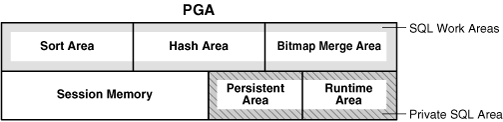
Not all of the PGA areas will exist in every case. PGA is subdivided into different areas.
– Session Memory: Also known as Stack Space (Session Memory).
– Private SQL Area:
This area holds information about a parsed SQL statement and other session specific information for processing for processing. When a server process executes SQL or PL/SQL code, the process uses the private SQL area to store bind variable values, query execution state information, and query execution work areas.
Private SQL Area is subdivided in to following parts:
Run-Time Area: This area contains query execution state information. For example, the run-time area tracks the number of rows retrieved so far in a full table scan.
Persistent Area: Area contains bind variable values.
– SQL Work Areas:
This area is a combination of Sort Area, Hash Area and Bitmap Merge Area. A sort operator uses the sort area to sort a set of rows. Similarly, a hash join operator uses a hash area to build a hash table from its left input, whereas a bitmap merge uses the bitmap merge area to merge data retrieved from scans of multiple bitmap indexes.
WORKAREA_SIZE_POLICY (AUTO | MANUAL) specifies the policy for sizing work areas. When set to Auto, Work areas used by memory-intensive operators (such as sort, group-by, hash-join, bitmap merge, & bitmap create) are sized automatically.
PGA_AGGREGATE_TARGET specifies the target aggregate PGA memory available to all server processes attached to the instance.
Setting PGA_AGGREGATE_TARGET to a nonzero value has the effect of automatically setting the WORKAREA_SIZE_POLICY parameter to AUTO. This means that SQL working areas used by memory-intensive SQL operators (such as sort, group-by, hash-join, bitmap merge, and bitmap create) will be automatically sized. A nonzero value for this parameter is the default since, unless you specify otherwise, Oracle sets it to 20% of the SGA or 10 MB, whichever is greater.
Setting PGA_AGGREGATE_TARGET to 0 automatically sets the WORKAREA_SIZE_POLICY parameter to MANUAL. This means that SQL workareas are sized using the *_AREA_SIZE parameters.
In below image, a pointer (Cursor) pointing towards ‘Private SQL Area’ to fetch information. The client process is responsible for managing private SQL areas.

* NOTE: For dedicated sessions, the UGA is a part of the RAM heap in the PGA that controls user sessions space for sorting and hash joins. If you are forced to use shared servers (the Multi-threaded Server or MTS) the UGA is inside the SGA large_pool_size region).
In sum, when using a dedicated connection, the User Global Area (UGA) supplements the PGA with additional memory for the user’s session, such as private SQL areas and other session-specific information such as sorting and session message queues.
………………………………………………………….
• UGA (User Global Area)
The UGA is session memory, which is memory allocated for session variables, such as logon information, and other information required by a database session. Essentially, the UGA stores the session state.

The UGA must be available to a database session for the life of the session. For this reason, the UGA cannot be stored in the PGA when using a shared server connection because the PGA is specific to a single process. Therefore, the UGA is stored in the SGA when using shared server connections, enabling any shared server process access to it. When using a dedicated server connection, the UGA is stored in the PGA.
UGA has following sections:
Session Variables –
OLAP Pool – This sessions opens automatically whenever a user queries a dimensional object like CUBE.
Posted in Basics | Tagged: Architecture | Leave a Comment »
Posted by FatDBA on April 19, 2013
Describing pre/post checklist and upgrade process details for upgrading a Oracle 10R2 or 11.2.0.1 to Oracle 11gR2(11.2.0.2/3)
Please check OS version as upgrade is only certified for RH 5.
cat /etc/red*
Red Hat Enterprise Linux Server release 5.4 (Tikanga)
**For 11.2.0.2.3, ensure RHEL is upgraded to 5.5 and above.
$ cat /etc/redhat-release
Red Hat Enterprise Linux Server release 5.5 (Tikanga)
**For 11.2.0.2.3, ensure ASM is upgraded to 11.2.0.3. (Check dir $ORA_CRS_HOME then cd .. then pwd)
Please ensure that 11.2.0.3.x86_64 is pushed on the box and tnsnames.ora and listener.ora are updated accordingly.
Verify all ET standards
* Index Placement
* DB User profile assignment
Need to install Oracle 11g using runinstaller.
Phase 1: PRE UPGRADE TASKS
Phase 2: UPGRADING THE DATABASE TO ORACLE 11G R2
Phase 3: POST UPGRADE TASKS.
Phase 1 : Pre upgrade tasks
Step 1 : Create the directory
mkdir preupgrade_bkup
Step 2 : Disable all the below jobs :
– All batch and cron jobs.
– Backup
– Archive removal and rotation
– Application jobs
– Stats collection job
– standby job at standby server and make sure all arch has been applied at DR/STANDBY server side.
Step 3 : Run the gather stats job
a) Gathering System Stats
exec dbms_stats.gather_schema_stats(‘SYS’);
b) Gathering Dictionary Stats
exec dbms_stats.gather_dictionary_stats;
c) Gathering all fixed objects stats (dynamic performance tables)
exec dbms_stats.gather_fixed_objects_stats;
d) Gathering Database Stats
exec dbms_stats.gather_database_stats(options => ‘GATHER AUTO’);
e) Run the stats for all the Application schemas :
exec DBMS_STATS.GATHER_SCHEMA_STATS(OWNNAME=>’OWNER’, ESTIMATE_PERCENT=>DBMS_STATS.AUTO_SAMPLE_SIZE, DEGREE=>DBMS_STATS.AUTO_DEGREE, CASCADE=>TRUE, OPTIONS=>’GATHER STALE’);
exec DBMS_STATS.GATHER_SCHEMA_STATS(OWNNAME=>’OWNER’, ESTIMATE_PERCENT=>DBMS_STATS.AUTO_SAMPLE_SIZE, DEGREE=>DBMS_STATS.AUTO_DEGREE, CASCADE=>TRUE);
Step 4 : Capture Database link information :
spool create_dblink.info
SELECT
‘create ‘||DECODE(U.NAME,’PUBLIC’,’public ‘)||’database link ‘||CHR(10)
||DECODE(U.NAME,’PUBLIC’,Null, U.NAME||’.’)|| L.NAME||chr(10)
||’connect to ‘ || L.USERID || ‘ identified by
||L.PASSWORD|| using || L.host || ‘
||chr(10)||’;’ TEXT
FROM sys.link$ L, sys.user$ U WHERE L.OWNER# = U.USER# ;
spool off
Step 5 : Create Pre-Upgrade BackupSET.
Run the database backup, be it RMAN (full not incremental) or hot backup whatever is configured in the environment.
Step 6: Verify Disk free space for archive mount point, we should have 15-20 gigs of space for arch (command to verify the space : df –h .)
Step 7 : Ensure no files need media recovery:
SQL> select * from v$recover_file;
no rows selected
*** Make sure currently no backup is running for the database, if yes then end backup using command.
SQL > Alter database end backup;
Database altered.
Step 7 : Verify DB version and installed options :
Ensure the properties for SYSTEM ,SYS user and database component status should be valid and default tablespace should be SYSTEM and SYSAUX respectively.
SQL> select username, default_tablespace from dba_users where username in (‘SYS’,’SYSTEM’);
=============================================================================================
SYS SYSTEM
SYSTEM SYSTEM
2 rows selected.
Database Components Information
select COMP_NAME, VERSION, status from dba_registry;
Database Patches Information
select ACTION_TIME, NAMESPACE, VERSION, COMMENTS, BUNDLE_SERIES from sys.registry$history Order by ACTION_TIME;
Database DST Information
col VERSION for 999
SELECT * FROM v$timezone_file;
Step 8: Purge the recyclebin :
PURGE DBA_RECYCLEBIN;
Step 9: Recompile invalid objects:
SQL>@?/rdbms/admin/utlrp.sql
Step 10 : Spool file before running upgrade tool :
SQL> spool pre_upgrade_database_details.log
SQL> @? /rdbms/admin/utlu112i.sql
SQL> spool off
Step 10: Stop the agent and listener :
emctl stop agent
lsnrctl stop <listener-name>
Step 11: Bring down the DB :
SQL>shutdown immediate;
Keeping in mind if the DB is an RAC change the CLUSTER_DATABASE=false
SQL> alter system set cluster_database = false scope = spfile;
Phase 2: Upgrading to Oracle Database 11g Release 2
[oracle]$ export ORACLE_HOME=/u01/app/oracle/oracle/product/product/11.1.0/db_1
[oracle]$ export PATH=$ORACLE_HOME/bin:$PATH
[oracle]$ export ORACLE_SID=orcl
[oracle]$ export TNS_ADMIN=$ORACLE_HOME/network/admin
connected to the database sys as sysdba
sqlplus “/ as sysdba” –> will be connected to idle instance
Step 1 : Create pfile (change compatible to 11.2.0.3) and start the instance using new pfile :
SQL > startup nomount;
Step 2: Create passwordfile
orapwd file=${ORACLE_HOME}/dbs/orapw${ORACLE_SID} password={password} entries =80 force=y
Step 3 : Upgrade the DB, upgrd.sql will take around 30 minutes to complete
SQL> spool $ET_INSTANCE_ROOT/bkup/upgrade/upgrade_to_11203.log
SQL> startup upgrade
SQL> @?/rdbms/admin/catupgrd.sql
SQL> startup
*** Can check the spool file for any errors …
Phase III: Post-Install Oracle Database 11gR2
Step 1: Verify Upgrade Status:
SQL> @?/rdbms/admin/utlu112s.sql .
Oracle Database 11.2 Post-Upgrade Status Tool 01-28-2011 10:45:32 .
Component Status Version HH:MM:SS .
Oracle Server . VALID 11.2.0.3.0 00:10:43
Gathering Statistics . 00:00:40 Total Upgrade Time: 00:12:03
PL/SQL procedure successfully completed.
Steps 2: Need to verify the components after the upgrade :
SQL >select COMP_NAME, VERSION, status from dba_registry;
SQL>select ACTION_TIME, NAMESPACE, VERSION, COMMENTS, BUNDLE_SERIES from sys.registry$history Order by ACTION_TIME;
SQL>SELECT * FROM v$timezone_file;
Step 3: Need to upgrade the timezone to 14
SQL>conn / as sysdba
SQL>shutdown immediate;
SQL>startup upgrade;
SQL> purge dba_recyclebin;
DBA Recyclebin purged.
SQL> TRUNCATE TABLE SYS.DST$TRIGGER_TABLE;
TRUNCATE TABLE sys.dst$affected_tables;
TRUNCATE TABLE sys.dst$error_table;
SQL> EXEC DBMS_DST.BEGIN_UPGRADE(11);
An upgrade window has been successfully started.
PL/SQL procedure successfully completed.
SQL> col value format a10
SQL> SELECT PROPERTY_NAME, SUBSTR(property_value, 1, 30) value FROM DATABASE_PROPERTIES WHERE PROPERTY_NAME LIKE ‘DST_%’ ORDER BY PROPERTY_NAME;
PROPERTY_NAME VALUE
—————————— ———-
DST_PRIMARY_TT_VERSION 11
DST_SECONDARY_TT_VERSION 7
DST_UPGRADE_STATE Upgrade
3 rows selected.
SQL> SELECT OWNER, TABLE_NAME, UPGRADE_IN_PROGRESS FROM ALL_TSTZ_TABLES where UPGRADE_IN_PROGRESS=’YES’;
no rows selected
SQL> EXEC DBMS_DST.BEGIN_UPGRADE(14);
An upgrade window has been successfully started.
SQL> SELECT PROPERTY_NAME, SUBSTR(property_value, 1, 30) value FROM DATABASE_PROPERTIES WHERE PROPERTY_NAME LIKE ‘DST_%’ ORDER BY PROPERTY_NAME;
PROPERTY_NAME VALUE —————————— ———- DST_PRIMARY_TT_VERSION 14 DST_SECONDARY_TT_VERSION 0 DST_UPGRADE_STATE NONE 3 rows selected.
SQL> select * from v$timezone_file;
FILENAME VERSION
——————– ———-
timezlrg_14.dat 14
Step 4: Verify invalid objects and compile them :
SQL>@?/rdbms/admin/utlrp.sql
Step 4: Start the database, agent, listner cleanly:
SQL> shutdown immediate
SQL> startup mount
SQL> alter system set cluster_database=TRUE scope=spfile; <— Only required for RAC
SQL> startup (If RAC, do it on both nodes)
lsnrctl start <listener-name>
Step 5: Run the gather statistics job again :
Step 6: Enable all the jobs which we commented before upgrade activity
Step 7 : Verify the database parameters.
Posted in Advanced | Tagged: migration, upgrade | Leave a Comment »
Posted by FatDBA on April 12, 2013
Noticed that some of my test databases monitored in OEM Grid Control started showing status of ‘Agent Unreachable’. This is what we are getting when we tried checking status of the Agent on the servers …
[oracle@prashant ~]$ emctl status dbconsole
OC4J Configuration issue. /u01/app/oracle/product/11.2.0/db_1/oc4j/j2ee/OC4J_DBConsole_prashant_orcl not found.
Below provided steps are sequence of steps that we should adopt in such scenario and will help us to fix the issue most of the times.
1. Set the SID
[oracle@prashant ~]$ echo $ORACLE_SID
orcl
2. Drop/Deconfig current EM repository.
This step will require you to feed deconfig process following details.
SID, Listener Port Number, SYS and SYSMAN Password.
[oracle@prashant ~]$ emca -deconfig dbcontrol db -repos drop;
STARTED EMCA at Apr 12, 2013 10:40:14 PM
EM Configuration Assistant, Version 11.2.0.0.2 Production
Copyright (c) 2003, 2005, Oracle. All rights reserved.
Enter the following information:
Database SID: orcl
Listener port number: 1521
Password for SYS user:
Password for SYSMAN user:
Do you wish to continue? [yes(Y)/no(N)]: Y
Apr 12, 2013 10:41:14 PM oracle.sysman.emcp.EMConfig perform
INFO: This operation is being logged at /u01/app/oracle/cfgtoollogs/emca/REDANT/emca_2013_04_12_22_40_14.log.
Apr 12, 2013 10:41:14 PM oracle.sysman.emcp.EMDBPreConfig performDeconfiguration
WARNING: EM is not configured for this database. No EM-specific actions can be performed.
Apr 12, 2013 10:41:14 PM oracle.sysman.emcp.ParamsManager checkListenerStatusForDBControl
WARNING: Error initializing SQL connection. SQL operations cannot be performed
Apr 12, 2013 10:41:14 PM oracle.sysman.emcp.EMReposConfig invoke
INFO: Dropping the EM repository (this may take a while) …
Apr 12, 2013 10:45:42 PM oracle.sysman.emcp.EMReposConfig invoke
INFO: Repository successfully dropped
Enterprise Manager configuration completed successfully
FINISHED EMCA at Apr 12, 2013 10:45:43 PM
3. Recreate EM repository for the same DB.
This step will require you to feed config process following details.
SID, Listener Port Number, Email address (Optional), SMTP server details (Optional) along with SYS and DBSNMP and SYSMAN Password.
[oracle@prashant ~]$ emca -config dbcontrol db -repos create;
STARTED EMCA at Apr 12, 2013 10:46:17 PM
EM Configuration Assistant, Version 11.2.0.0.2 Production
Copyright (c) 2003, 2005, Oracle. All rights reserved.
Enter the following information:
Database SID: orcl
Listener port number: 1521
Listener ORACLE_HOME [ /u01/app/oracle/product/11.2.0/db_1 ]:
Password for SYS user:
Password for DBSNMP user:
Password for SYSMAN user:
Email address for notifications (optional):
Outgoing Mail (SMTP) server for notifications (optional):
—————————————————————–
You have specified the following settings
Database ORACLE_HOME ……………. /u01/app/oracle/product/11.2.0/db_1
Local hostname ……………. prashant
Listener ORACLE_HOME ……………. /u01/app/oracle/product/11.2.0/db_1
Listener port number ……………. 1521
Database SID ……………. orcl
Email address for notifications ……………
Outgoing Mail (SMTP) server for notifications ……………
—————————————————————–
Do you wish to continue? [yes(Y)/no(N)]:
Apr 12, 2013 10:46:59 PM oracle.sysman.emcp.EMConfig perform
INFO: This operation is being logged at /u01/app/oracle/cfgtoollogs/emca/REDANT/emca_2013_04_12_22_46_16.log.
Apr 12, 2013 10:47:00 PM oracle.sysman.emcp.EMReposConfig createRepository
INFO: Creating the EM repository (this may take a while) …
Apr 12, 2013 10:54:15 PM oracle.sysman.emcp.EMReposConfig invoke
INFO: Repository successfully created
Apr 12, 2013 10:54:28 PM oracle.sysman.emcp.EMReposConfig uploadConfigDataToRepository
INFO: Uploading configuration data to EM repository (this may take a while) …
Apr 12, 2013 10:55:43 PM oracle.sysman.emcp.EMReposConfig invoke
INFO: Uploaded configuration data successfully
Apr 12, 2013 10:55:47 PM oracle.sysman.emcp.util.DBControlUtil configureSoftwareLib
INFO: Software library configured successfully.
Apr 12, 2013 10:55:47 PM oracle.sysman.emcp.EMDBPostConfig configureSoftwareLibrary
INFO: Deploying Provisioning archives …
Apr 12, 2013 10:56:06 PM oracle.sysman.emcp.EMDBPostConfig configureSoftwareLibrary
INFO: Provisioning archives deployed successfully.
Apr 12, 2013 10:56:06 PM oracle.sysman.emcp.util.DBControlUtil secureDBConsole
INFO: Securing Database Control (this may take a while) …
Apr 12, 2013 10:56:40 PM oracle.sysman.emcp.util.DBControlUtil secureDBConsole
INFO: Database Control secured successfully.
Apr 12, 2013 10:56:40 PM oracle.sysman.emcp.util.DBControlUtil startOMS
INFO: Starting Database Control (this may take a while) …
Apr 12, 2013 10:57:23 PM oracle.sysman.emcp.EMDBPostConfig performConfiguration
INFO: Database Control started successfully
Apr 12, 2013 10:57:23 PM oracle.sysman.emcp.EMDBPostConfig performConfiguration
INFO: >>>>>>>>>>> The Database Control URL is https://prashant:5500/em <<<<<<<<<<<
Apr 12, 2013 10:57:32 PM oracle.sysman.emcp.EMDBPostConfig invoke
WARNING:
************************ WARNING ************************
Management Repository has been placed in secure mode wherein Enterprise Manager data will be encrypted. The encryption key has been placed in the file: /u01/app/oracle/product/11.2.0/db_1/prashant_REDANT/sysman/config/emkey.ora. Please ensure this file is backed up as the encrypted data will become unusable if this file is lost.
***********************************************************
Enterprise Manager configuration completed successfully
4. Re-check the Status using EMCTL commands for both Dbconsole & Agent.
[oracle@prashant ~]$ emctl status dbconsole
Oracle Enterprise Manager 11g Database Control Release 11.2.0.1.0
Copyright (c) 1996, 2009 Oracle Corporation. All rights reserved.
https://prashant:5500/em/console/aboutApplication
Oracle Enterprise Manager 11g is running.
——————————————————————
Logs are generated in directory /u01/app/oracle/product/11.2.0/db_1/prashant_REDANT/sysman/log
[oracle@prashant ~]$ emctl status agent
Oracle Enterprise Manager 11g Database Control Release 11.2.0.1.0
Copyright (c) 1996, 2009 Oracle Corporation. All rights reserved.
—————————————————————
Agent Version : 10.2.0.4.2
OMS Version : 10.2.0.4.2
Protocol Version : 10.2.0.4.2
Agent Home : /u01/app/oracle/product/11.2.0/db_1/prashant_REDANT
Agent binaries : /u01/app/oracle/product/11.2.0/db_1
Agent Process ID : 26794
Parent Process ID : 26757
Agent URL : https://prashant:3938/emd/main
Repository URL : https://prashant:5500/em/upload/
Started at : 2013-04-12 22:56:42
Started by user : oracle
Last Reload : 2013-04-12 22:56:42
Last successful upload : 2013-04-12 22:58:34
Total Megabytes of XML files uploaded so far : 10.04
Number of XML files pending upload : 0
Size of XML files pending upload(MB) : 0.00
Available disk space on upload filesystem : 26.87%
Data channel upload directory : /u01/app/oracle/product/11.2.0/db_1/prashant_REDANT/sysman/recv
Last successful heartbeat to OMS : 2013-04-12 22:58:24
—————————————————————
Agent is Running and Ready
OEM Final screen is up!

Posted in Advanced | Tagged: Errors, OEM | Leave a Comment »
Posted by FatDBA on April 4, 2013
Below provided is the sample ADDM (Automatic Database Diagnostic Monitor) from one of my Test Database. Before that i would like to explain what is this ADDM and it’s advantages:
To view in more efficient way, click the Link: My ADDM (Sample) Report.txt – Notepad
The Automatic Database Diagnostic Monitor (ADDM) analyzes data in the Automatic Workload Repository (AWR) to identify potential performance bottlenecks. For each of the identified issues it locates the root cause and provides recommendations for correcting the problem. An ADDM analysis task is performed and its findings and recommendations stored in the database every time an AWR snapshot is taken provided the STATISTICS_LEVEL parameter is set to TYPICAL or ALL. The ADDM analysis includes the following.
ADDM Report for Task ‘TASK_964’
——————————-
Analysis Period
—————
AWR snapshot range from 99 to 105.
Time period starts at 03-APR-13 07.08.18 PM
Time period ends at 04-APR-13 07.20.18 PM
Analysis Target
—————
Database ‘REDANT’ with DB ID 629811920.
Database version 11.2.0.1.0.
ADDM performed an analysis of instance orcl, numbered 1 and hosted at
prashant.
Activity During the Analysis Period
———————————–
Total database time was 452 seconds.
The average number of active sessions was .01.
Summary of Findings
——————-
Description Active Sessions Recommendations
Percent of Activity
———————————– ——————- —————
1 I/O Throughput .01 | 100 3
2 Undersized instance memory 0 | 7.75 1
3 Hard Parse Due to Invalidations 0 | 5.3 1
4 “Other” Wait Class 0 | 4.95 0
5 Commits and Rollbacks 0 | 4.14 1
6 PL/SQL Compilation 0 | 4.05 1
7 Checkpoints Due to MTTR 0 | 3.44 1
8 Checkpoints Due to DROP or TRUNCATE 0 | 3 0
9 Hard Parse Due to Sharing Criteria 0 | 2.14 1
~~~~~~~~~~~~~~~~~~~~~~~~~~~~~~~~~~~~~~~~~~~~~~~~~~~~~~~~~~~~~~~~~~~~~~~~~~~~~~
~~~~~~~~~~~~~~~~~~~~~~~~~~~~~~~~~~~~~~~~~~~~~~~~~~~~~~~~~~~~~~~~~~~~~~~~~~~~~~
Findings and Recommendations
—————————-
Finding 1: I/O Throughput
Impact is .01 active sessions, 100% of total activity.
——————————————————
The throughput of the I/O subsystem was significantly lower than expected.
Recommendation 1: Host Configuration
Estimated benefit is .01 active sessions, 100% of total activity.
—————————————————————–
Action
Consider increasing the throughput of the I/O subsystem. Oracle’s
recommended solution is to stripe all data files using the SAME
methodology. You might also need to increase the number of disks for
better performance.
Rationale
During the analysis period, the average data files’ I/O throughput was
14 K per second for reads and 3.2 K per second for writes. The average
response time for single block reads was 14 milliseconds.
Recommendation 2: Host Configuration
Estimated benefit is .01 active sessions, 100% of total activity.
—————————————————————–
Action
Consider slowing down RMAN or Data Pump activity, or scheduling these
jobs when user activity is lower.
Rationale
The I/O throughput on data and temp files was divided as follows: 0% by
RMAN, 29% by Data Pump, 0% by Recovery and 70% by all other activity.
Recommendation 3: Host Configuration
Estimated benefit is .01 active sessions, 100% of total activity.
—————————————————————–
Action
The performance of some data and temp files was significantly worse than
others. If striping all files using the SAME methodology is not
possible, consider striping these file over multiple disks.
Rationale
For file /u01/app/oracle/oradata/orcl/sysaux01.dbf, the average response
time for single block reads was 132 milliseconds, and the total excess
I/O wait was 479 seconds.
Related Object
Database file
“/u01/app/oracle/oradata/orcl/sysaux01.dbf”
Symptoms That Led to the Finding:
———————————
Wait class “User I/O” was consuming significant database time.
Impact is 0 active sessions, 19.25% of total activity.
Finding 2: Undersized instance memory
Impact is 0 active sessions, 7.75% of total activity.
—————————————————–
The Oracle instance memory (SGA and PGA) was inadequately sized, causing
additional I/O and CPU usage.
The value of parameter “memory_target” was “500 M” during the analysis period.
Recommendation 1: Database Configuration
Estimated benefit is 0 active sessions, 7.75% of total activity.
—————————————————————-
Action
Increase memory allocated to the instance by setting the parameter
“memory_target” to 875 M.
Symptoms That Led to the Finding:
———————————
Hard parsing of SQL statements was consuming significant database time.
Impact is 0 active sessions, 20.38% of total activity.
Contention for latches related to the shared pool was consuming
significant database time.
Impact is 0 active sessions, 2.69% of total activity.
Wait class “Concurrency” was consuming significant database time.
Impact is 0 active sessions, 2.94% of total activity.
Wait class “User I/O” was consuming significant database time.
Impact is 0 active sessions, 19.25% of total activity.
Finding 3: Hard Parse Due to In-validations
Impact is 0 active sessions, 5.3% of total activity.
—————————————————-
Cursors were getting invalidated due to DDL operations. This resulted in
additional hard parses which were consuming significant database time.
Recommendation 1: Application Analysis
Estimated benefit is 0 active sessions, 5.3% of total activity.
—————————————————————
Action
Investigate appropriateness of DDL operations.
Symptoms That Led to the Finding:
———————————
Hard parsing of SQL statements was consuming significant database time.
Impact is 0 active sessions, 20.38% of total activity.
Contention for latches related to the shared pool was consuming
significant database time.
Impact is 0 active sessions, 2.69% of total activity.
Wait class “Concurrency” was consuming significant database time.
Impact is 0 active sessions, 2.94% of total activity.
Finding 4: “Other” Wait Class
Impact is 0 active sessions, 4.95% of total activity.
—————————————————–
Wait class “Other” was consuming significant database time.
Database latches in the “Other” wait class were not consuming significant
database time.
No recommendations are available.
Finding 5: Commits and Rollbacks
Impact is 0 active sessions, 4.14% of total activity.
—————————————————–
Waits on event “log file sync” while performing COMMIT and ROLLBACK operations
were consuming significant database time.
Recommendation 1: Host Configuration
Estimated benefit is 0 active sessions, 4.14% of total activity.
—————————————————————-
Action
Investigate the possibility of improving the performance of I/O to the
online redo log files.
Rationale
The average size of writes to the online redo log files was 6 K and the
average time per write was 3 milliseconds.
Rationale
The total I/O throughput on redo log files was 1.3 K per second for
reads and 1.5 K per second for writes.
Rationale
The redo log I/O throughput was divided as follows: 0% by RMAN and
recovery, 52% by Log Writer, 0% by Archiver, 0% by Streams AQ and 47% by
all other activity.
Symptoms That Led to the Finding:
———————————
Wait class “Commit” was consuming significant database time.
Impact is 0 active sessions, 4.14% of total activity.
Finding 6: PL/SQL Compilation
Impact is 0 active sessions, 4.05% of total activity.
—————————————————–
PL/SQL compilation consumed significant database time.
Recommendation 1: Application Analysis
Estimated benefit is 0 active sessions, 4.05% of total activity.
—————————————————————-
Action
Investigate the appropriateness of PL/SQL compilation. PL/SQL
compilation can be caused by DDL on dependent objects.
Finding 7: Checkpoints Due to MTTR
Impact is 0 active sessions, 3.44% of total activity.
—————————————————–
Buffer cache writes due to setting of the obsolete parameters
“fast_start_io_target”, “log_checkpoint_interval” and “log_checkpoint_timeout”
were consuming significant database time.
Recommendation 1: Database Configuration
Estimated benefit is 0 active sessions, 3.44% of total activity.
—————————————————————-
Action
Oracle’s recommended solution is to control MTTR setting using the
“fast_start_mttr_target” parameter instead of the
“fast_start_io_target”, “log_checkpoint_interval” and
“log_checkpoint_timeout” parameters.
Symptoms That Led to the Finding:
———————————
The throughput of the I/O subsystem was significantly lower than
expected.
Impact is .01 active sessions, 100% of total activity.
Wait class “User I/O” was consuming significant database time.
Impact is 0 active sessions, 19.25% of total activity.
Finding 8: Checkpoints Due to DROP or TRUNCATE
Impact is 0 active sessions, 3% of total activity.
————————————————–
Buffer cache writes due to DROP and TRUNCATE operations had a significant
impact on the throughput of the I/O subsystem.
No recommendations are available.
Symptoms That Led to the Finding:
———————————
The throughput of the I/O subsystem was significantly lower than
expected.
Impact is .01 active sessions, 100% of total activity.
Wait class “User I/O” was consuming significant database time.
Impact is 0 active sessions, 19.25% of total activity.
Wait class “Application” was consuming significant database time.
Impact is 0 active sessions, 3.8% of total activity.
Finding 9: Hard Parse Due to Sharing Criteria
Impact is 0 active sessions, 2.14% of total activity.
—————————————————–
SQL statements with the same text were not shared because of cursor
environment mismatch. This resulted in additional hard parses which were
consuming significant database time.
Common causes of environment mismatch are session NLS settings, SQL trace
settings and optimizer parameters.
Recommendation 1: Application Analysis
Estimated benefit is 0 active sessions, 2.14% of total activity.
—————————————————————-
Action
Look for top reason for cursor environment mismatch in
V$SQL_SHARED_CURSOR.
Symptoms That Led to the Finding:
———————————
Hard parsing of SQL statements was consuming significant database time.
Impact is 0 active sessions, 20.38% of total activity.
Contention for latches related to the shared pool was consuming
significant database time.
Impact is 0 active sessions, 2.69% of total activity.
Wait class “Concurrency” was consuming significant database time.
Impact is 0 active sessions, 2.94% of total activity.
~~~~~~~~~~~~~~~~~~~~~~~~~~~~~~~~~~~~~~~~~~~~~~~~~~~~~~~~~~~~~~~~~~~~~~~~~~~~~~
~~~~~~~~~~~~~~~~~~~~~~~~~~~~~~~~~~~~~~~~~~~~~~~~~~~~~~~~~~~~~~~~~~~~~~~~~~~~~~
Additional Information
———————-
Miscellaneous Information
————————-
Wait class “Configuration” was not consuming significant database time.
CPU was not a bottleneck for the instance.
Wait class “Network” was not consuming significant database time.
Session connect and disconnect calls were not consuming significant database
time.
The database’s maintenance windows were active during 23% of the analysis
period.
End of Report
Report written to addmrpt_1_99_105.txt
SQL> !
[oracle@prashant ~]$ ls
addmrpt_1_99_105.txt Desktop on.lst
[oracle@prashant ~]$ vi addmrpt_1_99_105.txt
Wait class “Application” was consuming significant database time.
Impact is 0 active sessions, 3.8% of total activity.
Finding 9: Hard Parse Due to Sharing Criteria
Impact is 0 active sessions, 2.14% of total activity.
—————————————————–
SQL statements with the same text were not shared because of cursor
environment mismatch. This resulted in additional hard parses which were
consuming significant database time.
Common causes of environment mismatch are session NLS settings, SQL trace
settings and optimizer parameters.
Recommendation 1: Application Analysis
Estimated benefit is 0 active sessions, 2.14% of total activity.
—————————————————————-
Action
Look for top reason for cursor environment mismatch in
V$SQL_SHARED_CURSOR.
Symptoms That Led to the Finding:
———————————
Hard parsing of SQL statements was consuming significant database time.
Impact is 0 active sessions, 20.38% of total activity.
Contention for latches related to the shared pool was consuming
significant database time.
Impact is 0 active sessions, 2.69% of total activity.
Wait class “Concurrency” was consuming significant database time.
Impact is 0 active sessions, 2.94% of total activity.
~~~~~~~~~~~~~~~~~~~~~~~~~~~~~~~~~~~~~~~~~~~~~~~~~~~~~~~~~~~~~~~~~~~~~~~~~~~~~~
~~~~~~~~~~~~~~~~~~~~~~~~~~~~~~~~~~~~~~~~~~~~~~~~~~~~~~~~~~~~~~~~~~~~~~~~~~~~~~
Additional Information
———————-
Miscellaneous Information
————————-
Wait class “Configuration” was not consuming significant database time.
CPU was not a bottleneck for the instance.
Wait class “Network” was not consuming significant database time.
Session connect and disconnect calls were not consuming significant database
time.
The database’s maintenance windows were active during 23% of the analysis
period.
Posted in Advanced | Tagged: Tuning | 1 Comment »
Posted by FatDBA on March 29, 2013
What is a Catbundle.sql script and it’s purpose after patching (Part of PSU Post-Patching) ?
Before asnwering about the role or importance of catbundle.sql script i would like to explain about what a database bundle is.
– A database bundle series is a sequence of patches where each patch in the series includes the contents of the previous patch in the series.
Installation of the database changes is done by catbundle.sql, which takes input from an XML file named bundledata_<bundle series>.xml.
catbundle.sql determines the last bundle applied to the database and executes only the scripts in the patch that have changed since the last bundle patch was applied.
Opatch tool replaces software files but does not modify database catalog. Applying a patch set update requires modifying the catalog. There is an sql script file named “catbundle.sql” under “$ORACLE_HOME/rdbms/admin” directory. Execute that script as sysdba to make necessary modification to the catalog.
* Patch your ORACLE_HOME before you start and execute the catbundle script.
Once done follow below provided steps if patching (PSU Track).
$ cd $ORACLE_HOME/rdbms/admin
$ sqlplus / as sysdba
sql>@catbundle.sql psu apply
Once you’ve executed the catbundle.sql means your database is fully patched.
– PrashAnt Dixit
Posted in Advanced | Tagged: Patching | 1 Comment »
Posted by FatDBA on March 16, 2013
Patching
A patch is a piece of software designed to fix problems with, or update a computer program or its supporting data. This includes fixing security vulnerabilities and other bugs, and improving the usability or performance. Oracle Database suffers from these problems as well, hence patching is an important DBA activity that is performed by any administrator on a frequent basis. The method of applying patches on database is known as Patching.
Types of Patches:
Upgrade Patches: Patches released by Oracle to upgrade databases. Like which takes your database from 10.2.0.1 to 10.2.0.4
CPU Patches: Critical Patch Update, quarterly delivered to fix security issues.
PSU Patches: PatchSet Update, also quarterly delivered, it includes CPU and a bunch of other one-off patches. First time introduced on 14th July 2009 by Oracle. Hence PSU = CPU + OneOff
One-Off Patches: One-off patch is single fix patch, to fix a particular issue.
* Both CPU & PSU are released on a predictable time or schedule. specifically the Tuesday closest to the 15th of January, April, July, and October.
* Although you can opt between PSU & CPU but it is always recommended that you choose CPU track.
* Once a PSU has been installed, the recommended way to get future security content is to apply subsequent PSUs. Reverting from PSU back to CPU, while possible, would require significant effort, and so is not advised.
Opatch is the built-in tool provided by Oracle. Resides in ORACLE_HOME/Opatch directory is the most trusted tool to apply almost all types of patches.
There are various Flags or options available in Opatch to apply patches in different scenarios.
-all_nodes: If want to apply/rollback/lsinventory (Check) on different nodes e.g in a RAC environment, use all_node option.
-force: If a conflict exist which prevents the patch from being applied, the -force flag can be used to apply the patch. OPatch will remove all the conflicting patches before applying the current patch.
-idfile: The input file which contains list of all patches seperated by commas or white spaces.
-invPtrLoc: used to locate orainst.loc file. In inventory oracle keep the detail of installed products in all oracle homes on the server, orainst.loc provides that list of installed products.
e.g $ opatch lsinventory -InvPtrLoc /oracle/TEST/product/9.2.0/oraInst.loc
Contents of oraInst.loc file:
inventory_loc=/u01/app/oraInventory
inst_group=oinstall
-jre: This option tells Opatch to use JRE (java) from specified location instead of the default location under Oracle Home.
-local: Patch the local node, then update the inventory of the local node. Do not pass the patch or inventory update to other nodes.
-local_node: This option can be used to specify to OPatch the local node name to be used for RAC mode application of the patch.
-no_inventory: Bypass the inventory for reading and updates.
– no_relink: option does not perform any ‘apply’ operations. This option can be used during multiple patch. This performs the linking step only once.
-no_sysmod: Option specifies not to update the files in the system. It just updates the inventory. It also not execute the pre and post scripts.
-phBaseFile: IF <patch_location> is not specified, use this option to point Optach to a file containing a list of patches to be n-applied.
-ocmrf: Give Opatch the absolute path to the OCM response file to be used for OCM configuration. OCM can collect the configuration of your servers and send it to Oracle support. Oracle support staff will use it when you open a service request. With OCM, you’ll get better and faster response from Oracle support. You can also view your configuration on metalink. Oracle can suggest you updates or patches according to your configuration.Although it is useful, using OCM is not mandatory. You can still get support from Oracle without OCM. However, during patching, opatch utility may ask for an OCM response file.
To create OCMRF File — Opatch utility ships with a script file named “emocmrsp” which is used for creating a response file. “emocmrsp” script will ask your metalink account information and your internet connection information and store it in a response file named “ocm.rsp”.
-post: This option is used to pass parameters to the post script. This script is executed after application of the patch. The value for this option have to be enclosed in double quotes. The parameters will be common parameters which will be passed to post scripts of all patches being applied.
This option should be ended by option ‘opatch_post_end’.
-pre: This option is used to pass parameters to the pre script. This script is executed before application of the patch. The value for this option have to be enclosed in double quotes. The parameters will be common parameters which will be passed to pre scripts of all patches being applied. This option should be ended by option ‘opatch_pre_end’.
-report: Prints out the actions without executing.
-retry: Tells OPatch how many times it should retry in case of an inventory lock failure.
-runsql: This options commands OPatch to run sql scripts and procedures if they are present in the given patch.
-silent: This supresses any user inteeractions.
-sqlScript: Option used to specify the custom sql script to be run by OPatch after patching is completed.
-verbose: This option prints more OPatch output to the screen as well as to the log file.
-oh: Oracle Home e.g. ./opatch lsinventory -oh /u01/app/grid/11.2.0.2/
-och: Oracle Clusterware Home (Path to CRS Home)
| Command | Description | Syntax (Examples) |
| apply | Installs an interim patch. The apply command applies an interim patch to a specified Oracle home. The ORACLE_HOME environment variable must be set to the Oracle home to be patched. | opatch apply [-force] [-invPtrLoc (path)] [-oh] [-patch_location] |
| napply | Installs n number of patches (hence napply). This command applies interim patches to several Oracle homes at the same time. | opatch napply <patch_location> -id 1,2,3 |
| auto | Applies Oracle Clusterware patches. (For RAC systems) | — |
| lsinventory | Lists what is currently installed on the system. | opatch lsinventory -detail: opatch lsinventory -bugs_fixed asc: |
| query | The query command queries a specific patch for specific details. It provides information about the patch and the system being patched. | opatch query [-all] [patch_location] … |
| rollback | The rollback command removes a specific interim patch from the appropriate Oracle home directory. | opatch rollback -id (patch_id) [-ph (patch directory)] |
| version | Prints the current version of the patch tool. | opatch version |
Posted in Advanced | Tagged: Patching | Leave a Comment »
 Tales From A Lazy Fat DBA