Tales From A Lazy Fat DBA

Its all about Databases, their performance, troubleshooting & much more …. ¯\_(ツ)_/¯

Database Version Details

Posted by FatDBA on July 14, 2012

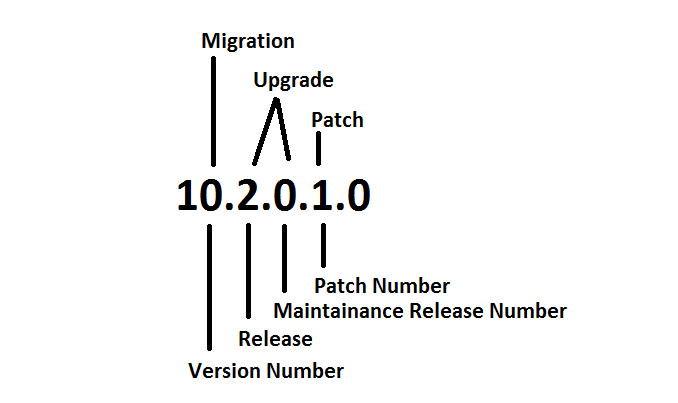
Below provided image is descriptive enough to explain the details of a Database Version.

Notes: Texts on the top of the number defined the name of the process/activity and below are the standard names. Last number in the range is shands for “Platform Specific Release Number” eg. the last zero out of 10.2.0.1.0

Posted in Basics | Tagged: , | 2 Comments »

Master Table – Data Pump Jobs

Posted by FatDBA on July 14, 2012

What is a Master Table & what’s the significance or importance of  it during a Data Pump Job ?

At the heart of the Data Pump operation is the Master Table.  This table is created at the beginning of a Data Pump operation and is dropped at the end of the successful completion of a Data Pump operation. The Master Table can also be dropped if the job is killed using the kill_job interactive command. If a job is stopped using the stop_job interactive command or if the job is terminated unexpectedly, the Master Table will be retained.
The Master Table is used to track the detailed progress information of a Data Pump job:

* The current set of dump files.
* The current state of every object exported or imported and their locations in the dump file set.
* The job’s user-supplied parameters.
* The status of every worker process.
* The state of current job status and restart information.

The Master Table is created in the schema of the current user running the Pump Dump export or import, and it keeps tracks of lots of detailed information.  As a result, this table can take up a significant amount of storage space.

[oracle@localhost /]$ expdp larry/champion tables=etr,orders directory=dpump

Export: Release 10.2.0.1.0 – Production on Tuesday, 01 May, 2012 23:27:46

Copyright (c) 2003, 2005, Oracle.  All rights reserved.

Connected to: Oracle Database 10g Enterprise Edition Release 10.2.0.1.0 – Production
With the Partitioning, OLAP and Data Mining options
Starting “LARRY”.”SYS_EXPORT_TABLE_01″:  larry/******** tables=etr,orders directory=dpump dumpfile=test.dmp logfile=testlog.log content=all
Estimate in progress using BLOCKS method…
Processing object type TABLE_EXPORT/TABLE/TABLE_DATA
Total estimation using BLOCKS method: 128 KB
Processing object type TABLE_EXPORT/TABLE/TABLE
Processing object type TABLE_EXPORT/TABLE/INDEX/INDEX
Processing object type TABLE_EXPORT/TABLE/INDEX/STATISTICS/INDEX_STATISTICS
Processing object type TABLE_EXPORT/TABLE/STATISTICS/TABLE_STATISTICS
. . exported “LARRY”.”ETR”                            5.648 KB       7 rows
. . exported “LARRY”.”ORDERS”                            5.734 KB       5 rows
Master table “LARRY”.”SYS_EXPORT_TABLE_01″ successfully loaded/unloaded
******************************************************************************
Dump file set for LARRY.SYS_EXPORT_TABLE_01 is:
/u01/app/oracle/oradata/test.dmp
Job “LARRY”.”SYS_EXPORT_TABLE_01″ successfully completed at 23:27:51

Example: As highlighted in Bold the Master Table is successfully loaded and unloaded at the end of the Data Pump Job. Created in the same schema (Larry) which initiated the DP job as underlined created by the name of: SYS_EXPORT_TABLE_01

Let the Red Prevail …
Prashant D

Posted in Advanced | Tagged: , , | 2 Comments »

Oracle Background Processes Explained – (10-07-2012)

Posted by FatDBA on July 10, 2012

Background Process Explained-
==========================================

[oracle@prashant1 2012_09_04]$ ps -ef | grep qrcl
oracle    3219  3176  0 20:31 pts/2    00:00:00 tail -f /u01/app/oracle/admin/qrcl/bdump/alert_qrcl.log
oracle    3545     1  0 20:43 ?        00:00:00 ora_pmon_qrcl
oracle    3547     1  0 20:43 ?        00:00:00 ora_psp0_qrcl
oracle    3549     1  0 20:43 ?        00:00:00 ora_mman_qrcl
oracle    3551     1  0 20:43 ?        00:00:00 ora_dbw0_qrcl
oracle    3553     1  0 20:43 ?        00:00:00 ora_lgwr_qrcl
oracle    3555     1  0 20:43 ?        00:00:00 ora_ckpt_qrcl
oracle    3557     1  0 20:43 ?        00:00:00 ora_smon_qrcl
oracle    3559     1  0 20:43 ?        00:00:00 ora_reco_qrcl
oracle    3561     1  0 20:43 ?        00:00:00 ora_cjq0_qrcl
oracle    3563     1  0 20:43 ?        00:00:00 ora_mmon_qrcl
oracle    3565     1  0 20:43 ?        00:00:00 ora_mmnl_qrcl
oracle    3567     1  0 20:43 ?        00:00:00 ora_d000_qrcl
oracle    3569     1  0 20:43 ?        00:00:00 ora_s000_qrcl
oracle    3573     1  0 20:43 ?        00:00:00 ora_arc0_qrcl
oracle    3575     1  0 20:43 ?        00:00:00 ora_arc1_qrcl
oracle    3579     1  0 20:43 ?        00:00:00 ora_qmnc_qrcl
oracle    3585     1  0 20:44 ?        00:00:00 ora_j000_qrcl
oracle    3589     1  0 20:44 ?        00:00:00 ora_q000_qrcl
oracle    3591     1  0 20:44 ?        00:00:00 ora_q001_qrcl
oracle    4137     1  0 21:05 ?        00:00:00 ora_q002_qrcl
oracle    4162  2694  0 21:06 pts/1    00:00:00 grep qrcl
[oracle@prashant1 2012_09_04]$

SMON :– SMON (System MONitor) is an Oracle background process created when you start a database instance. The SMON process performs instance recovery, cleans up after dirty shutdowns and coalesces adjacent free extents into larger free extents.  SMON wakes up every 5 minutes to perform housekeeping activities. SMON must always be running for an instance. If not, the instance will terminate.

$ ps -ef | grep smon
oracle   31144     1  0 11:10 ?        00:00:00 ora_smon_orcl

PMON (Process MONitor) is an Oracle background process created when you start a database instance. The PMON process will free up resources if a user process fails (eg. release database locks).
PMON is responsible to help listeners to determine if database service and it’s service handlers (Dispatchers) are available through registration.
During registration process PMON provides information like:
– Name of the database service provided by the database
– Service handlers (Dispatchers) available for the instance, including their type, protocol   address and current load details.

PMON normally wakes up every 3 seconds to perform its housekeeping activities. PMON must always be running for an instance. If not, the instance will terminate.
To speed-up housekeeping, one may also wake-up PMON (process 2 below) manually

SQL> oradebug setmypid
SQL> oradebug wakeup 2

MMON (Memory Monitor) is a background process that gathers memory statistics (snapshots) stores this information in the AWR (automatic workload repository). MMON is also responsible for issuing alerts for metrics that exceed their thresholds.  This process was introduced in Oracle 10g.

MMAN (Memory Manager) is a background process that manages the dynamic resizing of SGA memory areas as the workload increases or decreases.
This process was introduced in Oracle 10g.

ARCH (Oracle’s ARCHiver Process) is an Oracle background process created when you start an instance in ARCHIVE LOG MODE. The ARCH process will archive on-line redo log files to an archive destination, typically a directory on the database sever.

DBWR (DataBase WRiter) is an Oracle background process created when you start a database instance. The DBWR writes data from the SGA to the Oracle database files. When the SGA buffer cache fills the DBWR process selects buffers using an LRU algorithm and writes them to disk. From Dirty buffers to Data Files.

LGWR (LoG WRiter) is an Oracle background process created when you start a database instance. The LGWR writes the redo log buffers to the on-line redo log files. If the on-line redo log files are mirrored, all the members of the group will be written out simultaneously.

CKPT (Oracle Checkpoint Process) is an Oracle background process that timestamps all datafiles and control files to indicate that a checkpoint has occurred.
The ckeckpoint process was optional in Oracle 7 (set CHECKPOINT_PROCESS=TRUE) and could be enabled to speed-up checkpointing on databases with a large number of files. Starting with Oracle 8i, the checkpoint process is automatically started with the other Oracle processes at instance startup.

d000 (Dispatchers): Dispatchers are optional background processes, present only when the shared server configuration is used.

QMNC: A queue monitor process which monitors the message queues. Used by Oracle Streams Advanced Queuing.

MMNL Performs frequent and light-weight manageability-related tasks, such as session history capture and metrics computation.
Server Process (Not part of standard Oracle Architecutre) – Writes the data blocks from data file to DB Buffer Cache.

Oracle 11g Architecture (View Online)

Posted in Basics | Tagged: | Leave a Comment »

What is a Control File ?

Posted by FatDBA on July 10, 2012

What is a Control File ?
Every Oracle Database has a control file, which is a small binary file that records the physical structure of the database. The control file includes:

  • The database name
  • Names and locations of associated datafiles and redo log files
  • The timestamp of the database creation
  • The current log sequence number
  • Checkpoint information

The control file must be available for writing by the Oracle Database server whenever the database is open. Without the control file, the database cannot be mounted and recovery is difficult.

The control file of an Oracle Database is created at the same time as the database. By default, at least one copy of the control file is created during database creation. On some operating systems the default is to create multiple copies. You should create two or more copies of the control file during database creation. You can also create control files later, if you lose control files or want to change particular settings in the control files.

Backing it up in a binary format:
alter database backup controlfile to ‘/some/arbitrary/path’;
alter database backup controlfile to ‘/some/arbitrary/path’ reuse;

Backing it up in a human readable format:
alter database backup controlfile to trace;
alter database backup controlfile to trace as ‘/some/arbitrary/path’;
alter database backup controlfile to trace as ‘/some/arbitrary/path’ reuse;

Inside of a Control File (Contents):


STARTUP NOMOUNT
CREATE CONTROLFILE REUSE DATABASE “ORCL” NORESETLOGS  ARCHIVELOG
MAXLOGFILES 16
MAXLOGMEMBERS 3
MAXDATAFILES 100
MAXINSTANCES 8
MAXLOGHISTORY 292
LOGFILE
GROUP 1 ‘/u01/app/oracle/oradata/orcl/redo01.log’  SIZE 50M,
GROUP 2 ‘/u01/app/oracle/oradata/orcl/redo02.log’  SIZE 50M,
GROUP 3 ‘/u01/app/oracle/oradata/orcl/redo03.log’  SIZE 50M
— STANDBY LOGFILEDATAFILE
‘/u01/app/oracle/oradata/orcl/system01.dbf’,
‘/u01/app/oracle/oradata/orcl/undotbs01.dbf’,
‘/u01/app/oracle/oradata/orcl/sysaux01.dbf’,
‘/u01/app/oracle/oradata/orcl/users01.dbf’,
‘/u01/app/oracle/oradata/orcl/example01.dbf’
CHARACTER SET WE8ISO8859P1
;– Commands to re-create incarnation table
— Below log names MUST be changed to existing filenames on
— disk. Any one log file from each branch can be used to
— re-create incarnation records.
— ALTER DATABASE REGISTER LOGFILE ‘/u01/app/oracle/flash_recovery_area/ORCL/archivelog/2012_06_29/o1_mf_1_1_%u_.arc’;
— Recovery is required if any of the datafiles are restored backups,
— or if the last shutdown was not normal or immediate.
RECOVER DATABASE– All logs need archiving and a log switch is needed.
ALTER SYSTEM ARCHIVE LOG ALL;

— Database can now be opened normally.
ALTER DATABASE OPEN;

— Commands to add tempfiles to temporary tablespaces.
— Online tempfiles have complete space information.
— Other tempfiles may require adjustment.
ALTER TABLESPACE TEMP ADD TEMPFILE ‘/u01/app/oracle/oradata/orcl/temp01.dbf’
SIZE 20971520  REUSE AUTOEXTEND ON NEXT 655360  MAXSIZE 32767M;
— End of tempfile additions.

—     Set #2. RESETLOGS case

— The following commands will create a new control file and use it
— to open the database.
— Data used by Recovery Manager will be lost.
— The contents of online logs will be lost and all backups will
— be invalidated. Use this only if online logs are damaged.

— After mounting the created controlfile, the following SQL
— statement will place the database in the appropriate
— protection mode:
—  ALTER DATABASE SET STANDBY DATABASE TO MAXIMIZE PERFORMANCE

STARTUP NOMOUNT
CREATE CONTROLFILE REUSE DATABASE “ORCL” RESETLOGS  ARCHIVELOG
MAXLOGFILES 16
MAXLOGMEMBERS 3
MAXDATAFILES 100
MAXINSTANCES 8
MAXLOGHISTORY 292
LOGFILE
GROUP 1 ‘/u01/app/oracle/oradata/orcl/redo01.log’  SIZE 50M,
GROUP 2 ‘/u01/app/oracle/oradata/orcl/redo02.log’  SIZE 50M,
GROUP 3 ‘/u01/app/oracle/oradata/orcl/redo03.log’  SIZE 50M
— STANDBY LOGFILE

DATAFILE
‘/u01/app/oracle/oradata/orcl/system01.dbf’,
‘/u01/app/oracle/oradata/orcl/undotbs01.dbf’,
‘/u01/app/oracle/oradata/orcl/sysaux01.dbf’,
‘/u01/app/oracle/oradata/orcl/users01.dbf’,
‘/u01/app/oracle/oradata/orcl/example01.dbf’
CHARACTER SET WE8ISO8859P1
;

— Commands to re-create incarnation table
— Below log names MUST be changed to existing filenames on
— disk. Any one log file from each branch can be used to
— re-create incarnation records.
— ALTER DATABASE REGISTER LOGFILE ‘/u01/app/oracle/flash_recovery_area/ORCL/archivelog/2012_06_29/o1_mf_1_1_%u_.arc’;
— Recovery is required if any of the datafiles are restored backups,
— or if the last shutdown was not normal or immediate.
RECOVER DATABASE USING BACKUP CONTROLFILE

— Database can now be opened zeroing the online logs.
ALTER DATABASE OPEN RESETLOGS;

— Commands to add tempfiles to temporary tablespaces.
— Online tempfiles have complete space information.
— Other tempfiles may require adjustment.
ALTER TABLESPACE TEMP ADD TEMPFILE ‘/u01/app/oracle/oradata/orcl/temp01.dbf’
SIZE 20971520  REUSE AUTOEXTEND ON NEXT 655360  MAXSIZE 32767M;
— End of tempfile additions.

Posted in Advanced, Basics | Tagged: | Leave a Comment »

What are SYS and SYSTEM users ? — What are SYSDBA & SYSOPER Privileges?

Posted by FatDBA on July 10, 2012

What are SYS and SYSTEM users ?

SYS:

•automatically created when Oracle database is installed
•automatically granted the DBA role
•has a default password: CHANGE_ON_INSTALL
•owns the base tables and views for the database data dictionary

SYSTEM:

•automatically created when Oracle database is installed
•automatically granted the DBA role
•has a default password: MANAGER (make sure you change it)

When you create an Oracle Database, the user SYSTEM is also automatically created and granted the DBA role.
The SYSTEM username is used to create additional tables and views that display administrative information, and internal tables and views used by various Oracle Database options and tools. Never use the SYSTEM schema to store tables of interest to non-administrative users.

What are SYSDBA & SYSOPER Privileges?

SYSDBA role permissions:

CREATE DATABASE
CREATE SPFILE
STARTUP and SHUTDOWN
ALTER DATABASE: open, mount, back up, or change character set.
ARCHIVELOG and RECOVERY
Includes the RESTRICTED SESSION privilege

SYSOPER role permissions:

CREATE SPFILE
STARTUP and SHUTDOWN
ALTER DATABASE: open, mount, back up
ARCHIVELOG and RECOVERY
Includes the RESTRICTED SESSION privilege

Posted in Basics | Tagged: | Leave a Comment »

‘ORA-12547: TNS:lost contact’ after OPATCH_PLATFORM_ID Reset in sqlplus.

Posted by FatDBA on July 5, 2012

Resolution:

1. De-install the deployed patch first  —

[oracle@prashant 8974084]$ opatch rollback -id 8974084   (Click Y/Yes when it asked you to select out of Yes/No).

Once the patch uninstalled unset the OPATCH_PLATFORM_ID

example:     [oracle@prashant 8974084]$ unset OPATCH_PLATFORM_ID

2. Stop all middle wares included e.g. ENTERPRISE MANAGER, LISTENER and shutdown the database.

3. Revert back the PLATFORM_ID back to it’s old value —

[oracle@prashant 8974084]$ export OPATCH_PLATFORM_ID=46   (46 was the old value of the machine)

4. Recheck all Network files located in $ORACLE_HOME/dbs     like listener.ora, tnsnames.ora and tnsnames.ora they might corrupted as well. Make sure you have the correct Host Name, Post Number, Service number defined in  tnsnames.ora. Check sqlnet,ora and verify if it has the EZCONNECT , TNSNAMES.

5. reboot your machine.

6.  Start listener and to give the database a try to start. Most probably  chances are there that you’ll receive LOCAL_LISTENER definition failure message during the start.

In that case you have to check your parameter file and perform requisite changes to the local listener definitions (*.LOCAL_LISTENER=’ ‘)

7. Re try to start the database and you’ll be able to start DB this time.

Feedbacks: If failed to start the DB box even after performing these steps and that will also motivate me to write about and research  🙂

Posted in Advanced | Tagged: , , | 2 Comments »

OraDose… (05-07-2012)

Posted by FatDBA on July 5, 2012

If getting error regarding Platform ID during prerequisite checks when applying any patch on database.

Below is the error code:

[oracle@prashant 8974084]$ opatch apply
Invoking OPatch 11.1.0.6.6

Oracle Interim Patch Installer version 11.1.0.6.6
Copyright (c) 2009, Oracle Corporation.  All rights reserved.

Oracle Home       : /u01/app/oracle/product/11.2.0/db_1
Central Inventory : /u01/app/oraInventory
from           : /etc/oraInst.loc
OPatch version    : 11.1.0.6.6
OUI version       : 11.2.0.1.0
OUI location      : /u01/app/oracle/product/11.2.0/db_1/oui
Log file location : /u01/app/oracle/product/11.2.0/db_1/cfgtoollogs/opatch/opatch2012-07-05_12-07-37PM.log

Patch history file: /u01/app/oracle/product/11.2.0/db_1/cfgtoollogs/opatch/opatch_history.txt

ApplySession applying interim patch ‘8974084’ to OH ‘/u01/app/oracle/product/11.2.0/db_1’

Running prerequisite checks…
Prerequisite check “CheckPatchApplicableOnCurrentPlatform” failed.
The details are:
Patch ( 8974084 ) is not applicable on current platform.
Platform ID needed is : 46
Platform IDs supported by patch are: 226
ApplySession failed during prerequisite checks: Prerequisite check “CheckPatchApplicableOnCurrentPlatform” failed.
System intact, OPatch will not attempt to restore the system

OPatch failed with error code 74

Resolution:

Reset Platform ID using OPATCH_PLATFORM_ID to desired ID.

(Note: Changing Platform ID sometimes affects machines networks and you might loose connections – TNS Error – No Connection

Please perform said steps on your own risk)

example: [oracle@prashant 8974084]$ export OPATCH_PLATFORM_ID=226

Let’s re-run the patch after we are done with the ID resets —

[oracle@prashant 8974084]$ opatch apply
Invoking OPatch 11.1.0.6.6

Oracle Interim Patch Installer version 11.1.0.6.6
Copyright (c) 2009, Oracle Corporation.  All rights reserved.

Oracle Home       : /u01/app/oracle/product/11.2.0/db_1
Central Inventory : /u01/app/oraInventory
from           : /etc/oraInst.loc
OPatch version    : 11.1.0.6.6
OUI version       : 11.2.0.1.0
OUI location      : /u01/app/oracle/product/11.2.0/db_1/oui
Log file location : /u01/app/oracle/product/11.2.0/db_1/cfgtoollogs/opatch/opatch2012-07-05_12-19-49PM.log

Patch history file: /u01/app/oracle/product/11.2.0/db_1/cfgtoollogs/opatch/opatch_history.txt

ApplySession applying interim patch ‘8974084’ to OH ‘/u01/app/oracle/product/11.2.0/db_1’

Running prerequisite checks…

Using user-defined value, OPatch will treat this system as platform ID ‘226’.

OPatch detected non-cluster Oracle Home from the inventory and will patch the local system only.

Please shutdown Oracle instances running out of this ORACLE_HOME on the local system.
(Oracle Home = ‘/u01/app/oracle/product/11.2.0/db_1’)

Is the local system ready for patching? [y|n]
y
User Responded with: Y
Backing up files and inventory (not for auto-rollback) for the Oracle Home
Backing up files affected by the patch ‘8974084’ for restore. This might take a while…
Backing up files affected by the patch ‘8974084’ for rollback. This might take a while…

Patching component oracle.rdbms, 11.2.0.1.0…
Updating archive file “/u01/app/oracle/product/11.2.0/db_1/lib/libserver11.a”  with “lib/libserver11.a/kcb.o”
Updating archive file “/u01/app/oracle/product/11.2.0/db_1/lib/libserver11.a”  with “lib/libserver11.a/kcbb.o”
Updating archive file “/u01/app/oracle/product/11.2.0/db_1/lib/libserver11.a”  with “lib/libserver11.a/kcbo.o”
Updating archive file “/u01/app/oracle/product/11.2.0/db_1/lib/libserver11.a”  with “lib/libserver11.a/kcbs.o”
Updating archive file “/u01/app/oracle/product/11.2.0/db_1/lib/libserver11.a”  with “lib/libserver11.a/kcbz.o”
Updating archive file “/u01/app/oracle/product/11.2.0/db_1/lib/libserver11.a”  with “lib/libserver11.a/kcl.o”
Updating archive file “/u01/app/oracle/product/11.2.0/db_1/lib/libserver11.a”  with “lib/libserver11.a/kcbi.o”
Updating archive file “/u01/app/oracle/product/11.2.0/db_1/lib/libserver11.a”  with “lib/libserver11.a/kcbr.o”
Updating archive file “/u01/app/oracle/product/11.2.0/db_1/lib/libserver11.a”  with “lib/libserver11.a/kjb.o”
Updating archive file “/u01/app/oracle/product/11.2.0/db_1/lib/libserver11.a”  with “lib/libserver11.a/kjbl.o”
Updating archive file “/u01/app/oracle/product/11.2.0/db_1/lib/libserver11.a”  with “lib/libserver11.a/kjbm.o”
Updating archive file “/u01/app/oracle/product/11.2.0/db_1/lib/libserver11.a”  with “lib/libserver11.a/kjbr.o”
Updating archive file “/u01/app/oracle/product/11.2.0/db_1/lib/libserver11.a”  with “lib/libserver11.a/kjfc.o”
Updating archive file “/u01/app/oracle/product/11.2.0/db_1/lib/libserver11.a”  with “lib/libserver11.a/kmgs.o”
Updating archive file “/u01/app/oracle/product/11.2.0/db_1/lib/libserver11.a”  with “lib/libserver11.a/kmgsb.o”
Updating archive file “/u01/app/oracle/product/11.2.0/db_1/lib/libserver11.a”  with “lib/libserver11.a/ksu.o”
Updating archive file “/u01/app/oracle/product/11.2.0/db_1/lib/libgeneric11.a”  with “lib/libgeneric11.a/skgvm.o”
Running make for target ioracle
ApplySession adding interim patch ‘8974084’ to inventory

Verifying the update…
Inventory check OK: Patch ID 8974084 is registered in Oracle Home inventory with proper meta-data.
Files check OK: Files from Patch ID 8974084 are present in Oracle Home.

The local system has been patched and can be restarted.

OPatch succeeded.

—— WE ARE DONE ——

Posted in Advanced | Tagged: , , | Leave a Comment »

Alter database VS Alter system

Posted by FatDBA on June 30, 2012

Alter database VS Alter system

An “alter system” command is (mostly) only possible in status OPEN. The only exception from this I recall presently is  “alter system set param=value” to modify initialization parameters. That is already possible in NOMOUNT status.
“alter database” on the other hand is already possible in status MOUNT,

ALTER SYSTEM is an Instance Level command. Generally this applies for running processes, parameters etc. (however “ALTER SYSTEM DUMP” seems to be an exception).

ALTER DATABASE is a Database Level command. Generally, this applies to the physical structure of the database.

Think of an RAC environment. Most ALTER SYSTEM commands (ALTER SYSTEM DUMP is one exception) are local to the instance (although SET can set for multiple instances). The ALTER DATABASE commands are for the whole database.

Posted in Basics | Tagged: | Leave a Comment »

High-water Mark

Posted by FatDBA on June 30, 2012

High-water Mark —–

The high water mark level is just a line separate the used blocks and free blocks.

The blocks above the HWM level is free blocks, they are ready to use.
The blocks below the HWM level is used blocks, they are already used.

Example.
for example, if you delete some huge records from the database, that data will delete but the blocks are not ready to used, because that blocks are still below HWM level, so delete command never reset the HWM level,  At the same time you truncate the date, then the data will delete and that used blocks will goto above the HWM level, now its ready to used. now they consider has free blocks.

Posted in Advanced, Basics | Tagged: | Leave a Comment »

Dig AWR (Auto Workload Repository) …

Posted by FatDBA on June 28, 2012

Oracle 10g provides the AWR. The AWR is a repository of performance information collected by the database to aid in the tuning process for DBAs.

Historically people used bstat and estat to collect Oracle statistics over a time period and then compare them to each other. The bstat/estat approach was replaced with statspack available in Oracle 8i. Statspack was a package provided
by Oracle that did roughly the same thing but better. Statspack has now been surpassed in functionality by AWR which is always collecting execution statistics for future analysis and tuning performed by all of the expert components
provided by Oracle. Oracle recommends that all statspack users switch to AWR in 10g.

The metrics collected by AWR are easily obtained from v$metricname:

AWR is automatically installed and running with 10g. The new MMON process is responsible for collecting data and populating the AWR. The MMON process takes snapshots of performance data at regular intervals and inserts that data into the AWR tables. The tables containing AWR information are stored in the SYSAUX tablespace (also new in 10G) under the SYS schema. There are a ton of tables in this tablespace – 806 to be exact. However, the AWR related tables all begin with “WR”:

WRM$_WR_CONTROL       WRH$_TEMPFILE       WRI$_SQLSET_BINDS

The third letter of each table name signifies the type of data that it contains.
• I – advisory functions (SQL Advice, Space Advice, etc)
• M – metadata information
• H – historical data

The frequency of data collection is 60 minutes by default but that can be adjusted. All functionality for driving the workload repository is done via the Oracle supplied package DBMS_WORKLOAD_REPOSITORY. In 11g version, These snapshots are retained for 8 days. 7 days is the retention period in 10g.

The current settings for AWR retention and interval parameters can be viewed using dba_hist_wr_control.

Posted in Advanced | Tagged: | 2 Comments »