Tales From A Lazy Fat DBA

Its all about Databases, their performance, troubleshooting & much more …. ¯\_(ツ)_/¯

Posts Tagged ‘performance’

How to fix SQL Plan issues using OUTLINE DATA.

Posted by FatDBA on November 30, 2017

Hi Mates,
Today would like to discuss about the ‘SQL Plan Stability’, specially situations when the performance of a SQL statement degrades and performs poor in one environment and working absolutely good in other spheres.
I experienced such issues a lot during past few years while working as a performance consultant for many of the projects, but recently i encountered similar issue and would like to discuss about the same.
In short the situation is given below for that problematic SQL

Same request they say takes in SIT 268 sec:
• I run in SIT again –> 500 secs
• I run also in DEV –> 20 secs
• I run in preSIT –> 5 secs

Below are the details for the given Ill-SQL.

SQL Text:
SELECT a.port_inst_id AS mdf_es_port_inst_id, a.status AS mdf_es_port_status, d.port_inst_id AS mdf_ls_port_inst_id, d.status AS mdf_ls_port_status, regexp_substr( c.descr, :"SYS_B_00", :"SYS_B_01", :"SYS_B_02" ) AS naming_area, a.status AS mdf_es_port_status2, DECODE( a.reservation_inst_id, NULL, :"SYS_B_03", :"SYS_B_04" ) AS mdf_es_active_reservation, a.port_access_id AS lic_identity, egi_get_uda_value( a.equip_inst_id, :"SYS_B_05", :"SYS_B_06", :"SYS_B_07" ) AS kc, b.name AS coordinate, a.port_hum_id egi_port_name, egi_get_uda_value( d.equip_inst_id, :"SYS_B_08", :"SYS_B_09", :"SYS_B_10" ) AS cabinet_name, e.name AS termination_block_name, d.port_access_ id AS pair_name, egi_get_uda_value( d.equip_inst_id, :"SYS_B_11", :"SYS_B_12", :"SYS_B_13" ) AS signing_system, egi_get_uda_value( a.port_inst_id, :"SYS_B_14", :"SYS_B_15", :"SYS_B_16" ) AS processor_exchange, a.circ_path_inst_id AS es_circ_path_inst_id, a.next_path_inst_id AS es_next_path_inst_id, d.circ_path_inst_id AS ls_circ_path_inst_id, d.next_path_inst_id AS ls_next_path_inst_id, DECODE( d.role, :"SYS_B_17", :"SYS_B_18", :"SYS_B_19", :"SYS_B_20", :"SYS_B_21", :"SYS_B_22", :"SYS_B_23", :"SYS_B_24", NULL ) AS cabling_type FROM epa a, card_inst b, equip_inst c, epa d, card_inst e, xxx_xxxx_xxxxxxxx f WHERE a.port_inst_id = f.port_inst_id AND f.val_attr_inst_id = ( SELECT val_attr_inst_id FROM xxx_xxxx_xxxxxxxx WHERE group_name = :"SYS_B_25" AND attr_name = :"SYS_B_26" ) AND a.card_inst_id = b.card_inst_id AND b.type = :"SYS_B_27" AND a.equip_inst_id = c.equip_inst_id AND a.z_wired_port_inst_id = d.port_inst_id (+) AND d.card_inst_id = e.card_inst_id (+) AND regexp_substr( a.port_access_id, :"SYS_B_28", :"SYS_B_29", :"SYS_B_30" ) = :"SYS_B_31" AND to_number(regexp_substr( a.port_access_id, :"SYS_B_32", :"SYS_B_33", :"SYS_B_34" ) ) >= to_number(: "SYS_B_35") AND to_number(regexp_substr( a.port_access_id, :"SYS_B_36", :"SYS_B_37", :"SYS_B_38" ) ) <= to_number(:"SYS_B_39") AND f.attr_value = :"SYS_B_40" ORDER BY :"SYS_B_41"
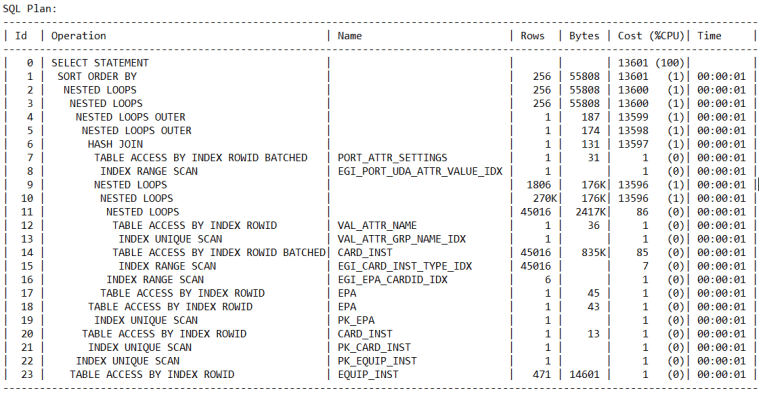
I see around 5 different PHV’s or plans coming for this statement and last two 18733286 and 2202641467 are the worst plans here, first one with PHV 1663132818 is the BEST among all others.
1663132818 is with very less elapsed time, CPU Usage, IO time, LIOs, Disk reads, Rows Processed and Cost.
** From DBA_HIST_SQLSTAT view.

Let’s collect the OUTLINE and QUERY Block details of the statement, and this can be collected using
select * from table(dbms_xplan.display_awr(‘SQL_ID’, PHV, format => ‘ADVANCED’));

Query Block Name / Object Alias (identified by operation id):
————————————————————-

1 - SEL$841DDE77
10 - SEL$841DDE77 / VAL_ATTR_NAME@SEL$2
11 - SEL$841DDE77 / VAL_ATTR_NAME@SEL$2
12 - SEL$841DDE77 / F@SEL$1
13 - SEL$841DDE77 / F@SEL$1
14 - SEL$841DDE77 / A@SEL$1
15 - SEL$841DDE77 / A@SEL$1
16 - SEL$841DDE77 / C@SEL$1
17 - SEL$841DDE77 / C@SEL$1
18 - SEL$841DDE77 / D@SEL$1
19 - SEL$841DDE77 / D@SEL$1
20 - SEL$841DDE77 / E@SEL$1
21 - SEL$841DDE77 / E@SEL$1
22 - SEL$841DDE77 / B@SEL$1
23 - SEL$841DDE77 / B@SEL$1

Outline Data
————-

/*+
BEGIN_OUTLINE_DATA
IGNORE_OPTIM_EMBEDDED_HINTS
OPTIMIZER_FEATURES_ENABLE('12.1.0.2')
DB_VERSION('12.1.0.2')
OPT_PARAM('optimizer_index_cost_adj' 10)
FIRST_ROWS(1)
OUTLINE_LEAF(@"SEL$841DDE77")
MERGE(@"SEL$683B0107")
OUTLINE(@"SEL$C772B8D1")
UNNEST(@"SEL$2")
OUTLINE(@"SEL$683B0107")
OUTLINE(@"SEL$7511BFD2")
OUTLINE(@"SEL$2")
OUTLINE(@"SEL$1")
INDEX_RS_ASC(@"SEL$841DDE77" "VAL_ATTR_NAME"@"SEL$2" ("VAL_ATTR_NAME"."GROUP_NAME" "VAL_ATTR_NAME"."ATTR_NAME"))
INDEX_RS_ASC(@"SEL$841DDE77" "F"@"SEL$1" ("PORT_ATTR_SETTINGS"."ATTR_VALUE"))
BATCH_TABLE_ACCESS_BY_ROWID(@"SEL$841DDE77" "F"@"SEL$1")
INDEX_RS_ASC(@"SEL$841DDE77" "A"@"SEL$1" ("EPA"."PORT_INST_ID"))
INDEX_RS_ASC(@"SEL$841DDE77" "C"@"SEL$1" ("EQUIP_INST"."EQUIP_INST_ID"))
INDEX_RS_ASC(@"SEL$841DDE77" "D"@"SEL$1" ("EPA"."PORT_INST_ID"))
INDEX_RS_ASC(@"SEL$841DDE77" "E"@"SEL$1" ("CARD_INST"."CARD_INST_ID"))
INDEX(@"SEL$841DDE77" "B"@"SEL$1" ("CARD_INST"."CARD_INST_ID"))
LEADING(@"SEL$841DDE77" "VAL_ATTR_NAME"@"SEL$2" "F"@"SEL$1" "A"@"SEL$1" "C"@"SEL$1" "D"@"SEL$1" "E"@"SEL$1"
"B"@"SEL$1")
USE_NL(@"SEL$841DDE77" "F"@"SEL$1")
USE_NL(@"SEL$841DDE77" "A"@"SEL$1")
USE_NL(@"SEL$841DDE77" "C"@"SEL$1")
USE_NL(@"SEL$841DDE77" "D"@"SEL$1")
USE_NL(@"SEL$841DDE77" "E"@"SEL$1")
USE_NL(@"SEL$841DDE77" "B"@"SEL$1")
NLJ_BATCHING(@"SEL$841DDE77" "B"@"SEL$1")
END_OUTLINE_DATA
*/

Let’s use the outline of the good plan as a hint to force the good execution plan to be used and check the execution time for the query.
Run the query from SQLPLUS using the hint:

SELECT
/*+
BEGIN_OUTLINE_DATA
IGNORE_OPTIM_EMBEDDED_HINTS
OPTIMIZER_FEATURES_ENABLE(‘12.1.0.2’)
DB_VERSION(‘12.1.0.2’)
OPT_PARAM(‘optimizer_index_cost_adj’ 10)
FIRST_ROWS(1)
OUTLINE_LEAF(@”SEL$841DDE77″)
MERGE(@”SEL$683B0107″)
OUTLINE(@”SEL$C772B8D1″)
UNNEST(@”SEL$2″)
OUTLINE(@”SEL$683B0107″)
OUTLINE(@”SEL$7511BFD2″)
OUTLINE(@”SEL$2″)
OUTLINE(@”SEL$1″)
INDEX_RS_ASC(@”SEL$841DDE77″ “VAL_ATTR_NAME”@”SEL$2” (“VAL_ATTR_NAME”.”GROUP_NAME” “VAL_ATTR_NAME”.”ATTR_NAME”))
INDEX_RS_ASC(@”SEL$841DDE77″ “F”@”SEL$1” (“PORT_ATTR_SETTINGS”.”ATTR_VALUE”))
BATCH_TABLE_ACCESS_BY_ROWID(@”SEL$841DDE77″ “F”@”SEL$1″)
INDEX_RS_ASC(@”SEL$841DDE77” “A”@”SEL$1” (“EPA”.”PORT_INST_ID”))
INDEX_RS_ASC(@”SEL$841DDE77″ “C”@”SEL$1” (“EQUIP_INST”.”EQUIP_INST_ID”))
INDEX_RS_ASC(@”SEL$841DDE77″ “D”@”SEL$1” (“EPA”.”PORT_INST_ID”))
INDEX_RS_ASC(@”SEL$841DDE77″ “E”@”SEL$1” (“CARD_INST”.”CARD_INST_ID”))
INDEX(@”SEL$841DDE77″ “B”@”SEL$1” (“CARD_INST”.”CARD_INST_ID”))
LEADING(@”SEL$841DDE77″ “VAL_ATTR_NAME”@”SEL$2” “F”@”SEL$1” “A”@”SEL$1” “C”@”SEL$1” “D”@”SEL$1” “E”@”SEL$1”
“B”@”SEL$1″)
USE_NL(@”SEL$841DDE77” “F”@”SEL$1″)
USE_NL(@”SEL$841DDE77” “A”@”SEL$1″)
USE_NL(@”SEL$841DDE77” “C”@”SEL$1″)
USE_NL(@”SEL$841DDE77” “D”@”SEL$1″)
USE_NL(@”SEL$841DDE77” “E”@”SEL$1″)
USE_NL(@”SEL$841DDE77” “B”@”SEL$1″)
NLJ_BATCHING(@”SEL$841DDE77” “B”@”SEL$1”)
END_OUTLINE_DATA
*/

A.PORT_INST_ID AS MDF_ES_PORT_INST_ID, A.STATUS AS MDF_ES_PORT_STATUS, D.PORT_INST_ID AS MDF_LS_PORT_INST_ID, D.STATUS AS MDF_LS_PORT_STATUS, REGEXP_SUBSTR(C.DESCR,'[^ ]+’, 1,1) AS NAMING_AREA, A.STATUS AS MDF_ES_PORT_STATUS2, DECODE(A.RESERVATION_INST_ID, NULL, ‘N’, ‘Y’) AS MDF_ES_ACTIVE_RESERVATION, A.PORT_ACCESS_ID AS LIC_IDENTITY, EGI_GET_UDA_VALUE(A.EQUIP_INST_ID,’EQUIPMENT’,’Eqp Legacy Names’,’TAD-N’) AS KC, B.NAME AS COORDINATE, A.PORT_HUM_ID EGI_PORT_NAME, EGI_GET_UDA_VALUE(D.EQUIP_INST_ID,’EQUIPMENT’,’Eqp Legacy Names’,’TAD-N’) AS CABINET_NAME, E.NAME AS TERMINATION_BLOCK_NAME, D.PORT_ACCESS_ID AS PAIR_NAME, EGI_GET_UDA_VALUE(D.EQUIP_INST_ID,’EQUIPMENT’,’Eqp Legacy Names’,’SIGNSYST’) AS SIGNING_SYSTEM, EGI_GET_UDA_VALUE(A.PORT_INST_ID,’PORT’,’Copper Port Info’,’Processor Exchange’) AS PROCESSOR_EXCHANGE, A.CIRC_PATH_INST_ID AS ES_CIRC_PATH_INST_ID, A.NEXT_PATH_INST_ID AS ES_NEXT_PATH_INST_ID, D.CIRC_PATH_INST_ID AS LS_CIRC_PATH_INST_ID, D.NEXT_PATH_INST_ID AS LS_NEXT_PATH_INST_ID, DECODE(D.ROLE,’Primary’,’P’,’Secondary’,’S’,’Spare’,’R’,’Junction’,’F’,NULL) AS CABLING_TYPE FROM EPA A, CARD_INST B, EQUIP_INST C, EPA D, CARD_INST E, PORT_ATTR_SETTINGS F WHERE A.PORT_INST_ID =F.PORT_INST_ID AND F.VAL_ATTR_INST_ID= (SELECT VAL_ATTR_INST_ID FROM VAL_ATTR_NAME WHERE GROUP_NAME=’Copper Port Info’ AND ATTR_NAME =’Processor Exchange’ ) AND A.CARD_INST_ID =B.CARD_INST_ID AND B.TYPE =’ES’ AND A.EQUIP_INST_ID =C.EQUIP_INST_ID AND A.Z_WIRED_PORT_INST_ID =D.PORT_INST_ID(+) AND D.CARD_INST_ID =E.CARD_INST_ID(+) AND REGEXP_SUBSTR(A.PORT_ACCESS_ID,'[^-]+’, 1,1) =:B4 AND TO_NUMBER(REGEXP_SUBSTR(A.PORT_ACCESS_ID,'[^-]+’, 1,2))>=TO_NUMBER(:B3 ) AND TO_NUMBER(REGEXP_SUBSTR(A.PORT_ACCESS_ID,'[^-]+’, 1,2))<=TO_NUMBER(:B2 ) AND F.ATTR_VALUE =:B1 ORDER BY 8

I’ve executed the query in SIT and it’s taking no more than 5 seconds now with those OUTLINES, that is reeeeally good 😊

Now when the best plan is identified and tested, Question comes “HOW TO FIX THIS PERMANENTLY ??”

This can be done using one of the Oracle provided script named “coe_xfr_sql_profile.sql” which is part of popular SQLTXPLAIN/SQLT tool.
Download it from Metalink website (Direct Link: https://support.oracle.com/epmos/faces/DocumentDisplay?_afrLoop=458593899434965&parent=DOCUMENT&sourceId=1955195.1&id=215187.1&_afrWindowMode=0&_adf.ctrl-state=11co9htqxp_387#aref_section13)

In order to fix or correct the cost estimates for CBO to adopt a good execution plan we can follow below steps.
• Run the script coe_xfr_sql_profile.sql as SYSDBA user providing the sql_id and the good Plan Hash Value (PHV)
SQL> START coe_xfr_sql_profile.sql SQL_ID PHV

• Above step generates a script named in the format: “coe_xfr_sql_profile_SQL_ID_PLAN_HASH_VALUE.sql” i.e. including the sql_id and plan hash value.
Example: “coe_xfr_sql_profile_ SQLID_PHV.sql”

• If you like to use the profile for all literals, you can modify the force_match parameter in the generated script from false to true: force_match => TRUE
This will ensure the profile will be enabled even when different literals are used in the SQL query.

• Run the generated script as SYSDBA user in order to correct the optimizer cost estimates used in the execution plan for the sql_id and encourage it to use the desired plan obtained from the stated plan hash value.

• Next we can check if profile is accepted successfully
select SQL_ID, SQL_PROFILE,PLAN_HASH_VALUE from V$SQL where SQL_ID=’ SQL ID’;

• In case if profile is required to be disabled/dropped then do following steps.
The profile can be disabled or dropped as follows using the the SQL_PROFILE name returned from the query above:

EXEC DBMS_SQLTUNE.ALTER_SQL_PROFILE(Name => ”, Attribute_Name => ‘STATUS’, Value => ‘DISABLED’);

To Drop the Profile:
EXEC DBMS_SQLTUNE.DROP_SQL_PROFILE(Name => ”);

This way we can test and fix a Plan Stability issues with any SQL statement!

Hope It Helps!
Prashant Dixit

Posted in Advanced | Tagged: , , | 4 Comments »

CKPT process blocking table gather stats session intermittently … Why ?

Posted by FatDBA on November 1, 2017

Hi Folks,
Today i would like to share one of the experience that we had while working in one of the production system with a customer with a weird situation where the Gather stats session getting intermittently blocked by CKPT database background process in database and sometimes stays as it is for more than 30 mins.

We were getting the “enq: RO – fast object reuse” wait contention when gathering schema/table statistics in parallel using DBMS_STATS package with DEGREE>1

During the analysis i’ve generated the System State dump and saw a clear blocking situation on object Enq RO-00010059-00000001 .

Snippet from SS Dump.

Resource Holder State
Enq RO-00010059-00000001 14: waiting for ‘rdbms ipc message’
Enq RO-00010059-00000001 89: 89: is waiting for 14: 89:

Workaround for the problem is either of the two solutions
– We can try flush the Buffer Cache.
Though flushing the buffer cache causes dirty blocks to be written to disk and will have some performance impact.
– Setting the parameter “_db_fast_obj_truncate” to FALSE.
This will revert back to 9i way of invalidating buffers in buffer cache.

Hope That Helps
Prashant Dixit

Posted in Advanced, troubleshooting | Tagged: , | Leave a Comment »

What’s new in coming few days here on FATDBA ….

Posted by FatDBA on October 24, 2017

Some of the performance troubleshooting that i have done using few of the specialized tools/scripts – SYSTEMTAP, CALIPER, STRACE, PTRACE, Few of the Profilers, Representation using PGraph, FlameGraphs and few of the beautifully written scripts/tools from legends like Brendan Gregg (www.brendangregg.com/), Luca Canali (cern.ch/canali) etc.

Posted in Advanced | Tagged: | Leave a Comment »

DB Sick/Hung/Slow :( …. How to troubleshoot using ‘Real Time ADDM’ ??

Posted by FatDBA on October 24, 2017

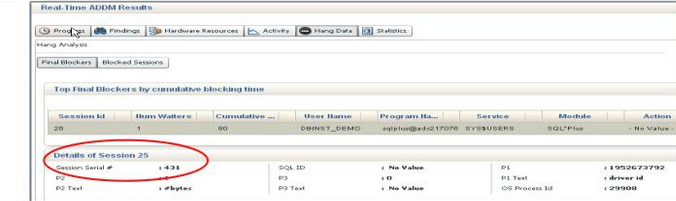
The new emergency monioring feature of “Real Time ADDM” or RT ADDM (Performance Menu within the EM Console) of Enterprise Manager Cloud provides a new feature which allows the DBAs to connect with the non responsive or hang/stalled database. Now someone might ask that this was earlier achieved using ‘-prelim’ option which allows the execution of ORADEBUG commands but if you remember it was not that flexible and allows only limited arguments like hanganalyze, ashdump etc.

This all new feature of 12c is one step ahead as it directly connects (Using the light weight lock/latch-free connection) with the SGA area and hits the hang Analysis and Active Session History tables and also helps to view the blockers etc. and other in-memory performance statistics.

So this is quite helpful at times when we have …
– Sick Systems
– DB is very slow
– DB Hung due to any contention for resources etc.
– DBAs are unable to login to Database.

So before that moment when we are all set to bounce the database there is this option available to take a look inside the database to understand the system.

Hope It Helps
Prashant Dixit

Posted in Advanced | Tagged: | Leave a Comment »

How to tune the IO contentions related with the Compaction in Cassandra ?

Posted by FatDBA on August 20, 2017

Hi Fellas,
Back and this time with some performance tuning scopes for Cassandra DB during the ‘Compaction’ process.
Before i proceed, would like to explain a bit about the compaction in Cassandra and what exactly is this and why a necessary evil …

Compaction in Cassandra refers to the operation of merging multiple SSTables into a single new one. Typically, compaction is done in a database for two primary reasons:

– To reduce the storage usage.
– To improve read performance by merging keys and obtaining a consolidated index.

For example, in Apache Cassandra, data files are merged periodically to form compacted SSTables.

There is a good chance of contention happening in database due to Compaction activity as the Compaction increases I/O contention on SSTable data read. Writing data in Cassandra database is generally fast and the write impacts may not be seen but reading data from SSTables will be slow in case when I/O contention increases due to compaction activities and degrades the performance of the database.

First would like to discuss how to identify the compaction related contentions on the database.
– We can use the “nodetool tablestats” or the old “nodetool cfstats” command to
monitor or watch-keep SSTables.
Below is a sample result from one of the Cassandra database server, here we need to check
– Check if the count is keep on growing, because that points out that there may be contention between reading SST
and the compaction process.
– Read generally slows down due to an obvious reason of data distributed or fragmented across many SSTs and
Compaction running continuous in the background.

%nodetool tablestats -H dixit.playlist
Keyspace: dixit
Read Count: 182849
Read Latency: 0.11363755339104945 ms.
Write Count: 435355
Write Latency: 0.01956930550929701 ms.
Pending Flushes: 0
Table: standard1
SSTable count: 2
Space used (live): 51.62 MB
Space used (total): 51.62 MB
Space used by snapshots (total): 0 bytes
Off heap memory used (total): 302.36 KB
SSTable Compression Ratio: 0.0
Number of keys (estimate): 376390
Memtable cell count: 200120
Memtable data size: 45.16 MB
Memtable off heap memory used: 0 bytes
Memtable switch count: 2
Local read count: 182849
Local read latency: 0.125 ms
Local write count: 435355
Local write latency: 0.022 ms
Pending flushes: 0
Bloom filter false positives: 11
Bloom filter false ratio: 0.00000
Bloom filter space used: 265.81 KB
Bloom filter off heap memory used: 265.8 KB
Index summary off heap memory used: 36.57 KB
Compression metadata off heap memory used: 0 bytes
Compacted partition minimum bytes: 216 bytes
Compacted partition maximum bytes: 258 bytes
Compacted partition mean bytes: 258 bytes
Average live cells per slice (last five minutes): 1.0
Maximum live cells per slice (last five minutes): 1
Average tombstones per slice (last five minutes): 1.0
Maximum tombstones per slice (last five minutes): 1

Below is the command that can be used to check for compaction statistics, here you need to look at the ‘pending tasks’, and ‘bytes total in progress’.

$ nodetool compactionstats
pending tasks: 5
compaction type keyspace table completed total unit progress
Compaction Keyspace1 Standard1 282310680 302170540 bytes 93.43%
Compaction Keyspace1 Standard1 58457931 307520780 bytes 19.01%
Active compaction remaining time : 0h00m16s

Solution to the problem
1. First one is quite simple – Avoid merging of update/delete requests.
2. Reduce the frequency of in-memory objects (In Memtables) flush.

This can be done by increasing the size of the memtables to avoid or stop database to perform frequent flushes.
– Less number of flushes leads to fewer SSTs compaction.
– Less Compaction reduces the I/Contentions and this in turn improve reads.
– There are couple of parameters that you can adjust in your cassandra.yaml file to control the flushing.
i.e. memtable_flush_after_mins, memtable_throughput_in_mb , memtable_operations_in_millions.

3. One more solution but that only applies on systems where this stress in IO is not much frequent, we can reduce
the “thread priority” which reduces the IOs.
As lowering the priority slows down the compaction writes but only applies if it doesn’t happen frequently.

Add below lines in cassandra-env.conf file (Under /conf folder) to lower the compaction priority.

JVM_OPTS=”$JVM_OPTS -XX:+UseThreadPriorities -XX:ThreadPriorityPolicy=42 -Dcassandra.compaction.priority=1″

One last line would like to add.
In case when the IO is a genuine problem, you will need to add more nodes or replace disks with better performing one’s or high IO disks.

Hope It Helps
Prashant Dixit

Posted in Advanced | Tagged: , , | Leave a Comment »

CELL_OFFLOAD_PROCESSING value in Non-Exadata Surrounds! — “High ‘ksv master wait’ And ‘ASM File Metadata Operation’ Wait Events

Posted by FatDBA on January 27, 2016

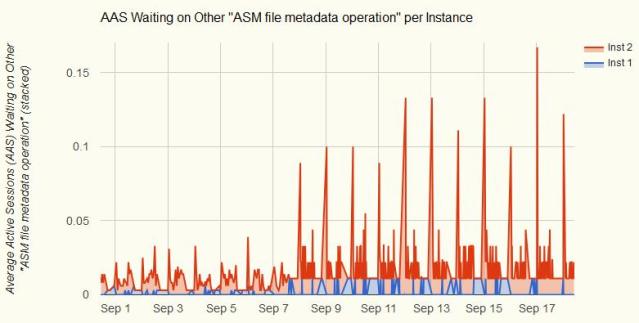
It was a case some time back while performing the performance analysis for one of the database, i encountered a curious wait event ‘ASM file metadata operation’. After further analysis i discovered that it’s happening specially when doing operations such as a DROP TABLESPACE, or in this case when using Data Pump. Though the server was basically not doing anything and much of the CPU cycles were IDLE but there was this strange wait event on ‘ASM file metadata operation’ with high waits on ‘ksv master wait’.

Below is the graphical depiction of the situation.
asm1

Image to highlight one of the major spike during the period.
asm2

Reason:
In an Exadata surrounds this is the suitable setting, nevertheless, in a non-Exadata environment, which it was in this case, this causes performance issues to arise as processes on the RDBMS awaits on a reply from the ASM which is trying to delivery smart-scan results.

Solution:
The following solutions are available for non-Exadata databases:
1. For the quickest solution, use the workaround. The workaround does not negatively impact non-Exadata databases.
This parameter is to be set on the database instance.
alter system set cell_offload_processing = false;
2. Upgrade to 12.1, when available. OR
3. Apply the 11.2.0.3 patch set OR
4. Apply one-off Patch 11800170, if available for your RDBMS and Grid Homes


Hope That Helps
Prashant Dixit

Posted in Advanced | Tagged: , | Leave a Comment »

Evaluating Storage Performance!

Posted by FatDBA on March 10, 2015

Being a DBA means you need to posses outstanding knowledge of DBA Subjects as obvious, but nowadays knowledge on storage/network/OS is a big surplus. This helps a modern day DBA to troubleshoot/rectify and helps to avoid million of hours wasted to identify DB issues when in fact there isn’t any.

This time i tried to discuss steps which one can take when there are waits likes – log file sync, db file async io submit, log file parallel write, control file parallel write and many of the parallel and sequential write observed in system.

Quick Fast Disk Test Results (DD Command):
———————————————
[oracle@dixitdb111 datafiles]$ time sh -c “dd if=/dev/zero of=dd-test-file bs=20k count=1000000 && sync”
1000000+0 records in
1000000+0 records out
8192000000 bytes (8.2 GB) copied, 26.4959 seconds, 309 MB/s

real 0m44.318s
user 0m0.278s
sys 0m19.410s
You have new mail in /var/spool/mail/oracle

[oracle@dixitdb111 datafiles]$ ls -ltrh
-rw-r–r– 1 oracle oinstall 7.7G Jan 30 11:59 dd-test-file

ORION
————-

ORION (ORacle IO Numbers) imitates the type of I/O performed by Oracle databases, which makes possible for you to measure I/O performance for storage arrangements without actually installing Oracle. This is now included in the “$ORACLE_HOME/bin” directory of Database/Grid installations.

There are many of the options available for the orion to run.
e.g. oltp, olap and many more.
Below pasted is a beautiful explanation by Alex Gorbachev (ACED, IOUG, OAKTABLE Member & Renowned Blogger)
Link: http://www.uyoug.org.uy/eventos2013/OTNLAD2013-Benchmarking-Oracle-IO-Performance-with-ORION-by-Alex-Gorbachev.pdf

[oracle@dixitdb111 bin]$ ./orion -run oltp
ORION: ORacle IO Numbers — Version 11.2.0.3.0
orion_20150203_0800
Calibration will take approximately 2 minutes.
Using a large value for -cache_size may take longer.

This will result in few .csv and text files with IO results with some beautiful charts/graphs and tabular records for the runtime.

Reference:
————–
_hist.csv
Histogram of I/O latencies.
_iops.csv
Performance results of
small I/Os in IOPS.
_lat.csv
Latency of small I/Os in microseconds.
_mbps.csv
Performance results of
large I/Os in MBPS.
_summary.txt
Summary of the input parameters, along with the minimum small I/O latency (in secs),
the maximum MBPS, and the maximum IOPS observed.
_trace.txt
Extended, unprocessed output

I/O calibration is one of those magical option. This feature enables user to assess the performance of the storage subsystem, and determine whether I/O performance problems are caused by the database or the storage subsystem. Unlike other external I/O calibration tools that issue I/Os sequentially, the I/O calibration feature of Oracle Database issues I/Os randomly using Oracle datafiles to access the storage media, producing results that more closely match the actual performance of the database.

SELECT d.name,
i.asynch_io
FROM v$datafile d,
v$iostat_file i
WHERE d.file# = i.file_no
AND i.filetype_name = ‘Data File’;

NAME ASYNCH_IO
—————————————————————– ———
/dbmnt1/dixitdb/datafiles/system01.dbf ASYNC_ON
/dbmnt2/dixitdb/datafiles/undotbs1_01.dbf ASYNC_ON
/dbmnt1/dixitdb/datafiles/sysaux01.dbf ASYNC_ON
/dbmnt1/dixitdb/datafiles/users01.dbf ASYNC_ON
/dbmnt1/dixitdb/datafiles/dbsystem01.dbf ASYNC_ON
/dbmnt1/dixitdb/datafiles/dbsystem02.dbf ASYNC_ON
/dbmnt1/dixitdb/datafiles/dbsystem03.dbf ASYNC_ON
/dbmnt1/dixitdb/datafiles/dbsystem04.dbf ASYNC_ON
/dbmnt1/dixitdb/datafiles/dbsystem05.dbf ASYNC_ON
/dbmnt1/dixitdb/datafiles/dbsystem06.dbf ASYNC_ON
/dbmnt1/dixitdb/datafiles/dbsystem07.dbf ASYNC_ON
/dbmnt1/dixitdb/datafiles/dbsystem08.dbf ASYNC_ON
/dbmnt1/dixitdb/datafiles/dbsystem09.dbf ASYNC_ON
/dbmnt1/dixitdb/datafiles/dbsystem10.dbf ASYNC_ON
/dbmnt2/dixitdb/datafiles/unicode1tbs01.dbf ASYNC_ON
/dbmnt2/dixitdb/datafiles/unicode2atbs01.dbf ASYNC_ON
/dbmnt2/dixitdb/datafiles/r11testtbs.dbf ASYNC_ON
/dbmnt1/dixitdb/datafiles/dbsystem11.dbf ASYNC_ON
/dbmnt1/dixitdb/datafiles/dbsystem12.dbf ASYNC_ON
/dbmnt2/dixitdb/datafiles/artest.dbf ASYNC_ON
/dbmnt1/dixitdb/datafiles/dbsystem13.dbf ASYNC_ON
/dbmnt1/dixitdb/datafiles/dbsystem14.dbf ASYNC_ON
/dbmnt1/dixitdb/datafiles/dbsystem15.dbf ASYNC_ON
/dbmnt3/dixitdb/datafiles/dbsystem16.dbf ASYNC_ON

* below query is resource intensive. Load/CPU spikes are expected during the run.

SET SERVEROUTPUT ON
DECLARE
l_latency PLS_INTEGER;
l_iops PLS_INTEGER;
l_mbps PLS_INTEGER;
BEGIN
DBMS_RESOURCE_MANAGER.calibrate_io (num_physical_disks => 1,
max_latency => 20,
max_iops => l_iops,
max_mbps => l_mbps,
actual_latency => l_latency);

DBMS_OUTPUT.put_line(‘Max IOPS = ‘ || l_iops);
DBMS_OUTPUT.put_line(‘Max MBPS = ‘ || l_mbps);
DBMS_OUTPUT.put_line(‘Latency = ‘ || l_latency);
END;
/

Max IOPS = 610
Max MBPS = 67
Latency = 19

==================
Calibration runs can be monitored using the V$IO_CALIBRATION_STATUS view.

SET LINESIZE 100
COLUMN start_time FORMAT A20
COLUMN end_time FORMAT A20

SELECT TO_CHAR(start_time, ‘DD-MON-YYY HH24:MI:SS’) AS start_time,
TO_CHAR(end_time, ‘DD-MON-YYY HH24:MI:SS’) AS end_time,
max_iops,
max_mbps,
max_pmbps,
latency,
num_physical_disks AS disks
FROM dba_rsrc_io_calibrate;

START_TIME END_TIME MAX_IOPS MAX_MBPS MAX_PMBPS LATENCY DISKS
——————– ——————– ———- ———- ———- ———- ———-
30-JAN-015 09:49:10 30-JAN-015 09:53:14 610 67 27 19 1

Thanks
Prashant Dixit

Posted in Advanced | Tagged: , | Leave a Comment »

Want to monitor your Exa Health — Answer is ‘Exachk’ …

Posted by FatDBA on December 30, 2014

Recently while working on one of the test exadata machine came across one of the very useful tool to monitoring exadata system health. Being one of the most popular topics that customers talk about is the monitoring of your exadata health.

The best tool for this is the Exachk (see MOS Doc ID 1070954.1)
This document contains the current Exachk release.

The recommendation or advices for Exachk is to:

1) Run the exachk (at a minimum) quarterly, and after any changes are made to the configuration
2) ALWAYS run the current exachk.  This script is periodically updated/improved upon so it is very important to be current
3) Keep track of any failures to ensure that you can identify any new items that appear in the report
4) A score of 80 or above is a good score for production. It is very rare to have a score that is 99+.

There are also a great whitepaper released in September 2013. This white paper can be referred and downloaded from here.

Click to access exadata-health-resource-usage-2021227.pdf

Thanks
Prashant Dixit

Posted in Advanced | Tagged: , | 2 Comments »

EXECUTION PLAN: “automatic DOP: skipped because of IO calibrate statistics are missing”

Posted by FatDBA on September 23, 2014

Recently during one Performance Problem i have attached one better SQL Profile to the statement which includes to add DOP (Degree Of Parallelism) to reduce the impacts of a definite FTS (Full Table Scan) but found one NOTE coming during the execution plan generation which reads
“automatic DOP: skipped because of IO calibrate statistics are missing”

SQL> execute dbms_sqltune.accept_sql_profile(task_name => ‘TASK_33935’,task_owner => ‘SYS’, replace => TRUE, profile_type =>DBMS_SQLTUNE.PX_PROFILE);

PL/SQL procedure successfully completed.

Elapsed: 00:00:00.86
SQL> explain plan for select count(*) from DIXIT_EVW_ETAILQ;

Explained.

Elapsed: 00:00:00.03
SQL> @xplan

PLAN_TABLE_OUTPUT
———————————————————————————————————————————————————————–

————————————————————————————————————————————-
Plan hash value: 584586630

—————————————————————————————————————-
| Id  | Operation              | Name             | Rows  | Cost (%CPU)| Time     |    TQ  |IN-OUT| PQ Distrib |
—————————————————————————————————————-
|   0 | SELECT STATEMENT       |                  |     1 | 36776   (1)| 00:07:22 |        |      |            |
|   1 |  SORT AGGREGATE        |                  |     1 |            |          |        |      |            |
|   2 |   PX COORDINATOR       |                  |       |            |          |        |      |            |
|   3 |    PX SEND QC (RANDOM) | :TQ10000         |     1 |            |          |  Q1,00 | P->S | QC (RAND)  |
|   4 |     SORT AGGREGATE     |                  |     1 |            |          |  Q1,00 | PCWP |            |
|   5 |      PX BLOCK ITERATOR |                  |   177M| 36776   (1)| 00:07:22 |  Q1,00 | PCWC |            |
|   6 |       TABLE ACCESS FULL| DIXIT_EVW_ETAILQ |   177M| 36776   (1)| 00:07:22 |  Q1,00 | PCWP |            |
—————————————————————————————————————-

Note
—–
   – automatic DOP: skipped because of IO calibrate statistics are missing
   – SQL profile “SYS_SQLPROF_0148a0b0821b0005” used for this statement

The ‘AUTOMATIC DOP’ is skipped because I/O calibration is not run to gather the required statistics. Required statistics can be collected using DBMS_RESOURCE_MANAGER.CALIBRATE_IO procedure.

SQL> select status from V$IO_CALIBRATION_STATUS;

STATUS
——————————-
NOT AVAILABLE

DECLARE
lat INTEGER;
iops INTEGER;
mbps INTEGER;
BEGIN
–DBMS_RESOURCE_MANAGER.CALIBRATE_IO(, ,iops, mbps, lat);
DBMS_RESOURCE_MANAGER.CALIBRATE_IO (28, 10, iops, mbps, lat);
DBMS_OUTPUT.PUT_LINE (‘max_iops = ‘ || iops);
DBMS_OUTPUT.PUT_LINE (‘latency = ‘ || lat);
DBMS_OUTPUT.PUT_LINE (‘max_mbps = ‘ || mbps);
end;
/

max_iops = 5944
latency = 9
max_mbps = 75

18 rows selected.

Elapsed: 00:00:00.11

Issue:
If using DBMS_RESOURCE_MANAGER.CALIBRATE_IO there are times when you might recieve beloe error message
ORA-56708: Could not find any datafiles with asynchronous i/o capability

Resolution:
Then we need to enable asynch I/O, set below two values to mentioned settings in the init.ora file.

disk_asynch_io = true
filesystemio_options = asynch

SQL> select status from V$IO_CALIBRATION_STATUS;

STATUS
——————–
AVAILABLE

Now you can implement the DOP for the query and this way you can reduce FTS impacts.

Hope That Helps
Prashant Dixit

Posted in Uncategorized | Tagged: , , | Leave a Comment »

Where are my DBA_BLOCKERS and DBA_WAITERS ??

Posted by FatDBA on July 12, 2014

While doing performance checks and tuning for one of the database found that two of the very well known dynamic views are not working and throwing “Does Not Exist”. We are using – Oracle Database 11g Release 11.2.0.3.0 – 64bit Production.
I was trying to call the views using SYS user.

Purpose of using discussed two dynamic views are:
DBA_BLOCKERS displays a session if it is not waiting for a locked object but is holding a lock on an object for which another session is waiting.
DBA_WAITERS shows all the sessions that are waiting for a lock, but do not hold locks for which another session is waiting.

SQL> conn / as sysdba
Connected.

SQL> desc dba_blockers;
ERROR:
ORA-04043: object dba_blockers does not exist

SQL> desc dba_waiters
ERROR:
ORA-04043: object dba_waiters does not exist

Solution:
——————-
Call one script catblock.sql from ORACLE_HOME/rdbms/admin folder which creates required views, synonyms and provides required grants to the DBA privileged user and it will be back.

SQL> @?/rdbms/admin/catblock.sql

View created.

Synonym created.

Grant succeeded.

—–

—–

SQL>
SQL>
SQL>
SQL> desc dba_blockers
Name                                     Null?    Type
—————————————- ——– —————————
HOLDING_SESSION                                   NUMBER

SQL> desc dba * waiters;
Usage: DESCRIBE [schema.]object[@db_link]
SQL> desc dba_waiters
Name                                     Null?    Type
—————————————- ——– —————————
WAITING_SESSION                                   NUMBER
HOLDING_SESSION                                   NUMBER
LOCK_TYPE                                         VARCHAR2(26)
MODE_HELD                                         VARCHAR2(40)
MODE_REQUESTED                                    VARCHAR2(40)
LOCK_ID1                                          NUMBER
LOCK_ID2                                          NUMBER

Posted in Advanced | Tagged: | Leave a Comment »