Tales From A Lazy Fat DBA

Its all about Databases, their performance, troubleshooting & much more …. ¯\_(ツ)_/¯

Posts Tagged ‘performance’

Some weirdness with V$DIAG_ALERT_EXT and magical support from Oracle Customer Support.

Posted by FatDBA on December 13, 2023

Hi All,

Recently, one of our custom monitoring scripts, which comprises more than 2000 lines of PL/SQL code covering all possible performance areas of the Oracle database, started behaving strangely on some 19c (19.15.0) databases. Usually, the report completes within 10-12 minutes on databases running version 12.2 and above, but it began taking approximately 30 minutes for a single run, with worst times exceeding 40 minutes. This issue seems to occur specifically on our 19c instances.

During analysis, we identified one of the underlying SQL queries in our script that queries V$DIAG_ALERT_EXT as the culprit, consuming most of the time and significantly exceeding average execution times. We utilize V$DIAG_ALERT_EXT to access the XML-formatted alert log from the Automatic Diagnostic Repository (ADR), particularly in cases where we can only access the database through integrated development environments (IDEs) like SQL Developer, and direct access to the databases is unavailable.

The SQL queries are straightforward, one of the simple one we used is focusing on capturing INCIDENT_ERROR and ERROR type codes. We have implemented filter conditions to select rows where the message_type is either 2 or 3 and where the originating_timestamp is within the last 8 hours (sysdate – 8/24 represents the current date and time minus 8 hours).

SELECT TO_CHAR(originating_timestamp,'DD/MM/YYYY HH24:MI:SS') AS time, message_text 

FROM v$diag_alert_ext
WHERE message_type IN (2, 3) AND originating_timestamp > sysdate - 8/24
ORDER BY RECORD_ID;

Initially, we were perplexed by the problem but were confident that it was specific to 21c databases, as all other versions where we had this script scheduled were working perfectly. After exhausting all optimization attempts and with no insights into what was happening with this specific dynamic view on this database version, we decided to engage Oracle support. They promptly confirmed that the issue was due to a known bug in Oracle 19c database – Bug 33513906, which is resolved in the 19.16.0.0.220719 (July 2022) Database Release Update (DB RU).

Oracle Database support stands out as one of the best I have worked with. They possess extensive knowledge about their products, provide comprehensive private and public documentation, and, in the presence of all diagnostic files, swiftly identify issues. Moreover, they offer both temporary and permanent fixes to problems.

Hope It Helped!
Prashant Dixit

Posted in Uncategorized | Tagged: , , , | Leave a Comment »

Why the Tablespace IO Stats are missing in my AWR report ?

Posted by FatDBA on October 22, 2023

Hi All,

In the past, I looked into a Database AWR performance report from a slow 19c where we suspected some IO issues and were looking into related metrics. “Tablespace IO Stats” was an important area and provided some important statistics like the average number of read requests per second, average read time in milliseconds, write waits, number of buffer waits, and average wait time in milliseconds for buffer waits for the tablespaces.

While looking into the report, I saw that the said section was not there and was missing for Tablespace IO stats. It appeared that the file IO statistics for Tablespaces had been disabled or were not collected. Below were the steps that you could do in such cases to get Tablespace IO stats data back in AWR reports in 19.X versions. Please run the following commands as SYS:

SQL> exec dbms_workload_repository.modify_table_settings(table_name => 'WRH$_FILESTATXS', flush_level => 'TYPICAL');
 
PL/SQL procedure successfully completed.
 
SQL> exec dbms_workload_repository.modify_table_settings(table_name => 'WRH$_DATAFILE', flush_level => 'TYPICAL');
 
PL/SQL procedure successfully completed.
 
SQL> exec dbms_workload_repository.modify_table_settings(table_name => 'Tempfile Group', flush_level => 'TYPICAL');
 
PL/SQL procedure successfully completed.
 
SQL> exec dbms_workload_repository.modify_table_settings(table_name => 'WRH$_TEMPFILE', flush_level => 'TYPICAL');
 
PL/SQL procedure successfully completed.
 
SQL> exec dbms_workload_repository.modify_table_settings(table_name => 'WRH$_TEMPSTATXS', flush_level => 'TYPICAL');
 
PL/SQL procedure successfully completed.
 
SQL>

When new AWR snapshots are generated, you will start getting Tablespace IO stats data for checking IO performance. You may have to run these commands in the PDBs also if you are generating AWR snapshots at PDB level and they are missing Tablespace IO stats data in AWR reports.

There is another way how you can force that data to the AWR, this is by using the new PL/SQL program called modify_table_settings() and that is recommended to be used to enable flushing of the tables WRH$_FILESTATXS, WRH$_DATAFILE and WRH$_TEMPSTATXS at TYPICAL or ALL depending on the flush_level of “Tempfile Group”.

Hope It Helped!
Prashant Dixit

Posted in Uncategorized | Tagged: , , , | Leave a Comment »

A simple lovely Python script to get complete row locking details in Oracle database …

Posted by FatDBA on August 12, 2023

Hi Guys,

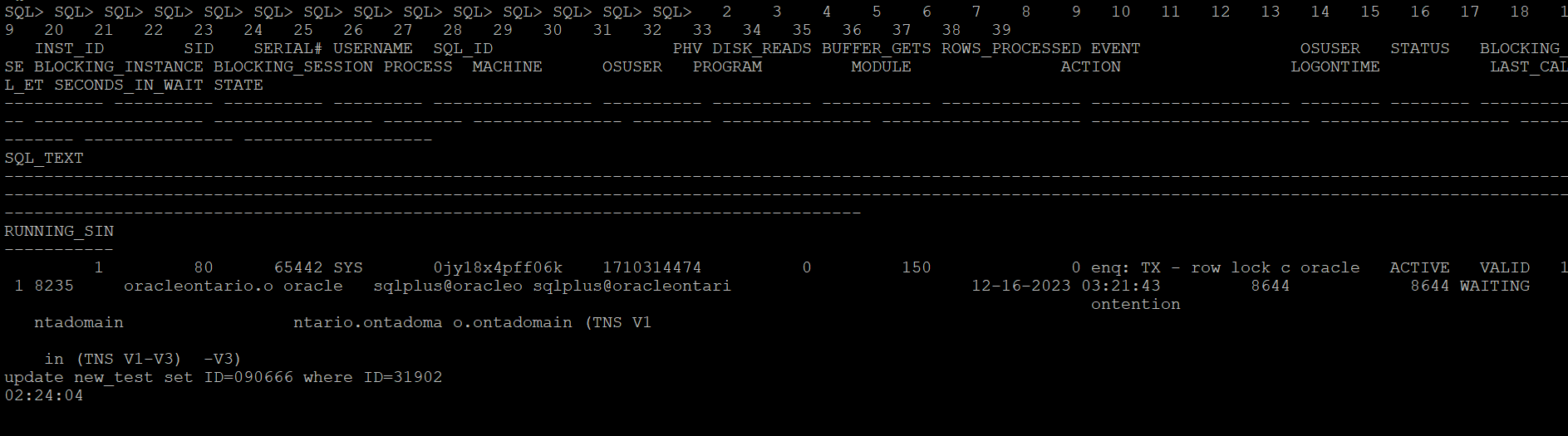
Recently I was working on one row locking contention where the a particular row was locked in exclusive mode caused all subsequent sessions trying to modify that row went in to waiting mode and were were waiting on ‘enq: TX row lock contention‘ wait event. This was a classic pessimistic row locking scenario which was happening due to application design problem.

The situation is not new for most of the DBAs, and they know what is causing the block, the relationship of parent and child blockers, the blocking and block SIDs, lock modes etc., but things are sometimes difficult for non-DBA users who don’t know where to go, what to call and what to check where there is locking in the database stopping their program to finish and they are scratching their head.

I have tried to write a Python script which connects with the Oracle Database using cx_Oracle module using connection details and start executing blocking specific SQL statements embedded inside the python code. I have even tried to add exception handling for the cases when there is any syntax errors or any grammar issues. Tried to add color coding too with result seperators to make the output easy to read. The embedd code makes it self-reliant and complete and makes it very easy to run on any system.

The code is pasted below and is also available on my GitHub website. Here is the link to download the source code —> https://github.com/fatdba/OtherScripts/blob/main/Python-Locking-Main.py

We only have to make sure that we have Python, PIP and Python Module cx_Oracle installed on the server/host.

[oracle@fatdba ~]$ python --version
Python 2.7.5
[root@fatdba ~]# pip install cx_Oracle==7.3
Collecting cx_Oracle==7.3
  Downloading https://files.pythonhosted.org/packages/71/2a/91eb1ccb37a249772a93620ee0539a3f902b187ddb82978d8519abe03899/cx_Oracle-7.3.0-cp27-cp27mu-manylinux1_x86_64.whl (728kB)
    100% |████████████████████████████████| 737kB 1.3MB/s
Installing collected packages: cx-Oracle
Successfully installed cx-Oracle-7.3.0
You are using pip version 8.1.2, however version 23.2.1 is available.
You should consider upgrading via the 'pip install --upgrade pip' command.
[root@fatdba ~]#
[root@fatdba ~]$ pip --version
pip 8.1.2 from /usr/lib/python2.7/site-packages (python 2.7)


Here is the code of the tool.
import cx_Oracle

# Database connection details
db_username = "system"
db_password = "xxxx"
db_host = "hostname-fqdn"
db_port = "1521"
db_service = "xxxx"

bold_start = "\033[1m"
color_green = "\033[32m"
reset_format = "\033[0m"

def print_colored(text, color_code):
    colored_text = "{}{}{}".format(color_code, text, reset_format)
    print(colored_text)

# Define the SQL statements
sql_statements = [
'''
SELECT rpad(instance_name, 17) current_instance, status, STARTUP_TIME, HOST_NAME, version, DATABASE_STATUS FROM v$instance
''',
"""
alter session set nls_date_format = 'DD-MON-YYYY HH24:MI:SS'
""",
"""
SELECT
    OUTPUT || CHR(10) || RPAD('-', LENGTH(OUTPUT) - LENGTH(REPLACE(OUTPUT, CHR(10), '')), '-') AS OUTPUT
FROM (
    SELECT
    'INST_ID -->  '||x.INST_ID || CHR(10) ||
    'Serial ID -->  '||x.sid || CHR(10) ||
    'Serial Num -->  '||x.serial# || CHR(10) ||
    'User Name -->  '||x.username || CHR(10) ||
    'Session Status -->  '||x.status || CHR(10) ||
    'Program -->  '||x.program || CHR(10) ||
    'Module -->  '||x.Module || CHR(10) ||
    'Action -->  '||x.action || CHR(10) ||
    'Machine -->  '||x.machine || CHR(10) ||
    'OS_USER -->  '||x.OSUSER || CHR(10) ||
    'Process -->  '||x.process || CHR(10) ||
    'State -->  '||x.State || CHR(10) ||
    'EVENT -->  '||x.event || CHR(10) ||
    'SECONDS_IN_WAIT -->  '||x.SECONDS_IN_WAIT || CHR(10) ||
    'LAST_CALL_ET -->  '||x.LAST_CALL_ET || CHR(10) ||
    'SQL_PROFILE --> '||SQL_PROFILE || CHR(10) ||
    'ROWS_PROCESSED --> '||ROWS_PROCESSED || CHR(10) ||
    'BLOCKING_SESSION_STATUS --> '||BLOCKING_SESSION_STATUS || CHR(10) ||
    'BLOCKING_INSTANCE --> '||BLOCKING_INSTANCE || CHR(10) ||
    'BLOCKING_SESSION --> '||BLOCKING_SESSION || CHR(10) ||
    'FINAL_BLOCKING_SESSION_STATUS --> '||FINAL_BLOCKING_SESSION_STATUS || CHR(10) ||
    'SQL_ID -->  '||x.sql_id || CHR(10) ||
    'SQL_TEXT -->  '||SQL_TEXT || CHR(10) ||
    'Logon Time -->  '||TO_CHAR(x.LOGON_TIME, 'MM-DD-YYYY HH24MISS') || CHR(10) ||
    'RunTime -->  '||ltrim(to_char(floor(x.LAST_CALL_ET/3600), '09')) || ':'
    || ltrim(to_char(floor(mod(x.LAST_CALL_ET, 3600)/60), '09')) || ':'
    || ltrim(to_char(mod(x.LAST_CALL_ET, 60), '09')) || CHR(10) AS OUTPUT,
    x.LAST_CALL_ET AS RUNT
    FROM   gv$sqlarea sqlarea
    ,gv$session x
    WHERE  x.sql_hash_value = sqlarea.hash_value
    AND    x.sql_address    = sqlarea.address
    AND    x.status='ACTIVE'
    AND x.event like '%row lock contention%'
    AND SQL_TEXT not like '%SELECT     OUTPUT || CHR(10)%'
    AND x.USERNAME IS NOT NULL
    AND x.SQL_ADDRESS    = sqlarea.ADDRESS
    AND x.SQL_HASH_VALUE = sqlarea.HASH_VALUE
)
ORDER BY RUNT DESC
""",
"""
with lk as (select blocking_instance||'.'||blocking_session blocker, inst_id||'.'||sid waiter
 from gv$session where blocking_instance is not null and blocking_session is not null and username is not null)
 select lpad(' ',2*(level-1))||waiter lock_tree from
 (select * from lk
 union all
 select distinct 'root', blocker from lk
 where blocker not in (select waiter from lk))
 connect by prior waiter=blocker start with blocker='root'
""",
"""
SELECT DECODE (l.BLOCK, 0, 'Waiting', 'Blocking ->') user_status
,CHR (39) || s.SID || ',' || s.serial# || CHR (39) sid_serial
,(SELECT instance_name FROM gv$instance WHERE inst_id = l.inst_id)
conn_instance
,s.SID
,s.PROGRAM
,s.inst_id
,s.osuser
,s.machine
,DECODE (l.TYPE,'RT', 'Redo Log Buffer','TD', 'Dictionary'
,'TM', 'DML','TS', 'Temp Segments','TX', 'Transaction'
,'UL', 'User','RW', 'Row Wait',l.TYPE) lock_type
,DECODE (l.lmode,0, 'None',1, 'Null',2, 'Row Share',3, 'Row Excl.'
,4, 'Share',5, 'S/Row Excl.',6, 'Exclusive'
,LTRIM (TO_CHAR (lmode, '990'))) lock_mode
,ctime
,object_name
FROM
   gv$lock l
JOIN
   gv$session s
ON (l.inst_id = s.inst_id
AND l.SID = s.SID)
JOIN gv$locked_object o
ON (o.inst_id = s.inst_id
AND s.SID = o.session_id)
JOIN dba_objects d
ON (d.object_id = o.object_id)
WHERE (l.id1, l.id2, l.TYPE) IN (SELECT id1, id2, TYPE
FROM gv$lock
WHERE request > 0)
ORDER BY id1, id2, ctime DESC
""",
"""
select l1.sid, ' IS BLOCKING ', l2.sid
from gv$lock l1, gv$lock l2 where l1.block =1 and l2.request > 0
and l1.id1=l2.id1
and l1.id2=l2.id2
""",
"""
select s2.inst_id,s1.username || '@' || s1.machine
 || ' ( SID=' || s1.sid || ' )  is blocking '
 || s2.username || '@' || s2.machine || ' ( SID=' || s2.sid || ' ) ' AS blocking_status
  from gv$lock l1, gv$session s1, gv$lock l2, gv$session s2
  where s1.sid=l1.sid and s2.sid=l2.sid and s1.inst_id=l1.inst_id and s2.inst_id=l2.inst_id
  and l1.BLOCK=1 and l2.request > 0
  and l1.id1 = l2.id1
  and l2.id2 = l2.id2
order by s1.inst_id
""",
"""
SELECT sid,
                                TYPE,
                                DECODE( block, 0, 'NO', 'YES' ) BLOCKER,
        DECODE( request, 0, 'NO', 'YES' ) WAITER,
        decode(LMODE,1,'    ',2,'RS',3,'RX',4,'S',5,'SRX',6,'X','NONE') lmode,
                                 decode(REQUEST,1,'    ',2,'RS',3,'RX',4,'S',5,'SRX',6,'X','NONE') request,
                                TRUNC(CTIME/60) MIN ,
                                ID1,
                                ID2,
        block
                        FROM  gv$lock
      where request > 0 OR block =1
""",
"""
select  sn.USERNAME,
        m.SID,
        sn.SERIAL#,
        m.TYPE,
        decode(LMODE,
                0, 'None',
                1, 'Null',
                2, 'Row-S (SS)',
                3, 'Row-X (SX)',
                4, 'Share',
                5, 'S/Row-X (SSX)',
                6, 'Exclusive') lock_type,
        decode(REQUEST,
                0, 'None',
                1, 'Null',
                2, 'Row-S (SS)',
                3, 'Row-X (SX)',
                4, 'Share',
                5, 'S/Row-X (SSX)',
                6, 'Exclusive') lock_requested,
        m.ID1,
        m.ID2,
        t.SQL_TEXT
from    v$session sn,
        v$lock m ,
        v$sqltext t
where   t.ADDRESS = sn.SQL_ADDRESS
and     t.HASH_VALUE = sn.SQL_HASH_VALUE
and     ((sn.SID = m.SID and m.REQUEST != 0)
or      (sn.SID = m.SID and m.REQUEST = 0 and LMODE != 4 and (ID1, ID2) in
        (select s.ID1, s.ID2
         from   gv$lock S
         where  REQUEST != 0
         and    s.ID1 = m.ID1
         and    s.ID2 = m.ID2)))
order by sn.USERNAME, sn.SID, t.PIECE
"""
]

banner = """
=========================================================
      Locking Stats Report
        Author: Prashant Dixit
        Version : 1.0
       Date : 2023-August-11
========================================================
"""
print_colored(banner, color_green)

try:
    # Establishing a database connection
    dsn = cx_Oracle.makedsn(db_host, db_port, service_name=db_service)
    connection = cx_Oracle.connect(user=db_username, password=db_password, dsn=dsn)

    # Executing each SQL statement
    cursor = connection.cursor()
    for idx, statement in enumerate(sql_statements):
        statement = statement.strip()
        if statement:
            try:
                cursor.execute(statement)

                if statement.upper().startswith("SELECT"):
                    result = cursor.fetchall()
                    if result:
                        column_names = [desc[0] for desc in cursor.description]
                        print_colored("Column Headers: " + ", ".join(column_names), color_green)
                        print("Results:")

                        for row in result:
                            print("Row:")
                            for col_name, col_value in zip(column_names, row):
                                print("{}: {}".format(col_name, col_value))
                            print("\n")

                    else:
                        print("No results.")

                    # Add a newline after the output of the first two SQL statements
                    #if idx == 1:
                     #   print("\n")

                #print("\n" * 1)  # Add a gap of one  lines

            except Exception as e:
                print("Error executing statement:", statement)
                print("Error details:", str(e))

    connection.commit()
    print("SQL statements execution completed.")

except Exception as e:
    connection.rollback()
    print("An error occurred:", str(e))

finally:
    if connection:
        connection.close()

…..

……

……

The output will look like this.

[oracle@fatdbatest ~]$ python locking.py

=========================================================
      Locking Stats Report
        Author: Prashant Dixit 
        Version : 1.0
       Date : 2023-August-11
========================================================

Column Headers: CURRENT_INSTANCE, STATUS, STARTUP_TIME, HOST_NAME, VERSION, BLOCKED, DATABASE_STATUS
Results:
Row:
CURRENT_INSTANCE: fatdba
STATUS: OPEN
STARTUP_TIME: 2023-06-03 19:42:57
HOST_NAME: fatdba.com
VERSION: 19.0.0.0.0
BLOCKED: NO
DATABASE_STATUS: ACTIVE


Column Headers: OUTPUT
Results:
Row:
OUTPUT: INST_ID -->  1
Serial ID -->  5065
Serial Num -->  17982
User Name -->  SYS
Session Status -->  ACTIVE
Program -->  sqlplus@fatdba.com (TNS V1-V3)
Module -->  sqlplus@fatdba.com (TNS V1-V3)
Action -->
Machine -->  fatdba.com
OS_USER -->  oracle
Process -->  6873
State -->  WAITING
EVENT -->  enq: TX - row lock contention
SECONDS_IN_WAIT -->  3
LAST_CALL_ET -->  4
SQL_PROFILE -->
ROWS_PROCESSED --> 0
BLOCKING_SESSION_STATUS --> VALID
BLOCKING_INSTANCE --> 1
BLOCKING_SESSION --> 5062
FINAL_BLOCKING_SESSION_STATUS --> VALID
SQL_ID -->  vdksq7js9b0cp
SQL_TEXT -->  update locking set id=100
Logon Time -->  08-11-2023 215112
RunTime -->  00:00:04

-------------------------

Column Headers: USER_STATUS, SID_SERIAL, CONN_INSTANCE, SID, PROGRAM, INST_ID, OSUSER, MACHINE, LOCK_TYPE, LOCK_MODE, CTIME, OBJECT_NAME
Results:
Row:
USER_STATUS: Blocking ->
SID_SERIAL: '5062,50729'
CONN_INSTANCE: fatdba
SID: 5062
PROGRAM: sqlplus@fatdba.com (TNS V1-V3)
INST_ID: 1
OSUSER: oracle
MACHINE: fatdba.com
LOCK_TYPE: Transaction
LOCK_MODE: Exclusive
CTIME: 9241
OBJECT_NAME: LOCKING


Row:
USER_STATUS: Waiting
SID_SERIAL: '5065,17982'
CONN_INSTANCE: fatdba
SID: 5065
PROGRAM: sqlplus@fatdba.com (TNS V1-V3)
INST_ID: 1
OSUSER: oracle
MACHINE: fatdba.com
LOCK_TYPE: Transaction
LOCK_MODE: None
CTIME: 5
OBJECT_NAME: LOCKING

Column Headers: SID, 'ISBLOCKING', SID
Results:
Row:
SID: 5062
'ISBLOCKING':  IS BLOCKING
SID: 5065


Column Headers: INST_ID, BLOCKING_STATUS
Results:
Row:
INST_ID: 1
BLOCKING_STATUS: SYS@fatdba.com ( SID=5062 )  is blocking SYS@fatdba.com ( SID=5065 )


Column Headers: SID, TYPE, BLOCKER, WAITER, LMODE, REQUEST, MIN, ID1, ID2, BLOCK
Results:
Row:
SID: 5062
TYPE: TX
BLOCKER: YES
WAITER: NO
LMODE: X
REQUEST: NONE
MIN: 154
ID1: 327688
ID2: 5988830
BLOCK: 1


Row:
SID: 5065
TYPE: TX
BLOCKER: NO
WAITER: YES
LMODE: NONE
REQUEST: X
MIN: 0
ID1: 327688
ID2: 5988830
BLOCK: 0


Column Headers: USERNAME, SID, SERIAL#, TYPE, LOCK_TYPE, LOCK_REQUESTED, ID1, ID2, SQL_TEXT
Results:
Row:
USERNAME: SYS
SID: 5065
SERIAL#: 17982
TYPE: TX
LOCK_TYPE: None
LOCK_REQUESTED: Exclusive
ID1: 327688
ID2: 5988830
SQL_TEXT: update locking set id=100

Hope It Helped!
Prashant Dixit

Posted in Uncategorized | Tagged: , , , | 1 Comment »

Auto Transaction Rollback in Oracle 23c – Is this the end of Row Lock Contention in Oracle Database ?

Posted by FatDBA on April 14, 2023

Hi Guys,

Oracle 23c is full of great features, one of the outstanding feature added to the version is the Automatic Transaction Rollback … Means no more long transaction level locking or the infamous event ‘enq: TX row lock contention‘ or the pessimistic locking 🙂

In case of a row level locking or pessimistic level locking where a single row of a table was locked by one of the following statements INSERT, UPDATE, DELETE, MERGE, and SELECT … FOR UPDATE. The row level lock from first session will exist it performs the rollback or a commit. This situation becomes severe in some case i.e. The application modifies some rows but doesn’t commit or terminate the transaction because of an exception in the application. Traditionally, in such cases the database administrator have to manually terminate the blocking transaction by killing the parent session.

Oracle 23c has come up with a brilliant feature which it implements through a session settings to control the transaction priority. Transaction priority (TXN_PRIORITY) is set at session level using ALTER SESSION command. Once the transaction priority is set, it will remain the same for all the transactions created in that session. This parameter specifies a priority (HIGH, MEDIUM, or LOW) for all transactions in a user session. When running in ROLLBACK mode, you can track the performance of Automatic Transaction Rollback by monitoring the following statistics:

TXN_AUTO_ROLLBACK_HIGH_PRIORITY_WAIT_TARGET This param specifies the max number of seconds that a HIGH priority txn will wait for a row lock. Similarly, there is another parameter for MEDIUM classed statements TXN_AUTO_ROLLBACK_MEDIUM_PRIORITY_WAIT_TARGET which specifies the max number of seconds that a MEDIUM priority txn will wait for a row lock.
NOTE : Some of these parameters has changed and are discussed in my latest port — https://fatdba.com/2024/07/14/key-parameter-renaming-for-auto-transaction-rollback-feature-in-23ai/

Lets do a quick demo to explain this behavior in details.

I have created a small table with two rows and two columns and will use it for this demo to test automatic txn rollback features. To show a quick demo, I will set txn_auto_rollback_high_priority_wait_target to a lower value of 15 seconds. Will issue an UPDATE statement from the first session after setting the TXN_PRIORITY to ‘LOW‘ at the session level and will open a parallel session (session 2) and issue the same statement where the it will try to modify the same row already in exclusive lock mode by session 1.


--------------------------------------
-- SESSION 1 
--------------------------------------

[oracle@mississauga ~]$ sqlplus / as sysdba
SQL*Plus: Release 23.0.0.0.0 - Developer-Release on Fri Apr 14 22:46:34 2023
Version 23.2.0.0.0
Copyright (c) 1982, 2023, Oracle.  All rights reserved.
Connected to:
Oracle Database 23c Free, Release 23.0.0.0.0 - Developer-Release
Version 23.2.0.0.0

SQL>
SQL> select * from dixit;

        ID NAME
---------- --------------------
       999 Fatdba
       101 Prashant

SQL> select to_number(substr(dbms_session.unique_session_id,1,4),'XXXX') mysid from dual;  

     MYSID
----------
        59

SQL> show parameter TXN_AUTO_ROLLBACK_HIGH_PRIORITY_WAIT_TARGET

NAME                                         TYPE        VALUE
-------------------------------------------- ----------- ------------------------------
txn_auto_rollback_high_priority_wait_target  integer     15

SQL> alter session set TXN_PRIORITY=LOW;

Session altered.

SQL> show parameter TXN_PRIORITY

NAME                                 TYPE        VALUE
------------------------------------ ----------- ------------------------------
txn_priority                         string      LOW


-- I will now issue update and don't issue ROLLBACK or COMMIT 
SQL> update dixit set id=101010101 where name='Fatdba';

1 row updated.

SQL > 

Okay so the stage is set! We’ve already ran an UPDATE statement on the table from SESSION 1 (SID : 59) and I will open a new session (session 2) and issue the same statement, but here the txn_priority is set to its default ‘HIGH‘ and we’ve already set txn_auto_rollback_high_priority_wait_target to 15 seconds earlier.


--------------------------------------
-- SESSION 2 
--------------------------------------

[oracle@mississauga ~]$ sqlplus / as sysdba

SQL*Plus: Release 23.0.0.0.0 - Developer-Release on Fri Apr 14 22:46:34 2023
Version 23.2.0.0.0
Copyright (c) 1982, 2023, Oracle.  All rights reserved.
Connected to:
Oracle Database 23c Free, Release 23.0.0.0.0 - Developer-Release
Version 23.2.0.0.0

SQL>
SQL> select to_number(substr(dbms_session.unique_session_id,1,4),'XXXX') mysid from dual; 

     MYSID
----------
       305

SQL> show parameter TXN_PRIORITY;

NAME                                 TYPE        VALUE
------------------------------------ ----------- ------------------------------
txn_priority                         string      HIGH

-- Now this session will go into blocking state. 
SQL> update dixit set id=0 where name='Fatdba';
...
.....


Alright, so session 2 (SID : 305) with txn_priority=HIGH is now blocked, as the row was first locked in exclusive mode by session 1 (SID : 59), but we’ve set TXN_PRIORITY=LOW (at session level) and system level change of TXN_AUTO_ROLLBACK_HIGH_PRIORITY_WAIT_TARGET to 15 seconds,

Lets query the database and see what is waiting on what ?? You will see SID 305 (session 2) is waiting for the txn level lock and waiting on event ‘enq: TX – row lock (HIGH priority)‘. BTW, this also a new event added into Oracle 23c for sessions waiting with HIGH priorities, other two are for LOW and MEDIUM priorities.

SQL>
SQL> select event#, name, WAIT_CLASS from v$event_name where name like '%TX - row%';

    EVENT# NAME                                                             WAIT_CLASS
---------- ---------------------------------------------------------------- ----------------------------------------------------------------
       340 enq: TX - row lock contention                                    Application
       341 enq: TX - row lock (HIGH priority)                               Application
       342 enq: TX - row lock (MEDIUM priority)                             Application
       343 enq: TX - row lock (LOW priority)                                Application

SQL>


-----------------------------------------------------------------
-- Contention details (What has blocked what ?)   
-----------------------------------------------------------------


SQL>

 INST_ID        SID    SERIAL# USERNAME                                                                                                                     SQL_ID PLAN_HASH_VALUE DISK_READS BUFFER_GETS ROWS_PROCESSED EVENT
---------- ---------- ---------- -------------------------------------------------------------------------------------------------------------------------------- ------------- --------------- ---------- ----------- -------------- ----------------------------------------------------------------
OSUSER                                                                                                                           STATUS   BLOCKING_SE BLOCKING_INSTANCE BLOCKING_SESSION PROCESS               MACHINE                                                          PROGRAM
-------------------------------------------------------------------------------------------------------------------------------- -------- ----------- ----------------- ---------------- ------------------------ ---------------------------------------------------------------- ------------------------------------------------------------------------------------
MODULE                                                           ACTION                                                           LOGONTIME           LAST_CALL_ET SECONDS_IN_WAIT STATE
---------------------------------------------------------------- ---------------------------------------------------------------- ------------------- ------------ --------------- -------------------
SQL_TEXT
----------------------------------------------------------------------------------------------------------------------------------------------------------------------------------------------------------------------------------------------------------------------------------------------------------------------------------------------------------------------------------------------------------------
RUNNING_SIN
-----------
         1        305      15926 SYS                                                                                                                          9jwbjqg195zdw      2635034114   0           6              0 enq: TX - row lock (HIGH priority)
oracle                                                                                                                           ACTIVE   VALID                   1        59 8808                     mississauga.candomain                                            sqlplus@mississauga.candomain (TNS V1-V3)
sqlplus@mississauga.candomain (TNS V1-V3)                                                                                         04-14-2023 22:46:35       12               13 WAITING
update dixit set id=00000000 where name='Fatdba'
00:00:12

The session 2 (SID 305) will wait for 15 seconds and database will automatically snipes session 1 (SID 59) due to LOW priority and UPDATE issued by Session 2 will persist, whereas session 1 (SID 59) and will throw “ORA-03135: connection lost contact”.

-- SESSION 1 with SID 59 
SQL>
SQL> select * from dixit;
select * from dixit
       *
ERROR at line 1:
ORA-03135: connection lost contact
Process ID: 8843
Session ID: 59 Serial number: 31129


-- SESSION 2 with SID 305 
SQL> update dixit set id=0 where name='Fatdba';

1 row updated.

SQL>    select * from dixit;

        ID NAME
---------- --------------------
         0 Fatdba
       101 Prashant

SQL>

Taking a moment to credit Kishy Kumar, Director of Development at Oracle Database and who also led the Priority Transactions project at Oracle, for giving me feedback on this post and helping me make necessary corrections. Link : https://www.linkedin.com/in/kishyk

Hope It Helped!
Prashant Dixit

Posted in Uncategorized | Tagged: , , , | 6 Comments »

An Oracle Deadlock scenario and the importance of Event 10027 trace …

Posted by FatDBA on February 16, 2023

Hi Guys,

Recently someone asked me about Oracle debug 10027 trace event which we use in case of a deadlock scenario i.e. ORA-0060. Though the deadlock itself creates a trace file in DIAG directory, but 10027 trace event gives you a better control over the amount and type of DIAG information generated in response to the deadlock case. I mean the default trace file for deadlock (ora-60) contains cached cursors, a deadlock graph, process state info, current SQL Statements of the session involved and session wait history.
Event 10027 may be used to augment the trace information with a system state dump or a call stack in an attempt to find the root cause of the deadlocks. The minimum amount of trace information is written at level 1, at this level it will hardly contain deadlock graph and current AQL statements of the sessions involved.

In todays post I will try to simulate a deadlock scenario in one of my test box and will generate the 10027 trace with level 2 to get more information. Level 2 will give you cached cursors, process state info, session wait history for all sessions and the system state which is not possible in case of level 1. I am going to try with the Level 4 here as I want to get system state dump and don’t want to complicate this scenario.

I am going to create two tables – TableB is child table of TableA and some supporting objects to simulate the deadlock case.
Will try to simulate a deadlock scenario when insert/update/delete happens on TableB we need to sum the amount(amt) and then update it in TableA.total_amt column.

[oracle@oracleontario ~]$ sqlplus dixdroid/oracle90

SQL*Plus: Release 19.0.0.0.0 - Production on Thu Feb 16 03:58:12 2023
Version 19.15.0.0.0

Copyright (c) 1982, 2022, Oracle.  All rights reserved.

Last Successful login time: Thu Feb 16 2023 03:04:03 -05:00

Connected to:
Oracle Database 19c Enterprise Edition Release 19.0.0.0.0 - Production
Version 19.15.0.0.0

SQL> create table tableA (pk_id number primary key, total_amt number);

Table created.

SQL> create table tableB (pk_id number primary key, fk_id number references tableA(pk_id) not null, amt number);

Table created.

SQL>
SQL> CREATE OR REPLACE PACKAGE global_pkg
IS
fk_id tableA.pk_id%TYPE;
END global_pkg;  
/

Package created.

SQL>
SQL> CREATE OR REPLACE TRIGGER tableB_ROW_TRG
BEFORE INSERT OR UPDATE OR DELETE
ON tableB
FOR EACH ROW
BEGIN
IF INSERTING OR UPDATING
THEN
global_pkg.fk_id := :new.fk_id;
ELSE
global_pkg.fk_id := :old.fk_id;
END IF;
END tableB_ROW_TRG;
/

Trigger created.

SQL>
SQL>
SQL>
SQL> CREATE OR REPLACE TRIGGER tableB_ST_trg
AFTER INSERT OR UPDATE OR DELETE
ON tableB
BEGIN
IF UPDATING OR INSERTING
THEN
UPDATE tableA
SET total_amt =
(SELECT SUM (amt)
FROM tableB
WHERE fk_id = global_pkg.fk_id)
WHERE pk_id = global_pkg.fk_id;
ELSE
UPDATE tableA
SET total_amt =
(SELECT SUM (amt)
FROM tableB
WHERE fk_id = global_pkg.fk_id)
WHERE pk_id = global_pkg.fk_id;
END IF;
END tableB_ST_trg;

Trigger created.

SQL>
SQL>
SQL> insert into tableA values (1, 0);

1 row created.

SQL> insert into tableA values (2, 0);

1 row created.

SQL> insert into tableB values (123, 1, 100);

1 row created.

SQL> insert into tableB values (456,1, 200);

1 row created.

SQL> insert into tableB values (789, 1, 100);

1 row created.

SQL> insert into tableB values (1011, 2, 50);

1 row created.

SQL> insert into tableB values (1213,2, 150);

1 row created.

SQL> insert into tableB values (1415, 2, 50);

1 row created.

SQL> commit;

Commit complete.

SQL>

Lets query the table and see the record count and next will delete an entry from tableB and won’t commit. At the same time will check the locks — TM lock on tableA.

SQL>
SQL> select * from tableA;

     PK_ID  TOTAL_AMT
---------- ----------
         1        400
         2        250

SQL> delete tableB where pk_id = 1415;

1 row deleted.

SQL> SELECT sid,
(SELECT username
FROM v$session s
WHERE s.sid = v$lock.sid)
uname,
TYPE,
id1,
id2,
(SELECT object_name
FROM user_objects
WHERE object_id = v$lock.id1)
nm
FROM v$lock
WHERE sid IN (SELECT sid
FROM v$session
WHERE username IN (USER)); 


       SID UNAME                          TY        ID1        ID2 NM
---------- ------------------------------ -- ---------- ---------- ------------------------------
       440 DIXDROID                       AE        134          0
       440 DIXDROID                       TX     589853       3078
       440 DIXDROID                       TM      82284          0 TABLEB
       440 DIXDROID                       TM      82282          0 TABLEA


I will now connect to another session (sesion 2) and delete from tableB and that will induce a locking scenario in the database and session 2 will go into hung/waiting state.

---- from session 2:
SQL>
SQL>
SQL> delete tableB where pk_id = 1213;
.....
.........
............. <HUNG > <HUNG > <HUNG > <HUNG > <HUNG > 

Lets see more stats on the blocking session.

SQL>
SQL> SELECT (SELECT username
FROM v$session
WHERE sid = a.sid)
blocker,
a.sid,
' is blocking ',
(SELECT username
FROM v$session
WHERE sid = b.sid)
blockee,
b.sid
FROM v$lock a, v$lock b
WHERE a.block = 1 AND b.request > 0 AND a.id1 = b.id1 AND a.id2 = b.id2;  


BLOCKER                     SID 'ISBLOCKING'  BLOCKEE                               SID
-------------------- ---------- ------------- ------------------------------ ----------
DIXDROID                    440  is blocking  DIXDROID                              427

And as expected 440 SID is now blocking 427. Now lets go back to the original (session 1) and will try to delete from tableB again and this will snipe the session 2 which is still in hung/wait state and will throw a deadlock error (ORA-00060). Though we have already collected blocking information from v$lock + v$session but to get more clarify about blocking sessions, I will set the 10027 trace event with level 2.

This will increase our chance of finding the root cause of the deadlocks. If the setting shall persist across instance startups, you need to use the initialization parameter EVENT.

i.e. EVENT=”10027 trace name contex forever, level 2″ otherwise use ALTER SYSTEM version of it.

------------------------------------------------------------
-- Execute below statement in session1
------------------------------------------------------------
delete tableB where pk_id = 1213;


---------------------------------------------------------------------------------------
-- Oracle is throwing deadlock error as below in session2
---------------------------------------------------------------------------------------
SQL>
SQL> ALTER SYSTEM SET EVENTS '10027 trace name context forever, level 2';

System altered.

SQL> delete tableB where pk_id = 1213;
delete tableB where pk_id = 1213
       *
ERROR at line 1:
ORA-00060: deadlock detected while waiting for resource
ORA-06512: at "DIXDROID.TABLEB_ST_TRG", line 11
ORA-04088: error during execution of trigger 'DIXDROID.TABLEB_ST_TRG'

-- same captured in alert log too.
2023-02-16T04:02:57.648156-05:00
Errors in file /u01/app/oracle/diag/rdbms/dixitdb/dixitdb/trace/dixitdb_ora_29389.trc:
2023-02-16T04:03:00.019794-05:00
ORA-00060: Deadlock detected. See Note 60.1 at My Oracle Support for Troubleshooting ORA-60 Errors. More info in file /u01/app/oracle/diag/rdbms/dixitdb/dixitdb/trace/dixitdb_ora_29389.trc.

And we done, we were able to simulate the deadlock case in the database. Now lets dig into the trace file generated by the deadlock along with information flushed by 10027 trace event. It has all crucial information associated with the deadlock.

2023-02-16 04:13:34.115*:ksq.c@13192:ksqdld_hdr_dump():
DEADLOCK DETECTED ( ORA-00060 )
See Note 60.1 at My Oracle Support for Troubleshooting ORA-60 Errors

[Transaction Deadlock]


Deadlock graph:
                                          ------------Blocker(s)-----------  ------------Waiter(s)------------
Resource Name                             process session holds waits serial  process session holds waits serial
TX-00080009-00000C62-00000000-00000000         45     427     X        13193      24     440           X  22765
TX-0004001A-00000C1E-00000000-00000000         24     440     X        22765      45     427           X  13193


----- Information for waiting sessions -----
Session 427:
  sid: 427 ser: 13193 audsid: 3390369 user: 115/DIXDROID
    flags: (0x41) USR/- flags2: (0x40009) -/-/INC
    flags_idl: (0x1) status: BSY/-/-/- kill: -/-/-/-
  pid: 45 O/S info: user: oracle, term: UNKNOWN, ospid: 30174
    image: oracle@oracleontario.ontadomain (TNS V1-V3)
  client details:
    O/S info: user: oracle, term: pts/1, ospid: 30173
    machine: oracleontario.ontadomain program: sqlplus@oracleontario.ontadomain (TNS V1-V3)
    application name: SQL*Plus, hash value=3669949024
  current SQL:
  UPDATE TABLEA SET TOTAL_AMT = (SELECT SUM (AMT) FROM TABLEB WHERE FK_ID = :B1 ) WHERE PK_ID = :B1

Session 440:
  sid: 440 ser: 22765 audsid: 3380369 user: 115/DIXDROID
    flags: (0x41) USR/- flags2: (0x40009) -/-/INC
    flags_idl: (0x1) status: BSY/-/-/- kill: -/-/-/-
  pid: 24 O/S info: user: oracle, term: UNKNOWN, ospid: 29847
    image: oracle@oracleontario.ontadomain (TNS V1-V3)
  client details:
    O/S info: user: oracle, term: pts/2, ospid: 29846
    machine: oracleontario.ontadomain program: sqlplus@oracleontario.ontadomain (TNS V1-V3)
    application name: SQL*Plus, hash value=3669949024
  current SQL:
  delete tableB where pk_id = 1213

.....
.......


----- Current SQL Statement for this session (sql_id=duw5q5rpd5xvs) -----
UPDATE TABLEA SET TOTAL_AMT = (SELECT SUM (AMT) FROM TABLEB WHERE FK_ID = :B1 ) WHERE PK_ID = :B1
----- PL/SQL Call Stack -----
  object      line  object
  handle    number  name
0x8ed34c98        11  DIXDROID.TABLEB_ST_TRG
.......
.........


----- VKTM Time Drifts Circular Buffer -----
session 427: DID 0001-002D-000000D9     session 440: DID 0001-0018-0000001C
session 440: DID 0001-0018-0000001C     session 427: DID 0001-002D-000000D9

Rows waited on:
  Session 427: obj - rowid = 0001416A - AAAUFqAAHAAAMgvAAB
  (dictionary objn - 82282, file - 7, block - 51247, slot - 1)
  Session 440: obj - rowid = 0001416C - AAAUFsAAHAAAMg/AAE
  (dictionary objn - 82284, file - 7, block - 51263, slot - 4)
.....
.......


Current Wait Stack:
     0: waiting for 'enq: TX - row lock contention'
        name|mode=0x54580006, usn<<16 | slot=0x4001a, sequence=0xc1e
        wait_id=69 seq_num=70 snap_id=1
        wait times: snap=18.173838 sec, exc=18.173838 sec, total=18.173838 sec
        wait times: max=infinite, heur=18.173838 sec
        wait counts: calls=6 os=6
        in_wait=1 iflags=0x15a0
    There is at least one session blocking this session.
      Dumping 1 direct blocker(s):
        inst: 1, sid: 440, ser: 22765
      Dumping final blocker:
        inst: 1, sid: 440, ser: 22765
    There are 1 sessions blocked by this session.
    Dumping one waiter:
      inst: 1, sid: 440, ser: 22765
      wait event: 'enq: TX - row lock contention'
        p1: 'name|mode'=0x54580006
        p2: 'usn<<16 | slot'=0x80009
        p3: 'sequence'=0xc62
      row_wait_obj#: 82284, block#: 51263, row#: 4, file# 7
      min_blocked_time: 0 secs, waiter_cache_ver: 33942
    Wait State:
      fixed_waits=0 flags=0x22 boundary=(nil)/-1
    Session Wait History:
        elapsed time of 0.004677 sec since current wait
........
............


24: USER ospid 29847 sid 440 ser 22765, waiting for 'enq: TX - row lock contention'
          Cmd: DELETE
          Blocked by inst: 1, sid: 427, ser: 13193
          Final Blocker inst: 1, sid: 427, ser: 13193
.....
.............


45: USER ospid 30174 sid 427 ser 13193, waiting for 'enq: TX - row lock contention'
          Cmd: UPDATE
          Blocked by inst: 1, sid: 440, ser: 22765
          Final Blocker inst: 1, sid: 440, ser: 22765
.........
.............


 The history is displayed in reverse chronological order.

    sample interval: 1 sec, max history 120 sec
    ---------------------------------------------------
      [19 samples,                                         04:13:16 - 04:13:34]
        waited for 'enq: TX - row lock contention', seq_num: 70
          p1: 'name|mode'=0x54580006
          p2: 'usn<<16 | slot'=0x4001a
          p3: 'sequence'=0xc1e
      [14 samples,                                         04:13:01 - 04:13:15]
        idle wait at each sample
      [session created at: 04:13:01]
    ---------------------------------------------------
    Sampled Session History Summary:
      longest_non_idle_wait: 'enq: TX - row lock contention'
      [19 samples, 04:13:16 - 04:13:34]
    ---------------------------------------------------
.........
..........


      Virtual Thread:
      kgskvt: 0x9b0e7f10, sess: 0x9ccdd4b8, pdb: 0, sid: 427 ser: 13193
      vc: (nil), proc: 0x9db42028, idx: 427
      consumer group cur: OTHER_GROUPS (pdb 0) (upd? 0)
mapped: DEFAULT_CONSUMER_GROUP, orig:  (pdb 0)
      vt_state: 0x2, vt_flags: 0xE030, blkrun: 0, numa: 1
      inwait: 1, wait event: 307, posted_run: 0
      lastmodrngcnt: 0, lastmodrngcnt_loc: '(null)'
      lastmodrblcnt: 0, lastmodrblcnt_loc: '(null)'
      location where insched last set: kgskbwt
      location where insched last cleared: kgskbwt
      location where inwait last set: kgskbwt
      location where inwait last cleared: NULL
      is_assigned: 1, in_scheduler: 0, insched: 0
      vt_active: 0 (pending: 1)
      vt_pq_active: 0, dop: 0, pq_servers (cur: 0 cg: 0)
      ps_allocs: 0, pxstmts (act: 0, done: 0 cg: 0)
      used quanta (usecs):
      stmt: 57272, accum: 0, mapped: 0, tot: 57272
      exec start consumed time lapse: 164377 usec
      exec start elapsed time lapse: 18179246 usec
      idle time: 0 ms, active time: 57272 (cg: 57272) usec
      last updnumps: 0 usec, active time (pq: 0 ps: 0) ms
      cpu yields:       stmt: 0, accum: 0, mapped: 0, tot: 0
      cpu waits:       stmt: 0, accum: 0, mapped: 0, tot: 0
      cpu wait time (usec):       stmt: 0, accum: 0, mapped: 0, tot: 0
      ASL queued time outs: 0, time: 0 (cur 0, cg 0)
      PQQ queued time outs: 0, time: 0 (cur 0, cg 0)
      Queue timeout violation: 0
      calls aborted: 0, num est exec limit hit: 0
      KTU Session Commit Cache Dump for IDLs:
      KTU Session Commit Cache Dump for Non-IDLs:
      ----------------------------------------
........
.............

Hope It Helped!
Prashant Dixit

Posted in Uncategorized | Tagged: , , , | 2 Comments »

Here goes my first blog post on Real Application Testing on Oracle Blogging platform …

Posted by FatDBA on January 30, 2023

I’m excited to announce that I’ve authored my first blog post on Oracle’s multi-cloud observability and management platform. 
My post “Real Application Testing for Capture and Replay in a PDB, a great addition in 19c.” recently got published by Oracle Corporation on their blogging platform 🙂 🙂 🙂 🙂

https://blogs.oracle.com/observability/post/real-application-testing-for-capture-and-replay-in-a-pdb-a-great-addition-was-made-in-19c

Hope It Helped!
Prashant Dixit

Posted in Advanced | Tagged: , , | Leave a Comment »

What is Cluster Health Advisor GUI or CHAG ?

Posted by FatDBA on January 4, 2023

CHA GUI (CHAG) is a graphical user interface for Cluster Health Advisor (CHA) which was earlier internal to Oracle teams but its now available to the customers. It is a standalone, interactive, real-time capable front-end/GUI to the classic CHA utility. Oracle 12.2 is the first version that is supported by CHA GUI (CHAG). You only require RAC license and there is no need for any additional license to use CHAG tool.

CHAG communicates directly with the Grid Infrastructure Management Repository (GIMR) using a JDBC connection.. GIMR is mandatory for CHAG to work as it fetches the data out of the GIMR repository. In case you don’t have the GIMR repo installed, for example on 19c databases as GIMR is optional there, you can use the local mode for CHAG to work, but in absence of GIMR mgmt repo you will not get the historical abilities to go back in time.

Installation is quite simple, you have to download and unzip the software on one of your cluster machines and I recommend not to dump it inside your ORACLE HOME, but in a separate place. CHAG requires X11 or XHost and Java as it uses Java Swing to open the GUI. CHAG can operate in several modes:

  • With a default connection to GIMR Database. This option initiate a live session and provide real-time monitoring.
  • With a user specified location of a GIMR Database (option -P). This option initiate a live session and provide real-time monitoring.
  • Read in a text file with monitoring data (option -f). This initiates a passive session, which allow to analyze textual data extracted from a GIMR, or data collected during a live session. This data is held in a “*.mdb” file.
  • Parse text file with data and generate JSON object with information similar to query “diagnosis” (option -C). This mode of operation ‘chag -C -f ‘ directs CHAG to parse a *.mdb file and to generate a summary of its content in JSON format.

For the offline mode you can get the “mdb” file to analyze using below command. Depending on the time model you will get n number of mdb files for the period.

chactl export repository -format mdb -start <timestamp> -end <timestamp>

About the usage, CHAG is invoked using the ‘chag’ script available in the bin directory of the CHA Home. CHAG is designed primarily for Cluster or Database experts. Usage is quite simple and straight forward, you can move the pointer/slider to choose any particular timeframe to catch problems, their cause and the corrective actions. You can use it both in real time and offline version, its just that for real time you have to be on any of the cluster node, for offline you can generate the MDB file (cha datafile) and can run it anywhere on the client machine with no need of oracle home and only Java will be needed.

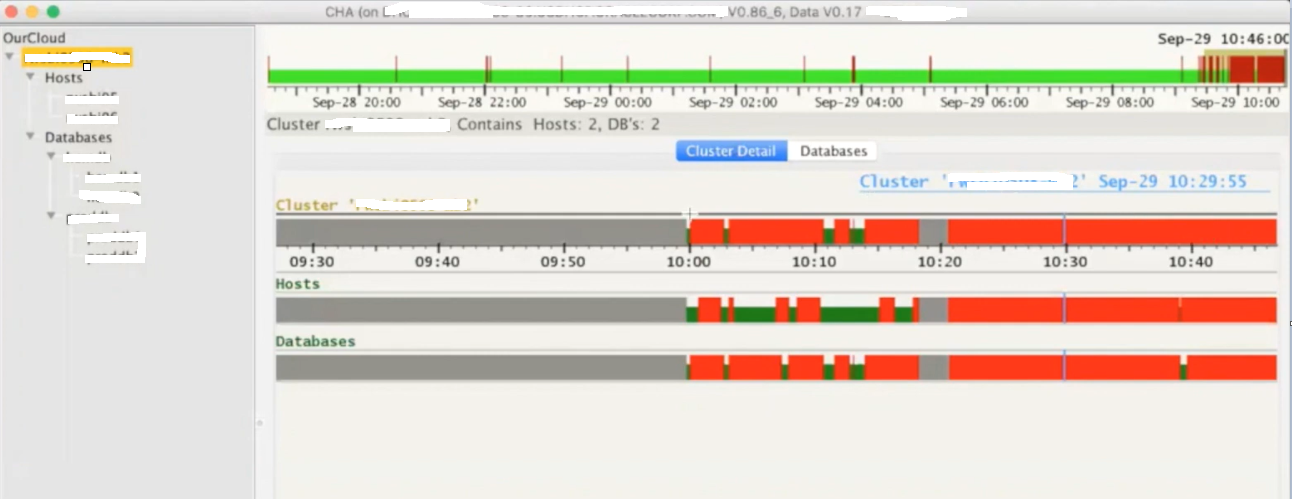
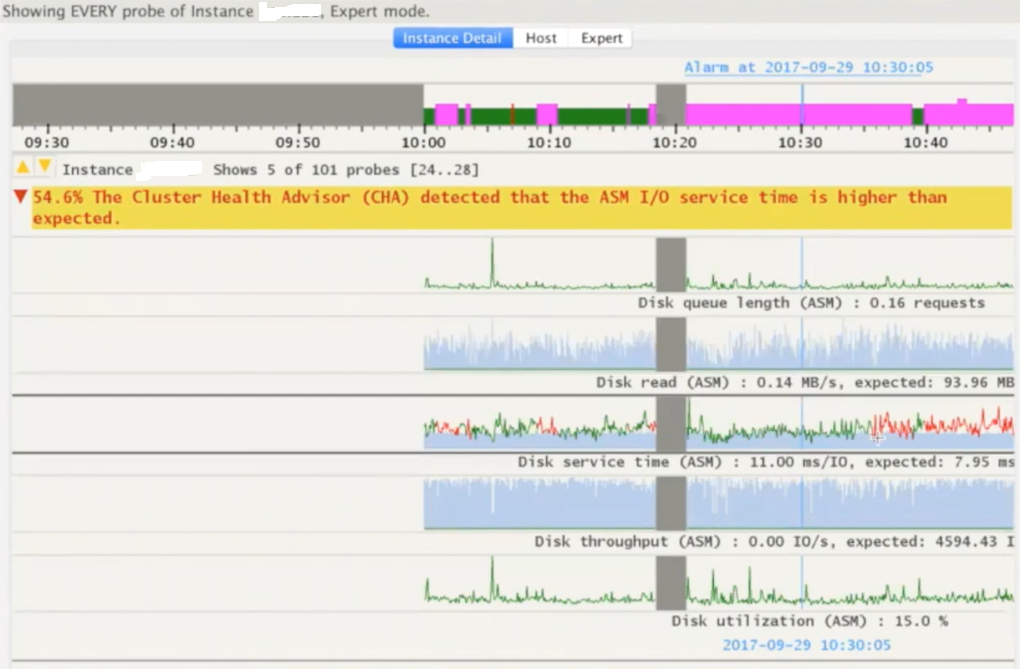
Below is the CHAG look and feel, its running on a 2 node RAC cluster where we have two databases installed. Here you see few color codes, where red colors means there were few problems during that interval.

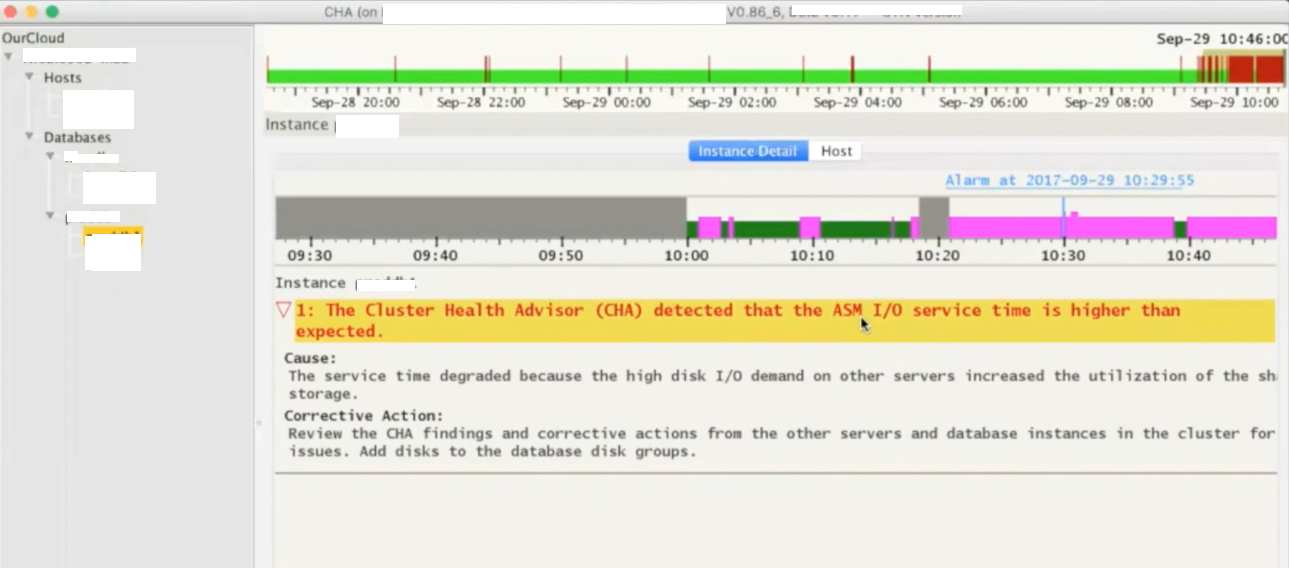
Next is how it explains more about any particular problem caught for the timeslot. Gives you cause and the corrective action, for example in below screenshot it has detected that the ASM IO service time is higher than the expected which points to the underlying IO Subsystem used by ASM disks.

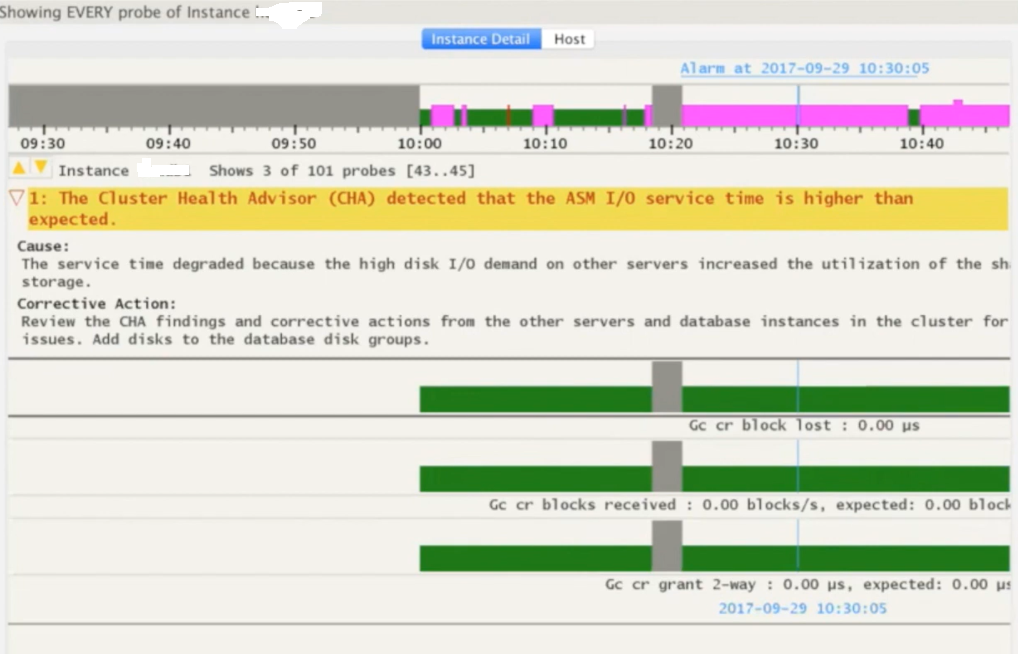
You can use SHIFT keys combinations to get wait event specific details for the selected time period.

You can use few other SHIFT key combinations to present the same data in the form of line graphs.

Few more examples or problems detected by the CHAG. This time it was reporting for redo log writes which are slower and that is something expected as ASM IO is slow too means the entire IO subsystem is impacted.

I highly recommend all readers to go through Doc ID 2340062.1 on metalink for more details on Cluster Health Advisor Graphical User Interface – CHAG.

Hope It Helped!
Prashant Dixit

Posted in Advanced, troubleshooting | Tagged: , , , | Leave a Comment »

No Hint, No Degree, No Auto-DOP, Why my query is going for the parallelism ?

Posted by FatDBA on December 16, 2022

Recently I was working on a performance problem where customer reported few of their SQL statements going for parallelism even when they are not forcing DOP via any HINT, and all of the referenced table and underlying Indexes were with degree=1

I was asked to take a look, and I immediately checked if Auto DOP was the reason forcing unwanted parallelism, but parallel_degree_policy was set to MANUAL which means the auto DOP, statement queuing and in-memory parallel execution all were disabled.

SQL> show parameter parallel_degree_policy

NAME                                 TYPE        VALUE
------------------------------------ ----------- ------------------------------
parallel_degree_policy               string      MANUAL

Next, I thought to verify Table and Indexes general stats or details and I queried DBA_TABLES & DBA_INDEXES for Instances column, and found one of the table was set to value ‘DEFAULT’. If we have a value of DEFAULT set for INSTANCES, it will always force the query use DEFAULT degree of parallelism.

Let me explain the impact of having DEFAULT value for Instances, and how it forces SQL to spawn parallelism. For demo purpose, I am going to create a test table and an index with INSTANCES value set to DEFAULT.

[oracle@oracleontario ~]$ sqlplus / as sysdba

SQL*Plus: Release 19.0.0.0.0 - Production on Mon Dec 19 08:23:12 2022
Version 19.15.0.0.0

Copyright (c) 1982, 2022, Oracle.  All rights reserved.


SQL> create table fatdba_table as select * from dba_objects;

Table created.

SQL>
SQL> select count(*) from fatdba_table;

  COUNT(*)
----------
     74932

SQL>

SQL> create index fatdba_table_idx on fatdba_table(OBJECT_TYPE,object_name) parallel(DEGREE 1 INSTANCES DEFAULT);

Index created.

SQL>
SQL> select index_name,degree,instances from dba_indexes where index_name='FATDBA_TABLE_IDX';

INDEX_NAME                     DEGREE                                   INSTANCES
------------------------------ ---------------------------------------- ----------------------------------------
FATDBA_TABLE_IDX               1                                        DEFAULT

SQL>

Alright the stage is set, lets run a SQL statement and force it to use that Index and see its impact on the execution.

SQL> explain plan for select /*+ index_ffs(fatdba_table,fatdba_table_idx) */ count(distinct object_name) from fatdba_table 
where OBJECT_TYPE='TABLE';

Explained.

SQL> set linesize 400 pagesize 400
SQL> select * from table(dbms_xplan.display) ;

PLAN_TABLE_OUTPUT
--------------------------------------------------------------------------------------------------------------------------------
Plan hash value: 1154043599

-------------------------------------------------------------------------------------------------------------------------------
| Id  | Operation                     | Name             | Rows  | Bytes | Cost (%CPU)| Time     |    TQ  |IN-OUT| PQ Distrib |
-------------------------------------------------------------------------------------------------------------------------------
|   0 | SELECT STATEMENT              |                  |     1 |    66 |   157   (1)| 00:00:01 |        |      |            |
|   1 |  SORT AGGREGATE               |                  |     1 |    66 |            |          |        |      |            |
|   2 |   PX COORDINATOR              |                  |       |       |            |          |        |      |            |
|   3 |    PX SEND QC (RANDOM)        | :TQ10001         |     1 |    66 |            |          |  Q1,01 | P->S | QC (RAND)  |
|   4 |     SORT AGGREGATE            |                  |     1 |    66 |            |          |  Q1,01 | PCWP |            |
|   5 |      VIEW                     | VW_DAG_0         |  1558 |   100K|   157   (1)| 00:00:01 |  Q1,01 | PCWP |            |
|   6 |       HASH GROUP BY           |                  |  1558 | 68552 |   157   (1)| 00:00:01 |  Q1,01 | PCWP |            |
|   7 |        PX RECEIVE             |                  |  1561 | 68684 |   156   (0)| 00:00:01 |  Q1,01 | PCWP |            |
|   8 |         PX SEND HASH          | :TQ10000         |  1561 | 68684 |   156   (0)| 00:00:01 |  Q1,00 | P->P | HASH       |
|   9 |          PX BLOCK ITERATOR    |                  |  1561 | 68684 |   156   (0)| 00:00:01 |  Q1,00 | PCWC |            |
|* 10 |           INDEX FAST FULL SCAN| FATDBA_TABLE_IDX |  1561 | 68684 |   156   (0)| 00:00:01 |  Q1,00 | PCWP |            |
-------------------------------------------------------------------------------------------------------------------------------

Predicate Information (identified by operation id):
---------------------------------------------------

  10 - filter("OBJECT_TYPE"='TABLE')

22 rows selected.

SQL>

As expected, it forced SQL to go with parallelism. Let me set INSTANCE value of the Index to 1 and see what happens next.

SQL> alter index FATDBA_TABLE_IDX noparallel;

Index altered.

SQL> select index_name,degree,instances from dba_indexes where index_name='FATDBA_TABLE_IDX';


INDEX_NAME                     DEGREE                                   INSTANCES
------------------------------ ---------------------------------------- ----------------------------------------
FATDBA_TABLE_IDX               1                                        1

SQL> SQL>


SQL> select index_name,degree,instances from dba_indexes where index_name='FATDBA_TABLE_IDX';


INDEX_NAME                     DEGREE                                   INSTANCES
------------------------------ ---------------------------------------- ----------------------------------------
FATDBA_TABLE_IDX               1                                        1

SQL> SQL> explain plan for select /*+ index_ffs(fatdba_table,fatdba_table_idx) */ count(distinct object_name) 
from fatdba_table where OBJECT_TYPE='TABLE';

Explained.

SQL> select * from table(dbms_xplan.display) ;

PLAN_TABLE_OUTPUT
------------------------------------------------------------------------------------------------------
Plan hash value: 3184007477

--------------------------------------------------------------------------------------------
| Id  | Operation               | Name             | Rows  | Bytes | Cost (%CPU)| Time     |
--------------------------------------------------------------------------------------------
|   0 | SELECT STATEMENT        |                  |     1 |    66 |   157   (1)| 00:00:01 |
|   1 |  SORT AGGREGATE         |                  |     1 |    66 |            |          |
|   2 |   VIEW                  | VW_DAG_0         |  1558 |   100K|   157   (1)| 00:00:01 |
|   3 |    HASH GROUP BY        |                  |  1558 | 68552 |   157   (1)| 00:00:01 |
|*  4 |     INDEX FAST FULL SCAN| FATDBA_TABLE_IDX |  1561 | 68684 |   156   (0)| 00:00:01 |
--------------------------------------------------------------------------------------------

Predicate Information (identified by operation id):
---------------------------------------------------

   4 - filter("OBJECT_TYPE"='TABLE')

16 rows selected.

And no parallelism was used after set the value of INSTANCES to 1.

Hope It Helped!
Prashant Dixit

Posted in Advanced, troubleshooting | Tagged: , , , | Leave a Comment »

TRANLOGOPTIONS, a crucial performance parameter, Golden Gate 21c, a BUG and a quick workaround …

Posted by FatDBA on October 23, 2022

One of the crucial performance parameter for Golden gate extract process is TRANLOGOPTIONS which controls the way that it interacts with the transaction log. You can use multiple TRANLOGOPTIONS statements in the same parameter file, or you can specify multiple options within the same TRANLOGOPTIONS statement.

There are lot of performance related options i.e. INCLUDEAUX (AUX trails when reading audit trails), DBLOGREADERBUFSIZE etc. that you can use with TRANLOGOPTIONS parameter, but recently I’d tried one of the tuning parameter PERFORMANCEPROFILE with our medium intensity workload. It can be set to HIGH and MEDIUM (default). It helps achieve better performance by grouping the parameters that affect performance. Once the performance profile is set up, this option automatically configures the applicable parameters, to achieve the desired throughput and latency.

We’d used this parameter in one of our 21c (21.7.0) GG installation with TRANLOGOPTIONS PERFORMANCEPROFILE HIGH, but immediately we’d started seeing spikes in extract’s latency. This was might be because it increases the Extract’s read buffer size to 8MB and the rule to purge the extract read buffer is either when the buffer is full or there is no ingress records for 0.2 seconds. Therefore, any uninterrupted workload with Extract consumption rate below 8MB will result in integrated Extract latency to exceed 1 second.

We’d checked with Oracle support and as a quick temporary solution they’d suggested to not use PERFORMANCEPROFILE parameter with HIGH flag, as the Extract consumption/intake rates are below specific value, such as ~15 MB/sec to get ~0.5 second extract response times. Hence we’d set the buffer size to one-third of the redo generation rate in MB/sec to get ~0.3 second maximum Extract latency. They also marked this as Bug 33772499 for GG 21c for July 2022 release.

Hope It Helped!
Prashant Dixit

Posted in Advanced, troubleshooting | Tagged: , , , | Leave a Comment »

Differences I have noticed in the Query Block Registry section of an execution plan between Oracle 19c and 21c

Posted by FatDBA on October 10, 2022

Hi Guys,

Todays post is a quick one about the difference that I have noticed in one of the extended execution plan section ‘Query block registry‘ between Oracle 19c (19.8) and Oracle 21c (21.3). I am not going to explain about query blocks etc. here as I’ve already made few blog posts on those topics in the past, this one is about the difference that you will observe between two said database versions for QBR section in execution plans.

First I am going to use the option/flag ‘qbregistry‘ (for Query block registry info) in Oracle database version 19.16, and next will repeat same steps in Oracle 21.3. Query block registy information can also be collect from the 10053 optimizer traces, but I always notice that one’s there in CBO traces are more repetitive that what you see as a concise version through execution plans with ‘qbregistry‘ option.

So, I have already set the playground, for testing purpose, created two sample tables and have written two outer join queries. One for each table. Then combining the results of these using union all.

--
-- In Oracle 19.16 Database
--
SQL*Plus: Release 19.0.0.0.0 - Production on Sun Oct 9 03:17:19 2022
Version 19.8.0.0.0

SQL> explain plan for select /*+ GATHER_PLAN_STATISTICS */ *
from   toys, bricks
where  toy_id = brick_id (+)
union all
select *
from   toys, bricks
where  toy_id (+) = brick_id
and    toy_id is null;  

Explained.


SQL> select * from table(dbms_xplan.display('PLAN_TABLE',NULL,'+alias +outline +qbregistry'));

PLAN_TABLE_OUTPUT
--------------------------------------------------------------------------------
Plan hash value: 731550672

-------------------------------------------------------------------------------
| Id  | Operation            | Name   | Rows  | Bytes | Cost (%CPU)| Time     |
-------------------------------------------------------------------------------
|   0 | SELECT STATEMENT     |        |     6 |   354 |     8   (0)| 00:00:01 |
|   1 |  UNION-ALL           |        |       |       |            |          |
|*  2 |   HASH JOIN OUTER    |        |     3 |   177 |     4   (0)| 00:00:01 |
|   3 |    TABLE ACCESS FULL | TOYS   |     3 |    96 |     2   (0)| 00:00:01 |
|   4 |    TABLE ACCESS FULL | BRICKS |     3 |    81 |     2   (0)| 00:00:01 |
|*  5 |   FILTER             |        |       |       |            |          |
|*  6 |    HASH JOIN OUTER   |        |     3 |   177 |     4   (0)| 00:00:01 |
|   7 |     TABLE ACCESS FULL| BRICKS |     3 |    81 |     2   (0)| 00:00:01 |
|   8 |     TABLE ACCESS FULL| TOYS   |     3 |    96 |     2   (0)| 00:00:01 |
-------------------------------------------------------------------------------

Query Block Name / Object Alias (identified by operation id):
-------------------------------------------------------------

   1 - SET$1
   2 - SEL$1
   3 - SEL$1 / TOYS@SEL$1
   4 - SEL$1 / BRICKS@SEL$1
   5 - SEL$2
   7 - SEL$2 / BRICKS@SEL$2
   8 - SEL$2 / TOYS@SEL$2

Outline Data
-------------

  /*+
      BEGIN_OUTLINE_DATA
      USE_HASH(@"SEL$1" "BRICKS"@"SEL$1")
      LEADING(@"SEL$1" "TOYS"@"SEL$1" "BRICKS"@"SEL$1")
      FULL(@"SEL$1" "BRICKS"@"SEL$1")
      FULL(@"SEL$1" "TOYS"@"SEL$1")
      USE_HASH(@"SEL$2" "TOYS"@"SEL$2")
      LEADING(@"SEL$2" "BRICKS"@"SEL$2" "TOYS"@"SEL$2")
      FULL(@"SEL$2" "TOYS"@"SEL$2")
      FULL(@"SEL$2" "BRICKS"@"SEL$2")
      OUTLINE_LEAF(@"SET$1")
      OUTLINE_LEAF(@"SEL$2")
      OUTLINE_LEAF(@"SEL$1")
      ALL_ROWS
      DB_VERSION('19.1.0')
      OPTIMIZER_FEATURES_ENABLE('19.1.0')
      IGNORE_OPTIM_EMBEDDED_HINTS
      END_OUTLINE_DATA
  */

Predicate Information (identified by operation id):
---------------------------------------------------

   2 - access("TOY_ID"="BRICK_ID"(+))
   5 - filter("TOY_ID" IS NULL)
   6 - access("TOY_ID"(+)="BRICK_ID")

Note
-----
   - dynamic statistics used: dynamic sampling (level=2)

Query Block Registry:
---------------------
<q o="2" f="y"><n><![CDATA[SET$1]]></n><f><h><t><![CDATA[NULL_HALIAS]]></t><s><![CDATA[SET$1]]></s></h></f></q>
<q o="2" f="y"><n><![CDATA[SEL$1]]></n><f><h><t><![CDATA[BRICKS]]></t><s><![CDATA[SEL$1]]></s></h><h><t><![CDATA[TOYS]]></t><s><![CDATA[SEL$1]]> </s></h></f></q>
<q o="2" f="y"><n><![CDATA[SEL$2]]></n><f><h><t><![CDATA[BRICKS]]></t><s><![CDATA[SEL$2]]></s></h><h><t><![CDATA[TOYS]]></t><s><![CDATA[SEL$2]]> </s></h></f></q>

73 rows selected.

SQL>
SQL> 

Above ‘Query Block Registry’ XML translates to something like this
SET$1 NULL_HALIAS|SET$1
SEL$1 BRICKS|SEL$1|TOYS|SEL$1
SEL$2 BRICKS|SEL$2|TOYS|SEL$2

Considering we have a two SELECT statements, one for each table, internally optimizer has created two query blocks SEL$1 and SEL$2, one for each of the select. Here its using a hint alias name ‘NULL_HALIAS‘, and points to both of the two SELECT statements used in the original query.

Next, lets execute the same statement in Oracle 21c (21.3.0) version and see the difference in QBR section.

--
-- In Oracle 21.3 Database
--
-- Skipping few sections to have more clarity about discussed topic
SQL*Plus: Release 21.0.0.0.0 - Production on Sat Oct 8 23:57:12 2022
Version 21.3.0.0.0

SQL>  select * from table(dbms_xplan.display('PLAN_TABLE',NULL,'+alias +outline +qbregistry'));

PLAN_TABLE_OUTPUT
----------------------------------------------------------------------------------------------------------------------------------------------------------------------------------------------------------------------------------------------------------------------------------------------------------------------------------------------------------------------------------------------------------------
Plan hash value: 731550672
...
.....
Query Block Name / Object Alias (identified by operation id):
-------------------------------------------------------------

   1 - SET$1
   2 - SEL$1
   3 - SEL$1 / "TOYS"@"SEL$1"
   4 - SEL$1 / "BRICKS"@"SEL$1"
   5 - SEL$2
   7 - SEL$2 / "BRICKS"@"SEL$2"
   8 - SEL$2 / "TOYS"@"SEL$2"

Outline Data
-------------
......
Predicate Information (identified by operation id):
---------------------------------------------------
.....

Query Block Registry:
---------------------

  SEL$1 (PARSER) [FINAL]
  SEL$2 (PARSER) [FINAL]
  SET$1 (PARSER) [FINAL]

SQL>

Here with 21c (21.3), first thing is its no more coming in the form of an XML, The curious part out of the entire output is the ‘Query Block Registry‘ where the [FINAL] is the transformation that is chosen by the CBO. This assures that time was used on a query block which has been selected for an optimal plan.

That’s it, just a small tidbit this time! 🙂

Hope It Helped!
Prashant Dixit

Posted in Advanced, troubleshooting | Tagged: , , , , | Leave a Comment »